Model Training
Ultralytics Platform provides comprehensive tools for training YOLO models, from organizing experiments to running cloud training jobs with real-time metrics streaming.
Watch: Get Started with Ultralytics Platform - Train
Overview
The Training section helps you:
- Organize models into projects for easier management
- Train on cloud GPUs with a single click
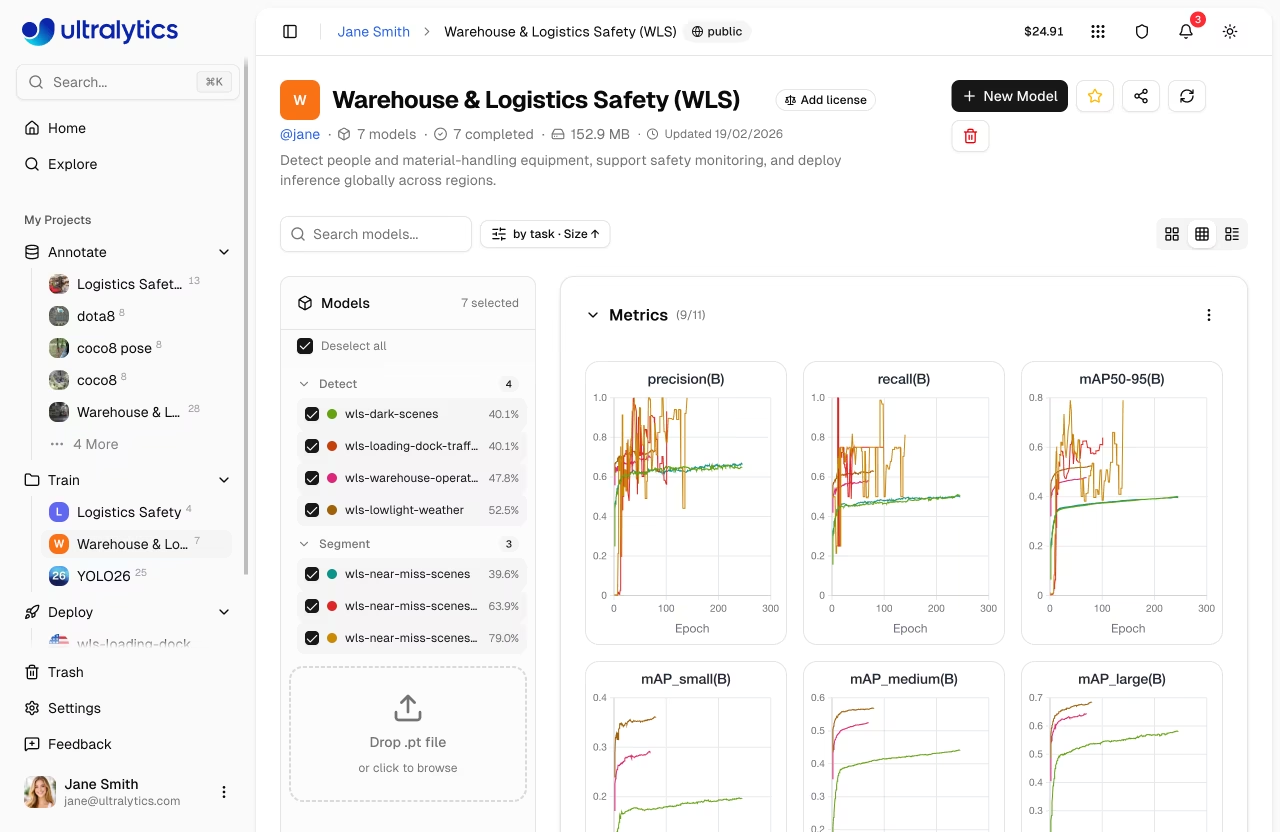
- Monitor real-time metrics during training
- Compare model performance across experiments
- Export to 17+ deployment formats (see supported formats)
Workflow
graph LR
    A[📁 Project] --> B[⚙️ Configure]
    B --> C[🚀 Train]
    C --> D[📈 Monitor]
    D --> E[📦 Export]

    style A fill:#4CAF50,color:#fff
    style B fill:#2196F3,color:#fff
    style C fill:#FF9800,color:#fff
    style D fill:#9C27B0,color:#fff
style E fill:#00BCD4,color:#fff| Stage | Description |
|---|---|
| Project | Create a workspace to organize related models |
| Configure | Select dataset, base model, and training parameters |
| Train | Run on cloud GPUs or your local hardware |
| Monitor | View real-time loss curves and metrics |
| Export | Convert to 17+ deployment formats (details) |
Training Options
Ultralytics Platform supports multiple training approaches:
| Method | Description | Best For |
|---|---|---|
| Cloud Training | Train on Ultralytics Cloud GPUs | No local GPU, scalability |
| Local Training | Train locally, stream metrics to the platform | Existing hardware, privacy |
| Colab Training | Use Google Colab with platform integration | Free GPU access |
GPU Options
Available GPUs for cloud training on Ultralytics Cloud:
| GPU | Generation | VRAM | Cost/Hour | Best For |
|---|---|---|---|---|
| RTX 2000 Ada | Ada | 16 GB | $0.24 | Small datasets, testing |
| RTX A4500 | Ampere | 20 GB | $0.25 | Small-medium datasets |
| RTX 4000 Ada | Ada | 20 GB | $0.26 | Medium datasets |
| RTX A5000 | Ampere | 24 GB | $0.27 | Medium datasets |
| L4 | Ada | 24 GB | $0.39 | Inference optimized |
| A40 | Ampere | 48 GB | $0.40 | Larger batch sizes |
| RTX 3090 | Ampere | 24 GB | $0.46 | General training |
| RTX A6000 | Ampere | 48 GB | $0.49 | Large models |
| RTX PRO 4500 | Blackwell | 32 GB | $0.54 | Great price/performance |
| RTX 4090 | Ada | 24 GB | $0.59 | Best price/performance |
| RTX 6000 Ada | Ada | 48 GB | $0.77 | Large batch training |
| L40S | Ada | 48 GB | $0.86 | Large batch training |
| RTX 5090 | Blackwell | 32 GB | $0.89 | Latest consumer generation |
| L40 | Ada | 48 GB | $0.99 | Large models |
| A100 PCIe | Ampere | 80 GB | $1.39 | Production training |
| A100 SXM | Ampere | 80 GB | $1.49 | Production training |
| RTX PRO 6000 | Blackwell | 96 GB | $1.69 | Recommended default |
| H100 PCIe | Hopper | 80 GB | $2.39 | High-performance training |
| H100 SXM | Hopper | 80 GB | $2.69 | Fastest training |
| H100 NVL | Hopper | 94 GB | $3.07 | Maximum performance |
| H200 NVL | Hopper | 143 GB | $3.39 | Maximum memory (Pro+) |
| H200 SXM | Hopper | 141 GB | $3.59 | Maximum performance (Pro+) |
| B200 | Blackwell | 180 GB | $4.99 | Largest models (Pro+) |
GPU Tier Access
H200 and B200 GPUs require a Pro or Enterprise plan. All other GPUs are available on all plans including Free.
Signup Credits
New accounts receive signup credits for training. Check Billing for details.
Real-Time Metrics
During training, view live metrics across three subtabs:
graph LR
    A[Charts] --> B[Loss Curves]
    A --> C[Performance Metrics]
    D[Console] --> E[Live Logs]
    D --> F[Error Detection]
    G[System] --> H[GPU Utilization]
    G --> I[Memory & Temp]

    style A fill:#2196F3,color:#fff
    style D fill:#FF9800,color:#fff
style G fill:#9C27B0,color:#fff| Subtab | Metrics |
|---|---|
| Charts | Box/class/DFL loss, mAP50, mAP50-95, precision, recall |
| Console | Live training logs with ANSI color and error detection |
| System | GPU utilization, memory, temperature, CPU, disk |
Automatic Checkpoints
The Platform automatically saves checkpoints at every epoch. The best model (highest mAP) and final model are always preserved.
Quick Start
Get started with cloud training in under a minute:
- Create a project in the sidebar
- Click New Model
- Select a model, dataset, and GPU
- Click Start Training
export ULTRALYTICS_API_KEY="YOUR_API_KEY"
yolo train model=yolo26n.pt data=ul://username/datasets/my-dataset \
  epochs=100 project=username/my-project name=exp1
from ultralytics import YOLO

model = YOLO("yolo26n.pt")
model.train(
    data="ul://username/datasets/my-dataset",
    epochs=100,
    project="username/my-project",
    name="exp1",
)
Quick Links
- Projects: Organize your models and experiments
- Models: Manage trained checkpoints
- Cloud Training: Train on cloud GPUs
FAQ
How long does training take?
Training time depends on:
- Dataset size (number of images)
- Model size (n, s, m, l, x)
- Number of epochs
- GPU type selected
A typical training run with 1000 images, YOLO26n, 100 epochs on RTX PRO 6000 takes about 2-3 hours. Smaller runs (500 images, 50 epochs on RTX 4090) complete in under an hour. See cost examples for detailed estimates.
Can I train multiple models simultaneously?
Yes. Concurrent cloud training limits depend on your plan: Free allows 3, Pro allows 10, and Enterprise is unlimited. For additional parallel training, use remote training from multiple machines.
What happens if training fails?
If training fails:
- Checkpoints are saved at each epoch
- You can resume from the last checkpoint
- Credits are only charged for completed compute time
How do I choose the right GPU?
| Scenario | Recommended GPU |
|---|---|
| Most training jobs | RTX PRO 6000 |
| Large datasets or batch sizes | H100 SXM or H200 (Pro+) |
| Budget-conscious | RTX 4090 |


