Ultralytics Solutions: Harness YOLO26 to Solve Real-World Problems
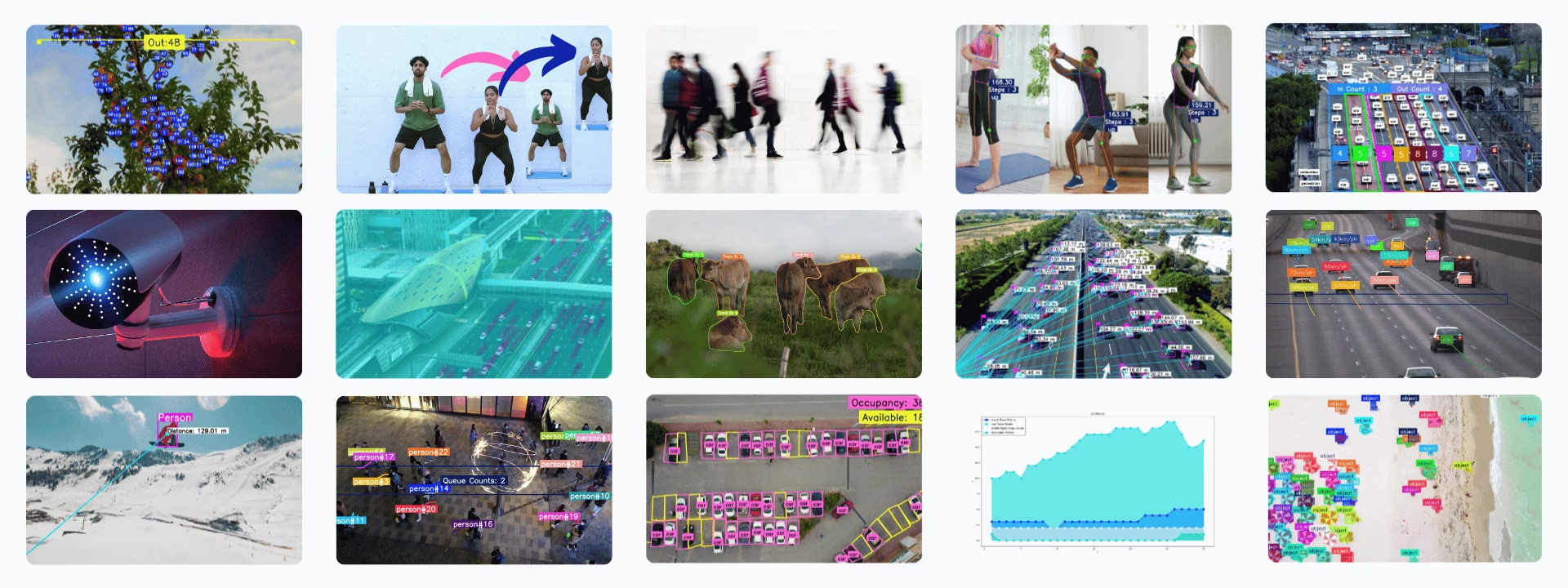
Ultralytics Solutions are ready-to-use applications of Ultralytics YOLO models for common computer vision problems such as object counting, heatmaps, speed estimation, queue management, and object blurring. Most solutions wrap detection, tracking, or pose estimation in a configurable class that you can run from Python or the yolo solutions CLI.
Watch: How to Run Ultralytics Solutions from the Command Line (CLI) | Ultralytics YOLO26 🚀
Solutions#
Each solution below has a dedicated guide:
- Analytics: Generate line, bar, pie, and area charts from YOLO26 detections to analyze trends over time.
- Distance Calculation: Calculate distances between objects using bounding box centroids in YOLO26 for spatial analysis.
- Heatmaps: Accumulate YOLO26 detections into a heatmap overlay that shows where objects appear or move most often.
- Instance Segmentation with Object Tracking: Combine instance segmentation and object tracking with YOLO26 to follow object outlines across video frames.
- Live Inference with Streamlit: Run real-time object detection with YOLO26 in your web browser through a Streamlit interface.
- Object Blurring: Apply object blurring using YOLO26 to protect privacy in image and video processing.
- Object Counting: Count objects that cross a line or enter a region in videos and live streams with YOLO26.
- Object Counting in Regions: Count objects inside multiple user-defined regions with YOLO26.
- Object Cropping: Crop detected objects from images and videos with YOLO26 and save each one as a separate image.
- Parking Management: Monitor occupied and available parking spaces with YOLO26.
- Queue Management: Count people waiting in a queue region with YOLO26 to monitor queue lengths.
- Security Alarm System: Build a security alarm system with YOLO26 that sends an email alert when the number of detected objects reaches a threshold.
- Similarity Search: Retrieve images with natural language queries such as "person holding a bag" or "vehicles in motion" by combining OpenAI CLIP embeddings with cosine-similarity search.
- Speed Estimation: Estimate object speed with YOLO26 and object tracking for applications such as traffic monitoring.
- Track Objects in Zone: Track objects only inside a defined zone of the video frame with YOLO26.
- VisionEye View Objects Mapping: Connect detected objects to a fixed observer point, mimicking how the human eye focuses on specific objects.
- Workouts Monitoring: Count exercise repetitions and track workout stages in real time with YOLO26 pose estimation.
Solutions Arguments#
| Argument | Type | Default | Description |
|---|---|---|---|
model | str | None | Path to an Ultralytics YOLO model file. |
region | list or dict | None | Points defining the region of interest, either a list of (x, y) tuples or a dictionary mapping region names to point lists for multiple regions (RegionCounter only). When None, solutions that require a region fall back to a predefined default. |
show_in | bool | True | Flag to control whether to display the in counts on the video stream. |
show_out | bool | True | Flag to control whether to display the out counts on the video stream. |
analytics_type | str | 'line' | Type of graph, i.e., line, bar, area, or pie. |
colormap | int | cv2.COLORMAP_DEEPGREEN | Colormap to use for the heatmap. |
line_width | int | 2 | Line thickness for the boxes, keypoints and counts the solution draws. |
verbose | bool | True | Enables the solution's per-frame log of input shape, class counts and processing speed. The tracking call itself is always silent. |
json_file | str | None | Path to the JSON file that contains all parking coordinates data. |
up_angle | float | 145.0 | Angle threshold for the 'up' pose. |
kpts | list[int] | [6, 8, 10] | List of three keypoint indices used for monitoring workouts. These keypoints correspond to body joints or parts, such as shoulders, elbows, and wrists, for exercises like push-ups, pull-ups, squats, and ab-workouts. |
down_angle | float | 90.0 | Angle threshold for the 'down' pose. |
blur_ratio | float | 0.5 | Adjusts percentage of blur intensity, with values in range 0.1 - 1.0. |
crop_dir | str | 'cropped-detections' | Directory name for storing cropped detections. |
records | int | 5 | Total detections count to trigger an email with security alarm system. |
vision_point | tuple[int, int] | (20, 20) | The point where vision will track objects and draw paths using VisionEye Solution. |
source | str | None | Path to the input source (video, RTSP, etc.). Only usable with Solutions command line interface (CLI). |
figsize | tuple[float, float] | (12.8, 7.2) | Figure size in inches for Analytics charts; (12.8, 7.2) renders a 1280×720 frame. |
fps | float | 30.0 | Frames per second used for speed calculations. |
max_hist | int | 5 | Maximum historical points to track per object for speed/direction calculations. |
meter_per_pixel | float | 0.05 | Scaling factor used for converting pixel distance to real-world units. |
max_speed | int | 120 | Maximum speed in km/h; higher estimated speeds are capped at this value. |
data | str | 'images' | Path to image directory used for similarity search. |
imgsz | int | 640 | Input image size for model inference. |
Solutions forward the inference and tracking arguments below to model.track().
| Argument | Type | Default | Description |
|---|---|---|---|
tracker | str | 'tracktrack.yaml' | Specifies the tracking algorithm to use. Built-in options: botsort.yaml, bytetrack.yaml, ocsort.yaml, deepocsort.yaml, fasttrack.yaml, tracktrack.yaml. |
conf | float | 0.25 | Sets the confidence threshold for detections; lower values allow more objects to be tracked but may include false positives. |
iou | float | 0.7 | Sets the Intersection over Union (IoU) threshold for filtering overlapping detections. |
classes | list | None | Filters results by class index. For example, classes=[0, 2, 3] only tracks the specified classes. |
device | str | None | Specifies the device for inference (e.g., cpu, cuda:0 or 0). Allows users to select between CPU, a specific GPU, or other compute devices for model execution. |
imgsz | int or tuple | 640 | Target inference image size: an integer for a square or a (height, width) pair. Shapes are adjusted to the model stride. |
max_det | int | 300 | Maximum number of detections kept per frame before tracking, limiting the objects a solution processes in dense scenes. |
quantize | int or str | None | Inference precision: 16 (FP16) or 32/unset (FP32) for PyTorch and TorchScript models off CPU; other formats use the precision their artifact and runtime select. Replaces the deprecated half arg. |
You can use show_conf, show_labels, and other mentioned arguments to customize the visualization.
| Argument | Type | Default | Description |
|---|---|---|---|
show | bool | False | If True, displays the annotated images or videos in a window. Useful for immediate visual feedback during development or testing. |
show_conf | bool | True | Displays the confidence score for each detection alongside the label. Gives insight into the model's certainty for each detection. |
show_labels | bool | True | Displays labels for each detection in the visual output. Provides immediate understanding of detected objects. |
Usage of SolutionAnnotator#
All Ultralytics Solutions use the SolutionAnnotator class, which extends the main Annotator class and provides the following methods:
| Method | Return Type | Description |
|---|---|---|
draw_region() | None | Draws a region using specified points, colors, and thickness. |
queue_counts_display() | None | Displays queue counts in the specified region. |
display_analytics() | None | Displays overall statistics for parking lot management. |
estimate_pose_angle() | float | Calculates the angle between three points in an object pose. |
draw_specific_kpts() | np.ndarray | Draws specific keypoints on the image. |
plot_workout_information() | int | Draws a labeled text box on the image. |
plot_angle_and_count_and_stage() | None | Visualizes angle, step count, and stage for workout monitoring. |
plot_distance_and_line() | None | Displays the distance between centroids and connects them with a line. |
display_objects_labels() | None | Annotates bounding boxes with object class labels. |
sweep_annotator() | None | Visualizes a vertical sweep line and optional label. |
visioneye() | None | Maps and connects object centroids to a visual "eye" point. |
adaptive_label() | None | Draws a circular or rectangular background label in the center of a bounding box. |
Working with SolutionResults#
Every solution except Similarity Search returns a SolutionResults object when called.
- For object counting, the results include
in_count,out_count, andclasswise_count.
import cv2

from ultralytics import solutions

im0 = cv2.imread("path/to/img")

region_points = [(20, 400), (1080, 400), (1080, 360), (20, 360)]

counter = solutions.ObjectCounter(
    show=True,  # display the output
    region=region_points,  # pass region points
    model="yolo26n.pt",  # model="yolo26n-obb.pt" for object counting with OBB model.
    # classes=[0, 2],  # count specific classes i.e. person and car with COCO pretrained model.
    # tracker="botsort.yaml"  # Choose trackers i.e "bytetrack.yaml"
)
results = counter(im0)
print(results.in_count)  # display in_counts
print(results.out_count)  # display out_counts
print(results.classwise_count)  # display classwise_count
SolutionResults objects have the following attributes:
| Attribute | Type | Description |
|---|---|---|
plot_im | np.ndarray | Image with visual overlays such as counts, blur effects, or solution-specific enhancements. |
in_count | int | Total number of objects detected entering the defined zone in the video stream. |
out_count | int | Total number of objects detected exiting the defined zone in the video stream. |
classwise_count | dict[str, dict[str, int] | int] | Per-class counts: {"IN": int, "OUT": int} for ObjectCounter and Heatmap, or an int for Analytics. |
queue_count | int | Number of objects currently within a predefined queue or waiting area (suitable for queue management). |
workout_count | list[int] | Per-track workout repetition counts from AI Gym (one entry per currently tracked individual). |
workout_angle | list[float] | Per-track exercise angles from AI Gym (one entry per currently tracked individual). |
workout_stage | list[str] | Per-track current workout stage from AI Gym (one entry per currently tracked individual). |
pixels_distance | float | Pixel-based distance between two objects or points, such as bounding boxes (suitable for distance calculation). |
available_slots | int | Number of unoccupied slots in a monitored area (suitable for parking management). |
filled_slots | int | Number of occupied slots in a monitored area (suitable for parking management). |
email_sent | bool | Indicates whether a notification or alert email has been successfully sent (suitable for security alarm). |
total_tracks | int | Total number of unique object tracks observed during video analysis. |
region_counts | dict[str, int] | Object counts within user-defined regions or zones. |
speed_dict | dict[int, int] | Track-wise dictionary of estimated object speeds in km/h from SpeedEstimator, useful for velocity analysis. |
total_crop_objects | int | Total number of cropped object images generated by the ObjectCropper solution. |
speed | dict[str, float] | Dictionary containing performance metrics for tracking and solution processing. |
For more details, refer to the SolutionResults class documentation.
Solutions Usage via CLI#
Most solutions can be run directly from the command-line interface.
Syntax
yolo SOLUTIONS SOLUTION_NAME ARGS
- SOLUTIONS is a required keyword.
- SOLUTION_NAME is one of:
['count', 'crop', 'blur', 'workout', 'heatmap', 'isegment', 'queue', 'speed', 'analytics', 'trackzone', 'inference', 'visioneye', 'region', 'security', 'parking']. - ARGS (optional) are custom
arg=valuepairs, such asshow_in=True, to override default settings.
yolo solutions count show=True # for object counting

yolo solutions count source="path/to/video.mp4" # specify video file path
Contribute to Our Solutions#
Community contributions are welcome. If you have built a solution with Ultralytics YOLO that is not covered here, consider sharing it as a guide so other users can benefit.
FAQ#
Ultralytics YOLO26 counts objects in real time by combining detection with tracking, so each object is counted once as it crosses a line or enters a region. To set up YOLO26 for live video stream analysis, install
ultralytics, load a model, and pass video frames tosolutions.ObjectCounter.Ultralytics YOLO26 adds real-time object detection and alerting to camera-based security systems. With the Security Alarm System solution, YOLO26 sends an email alert when the number of detected objects in the surveillance area reaches a threshold.
Ultralytics YOLO26 counts and tracks people inside a queue region, giving you live queue lengths that help reduce wait times and plan staffing.
Yes. Ultralytics YOLO26 pose models track body keypoints in real time, so the workout monitoring solution can measure joint angles, count repetitions, and report the current exercise stage.
Ultralytics YOLO26 can generate heatmaps that show where objects appear or move most often in a scene, highlighting regions of high activity. These data visualizations help you understand traffic patterns and trends over time.


Comments23
Ask a question, share your results, or help someone else.
ZHIYUAN816(edited)
But acturally I don't konw how to set plots_max
 Glenn JocherUltralytics(edited)
@ZHIYUAN816 you don't need to set anything: the warning has no effect on training or metrics, only on how many items are drawn on the plotted validation images (optional, for visual review). In current versions that limit follows the
max_detargument (default 300).
WARNING ⚠️ Limiting validation plots to first 50 items per image for speed... WARNING ⚠️ Limiting validation plots to first 50 items per image for speed... how to solve this problem bro?
- Glenn JocherUltralytics(edited)
@ZHIYUAN816 this is not an error but a warning that the plotted prediction images are limited to a maximum number of items per image. It does not affect training. In current versions the limit follows
max_det(default 300).
smc0927
If I want a target to be detected only once, is it possible? If so, how can I do it?
RizwanMunawar
@smc0927 Hi! I’m not entirely sure I understand your question. Could you please clarify a bit?
Generally, the counting process is designed to occur only once for each track ID. Once an object is counted, it won't be counted again, even if it crosses the same
regionorlinemultiple times.ok,I want to print out the coordinates of the target, but that's not what I want because it's going to be printed multiple times over a period of time. I want it to be output only once, is there a way to achieve this?
@smc0927 Yes it's possible. You can simply iterate over the detection results. BTW, this discussion is more related to Ultralytics solutions, while your question is related to prediction :)
Sample Code
from ultralytics import YOLO
model = YOLO("yolo11n.pt")
results = model.predict("path/to/im0")

if results[0].boxes.id is not None:
      boxes = results[0].boxes.xyxy.cpu()
      track_ids = results[0].boxes.id.int().cpu().tolist()
      clss = results[0].boxes.cls.cpu().tolist()

      for box, cls in enumerate(boxes, clss):
          # Here you can add the logic to display single-time details of the object
Thanks :)
sorry
hodat2608
Hi everyone, hi @glenn-jocher, I want to install pycuda on my windows 10 using python 3.12, but I still can't do it. It's hard to find any documentation or tutorials like that, @glenn-jocher or anyone can send me a link or tutorial to install pycuda? Please help me. Thanks first
MuhammedEnesGurkan
hey how can ı find yolo v8 solutions source codes.
- Glenn JocherUltralytics
@MuhammedEnesGurkan you can find the source codes for YOLOv8 solutions on the Ultralytics GitHub repository. For more detailed guides and examples, please visit the Ultralytics Solutions page at https://docs.ultralytics.com/solutions/.
maxexplorer
Hi there,
After updating Ultralytics and using YOLO11, will the YOLOv8 models still work in this virtual environment?
Thank you in advance for your help and the great work you’re doing!
- Glenn JocherUltralytics
@maxexplorer yes, YOLOv8 models will continue to work in your virtual environment after updating to YOLO11. If you have further questions, feel free to ask!
yosifsaab
hi i have error during using the google colab for classification two classes images by yolov8n
results = model.train(data=DATA_DIR, epochs=1, imgsz=64)- Glenn JocherUltralytics
@yosifsaab it seems you're encountering an error with YOLOv8n in Google Colab. Please ensure your
DATA_DIRis correctly set and that your dataset is properly formatted. If the issue persists, check the Colab notebook for any specific error messages that might provide more details. For further assistance, you can refer to the Ultralytics documentation.
Nkosiyazimelani
Hi guys, how do i update the nc that my model can detect without having to train with old and new objects. i have updated my .YAML file but the model is still detecting the old number of objects(20 instead of 46). i have been told to look on the model itself and change the output number of class to the new updated on but there is nothing of that sort in the model file( best.pt). please help.
- Glenn JocherUltralytics(edited)
@Nkosiyazimelani the number of classes (
nc) is part of the trained model's detection head, so editing the.yamlfile after training doesn't change whatbest.ptpredicts. You need to train again with a dataset YAML that has all 46 classes. You don't have to start from scratch, you can fine-tune from your existing weights, and the layers whose shapes depend on the class count are reinitialized automatically:from ultralytics import YOLO model = YOLO("best.pt") model.train(data="your_46_class_dataset.yaml", epochs=100)Make sure your dataset contains labeled examples of both the old and the new classes, otherwise the model will forget the old ones.
nounotabe
How to specify the device to be used (e.g. cuda:1)?
- Glenn JocherUltralytics
@nounotabe to specify the device for running YOLOv8, you can use the
deviceargument. For example, to use the second GPU (cuda:1), you can setdevice='cuda:1'. This can be done in both the CLI and Python API. If you encounter any issues, please ensure you are using the latest version of the package. For more detailed guidance, you can refer to our documentation at https://docs.ultralytics.com. cobaltautomationdev
lasted version of ultralytics. solutions not works in Windows10, but works in Google Colab. What's wrong with it? How to settle it? from ultralytics import solutions,YOLO , Couldn't import solutions in my windows10.
- Glenn JocherUltralytics
It seems like there might be an issue with the
solutionsmodule on Windows 10. Please ensure you are using the latest version of the Ultralytics package. If the issue persists, try reinstalling the package or running the code in a different environment. For further assistance, you can refer to our documentation at https://docs.ultralytics.com/solutions/. Just updated to v8.2.78 today ,uninstall and reinstall the latest version. and now it works on Windows10 . it seems there something changed in solutions init.py . this file caused import error in previous version. I noticed that in version 8.2.0, file init.py is blank. now add some code in it.