DOTA Dataset with OBB#
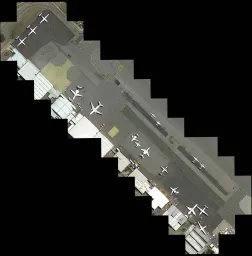
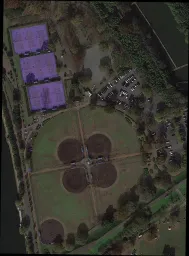
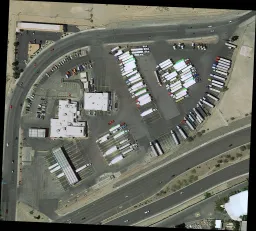
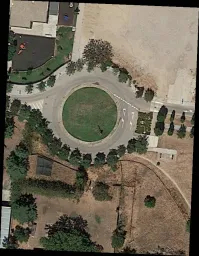
The DOTA dataset is a large-scale benchmark for object detection in aerial images, released in three versions (v1.0, v1.5, v2.0) with up to 1.7M Oriented Bounding Box (OBB) annotations across 18 categories, captured from diverse aerial sensors and platforms.
Explore the officially hosted DOTA v1.5 and DOTA v1.0 datasets on Ultralytics Platform to preview their oriented annotations, inspect statistics, and clone them for training.
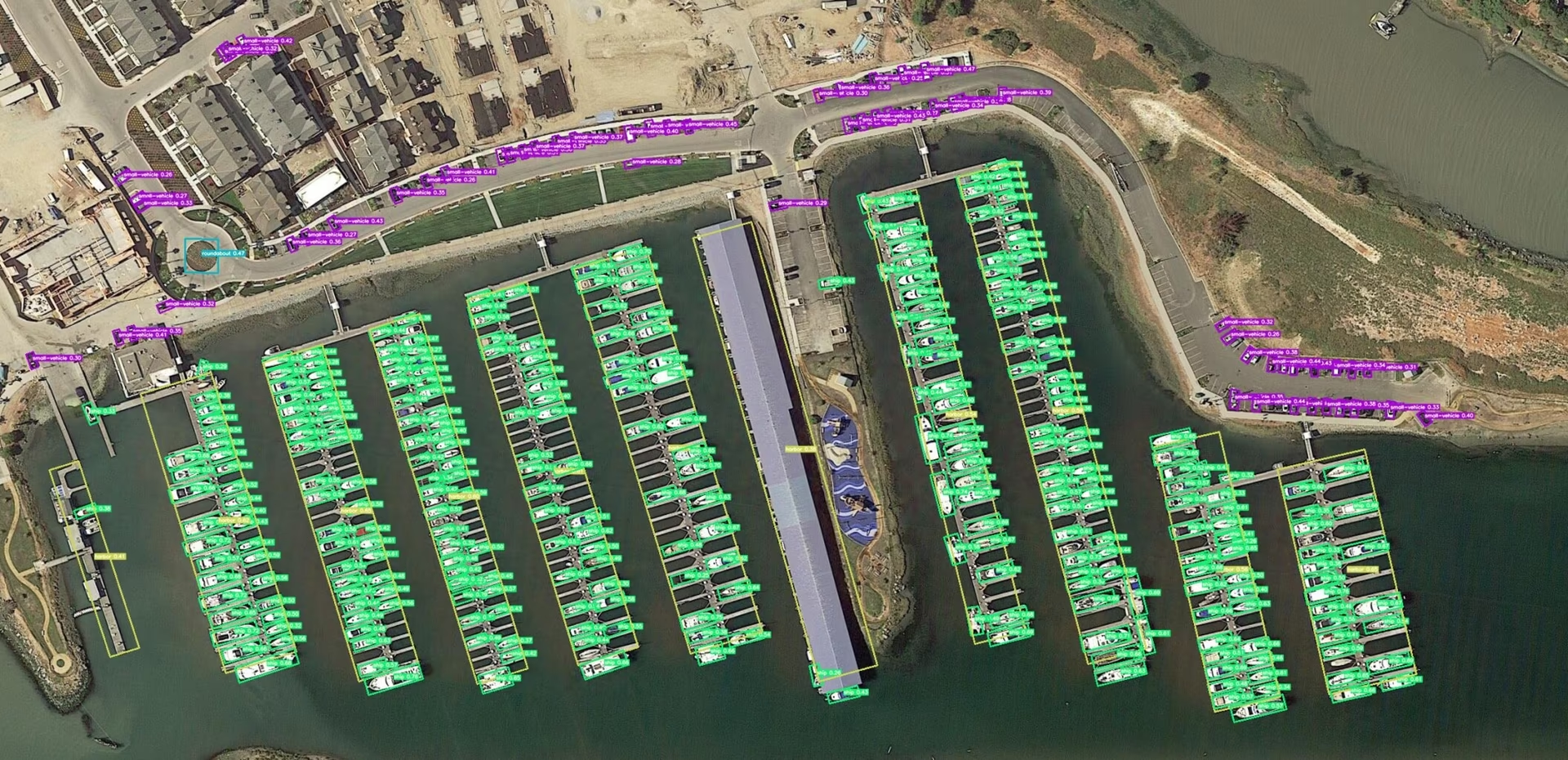
Key Features#
Watch: How to Train Ultralytics YOLO on the DOTA Dataset for Oriented Bounding Boxes in Google Colab
- Collection from various sensors and platforms, with image sizes ranging from 800 × 800 to 20,000 × 20,000 pixels.
- Features more than 1.7M oriented bounding boxes across 18 categories.
- Encompasses multiscale object detection thanks to the wide spread of object sizes per image.
- Instances are annotated by experts using arbitrary (8 d.o.f.) quadrilaterals, capturing objects of different scales, orientations, and shapes.
Dataset Versions#
DOTA-v1.0#
- Contains 15 common categories.
- Comprises 2,806 images with 188,282 instances.
- Split ratios: 1/2 for training (1,411 images), 1/6 for validation (458 images), and 1/3 for testing (937 images).
DOTA-v1.5#
- Incorporates the same images as DOTA-v1.0.
- Very small instances (less than 10 pixels) are also annotated.
- Addition of a new category: "container crane".
- A total of 403,318 instances.
- Released for the DOAI Challenge 2019 on Object Detection in Aerial Images.
DOTA-v2.0#
- Collections from Google Earth, GF-2 Satellite, and other aerial images.
- Contains 18 common categories.
- Comprises 11,268 images with 1,793,658 instances.
- New categories introduced: "airport" and "helipad".
- Image splits:
- Training: 1,830 images with 268,627 instances.
- Validation: 593 images with 81,048 instances.
- Test-dev: 2,792 images with 353,346 instances.
- Test-challenge: 6,053 images with 1,090,637 instances.
Dataset Structure#
DOTA exhibits a structured layout tailored for OBB object detection challenges:
- Images: A vast collection of high-resolution aerial images capturing diverse terrains and structures.
- Oriented Bounding Boxes: Annotations in the form of rotated rectangles encapsulating objects irrespective of their orientation, ideal for capturing objects like airplanes, ships, and buildings.
Applications#
DOTA serves as a benchmark for training and evaluating models built for aerial image analysis. Its oriented bounding box annotations make it a demanding test for object detection models on rotated, densely packed aerial targets. The dataset is widely used in remote sensing, surveillance, and environmental monitoring.
Dataset YAML#
A dataset YAML file specifies image/label roots, class names, and other important metadata. Ultralytics maintains official YAML files for the two most commonly used releases:
Use the YAML that matches the release you downloaded, or author a custom YAML if you are working with DOTA-v2 or another derivative. Both releases download automatically (2 GB) from Ultralytics GitHub assets the first time you train.
# Ultralytics 🚀 AGPL-3.0 License - https://ultralytics.com/license

# DOTA 1.0 dataset https://captain-whu.github.io/DOTA/index.html for object detection in aerial images by Wuhan University
# Documentation: https://docs.ultralytics.com/datasets/obb/dota-v2
# Example usage: yolo train model=yolov8n-obb.pt data=DOTAv1.yaml
# parent
# ├── ultralytics
# └── datasets
#     └── DOTAv1 ← downloads here (2 GB)

# Train/val/test sets as 1) dir: path/to/imgs, 2) file: path/to/imgs.txt, or 3) list: [path/to/imgs1, path/to/imgs2, ..]
path: DOTAv1 # dataset root dir
train: images/train # train images (relative to 'path') 1411 images
val: images/val # val images (relative to 'path') 458 images
test: images/test # test images (optional) 937 images

# Classes for DOTA 1.0
names:
  0: plane
  1: ship
  2: storage tank
  3: baseball diamond
  4: tennis court
  5: basketball court
  6: ground track field
  7: harbor
  8: bridge
  9: large vehicle
  10: small vehicle
  11: helicopter
  12: roundabout
  13: soccer ball field
  14: swimming pool

# Download script/URL (optional)
download: https://github.com/ultralytics/assets/releases/download/v0.0.0/DOTAv1.zip
Split DOTA images#
The raw imagery routinely exceeds 10,000 pixels on a side, so tiling is recommended before feeding the data to YOLO. Use the helper below to slice the source imagery into overlapping 1024 × 1024 crops at multiple scales while keeping the annotations in sync.
from ultralytics.data.split_dota import split_test, split_trainval

# Split train and val set, with labels.
split_trainval(
    data_root="path/to/DOTAv1.0/",
    save_dir="path/to/DOTAv1.0-split/",
    rates=[0.5, 1.0, 1.5],  # multiscale
    gap=500,
)
# Split test set, without labels.
split_test(
    data_root="path/to/DOTAv1.0/",
    save_dir="path/to/DOTAv1.0-split/",
    rates=[0.5, 1.0, 1.5],  # multiscale
    gap=500,
)Keep the output directory organized in the standard YOLO layout (images/train, labels/train, etc.) so you can reference it directly from the dataset YAML.
Usage#
To train a YOLO26n-obb model on the DOTA v1 dataset, use the following code snippets. Always refer to your model's documentation for a thorough list of available arguments. For those looking to experiment with a smaller subset first, consider using the DOTA8 dataset, which contains just 8 images for quick testing and is browsable on Ultralytics Platform.
All images and associated annotations in the DOTAv1 dataset can be used for academic purposes only; commercial use is prohibited.
from ultralytics import YOLO

# Load a pretrained YOLO26n-OBB model
model = YOLO("yolo26n-obb.pt")

# Train the model on the DOTAv1 dataset
results = model.train(data="DOTAv1.yaml", epochs=100, imgsz=1024)
Sample Data and Annotations#
The sample below shows typical DOTA scenes and annotations:
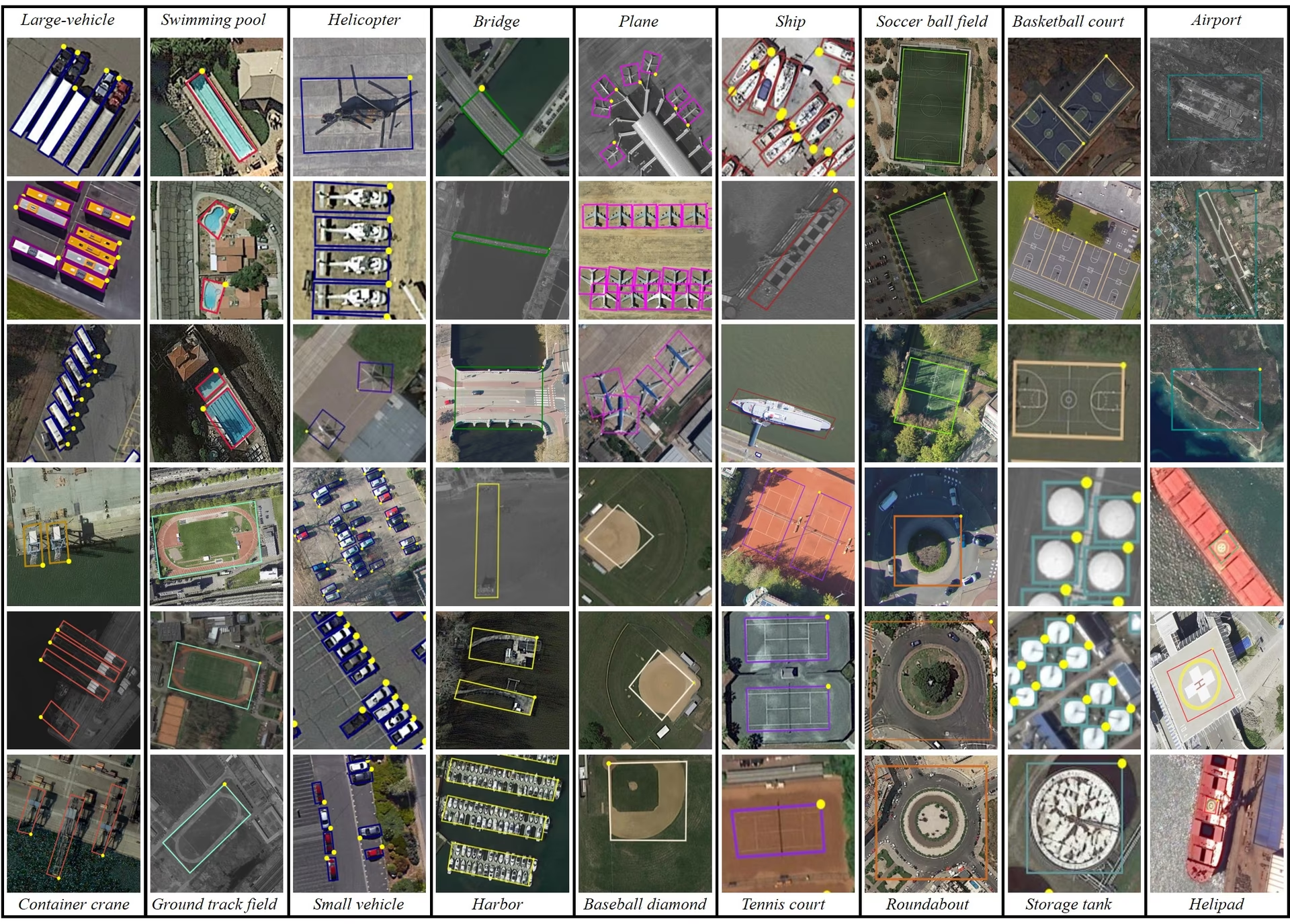
- DOTA examples: This snapshot underlines the complexity of aerial scenes and the significance of Oriented Bounding Box annotations, capturing objects in their natural orientation.
These scenes highlight detection challenges specific to aerial imagery. DOTA-v2.0 is widely used for remote sensing and aerial surveillance projects thanks to its comprehensive annotations and diverse object categories.
Citations and Acknowledgments#
If you use DOTA in your work, please cite the relevant research papers:
@article{9560031,
  author={Ding, Jian and Xue, Nan and Xia, Gui-Song and Bai, Xiang and Yang, Wen and Yang, Michael and Belongie, Serge and Luo, Jiebo and Datcu, Mihai and Pelillo, Marcello and Zhang, Liangpei},
  journal={IEEE Transactions on Pattern Analysis and Machine Intelligence},
  title={Object Detection in Aerial Images: A Large-Scale Benchmark and Challenges},
  year={2022},
  volume={44},
  number={11},
  pages={7778-7796},
  doi={10.1109/TPAMI.2021.3117983}
}
We thank the team behind the DOTA datasets for curating them. For full details on the dataset, visit the official DOTA website.
FAQ#
The DOTA dataset is a specialized dataset focused on object detection in aerial images. It features Oriented Bounding Boxes (OBB), providing annotated images from diverse aerial scenes. DOTA's diversity in object orientation, scale, and shape across its 1.7M annotations and 18 categories makes it ideal for developing and evaluating models tailored for aerial imagery analysis, such as those used in surveillance, environmental monitoring, and disaster management.
DOTA uses Oriented Bounding Boxes (OBB) for annotation, which are represented by rotated rectangles encapsulating objects regardless of their orientation. This method ensures that objects, whether small or at different angles, are accurately captured. The dataset's multiscale images, ranging from 800 × 800 to 20,000 × 20,000 pixels, further allow for the detection of both small and large objects effectively. This approach is particularly valuable for aerial imagery where objects appear at various angles and scales.
To train a model on the DOTA dataset, you can use the following example with Ultralytics YOLO:
Train Examplefrom ultralytics import YOLO # Load a pretrained YOLO26n-OBB model model = YOLO("yolo26n-obb.pt") # Train the model on the DOTAv1 dataset results = model.train(data="DOTAv1.yaml", epochs=100, imgsz=1024)For more details on how to split and preprocess the DOTA images, refer to the split DOTA images section.
- DOTA-v1.0: Includes 15 common categories across 2,806 images with 188,282 instances. The dataset is split into training, validation, and testing sets.
- DOTA-v1.5: Builds upon DOTA-v1.0 by annotating very small instances (less than 10 pixels) and adding a new category, "container crane," totaling 403,318 instances.
- DOTA-v2.0: Expands further with annotations from Google Earth and GF-2 Satellite, featuring 11,268 images and 1,793,658 instances. It includes new categories like "airport" and "helipad."
For a detailed comparison and additional specifics, check the dataset versions section.
DOTA images, which can be very large, are split into smaller resolutions for manageable training. Here's a Python snippet to split images:
Examplefrom ultralytics.data.split_dota import split_test, split_trainval # split train and val set, with labels. split_trainval( data_root="path/to/DOTAv1.0/", save_dir="path/to/DOTAv1.0-split/", rates=[0.5, 1.0, 1.5], # multiscale gap=500, ) # split test set, without labels. split_test( data_root="path/to/DOTAv1.0/", save_dir="path/to/DOTAv1.0-split/", rates=[0.5, 1.0, 1.5], # multiscale gap=500, )This process facilitates better training efficiency and model performance. For detailed instructions, visit the split DOTA images section.
Comments17
Ask a question, share your results, or help someone else.
XWP-PPP
May I ask how you converted the inference results from YOLOV8 OBB into inference results that can be uploaded to DOTA's Task 1 server? I saved the final inference results of the model in the form of xyxyxy and uploaded them via email. However, the mAP results provided on YOLO's official website differ significantly. I would like to know the reason for this. Can you provide me with a conversion code to convert the test image set into a result that can be uploaded to DOTA's Task 1 server? Thank you very much for your help!
1 Paula DerrengerUltralytics(edited)
@XWP-PPP hi there!
DOTA's Task 1 server expects a zip of one text file per class (
Task1_plane.txt,Task1_storage-tank.txt, ...), where each line isimgname score x1 y1 x2 y2 x3 y3 x4 y4, with the image name given without extension. OBB results are stored inresult.obb, notresult.boxes. Here is a snippet that builds those files:import shutil from collections import defaultdict from pathlib import Path from ultralytics import YOLO # Load your trained YOLO26-OBB model model = YOLO("path/to/your/yolo26n-obb.pt") # Collect one DOTA Task1 line per detection: imgname score x1 y1 x2 y2 x3 y3 x4 y4 (pixels) category_results = defaultdict(list) for r in model.predict(source="path/to/test/images", stream=True): img_name = Path(r.path).stem for cls, conf, pts in zip(r.obb.cls.int().tolist(), r.obb.conf.tolist(), r.obb.xyxyxyxy.flatten(1).tolist()): coords = " ".join(f"{p:.1f}" for p in pts) category_results[f"Task1_{model.names[cls].replace(' ', '-')}.txt"].append(f"{img_name} {conf:.6f} {coords}\n") # Save one file per category and zip the submission folder output_dir = Path("submission") output_dir.mkdir(exist_ok=True) for category_file, lines in category_results.items(): (output_dir / category_file).write_text("".join(lines)) shutil.make_archive("submission", "zip", output_dir)Upload
submission.zipto the DOTA Task 1 server. If your mAP differs from your local validation, check that image names match the test set and that the coordinates are in pixels of the original (unsplit) images. For more details, see the DOTA Dataset Documentation. Happy coding! 😊
Taufiq-Ahmed-pranto
Hi, I want to use the DOTA dataset only for YOLOv11 Nano. I don't want to use the model with oriented bounding boxes (OBB). What is the procedure?
 Jie Liu
I have download dotav1 form
https://github.com/ultralytics/assets/releases/download/v0.0.0/DOTAv1.zipand use script split dataset.from ultralytics.data.split_dota import split_test, split_trainval # split train and val set, with labels. split_trainval( data_root="/dataset/coco/DOTAv1", save_dir="/dataset/coco/DOTAv1.0-split/", rates=[0.5, 1.0, 1.5], # multiscale gap=500, ) # split test set, without labels. split_test( data_root="/dataset/coco/DOTAv1/", save_dir="/dataset/coco/DOTAv1.0-split/", rates=[0.5, 1.0, 1.5], # multiscale gap=500, )how to reproduce yolov11 obb result, please show me the command like
yolo train model=ultralytics-8.3.13/ultralytics/cfg/models/11/yolo11n-obb.yaml data=DOTAv1/DOTAv1.yaml epochs=500 batch=32*4 imgsz=640 device=4,5,6,7 cache=disk amp=True Glenn JocherUltralytics(edited)
@keeper-jie for training YOLO26-OBB on DOTAv1 after splitting, use this command with your 4 GPUs:
yolo obb train data=DOTAv1.yaml model=yolo26n-obb.pt epochs=500 imgsz=1024 batch=128 device=4,5,6,7Key parameters from our DOTA documentation:
imgsz=1024(matches dataset's multiscale split)- Use official model name
yolo26n-obb.ptrather than YAML path - Batch size 128 (32*4 GPUs) via
batch=128
Ensure your dataset YAML paths point to the split images directory.
huynhkhoa44
I have labeled data in YOLOv8 object detection format, our label data format is already rotated rectangles to the correct angle of the object, however since it is in YOLOv8 object detection format, the "angle" parameter is missing. I no longer keep the label folder on CVAT so I cannot export to a different label format. Is there a way to add the angle value from the 4 pre-existing <x_center> <y_center> values?
- Glenn JocherUltralytics
To add the angle value from your existing YOLOv8 labels, you'll need to calculate it based on the coordinates. Unfortunately, without the original CVAT labels, this requires manual computation or using a tool that supports angle annotations. For guidance on datasets with oriented bounding boxes, you can refer to the DOTA dataset documentation at https://docs.ultralytics.com/datasets/obb/dota-v2/.
jack-ready
Recently, I've been using YOLOv8 to train the DOTAv1 dataset and encountered some issues. I was wondering if I could seek advice. 1.To train the DOTA dataset, we split the original DOTA images with high-resolution into images with 1024x1024. I noticed that the provided segmentation code provides three sizes, rates=[0.5, 1.0, 1.5]. In order to obtain 1024×1024 images, it seems that we should choose rates=1, but I noticed that some images in the segmentation results of the validation set are smaller than 1024×1024, such as 1024×1023, 824*1024, etc. What is the reason for this?Will it affect the experiment? 2.Another issue arises during the training process. I noticed that the training process conducts validation after each epoch. I attempted to disable validation by setting val=False, but it seems to have no effect. What could be the reason for this? The training code snippet is as follows: results = model.train(data="DOTAv1.yaml", epochs=100, imgsz=640, batch=10, workers=0, val=False). Additionally, during validation, it seems that the images are not being resized to 640. Printing the results in the code yields torch.Size([10, 3, 672, 672]), whereas during the training process, images are correctly resized to 640. Could someone help me understand this?
- Glenn JocherUltralytics(edited)
@jack-ready hi there!
Thank you for reaching out with your questions regarding training the DOTA dataset with YOLOv8. Let's address each of your concerns:
-
Image Splitting and Sizes: When splitting high-resolution DOTA images into 1024x1024 segments using
rates=[0.5, 1.0, 1.5], you might notice some resulting images are slightly smaller than 1024x1024 (e.g., 1024x1023 or 824x1024). This occurs due to the way the splitting algorithm handles the edges of the original images. If the original image dimensions are not perfectly divisible by 1024, the last segment in each row or column might be smaller. This should not significantly affect your experiment as long as the majority of your data maintains the expected size. However, you can ensure consistency by padding these smaller images to 1024x1024 if necessary. -
Disabling Validation: The
val=Falseargument should indeed disable validation during training. If it doesn't seem to work, please ensure you are using the latest version of the Ultralytics package. You can update it using:pip install --upgrade ultralyticsIf the issue persists, providing a minimum reproducible example would be very helpful for us to diagnose the problem. You can find guidance on creating one here: Minimum Reproducible Example.
-
Image Resizing During Validation: The discrepancy in image sizes during validation (e.g.,
torch.Size([10, 3, 672, 672])instead of 640) might be due to the model's internal resizing logic. Ensure that theimgszparameter is correctly set for both training and validation. Validation uses the sameimgszas training, so set it explicitly in your training script:results = model.train(data="DOTAv1.yaml", epochs=100, imgsz=640, batch=10, workers=0, val=True)
I hope this helps! If you have any further questions or need additional assistance, feel free to ask. Happy training! 🚀
-
Thank you very much for your help. I have another question regarding the YOLOV8 training on the DOTA v1.0 dataset. I would like to know how to set the training parameters, such as learning rate, optimizer, and loss function. When I try to reproduce the results, my mAP50 is about 74%, but it does not reach 78%. I would greatly appreciate any assistance you can provide.Below is my training code. from ultralytics import YOLO model = YOLO("yolov8n-obb.yaml") model.load("yolov8n-obb.pt") model = YOLO("yolov8n-obb.yaml").load("yolov8n.pt") results = model.train(data="DOTAv1.yaml", epochs=100, imgsz=640, batch=48, workers=0,project="runs/DOTAV1.0",val=True,resume=True)
- Glenn JocherUltralytics(edited)
Hi there! Glad to help with your training setup. To fine-tune your training parameters for better mAP50 results, you can adjust the learning rate, optimizer, and loss function. For instance, you might try a lower learning rate or switch to a different optimizer like Adam. Here's a quick example:
from ultralytics import YOLO

model = YOLO("yolo26n-obb.yaml").load("yolo26n-obb.pt")
results = model.train(
    data="DOTAv1.yaml",
    epochs=100,
    imgsz=640,
    batch=48,
    workers=0,
    project="runs/DOTAV1.0",
    val=True,
    lr0=0.001,  # Adjust learning rate
    optimizer='Adam'  # Change optimizer
)
Ensure you're using the latest version of the Ultralytics package to avoid any bugs. If you still face issues, feel free to share more details. Happy training! 🚀
Tintin26100
How can I find the number of instances per class in DOTA v1.5 ? I've been searching for this information for a moment and I can't find any answers
- Paula DerrengerUltralytics
@Tintin26100 hello!
The number of instances per class in DOTA v1.5 isn't directly listed in the dataset's summary. However, you can obtain this information by analyzing the annotation files provided with the dataset. Each object instance in these files is labeled with a class, and you can count the number of times each class appears.
If you need further guidance on how to process these annotation files or any other assistance with the DOTA dataset, feel free to ask!
Happy coding! 😊
Hi, thanks for your quick answer, I will gladly accept your help because I don't really know what to do to extract those informations, where do you find the annotation files ? Is it on the github ? If it is what's it's path ? Thanks for the time you spend helping
- Paula DerrengerUltralytics
@Tintin26100 hello!
The annotation files for the DOTA dataset are typically included within the dataset download itself. These files contain the details for each instance, including class labels and oriented bounding box coordinates.
For the DOTA v1.5 dataset, you can find these files in the dataset directory after you download it from the official DOTA dataset page or the provided download link in the dataset's YAML configuration file. The path to the annotations will usually be structured under the
labelsorannotationsdirectory within the main dataset folder.If you've already downloaded the dataset, you should look for
.txtor.jsonfiles corresponding to each image in the dataset, which contain the annotations. If you need further assistance navigating these files or extracting specific data, feel free to ask!Thank you for reaching out, and happy analyzing! 😊
hencai
how to test DOTA datatests online using YOLOv8-obb? somebody help me ?
- Glenn JocherUltralytics(edited)
Hey there! 😊 Testing the DOTA dataset online using YOLO26-obb is quite straightforward. If you've already prepared your dataset according to the Ultralytics guidelines and split the images, here's a simple example to get you started with training:
# Train a YOLO26n-OBB model on the DOTA v1 dataset
yolo obb train data=DOTAv1.yaml model=yolo26n-obb.pt epochs=100 imgsz=640
This command uses DOTA v1 and the corresponding
.yamlfile (DOTAv1.yaml) describing your dataset paths and classes. Adjustepochsandimgszbased on your needs.Just make sure to check out the DOTA dataset page on Ultralytics docs for more info on dataset preparation and additional configurations! Happy detecting! 🚀