YOLOv5 Quickstart 🚀
This guide is a starting point for real-time object detection with Ultralytics YOLOv5. It covers installation, inference with PyTorch Hub and detect.py, and training, so you can apply this deep learning model to your own projects.
Install#
Clone the YOLOv5 repository and install its requirements in an environment with Python>=3.8.0 and PyTorch>=1.8.
git clone https://github.com/ultralytics/yolov5 # clone repository
cd yolov5
pip install -r requirements.txt # install dependencies
Inference with PyTorch Hub#
Run YOLOv5 inference through PyTorch Hub, which downloads models automatically from the latest YOLOv5 release. This method uses PyTorch for model loading and execution, making it straightforward to get predictions.
import torch

# Model loading
model = torch.hub.load("ultralytics/yolov5", "yolov5s")  # Can be 'yolov5n' - 'yolov5x6', or 'custom'

# Inference on images
img = "https://ultralytics.com/images/zidane.jpg"  # Can be a file, Path, PIL, OpenCV, numpy, or list of images

# Run inference
results = model(img)

# Display results
results.print()  # or .show(), .save(), .crop(), .pandas(), etc.
Inference with detect.py#
Use detect.py for inference on a wide range of sources. It automatically fetches models from the latest YOLOv5 release and saves results to runs/detect. This script is ideal for command-line usage and integrating YOLOv5 into larger systems, supporting inputs like images, videos, directories, webcams, and even live streams.
python detect.py --weights yolov5s.pt --source 0                              # webcam
python detect.py --weights yolov5s.pt --source image.jpg                      # image
python detect.py --weights yolov5s.pt --source video.mp4                      # video
python detect.py --weights yolov5s.pt --source screen                         # screenshot
python detect.py --weights yolov5s.pt --source path/                          # directory
python detect.py --weights yolov5s.pt --source list.txt                       # list of images
python detect.py --weights yolov5s.pt --source list.streams                   # list of streams
python detect.py --weights yolov5s.pt --source 'path/*.jpg'                   # glob pattern
python detect.py --weights yolov5s.pt --source 'https://youtu.be/LNwODJXcvt4' # YouTube video
python detect.py --weights yolov5s.pt --source 'rtsp://example.com/media.mp4' # RTSP, RTMP, HTTP streamTraining#
Replicate the YOLOv5 COCO dataset benchmarks by following the training instructions below. The necessary models and datasets (like coco128.yaml or the full coco.yaml) are pulled directly from the latest YOLOv5 release. Training YOLOv5n/s/m/l/x on a V100 GPU should typically take 1/2/4/6/8 days respectively (note that Multi-GPU training setups work faster). Maximize performance by using the highest possible --batch-size or use --batch-size -1 for the YOLOv5 AutoBatch feature, which automatically finds the optimal batch size. The following batch sizes are ideal for V100-16GB GPUs. See the Architecture Summary for details on model configuration files (*.yaml).
# Train YOLOv5n on COCO128 for 3 epochs
python train.py --data coco128.yaml --epochs 3 --weights yolov5n.pt --batch-size 128

# Train YOLOv5s on COCO for 300 epochs
python train.py --data coco.yaml --epochs 300 --weights '' --cfg yolov5s.yaml --batch-size 64

# Train YOLOv5m on COCO for 300 epochs
python train.py --data coco.yaml --epochs 300 --weights '' --cfg yolov5m.yaml --batch-size 40

# Train YOLOv5l on COCO for 300 epochs
python train.py --data coco.yaml --epochs 300 --weights '' --cfg yolov5l.yaml --batch-size 24

# Train YOLOv5x on COCO for 300 epochs
python train.py --data coco.yaml --epochs 300 --weights '' --cfg yolov5x.yaml --batch-size 16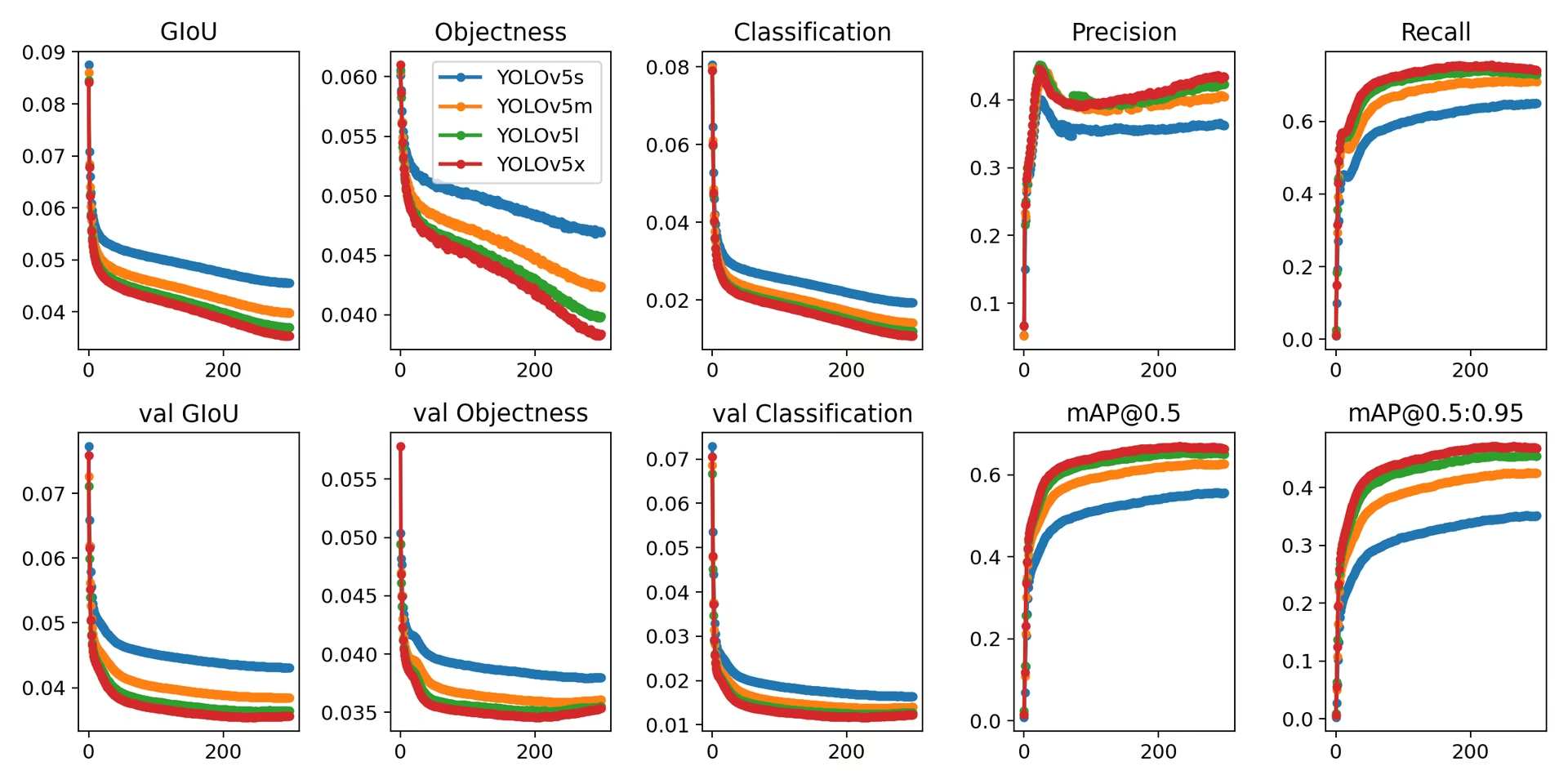
As you apply YOLOv5 to your computer vision projects, the GitHub repository is the place to ask questions and share results with other developers and researchers. You can also use Ultralytics Platform for dataset management and model training without code, or browse the Solutions page for real-world applications.
FAQ#
Not for inference. PyTorch Hub downloads the code and weights on demand with
torch.hub.load("ultralytics/yolov5", "yolov5s"). Cloning is required to run thetrain.py,val.py,detect.py, andexport.pyscripts.yolov5s.ptis the best balance of speed and accuracy for most projects. Useyolov5n.ptfor edge devices,yolov5m.pttoyolov5x.ptwhen accuracy matters more than speed, and the P6 variants such asyolov5s6.ptfor training at 1280 pixels. See the pretrained checkpoints table for the full list.Put images and YOLO-format labels in parallel
images/andlabels/folders, describe them in adataset.yaml, and runpython train.py --data dataset.yaml --weights yolov5s.pt. The Train Custom Data tutorial walks through each step.YOLOv5 is stable and remains fully supported in the standalone repository, but it is no longer the latest model. For new work, YOLO26 in the
ultralyticspackage is faster, more accurate, and exports end-to-end without NMS, using the samepip install ultralyticsworkflow described in the Quickstart.


Comments
Ask a question, share your results, or help someone else.