Ultralytics YOLO26#
Overview#
Ultralytics YOLO26 is a unified family of real-time vision models described in the Ultralytics YOLO26 paper. It introduces native end-to-end inference, a lighter detection head, an updated training recipe, and task-specific heads for detection, segmentation, pose estimation, classification, and oriented detection.
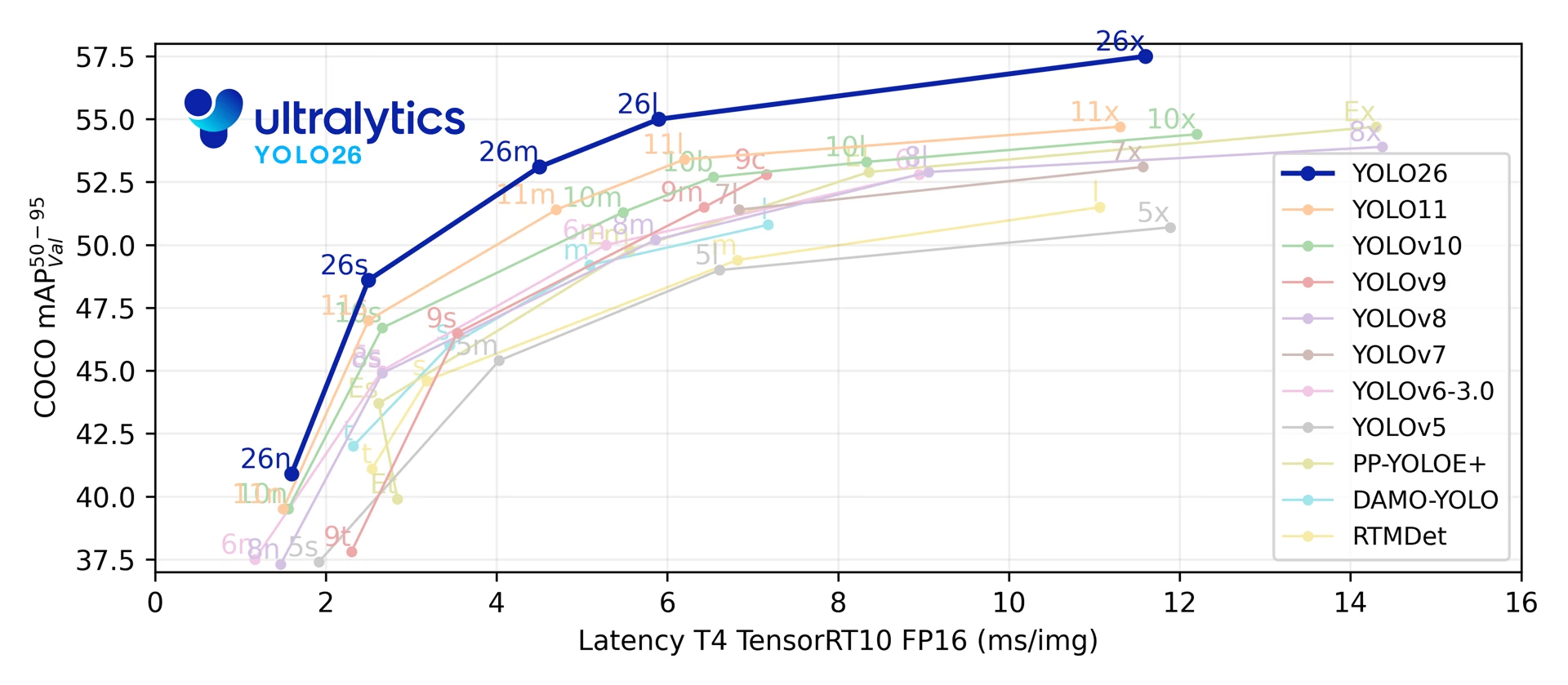
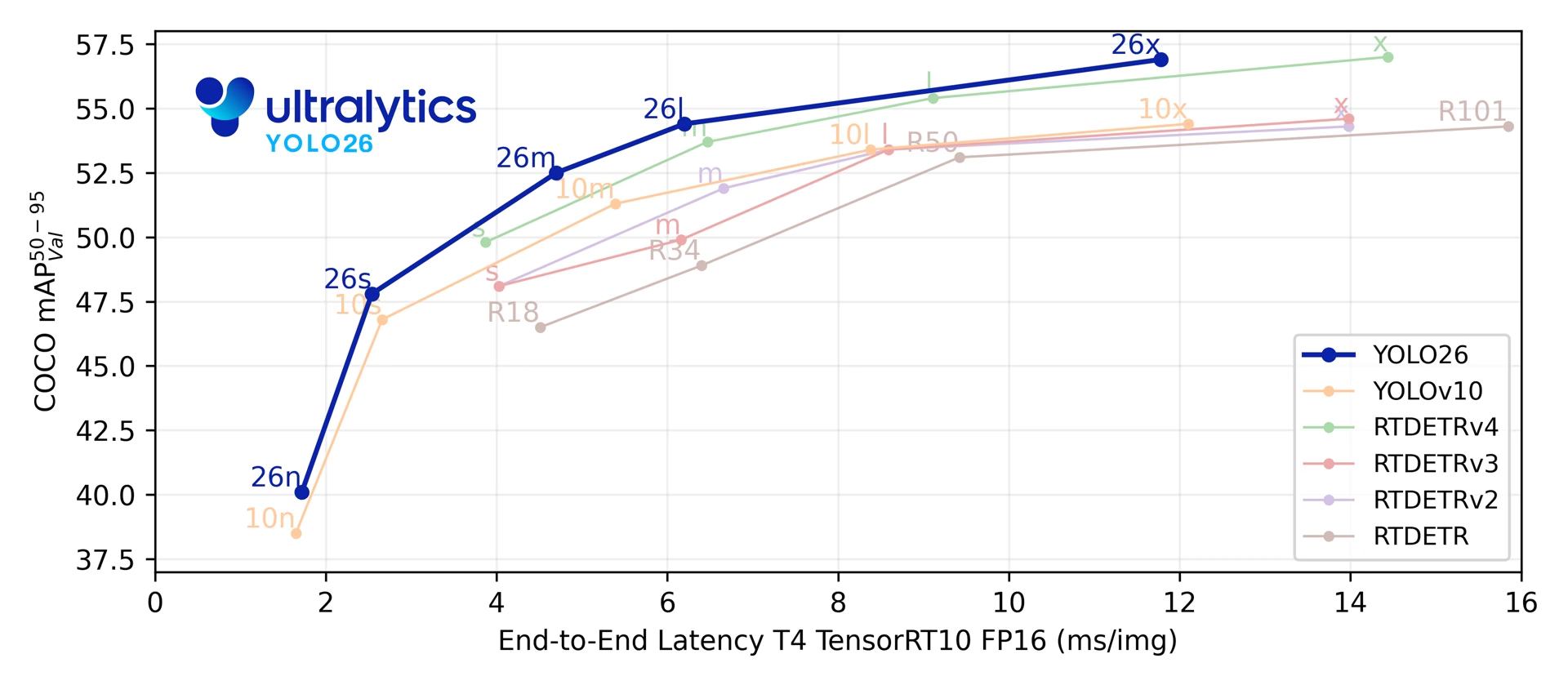
Across its five detection scales, YOLO26 reaches 40.9-57.5 mAP on COCO at 1.7-11.8 ms T4 TensorRT latency. The paper also reports up to 43% faster CPU ONNX inference for YOLO26n compared with YOLO11n on an Intel Xeon CPU @ 2.00 GHz.
See the unreleased YOLO27 preview for planned architecture, tasks, and preliminary benchmarks.
from ultralytics import YOLO

model = YOLO("yolo26n.pt")  # load a pretrained YOLO26n model
results = model("path/to/bus.jpg") # run inferenceExplore and run YOLO26 models directly on Ultralytics Platform.
The YOLO26 model family is built around four design areas:
- Native end-to-end inference: The optional one-to-one detection head produces predictions without non-maximum suppression (NMS), simplifying deployment and reducing post-processing.
- Lighter box regression: YOLO26 removes Distribution Focal Loss (DFL), reducing detection-head complexity while preserving an unconstrained regression range.
- Training recipe updates: The training pipeline combines MuSGD (a hybrid Muon + SGD optimizer), Progressive Loss, and STAL (Small-Target-Aware Label Assignment) to improve optimization, shift supervision toward the inference-time head, and maintain positive label coverage for small objects. The full hyperparameters behind the released checkpoints are documented in the YOLO26 Training Recipe guide.
- Task-specific heads and losses: YOLO26 adds targeted designs for instance segmentation, semantic segmentation variants, pose estimation, and oriented detection while keeping a single model pipeline across tasks.
Together, these updates improve the accuracy-latency tradeoff across model scales and deployment targets.
Key Features#
-
DFL-Free Regression YOLO26 removes Distribution Focal Loss (DFL), reducing detection-head complexity and simplifying export.
-
End-to-End NMS-Free Inference YOLO26 supports native end-to-end inference with
nms=False, producing predictions without a separate NMS pass. The default one-to-many path uses NMS for accuracy. -
Progressive Loss + STAL Progressive Loss shifts training emphasis toward the inference-time head, while STAL improves positive label coverage for small objects.
-
MuSGD Optimizer A hybrid optimizer that combines SGD with Muon, adapting optimization ideas from large language model training to computer vision.
-
Efficient Deployment The simplified head and optional NMS-free path reduce inference overhead across export targets and hardware profiles, including the paper's reported CPU ONNX speedup for YOLO26n versus YOLO11n.
-
Instance Segmentation Enhancements Introduces semantic segmentation loss to improve model convergence and an upgraded proto module that leverages multi-scale information for superior mask quality. The paper reports gains over YOLO11 of up to +2.5 box AP and +3.7 mask AP on COCO instance segmentation.
-
Precision Pose Estimation Integrates Residual Log-Likelihood Estimation (RLE) for more accurate keypoint localization and optimizes the decoding process for increased inference speed. The paper reports up to +7.2 AP over YOLO11 on COCO pose estimation.
-
Refined OBB Decoding Introduces a specialized angle loss to improve detection accuracy for square-shaped objects and optimizes OBB decoding to resolve boundary discontinuity issues. The paper reports up to +3.4 mAP over YOLO11 on DOTA-v1.0 oriented detection.
Supported Tasks and Modes#
YOLO26 supports the standard Ultralytics task set across five model scales:
| Model | Filenames | Task | Training | Validation | Inference | Export |
|---|---|---|---|---|---|---|
| YOLO26 | yolo26n.pt yolo26s.pt yolo26m.pt yolo26l.pt yolo26x.pt | Detection | ✅ | ✅ | ✅ | ✅ |
| YOLO26-seg | yolo26n-seg.pt yolo26s-seg.pt yolo26m-seg.pt yolo26l-seg.pt yolo26x-seg.pt | Instance Segmentation | ✅ | ✅ | ✅ | ✅ |
| YOLO26-sem | yolo26n-sem.pt yolo26s-sem.pt yolo26m-sem.pt yolo26l-sem.pt yolo26x-sem.pt | Semantic Segmentation | ✅ | ✅ | ✅ | ✅ |
| YOLO26-depth | yolo26n-depth.pt yolo26s-depth.pt yolo26m-depth.pt yolo26l-depth.pt yolo26x-depth.pt | Depth Estimation | ✅ | ✅ | ✅ | ✅ |
| YOLO26-cls | yolo26n-cls.pt yolo26s-cls.pt yolo26m-cls.pt yolo26l-cls.pt yolo26x-cls.pt | Classification | ✅ | ✅ | ✅ | ✅ |
| YOLO26-pose | yolo26n-pose.pt yolo26s-pose.pt yolo26m-pose.pt yolo26l-pose.pt yolo26x-pose.pt | Pose/Keypoints | ✅ | ✅ | ✅ | ✅ |
| YOLO26-obb | yolo26n-obb.pt yolo26s-obb.pt yolo26m-obb.pt yolo26l-obb.pt yolo26x-obb.pt | Oriented Detection | ✅ | ✅ | ✅ | ✅ |
This unified framework covers real-time detection, instance segmentation, semantic segmentation, monocular depth estimation, classification, pose estimation, and oriented object detection with training, validation, inference, and export support.
yolo26-p2.yaml and yolo26-p6.yaml add a P2 (small-object) or P6 (large-input) detection head and are shipped as YAML architectures only. No scale-specific yolo26*-p2.pt or yolo26*-p6.pt weights are released. Instantiate a scaled config from YAML (for example, YOLO("yolo26n-p6.yaml")) and train or fine-tune it as needed.
Performance Metrics#
See Detection Docs for usage examples with these models trained on COCO, which include 80 pretrained classes.
| Model | size (pixels) | mAPval 50-95 | mAPval 50-95(e2e) | Speed CPU ONNX (ms) | Speed T4 TensorRT10 (ms) | params (M) | FLOPs (B) |
|---|---|---|---|---|---|---|---|
| YOLO26n | 640 | 40.9 | 40.1 | 38.9 ± 0.7 | 1.7 ± 0.0 | 2.4 | 5.5 |
| YOLO26s | 640 | 48.6 | 47.8 | 87.2 ± 0.9 | 2.5 ± 0.0 | 9.5 | 20.9 |
| YOLO26m | 640 | 53.1 | 52.5 | 220.0 ± 1.4 | 4.7 ± 0.1 | 20.4 | 68.4 |
| YOLO26l | 640 | 55.0 | 54.4 | 286.2 ± 2.0 | 6.2 ± 0.2 | 24.8 | 86.8 |
| YOLO26x | 640 | 57.5 | 56.9 | 525.8 ± 4.0 | 11.8 ± 0.2 | 55.7 | 194.4 |
Params and FLOPs values are for the fused model after Conv/BatchNorm folding and removal of the unused detection branch. Speed measurements select the NMS-free head with nms=False. Pretrained checkpoints retain the full training architecture and may show higher counts.
Usage Examples#
This section provides simple YOLO26 training and inference examples. For full documentation on these and other modes, see the Predict, Train, Val, and Export docs pages.
Note that the example below is for YOLO26 Detect models for object detection. For additional supported tasks, see the Segment, Semantic Segmentation, Depth, Classify, Pose, and OBB docs.
PyTorch pretrained *.pt models as well as configuration *.yaml files can be passed to the YOLO() class to create a model instance in Python:
from ultralytics import YOLO

# Load a COCO-pretrained YOLO26n model
model = YOLO("yolo26n.pt")

# Run inference with the YOLO26n model on the 'bus.jpg' image
results = model("path/to/bus.jpg")

# Train the model on the COCO8 example dataset for 100 epochs
results = model.train(data="coco8.yaml", epochs=100, imgsz=640)YOLO26 detection models use a dual-head architecture that provides flexibility for different deployment scenarios:
- One-to-Many Head (Default): Generates traditional YOLO outputs requiring NMS post-processing, outputting
(N, nc + 4, 8400)wherencis the number of classes. This head typically achieves slightly higher accuracy at the cost of additional processing. - One-to-One Head (
nms=False): Produces end-to-end predictions without NMS, outputting(N, 300, 6)with a maximum of 300 detections per image. This head is optimized for fast inference and simplified deployment.
You can switch between heads during export, prediction, or validation:
from ultralytics import YOLO

model = YOLO("yolo26n.pt")

# Use one-to-many head (default, Ultralytics applies NMS)
results = model.predict("image.jpg")  # inference
metrics = model.val(data="coco.yaml")  # validation
model.export(format="onnx")  # export

# Opt into the NMS-free one-to-one head
results = model.predict("image.jpg", nms=False)  # inference
metrics = model.val(data="coco.yaml", nms=False)  # validation
model.export(format="onnx", nms=False)  # export
Prediction and validation default to the one-to-many head for accuracy. Use nms=False for NMS-free inference, or nms=True to embed NMS in a supported export. Both heads are trained regardless of this choice. See the End-to-End Detection guide for output formats and export compatibility.
YOLOE-26: Open-Vocabulary Detection and Segmentation#
YOLO26 also powers YOLOE-26, an open-vocabulary variant that detects and segments object categories from text prompts, visual prompts, or a prompt-free mode instead of a fixed class list learned at training time. YOLOE-26 keeps YOLO26's optional NMS-free end-to-end (e2e) head, so open-vocabulary inference stays fast enough for dynamic environments where target categories change over time. YOLOE-26x reaches 40.6 AP on LVIS minival under text prompting, 38.5 AP under visual prompting and 31.1 AP prompt-free — the paper's Non-E2E figures, which its end-to-end head trails by 1.1, 2.3 and 1.2 AP.
See the YOLOE documentation for per-scale performance tables, prompt-free variants, and full usage examples.
Citations and Acknowledgments#
For a complete technical description of the YOLO26 architecture, training recipe, task heads, and YOLOE-26 open-vocabulary extension, read Ultralytics YOLO26: Unified Real-Time End-to-End Vision Models. If you use YOLO26 in your research, please cite:
@misc{jocher2026ultralyticsyolo26unifiedrealtime,
  title = {Ultralytics YOLO26: Unified Real-Time End-to-End Vision Models},
  author = {Glenn Jocher and Jing Qiu and Mengyu Liu and Shuai Lyu and Fatih Cagatay Akyon and Muhammet Esat Kalfaoglu},
  year = {2026},
  eprint = {2606.03748},
  archivePrefix = {arXiv},
  primaryClass = {cs.CV},
  doi = {10.48550/arXiv.2606.03748},
  url = {https://arxiv.org/abs/2606.03748},
}
YOLO26 code, models, and documentation are available in the Ultralytics GitHub repository and Ultralytics Docs under AGPL-3.0 and Enterprise licenses.
FAQ#
- DFL-free regression: Simplifies the detection head and export path
- End-to-end NMS-free inference: Supports NMS-free inference with
nms=False - Progressive Loss + STAL: Improves training alignment and small-object label coverage
- MuSGD optimizer: Combines SGD with Muon-inspired optimization for stable training
- Task-specific heads and losses: Improves segmentation, pose, and oriented detection support
YOLO26 is a unified model family, providing end-to-end support for multiple computer vision tasks:
- Object Detection
- Instance Segmentation
- Semantic Segmentation
- Monocular Depth Estimation
- Image Classification
- Pose Estimation
- Oriented Object Detection (OBB)
Each size variant (n, s, m, l, x) supports all tasks, plus open-vocabulary versions via YOLOE-26.
YOLO26 improves deployment efficiency with:
- Optional native end-to-end inference without NMS (
nms=False) - DFL-free regression and a lighter detection head
- Fused-model export that removes training-only auxiliary components
- Up to 43% faster CPU ONNX inference for YOLO26n versus YOLO11n on an Intel Xeon CPU @ 2.00 GHz
- Flexible export formats including TensorRT, ONNX, CoreML, LiteRT, and OpenVINO
- Optional native end-to-end inference without NMS (
YOLO26 models are available for download through the
ultralyticspackage. Install or update the package and load a model:from ultralytics import YOLO # Load a pretrained YOLO26 nano model model = YOLO("yolo26n.pt") # Run inference on an image results = model("image.jpg")See the Usage Examples section for training, validation, and export instructions.