YOLO26モデルのMNNエクスポートとデプロイ#
MNN#
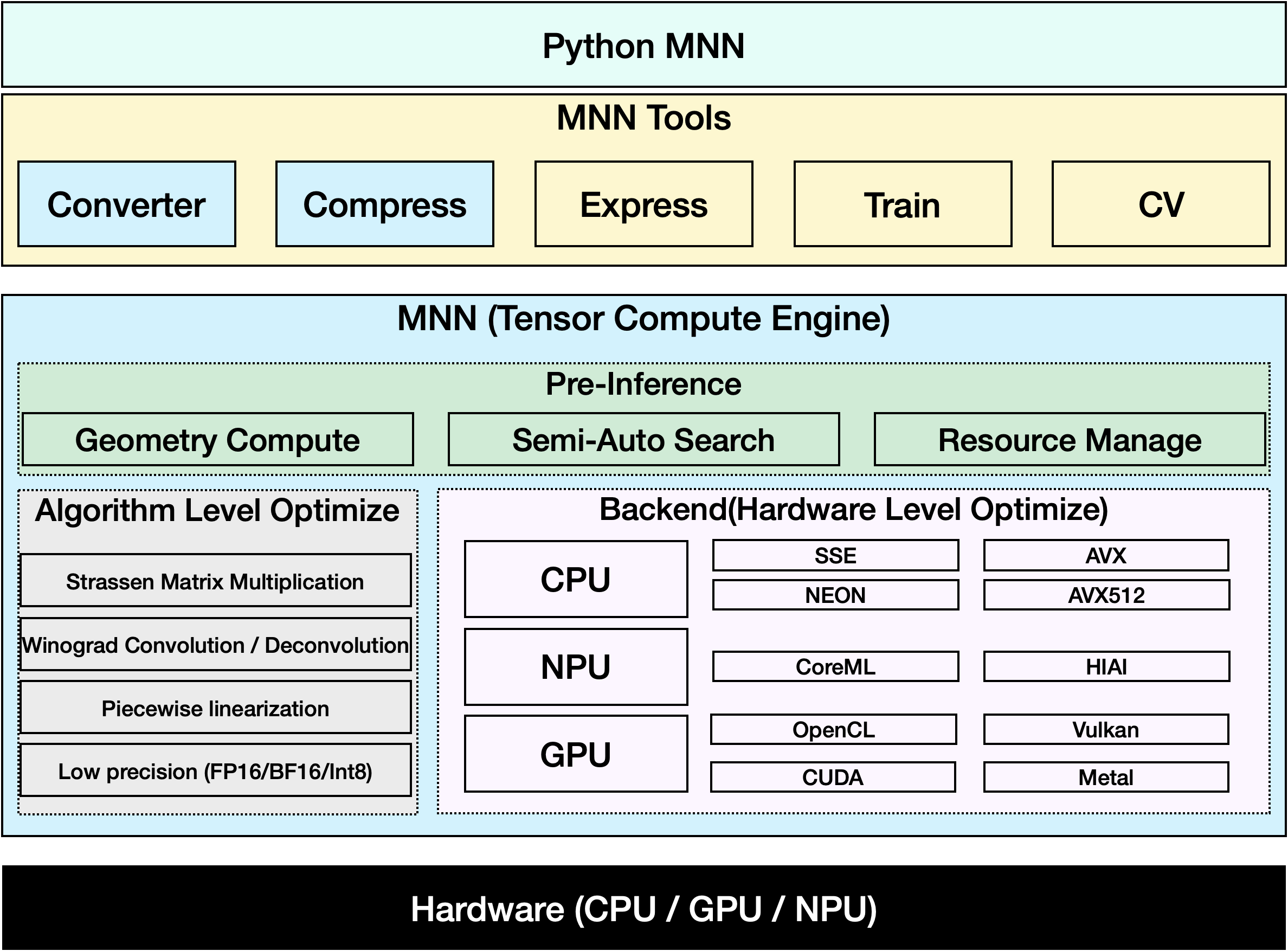
MNNは、効率性に優れた軽量なディープラーニングフレームワークです。ディープラーニングモデルの推論とトレーニングに対応し、デバイス上での推論とトレーニングにおいて業界をリードする性能を発揮します。現在、MNNは淘宝(Taobao)、天猫(Tmall)、優酷(Youku)、釘釘(DingTalk)、閑魚(Xianyu)など、Alibaba Inc.の30を超えるアプリに統合されており、ライブ配信、ショート動画撮影、検索レコメンデーション、画像による商品検索、インタラクティブマーケティング、株式配分、セキュリティリスク管理など、70を超えるユースケースをカバーしています。また、MNNはIoTなどの組み込みデバイスでも使用されています。
視聴: Ultralytics YOLO26をMNN形式にエクスポートする方法 | モバイルデバイスで推論を高速化📱
対応タスク#
MNNエクスポートは、Ultralyticsの7つすべてのタスクに対応しています。セマンティックセグメンテーションと深度推定を利用できるのはYOLO26のみです。これらのヘッドを備えているのはYOLO26だけです。
MNNへのエクスポート: YOLO26モデルの変換#
Ultralytics YOLOモデルをMNN形式に変換すると、モデルの互換性とデプロイの柔軟性を高めることができます。この変換により、モバイル環境や組み込み環境向けにモデルが最適化され、リソースに制約のあるデバイスでも効率的な性能を確保できます。
インストール#
必要なパッケージをインストールするには、次を実行します。
# Install the required package for YOLO26 and MNN
pip install ultralytics
pip install MNN使用方法#
すべてのUltralytics YOLO26モデルは、追加設定なしでエクスポートできるように設計されているため、希望するデプロイワークフローに簡単に統合できます。アプリケーションに最適な設定を選ぶには、対応するエクスポート形式と設定オプションの一覧をご覧ください。
MNN形式は、エクスポート、予測、検証の各モードに対応しています。モデルをエクスポートした後、エクスポート済みのモデルを読み込んで推論を実行するか、精度を検証します。
from ultralytics import YOLO

# YOLO26モデルを読み込みます
model = YOLO("yolo26n.pt")

# モデルをMNN形式にエクスポート
model.export(format="mnn") # 'yolo26n.mnn'を作成from ultralytics import YOLO
# エクスポート済みのMNNモデルを読み込む
model = YOLO("yolo26n.mnn")
# 推論を実行
results = model("https://ultralytics.com/images/bus.jpg")from ultralytics import YOLO
# エクスポート済みのMNNモデルを読み込む
model = YOLO("yolo26n.mnn")
# COCO8データセットで精度を検証します
metrics = model.val(data="coco8.yaml")エクスポート引数#
| 引数 | 種類 | デフォルト | 説明 |
|---|---|---|---|
format | str | 'mnn' | エクスポートしたモデルのターゲットフォーマットです。さまざまなデプロイ環境との互換性を定義します。 |
imgsz | intまたはtuple | 640 | モデル入力の画像サイズです。正方形画像の場合は整数、特定のサイズの場合はタプル(height, width)を指定できます。 |
quantize | intまたはstr | None | 量子化精度: 16(FP16)または8(INT8)を指定すると、エクスポートされる重みのサイズが小さくなります。32を指定するか未設定にすると、FP32の重みがエクスポートされますが、UltralyticsのMNNBackendはFP32ではなくlow精度で実行されます。非推奨のhalf/int8フラグを置き換えるオプションです。 |
simplify | bool | True | onnxslimを使用して、中間ONNXグラフを簡素化します。 |
opset | int | None | 中間ONNXグラフのONNX opsetバージョンを指定します。設定しない場合は、サポートされている最新バージョンが使用されます。 |
batch | int | 1 | エクスポートモデルのバッチ推論サイズ、またはpredictモードでエクスポートモデルが同時に処理する画像の最大数を指定します。 |
dynamic | bool | False | 入力画像の動的なサイズに対応します。nms=Trueとは併用できません。 |
nms | bool、省略可 | None | raw出力(None、デフォルト)、NMSの組み込み(True)、またはNMSフリーヘッド(False)を選択します。組み込みNMSは、dynamic=Falseを指定するとdetectとposeに対応します。 |
device | str | None | エクスポートに使用するデバイスを指定します。GPU(device=0)、CPU(device=cpu)、Appleシリコン向けMPS(device=mps)から選択します。 |
エクスポートプロセスの詳細については、Ultralyticsのエクスポートに関するドキュメントページをご覧ください。
MNNのみを使用した推論#
YOLO26の推論と前処理をMNNのみで行う関数を実装しました。あらゆるシナリオに簡単にデプロイできるよう、Python版とC++版を用意しています。
import argparse

import MNN
import MNN.cv as cv2
import MNN.numpy as np

def inference(model, img, precision, backend, thread):
    config = {}
    config["precision"] = precision
    config["backend"] = backend
    config["numThread"] = thread
    rt = MNN.nn.create_runtime_manager((config,))
    # net = MNN.nn.load_module_from_file(model, ['images'], ['output0'], runtime_manager=rt)
    net = MNN.nn.load_module_from_file(model, [], [], runtime_manager=rt)
    original_image = cv2.imread(img)
    ih, iw, _ = original_image.shape
    length = max((ih, iw))
    scale = length / 640
    image = np.pad(original_image, [[0, length - ih], [0, length - iw], [0, 0]], "constant")
    image = cv2.resize(
        image, (640, 640), 0.0, 0.0, cv2.INTER_LINEAR, -1, [0.0, 0.0, 0.0], [1.0 / 255.0, 1.0 / 255.0, 1.0 / 255.0]
    )
    image = image[..., ::-1]  # BGRからRGBへ
    input_var = image[None]
    input_var = MNN.expr.convert(input_var, MNN.expr.NC4HW4)
    output_var = net.forward(input_var)
    output_var = MNN.expr.convert(output_var, MNN.expr.NCHW)
    output_var = output_var.squeeze()
    # output_varの形状: [84, 8400]; 84の意味: [cx, cy, w, h, prob * 80]
    cx = output_var[0]
    cy = output_var[1]
    w = output_var[2]
    h = output_var[3]
    probs = output_var[4:]
    # [cx, cy, w, h] -> [x0, y0, x1, y1]
    x0 = cx - w * 0.5
    y0 = cy - h * 0.5
    x1 = cx + w * 0.5
    y1 = cy + h * 0.5
    boxes = np.stack([x0, y0, x1, y1], axis=1)
    # 最大のprobとidxを取得
    scores = np.max(probs, 0)
    class_ids = np.argmax(probs, 0)
    result_ids = MNN.expr.nms(boxes, scores, 100, 0.45, 0.25)
    print(result_ids.shape)
    # NMSの結果: box、score、ids
    result_boxes = boxes[result_ids]
    result_scores = scores[result_ids]
    result_class_ids = class_ids[result_ids]
    for i in range(len(result_boxes)):
        x0, y0, x1, y1 = result_boxes[i].read_as_tuple()
        y0 = int(y0 * scale)
        y1 = int(y1 * scale)
        x0 = int(x0 * scale)
        x1 = int(x1 * scale)
        # パディングが適用された場合に備えて、元の画像サイズに合わせて値を制限
        x1 = min(iw, x1)
        y1 = min(ih, y1)
        print(result_class_ids[i])
        cv2.rectangle(original_image, (x0, y0), (x1, y1), (0, 0, 255), 2)
    cv2.imwrite("res.jpg", original_image)

if __name__ == "__main__":
    parser = argparse.ArgumentParser()
    parser.add_argument("--model", type=str, required=True, help="the yolo26 model path")
    parser.add_argument("--img", type=str, required=True, help="the input image path")
    parser.add_argument("--precision", type=str, default="normal", help="inference precision: normal, low, high, lowBF")
    parser.add_argument(
        "--backend",
        type=str,
        default="CPU",
        help="inference backend: CPU, OPENCL, OPENGL, NN, VULKAN, METAL, TRT, CUDA, HIAI",
    )
    parser.add_argument("--thread", type=int, default=4, help="inference using thread: int")
    args = parser.parse_args()
inference(args.model, args.img, args.precision, args.backend, args.thread)概要#
このガイドでは、Ultralytics YOLO26モデルをMNNにエクスポートし、推論にMNNを使用する方法を紹介します。MNN形式はエッジAIアプリケーションで優れた性能を発揮するため、リソースに制約のあるデバイスへのコンピュータービジョンモデルのデプロイに最適です。
詳しい使用方法については、MNNのドキュメントをご覧ください。
よくある質問#
Ultralytics YOLO26モデルをMNN形式にエクスポートするには、次の手順に従います。
エクスポートfrom ultralytics import YOLO # YOLO26モデルを読み込みます model = YOLO("yolo26n.pt") # MNN形式にエクスポート model.export(format="mnn") # fp32の重みを使用して'yolo26n.mnn'を作成 model.export(format="mnn", quantize=16) # fp16の重みを使用して'yolo26n.mnn'を作成 model.export(format="mnn", quantize=8) # int8の重みを使用して'yolo26n.mnn'を作成エクスポートオプションの詳細については、ドキュメントのエクスポートのページをご覧ください。
エクスポートしたYOLO26 MNNモデルで予測するには、YOLOクラスの
predict関数を使用します。推論from ultralytics import YOLO # YOLO26 MNNモデルを読み込む model = YOLO("yolo26n.mnn") # 推論を実行 results = model("https://ultralytics.com/images/bus.jpg") for result in results: result.show() # 画面に表示 result.save(filename="result.jpg") # ディスクに保存MNNは汎用性に優れており、さまざまなプラットフォームに対応しています。
- モバイル: Android、iOS、Harmony。
- 組み込みシステムおよびIoTデバイス: Raspberry PiやNVIDIA Jetsonなどのデバイス。
- デスクトップおよびサーバー: Linux、Windows、macOS。
YOLO26モデルをモバイルデバイスにデプロイするには、次の手順に従います。
- Android向けビルド: MNN Androidガイドに従います。
- iOS向けビルド: MNN iOSガイドに従います。
- Harmony向けビルド: MNN Harmonyガイドに従います。