手部关键点数据集
简介#
Ultralytics Hand Keypoints 数据集包含 26,768 张手部图像,每张图像都标注了 21 个keypoints,这些标注由 Google MediaPipe 库生成,具有很高的准确性和一致性。该数据集兼容 Ultralytics YOLO26 格式,可用于训练姿态估计模型。
观看: 使用 Ultralytics YOLO 进行手部关键点估计 | 人手姿态估计教程
关键点#
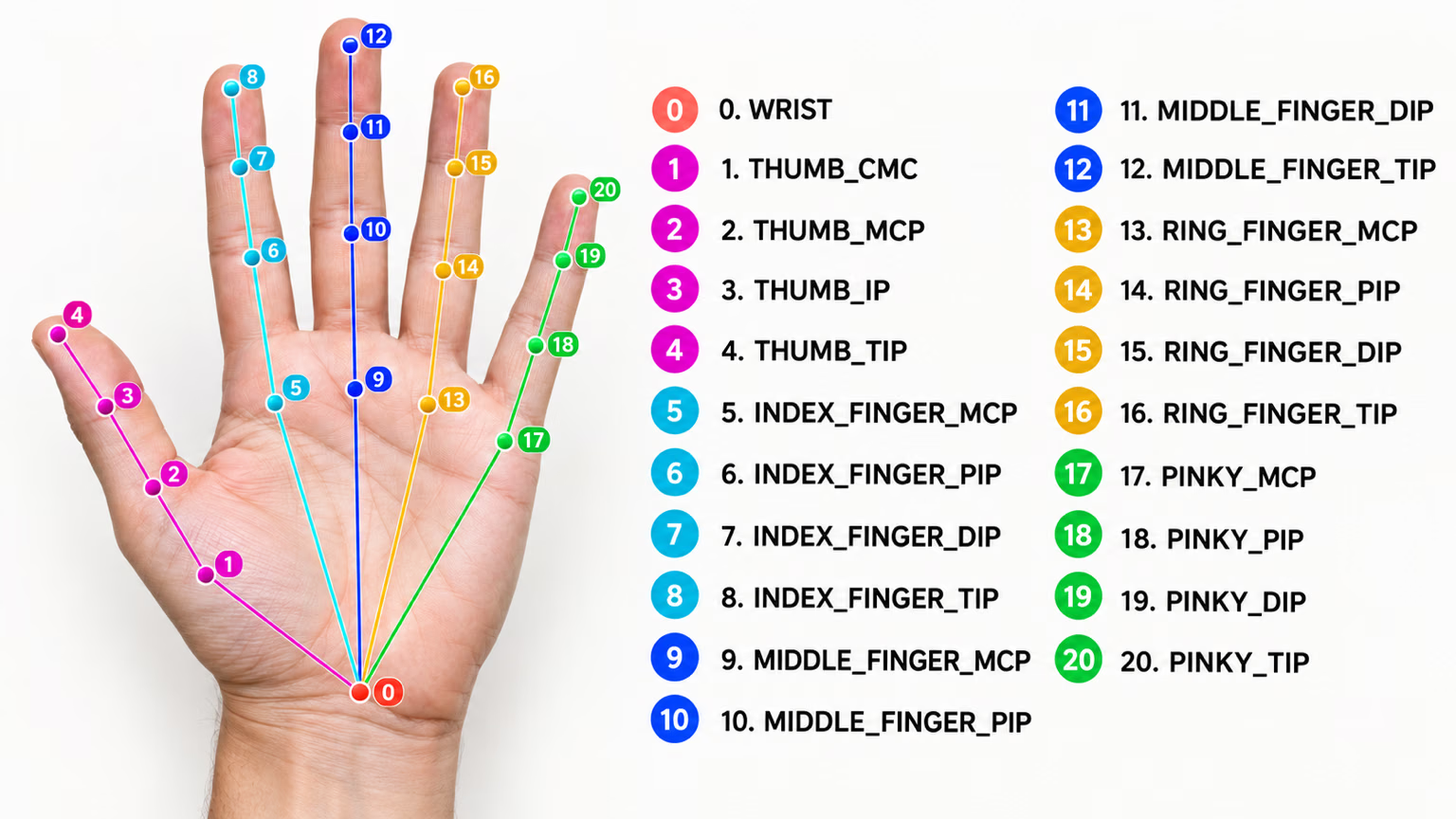
每只手均按如下方式标注 21 个关键点:
- 手腕
- 拇指(4 个点)
- 食指(4 个点)
- 中指(4 个点)
- 无名指(4 个点)
- 小指(4 个点)
数据集结构#
- 图像总数:26,768(18,776 张训练 / 7,992 张验证)。
- 类别:1 个(hand)。
- 关键点:每只手有 21 个关键点,采用
(x, y, visibility)三元组格式。 - 下载大小:约 ~369 MB。
如果你需要通用手部关键点之外的自定义手势词汇,Ultralytics Platform 可让你直接在浏览器中为自己的数据集进行标注和训练。
应用场景#
手部关键点支持多种实际应用:
- 手势识别:人机交互和非接触式控制界面。
- AR/VR 控制:与虚拟对象进行精准交互。
- 机器人操作:对机械手进行精细控制。
- 医疗保健:分析手部运动以辅助医疗诊断。
- 动画:通过动作捕捉实现逼真的手部运动。
- 生物特征认证:基于手部几何特征的安全系统。
数据集 YAML#
使用 YAML 文件定义数据集配置,其中包含数据集路径、类别和其他相关信息。对于手部关键点数据集,hand-keypoints.yaml 文件由 https://github.com/ultralytics/ultralytics/blob/main/ultralytics/cfg/datasets/hand-keypoints.yaml 维护。
# Ultralytics 🚀 AGPL-3.0 License - https://ultralytics.com/license

# Hand Keypoints dataset by Ultralytics
# Documentation: https://docs.ultralytics.com/datasets/pose/hand-keypoints
# Example usage: yolo train data=hand-keypoints.yaml
# parent
# ├── ultralytics
# └── datasets
#     └── hand-keypoints ← downloads here (369 MB)

# Train/val/test sets as 1) dir: path/to/imgs, 2) file: path/to/imgs.txt, or 3) list: [path/to/imgs1, path/to/imgs2, ..]
path: hand-keypoints # dataset root dir
train: images/train # train images (relative to 'path') 18776 images
val: images/val # val images (relative to 'path') 7992 images

# Keypoints
kpt_shape: [21, 3] # number of keypoints, number of dims (2 for x,y or 3 for x,y,visible)
flip_idx: [0, 1, 2, 3, 4, 5, 6, 7, 8, 9, 10, 11, 12, 13, 14, 15, 16, 17, 18, 19, 20]

# Classes
names:
  0: hand

# Keypoint names per class
kpt_names:
  0:
    - wrist
    - thumb_cmc
    - thumb_mcp
    - thumb_ip
    - thumb_tip
    - index_mcp
    - index_pip
    - index_dip
    - index_tip
    - middle_mcp
    - middle_pip
    - middle_dip
    - middle_tip
    - ring_mcp
    - ring_pip
    - ring_dip
    - ring_tip
    - pinky_mcp
    - pinky_pip
    - pinky_dip
    - pinky_tip

# Download script/URL (optional)
download: https://github.com/ultralytics/assets/releases/download/v0.0.0/hand-keypoints.zip用法#
要在 Hand Keypoints 数据集上以 640 的图像尺寸训练YOLO26n-pose模型 100 个周期,可以使用以下代码片段。
from ultralytics import YOLO

# 加载模型
model = YOLO("yolo26n-pose.pt")  # 加载预训练模型(推荐用于训练)

# 训练模型
results = model.train(data="hand-keypoints.yaml", epochs=100, imgsz=640)示例图像和标注#
手部关键点数据集包含各种带有人手关键点标注的图像。以下是数据集中的一些图像示例及其对应的标注:
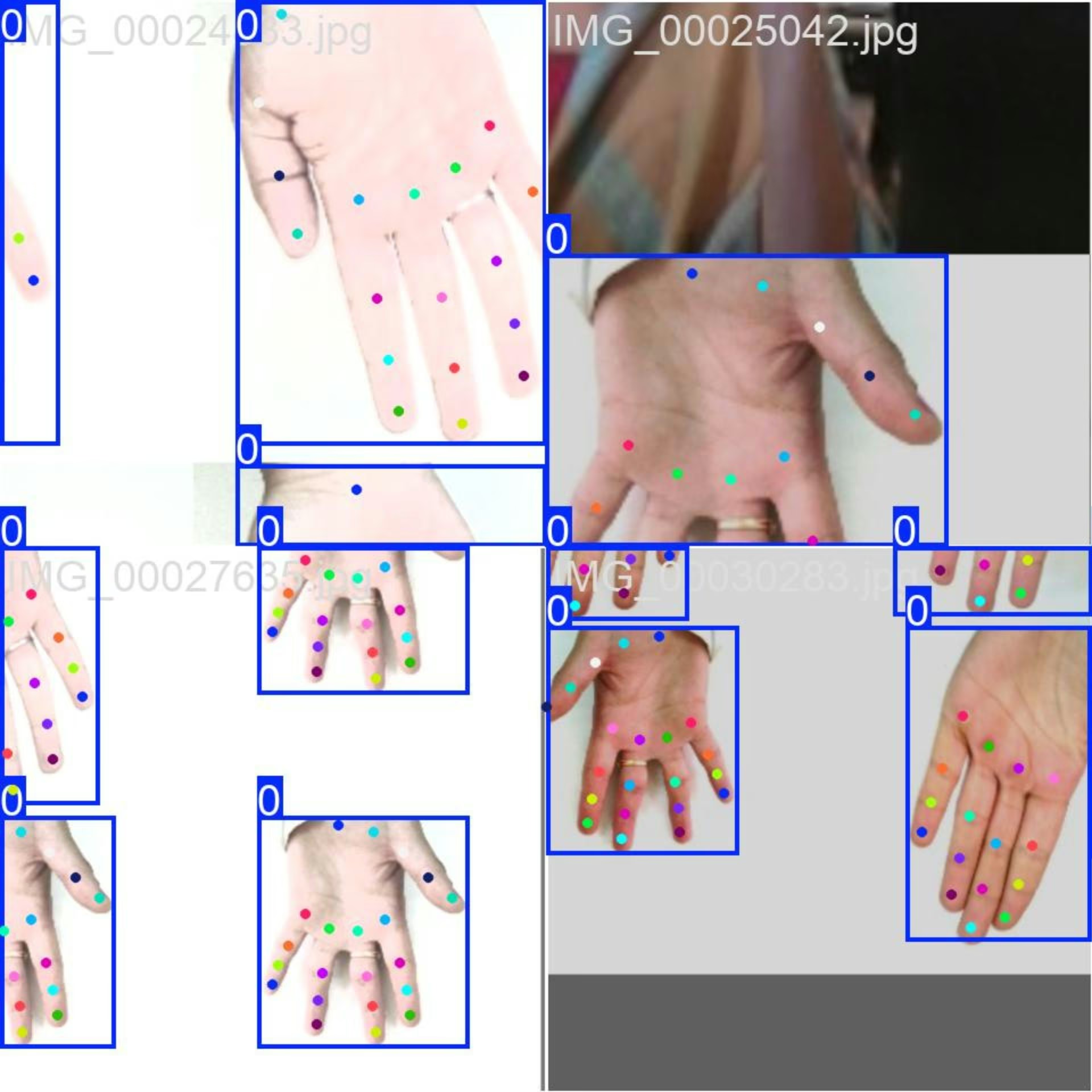
- 马赛克图像:此图像展示了由数据集马赛克图像组成的训练批次。马赛克是一种训练时使用的技术,它将多张图像合并为一张图像,从而增加每个训练批次中目标和场景的多样性。这有助于提升模型对不同目标尺寸、长宽比和上下文的泛化能力。
该示例展示了手部关键点数据集中图像的多样性和复杂性,以及在训练过程中使用马赛克增强的优势。
引用与致谢#
如果你在研究或开发工作中使用手部关键点数据集,请注明以下来源:
我们感谢以下来源提供本数据集使用的图像:
这些图像是在各个平台所提供的相应许可下收集和使用的,并根据知识共享署名-非商业性使用-相同方式共享 4.0 国际许可协议进行分发。
我们还要感谢此数据集的创建者 Rion Dsilva,感谢他将数据集贡献给视觉 AI 研究社区。
常见问题#
Hand Keypoints 数据集包含 26,768 张带标注的图像,每只手有 21 个关键点,由 Google MediaPipe 生成,为姿态估计模型提供了执行高级姿态估计任务所需的数据规模和标注精度。
Hand Keypoints 支持手势识别、AR/VR 控制、机器人操作、医疗健康运动分析、动画制作和生物特征身份验证;各项应用的详情请参阅应用部分。
Hand Keypoints 数据集分为两个子集:
- 训练集:包含 18,776 张图像,用于训练姿势估计模型。
- 验证集:包含 7,992 张图像,用于模型训练期间的验证。
数据集配置定义在 YAML 文件中,其中包含路径、类别和其他相关信息。你可以在 hand-keypoints.yaml 找到
hand-keypoints.yaml文件。如需在训练中使用此 YAML 文件,请按照上方训练示例所示,在训练脚本或 CLI 命令中指定该文件。更多详情请参阅数据集 YAML部分。


评论32
提出问题、分享结果,或帮助其他人。
vbalab
Ready-to-use YOLO26s-pose fine-tuned for hand keypoints!
The link: https://github.com/vbalab/YOLO26s-pose-hands
2 Glenn JocherUltralytics
Thanks for sharing your YOLO26s hand-keypoints weights repo — for anyone trying it, please include (in that repo) the exact
ultralyticsversion + training args and a validation result on the official Hand Keypoints dataset so others can reproduce/compare easily; quick sanity-check command:yolo pose val model=path/to/best.pt data=hand-keypoints.yaml imgsz=640
MengBo-GitHub
感谢如此详细的教学文档,可惜在个人学习使用阶段没有足够的 训练条件 ,我请求分享一些训练后的模型提供给学习者使用,感激不尽😄
1- Glenn JocherUltralytics(已编辑)
感谢支持!目前我们未提供基于 Hand Keypoints 的官方预训练权重;建议从 YOLO26n‑pose.pt 做迁移学习,或使用 Ultralytics Platform 进行一键云端训练获取可用模型,如有社区训练的 checkpoint 也欢迎在此贴共享链接。
chrismuntean
I trained a model using this tutorial so you don't have to!
Feel free to use it as you wish:
https://github.com/chrismuntean/YOLO11n-pose-hands
1zlj127
Wow! Thank you so much for your contribution, bro. It has saved me most of the time for pre-training. You're my god!
1
RedAbraham
what's the meaning of output(130069)? I wanna deploy the model by myself but I don't know how to analyze the output
- Glenn JocherUltralytics(已编辑)
That
(1, 300, 69)is the exported end-to-end pose head output shaped as(batch, num_predictions, num_channels); for Hand Keypointskpt_shape: [21, 3], so69 = 4 (box x1,y1,x2,y2) + 1 (confidence score) + 1 (class index,names: {0: hand}) + 21*3 (keypoints x,y,visibility). There is no separate objectness channel. See the Hand Keypoints dataset docs and the general pose dataset overview.# out: (1, 300, 69) pred = out[0] # (300, 69) boxes_xyxy = pred[:, 0:4] # x1,y1,x2,y2 score = pred[:, 4] # confidence score cls = pred[:, 5] # class index (1 class) kpts = pred[:, 6:].reshape(-1, 21, 3) # (300, 21, 3) -> x,y,visIf you tell me your export format (e.g. ONNX/TensorRT), you can drop the tensor names and a small snippet of the output here in this discussion so the team can see it.
samasadii(已编辑)
I've noticed in this dataset almost all of the points are labeled as visible, even the ones that are not visible in the image.
changshen123
Hi @glenn-jocher i want to konw that how much epochs are suitable for your dataset?
jugal-sheth
from ultralytics import YOLO

# Load a model
model = YOLO("yolo11n-pose.pt")  # load a pretrained model (recommended for training)

# Train the model
results = model.train(data="hand-keypoints.yaml", epochs=100, imgsz=640)
Error
train: WARNING ⚠️ D:\projects\hand-track\datasets\dataset\train\images\IMG_00035498.jpg: ignoring corrupt image/label: cannot reshape array of size 67 into shape (2) train: WARNING ⚠️ D:\projects\hand-track\datasets\dataset\train\images\IMG_00035499.jpg: ignoring corrupt image/label: cannot reshape array of size 67 into shape (2) train: WARNING ⚠️ D:\projects\hand-track\datasets\dataset\train\images\IMG_00035500.jpg: ignoring corrupt image/label: cannot reshape array of size 67 into shape (2) . . . . . . . train: WARNING ⚠️ D:\projects\hand-track\datasets\dataset\train\images\IMG_00035501.jpg: ignoring corrupt image/label: cannot reshape array of size 67 into shape (2) train: WARNING ⚠️ D:\projects\hand-track\datasets\dataset\train\images\IMG_00035503.jpg: ignoring corrupt image/label: cannot reshape array of size 67 into shape (2) train: WARNING ⚠️ D:\projects\hand-track\datasets\dataset\train\images\IMG_00035504.jpg: ignoring corrupt image/label: cannot reshape array of size 67 into shape (2) train: WARNING ⚠️ D:\projects\hand-track\datasets\dataset\train\images\IMG_00035505.jpg: ignoring corrupt image/label: cannot reshape array of size 67 into shape (2) train: WARNING ⚠️ D:\projects\hand-track\datasets\dataset\train\images\IMG_00035507.jpg: ignoring corrupt image/label: cannot reshape array of size 67 into shape (2) train: WARNING ⚠️ D:\projects\hand-track\datasets\dataset\train\images\IMG_00035509.jpg: ignoring corrupt image/label: cannot reshape array of size 67 into shape (2) WARNING ⚠️ No images found in D:\projects\hand-track\datasets\dataset\train\labels.cache, training may not work correctly. See https://docs.ultralytics.com/datasets for dataset formattingg guidance. Traceback (most recent call last): File "d:\projects\hand-track\test.py", line 36, in model.train(data="config.yaml", epochs=100, imgsz=896, device=0) File "C:\Users\jugal\miniconda3\envs\hand\Lib\site-packages\ultralytics\engine\model.py", line 808, in train self.trainer.train() File "C:\Users\jugal\miniconda3\envs\hand\Lib\site-packages\ultralytics\engine\trainer.py", line 207, in train self._do_train(world_size) File "C:\Users\jugal\miniconda3\envs\hand\Lib\site-packages\ultralytics\engine\trainer.py", line 322, in _do_train self._setup_train(world_size) File "C:\Users\jugal\miniconda3\envs\hand\Lib\site-packages\ultralytics\engine\trainer.py", line 286, in _setup_train self.train_loader = self.get_dataloader(self.trainset, batch_size=batch_size, rank=LOCAL_RANK, mode="train") ^^^^^^^^^^^^^^^^^^^^^^^^^^^^^^^^^^^^^^^^^^^^^^^^^^^^^^^^^^^^^^^^^^^^^^^^^^^^^^^^^^^^^^^^ File "C:\Users\jugal\miniconda3\envs\hand\Lib\site-packages\ultralytics\models\yolo\detect\train.py", line 49, in get_dataloader dataset = self.build_dataset(dataset_path, mode, batch_size) ^^^^^^^^^^^^^^^^^^^^^^^^^^^^^^^^^^^^^^^^^^^^^^^^^^ File "C:\Users\jugal\miniconda3\envs\hand\Lib\site-packages\ultralytics\models\yolo\detect\train.py", line 43, in build_dataset return build_yolo_dataset(self.args, img_path, batch, self.data, mode=mode, rect=mode == "val", stride=gs) ^^^^^^^^^^^^^^^^^^^^^^^^^^^^^^^^^^^^^^^^^^^^^^^^^^^^^^^^^^^^^^^^^^^^^^^^^^^^^^^^^^^^^^^^^^^^^^^^^^^ File "C:\Users\jugal\miniconda3\envs\hand\Lib\site-packages\ultralytics\data\build.py", line 99, in build_yolo_dataset return dataset( ^^^^^^^^ File "C:\Users\jugal\miniconda3\envs\hand\Lib\site-packages\ultralytics\data\dataset.py", line 64, in init super().init(*args, **kwargs) File "C:\Users\jugal\miniconda3\envs\hand\Lib\site-packages\ultralytics\data\base.py", line 74, in init self.labels = self.get_labels() ^^^^^^^^^^^^^^^^^ File "C:\Users\jugal\miniconda3\envs\hand\Lib\site-packages\ultralytics\data\dataset.py", line 161, in get_labels len_cls, len_boxes, len_segments = (sum(x) for x in zip(*lengths)) ^^^^^^^^^^^^^^^^^^^^^^^^^^^^^^^^ ValueError: not enough values to unpack (expected 3, got 0)
- Glenn JocherUltralytics(已编辑)
@jugal-sheth hi there! It looks like your labels are incorrectly formatted for hand keypoints estimation. Each hand-keypoints label row needs 68 values: class, x, y, width, height (5 values) plus 21 keypoints with 3 values each (x, y, visibility = 63), but your rows appear to have 67. Please verify your label files match the format shown in the hand-keypoints documentation. Let us know if you need any other assistance!
Hi @glenn-jocher Thank you for your reply I haven't changed anything in sample code given on this website https://docs.ultralytics.com/datasets/pose/hand-keypoints/#how-do-i-train-a-yolo11-model-on-the-hand-keypoints-dataset
- Glenn JocherUltralytics
@jugal-sheth hi there! It seems your custom labels may not include the required bounding box coordinates alongside keypoints. The YOLO pose format requires each label to start with class, x_center, y_center, width, height (5 values) followed by 21 keypoints (63 values), totaling 68 values per label. Your 67-value labels suggest missing one element. Please verify your label format matches our pose estimation requirements exactly. Let us know if you need further clarification! 🚀
berlintop
I used yolov11n and yolov11x to train many models based on this dataset. The log accuracy of small batch and large epoch training is very good, but it is very poor during actual inference, much worse than mediaPipa, especially when rotating, the key points are very inaccurate. I am very confused about this, is there any trick to the training parameters?
- Glenn JocherUltralytics
@737296 the issue you described could be due to overfitting or suboptimal augmentation and training practices. To address inaccuracies during inference, consider increasing data augmentation (e.g., rotation, scaling), fine-tuning learning rates or epochs, and ensuring sufficient diversity in the dataset. MediaPipe's robustness might stem from its architecture and preprocessing, so refining training parameters or exploring a different YOLO11 variant could help. Refer to the Hand Keypoints Dataset documentation for guidance on dataset setup and training. Let us know if further clarification is needed!
chengziNaomi
In yolov8-pose, what effect does the number of key points have on the detection results? Less key points, better results or more key points, better results? Now I want to identify the basket in the field, do I identify the four corner points on the top of the basket or the eight corner points on the basket?
- Glenn JocherUltralytics
@chengziNaomi the number of keypoints can affect detection results based on your specific application. For identifying a basket, consider the complexity and precision needed. Using more keypoints might provide better detail, but it depends on your use case. For further guidance, you can explore the hand keypoints documentation at Ultralytics Docs.
Thank you for your reply. I have one more question. Why is the ratio of train and valid about 2:1 in this hand keypoints datasets? but in seg, the ratio is 10:1:1?Is it a special requirements from yolov8-pose?
- Glenn JocherUltralytics
The dataset split ratios are often determined by the specific requirements of the task and dataset characteristics. For hand keypoints, a 2:1 ratio might balance training and validation needs effectively, while segmentation tasks might use a 10:1:1 ratio to ensure sufficient data for training, validation, and testing. These choices are not specific to YOLOv8-pose but are tailored to optimize model performance for each dataset type.
Thank you very much! I want to add negative samples to the datasets, what is the way for yolov8-pose to add negative samples?All I need to do is add the background image and blank txt text to train and val,right?
- Glenn JocherUltralytics
To add negative samples in YOLOv8-pose, you can include background images with corresponding blank
.txtfiles in your dataset. This approach helps the model learn to distinguish between relevant and irrelevant features.
redsuning
train: WARNING ⚠️ G:\datasets\hand\hand-keypoints\train\images\IMG_00001070.jpg: ignoring corrupt image/label: non-normalized or out of bounds coordinates [ 1.0379] train: WARNING ⚠️ G:\datasets\hand\hand-keypoints\train\images\IMG_00001796.jpg: ignoring corrupt image/label: non-normalized or out of bounds coordinates [ 1.0006] train: WARNING ⚠️ G:\datasets\hand\hand-keypoints\train\images\IMG_00001800.jpg: ignoring corrupt image/label: non-normalized or out of bounds coordinates [ 1.0027] train: WARNING ⚠️ G:\datasets\hand\hand-keypoints\train\images\IMG_00001801.jpg: ignoring corrupt image/label: non-normalized or out of bounds coordinates [ 1.0049] train: WARNING ⚠️ G:\datasets\hand\hand-keypoints\train\images\IMG_00001886.jpg: ignoring corrupt image/label: non-normalized or out of bounds coordinates [ 1.0051 1.0038 1.0088 1.0114] train: WARNING ⚠️ G:\datasets\hand\hand-keypoints\train\images\IMG_00001887.jpg: ignoring corrupt image/label: non-normalized or out of bounds coordinates [ 1.0048 1.0062 1.0099 1.0121] train: WARNING ⚠️ G:\datasets\hand\hand-keypoints\train\images\IMG_00001888.jpg: ignoring corrupt image/label: non-normalized or out of bounds coordinates [ 1 1.0017] train: WARNING ⚠️ G:\datasets\hand\hand-keypoints\train\images\IMG_00001994.jpg: ignoring corrupt image/label: non-normalized or out of bounds coordinates [ 1.0059] train: WARNING ⚠️ G:\datasets\hand\hand-keypoints\train\images\IMG_00001998.jpg: ignoring corrupt image/label: non-normalized or out of bounds coordinates [ 1.0044] train: WARNING ⚠️ G:\datasets\hand\hand-keypoints\train\images\IMG_00001999.jpg: ignoring corrupt image/label: non-normalized or out of bounds coordinates [ 1.007] train: WARNING ⚠️ G:\datasets\hand\hand-keypoints\train\images\IMG_00002000.jpg: ignoring corrupt image/label: non-normalized or out of bounds coordinates [ 1.0083] train: WARNING ⚠️ G:\datasets\hand\hand-keypoints\train\images\IMG_00002001.jpg: ignoring corrupt image/label: non-normalized or out of bounds coordinates [ 1.0146] train: WARNING ⚠️ G:\datasets\hand\hand-keypoints\train\images\IMG_00002002.jpg: ignoring corrupt image/label: non-normalized or out of bounds coordinates [ 1.0178] train: WARNING ⚠️ G:\datasets\hand\hand-keypoints\train\images\IMG_00002003.jpg: ignoring corrupt image/label: non-normalized or out of bounds coordinates [ 1.0178] train: WARNING ⚠️ G:\datasets\hand\hand-keypoints\train\images\IMG_00002143.jpg: ignoring corrupt image/label: non-normalized or out of bounds coordinates [ 1.0582 1.0216] train: WARNING ⚠️ G:\datasets\hand\hand-keypoints\train\images\IMG_00002144.jpg: ignoring corrupt image/label: non-normalized or out of bounds coordinates [ 1.0641 1.0333] train: WARNING ⚠️ G:\datasets\hand\hand-keypoints\train\images\IMG_00002202.jpg: ignoring corrupt image/label: non-normalized or out of bounds coordinates [ 1.0041 1.0052 1.008 1.0093 1.0108 1.0112 1.0116] train: WARNING ⚠️ G:\datasets\hand\hand-keypoints\train\images\IMG_00002451.jpg: ignoring corrupt image/label: non-normalized or out of bounds coordinates [ 1.0121] train: WARNING ⚠️ G:\datasets\hand\hand-keypoints\train\images\IMG_00002454.jpg: ignoring corrupt image/label: non-normalized or out of bounds coordinates [ 1.023 1.0012] Many of the callout coordinates are beyond 1
- Glenn JocherUltralytics
@redsuning the warnings indicate that some images have non-normalized or out-of-bounds coordinates. Please check your dataset annotations to ensure all keypoints are within the expected range. You might need to normalize the coordinates to fit within the [0, 1] range. For more details, you can refer to the dataset documentation.
I know the reason for this warning, but the dataset I'm using is the default Hand-keypoints dataset you uploaded, and I mean your Hand-keypoints dataset labeling data needs to be modified.
1- Glenn JocherUltralytics
Thank you for bringing this to our attention. We'll review the dataset annotations for any inconsistencies. If you have further questions, feel free to ask here.
AlgosDuCouteau
seem like the issue has not been fixed, i am still get the errors, will it affect training results?
1- Glenn JocherUltralytics
The warnings won't affect training results if the majority of your dataset is intact. We'll review the dataset annotations for any issues. For further details, please refer to the hand-keypoints documentation.
In fact, the official dataset has 5% incorrect labels.
- Glenn JocherUltralytics
Thank you for pointing this out. We will investigate and address any labeling issues in the Hand Keypoints dataset as soon as possible. Meanwhile, you may exclude problematic samples or adjust the annotations for your use case to ensure optimal training results.