Account Management#
Ultralytics Platform provides comprehensive account management for API keys, billing, teams, and user settings. Manage your account securely with GDPR-compliant data handling.
Watch: Get Started with Ultralytics Platform - Account
Overview#
The Account section helps you:
- Configure your profile, social links, and workspace preferences
- Create and manage API keys for remote training and programmatic access
- Track credit balance, spend, payments, and billing
- Collaborate with team members using shared workspaces
- Monitor account activity and audit events
- Recover deleted items from Trash within 30 days
- Export your data for GDPR compliance
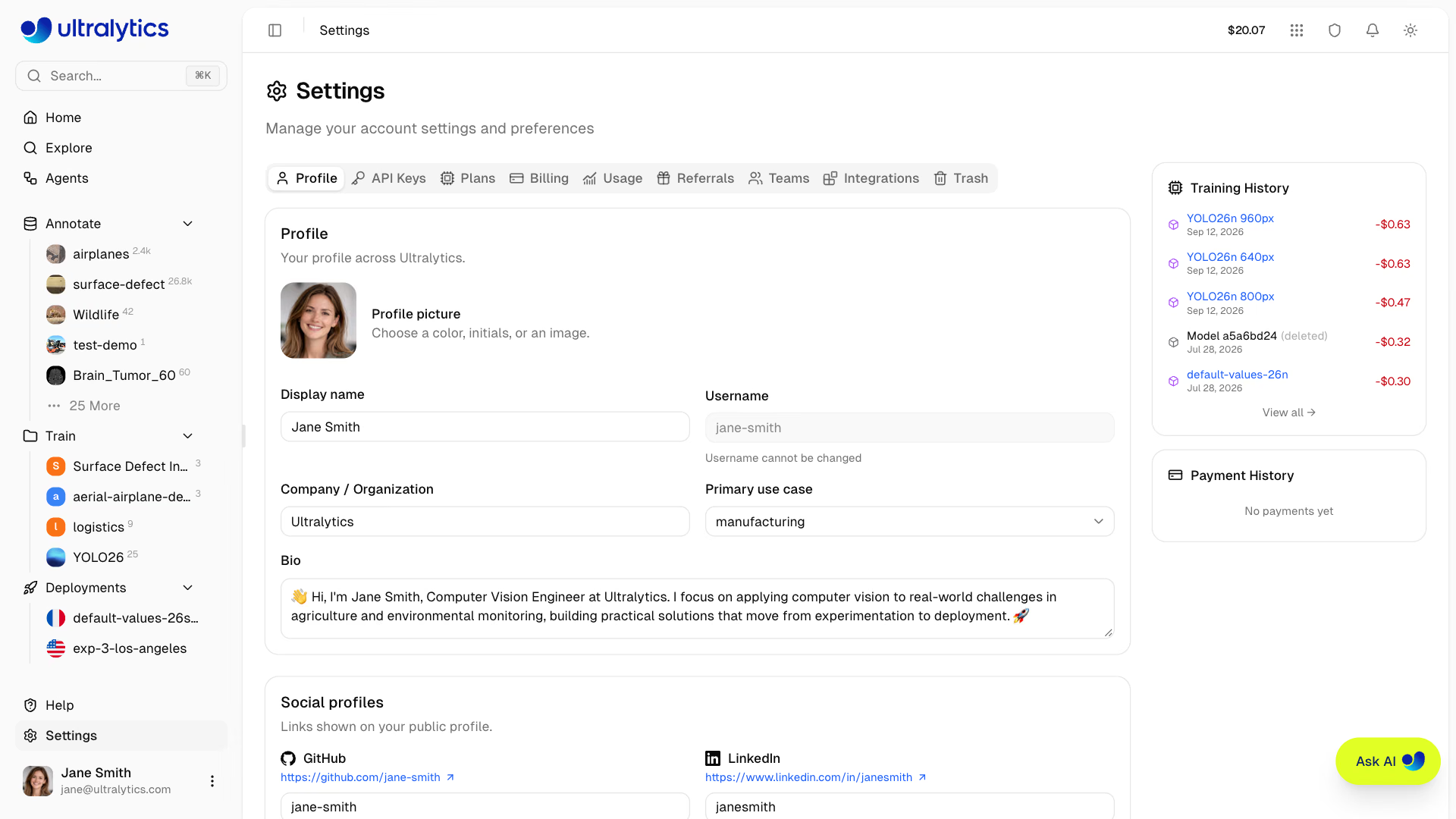
Account Features#
| Feature | Description |
|---|---|
| Settings | Profile, emails, social links, and data region |
| API Keys | Generate AES-256-GCM encrypted keys for programmatic access |
| Plans | Free, Pro, and Enterprise plan comparison |
| Billing | Credits, payment methods, and transaction history |
| Usage | Spend charts, usage events, and storage breakdown |
| Teams | Members, roles, invites, and seat management |
| Trash | Recover deleted items within 30 days |
| Activity | Event log with inbox, archive, search, and undo |
Settings Tabs#
Account management is organized into nine tabs within Settings (in order):
| Tab | Description |
|---|---|
Profile | Display name, bio, company, use case, emails, social links, data region, connected accounts |
API Keys | Create and manage API keys for remote training and programmatic access |
Plans | Compare Free, Pro, and Enterprise plans |
Billing | Credit balance, top-ups, promo codes, payment methods, billing address, transactions |
Usage | Spend over time, usage events, and storage breakdown for the active workspace |
Referrals | Personal referral link and the $10 credit earned once a referred friend tops up $10 |
Teams | Member list, roles, invites, seat allocation, and the permission matrix |
Integrations | Connect cloud or On Premise storage and compute, Slack notifications, and dataset imports |
Trash | Soft-deleted projects, datasets, and models (30-day recovery) |
Security#
Ultralytics Platform implements multiple security measures:
Authentication#
- OAuth: Sign in with Google or GitHub
- Email/password: Sign in with email and password
- Session management: Sessions shared across Ultralytics subdomains
Data Protection#
- Transport security: Platform traffic uses HTTPS
- API Keys: AES-256-GCM encrypted storage
- Data region: Datasets, models, and managed training data use your selected US, EU, or AP region; deployment regions are selected separately
Access Control#
- Owner-only API keys: Only the workspace owner can create, view, or revoke a workspace's API keys, because a workspace key acts as the owner
- Team roles: Owner, Admin, Editor, and Viewer roles (Pro and Enterprise)
- Audit logging: Track all account activity in the Activity feed
Quick Links#
- Settings: Profile, social links, data region, and account management
- Teams: Team creation, roles, shared resources, and enterprise features
- Billing: Credits, plans, and payment management
- API Keys: Create and manage API keys
- Activity: Track account events and notifications
- Trash: Recover deleted projects, datasets, and models
FAQ#
Usernames cannot be changed after account creation. Your username is set during onboarding and is permanent.
Manage your email addresses directly on the platform:
- Go to
Settings > Profile - Scroll to the Emails section
- Add a new email, enter the 6-digit code sent to it, then set it as primary
- Go to
Account deletion is available in Settings:
- Go to
Settings > Profile - Scroll to the Delete My Account card at the bottom
- Click Delete My Account
- Type
DELETEto confirm, then click Delete My Account
In a team workspace the same card reads Delete Team and is visible only to the team owner. Remove every non-owner member first; the team's resources are deleted automatically.
Permanent ActionAccount deletion is permanent. All data, models, and deployments are removed, along with any remaining credit balance. Export your data first if needed.
- Go to
Yes, Ultralytics Platform implements:
- Secure encrypted connections (HTTPS)
- AES-256-GCM encryption for API keys
- Regional storage for datasets, models, and managed training data (US, EU, AP)
Your data region is selected during onboarding and can't be changed yourself. Contact support to request a region change. Dedicated deployments use the deployment region selected when each endpoint is created.