Ultralytics Platform#
Ultralytics Platform is a comprehensive end-to-end computer vision platform that streamlines the entire ML workflow from data preparation to model deployment. Built for teams and individuals who need production-ready computer vision solutions without the infrastructure complexity.
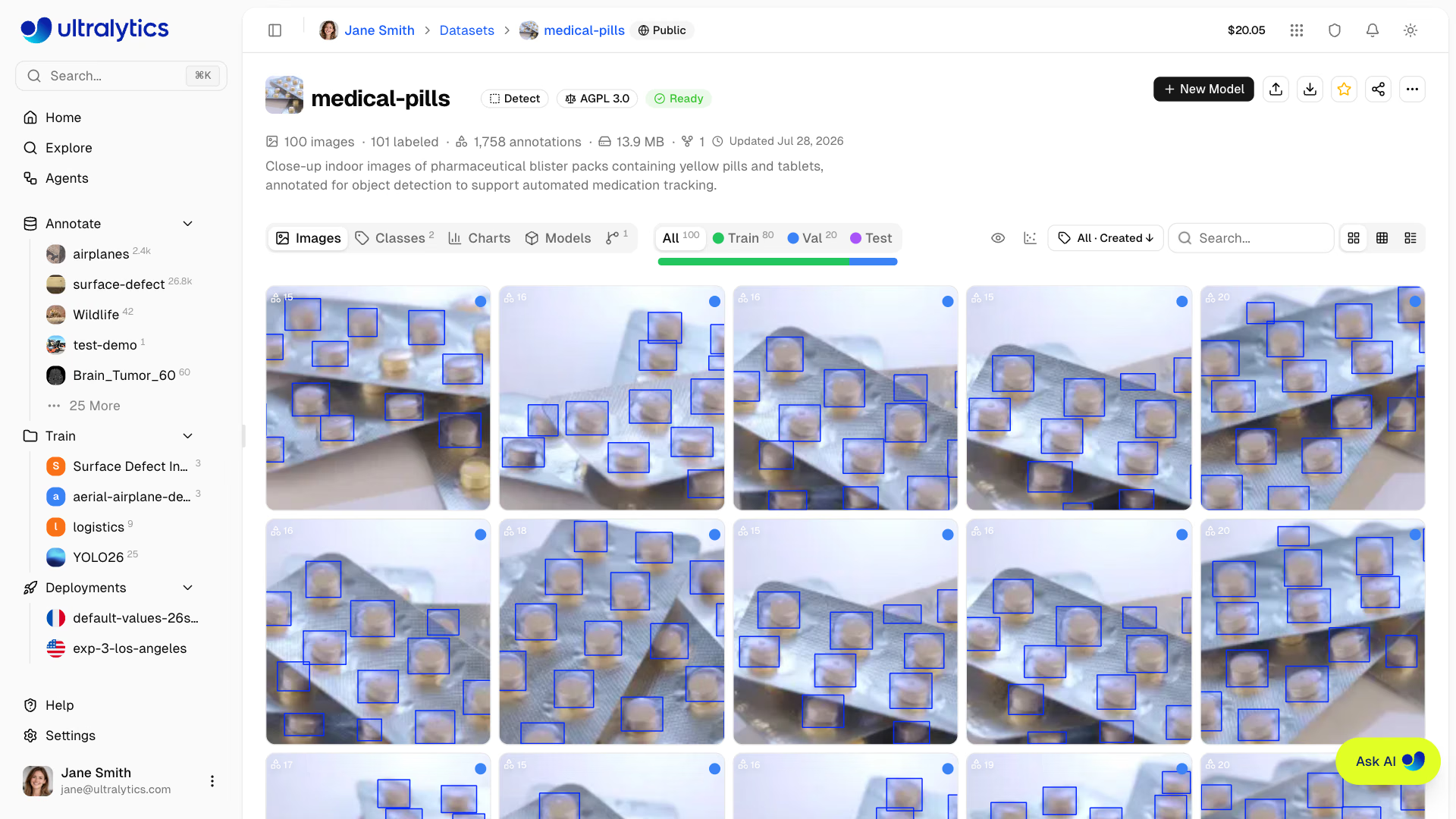
What is Ultralytics Platform?#
Ultralytics Platform brings dataset management and annotation, experiment tracking, cloud and remote training, model export, dedicated inference endpoints, and deployment monitoring into one workspace. It has native support for YOLO26, YOLO11, YOLOv8, and YOLOv5 models.
Workflow: Upload → Annotate → Train → Export or Deploy#
The Platform provides an end-to-end workflow:
| Stage | Features |
|---|---|
| Upload | Images (50MB), videos (1GB), and dataset files (ZIP, TAR including .tar.gz/.tgz, NDJSON) from your machine, a URL, cloud storage, or an on-premise host |
| Annotate | Manual annotation tools for 6 task types, plus Smart Annotation with SAM models for detect, segment, semantic, and OBB, YOLO models for those tasks and pose, or class-prompted models (hosted open-source or paid provider models) for detection datasets with 1–200 classes (see supported task types) |
| Train | Cloud GPUs (24 on all plans + 2 Pro/Enterprise-only: B200, B300), real-time metrics, project organization |
| Export | 22 deployment formats (ONNX, TensorRT, CoreML, LiteRT, Hailo, Ascend, etc.; see supported formats) |
| Deploy | 42 global regions with dedicated endpoints, scale-to-zero by default (single active instance), and monitoring |
What you can do:
- Upload images, videos, and dataset files to create training datasets
- Visualize annotations with interactive overlays for the 6 YOLO task types supported by the annotation editor (see supported task types)
- Train models on cloud GPUs (24 on all plans, 26 with Pro or Enterprise for B200 and B300) with real-time metrics
- Export to 22 deployment formats (ONNX, TensorRT, CoreML, LiteRT, Hailo, Ascend, etc.)
- Deploy to 42 global regions with one-click dedicated endpoints
- Build Agents workflows that connect models, conditions, dataset collection, Slack alerts, and webhooks
- Monitor training progress, deployment health, and usage metrics
- Connect cloud storage, annotation tools, and Slack through integrations
- Collaborate by making projects and datasets public for the community
Multi-Region Infrastructure#
Your data stays in your region. Ultralytics Platform operates infrastructure in three global regions:
| Region | Label | Location | Best For |
|---|---|---|---|
| US | Americas | Iowa, USA | Americas users, fastest for Americas |
| EU | Europe, Middle East & Africa | Belgium, Europe | European users, GDPR compliance |
| AP | Asia Pacific | Taiwan, Asia-Pacific | Asia-Pacific users, lowest APAC latency |
You select your data region during onboarding. Datasets, models, and managed training data remain in that region. Dedicated endpoints are deployed separately to a region you choose from the global deployment map.
You cannot change your data region yourself after account creation. During onboarding, the Platform measures latency to each region and recommends the closest one. Contact support if you later need to request a region change. This applies to dataset and model content; account-level data such as profile, billing, and activity records is processed globally, as described in our Privacy Policy and Data Processing Agreement.
Key Features#
Data Preparation#
- Dataset Management: Create datasets from local files, a URL, connected cloud storage, or an on-premise host, with automatic processing
- Annotation Editor: Manual annotation tools for 6 YOLO task types (detect, segment, semantic, classify, pose, OBB; see supported task types)
- Skeleton Templates: Built-in (Person, Hand, Dog, Face, Box) and custom skeleton templates for one-click pose annotation
- Smart Annotation: Use SAM 2.1 (Tiny, Small, Base, Large), SAM 3, or SAM 3.1 (default) from the annotation toolbar for detect, segment, semantic, and OBB tasks, pretrained Ultralytics YOLO models and your own fine-tuned YOLO models for those tasks and pose, or class-prompted models on detection datasets with 1–200 classes: eight hosted open-source models (Moondream 3.1 by default), hosted text-prompted SAM 3 and SAM 3.1, or paid vision models from OpenAI, Anthropic, Google, Meta, SpaceXAI, DeepSeek, Z.ai, Kimi, Xiaomi MiMo, Alibaba, and MiniMax with a provider key from Settings > API Keys
- Dataset Versioning: Create numbered NDJSON snapshots with descriptions, then download or restore any version for reproducible training
- Statistics: Class distribution, split distribution, location heatmaps, and bounding box dimension analysis
Model Training#
- Cloud Training: Train on cloud GPUs (24 on all plans, 26 with Pro or Enterprise for B200 and B300) with real-time metrics and a live cost estimate
- Remote Training: Train anywhere and stream metrics to Ultralytics Platform
- Advanced Settings: Override any Ultralytics training argument from a built-in YAML editor in the training dialog
- Project Organization: Group related models, compare experiments, track activity
- 22 Export Formats: ONNX, TensorRT, CoreML, LiteRT, Hailo, Ascend, and more (see supported formats)
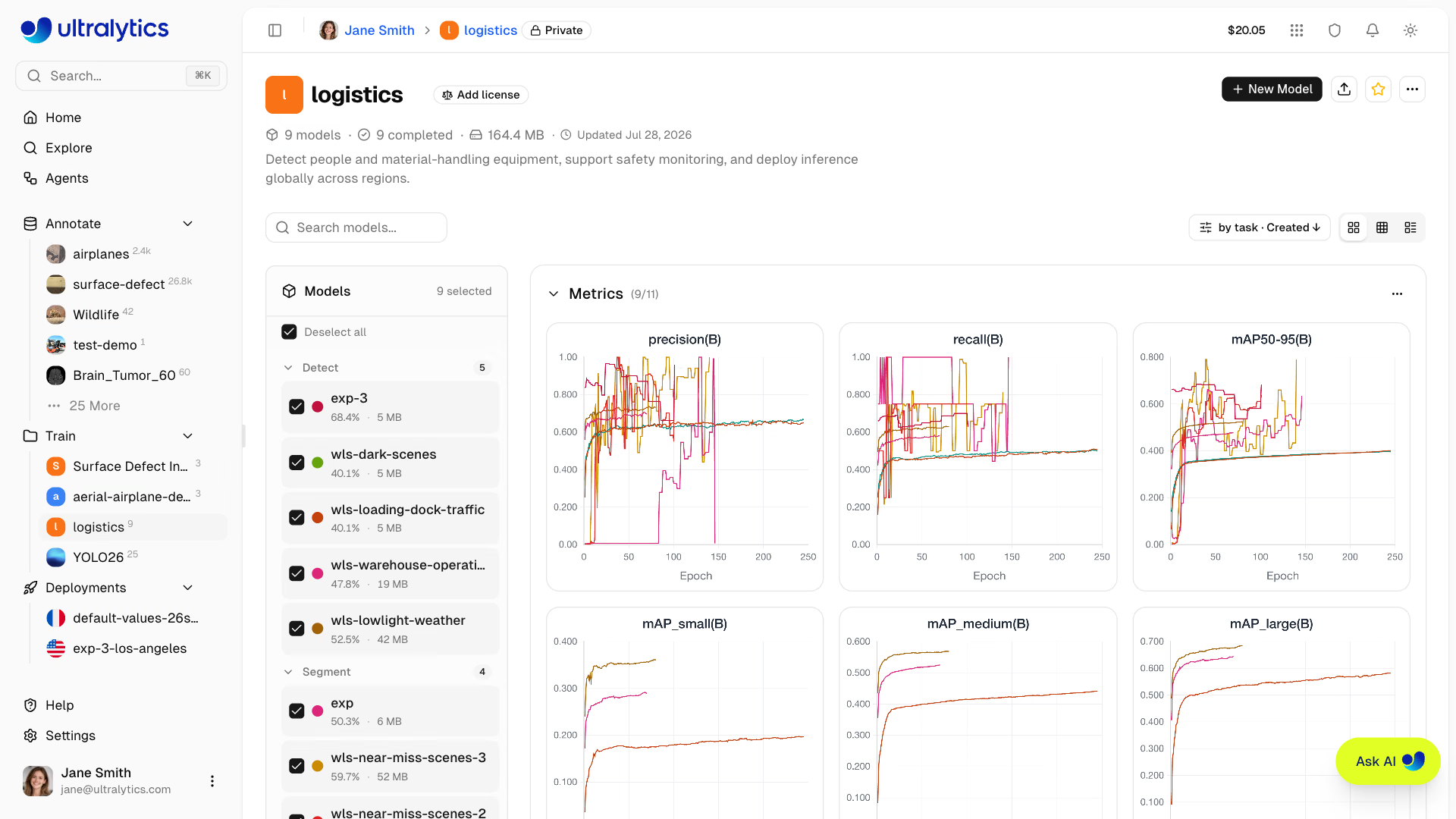
You can train models either through the web UI (cloud training) or from your own machine (remote training):
- Navigate to your project
- Click
New Model - Select dataset, model, GPU, and epochs
- Monitor real-time loss curves and metrics
Deployment#
- Inference Testing: Test models directly in the browser with your own images, a webcam capture, or the built-in examples
- Dedicated Endpoints: Deploy to 42 global regions with scale-to-zero by default (single active instance)
- Monitoring: Real-time metrics, request logs, and performance dashboards
Once deployed, call your endpoint from any language. conf, iou, and imgsz are optional form fields that default to
0.25, 0.7, and the model's training image size (640 if unavailable):
import requests

url = "https://your-deployment-url.run.app/predict"
api_key = "YOUR_API_KEY"
args = {"conf": 0.25, "iou": 0.7, "imgsz": 640}

with open("image.jpg", "rb") as f:
    response = requests.post(
        url,
        headers={"Authorization": f"Bearer {api_key}"},
        data=args,
        files={"file": f},
    )

print(response.json())
Account Management#
- Teams & Organizations: Collaborate with team members, manage roles and invites, and switch workspaces from the account menu
- API Keys: Secure key management for remote training and API access
- Credits & Billing: Pay-as-you-go training with transparent pricing and top-ups from $5 to $1,000
- Activity Feed: Track all account events and actions
- Trash & Restore: 30-day soft delete with item recovery
- GDPR Compliance: Data export and account deletion
See the canonical Free, Pro, and Enterprise comparison for current limits, GPU access, collaboration, and licensing.
Quick Links#
Get started with these resources:
- Quickstart: Create your first project and train a model in minutes
- Explore: Browse and clone public datasets and projects, and search images by what they show
- Data: Dataset preparation overview
- Datasets: Upload and manage your training data
- Annotation: Label your data with manual and AI-assisted tools
- Train: Training overview
- Projects: Organize your models and experiments
- Models: Model pages, downloads, and exports
- Cloud Training: Train on cloud GPUs
- Deploy: Deployment overview
- Inference: Test your models
- Endpoints: Deploy models to production
- Monitoring: Track deployment performance
- Account: Account overview
- Settings: Profile and workspace preferences
- Teams: Members, roles, and invites
- API Keys: Manage API access
- Billing: Credits and payment
- Activity: Track account events
- Trash: Recover deleted items
- Integrations: Cloud storage, annotation tools, and Slack
- REST API: API reference
Troubleshooting#
Dataset Issues#
| Problem | Solution |
|---|---|
| Dataset won't process | Check file format is supported (JPEG, PNG, WebP, TIFF, HEIC, AVIF, BMP, JP2, DNG, MPO for images). Max file size: images 50 MB, videos 1 GB, dataset archives 10 GB (Free) / 20 GB (Pro) / 50 GB (Enterprise) |
| Missing annotations | Verify labels are in YOLO format with .txt files matching image filenames, or upload COCO JSON |
| "Train split required" | Add train/ folder to your dataset structure, or redistribute splits via the split bar |
| Class names undefined | Add a data.yaml file with names: list (see YOLO format), or define classes in the Classes tab |
Training Issues#
| Problem | Solution |
|---|---|
| Training won't start | Check credit balance in Settings > Billing. Positive balance required |
| Out of memory error | Reduce batch size, use smaller model (n/s), or select GPU with more VRAM |
| Poor metrics | Check dataset quality, increase epochs, try data augmentation, verify class balance |
| Training slow | Select faster GPU, reduce image size, check dataset isn't bottlenecked |
Deployment Issues#
| Problem | Solution |
|---|---|
| Endpoint not responding | Check endpoint status (Ready vs Stopped). A cold start after idle can take up to a minute on the first request |
| 401 Unauthorized | Verify the API key is active and copied correctly |
| Slow inference | Check model size, consider TensorRT export, select closer region |
| Export failed | Some formats require specific model architectures. Try ONNX for broadest compatibility |
Common Questions#
Can I change my username after signup?
No, usernames are permanent and cannot be changed. Choose carefully during signup.
Can I change my data region?
Your data region is selected during onboarding and can't be changed yourself. To switch regions, contact support to request a region change.
How do I get more credits?
Go to Settings > Billing and click Top Up. Purchase credits from $5 to $1,000. Purchased credits never expire.
What happens if training fails?
If cloud compute had started, elapsed GPU time is charged. Failures before a GPU starts have no compute usage charge.
Can I download my trained model?
Yes. Click the download icon on a model page for its .pt weights, or open the Export tab for completed exported formats.
How do I share my work publicly?
Open the project or dataset, click its Private badge in the top navigation bar, and confirm Make public. Public content appears on the Explore page.
What are the file size limits?
Images: 50MB, Videos: 1GB, datasets: 10GB on Free, 20GB on Pro, 50GB on Enterprise. For larger files, split into multiple uploads.
How long are deleted items kept in Trash?
30 days. After that, items are permanently deleted and cannot be recovered.
Can I use Platform models commercially?
Free and Pro plans use the AGPL license. For commercial use without AGPL requirements, see Ultralytics Licensing.
FAQ#
To get started with Ultralytics Platform:
- Sign Up: Create an account at platform.ultralytics.com
- Select Region: Choose your data region (US, EU, or AP) during onboarding
- Upload Dataset: Open
Annotatein the sidebar and upload your data - Train Model: Create a project and start training on cloud GPUs
- Deploy: Test your model and deploy to a dedicated endpoint
For a detailed guide, see the Quickstart page.
Ultralytics Platform offers:
- Unified Workflow: Data, training, and deployment in one place
- Multi-Region: Data residency in US, EU, or AP regions
- No-Code Training: Train advanced YOLO models without writing code
- Real-Time Metrics: Stream training progress and monitor deployments
- 42 Deploy Regions: Deploy models close to your users worldwide
- 7 Task Types: Support for detection, instance segmentation, semantic segmentation, depth estimation, classification, pose, and OBB (see task docs)
- AI-Assisted Annotation: Smart annotation with SAM, YOLO, and class-prompted models (detection datasets with 1–200 classes) to speed up data preparation
Ultralytics Platform supports multiple GPU types for cloud training:
GPU Generation VRAM Cost/Hour Best For RTX 2000 Ada Ada 16 GB $0.24 Small datasets, testing RTX A4500 Ampere 20 GB $0.25 Small-medium datasets RTX 4000 Ada Ada 20 GB $0.26 Medium datasets RTX A5000 Ampere 24 GB $0.27 Medium datasets L4 Ada 24 GB $0.39 Inference optimized A40 Ampere 48 GB $0.44 Larger batch sizes RTX 3090 Ampere 24 GB $0.46 General training RTX A6000 Ampere 48 GB $0.49 Large models RTX PRO 4000 Blackwell 24 GB $0.57 Budget Blackwell RTX PRO 4500 Blackwell 32 GB $0.64 Great price/performance RTX 4090 Ada 24 GB $0.69 Best price/performance RTX 6000 Ada Ada 48 GB $0.77 Large batch training L40S Ada 48 GB $0.86 Large batch training RTX PRO 5000 Blackwell 48 GB $0.96 Large batch training RTX 5090 Blackwell 32 GB $0.99 Latest consumer generation L40 Ada 48 GB $0.99 Large models A100 PCIe Ampere 80 GB $1.39 Production training A100 SXM Ampere 80 GB $1.49 Production training RTX PRO 6000 Blackwell 96 GB $2.09 Recommended default H100 PCIe Hopper 80 GB $2.89 High-performance training H100 NVL Hopper 94 GB $3.19 Maximum performance H100 SXM Hopper 80 GB $3.29 Fastest training H200 NVL Hopper 143 GB $3.39 Maximum memory H200 SXM Hopper 141 GB $4.39 Maximum performance B200 Blackwell 180 GB $5.89 Large models (Pro+) B300 Blackwell 288 GB $7.39 Largest models (Pro+) See Cloud Training for complete pricing and GPU options.
You can train models on your own hardware and stream real-time metrics to Ultralytics Platform.
Package Version RequirementPlatform integration requires Python>=3.11 and ultralytics>=8.4.120. Lower versions will NOT work with Platform.
pip install "ultralytics>=8.4.120"# Set your API key export ULTRALYTICS_API_KEY="YOUR_API_KEY" # Train with project/name to stream metrics yolo train model=yolo26n.pt data=coco.yaml epochs=100 project=username/my-project name=exp1See Cloud Training for more details on remote training.
The Platform includes a full-featured annotation editor supporting:
- Manual Tools: Bounding boxes, polygons, keypoints with skeleton templates, oriented boxes, classification
- Skeleton Templates: Place all keypoints at once using built-in (Person, Hand, Dog, Face, Box) or custom templates
- Smart Annotation: Use SAM 2.1, SAM 3, or SAM 3.1 (default) for click-based annotation on detect, segment, semantic, and OBB datasets, run pretrained Ultralytics YOLO models and your own fine-tuned YOLO models from the toolbar for those tasks and pose, or run class-prompted models on detection datasets with 1–200 classes: eight hosted open-source models (Moondream 3.1 by default), hosted text-prompted SAM 3 and SAM 3.1, or paid vision models from OpenAI, Anthropic, Google, Meta, SpaceXAI, DeepSeek, Z.ai, Kimi, Xiaomi MiMo, Alibaba, and MiniMax with a provider key from Settings > API Keys
- Keyboard Shortcuts: Efficient workflows with hotkeys, listed in the editor's shortcuts popover
Shortcut Action VManual (draw) mode SSmart mode (SAM, YOLO, or class-prompted model) PPredict (in Smart mode) AToggle auto-apply (SAM Smart mode) 1-9Select class by number HToggle annotation visibility Space+ drag or middle-click dragPan the canvas Delete/BackspaceDelete selected annotation Ctrl+SSave annotations Ctrl+ZUndo Ctrl+YRedo EscapeSave / deselect / exit See Annotation for the complete guide.
The Platform supports the same 22 deployment formats as Ultralytics Export mode. PyTorch is the source format; each row with a
formatargument is an export target.Format formatArgumentModel Metadata Arguments PyTorch - yolo26n.pt✅ - TorchScript torchscriptyolo26n.torchscript✅ imgsz,quantize,dynamic,nms,batch,deviceONNX onnxyolo26n.onnx✅ imgsz,quantize,dynamic,simplify,opset,nms,batch,data,fraction,deviceOpenVINO openvinoyolo26n_openvino_model/✅ imgsz,quantize,dynamic,nms,batch,data,fraction,deviceTensorRT engineyolo26n.engine✅ imgsz,quantize,dynamic,simplify,opset,workspace,nms,batch,data,fraction,deviceCoreML coremlyolo26n.mlpackage✅ imgsz,dynamic,quantize,nms,batch,deviceApple Core AI coreaiyolo26n.aimodel✅ imgsz,batch,quantizeTF SavedModel saved_modelyolo26n_saved_model/✅ imgsz,quantize,opset,nms,batch,data,fraction,deviceTF GraphDef pbyolo26n.pb❌ imgsz,opset,batch,deviceTF Edge TPU edgetpuyolo26n_edgetpu.tflite✅ imgsz,quantize,opset,data,fraction,deviceLiteRT litertyolo26n.tflite✅ imgsz,quantize,batch,data,fraction,devicePaddlePaddle paddleyolo26n_paddle_model/✅ imgsz,batch,deviceMNN mnnyolo26n.mnn✅ imgsz,batch,dynamic,quantize,simplify,opset,nms,deviceNCNN ncnnyolo26n_ncnn_model/✅ imgsz,quantize,batch,deviceIMX500 imxyolo11n_imx_model/✅ imgsz,quantize,data,fraction,nms,deviceRKNN rknnyolo26n_rknn_model/✅ imgsz,batch,name,quantize,simplify,opset,data,fraction,deviceExecuTorch executorchyolo26n_executorch_model/✅ imgsz,batch,deviceAxelera axelerayolo26n_axelera_model/✅ imgsz,batch,quantize,data,fraction,deviceDEEPX deepxyolo26n_deepx_model/✅ imgsz,quantize,simplify,opset,data,optimize,deviceQualcomm QNN qnnyolo26n_qnn.onnx✅ imgsz,batch,name,quantize,simplify,opset,data,fraction,deviceHailo hailoyolo26n_hailo_model/✅ imgsz,name,quantize,data,fraction,simplify,conf,iou,deviceHuawei Ascend ascendyolo26n_ascend_model/✅ imgsz,batch,name,quantize,opset,simplify,nms,deviceAMD Xilinx xilinxyolo26n_xilinx_model/✅ imgsz,name,quantize,data,fraction,opset,simplify,devicenms=Nonedefaults to raw outputs for external NMS (YOLO26 keeps its NMS-free head on Axelera). Setnms=Falseto select an available NMS-free head; unsupported formats fall back to their native output path. Thenmsentries above identify formats that can embed NMS withnms=True.See Models Export, the Export mode guide, and the Integrations index for format-specific options.