On Premise#
On Premise lets your Enterprise workspace use datasets and compute on a Linux, macOS, or Windows computer. Source images and videos remain on your computer. Training behaves like any other remote training location: metrics stream to Platform and completed model weights upload for download, prediction, export, and deployment.
Setup takes one command. Platform detects your operating system, fills in sensible folder locations, installs Docker if needed, and shows live connection progress.
How It Works#
Data Boundaries#
| Data | Your On Premise computer | Platform and cloud services |
|---|---|---|
| Source and derived dataset pixels | Stay local for ingest, preview, and training | Never stored, logged, or processed |
| Classes, labels, and annotations | Source labels are read during ingest | Stored as the canonical dataset metadata so you can annotate in Platform |
| Training models | The run, best checkpoint, and other training artifacts are written to your models folder | The best checkpoint uploads for download, prediction, export, and deployment; other artifacts stay on your computer |
Model weights, labels, annotations, and metrics can encode information learned from your images. Only the dataset pixels have the strict local-only boundary. Cloud prediction processes only images you separately submit to that cloud workflow; the worker never forwards an image from your mounted dataset.
Before You Start#
Choose a computer that can reach your datasets and stay powered on while Platform is using them:
| Minimum | Recommended | |
|---|---|---|
| Operating system | 64-bit Linux, Apple silicon macOS, or x86-64 Windows with WSL 2 | Current operating system and Docker releases |
| CPU | 4 cores | 8 or more cores for CPU training |
| Memory | 8 GB RAM | 16 GB or more |
| Storage | 20 GB free, plus room for your datasets and models | SSD with at least twice your working dataset size free |
| Network | Outbound HTTPS to Ultralytics Platform and Docker container registries | Stable broadband for the initial container image download |
A GPU is optional. Every computer can ingest datasets and train models on its CPU. A compatible NVIDIA GPU can accelerate larger training jobs.
If your company restricts outbound traffic, allow HTTPS access to Ultralytics Platform, Docker registries, and Python package downloads before setup. The worker always dials out to Platform, so no inbound access to your network is required.
Connect Your Computer#
- Open Ultralytics Platform on the computer that can access your datasets.
- Go to
Settings > Integrationsand select On Premise from the integration list. - Review the prefilled Dataset folder on this machine and Models folder on this machine paths.
- Select Create install command.
- Open the terminal named in the dialog, copy the command, paste it, and press Enter.
- Keep the Integrations page open until the progress indicator shows Connected.
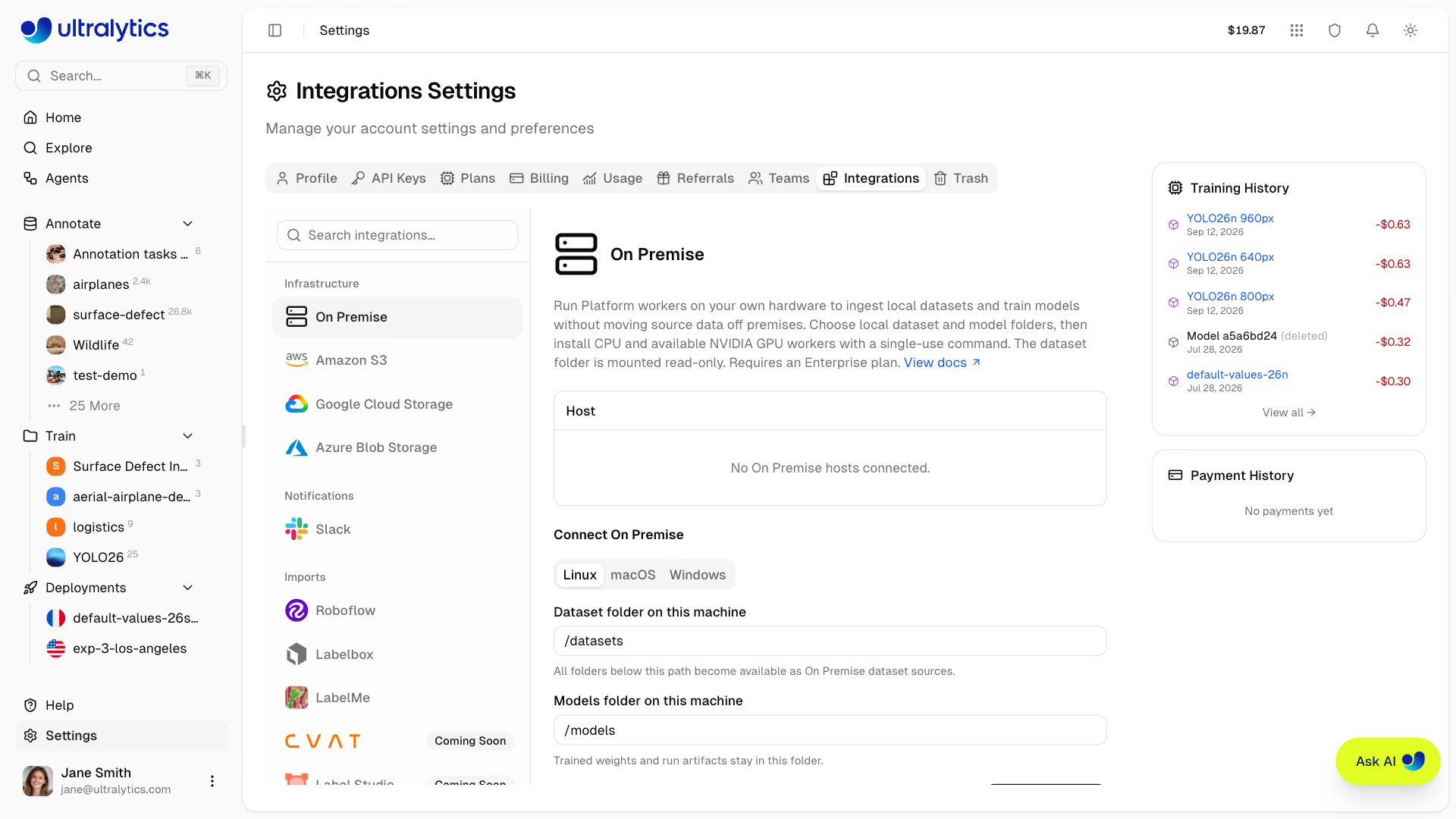
The page tracks the six setup steps live — running the command, downloading the worker files, downloading the Docker image, building the worker, starting it, and confirming the connection — so you can watch progress without reading the terminal. Connecting a host requires the workspace editor role and an active Enterprise plan; workspaces on another plan see a Request a demo button, which sends an Enterprise demo request instead of creating an install command.
Platform fills in the folders and one-time connection token before you copy the command. The generated command follows the format below:
Open Terminal and paste:
curl -fsSL 'https://platform.ultralytics.com/api/workers/install?os=linux' \
  | sudo sh -s -- \
    "/datasets" \
    "/models" \
"YOUR_CONNECTION_TOKEN"Platform includes the connection token automatically. It proves this computer is allowed to connect to your workspace, expires after 10 minutes, and works once. You never enter it separately. Do not share the generated command while it is valid.
The defaults work without editing:
| Linux | macOS and Windows | |
|---|---|---|
| Dataset folder | /datasets | ~/Ultralytics/datasets |
| Models folder | /models | ~/Ultralytics/models |
The setup command creates these folders, installs and starts Docker when needed, and configures the connection to restart with your computer. Your operating system may ask you to approve installation or restart before setup can finish.
Docker Base Images#
The installer runs one container and selects the official Ultralytics base image for the host:
| Host | Base image pattern |
|---|---|
| Apple silicon or ARM64 Linux | ultralytics/ultralytics:latest-arm64 |
| x86-64 CPU | ultralytics/ultralytics:latest-cpu |
| x86-64 with a supported NVIDIA GPU | ultralytics/ultralytics:latest |
The worker build adds its connectivity dependencies and updates the image's Ultralytics package to the latest version. It detects CUDA during setup, so an NVIDIA host still runs one container rather than separate CPU and GPU workers. Platform's cloud services handle model prediction and export after the best checkpoint uploads.
CPU setup requires nothing beyond the guided installation. On Linux, NVIDIA GPU acceleration requires Docker >= 28.2 and NVIDIA Container Toolkit >= 1.18. Platform detects the supported GPU path automatically on Linux and Windows, while macOS hosts train on CPU; see the Docker Quickstart Guide for setup details.
Add a Dataset#
- Put your dataset inside the configured dataset folder.
- In Platform, select New Dataset > On Premise.
- Choose the connected computer.
- Browse to the dataset folder, choose the task, and select Create.
Platform indexes the dataset locally and opens it in the same gallery used for uploaded and cloud-storage datasets. You can preview images, inspect labels, filter the dataset, and annotate without uploading the pixels.
Supported Data#
On Premise supports the same ingest formats and computer-vision tasks as uploaded data:
- Images and videos
- ZIP, TAR, TAR.GZ, and TGZ archives
- Ultralytics and Labelbox NDJSON, COCO JSON, and LabelMe JSON
- YOLO datasets and classification folders
- Detect, segment, semantic, classify, pose, and oriented bounding box (OBB) tasks
Platform automatically recognizes common dataset layouts, classes, labels, and train/validation/test splits. The dataset folder is mounted read-only, so Platform never resizes, re-encodes, edits, or deletes your source files. Anything derived during ingest — extracted archives, downloaded NDJSON assets, and video frames — is written to a private Docker volume on the same computer.
Preview and Annotate#
When you open an image, your browser loads it directly from the connected computer. There is no certificate, hostname, VPN, or preview configuration.
Annotations and dataset organization are saved in your Platform workspace, but edits in Platform never change your source image or label files.
Train a Model#
Start training through the normal Platform training dialog:
- Open a project and select New Model.
- Choose the On Premise dataset.
- Select a model and training settings.
- Start training.
Platform runs the job on the connected computer. It uses an available NVIDIA GPU or falls back to CPU automatically, so a Mac can train a small model such as YOLO26n on COCO8 without dedicated GPU hardware.
Training files are written to the configured models folder while the run is active. The Ultralytics package uses the same remote-training callbacks as any customer-managed machine: progress and metrics stream to Platform, the best checkpoint uploads to Platform storage, and the completed model works with the existing download, prediction, export, and deployment paths. Other training artifacts remain in your models folder. On Premise training does not use Platform compute credits, and Platform never sends the training job to cloud compute.
Manage the Connection#
Open Settings > Integrations to see each computer, its hostname and hardware, whether its CPU and GPU are online, and
when it last reported. A computer that is shut down or loses connectivity shows as Offline with its last-seen
details, and its datasets become temporarily unavailable rather than falling back to cloud compute. The worker starts
with Docker and reconnects on its own once the computer is back online; nothing needs to be rerun.
The worker updates itself. Each time its container starts, and every 10 minutes while it is idle, it downloads any newer worker code from Platform and restarts into it. It never restarts during a job. Computers connected before self-updating was available start updating after you run a new install command on them once.
Run the install command again on a connected computer to change its folders or refresh its Docker image. The computer keeps the same host, so its datasets keep working and no duplicate host appears.
One workspace per computer. A computer runs one worker. Running an install command from another workspace moves the computer there and disconnects its host in the workspace it leaves.
Reconnect issues a fresh install command for a disconnected host. Run it on the computer that should serve that host, and its existing datasets resume without being re-imported. Disconnected hosts stay listed only while datasets or models still depend on them.
Disconnect revokes that host's access immediately. Queued, starting, and running jobs bound to it are cancelled,
including training in progress, and a dataset that was still being imported fails with On Premise host disconnected during ingest. Datasets that finished importing keep their classes, labels, and annotations but cannot be previewed or
trained on until you reconnect. Nothing is deleted from the computer, and models already uploaded to Platform remain
available.
Current Limitations#
- No rescan. A dataset is indexed once when you create it. If the source files change afterwards, Platform does not notice — create a new dataset to pick up the changes.
- Platform-copy features are unavailable. On Premise datasets exclude the features that need Platform-owned copies of your images: auto-annotation, clustering analysis, dataset cloning, and immutable version snapshots.
- Training does not move. If the worker process stops mid-run, the run fails rather than restarting elsewhere.
- Model files stay on the host. Deleting or trashing a model in Platform removes it from Platform, not from your models folder — clean that folder up yourself when a run is no longer needed.
Deleting an On Premise dataset, or individual images from it, removes Platform's references and annotations only. Your files are never touched.
If Setup Does Not Finish#
- Docker asks for permission: Approve the prompt and wait for Docker to start. Setup continues automatically.
- Windows asks for a restart: Restart the computer, return to
Settings > Integrations, and create a new install command. - The setup command expired: Create a new install command. Each command is temporary and works once.
- Another machine already reconnected this host: A different computer ran a Reconnect command for the same host first. Create a new install command for this computer.
- The connection stays offline: Open Docker Desktop, rerun a newly generated command, and keep the terminal open until it reports that On Premise is running.
- Previews do not load: Open Platform in a browser on the connected computer. Dataset previews come directly from that computer.
- You need the worker logs: The installer writes to
/opt/ultralytics-workeron Linux and~/.ultralytics/workeron macOS and Windows. Rundocker compose logs -ffrom that folder to follow the worker.
Also see Datasets, Annotation, and Training.
FAQ#
Dataset pixels never do. They are read locally for ingest, preview, and training. Classes, labels, annotations, training metrics, and the best checkpoint are stored in Platform so you can annotate, download, predict, export, and deploy. See Data Boundaries.
No. Every host can ingest datasets and train on its CPU, and a compatible NVIDIA GPU on Linux or Windows accelerates larger jobs automatically. On Premise training does not use Platform compute credits.
Its datasets become temporarily unavailable and running jobs fail rather than moving to cloud compute. Datasets that finished importing keep their classes, labels, and annotations and work again once the host reconnects.
A dataset is indexed once when it is created and is not rescanned. Create a new dataset from the updated folder to pick up the changes.
The installer writes to
/opt/ultralytics-workeron Linux and~/.ultralytics/workeron macOS and Windows. Rundocker compose logs -ffrom that folder.