Integrations#
Ultralytics Platform integrations connect your workspace to other tools and services you already use. Send job results to Slack, import existing datasets with a single API key, or connect your cloud storage and use the data where it lives.
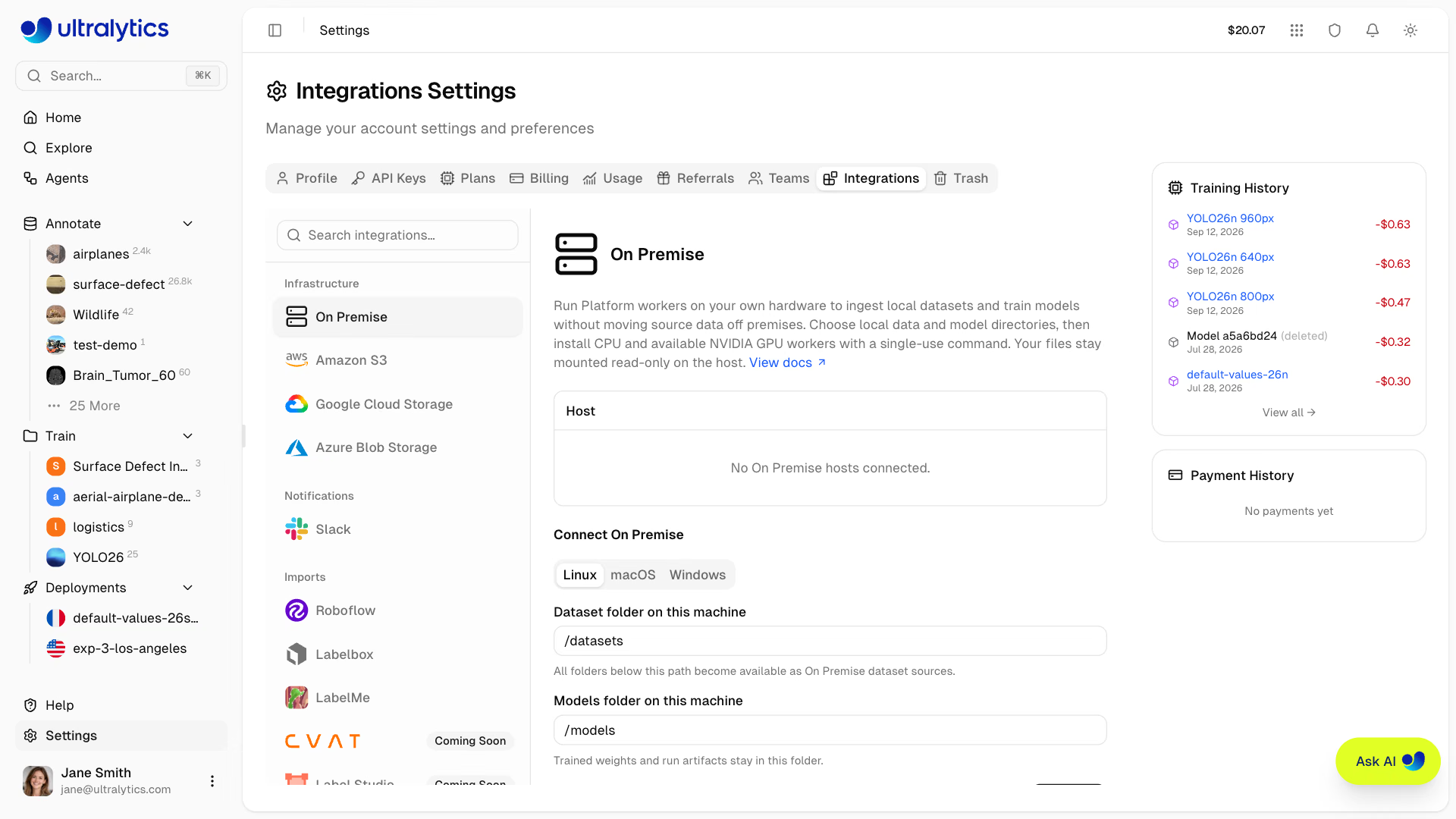
Accessing Integrations#
All integrations are managed from your account settings:
- Go to Settings > Integrations
- Pick a service from the list on the left — grouped into Infrastructure, Notifications, and Imports — or type its name in the search box
- Follow the connection prompts
Roboflow imports start with a preview so you can review what will be transferred and confirm that you have enough storage. Labelbox, LabelMe, CVAT, and Label Studio need no connection at all — upload the exported dataset and Platform reads it directly. Cloud storage connections verify list and read access on every selected bucket before anything is saved.
Available Integrations#
| Integration | Category | What it does |
|---|---|---|
| On Premise | Infrastructure | Indexes and trains on datasets that never leave your own computer |
| Amazon S3 | Infrastructure | Indexes datasets in place from your S3 buckets |
| Google Cloud Storage | Infrastructure | Indexes datasets in place from your GCS buckets |
| Azure Blob Storage | Infrastructure | Indexes datasets in place from your blob containers |
| Slack | Notifications | Posts selected training, auto-annotation, export, and deployment results to one Slack channel |
| Roboflow | Imports | Imports the datasets you select from a Roboflow workspace using an API key |
| Labelbox | Imports | Reads Labelbox NDJSON exports as datasets |
| LabelMe | Imports | Reads zipped LabelMe JSON annotations as detection or segmentation datasets |
| CVAT | Imports | Imports CVAT Ultralytics YOLO and COCO exports — direct import coming soon |
| Label Studio | Imports | Imports Label Studio YOLO and COCO exports — direct import coming soon |
Plans and Permissions#
Slack alerts and every dataset import work on all plans. Google Cloud Storage, Amazon S3, and Azure Blob Storage connections require a Pro or Enterprise plan, and On Premise requires an active Enterprise plan.
Connecting, changing, or disconnecting cloud storage and Slack requires the workspace admin or owner role. Importing datasets and connecting an On Premise host require the editor role.
FAQ#
On Premise, Amazon S3, Google Cloud Storage, Azure Blob Storage, and Slack are live connections managed from Settings > Integrations. Roboflow imports from an API key that is used once and discarded. Labelbox, LabelMe, CVAT, and Label Studio need no connection at all: export from the tool and upload the file as a new dataset.
No. Cloud storage and On Premise datasets are indexed in place, so the images are streamed on demand and do not consume your storage quota. Only labels, classes, and annotations are stored in Platform.
Slack alerts and every dataset import work on all plans. Cloud storage connections require a Pro or Enterprise plan, and On Premise requires an active Enterprise plan.
Yes. Disconnecting cloud storage or On Premise deletes the stored credentials but keeps the datasets, classes, labels, and annotations in your workspace. Their images become available again when you reconnect the same storage account or host.