Billing#
Ultralytics Platform uses credits for metered compute: cloud training, batch annotation, and custom-resource endpoint uptime. Add credits, track
usage, and manage your subscription from Settings > Billing.
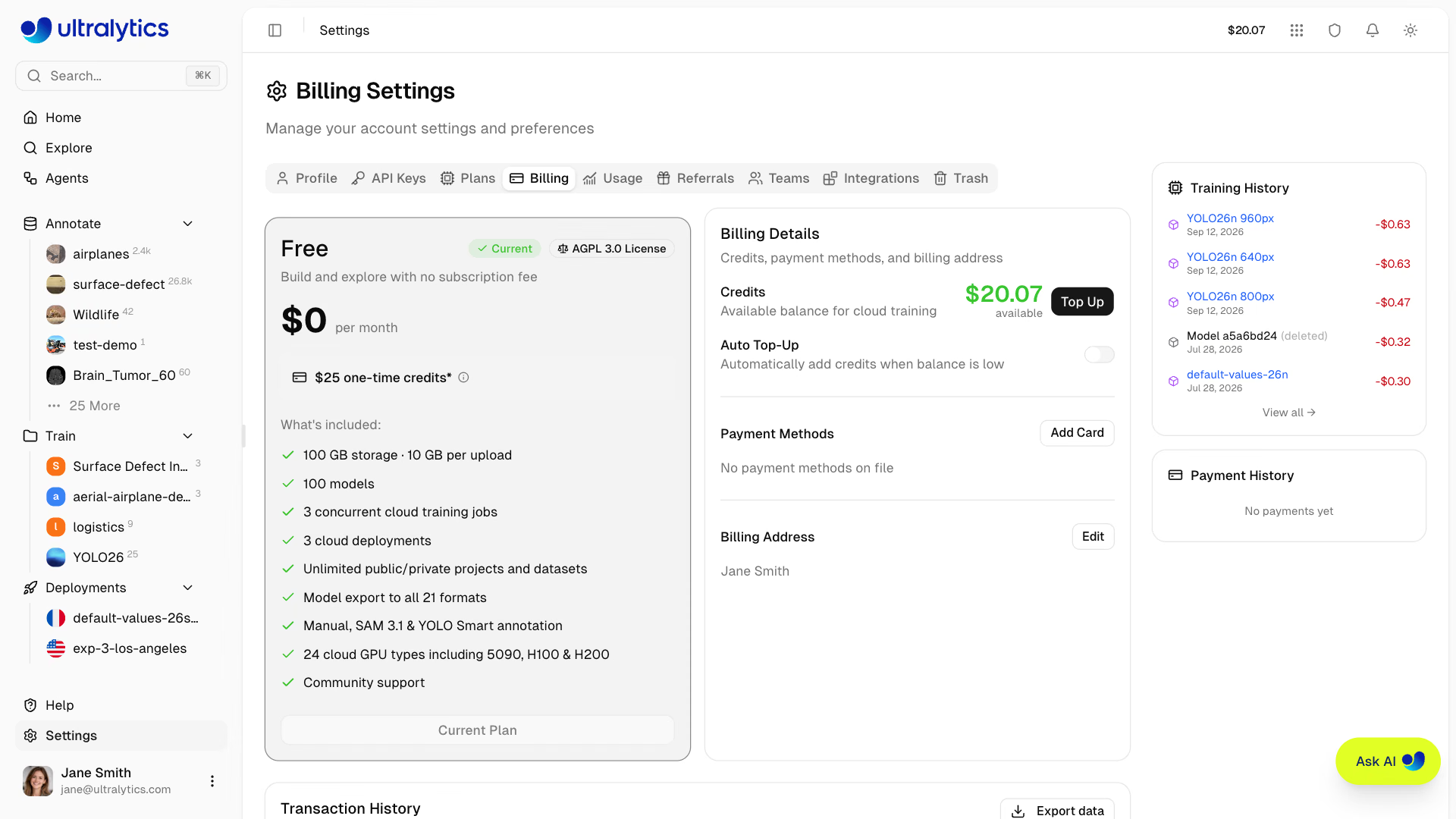
Plans#
Choose the plan that fits your needs. Compare plans in Settings > Plans:
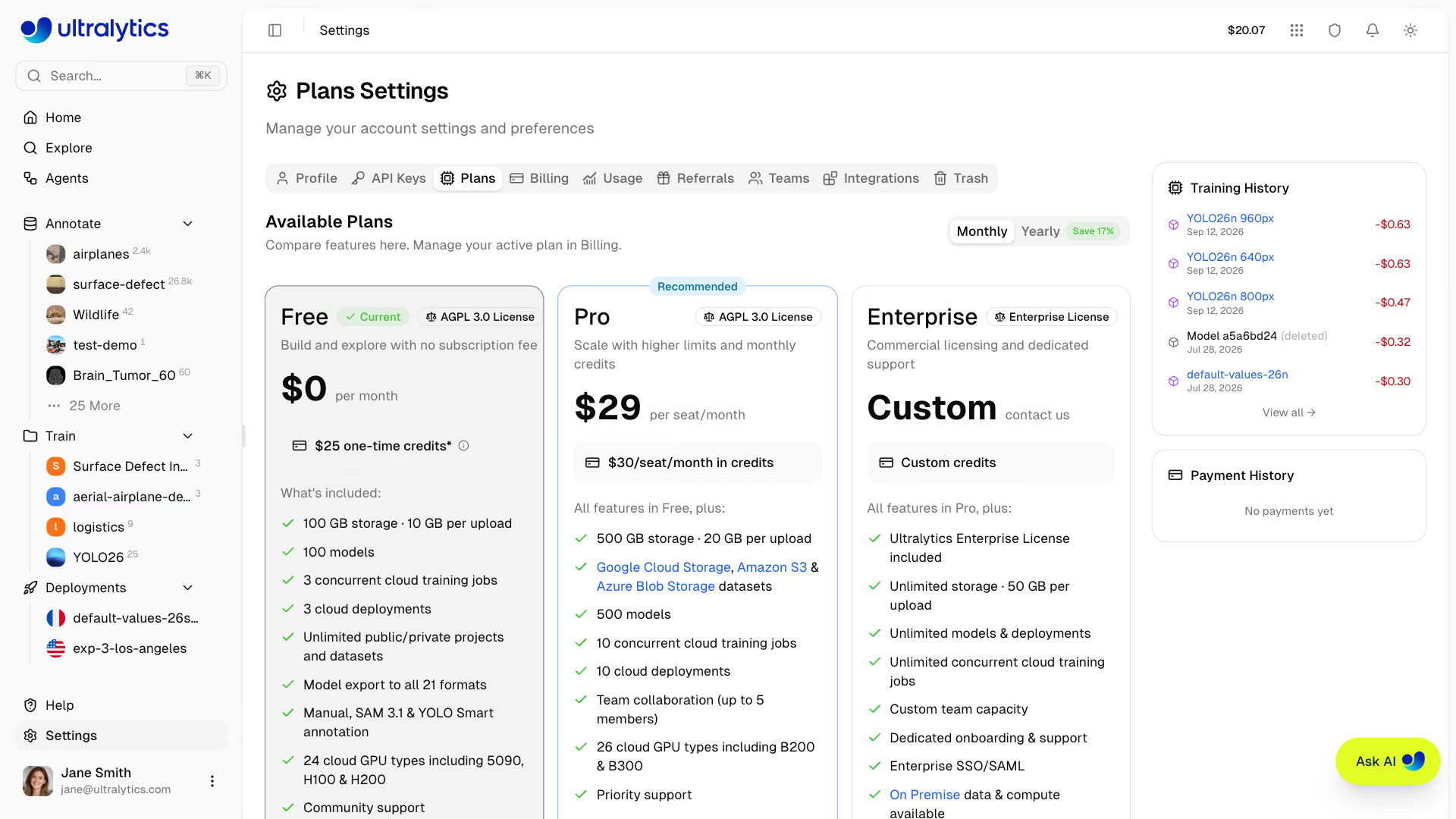
| Feature | Free | Pro ($29/mo) | Enterprise |
|---|---|---|---|
| Signup Credit | $5 / $25* | - | Custom |
| Monthly Credit | - | $30/seat/month | Custom |
| Models | 100 | 500 | Unlimited |
| Concurrent Trainings | 3 | 10 | Unlimited |
| Storage | 100 GB | 500 GB | Unlimited |
Dataset Upload (ZIP/TAR incl. .tar.gz/.tgz/NDJSON) | 10 GB | 20 GB | 50 GB |
| Deployments | 3 | 10 | Unlimited |
| Cloud Storage Datasets (GCS, S3, Azure Blob Storage) | - | Yes | Yes |
| Cloud GPU Types | 24 | 26 | 26 |
| Best GPUs (B200, B300) | - | Yes | Yes |
| Teams | - | Up to 5 members | Custom size |
| SSO / SAML | - | - | Yes |
| On Premise Data & Compute | - | - | Yes |
| Enterprise License | - | - | Yes |
| License | AGPL-3.0 | AGPL-3.0 | Enterprise |
*Free plan: $5 at signup, or $25 if you verify a company/work email address.
Free Plan#
Get started at no cost:
- $5 signup credit ($25 total after verifying a company/work email)
- Unlimited public and private projects and datasets
- 100 models
- 3 concurrent cloud training jobs
- 3 cloud deployments
- 100 GB storage · 10 GB dataset upload limit
- Model export to all 22 formats
- Manual, SAM 3.1, and YOLO Smart annotation
- 24 cloud GPU types including 5090, H100 & H200 ($0.24–$4.39/hr)
- Community support
Sign up with, or later add and verify, a company email address (not gmail.com, outlook.com, and similar consumer
domains) to top your signup credit up from $5 to $25. The bonus is granted once per account — add the address in
Settings > Profile.
Pro Plan#
For professionals and small teams ($29 per seat/month or $290 per seat/year):
- $30/seat/month in credits, granted every calendar month
- 500 models
- 10 concurrent cloud training jobs
- 500 GB storage · 20 GB dataset upload limit
- 10 cloud deployments
- Google Cloud Storage, Amazon S3, and Azure Blob Storage datasets
- Team collaboration with 4-role RBAC (up to 5 members)
- Access to the best GPUs (B200, B300) — 26 GPU types in total
- Priority support
Choose yearly billing ($290 per seat/year) to save about 17% compared to monthly billing.
Enterprise#
For organizations with advanced needs:
- Custom credit allocation
- Unlimited models, storage, training jobs, and deployments · 50 GB dataset upload limit
- Custom team capacity (50 seats by default)
- Enterprise License (commercial use, non-AGPL)
- SSO / SAML authentication
- On Premise data and compute
- Custom SLAs on top of ISO/IEC 27001:2022 and SOC 2 Type I compliance
- Dedicated onboarding and support
Enterprise plans are provisioned by the Ultralytics team. Click Request Enterprise Demo on the Enterprise card in
Settings > Plans to get in touch, or see Ultralytics Licensing for plan
details.
Credits#
Credits are the currency for Platform compute services.
Credit Balance#
View your balance in Settings > Billing:
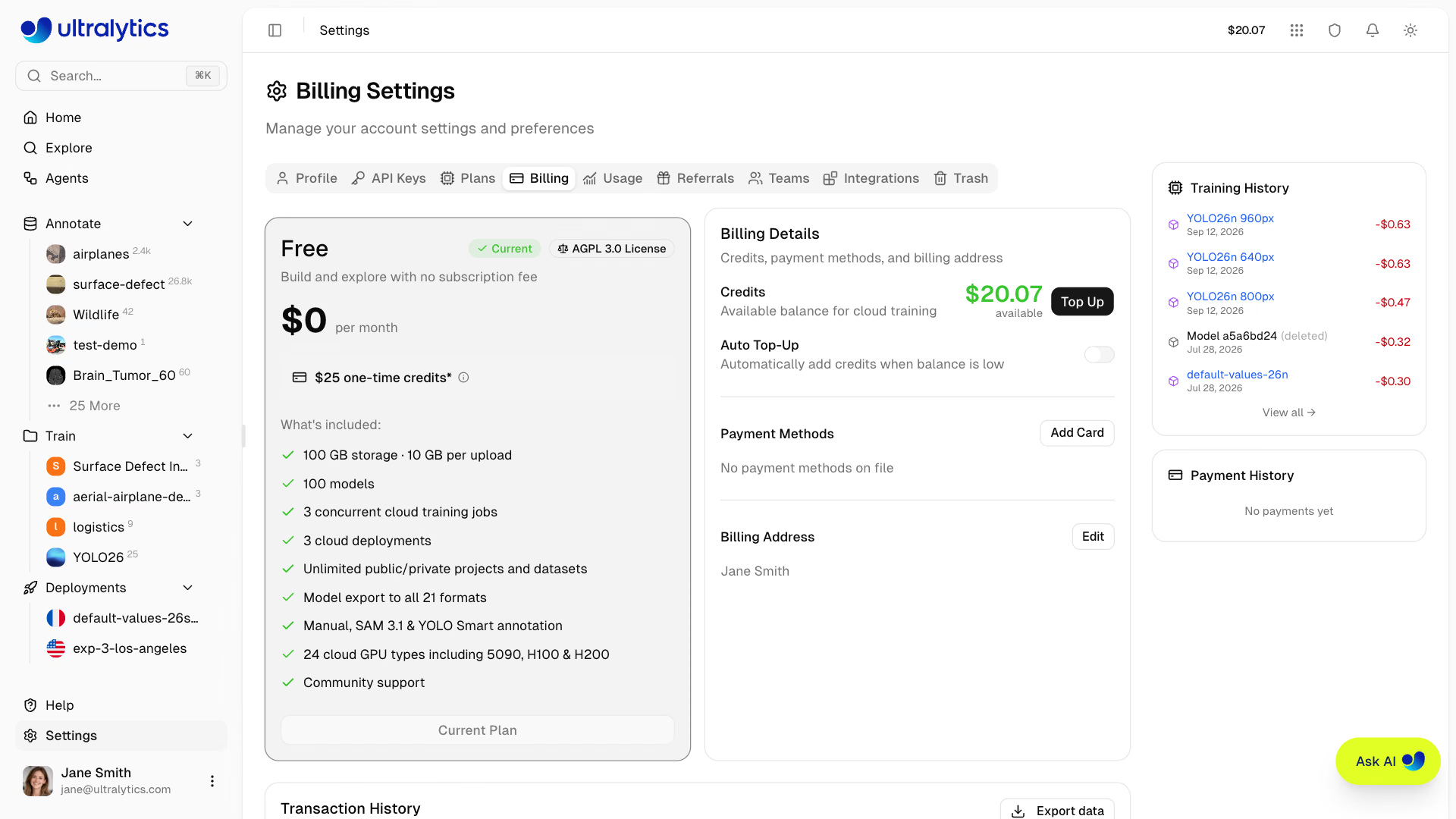
| Balance Type | Description |
|---|---|
| Available | Credits available for compute charges |
The balance is a single wallet per workspace. It can go negative if a training run's final settlement exceeds the credits on hand, and it is shown in red when it does.
Credit Uses#
Credits are consumed by:
| Service | Rate |
|---|---|
| Cloud Training | GPU rate x hours |
| Batch Annotation | $1.00 per 1,000 images, minimum $0.01 per run |
| Face Blurring | $1.00 per 1,000 images for a whole dataset, minimum $0.01 per run; single images, previews, and blurring on upload free |
| Endpoint Uptime | Resource rate x hours, custom-resource endpoints only |
Pro monthly grants are use-it-or-lose-it. At each billing cycle boundary — and when a Pro plan ends — any unused portion of the grants issued that cycle is removed with a Credits Expired transaction. Credits you purchased yourself are never expired.
Add Credits#
Top up your balance:
- Go to Settings > Billing
- Click Top Up
- Pick a preset amount, or choose Custom amount… and enter $5 – $1,000
- Complete payment in the secure checkout tab that opens
Your balance updates automatically once the payment succeeds — you don't need to reload the page.
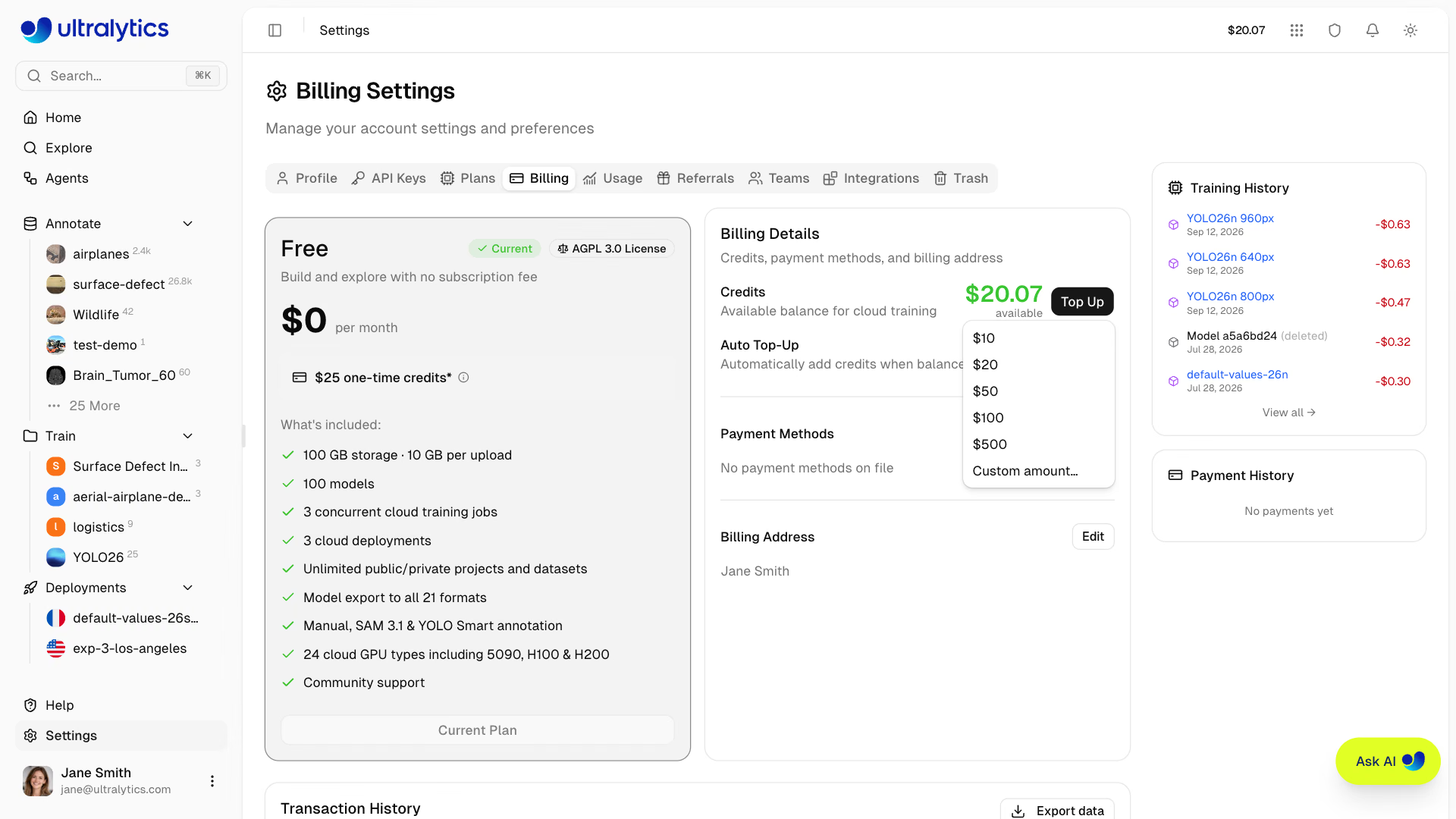
Top-Up Presets#
| Amount |
|---|
| $10 |
| $20 |
| $50 |
| $100 |
| $500 |
Custom amounts between $5 and $1,000 are also supported.
Auto Top-Up#
Enable automatic credit purchases when your balance drops below a threshold:
- Go to Settings > Billing
- Toggle Auto Top-Up on
- Set Threshold (balance level that triggers a top-up)
- Set Amount (credits to purchase when triggered, $5 – $5,000)
- Click Save
Default settings: threshold $20, amount $100.
Auto top-up is evaluated whenever a charge lowers your balance, including mid-run training charges, and charges your default payment method. Top-ups are briefly rate-limited to prevent duplicate charges. If the card is declined or missing, an Auto Top-Up Failed row is added to your transaction history with the reason, no credits are added, and auto top-up turns off until you switch it back on.
Auto top-up can reduce the chance that a paid cloud training job is stopped for insufficient credits. It requires a valid default payment method.
Redeem a Promo Code#
If you did not apply a promo code during signup, redeem one later:
- Switch to your personal workspace and go to Settings > Billing
- Enter the code under Promo Code
- Click Redeem
The credits are added to your balance immediately and appear as a Promo Bonus transaction. Each account redeems
one promo code in total, so a code applied during signup counts. Referral codes (REF- followed by eight characters)
work only during signup.
Payment Methods#
Manage payment methods in Settings > Billing:
- Add Card: Click Add Card to add a credit or debit card
- Set as Default: Set a default payment method for top-ups and subscriptions
- Remove: Remove payment methods you no longer need
Billing Address#
Set a billing address for invoices:
- Go to Settings > Billing
- Click Add Address (or Edit if already set)
- Enter your billing details (name, address, country)
- Click Save
Training Cost Flow#
Cloud training estimates cost before start, meters GPU time while the run is in progress, and settles the remainder when the run ends.
How It Works#
- Estimate: Platform calculates estimated cost based on model size, dataset size, epochs, and GPU
- Authorize Start: Your available balance is checked before training starts
- Meter: As the job runs, accrued GPU time is debited from your balance in steps — so a long run's cost appears in your balance while it is still training
- Settle: When the job reaches a terminal state (completed, failed, cancelled, or auto-terminated), the remaining tail is debited and a single Training transaction is written for the whole run
You pay for actual compute time used, including partial runs that are cancelled. If metering pushes your balance below zero, your running cloud jobs are shut down — after any auto top-up has had a chance to land.
Training Costs#
Cloud training costs depend on GPU selection:
| GPU | Generation | VRAM | Cost/Hour | Best For |
|---|---|---|---|---|
| RTX 2000 Ada | Ada | 16 GB | $0.24 | Small datasets, testing |
| RTX A4500 | Ampere | 20 GB | $0.25 | Small-medium datasets |
| RTX 4000 Ada | Ada | 20 GB | $0.26 | Medium datasets |
| RTX A5000 | Ampere | 24 GB | $0.27 | Medium datasets |
| L4 | Ada | 24 GB | $0.39 | Inference optimized |
| A40 | Ampere | 48 GB | $0.44 | Larger batch sizes |
| RTX 3090 | Ampere | 24 GB | $0.46 | General training |
| RTX A6000 | Ampere | 48 GB | $0.49 | Large models |
| RTX PRO 4000 | Blackwell | 24 GB | $0.57 | Budget Blackwell |
| RTX PRO 4500 | Blackwell | 32 GB | $0.64 | Great price/performance |
| RTX 4090 | Ada | 24 GB | $0.69 | Best price/performance |
| RTX 6000 Ada | Ada | 48 GB | $0.77 | Large batch training |
| L40S | Ada | 48 GB | $0.86 | Large batch training |
| RTX PRO 5000 | Blackwell | 48 GB | $0.96 | Large batch training |
| RTX 5090 | Blackwell | 32 GB | $0.99 | Latest consumer generation |
| L40 | Ada | 48 GB | $0.99 | Large models |
| A100 PCIe | Ampere | 80 GB | $1.39 | Production training |
| A100 SXM | Ampere | 80 GB | $1.49 | Production training |
| RTX PRO 6000 | Blackwell | 96 GB | $2.09 | Recommended default |
| H100 PCIe | Hopper | 80 GB | $2.89 | High-performance training |
| H100 NVL | Hopper | 94 GB | $3.19 | Maximum performance |
| H100 SXM | Hopper | 80 GB | $3.29 | Fastest training |
| H200 NVL | Hopper | 143 GB | $3.39 | Maximum memory |
| H200 SXM | Hopper | 141 GB | $4.39 | Maximum performance |
| B200 | Blackwell | 180 GB | $5.89 | Large models (Pro+) |
| B300 | Blackwell | 288 GB | $7.39 | Largest models (Pro+) |
B200 and B300 GPUs require a Pro or Enterprise plan. All other GPUs are available on all plans.
See Cloud Training for complete GPU options and pricing.
Cost Calculation#
Total Cost = GPU Rate x Training Time (hours)Example: Training for 2.5 hours on RTX PRO 6000
$2.09 x 2.5 = $5.23Upgrade to Pro#
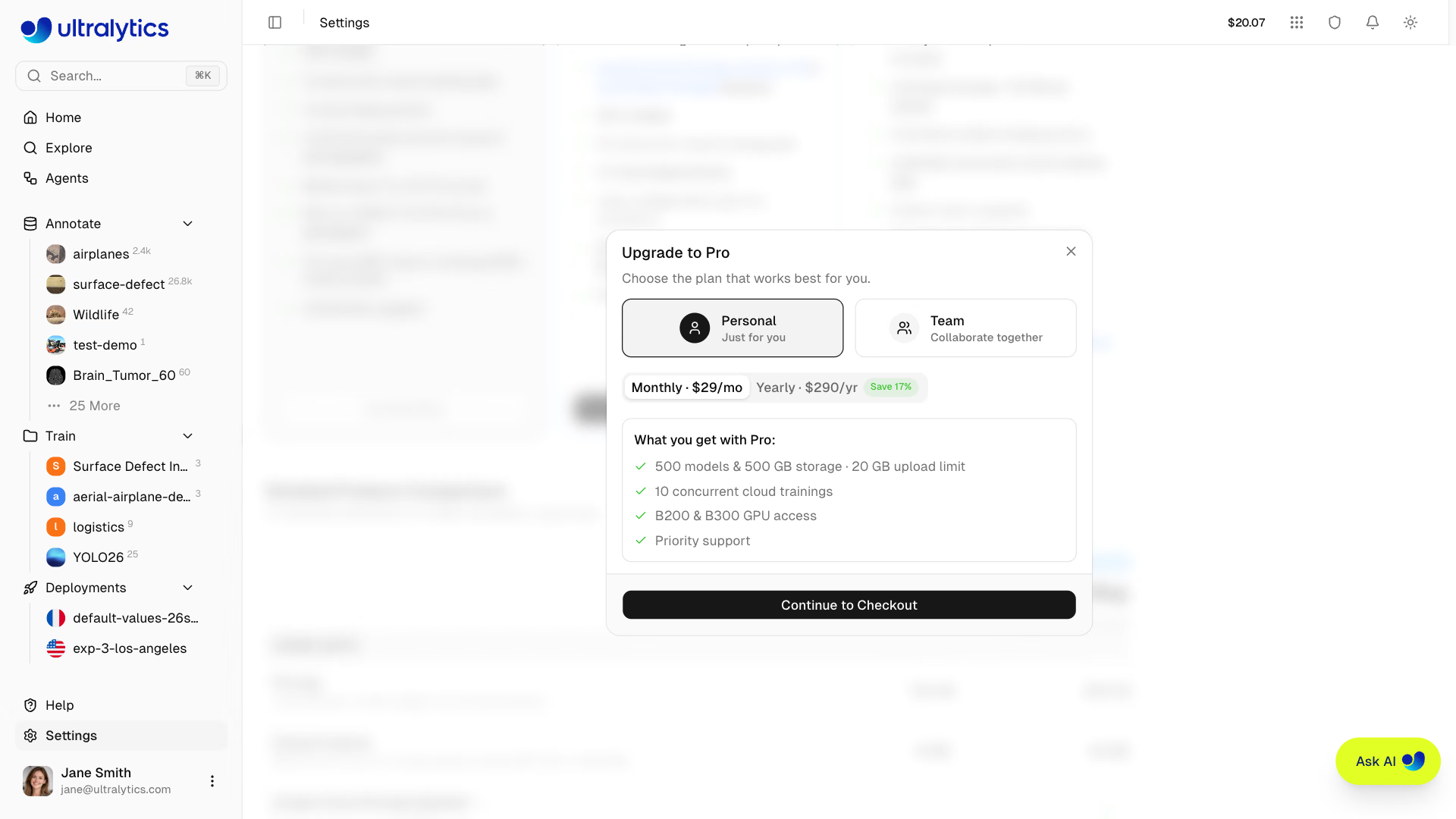
Upgrade for more features and monthly credits:
- Go to Settings > Plans
- Click Upgrade to Pro
- Choose Personal to upgrade your own workspace, or Team to create a new team workspace at the same time
- Choose billing cycle (Monthly or Yearly)
- Complete checkout
Pro Benefits#
After upgrading:
- $30/seat/month credit added immediately and every calendar month after
- Storage increased to 500 GB · 20 GB dataset upload limit
- 500 models
- 10 concurrent cloud training jobs
- 10 cloud deployments
- Google Cloud Storage, Amazon S3, and Azure Blob Storage datasets
- Team collaboration (up to 5 members, including you)
- Access to best GPUs (B200, B300)
- Priority support
Renewals#
Ultralytics bills the Pro plan directly from your saved payment method. At the end of each billing period, your default payment method is charged for the seats currently in use. If the charge fails you're emailed, and the platform retries on the following days — after three failed attempts the workspace is downgraded to Free.
Cancel Pro#
Cancel anytime from the Plans tab:
- Go to Settings > Plans
- Click Cancel Subscription on the Pro plan card
- Confirm in the dialog
If you cancel before the end of your billing period, a Resume Subscription button appears — click it to undo the cancellation before the period ends.
Pro features remain active until the end of your current billing period, and yearly plans keep receiving monthly credit grants until then.
Downgrading to Free#
When your Pro subscription ends (cancelled or expired), your account reverts to the Free plan. Here's what happens to your existing resources:
| Resource | What Happens |
|---|---|
| Models | All models preserved. Cannot create new models beyond 100-model limit |
| Deployments | All deployments preserved. Cannot create new beyond 3-deployment limit |
| Storage | All data preserved. Cannot upload new data beyond 100 GB limit |
Dataset Upload (ZIP/TAR incl. .tar.gz/.tgz/NDJSON) | Upload limit reduced from 20 GB to 10 GB per file |
| Purchased Credits | Preserved and usable |
| Unused Monthly Credits | Expired at the downgrade, recorded as a Credits Expired transaction |
| Monthly Credits | $30/seat/month grants stop |
| Team Members | All non-owner members removed and notified by email; pending invites cancelled |
| Cloud Storage Datasets | GCS, S3, and Azure Blob Storage datasets require Pro or Enterprise |
| GPU Access | Standard GPUs remain available. Best GPUs (B200, B300) require Pro or Enterprise |
| Concurrent Trainings | Limit reduced from 10 to 3 |
Downgrading does not delete models, datasets, or deployments. The workspace owner retains access, while Free-plan creation limits apply and team members are removed from the workspace.
Transaction History#
View all transactions in Settings > Billing. The table covers the selected date range (last 30 days by default),
supports free-text search across every field, and exports to CSV or JSON from the menu in the card header.
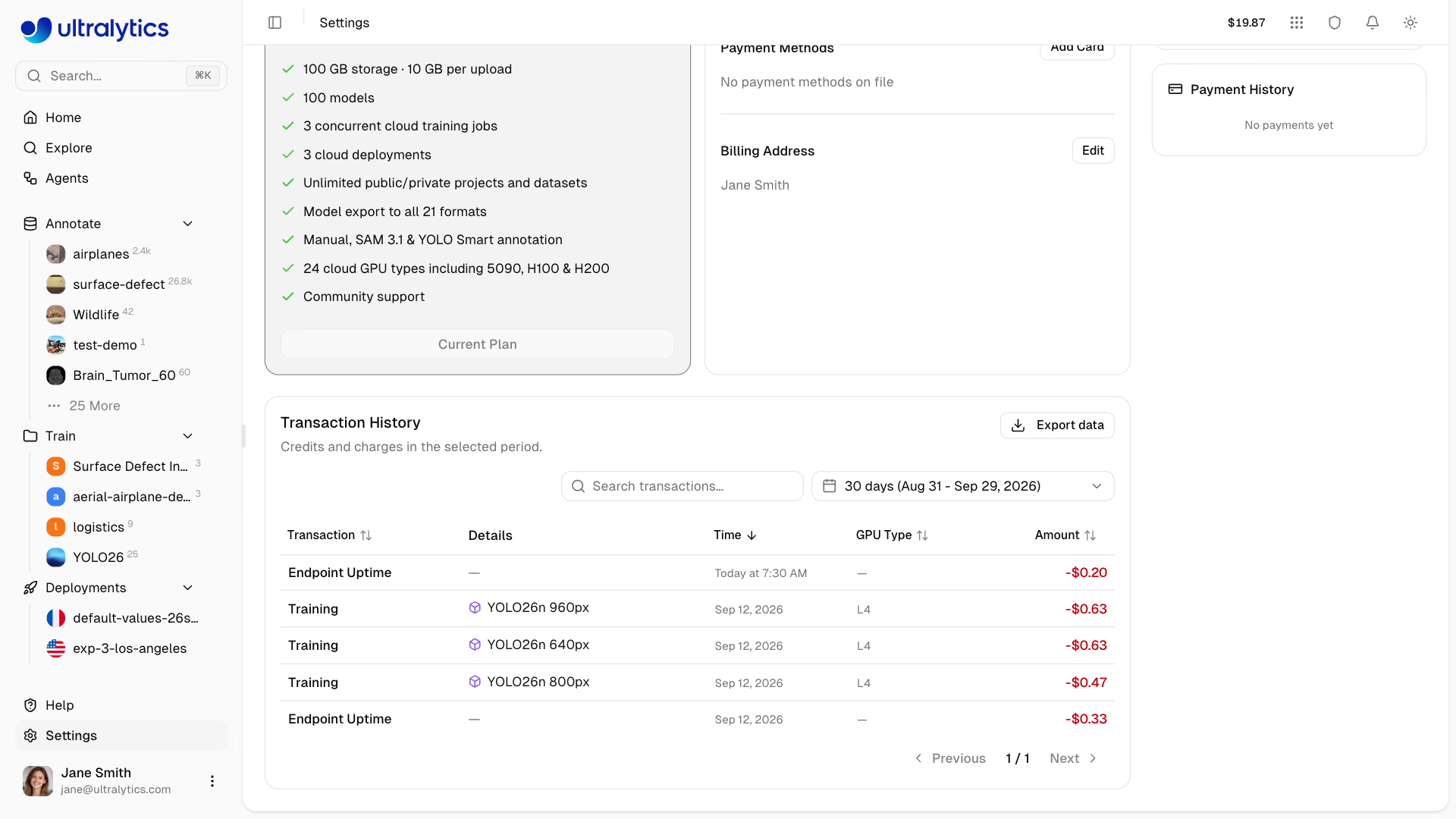
| Column | Description |
|---|---|
| Transaction | Transaction type (see below) |
| Details | Additional context — a link to the charged model, a receipt link, or a billing period |
| Time | When the transaction was recorded |
| User | Which member incurred the charge (team workspaces with more than one actor) |
| GPU Type | GPU used, on rows where one was recorded |
| Amount | Transaction value (green for credits, red for charges) |
| Balance | Resulting balance after transaction |
Transaction Types#
| Type | Meaning |
|---|---|
| Signup Bonus | Signup credit, including the company-email top-up |
| Credit Purchase | Manual top-up |
| Auto Top-Up | Automatic top-up triggered by your threshold |
| Auto Top-Up Failed | An automatic top-up failed; no credits were added |
| Subscription | Pro subscription or seat charge |
| Monthly Grant | $30/seat monthly Pro credit |
| Credits Expired | Unused monthly grant removed at a cycle boundary or downgrade |
| Training | Settled cost of one cloud training run |
| Auto-Annotation | Settled cost of one Batch Annotation or whole-dataset face-blurring run |
| Endpoint Uptime | Settled uptime of a custom-resource endpoint |
| Refund | Refunded charge |
| Promo Bonus | Credit from a promotional code or a referral reward |
| Adjustment | Manual correction applied by Ultralytics |
FAQ#
- Running paid cloud training: Stops when metered usage pushes the balance below zero
- New training: Cannot start new jobs until balance is positive
- Deployments: Default-size endpoints keep running; custom-size endpoints, and any background camera on them, are stopped automatically
Add credits to restore a positive balance before starting new training jobs. Enable auto top-up to reduce the chance of an active job being stopped for insufficient funds.
Card payments (credit purchases, auto top-ups, and Pro subscription and seat charges) show a receipt link in the Details column of the transaction history. It opens the payment's invoice when one was issued, otherwise the card receipt.
If a cloud GPU has started, failed, cancelled, completed, and auto-terminated jobs are charged for elapsed GPU time. Validation or launch failures before cloud compute starts have no GPU usage charge. See Cloud Training Billing for the full breakdown.
No. Each billing cycle boundary expires whatever is left of that cycle's $30/seat grants before issuing the next one, recorded as a Credits Expired transaction. Credits you bought with a top-up are never expired, so a balance made up of purchased credits carries over indefinitely.
The invite dialog shows the prorated amount due today and the new recurring total before you confirm. If a seat you already paid for this period is vacant — because a member left or an invite was cancelled — the new member reuses it at no extra charge for the rest of the period. See Teams.
The Free plan includes $5 in signup credit, and no credit card is required. To raise it to $25, add and verify a company email address (not Gmail, Outlook or another consumer domain) from your personal workspace in
Settings > Profile; the extra $20 is added once per account. If you have a promo code you didn't use at signup, redeem it from your personal workspace under Settings > Billing. See Redeem a Promo Code.