Ultralytics Platform Quickstart#
Ultralytics Platform provides a guided workflow to upload datasets, train new YOLO models from pretrained weights, test completed models in the browser, and configure dedicated inference endpoints.
Watch: Get Started with Ultralytics Platform - QuickStart
The following interactive diagram outlines the four primary stages of the Ultralytics Platform workflow. Click any stage to jump to its instructions.
Get Started#
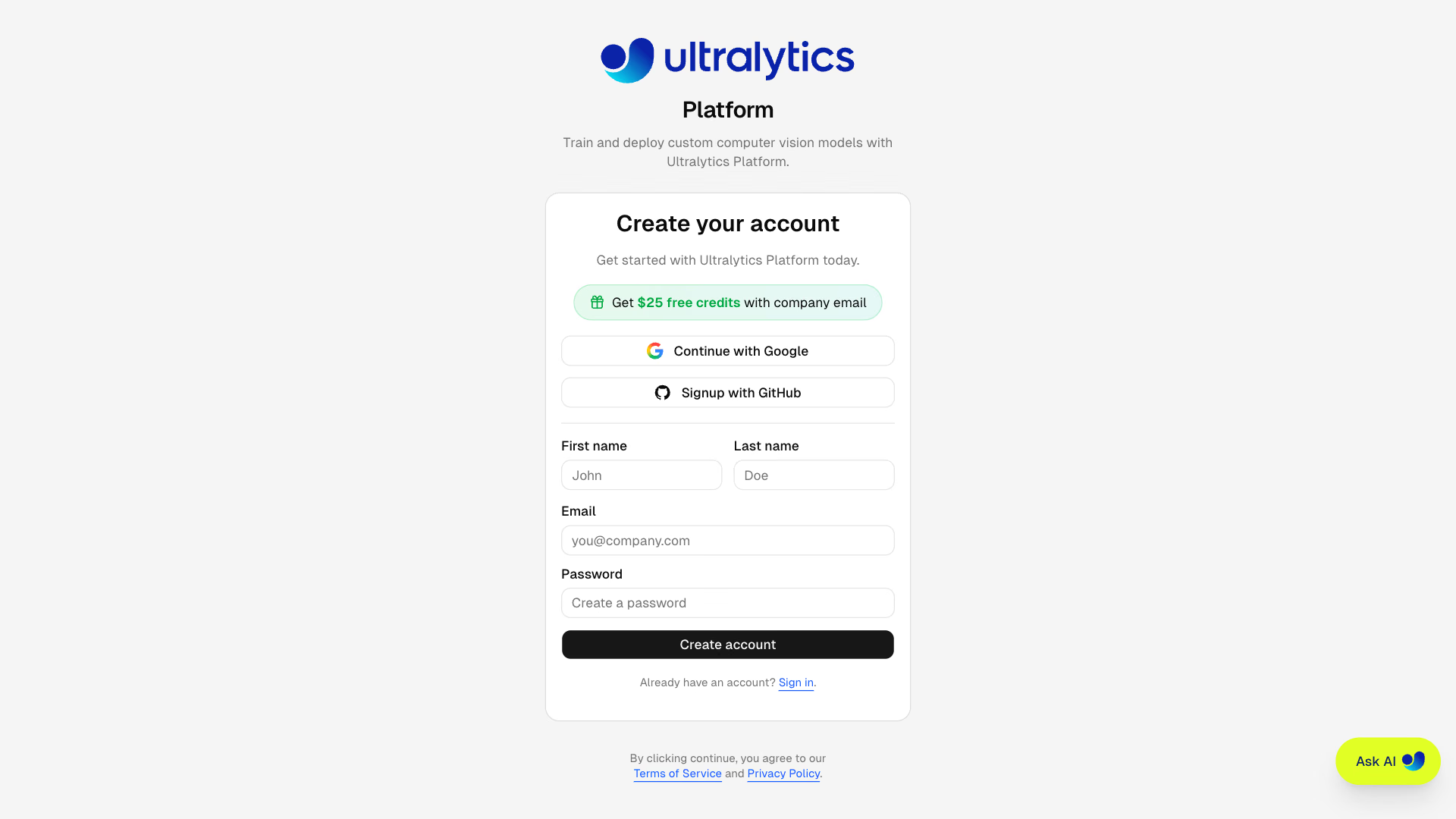
Ultralytics Platform offers a variety of easy signup options. You can register and log in using your Google or GitHub accounts, or with your email address.
Region Selection#
During onboarding, you'll be asked to select your data region. The Platform automatically measures latency to each region and recommends the closest one. This choice determines where your datasets, models, and managed training data are stored. Dedicated endpoint regions are selected separately when you deploy a model.
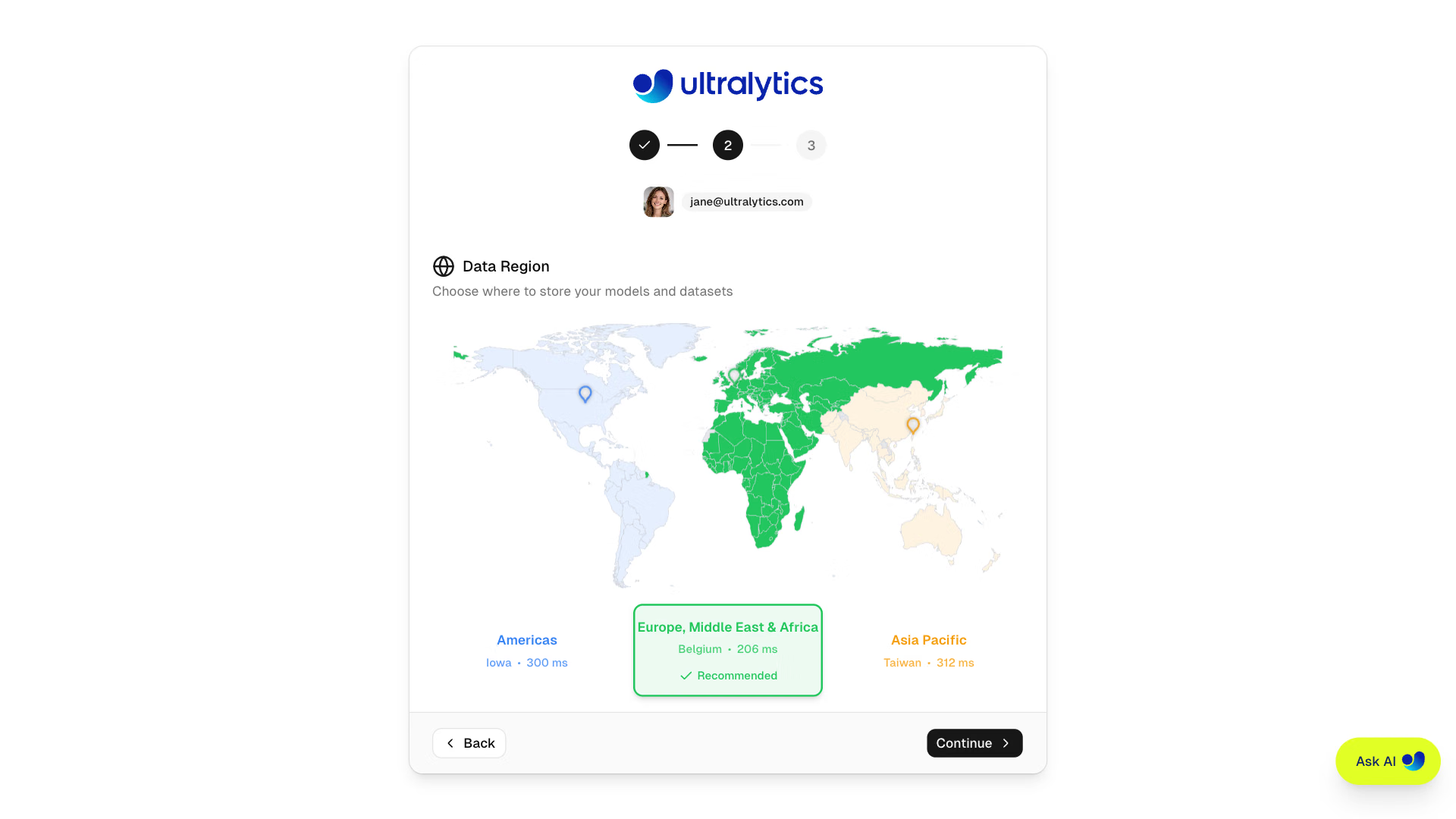
| Region | Label | Location | Best For |
|---|---|---|---|
| US | Americas | Iowa, USA | Americas users, fastest for Americas |
| EU | Europe, Middle East & Africa | Belgium, Europe | European users, GDPR compliance |
| AP | Asia Pacific | Taiwan, Asia-Pacific | Asia-Pacific users, lowest APAC latency |
Your data region is set during onboarding and cannot be changed yourself afterward, so choose the region closest to you or your users for best performance. If you need to move regions later, contact support to request a change.
Free Credits#
Every new account receives free credits for cloud GPU training:
| Email Type | Sign-up Credits | How to Qualify |
|---|---|---|
| Work/Company Email | $25.00 | Use your company domain (@company.com) |
| Personal Email | $5.00 | Gmail, Yahoo, Outlook, etc. |
Sign up with a work email to receive $25 in credits. If you signed up with a personal email, you can verify a work email later to unlock the additional $20 in credits.
Complete Your Profile#
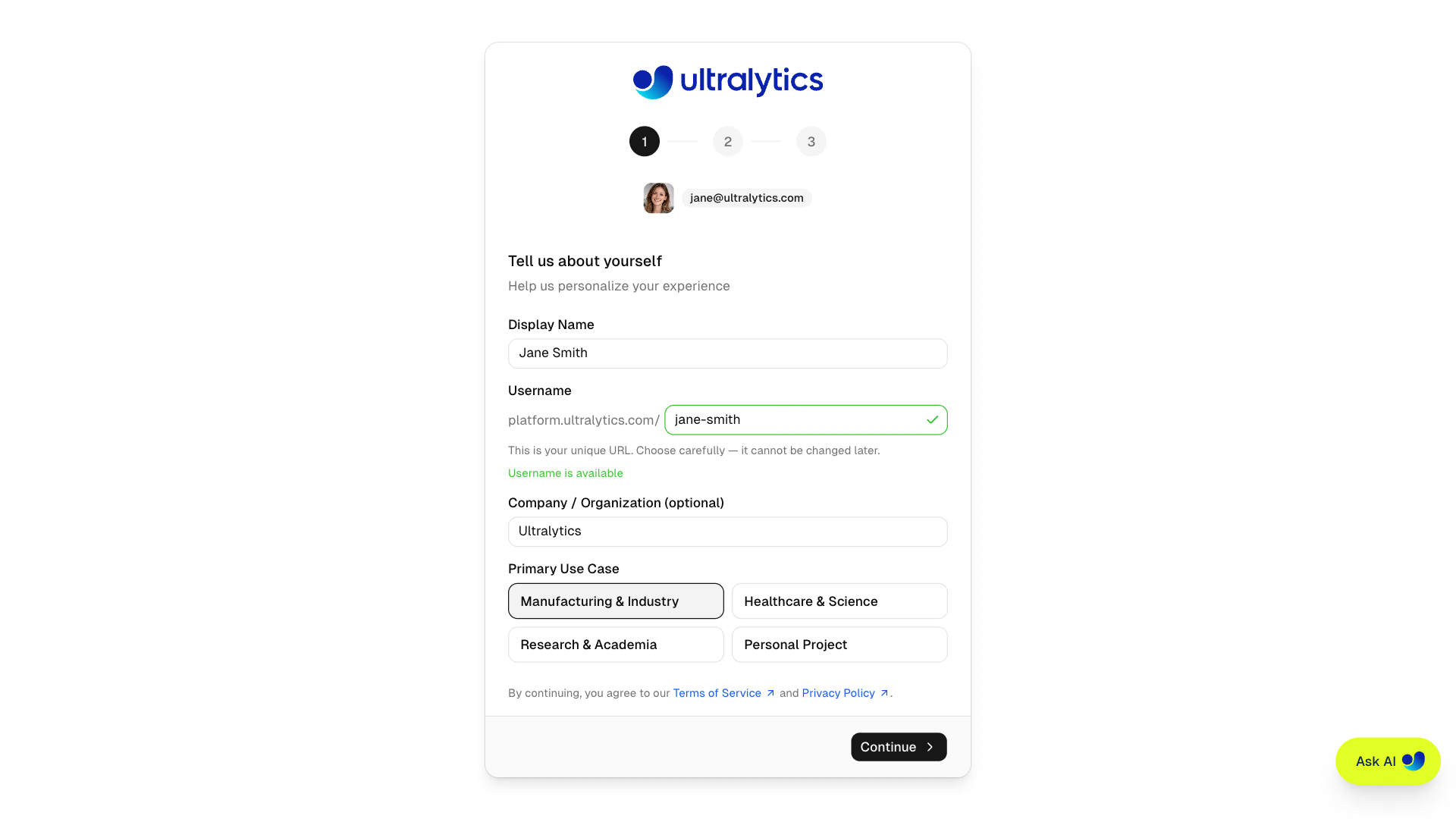
The onboarding flow guides you through three steps:
- Profile - Enter your display name, unique username (permanent, cannot be changed later), organization (optional), and primary use case
- Data Region - Select US, EU, or AP with a visual world map showing latency
- Complete - Review your selections, optionally apply a promo code, and finish signup to claim your welcome credits
Update Later
You can update your profile anytime from Settings, including your display name, bio, and social links. Your username cannot be changed after signup. The data region has no self-service change; contact support to request a move.
Home Dashboard#
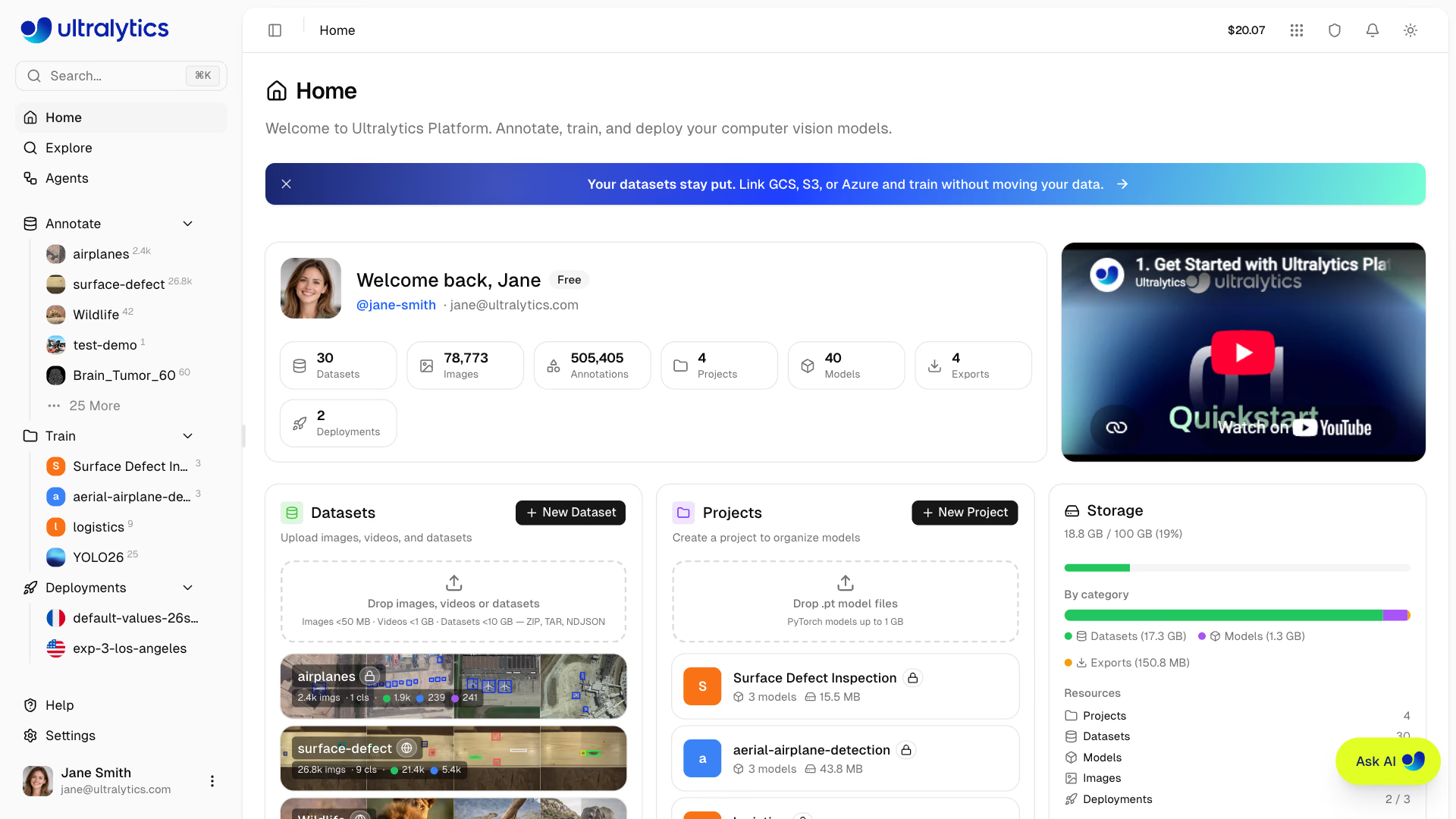
After signing in, you will be directed to the Home page of Ultralytics Platform, which provides a welcome card with workspace stats, an overview video, quick access to datasets, projects, and storage, and a recent activity feed.
Sidebar Navigation#
The sidebar provides access to all Platform sections:
| Section | Item | Description |
|---|---|---|
| Top | Search | Quick search across all your resources (Cmd+K) |
| Home | Dashboard with quick actions and recent activity | |
| Explore | Discover public projects, datasets, and images | |
| Agents | Build visual Agents workflows with YOLO, conditions, and VLMs | |
| Content | Annotate | Your datasets, with a + shortcut to create one |
| Train | Your projects containing trained models | |
| Deployments | Your deployments, each opening its deployment page, with a + shortcut to create one | |
| Footer | Help | Guides, community links, and the in-app feedback form |
| Settings | Account, billing, teams, and preferences | |
| Account | Profile menu with workspace switcher, activity, and Log out |
Each content section lists your five most recent items with a link to the rest. Hovering an item reveals a delete action
that moves it to Trash, except deployments, which are deleted permanently after confirmation; Trash
itself is reached from search (Cmd+K) or by opening platform.ultralytics.com/trash.
Without an account the same sidebar shows public Datasets and Models from @ultralytics instead of your
own content, and the footer shows a sign-up card in place of the account menu.
Welcome Card#
The welcome card shows your profile, plan badge (which links to plan comparison), and workspace statistics at a glance. Each stat links to the matching workspace view:
| Stat | Description |
|---|---|
| Datasets | Number of datasets |
| Images | Total images across all datasets |
| Annotations | Total annotation count |
| Projects | Number of projects |
| Models | Total trained models |
| Exports | Number of model exports |
| Deployments | Active deployment count |
Quick Actions#
Below the welcome card, the dashboard shows three cards:
- Datasets: Create a new dataset or drop images, videos, or dataset files to upload. Shows your recent datasets.
- Projects: Create a new project or drop
.ptmodel files to upload. Shows your recent projects. - Storage: Overview of your storage usage (datasets, models, exports) with plan limits.
A Recent Activity table at the bottom shows your latest datasets, projects, and deployments with their status and last update time.
Global Search#
Press Cmd+K (Mac) or Ctrl+K (Windows/Linux) to open the search bar. Search across pages, projects, datasets, and deployments instantly.
AI Chat Assistant#
Click Ask AI to work with an AI agent that automates tasks across Ultralytics Platform. It works directly with your datasets and models to annotate images, run training experiments, compare results, and export or deploy models. See AutoTrain with Ask AI for example prompts and setup for your own coding agent.
Onboarding Tours#
The Platform includes guided tours that introduce key features as you explore different sections:
| Tour | Trigger | What It Covers |
|---|---|---|
| Nav Tour | First visit to Home after onboarding | Home, Explore, Annotate, Train, Deploy, Settings, Your Account |
| Project Tour | First visit to a project page | Models, Training Charts, Train a Model |
| Dataset Tour | First visit to a dataset page | Images, Dataset Splits, Classes, Charts, Train a Model, Upload Images, Download Dataset |
Enterprise plan users see an enhanced Nav Tour with enterprise-specific guidance on the Train step.
Restart Tours#
To replay any tour:
- Redo Tour button — Click your profile avatar (bottom-left of the sidebar) to open the account menu, then select Redo Tour. This resets all tours so they replay on your next visit to each section.
- URL parameter — Append
?tour=with the tour ID to restart one directly:?tour=navon the Home page,?tour=projecton a project page, or?tour=dataseton a dataset page.
Upload Your First Dataset#
Open Annotate in the sidebar and click the + to create a new dataset. You can also drag and drop files directly onto the Datasets card on the Home dashboard.
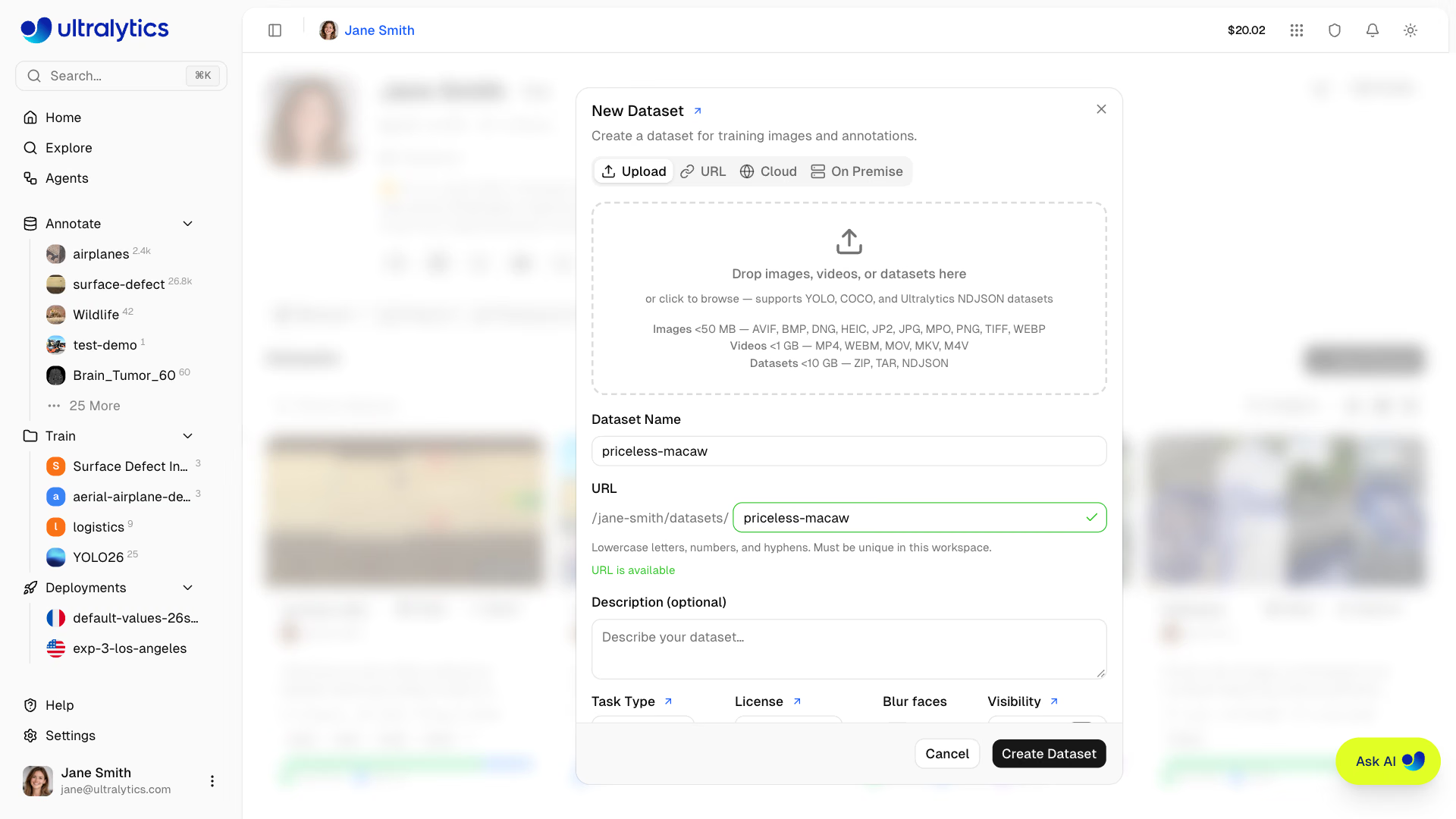
The New Dataset dialog offers four sources. This quickstart uses Upload; the others are covered in Datasets and Integrations:
| Source | Availability | Description |
|---|---|---|
| Upload | All plans | Drop images, videos, archives, or NDJSON from your machine |
| URL | All plans | Import from a direct HTTP or HTTPS link to a ZIP, TAR, TAR.GZ, TGZ, or NDJSON file |
| Cloud | Pro and above | Connect an S3, GCS, or Azure bucket |
| On Premise | Enterprise | Index data that stays on your own connected host |
Uploads support multiple formats (full details in Datasets):
| Format | Max Size (Free / Pro / Enterprise) | Description |
|---|---|---|
| Images | 50 MB | JPG, PNG, WebP, TIFF, and other common formats |
| Dataset Archive | 10 / 20 / 50 GB | ZIP or TAR archive (including .tar.gz and .tgz) with images and labels |
| Video | 1 GB | MP4, WebM, MOV, MKV, M4V - frames extracted at 1 FPS (max 100 frames) |
| NDJSON | 10 / 20 / 50 GB | Ultralytics dataset export format for portable metadata |
After upload, the platform automatically processes your data:
- Images larger than 4096px are resized (preserving aspect ratio; TIFF originals are stored as uploaded)
- 256px thumbnails are generated for fast browsing
- YOLO, COCO, LabelMe, and Ultralytics or Labelbox NDJSON labels are parsed and validated
- Statistics are computed (class distribution, heatmaps, dimensions)
For best results, upload a ZIP or TAR archive (including .tar.gz and .tgz) with the standard YOLO structure:
my-dataset.zip
├── data.yaml          # Class names and splits
├── train/
│   ├── images/
│   │   ├── img001.jpg
│   │   └── img002.jpg
│   └── labels/
│       ├── img001.txt
│       └── img002.txt
└── val/
    ├── images/
    └── labels/
For full syntax across tasks, see detect, segment, pose, OBB, and classify dataset guides.
Read more about datasets and supported formats for detect, segment, pose, OBB, and classify.
Create Your First Project#
Projects help you organize related models and experiments. Open Train in the sidebar and click the + to create a project. You can also drop .pt weights onto the Projects card on the Home dashboard to create a project and import them in one step.
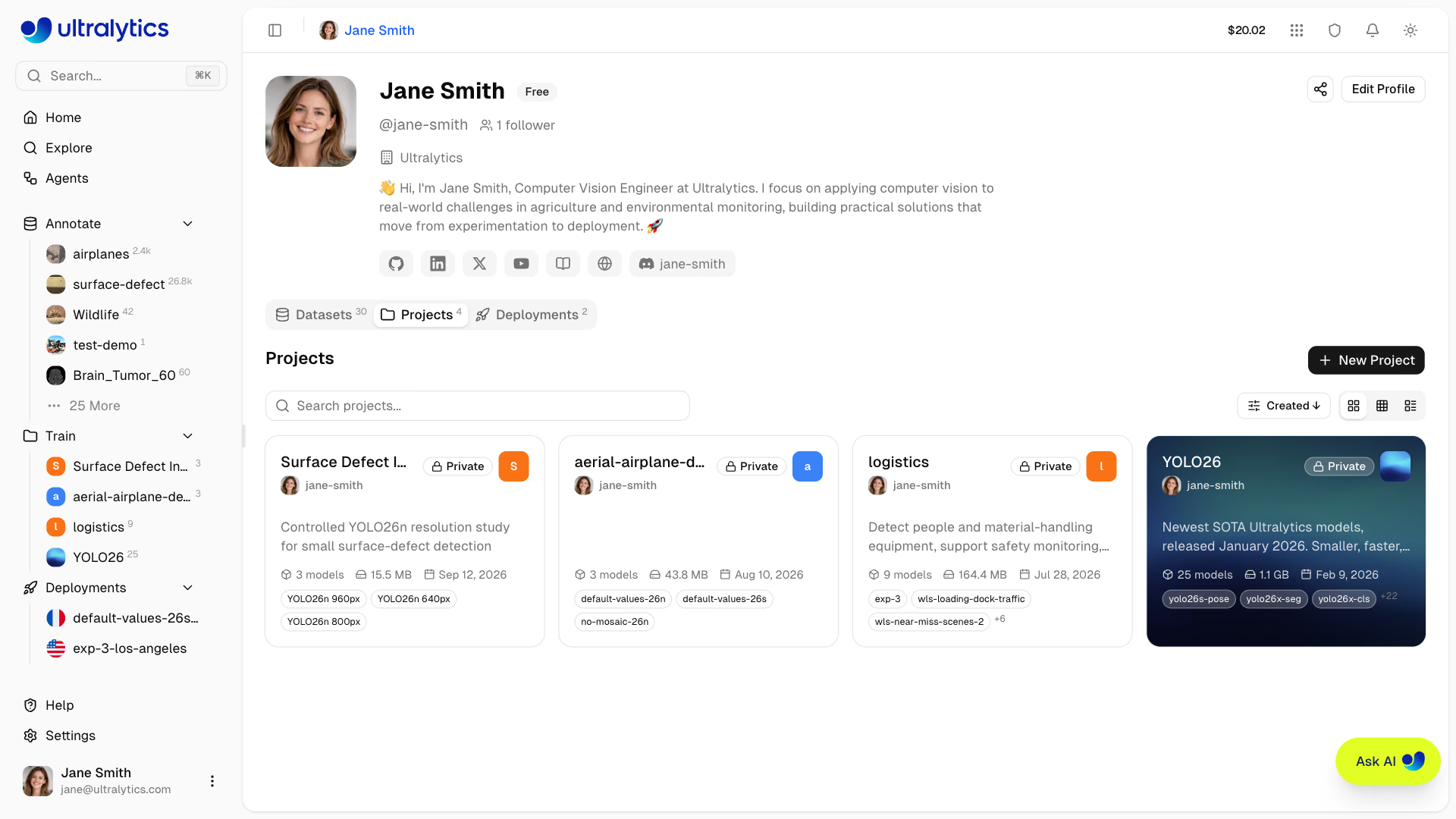
Enter a name and optional description. Projects organize model runs and imported or cloned model weights, with charts for comparing completed training results.
Read more about projects.
Train Your First Model#
From your project, click New Model to open the Train New Model dialog. You can also start from a dataset page, in which case the dataset is locked in and you pick the destination project instead.
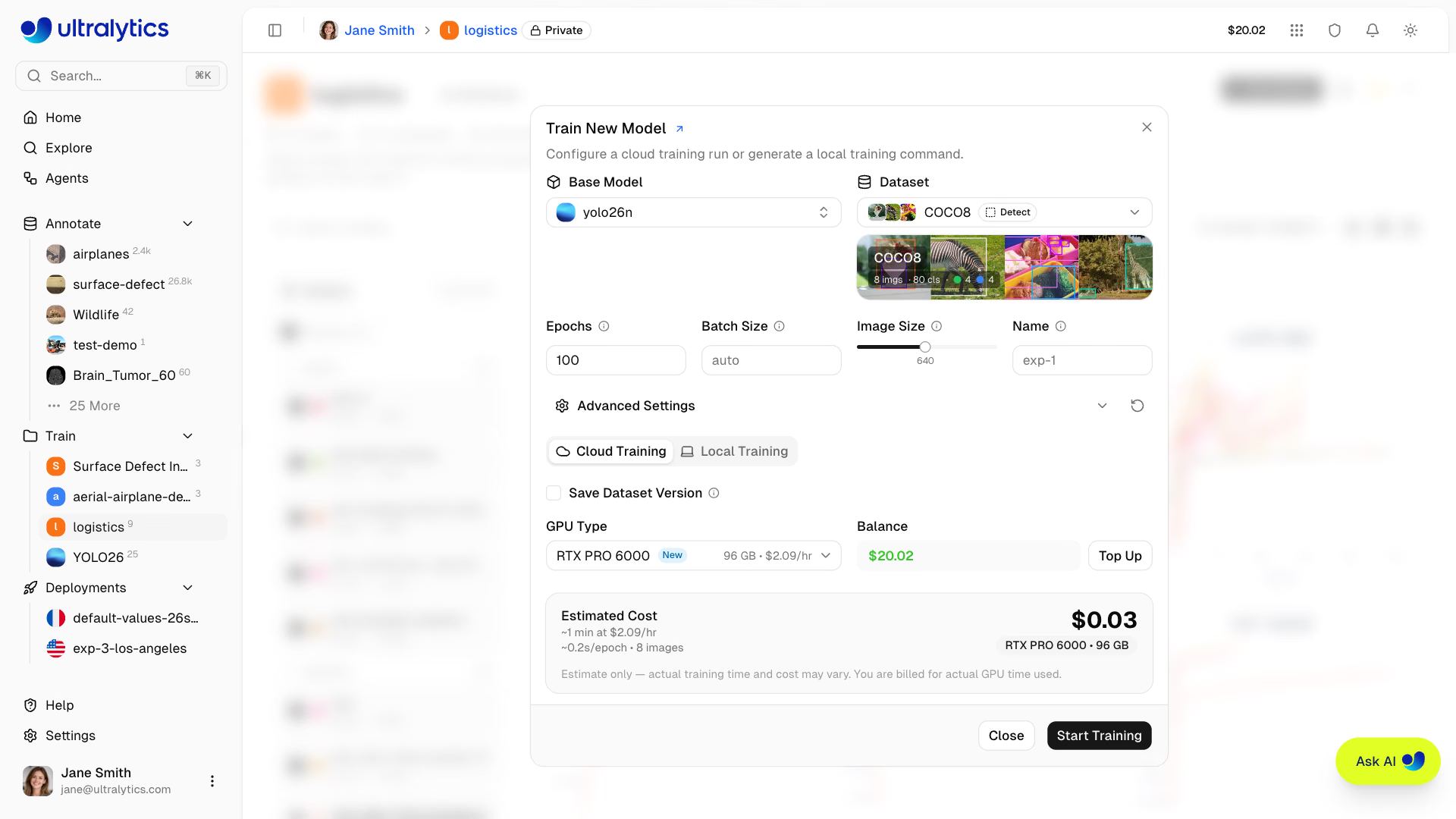
Training Configuration#
- Base Model: Select official Ultralytics weights or one of your own trained models. The dialog warns if the model task and dataset task don't match.
- Dataset: Choose a ready dataset with at least one train image, at least one validation or test image, and at least one labeled image
- Parameters: Set Epochs (default 100), Batch Size (blank means auto), Image Size (default 640), and an optional run Name. Expand Advanced Settings to edit any other Ultralytics training argument in a YAML editor.
- Select GPU: On the Cloud Training tab, choose compute based on your budget and model size. The default is RTX PRO 6000 (96 GB Blackwell, $2.09/hr), which handles every YOLO26 variant. See the full GPU pricing table or the Cloud Training GPU step for the complete list and tier gating.
- Start Training: Review the estimated cost and duration next to your credit balance, then click
Start Training.
Tick Save Dataset Version before starting to snapshot a Platform-hosted dataset and link it to the run, so the exact training data can be reproduced later. See Datasets.
Cloud training requires a positive credit balance sufficient to cover the estimated job cost. Top up directly from the training dialog, or check your balance in Settings > Billing. New accounts receive free credits ($5 for personal email, $25 for work email).
Monitor Training#
Once training starts, open the model's Train tab to monitor progress in real time through three subtabs:
| Subtab | Content |
|---|---|
| Charts | Training/validation loss curves, mAP, precision, recall |
| Console | Live training log output |
| System | GPU utilization, memory usage, hardware metrics |
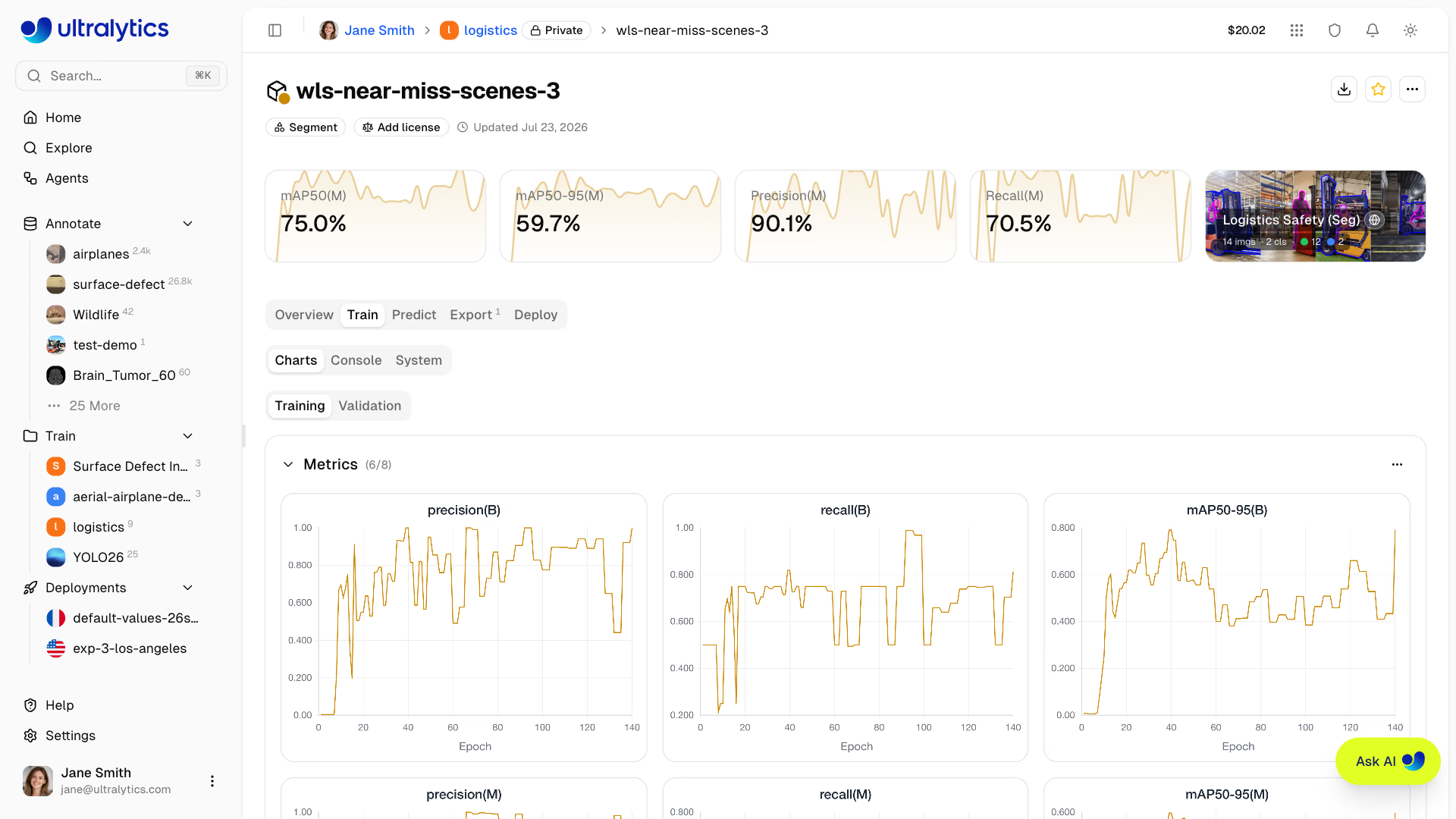
Metrics are streamed in real-time via SSE (Server-Sent Events). Once validation artifacts exist, the Charts subtab splits into Training and Validation views, with the confusion matrix, PR curves, and F1 curves under Validation.
You can cancel a running training job at any time. You're only charged for the compute time used up to that point.
Read more about cloud training.
Test Your Model#
After training completes, test your model directly in the browser:
- Navigate to your model's
Predicttab - Upload an image, drag and drop, capture one from your webcam, or click an example image (auto-inference on drop)
- View task-appropriate prediction overlays, per-stage timings (preprocess, inference, postprocess, network), and the raw JSON response
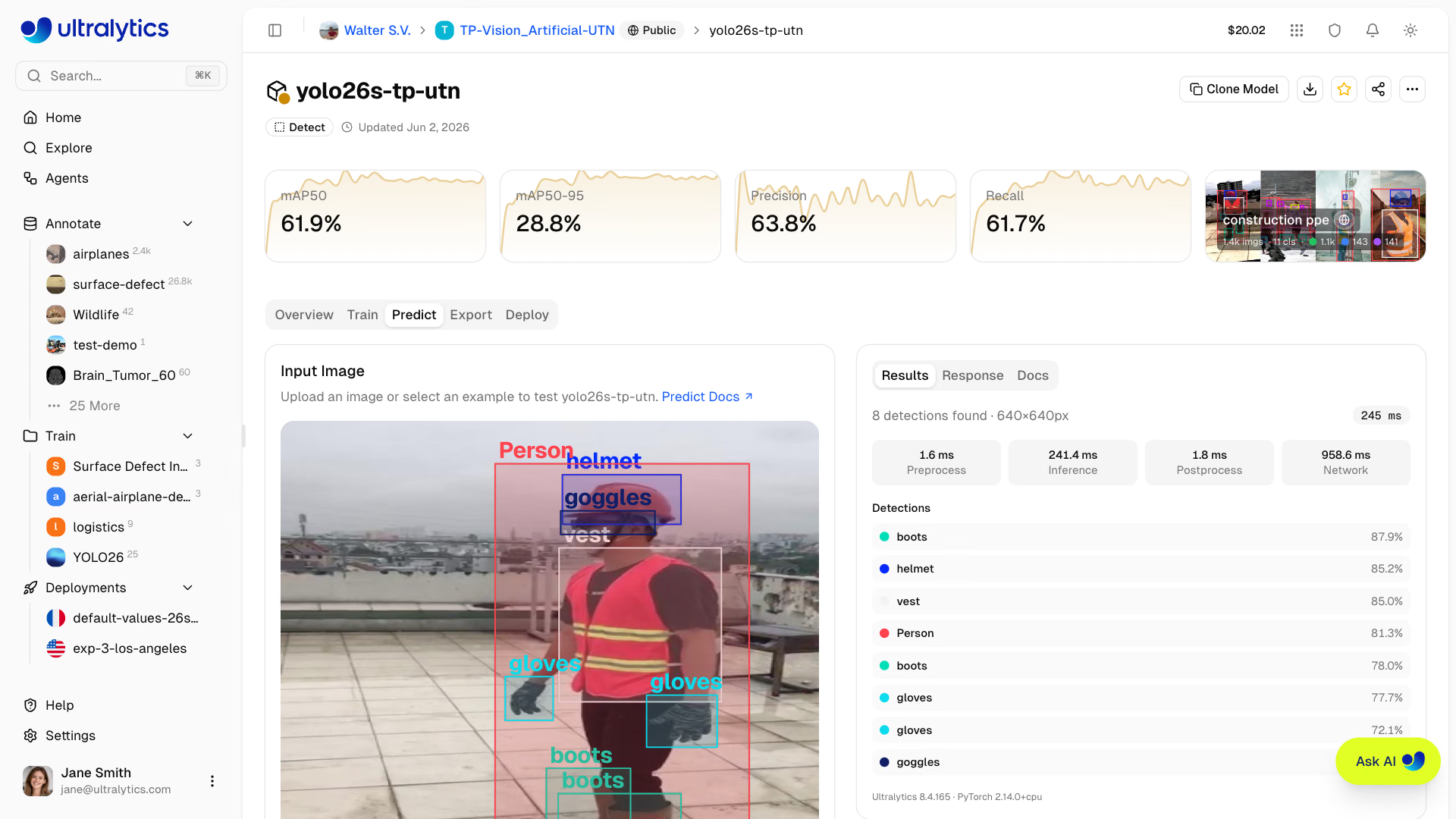
Adjust inference parameters:
| Parameter | Default | Description |
|---|---|---|
| Confidence | 0.25 | Filter low-confidence predictions |
| IoU | 0.7 | Control overlap for NMS |
| Image Size | 640 | Resize input for inference |
Under API Docs, the Predict tab shows example code in Python, JavaScript, and cURL, pre-filled with the parameters you selected above. Deploy the model first, then replace the placeholder URL and key with the values from your endpoint:
import requests

url = "https://your-deployment-url.run.app/predict"
api_key = "YOUR_API_KEY"
args = {"conf": 0.25, "iou": 0.7, "imgsz": 640}

with open("image.jpg", "rb") as f:
    response = requests.post(
        url,
        headers={"Authorization": f"Bearer {api_key}"},
        data=args,
        files={"file": f},
    )

print(response.json())The Predict tab runs inference automatically when you drop an image — no need to click a button — and re-runs it whenever you change confidence, IoU, or image size. Example images (bus.jpg, zidane.jpg) are preloaded for instant testing.
Read more about inference.
Deploy to Production#
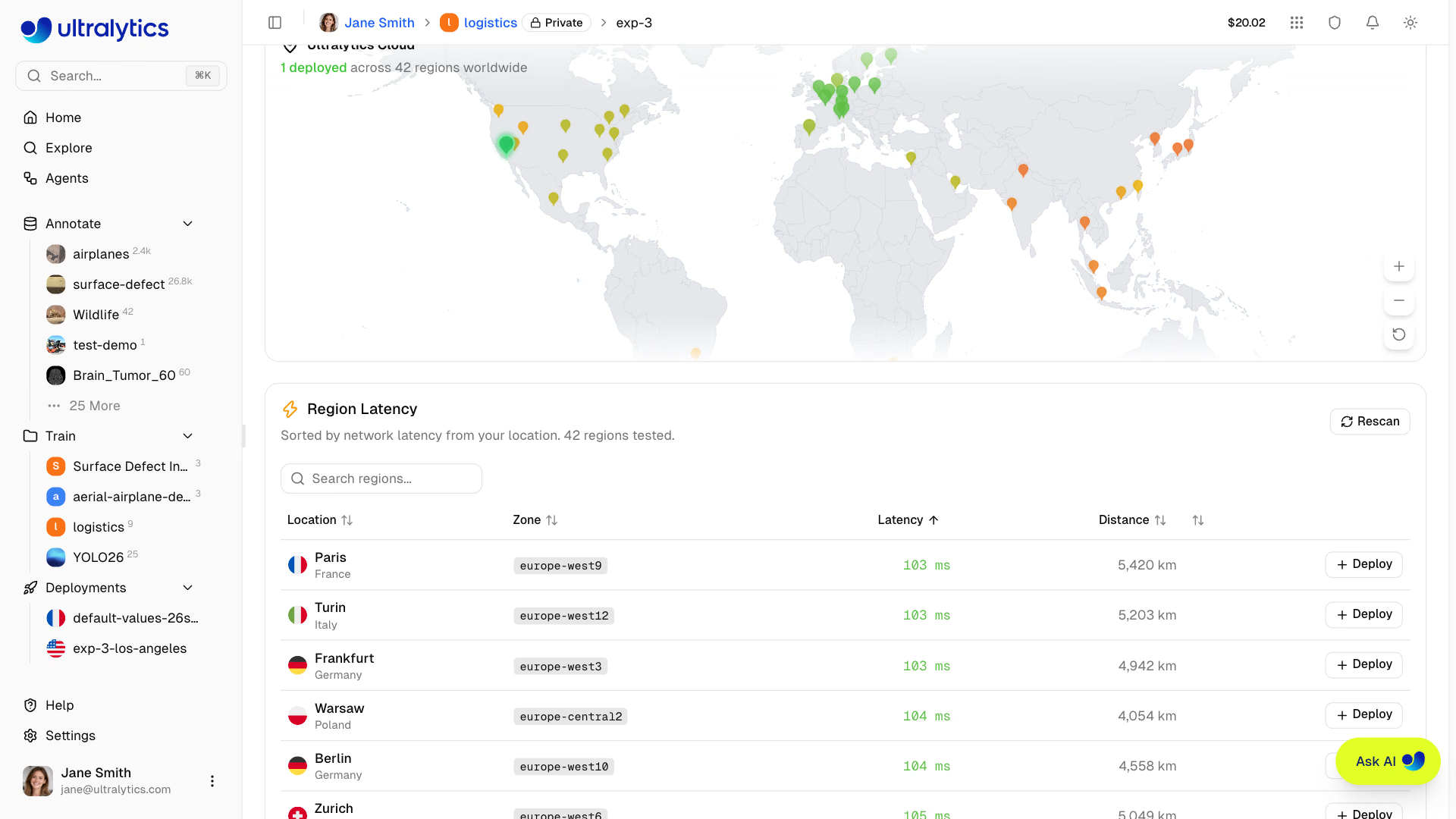
Deploy your model to a dedicated endpoint for production use:
- Navigate to your model's
Deploytab - The Platform measures latency to all 42 regions and plots them on a world map, colored on a green-to-red gradient (lower latency is greener, higher latency is redder)
- In the Region Latency table below the map — sorted by latency from your location — find the region you want. Use
Rescanto re-measure at any time. - Click
Deployon that row to create your endpoint
Once provisioning completes, your endpoint provides:
- Unique URL: HTTPS endpoint for API calls
- Scale-to-zero behavior: Idle default-size endpoints scale to zero; custom sizes stay warm and use hourly uptime billing (deployments currently run a single active instance)
- Monitoring: Request metrics and logs
Endpoints can be started, stopped, and deleted. Stopped endpoints retain their configuration and can be restarted with one click.
After deployment, you can manage all your endpoints from the Deployments tab on your profile, reached from the Deployments section in the sidebar. The tab shows a global map with your active deployments, 24-hour metrics (active deployments, total requests, error rate, and P95 latency), and a list of every endpoint.
Read more about endpoints.
Remote Training (Optional)#
If you prefer to train on your own hardware, you can use your API key to train anywhere and stream metrics to Ultralytics Platform.
The fastest route is the Local Training tab in the training dialog: it builds the full command for your selected model, dataset, and parameters, and fills in an API key (creating one if you don't have one yet). Copy it and run it in your terminal.
To assemble the command yourself:
- Generate an API key in
Settings > API Keys - Set the environment variable and train with a
username/projectvalue forproject:
export ULTRALYTICS_API_KEY="YOUR_API_KEY"

yolo train model=yolo26n.pt data=coco.yaml epochs=100 project=username/my-project name=exp1Local training with metric streaming requires Python>=3.11 and ultralytics>=8.4.120. API keys start with ul_ followed by 40 hex characters (43 characters total) and are full-access tokens scoped to your workspace.
Read more about API keys, dataset URIs, and remote training.
Feedback & Help#
The Help page in the sidebar footer collects documentation links, video walkthroughs, and community resources, and includes an in-app feedback form. You can rate your experience from 1 to 5 stars, choose a feedback type (Bug, Feature, or General), and attach a screenshot.
If you need more help:
- AI Chat: Click the floating chat widget on any page for instant help
- Documentation: Browse these docs for detailed guides on datasets, annotation, training, deployment, and billing
- Discord: Join our Discord community for discussions
- GitHub: Report issues on GitHub
- REST API and Python SDK: See the API reference, install the
ultralytics-platformclient, or try the interactive API docs for programmatic access to all Platform features
FAQ#
No. Every new account receives free training credits at signup, $25 with a work email or $5 with a personal email, and you can upload datasets, annotate, and test models without adding a payment method. See Billing for plans and how to add credits later.
Your username is permanent, and the data region is set during onboarding and cannot be changed yourself. Contact support if you need to move regions. Display name, bio, and social links can be updated anytime in Settings.
Upload a ZIP, TAR, or TAR.GZ archive in YOLO format, COCO JSON, LabelMe JSON, or Ultralytics or Labelbox NDJSON, or a plain folder of images to annotate in Platform. Platform detects the task and splits from the archive layout. See Datasets for the full list.
Yes. Use the Local Training tab in the training dialog to copy a ready-made command, or set
ULTRALYTICS_API_KEYand passproject=username/my-projecttoyolo train. Metrics stream to Platform in real time and the final weights upload when training finishes. See Remote Training.Download the
best.ptweights from the model page, export to formats such as ONNX, TensorRT, or CoreML, or call the model through a dedicated endpoint. You can also load it directly withYOLO("ul://username/project/model")in theultralyticspackage.