Roboflow Integration#
The Roboflow integration imports the supported datasets you select from your Roboflow workspace into Ultralytics Platform at their latest version. Re-run it any time to pull in datasets you've added since your last import.
Import from Roboflow#
- Go to Settings > Integrations and select Roboflow from the integration list.
- Paste your Roboflow API Key and click Import.
- Review the Import from Roboflow preview:
- A table of new datasets (name, task, images, size), all selected; clear any you want to leave out
- Counts of datasets that are already imported, have an unsupported task, or couldn't be sized
- The size of your selection against your storage
- Click Import N to import the N selected datasets; it stays disabled until the selection fits your storage.
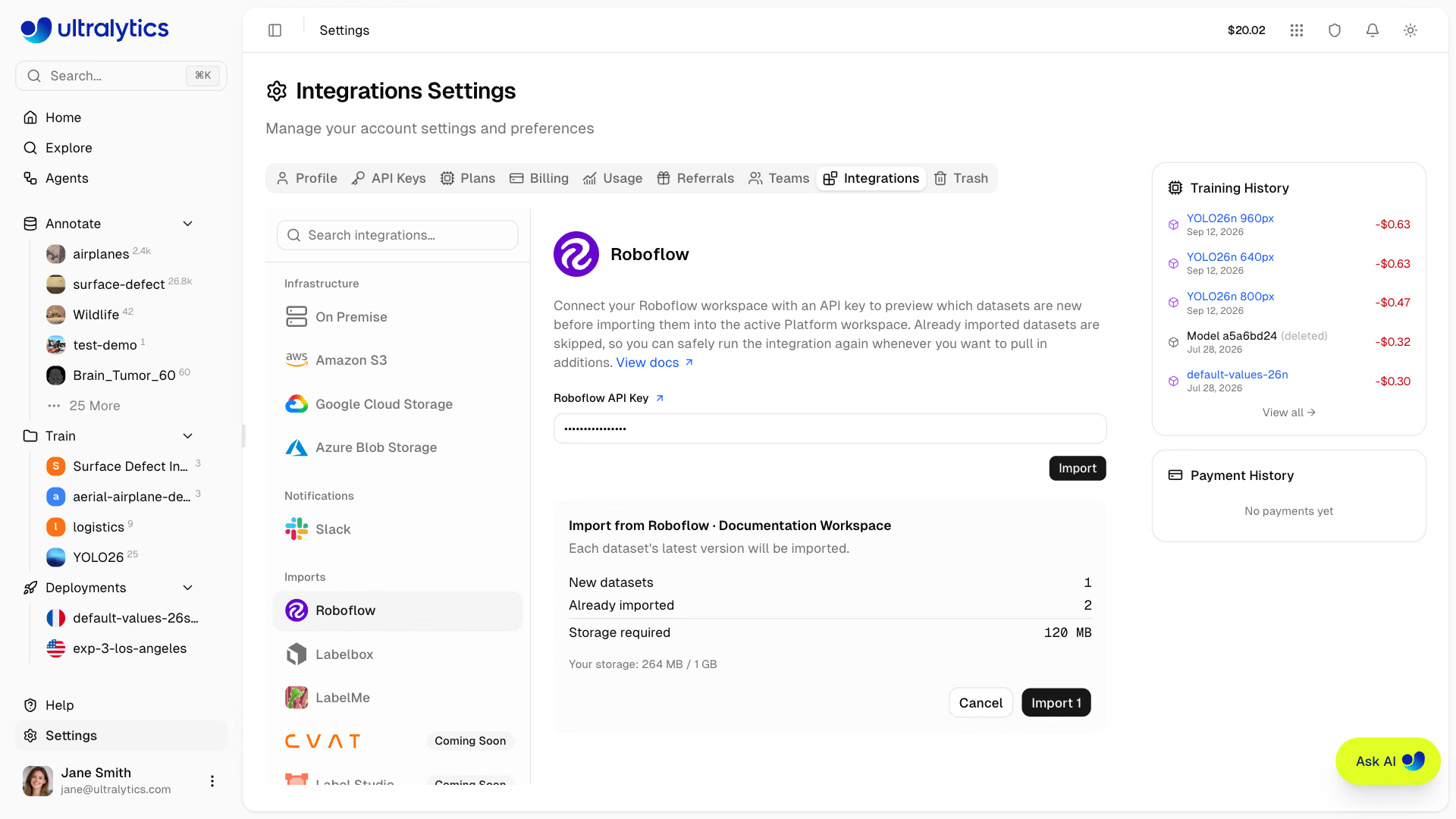
Imported datasets appear in your Datasets list immediately with a processing status and become ready once their images and annotations finish importing.
Any workspace editor can run the import. The preview is the slow step: Roboflow generates each new dataset's export archive before it can report a size, so a workspace with many fresh versions can take a minute or more to preview. If a very large workspace times out, run it again — Roboflow keeps generating the exports it already started, so the next preview has less to wait for.
If some datasets can't be started, for example because one exceeds your plan's per-import size limit, the rest still import and the notification after you confirm names the first failure and its reason. Requests that are rate-limited, fail with a server error, or time out are retried automatically, so one hiccup doesn't fail the whole workspace.
Supported Task Types#
Roboflow projects are mapped to the matching YOLO task type:
| Roboflow Project Type | Platform Task |
|---|---|
| Object Detection | Detect |
| Instance Segmentation | Segment |
| Single-Label Classification | Classify |
| Keypoint Detection | Pose |
Follow Roboflow's guide to find your API key. Platform uses the key to run the preview and the import and then discards it — nothing is saved, and there is no connection to disconnect later.
Projects with unsupported task types (such as multi-label classification and semantic segmentation) and projects that don't yet have a generated version are skipped; the preview counts the unsupported ones. A dataset whose export size Roboflow can't report in time is also left out and counted under couldn't be sized, retry later.
Already-imported dataset versions are detected and skipped automatically, so you can safely re-run the import to pull in newly added datasets without creating duplicates. A dataset whose import failed is retried in place instead of skipped. Bumping a project's version in Roboflow makes it a new dataset to import rather than an update to the one you already have.
A previously imported dataset that you moved to Trash is still detected and skipped, because it keeps occupying storage during the retention window. Delete it permanently before re-importing the same Roboflow version.
FAQ#
No. The key is used to run the preview and the import, then discarded. There is no saved connection and nothing to disconnect later.
Object detection, instance segmentation, single-label classification, and keypoint detection projects that have at least one generated version. Multi-label classification and semantic segmentation projects, and projects without a version, are skipped. You can also clear any new dataset in the preview to leave it out.
Run the import again. Datasets that are already imported, including ones sitting in Trash, are skipped, so only new projects and new versions are transferred.
Open the dataset to see why it failed, then run the import again. The preview lists the failed dataset among the new ones, and the import retries it in place rather than creating a second copy.
Roboflow generates an export archive for each new dataset version before it can report a size, so workspaces with many fresh versions can take a minute or more to preview. If it times out, run it again — Roboflow keeps generating the exports it already started, so the next preview has less to wait for.