CVAT Integration
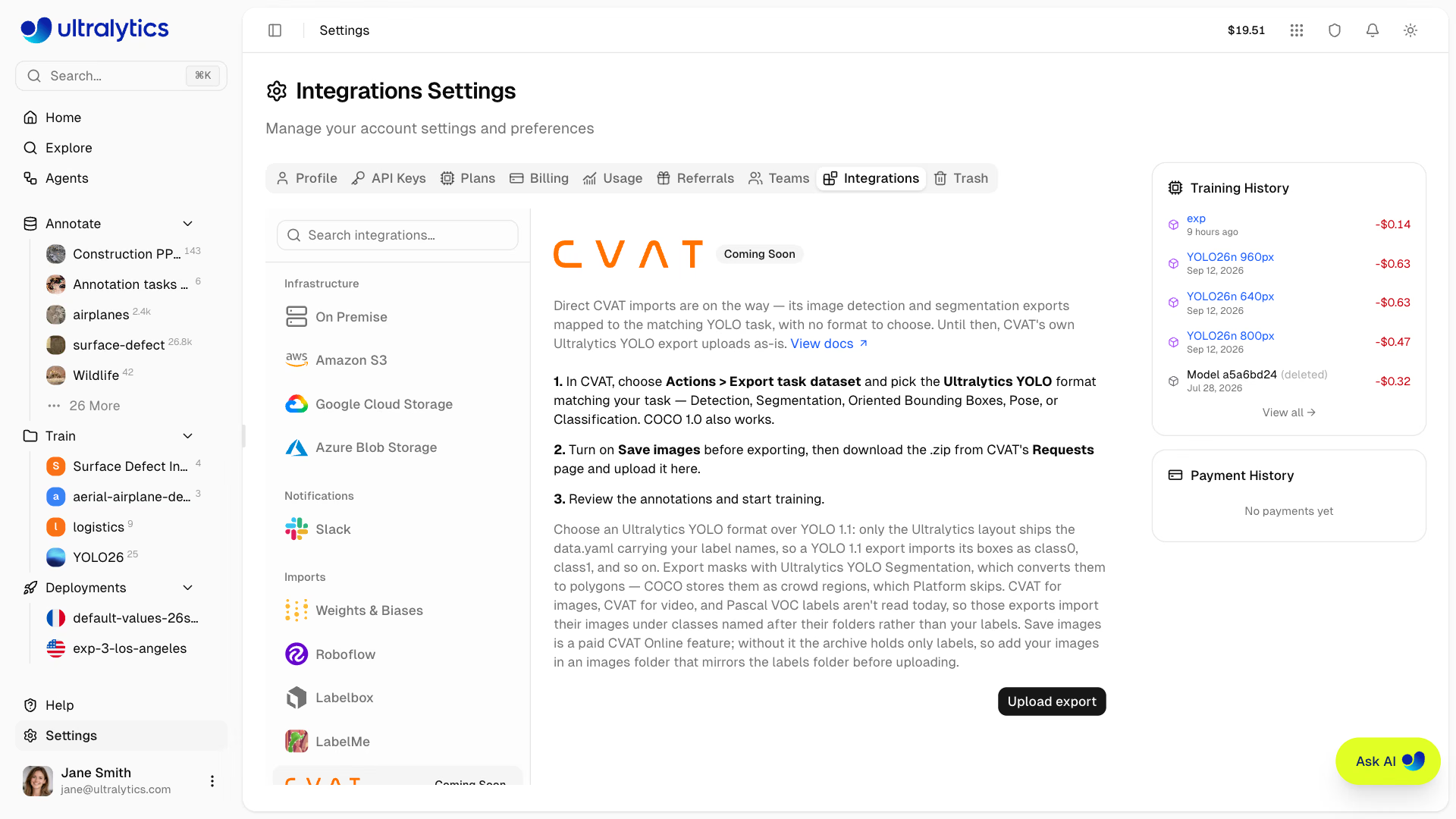
Direct CVAT imports are coming to Ultralytics Platform, so that a CVAT image detection or segmentation export uploads as-is with no format to choose.
Until then there is a short path that works today, because CVAT already exports in the Ultralytics YOLO layout Platform reads.
Import from CVAT Today#
- Export from CVAT. Open your task and choose Actions > Export task dataset (from a job it is Menu > Export job dataset).
- Pick the format. Choose the Ultralytics YOLO entry matching your task — CVAT lists
Ultralytics YOLO Detection 1.0,Ultralytics YOLO Detection Track 1.0,Ultralytics YOLO Segmentation 1.0,Ultralytics YOLO Oriented Bounding Boxes 1.0,Ultralytics YOLO Pose 1.0, andUltralytics YOLO Classification 1.0separately. - Turn on Save images, name the
.zip, and click OK. Save images is a paid feature on CVAT Online; without it the archive holds only labels, so add your images in animages/folder that mirrorslabels/before uploading. - Download the archive. The export runs in the background — collect it from CVAT's Requests page when it finishes.
- Upload to Platform. Create a new dataset from the ZIP.
- Train. Edit the annotations, train, and deploy without leaving the workspace.
Export with the CLI#
CVAT's CLI exports the same archive from a terminal:
pip install cvat-cli
cvat-cli project export-dataset --format "Ultralytics YOLO Detection 1.0" --with-images yes 104 dataset.zip
Replace 104 with your project ID and the format string with the variant matching your task. --with-images yes is the CLI equivalent of the Save images switch; without it the archive holds only labels, so add an images/ folder that mirrors labels/ before uploading.
CVAT's Ultralytics YOLO export produces the layout Platform expects, so nothing needs converting:
archive.zip/
├── data.yaml          # class names Platform reads
├── images/train/
└── labels/train/
What Each Export Keeps#
Each Ultralytics YOLO format writes only the CVAT shapes its task can hold, so pick the one matching how you labeled:
- Detection keeps rectangles, but skips rotated ones — export those with Oriented Bounding Boxes
- Detection Track keeps rectangles plus a track ID; Platform imports them as boxes and ignores the track ID
- Segmentation keeps polygons and masks, converting masks to polygons, and drops rectangles
- Pose keeps skeletons only; standalone points are not exported
- Classification keeps tags, and images without a tag land in a
no_labelclass
Polylines are not written by any of them.
Choosing an Export Format#
CVAT offers many export formats. These matter here:
| CVAT Format | Works | Notes |
|---|---|---|
| Ultralytics YOLO | Best | Ships data.yaml, so your label names come across intact |
| COCO 1.0 | Yes | Read too; a mix of polygons and boxes imports as segment, and the box-only ones are dropped |
| COCO Keypoints 1.0 | Yes | Imports as a pose dataset, with the keypoint count taken from the most common shape |
| YOLO 1.1 | Partly | Boxes import, but its obj.names file is not read — classes arrive as class0, class1, … |
| CVAT for images | No | The XML annotations are not read yet; the same applies to CVAT for video |
Every COCO annotation must carry a bbox to be read, and crowd regions ("iscrowd": 1) are skipped. CVAT writes masks
to COCO as crowd regions, so export masks with Ultralytics YOLO Segmentation instead. Category names
become the class names, and category IDs are unified across all the JSON files in the archive, so per-split exports keep
consistent class IDs. An object stored as several polygons is joined into one polygon.
Platform does not read CVAT for images, CVAT for video, or Pascal VOC XML labels, and these exports fail quietly rather than loudly: the images import, the annotations do not, and an export of five or more images also picks up classes named after its image folders. Choose Ultralytics YOLO or COCO instead.
What the Integration Will Add#
Picking the right export format is the step the integration removes. Once it ships, you will export any of CVAT's image detection and segmentation formats, upload it, and Platform will map the annotations to the matching YOLO task itself.
- No format to choose — CVAT's image detection and segmentation exports map to a YOLO dataset with label names preserved
- One workspace — labeling, training, and deployment stop spanning separate tools and a conversion script
- Keep annotating — imported datasets open in Platform's annotation editor, including SAM-powered smart annotation
- Train immediately — datasets are ready for cloud training as soon as they finish processing
FAQ#
Choose the Ultralytics YOLO entry that matches your task, with Save images turned on. It ships
data.yaml, so class names arrive intact. COCO 1.0 and COCO Keypoints 1.0 also import, while YOLO 1.1 loses class names and CVAT XML and Pascal VOC import without annotations.The Save images switch was off, or the CLI export ran without
--with-images yes. The archive then holds only labels. Re-export with images included, or, on a CVAT Online plan without Save images, add animages/folder that mirrorslabels/to the ZIP.Yes. Use
Ultralytics YOLO Segmentation 1.0orUltralytics YOLO Pose 1.0, or the COCO variants. Masks need the Ultralytics YOLO Segmentation export, which converts them to polygons, and pose needs CVAT skeletons. A COCO export mixing polygons and boxes imports as a segment dataset and drops the box-only annotations.You will upload any CVAT image detection or segmentation export as-is and Platform will map it to the matching YOLO task itself. Datasets you import today with the Ultralytics YOLO export continue to work unchanged.


Comments
Ask a question, share your results, or help someone else.