Labelbox Integration
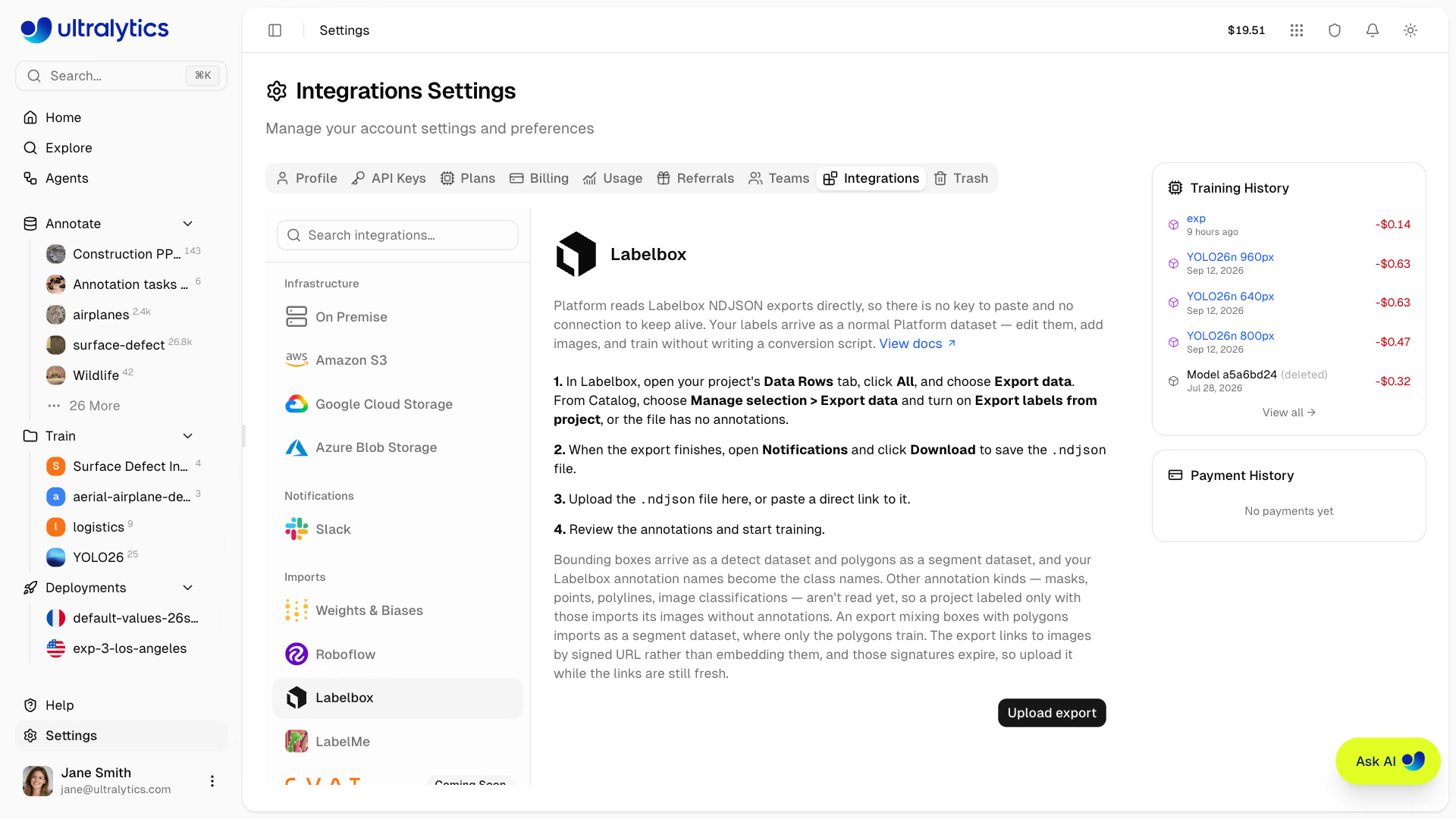
Ultralytics Platform reads Labelbox NDJSON exports directly. There is no key to paste, no connection to keep alive, and no conversion script to maintain — export from Labelbox, upload the file, and your labels arrive as a normal Platform dataset.
Import from Labelbox#
- Export from Labelbox. For a labeling project, open its Data Rows tab, select All, click Export data, choose the fields to include, and confirm. From Catalog, select the data rows and choose Manage selection > Export data, then turn on Export labels from project and pick the project, or the file arrives with no annotations at all.
- Download the file. Labelbox runs the export as a background job. Watch for it in Notifications and click Download when it finishes to save the
.ndjsonfile. - Upload to Platform. Create a new dataset and upload the
.ndjsonfile, or paste a direct link to it. You can also start from Settings > Integrations > Labelbox. - Train. Once processing finishes, edit the annotations and train exactly like any other Platform dataset.
Unlike CVAT and Label Studio, there is no format to choose — Labelbox's own export is the supported one.
Export with the SDK#
Labelbox also offers the export task in its Python SDK, which is the easier route for a repeatable pipeline. Stream the task and write one JSON object per line:
import json

import labelbox

client = labelbox.Client(api_key="YOUR_LABELBOX_API_KEY")
export_task = labelbox.ExportTask.get_task(client, "YOUR_EXPORT_TASK_ID")
export_task.wait_till_done()  # streaming a task that isn't COMPLETE raises

with open("dataset.ndjson", "w") as f:
f.writelines(json.dumps(data_row.json) + "\n" for data_row in export_task.get_buffered_stream())NDJSON is one JSON object per line. json.dump(list_of_rows, f) writes a single array instead, and Platform skips any line that is not a JSON object — the import finds no data rows at all. Use the loop above, or "\n".join(json.dumps(r) for r in rows).
What Gets Imported#
Platform recognizes the Labelbox format on its own and maps bounding boxes and polygons to the matching YOLO task type:
| Labelbox Annotation | Imported |
|---|---|
| Bounding box | Detect |
| Polygon | Segment |
| Segmentation mask, point, polyline, relationship, classification | Not yet |
Each object's name becomes the class name — so a "name": "Dog" annotation imports as the class Dog, not its lowercase value — and pixel coordinates are normalized against the media_attributes dimensions in the export, so keep media attributes in the export: rows without a width and height import their image without annotations. Only objects Platform can import register a class, so mask, point, and polyline tools don't add empty classes to the dataset. Each image is named after its data_row.external_id, then its global_key, falling back to the file name in the signed URL when the export carries neither. Image data rows are imported; video, text, and other non-image data rows are skipped. A catalog export with no annotations imports as an unlabeled image dataset, ready to label in Platform's annotation editor.
A single data row looks like this, trimmed to the fields Platform reads:
{
    "data_row": {
        "external_id": "000000000307.jpg",
        "global_key": "000000000307.jpg",
        "row_data": "https://storage.labelbox.com/...?Expires=...&Signature=..."
    },
    "media_attributes": { "height": 480, "width": 640, "mime_type": "image/jpeg" },
    "projects": {
        "<project-id>": {
            "labels": [
                {
                    "annotations": {
                        "objects": [
                            {
                                "name": "Dog",
                                "annotation_kind": "ImageBoundingBox",
                                "bounding_box": { "top": 200.0, "left": 407.0, "height": 172.0, "width": 176.0 }
                            }
                        ]
                    }
                }
            ]
        }
    }
}
Everything else in the export — embeddings, metadata_fields, attachments, project_details — is ignored. The embeddings are worth deselecting when you export: in a sample export they were around four-fifths of the file, against a fifth for the fields Platform actually reads.
Only bounding boxes and polygons are read today, and only from an object annotation — image-level classifications live elsewhere in the export and are skipped. A project labeled entirely with the segmentation-mask (brush) tool, points, polylines, or classifications imports its images but no annotations, and no error is raised. You can spot it on the dataset page: an imported dataset that kept its labels shows a labeled and annotation count next to the image count, and one that lost them shows neither.
A Labelbox export references each image by signed URL rather than embedding the pixels, and those signatures expire. Platform downloads the images from those URLs, probing a sample before it starts, so an export whose links have all lapsed fails immediately and tells you why — re-export from Labelbox and upload the new file. An export that is only partly expired imports the images it can still reach and skips the rest, so upload soon after exporting.
An export containing both bounding boxes and polygons is imported as a segment dataset, and a segment dataset carries polygon geometry only — the box annotations are not used for training or included in version exports. Export boxes and polygons as separate Labelbox projects if you need both. Polygons also need at least three points to be read.
FAQ#
Platform reads NDJSON, one JSON object per line. An export saved as a single JSON array is skipped entirely. Use the SDK loop above or Labelbox's own Export data download, which is already NDJSON.
Labelbox exports reference images by signed URL, and those signatures expire. Re-export from Labelbox and upload the new file soon after it finishes.
No. A mixed export imports as a segment dataset and only the polygons are used. Export boxes and polygons as separate Labelbox projects if you need both.


Comments
Ask a question, share your results, or help someone else.