SAM 3: Segment Anything with Concepts
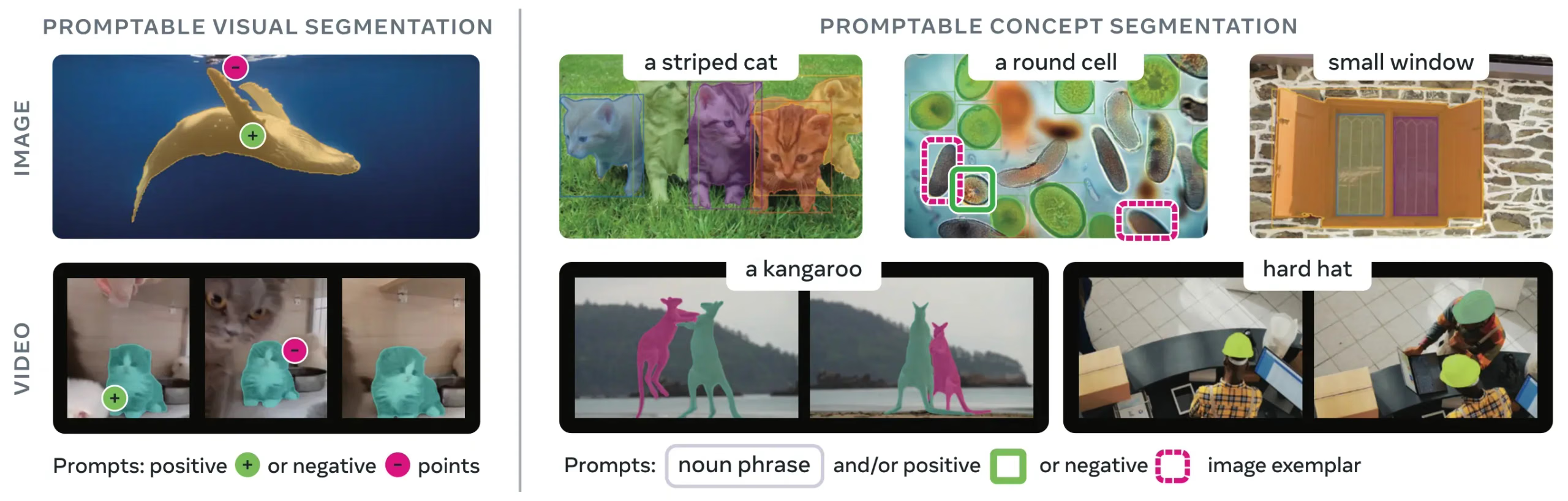
SAM 3 (Segment Anything Model 3) is Meta's foundation model for Promptable Concept Segmentation (PCS). Building upon SAM 2, SAM 3 introduces a new capability: detecting, segmenting, and tracking all instances of a visual concept specified by text prompts, image exemplars, or both. Unlike previous SAM versions that segment single objects per prompt, SAM 3 can find and segment every occurrence of a concept appearing anywhere in images or videos, aligning with open-vocabulary goals in modern instance segmentation.
Watch: How to Use Meta Segment Anything 3 with Ultralytics | Text-Prompt Segmentation on Images & Videos
SAM 3 is fully integrated into the ultralytics package, providing native support for concept segmentation with text prompts, image exemplar prompts, and video tracking. The newer SAM 3.1 checkpoint is supported for image prediction.
Overview#
SAM 3 achieves a 2× performance gain over existing systems in Promptable Concept Segmentation while maintaining and improving SAM 2's capabilities for interactive visual segmentation. The model excels at open-vocabulary segmentation, allowing users to specify concepts using simple noun phrases (e.g., "yellow school bus", "striped cat") or by providing example images of the target object. In Ultralytics, SAM 3 runs through predict mode, with dedicated video predictors for tracking.
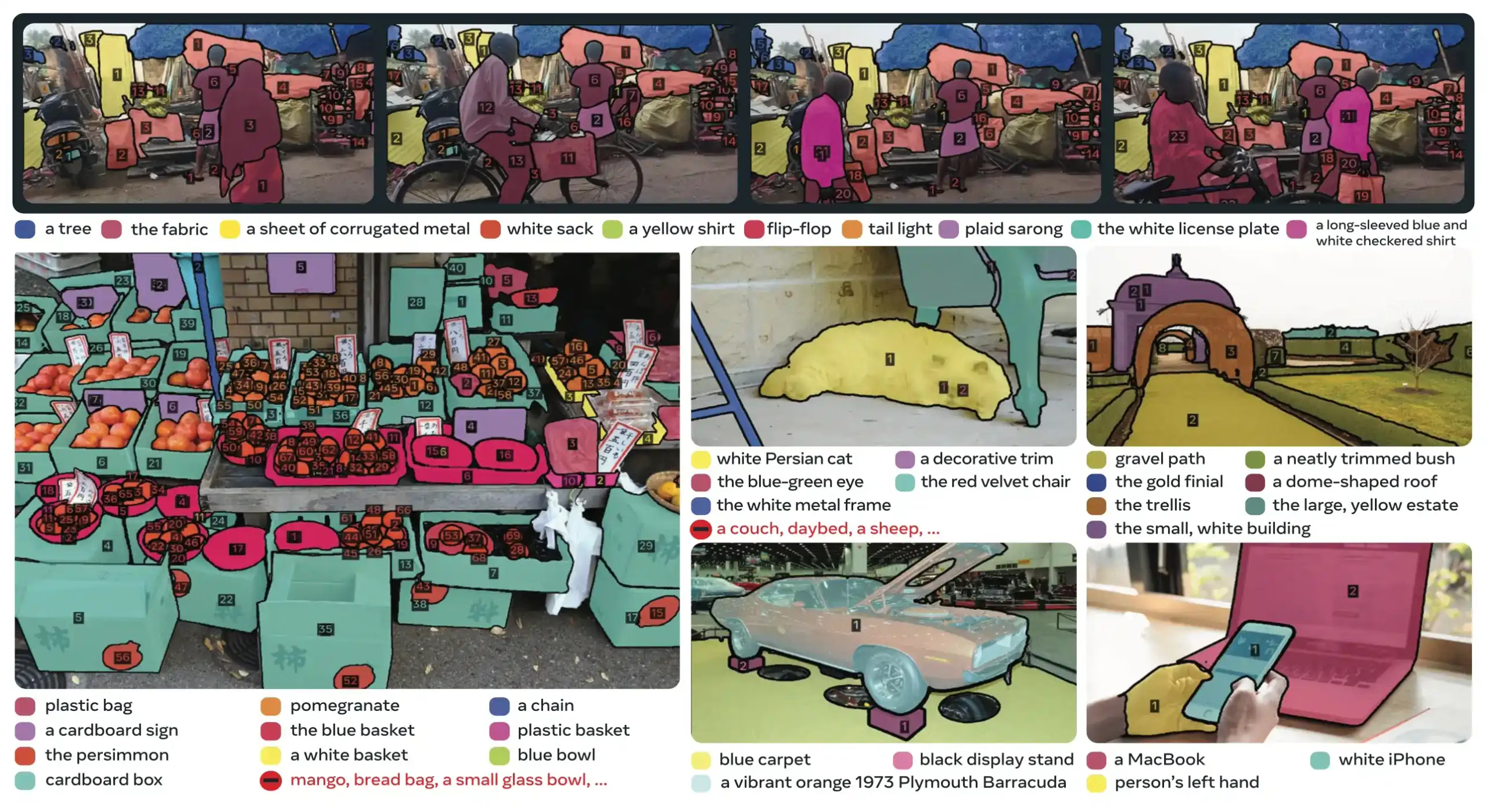
What is Promptable Concept Segmentation (PCS)?#
The PCS task takes a concept prompt as input and returns segmentation masks with unique identities for all matching object instances. Concept prompts can be:
- Text: Simple noun phrases like "red apple" or "person wearing a hat", similar to zero-shot learning
- Image exemplars: Bounding boxes around example objects (positive or negative) for fast generalization
- Combined: Both text and image exemplars together for precise control
This differs from traditional visual prompts (points, boxes, masks) which segment only a single specific object instance, as popularized by the original SAM family.
Key Performance Metrics#
| Metric | SAM 3 Achievement |
|---|---|
| LVIS Zero-Shot Mask AP | 47.0 (vs previous best 38.5, +22% improvement) |
| SA-Co Benchmark | 2× better than existing systems |
| Inference Speed (H200 GPU) | 30 ms per image with 100+ detected objects |
| Video Performance | Near real-time for ~5 concurrent objects |
| MOSEv2 VOS Benchmark | 60.1 J&F (+25.5% over SAM 2.1, +17% over prior SOTA) |
| Interactive Refinement | +18.6 CGF1 improvement after 3 exemplar prompts |
| Human Performance Gap | Achieves 88% of estimated lower bound on SA-Co/Gold |
For context on model metrics and trade-offs in production, see model evaluation insights and YOLO performance metrics.
SAM 3.1#
SAM 3.1, released by Meta on March 27, 2026, is a new SAM 3 checkpoint that adds Object Multiplex, a shared-memory approach to multi-object video tracking. Instead of processing every tracked object independently, SAM 3.1 groups objects into fixed-capacity buckets and processes them jointly, which Meta reports as a ~7× speedup at 128 objects on a single H100 GPU. The image detector and the interactive point-prompt head keep the SAM 3 architecture.
| Benchmark | Metric | SAM 3 | SAM 3.1 |
|---|---|---|---|
| SA-Co/VEval SA-V (test) | cgF1 | 30.3 | 30.5 |
| SA-Co/VEval YT-Temporal-1B (test) | cgF1 | 50.8 | 52.9 |
| SA-Co/VEval SmartGlasses (test) | cgF1 | 36.4 | 36.3 |
| MOSEv1 (val) | J&F | 78.4 | 79.6 |
| DAVIS17 (val) | J&F | 92.2 | 92.7 |
| SA-V (test) | J&F | 84.4 | 85.1 |
| YTVOS19 (val) | G | 89.7 | 89.3 |
| MOSEv2 (val) | J&Ḟ | 60.3 | 62.3 |
Ultralytics loads the SAM 3.1 checkpoint (sam3.1_multiplex.pt) into the SAM 3 image predictors: SAM("sam3.1_multiplex.pt") for point and box prompts, and SAM3SemanticPredictor for text and exemplar prompts. Object Multiplex video tracking is not supported yet, so keep using sam3.pt with SAM3VideoPredictor and SAM3VideoSemanticPredictor.
Architecture#
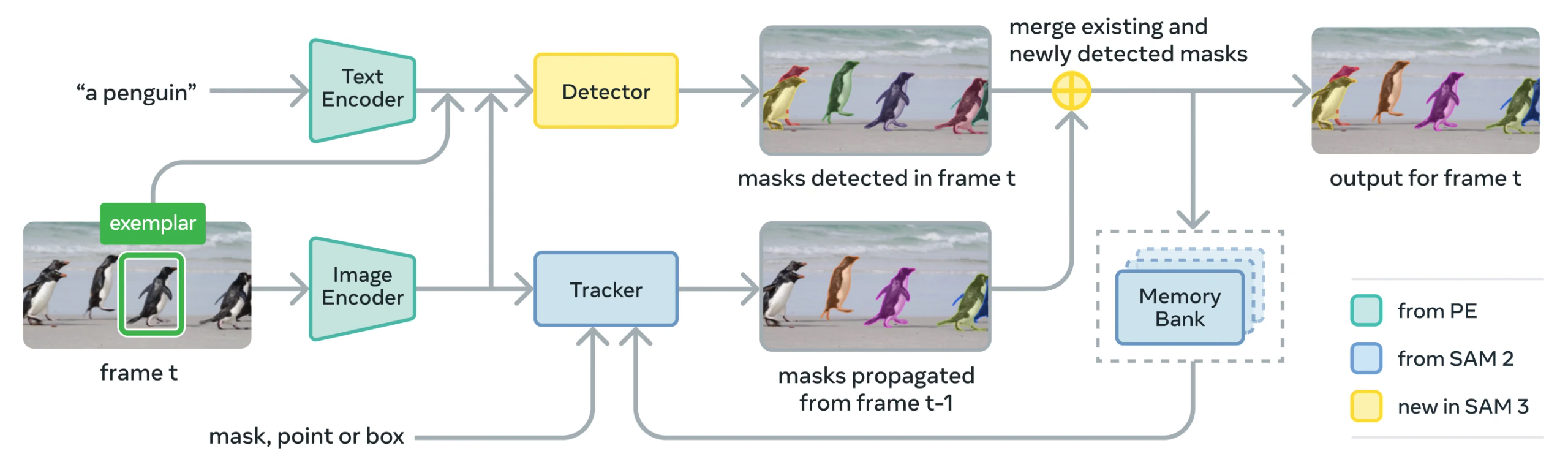
SAM 3 consists of a detector and tracker that share a Perception Encoder (PE) vision backbone. This decoupled design avoids task conflicts while enabling both image-level detection and video-level tracking, with an interface compatible with Ultralytics Python usage and CLI usage.
Core Components#
-
Detector: DETR-based architecture for image-level concept detection
- Text encoder for noun phrase prompts
- Exemplar encoder for image-based prompts
- Fusion encoder to condition image features on prompts
- Novel presence head that decouples recognition ("what") from localization ("where")
- Mask head for generating instance segmentation masks
-
Tracker: Memory-based video segmentation inherited from SAM 2
- Prompt encoder, mask decoder, memory encoder
- Memory bank for storing object appearance across frames
-
Presence Token: A learned global token that predicts whether the target concept is present in the image/frame, improving detection by separating recognition from localization.
Key Innovations#
- Decoupled Recognition and Localization: The presence head predicts concept presence globally, while proposal queries focus only on localization, avoiding conflicting objectives.
- Unified Concept and Visual Prompts: Supports both PCS (concept prompts) and PVS (visual prompts like SAM 2's clicks/boxes) in a single model.
- Interactive Exemplar Refinement: Users can add positive or negative image exemplars to iteratively refine results, with the model generalizing to similar objects rather than just correcting individual instances.
- Temporal Disambiguation: Uses masklet detection scores and periodic re-prompting to handle occlusions, crowded scenes, and tracking failures in video, aligning with instance segmentation and tracking best practices.
SA-Co Dataset#
SAM 3 is trained on Segment Anything with Concepts (SA-Co), Meta's largest and most diverse segmentation dataset to date, expanding beyond common benchmarks like COCO and LVIS.
Training Data#
| Dataset Component | Description | Scale |
|---|---|---|
| SA-Co/HQ | High-quality human-annotated image data from 4-phase data engine | 5.2M images, 4M unique noun phrases |
| SA-Co/SYN | Synthetic dataset labeled by AI without human involvement | 38M noun phrases, 1.4B masks |
| SA-Co/EXT | 15 external datasets enriched with hard negatives | Varies by source |
| SA-Co/VIDEO | Video annotations with temporal tracking | 52.5K videos, 24.8K unique noun phrases |
Benchmark Data#
The SA-Co evaluation benchmark contains 214K unique phrases across 126K images and videos, providing over 50× more concepts than existing benchmarks. It includes:
- SA-Co/Gold: 7 domains, triple-annotated for measuring human performance bounds
- SA-Co/Silver: 10 domains, single human annotation
- SA-Co/Bronze and SA-Co/Bio: 9 existing datasets adapted for concept segmentation
- SA-Co/VEval: Video benchmark with 3 domains (SA-V, YT-Temporal-1B, SmartGlasses)
Data Engine Innovations#
SAM 3's scalable human- and model-in-the-loop data engine achieves 2× annotation throughput through:
- AI Annotators: Llama-based models propose diverse noun phrases, including hard negatives
- AI Verifiers: Fine-tuned multimodal LLMs verify mask quality and exhaustivity at near-human performance
- Active Mining: Focuses human effort on challenging failure cases where AI struggles
- Ontology-Driven: Uses a large ontology grounded in Wikidata for concept coverage
Installation#
Install or upgrade the ultralytics package:
pip install -U ultralyticsUnlike other Ultralytics models, SAM 3 weights (sam3.pt) are not automatically downloaded. You must first request access for the model weights on the SAM 3 model page on Hugging Face and then, once approved, download sam3.pt from that page. Place the downloaded sam3.pt file in your working directory or specify the full path when loading the model.
SAM 3.1 weights (sam3.1_multiplex.pt) are gated the same way on the SAM 3.1 model page. Pass sam3.1_multiplex.pt anywhere the image examples below use sam3.pt.
If you get the above error during prediction, it means you have the incorrect clip package installed. Install the correct clip package by running the following:
pip uninstall clip -y
pip install git+https://github.com/ultralytics/CLIP.git
How to Use SAM 3: Versatility in Concept Segmentation#
SAM 3 supports both Promptable Concept Segmentation (PCS) and Promptable Visual Segmentation (PVS) tasks through different predictor interfaces:
Supported Tasks and Models#
| Task Type | Prompt Types | Output |
|---|---|---|
| Concept Segmentation (PCS) | Text (noun phrases), image exemplars | All instances matching the concept |
| Visual Segmentation (PVS) | Points, boxes, masks | Single object instance (SAM 2 style) |
| Interactive Refinement | Add/remove exemplars or clicks iteratively | Refined segmentation with improved accuracy |
Concept Segmentation Examples#
Segment with Text Prompts#
Find and segment all instances of a concept using a text description. Text prompts require the SAM3SemanticPredictor interface.
from ultralytics.models.sam import SAM3SemanticPredictor

# Initialize predictor with configuration
overrides = {
    "conf": 0.25,
    "task": "segment",
    "mode": "predict",
    "model": "sam3.pt",
    "quantize": 16,  # Use FP16 for faster inference
    "save": True,
}
predictor = SAM3SemanticPredictor(overrides=overrides)

# Set image once for multiple queries
predictor.set_image("path/to/image.jpg")

# Query with multiple text prompts
results = predictor(text=["person", "bus", "glasses"])

# Works with descriptive phrases
results = predictor(text=["person with red cloth", "person with blue cloth"])

# Query with a single concept
results = predictor(text=["a person"])
Segment with Image Exemplars#
Use bounding boxes as visual prompts to find all similar instances. This also requires SAM3SemanticPredictor for concept-based matching.
from ultralytics.models.sam import SAM3SemanticPredictor

# Initialize predictor
overrides = {"conf": 0.25, "task": "segment", "mode": "predict", "model": "sam3.pt", "quantize": 16, "save": True}
predictor = SAM3SemanticPredictor(overrides=overrides)

# Set image
predictor.set_image("path/to/image.jpg")

# Provide bounding box examples to segment similar objects
results = predictor(bboxes=[[480.0, 290.0, 590.0, 650.0]])

# Multiple bounding boxes as exemplars of the same visual concept
results = predictor(bboxes=[[539, 599, 589, 639], [343, 267, 499, 662]])
Feature-based Inference for Efficiency#
Extract image features once and reuse them for multiple segmentation queries to improve efficiency.
import cv2

from ultralytics.models.sam import SAM3SemanticPredictor
from ultralytics.utils.plotting import Annotator, colors

# Initialize predictors
overrides = {"conf": 0.50, "task": "segment", "mode": "predict", "model": "sam3.pt", "verbose": False}
predictor = SAM3SemanticPredictor(overrides=overrides)
predictor2 = SAM3SemanticPredictor(overrides=overrides)

# Extract features from the first predictor
source = "path/to/image.jpg"
predictor.set_image(source)
src_shape = cv2.imread(source).shape[:2]

# Setup second predictor and reuse features
predictor2.setup_model()

# Perform inference using shared features with text prompt
masks, boxes = predictor2.inference_features(predictor.features, src_shape=src_shape, text=["person"])

# Perform inference using shared features with bounding box prompt
masks, boxes = predictor2.inference_features(predictor.features, src_shape=src_shape, bboxes=[[439, 437, 524, 709]])

# Visualize results
if masks is not None:
    masks, boxes = masks.cpu().numpy(), boxes.cpu().numpy()
    im = cv2.imread(source)
    annotator = Annotator(im, pil=False)
    annotator.masks(masks, [colors(x, True) for x in range(len(masks))])

    cv2.imshow("result", annotator.result())
    cv2.waitKey(0)
Video Concept Segmentation#
Track Concepts Across Video with Bounding Boxes#
Detect and track object instances across video frames using bounding box prompts.
from ultralytics.models.sam import SAM3VideoPredictor

# Create video predictor
overrides = {"conf": 0.25, "task": "segment", "mode": "predict", "model": "sam3.pt", "quantize": 16}
predictor = SAM3VideoPredictor(overrides=overrides)

# Track objects using bounding box prompts
results = predictor(source="path/to/video.mp4", bboxes=[[706.5, 442.5, 905.25, 555], [598, 635, 725, 750]], stream=True)

# Process and display results
for r in results:
    r.show()  # Display frame with segmentation masks
Track Concepts with Text Prompts#
Track all instances of concepts specified by text across video frames.
from ultralytics.models.sam import SAM3VideoSemanticPredictor

# Initialize semantic video predictor
overrides = {
    "conf": 0.25,
    "task": "segment",
    "mode": "predict",
    "imgsz": 640,
    "model": "sam3.pt",
    "quantize": 16,
    "save": True,
}
predictor = SAM3VideoSemanticPredictor(overrides=overrides)

# Track concepts using text prompts
results = predictor(source="path/to/video.mp4", text=["person", "bicycle"], stream=True)

# Process results
for r in results:
    r.show()  # Display frame with tracked objects

# Alternative: Track with bounding box prompts
results = predictor(
    source="path/to/video.mp4",
    bboxes=[[864, 383, 975, 620], [705, 229, 782, 402]],
    labels=[1, 1],  # Positive labels
    stream=True,
)
Visual Prompts (SAM 2 Compatibility)#
SAM 3 maintains full backward compatibility with SAM 2's visual prompting for single-object segmentation:
The basic SAM interface behaves exactly like SAM 2, segmenting only the specific area indicated by visual prompts (points, boxes, or masks).
from ultralytics import SAM

model = SAM("sam3.pt")

# Single point prompt - segments object at specific location
results = model.predict(source="path/to/image.jpg", points=[900, 370], labels=[1])
results[0].show()

# Multiple points - segments single object with multiple point hints
results = model.predict(source="path/to/image.jpg", points=[[400, 370], [900, 370]], labels=[1, 1])

# Box prompt - segments object within bounding box
results = model.predict(source="path/to/image.jpg", bboxes=[100, 150, 300, 400])
results[0].show()Using SAM("sam3.pt") with visual prompts (points/boxes/masks) will segment only the specific object at that location, just like SAM 2. To segment all instances of a concept, use SAM3SemanticPredictor with text or exemplar prompts as shown above.
Performance Benchmarks#
Image Segmentation#
SAM 3 achieves state-of-the-art results across multiple benchmarks, including real-world datasets like LVIS and COCO for segmentation:
| Benchmark | Metric | SAM 3 | Previous Best | Improvement |
|---|---|---|---|---|
| LVIS (zero-shot) | Mask AP | 47.0 | 38.5 | +22.1% |
| SA-Co/Gold | CGF1 | 65.0 | 34.3 (OWLv2) | +89.5% |
| COCO (zero-shot) | Box AP | 53.5 | 52.2 (T-Rex2) | +2.5% |
| ADE-847 (semantic seg) | mIoU | 14.7 | 9.2 (APE-D) | +59.8% |
| PascalConcept-59 | mIoU | 59.4 | 58.5 (APE-D) | +1.5% |
| Cityscapes (semantic seg) | mIoU | 65.1 | 44.2 (APE-D) | +47.3% |
Explore dataset options for quick experimentation in Ultralytics datasets.
Video Segmentation Performance#
SAM 3 shows significant improvements over SAM 2 and prior state-of-the-art across video benchmarks such as DAVIS 2017 and YouTube-VOS:
| Benchmark | Metric | SAM 3 | SAM 2.1 L | Improvement |
|---|---|---|---|---|
| MOSEv2 | J&F | 60.1 | 47.9 | +25.5% |
| DAVIS 2017 | J&F | 92.0 | 90.7 | +1.4% |
| LVOSv2 | J&F | 88.2 | 79.6 | +10.8% |
| SA-V | J&F | 84.6 | 78.4 | +7.9% |
| YTVOS19 | J&F | 89.6 | 89.3 | +0.3% |
Few-Shot Adaptation#
SAM 3 adapts to new domains with few examples, which is relevant for data-centric AI workflows:
| Benchmark | 0-shot AP | 10-shot AP | Previous Best (10-shot) |
|---|---|---|---|
| ODinW13 | 59.9 | 71.6 | 67.9 (gDino1.5-Pro) |
| RF100-VL | 14.3 | 35.7 | 33.7 (gDino-T) |
Interactive Refinement Effectiveness#
SAM 3's concept-based prompting with exemplars converges much faster than visual prompting:
| Prompts Added | CGF1 Score | Gain vs Text-Only | Gain vs PVS Baseline |
|---|---|---|---|
| Text only | 46.4 | baseline | baseline |
| +1 exemplar | 57.6 | +11.2 | +6.7 |
| +2 exemplars | 62.2 | +15.8 | +9.7 |
| +3 exemplars | 65.0 | +18.6 | +11.2 |
| +4 exemplars | 65.7 | +19.3 | +11.5 (plateau) |
Object Counting Accuracy#
SAM 3 provides accurate counting by segmenting all instances, a common requirement in object counting:
| Benchmark | Accuracy | MAE | vs Best MLLM |
|---|---|---|---|
| CountBench | 95.6% | 0.11 | 92.4% (Gemini 2.5) |
| PixMo-Count | 87.3% | 0.22 | 88.8% (Molmo-72B) |
SAM 3 vs SAM 2 vs YOLO Comparison#
Here we compare SAM 3's capabilities with SAM 2 and YOLO26 models:
| Capability | SAM 3 | SAM 2 | YOLO26n-seg |
|---|---|---|---|
| Concept Segmentation | ✅ All instances from text/exemplars | ❌ Not supported | ❌ Not supported |
| Visual Segmentation | ✅ Single instance (SAM 2 compatible) | ✅ Single instance | ✅ All instances |
| Zero-shot Capability | ✅ Open vocabulary | ✅ Geometric prompts | ❌ Closed set |
| Interactive Refinement | ✅ Exemplars + clicks | ✅ Clicks only | ❌ Not supported |
| Video Tracking | ✅ Multi-object with identities | ✅ Multi-object | ✅ Multi-object |
| LVIS Mask AP (zero-shot) | 47.0 | N/A | N/A |
| MOSEv2 J&F | 60.1 | 47.9 | N/A |
| Speed (GPU, ms/im) | 2921 | 857 | 8.4 |
| Model Size | 3.45 GB | 162 MB (base) | 6.4 MB |
Speed benchmarked on NVIDIA RTX PRO 6000 with torch==2.9.1 and ultralytics==8.4.19.
Key Takeaways:
- SAM 3: Best for open-vocabulary concept segmentation, finding all instances of a concept with text or exemplar prompts
- SAM 2: Best for interactive single-object segmentation in images and videos with geometric prompts
- YOLO26: Best for real-time, high-speed segmentation with optional NMS-free end-to-end inference, exportable to many formats for deployment on GPUs, CPUs, and edge devices
- YOLOE: Best for real-time open-vocabulary detection and segmentation with text or visual prompts
SAM Comparison vs YOLO#
Comparing SAM 3, SAM 2, SAM, MobileSAM, and FastSAM against Ultralytics YOLO segmentation models (YOLOv8, YOLO11, YOLO26) in size, parameters, and GPU inference speed:
| Model | Size (MB) | Parameters (M) | Speed (GPU) (ms/im) |
|---|---|---|---|
| Meta SAM-b | 375 | 93.7 | 1306 |
| Meta SAM2-b | 162 | 80.8 | 857 |
| Meta SAM2-t | 78.1 | 38.9 | 668 |
| Meta SAM3 | 3450 | 473.6 | 2921 |
| MobileSAM | 40.7 | 10.1 | 605 |
| FastSAM-s with YOLOv8 backbone | 23.7 | 11.8 | 55.9 |
| Ultralytics YOLOv8n-seg | 6.7 (515x smaller) | 3.4 (139.1x less) | 17.4 (167x faster) |
| Ultralytics YOLO11n-seg | 5.9 (585x smaller) | 2.9 (163.1x less) | 12.6 (231x faster) |
| Ultralytics YOLO26n-seg | 6.4 (539x smaller) | 2.7 (175.2x less) | 8.4 (347x faster) |
This comparison demonstrates the substantial differences in model sizes and speeds between SAM variants and YOLO segmentation models. While SAM provides unique automatic segmentation capabilities, YOLO models, particularly YOLOv8n-seg, YOLO11n-seg and YOLO26n-seg, are significantly smaller, faster, and more computationally efficient.
Tests run on an NVIDIA RTX PRO 6000 with 96GB of VRAM using torch==2.9.1 and ultralytics==8.4.19. To reproduce this test:
from ultralytics import ASSETS, SAM, YOLO, FastSAM

# Profile SAM3, SAM2-t, SAM2-b, SAM-b, MobileSAM
for file in ["sam_b.pt", "sam2_b.pt", "sam2_t.pt", "mobile_sam.pt", "sam3.pt"]:
    model = SAM(file)
    model.info()
    model(ASSETS)

# Profile FastSAM-s
model = FastSAM("FastSAM-s.pt")
model.info()
model(ASSETS)

# Profile YOLO models
for file_name in ["yolov8n-seg.pt", "yolo11n-seg.pt", "yolo26n-seg.pt"]:
    model = YOLO(file_name)
    model.info()
    model(ASSETS, nms=False)  # YOLO26 NMS-free head; no-op for YOLOv8/YOLO11
Evaluation Metrics#
SAM 3 introduces new metrics designed for the PCS task, complementing familiar measures like F1 score, precision, and recall.
Classification-Gated F1 (CGF1)#
The primary metric combining localization and classification:
CGF1 = 100 × pmF1 × IL_MCC
Where:
- pmF1 (Positive Macro F1): Measures localization quality on positive examples
- IL_MCC (Image-Level Matthews Correlation Coefficient): Measures binary classification accuracy ("is the concept present?")
Why These Metrics?#
Traditional AP metrics don't account for calibration, making models difficult to use in practice. By evaluating only predictions above 0.5 confidence, SAM 3's metrics enforce good calibration and mimic real-world usage patterns in interactive prediction and tracking loops.
Key Ablations and Insights#
Impact of Presence Head#
The presence head decouples recognition from localization, providing significant improvements:
| Configuration | CGF1 | IL_MCC | pmF1 |
|---|---|---|---|
| Without presence | 57.6 | 0.77 | 74.7 |
| With presence | 63.3 | 0.82 | 77.1 |
The presence head provides a +5.7 CGF1 boost (+9.9%), primarily improving recognition ability (IL_MCC +6.5%).
Effect of Hard Negatives#
| Hard Negatives/Image | CGF1 | IL_MCC | pmF1 |
|---|---|---|---|
| 0 | 31.8 | 0.44 | 70.2 |
| 5 | 44.8 | 0.62 | 71.9 |
| 30 | 49.2 | 0.68 | 72.3 |
Hard negatives are crucial for open-vocabulary recognition, improving IL_MCC by 54.5% (0.44 → 0.68).
Training Data Scaling#
| Data Sources | CGF1 | IL_MCC | pmF1 |
|---|---|---|---|
| External only | 30.9 | 0.46 | 66.3 |
| External + Synthetic | 39.7 | 0.57 | 70.6 |
| External + HQ | 51.8 | 0.71 | 73.2 |
| All three | 54.3 | 0.74 | 73.5 |
High-quality human annotations provide large gains over synthetic or external data alone. For background on data quality practices, see data collection and annotation.
Applications#
SAM 3's concept segmentation capability enables new use cases:
- Content Moderation: Find all instances of specific content types across media libraries
- E-commerce: Segment all products of a certain type in catalog images, supporting auto-annotation
- Medical Imaging: Identify all occurrences of specific tissue types or abnormalities
- Autonomous Systems: Track all instances of traffic signs, pedestrians, or vehicles by category
- Video Analytics: Count and track all people wearing specific clothing or performing actions
- Dataset Annotation: Rapidly annotate all instances of rare object categories
- Scientific Research: Quantify and analyze all specimens matching specific criteria
SAM 3 Agent: Extended Language Reasoning#
SAM 3 can be combined with Multimodal Large Language Models (MLLMs) to handle complex queries requiring reasoning, similar in spirit to open-vocabulary systems like OWLv2 and T-Rex.
Performance on Reasoning Tasks#
| Benchmark | Metric | SAM 3 Agent (Gemini 2.5 Pro) | Previous Best |
|---|---|---|---|
| ReasonSeg (validation) | gIoU | 76.0 | 65.0 (SoTA) |
| ReasonSeg (test) | gIoU | 73.8 | 61.3 (SoTA) |
| OmniLabel (validation) | AP | 46.7 | 36.5 (REAL) |
| RefCOCO+ | Acc | 91.2 | 89.3 (LISA) |
Example Complex Queries#
SAM 3 Agent can handle queries requiring reasoning:
- "People sitting down but not holding a gift box in their hands"
- "The dog closest to the camera that is not wearing a collar"
- "Red objects larger than the person's hand"
The MLLM proposes simple noun phrase queries to SAM 3, analyzes returned masks, and iterates until satisfied.
Limitations#
SAM 3 has the following limitations:
- Phrase Complexity: Best suited for simple noun phrases; long referring expressions or complex reasoning may require MLLM integration
- Ambiguity Handling: Some concepts remain inherently ambiguous (e.g., "small window", "cozy room")
- Computational Requirements: Larger and slower than specialized detection models like YOLO
- Vocabulary Scope: Focused on atomic visual concepts; compositional reasoning is limited without MLLM assistance
- Rare Concepts: Performance may degrade on extremely rare or fine-grained concepts not well-represented in training data
Citation#
@misc{carion2025sam3,
  title         = {SAM 3: Segment Anything with Concepts},
  author        = {Nicolas Carion and Laura Gustafson and Yuan-Ting Hu and Shoubhik Debnath and Ronghang Hu and Didac Suris and Chaitanya Ryali and Kalyan Vasudev Alwala and Haitham Khedr and Andrew Huang and Jie Lei and Tengyu Ma and Baishan Guo and Arpit Kalla and Markus Marks and Joseph Greer and Meng Wang and Peize Sun and Roman R{\"a}dle and Triantafyllos Afouras and Effrosyni Mavroudi and Katherine Xu and Tsung-Han Wu and Yu Zhou and Liliane Momeni and Rishi Hazra and Shuangrui Ding and Sagar Vaze and Francois Porcher and Feng Li and Siyuan Li and Aishwarya Kamath and Ho Kei Cheng and Piotr Doll{\'a}r and Nikhila Ravi and Kate Saenko and Pengchuan Zhang and Christoph Feichtenhofer},
  year          = {2025},
  eprint        = {2511.16719},
  archivePrefix = {arXiv},
  primaryClass  = {cs.CV},
  url           = {https://arxiv.org/abs/2511.16719}
}FAQ#
SAM 3 was released by Meta on November 19, 2025 and is fully integrated into the
ultralyticspackage, with support for image prediction and video tracking through dedicated predictors.Yes. SAM 3 is fully integrated into the Ultralytics Python package, including concept segmentation, SAM 2–style visual prompts, and multi-object video tracking. SAM 3 and SAM 3.1 also power the smart annotation feature on Ultralytics Platform, where SAM 3.1 is the default model and you can annotate images with just a few clicks. On detection datasets with 1–200 classes, SAM 3 Text and SAM 3.1 Text also auto-annotate from your class names, and the VLM Leaderboard compares their accuracy with vision language models.
Yes, for image prediction. Load
sam3.1_multiplex.ptwherever the image examples on this page usesam3.pt:SAM("sam3.1_multiplex.pt")for point and box prompts, andSAM3SemanticPredictorfor text and exemplar prompts. Object Multiplex video tracking is not supported yet, so keep usingsam3.ptwith the video predictors. See SAM 3.1 for Meta's benchmarks.PCS is a new task introduced in SAM 3 that segments all instances of a visual concept in an image or video. Unlike traditional segmentation that targets a specific object instance, PCS finds every occurrence of a category. For example:
- Text prompt: "yellow school bus" → segments all yellow school buses in the scene
- Image exemplar: Box around one dog → segments all dogs in the image
- Combined: "striped cat" + exemplar box → segments all striped cats matching the example
Feature SAM 2 SAM 3 Task Single object per prompt All instances of a concept Prompt Types Points, boxes, masks + Text phrases, image exemplars Detection Capability Requires external detector Built-in open-vocabulary detector Recognition Geometry-based only Text and visual recognition Architecture Tracker only Detector + Tracker with presence head Zero-Shot Performance N/A (requires visual prompts) 47.0 AP on LVIS, 2× better on SA-Co Interactive Refinement Clicks only Clicks + exemplar generalization SAM 3 maintains backward compatibility with SAM 2 visual prompting while adding concept-based capabilities.
SAM 3 is trained on the Segment Anything with Concepts (SA-Co) dataset:
Training Data:
- 5.2M images with 4M unique noun phrases (SA-Co/HQ) - high-quality human annotations
- 52.5K videos with 24.8K unique noun phrases (SA-Co/VIDEO)
- 1.4B synthetic masks across 38M noun phrases (SA-Co/SYN)
- 15 external datasets enriched with hard negatives (SA-Co/EXT)
Benchmark Data:
- 214K unique concepts across 126K images/videos
- 50× more concepts than existing benchmarks (e.g., LVIS has ~4K concepts)
- Triple annotation on SA-Co/Gold for measuring human performance bounds
This scale and diversity underpin SAM 3's zero-shot generalization across open-vocabulary concepts.
SAM 3 and YOLO26 serve different use cases:
SAM 3 Advantages:
- Open-vocabulary: Segments any concept via text prompts without training
- Zero-shot: Works on new categories immediately
- Interactive: Exemplar-based refinement generalizes to similar objects
- Concept-based: Automatically finds all instances of a category
- Accuracy: 47.0 AP on LVIS zero-shot instance segmentation
YOLO26 Advantages:
- Speed: Orders of magnitude faster inference, with an optional NMS-free end-to-end head
- Efficiency: 539× smaller models (6.4MB vs 3.45GB)
- Resource-friendly: Runs on edge devices and mobile
- Real-time: Optimized for production deployments
Recommendation:
- Use SAM 3 for flexible, open-vocabulary segmentation where you need to find all instances of concepts described by text or examples
- Use YOLO26 for high-speed, production deployments where categories are known in advance
- Use SAM 2 for interactive single-object segmentation with geometric prompts
SAM 3 is designed for simple noun phrases (e.g., "red apple", "person wearing hat"). For complex queries requiring reasoning, combine SAM 3 with an MLLM as SAM 3 Agent:
Simple queries (native SAM 3):
- "yellow school bus"
- "striped cat"
- "person wearing red hat"
Complex queries (SAM 3 Agent with MLLM):
- "People sitting down but not holding a gift box"
- "The dog closest to the camera without a collar"
- "Red objects larger than the person's hand"
SAM 3 Agent achieves 76.0 gIoU on ReasonSeg validation (vs 65.0 previous best, +16.9% improvement) by combining SAM 3's segmentation with MLLM reasoning capabilities.
On the SA-Co/Gold benchmark with triple human annotation:
- Human lower bound: 74.2 CGF1 (most conservative annotator)
- SAM 3 performance: 65.0 CGF1
- Achievement: 88% of estimated human lower bound
- Human upper bound: 81.4 CGF1 (most liberal annotator)
SAM 3 achieves strong performance approaching human-level accuracy on open-vocabulary concept segmentation, with the gap primarily on ambiguous or subjective concepts (e.g., "small window", "cozy room").


Comments105
Ask a question, share your results, or help someone else.
 Glenn JocherUltralytics(edited)
SAM 3 looks like a big step forward for open-vocabulary segmentation, and it is now supported natively in
ultralytics. This page covers text, exemplar and video prompts; thesam3.ptweights are gated and must be requested from Meta on Hugging Face first.Feel free to drop questions or comments for the team below!
7koolfox
Incredible, when you think it’s available for use?
2- Glenn JocherUltralytics(edited)
SAM 3 is available now in
ultralytics: runpip install -U ultralyticsand see this page for usage. Thesam3.ptweights must be requested from Meta first. Abdulhady-WITCo
Appreciate the effort, and can't wait for your implementation. It's resource heavy already but I'm sure your optimisation will make a difference. Best of luck.
- Glenn JocherUltralytics(edited)
Thanks for the kind words—most of the credit goes to the Meta SAM team and the Ultralytics community. SAM 3 is now available in
ultralytics, and this page covers exactly those trade-offs, so you can balance its open-vocabulary power against lighter options like YOLO26 or SAM 2 on your hardware.
mishaogui
sam3如何把預訓練模型導出onnx進行推理,目前官方好像還不支持導出,求導出和推理。
1- Glenn JocherUltralytics(edited)
目前
ultralytics里 SAM 3 只支持predict/track推理,还没有提供把sam3.pt导出 ONNX 的官方流程(yolo export主要面向 YOLO 等可部署导出管线的模型);建议先按 SAM 3 使用文档 用 PyTorch 方式部署推理。如果你的目标是 ONNX 部署分割(固定类别/已知类别),更推荐直接用可导出的 YOLO26 分割 并参考 Export 模式;若你这边是“必须 SAM3→ONNX”的需求,麻烦在 Ultralytics 新建 Issue 说明场景并附上
yolo checks和最小复现脚本,方便我们评估支持路径。
tomer196
Hi, thanks for the great work. I am trying to use sam3.1. Is it supported? I tried using sam3.1 weights, and it seems to work, but each frame the objects get new IDs. Am I doing something wrong? Thanks
- Glenn JocherUltralytics(edited)
SAM 3.1 is supported for image prediction: load
sam3.1_multiplex.ptwherever the image examples usesam3.pt(SAM("sam3.1_multiplex.pt")for point and box prompts,SAM3SemanticPredictorfor text and exemplar prompts). Object Multiplex video tracking is not supported yet, so usesam3.ptwithSAM3VideoPredictororSAM3VideoSemanticPredictor. For stable identities across frames, run a video predictor on the full video rather than image inference frame-by-frame, since per-frame inference assigns fresh IDs each time. See the SAM 3 docs and the SAM predictor reference, and if you’re already doing that please drop a minimal repro plusyolo checksoutput here so the team can take a closer look.
yccckid
你好,我测试下来输入的常见的类别的提示词(包括一些限定词)都是可以分割的。不过提示词输入得越多确实MLLM时间会更长,sam分割倒是挺快的。你说的这个“ 只有在单点(正负样本)和掩码提示(精细化粗糙掩码)是会出现分割源码出现零碎和空洞现象 ”是在分割什么物体?物体的表面纹理是不是比较sparsely textured?怎么解决的?谢谢
On Thu, 23 Apr 2026 at 09:11, Yiwang2333 @.***> wrote:
我之前使用MLLM与SAM3结合起来成为SAM 3 Agent进行测试并没有发现分割的掩码出现空洞问题,他们都是完整的,只不过会出现分割不了提示词中的内容,而且耗时这方面会增加,这也正常。只有在单点(正负样本)和掩码提示(精细化粗糙掩码)是会出现分割源码出现零碎和空洞现象
— Reply to this email directly, view it on GitHub https://github.com/orgs/ultralytics/discussions/22441?email_source=notifications&email_token=APKLLPPMDYK4F36HG6B3BOL4XFUUJA5CNFSNUABIM5UWIORPF5TWS5BNNB2WEL2ENFZWG5LTONUW63SDN5WW2ZLOOQXTCNRWG43TCMBVUZZGKYLTN5XKOY3PNVWWK3TUUVSXMZLOOSWGM33PORSXEX3DNRUWG2Y#discussioncomment-16677105, or unsubscribe https://github.com/notifications/unsubscribe-auth/APKLLPKUZ2OAWS3Y672TETD4XFUUJAVCNFSM6AAAAACJTVH7HGVHI2DSMVQWIX3LMV43URDJONRXK43TNFXW4Q3PNVWWK3TUHMYTMNRXG4YTANI . You are receiving this because you commented.Message ID: @.*** com>
- Glenn JocherUltralytics
这种情况更像是
SAM("sam3.pt")的视觉提示分割问题而不是概念分割本身:单点或粗掩码在细长边界、低对比度或稀疏纹理目标上更容易出现碎片和空洞,通常可通过增加正负点、改用更紧的框提示,或直接用SAM3SemanticPredictor做文本/示例提示来改善,相关用法见 SAM 3 文档;如果你愿意,也欢迎把一张示例图和最小复现代码直接发在这个讨论里,我们可以按你的具体 case 看看。 Yiwang2333
其实我也想把示例和代码文件展示出来,但是可能我太蠢了不知道怎么发在这个讨论中,我已急哭😭
- Glenn JocherUltralytics
没关系,直接发在这里就可以:图片可直接拖到评论框上传,代码按 GitHub Markdown 写法 用代码块贴出;如果文件太大,就先发一个最小复现示例,只保留
model初始化、输入图像、提示词和实际输出即可,例如:from ultralytics import SAM model = SAM("sam3.pt") results = model.predict("test.jpg", points=[900, 370], labels=[1]) print(results[0].masks.data.shape if results[0].masks is not None else None)如果暂时不方便传图,也可以先把异常现象和文字版输出贴出来,我们继续帮你看。
一、单点分割 import numpy as np import torch from PIL import Image from sam3.model_builder import build_sam3_image_model from sam3.model.sam3_image_processor import Sam3Processor
device = "cuda" if torch.cuda.is_available() else "cpu" sam3_pt_path = "sam3_model/sam3.pt"
model = build_sam3_image_model( bpe_path=None, checkpoint_path=sam3_pt_path, device=device, enable_inst_interactivity=True, load_from_HF=False, ) processor = Sam3Processor(model) model.eval()
pil_image = Image.open("test.jpg").convert("RGB") inference_state = processor.set_image(pil_image)
正样本(1) + 负样本(0),点数与标签一一对应
point_coords = np.array([ [900.0, 370.0], # 前景点:点在目标上 [800.0, 400.0], # 背景点:点在要排除的区域 ]) point_labels = np.array([1, 0])
masks, scores, logits = model.predict_inst( inference_state, point_coords=point_coords, point_labels=point_labels, multimask_output=True, ) best = masks[int(np.argmax(scores))] mask_np = best.cpu().numpy() if isinstance(best, torch.Tensor) else np.asarray(best) print(mask_np.shape)
二、交互式细化 import numpy as np import torch from PIL import Image from sam3.model_builder import build_sam3_image_model from sam3.model.sam3_image_processor import Sam3Processor
device = "cuda" if torch.cuda.is_available() else "cpu" sam3_pt_path = "sam3_model/sam3.pt"
model = build_sam3_image_model( bpe_path=None, checkpoint_path=sam3_pt_path, device=device, enable_inst_interactivity=True, load_from_HF=False, ) processor = Sam3Processor(model) model.eval()
pil_image = Image.open("test.jpg").convert("RGB") inference_state = processor.set_image(pil_image)
若需要文本提示(与 demo 一致):
inference_state = processor.set_text_prompt(state=inference_state, prompt="your english prompt")
init_x = 900.0 init_y = 370.0 refinement_points = [[910.0, 380.0], [920.0, 360.0]] refinement_labels = [1, 0]
all_points = [[init_x, init_y]] + refinement_points all_labels = [1] + refinement_labels
masks, scores, logits = model.predict_inst( inference_state, point_coords=np.array(all_points), point_labels=np.array(all_labels), multimask_output=True, ) best = masks[int(np.argmax(scores))] mask_np = best.cpu().numpy() if isinstance(best, torch.Tensor) else np.asarray(best) print(mask_np.shape)
测试使用的是同一张图片,分割的内容是图中汽车,在单点分割和交互式细化中正负样本点结合使用会出现分割车辆边缘出现参差不齐零碎现象
- Glenn JocherUltralytics
感谢把代码贴出来,这更像是交互式点提示的行为而不是“汽车”这个类别本身:车窗反光、轮胎空隙和细长边界会让负点一旦靠近车身就容易把掩码边缘切碎或挖空,而且
multimask_output=True返回的最高分候选也不一定是最平滑的那个;建议先把负点移到目标外更远的位置、在断裂边缘补几个正点,或直接改用框/示例提示,如果你的目标是稳定分割整辆车,SAM3SemanticPredictor的文本/示例提示通常比稀疏点提示更稳,相关接口可参考 SAM 3 文档里的视觉提示与概念分割说明。 感谢您的回答,我还有一个问题,就是文本提示分割时,文本提示词可以对多张图片起作用,能做输入一个文本可以对所有图片进行分割,这一个功能已经实现。 但是有一个我实在是难以实现,就是比如有多张图片A、B、C、D...,在纯框选示例提示分割下,能不能做到只在A图上进行框选,然后进行纯框选示例提示分割时可以对A、B、C、D...多张图片进行分割呢。也就是实现一批图片中,只在一张图片上进行框选就能进行所有图片的分割,类似于图片搜索一样,在一批图片中随机挑一张图片,在这张挑选的图片中框选出汽车然后所有图片中的汽车都能被分割出来(类似在一批图片中框选后搜索出有汽车的图片进行分割)。我不知道这个功能是否能做到。 目前我使用的方法是在框选时将框选的目标进行切块,然后拼接在每一张待搜索图片上,最后根据拼接图片中的小目标切块进行示例提示分割,来实现一张图中框选能对所有图片进行分割,不过这种方法的效果有些一般,有时候分割不到东西或者是遗漏一些需要分割的目标。 还有一种方法是评论区向我提供的思路,将几何特征缓存下来,然后再另一张图片上应用这个几何特征,参考https://github.com/leon0514/trt-sam3,但是这位先生也提到了效果不好,目前我也正在尝试实现这种方法。 或者是理解在单图时框选示例提示分割到底在做什么,然后将这个行为重复作用于其他图片,这样是否也能实现呢?
- Glenn JocherUltralytics
目前原生
SAM3SemanticPredictor还不支持“在 A 图框一次,然后直接对 B/C/D 这类独立图片做纯示例检索+分割”;bboxes示例提示是作用在当前set_image()的那张图上,而文档里的inference_features()也是复用同一张图的特征、不是跨图迁移,所以更可靠的做法还是先用文本提示或检索/检测筛出候选图,再逐张做 SAM 3 分割,接口细节可参考 SAM3SemanticPredictor 参考。 好的,谢谢您的回复
shspc
ultralytics支持从其他图像中抽取特征作为视觉提示吗
在SAM3中
- Glenn JocherUltralytics
目前公开接口里,SAM 3 支持用
SAM3SemanticPredictor的bboxes做 exemplar 式视觉提示,也支持用inference_features()复用已提取特征,但文档里的用法主要是对当前图像做特征复用,不是直接把“另一张图像”的特征当作 prompt 传入;你可以先参考 SAM 3 文档 和 predictor API,如果你的目标是跨图像 exemplar prompting,欢迎把最小复现流程贴在这里,团队会继续看。 aoaoy288-oss
想知道,sam3是否能导成ONNX等格式
ZePequeno25
gostei bastante da para integrar diferentes modelos
SWTZJD
想请问SAM3最低支持的python版本和pytorch版本
- Glenn JocherUltralytics
欢迎直接把环境信息贴在这里,团队会看到;按目前公开信息,
SAM 3自ultralytics>=8.3.237起已集成,而ultralytics的基础要求是 Python>=3.8、PyTorch>=1.8,所以SAM 3目前至少按这组版本起步,参考 SAM 3 文档 和 Ultralytics PyPI 安装说明。 (docs.ultralytics.com)
cyt1990cyt1990-dev
运行环境为:Ultralytics 8.4.21 Python-3.11.8 torch-2.5.1+cu121 CUDA:0 (NVIDIA GeForce RTX 4070, 12282MiB) 运行使用掩码提示的概念分割的示例程序报错如下:WARNING imgsz=[640] must be multiple of max stride 14, updating to [644] Traceback (most recent call last): File "C:\Users\admin\PycharmProjects\PythonProject\testMasks.py", line 12, in results = predictor(source=img_path, masks=[rough]) ^^^^^^^^^^^^^^^^^^^^^^^^^^^^^^^^^^^^^^^^^ File "C:\Users\admin\PycharmProjects\PythonProject.venv\Lib\site-packages\ultralytics\engine\predictor.py", line 225, in call return list(self.stream_inference(source, model, *args, **kwargs)) # merge list of Results into one ^^^^^^^^^^^^^^^^^^^^^^^^^^^^^^^^^^^^^^^^^^^^^^^^^^^^^^^^^^^ File "C:\Users\admin\PycharmProjects\PythonProject.venv\Lib\site-packages\torch\utils_contextlib.py", line 36, in generator_context response = gen.send(None) ^^^^^^^^^^^^^^ File "C:\Users\admin\PycharmProjects\PythonProject.venv\Lib\site-packages\ultralytics\engine\predictor.py", line 330, in stream_inference preds = self.inference(im, *args, **kwargs) ^^^^^^^^^^^^^^^^^^^^^^^^^^^^^^^^^^^ File "C:\Users\admin\PycharmProjects\PythonProject.venv\Lib\site-packages\ultralytics\models\sam\predict.py", line 205, in inference return self.prompt_inference(im, bboxes, points, labels, masks, multimask_output) ^^^^^^^^^^^^^^^^^^^^^^^^^^^^^^^^^^^^^^^^^^^^^^^^^^^^^^^^^^^^^^^^^^^^^^^^^^ File "C:\Users\admin\PycharmProjects\PythonProject.venv\Lib\site-packages\ultralytics\models\sam\predict.py", line 236, in prompt_inference return self._inference_features(features, *prompts, multimask_output) ^^^^^^^^^^^^^^^^^^^^^^^^^^^^^^^^^^^^^^^^^^^^^^^^^^^^^^^^^^^^^^ File "C:\Users\admin\PycharmProjects\PythonProject.venv\Lib\site-packages\ultralytics\models\sam\predict.py", line 814, in _inference_features pred_masks, pred_scores, _, _ = self.model.sam_mask_decoder( ^^^^^^^^^^^^^^^^^^^^^^^^^^^^ File "C:\Users\admin\PycharmProjects\PythonProject.venv\Lib\site-packages\torch\nn\modules\module.py", line 1736, in _wrapped_call_impl return self._call_impl(*args, **kwargs) ^^^^^^^^^^^^^^^^^^^^^^^^^^^^^^^^ File "C:\Users\admin\PycharmProjects\PythonProject.venv\Lib\site-packages\torch\nn\modules\module.py", line 1747, in _call_impl return forward_call(*args, **kwargs) ^^^^^^^^^^^^^^^^^^^^^^^^^^^^^ File "C:\Users\admin\PycharmProjects\PythonProject.venv\Lib\site-packages\ultralytics\models\sam\modules\decoders.py", line 334, in forward masks, iou_pred, mask_tokens_out, object_score_logits = self.predict_masks( ^^^^^^^^^^^^^^^^^^^ File "C:\Users\admin\PycharmProjects\PythonProject.venv\Lib\site-packages\ultralytics\models\sam\modules\decoders.py", line 398, in predict_masks src = src + dense_prompt_embeddings ~~~~^~~~~~~~~~~~~~~~~~~~~~~~~ RuntimeError: The size of tensor a (46) must match the size of tensor b (161) at non-singleton dimension 3
运行代码如下所示: import cv2 import numpy as np from ultralytics.models.sam import SAM3Predictor
predictor = SAM3Predictor(overrides=dict(task="segment", mode="predict", model="sam/sam3.pt")) img_path = "测试图片/测试图片1/Out.jpg" rough = cv2.imread("测试图片/测试图片1/rough.jpg", cv2.IMREAD_GRAYSCALE) rough = (rough > 0).astype(np.uint8)
results = predictor(source=img_path, masks=[rough]) for result in results: annotated_img = result.plot() cv2.imshow("SAM with Mask Prompt", annotated_img) cv2.waitKey(0) cv2.destroyAllWindows()
图片Out.jpg,rough.jpg是大小为4024*3036,位深度为8的灰度图片
- Glenn JocherUltralytics
感谢补充代码,这个报错看起来不是图片分辨率本身的问题,而是
SAM3Predictor走masks=提示时出现了特征尺寸不匹配;按 SAM 3 文档 当前概念分割应使用SAM3SemanticPredictor配合text或示例bboxes,而SAM("sam3.pt")/SAM3Predictor主要是单对象视觉提示流程。若你在最新版本下仍需要masks提示,请新开一个 issue 并附上yolo checks输出、完整文本回溯和最小可复现脚本,方便我们确认这是否是 SAM 3 的一个 bug。
max-dev-14
I'd compared facebook/sam3 and ultralytics/sam3. I set up both the models for inference as follow: imgsz=1008, half=True, conf=0.5 and prompts = [ "person", "car", "truck", "tractor", "building", "combine harvester", "power lines", "clear sky", "trees", "crop field", "harvested field", "grassy field", "dark frame edges", "farm lane", "windrow" ] I'd attached scripts I used for inference: ul-sam3.py - ultralytics/sam3 inference. fb-sam3.py - facebook/sam3 inference.
I expected that there would be the same results of inference on the same videos and paramteres above. But I'd got different segments, as it can be seen on the screens below (there are original frame to the left, facebook/sam3 segmentation on the middle and ultralytics/sam3 segmentation to the right).
Can someone explain me why it's happened like this?
- Glenn JocherUltralytics
Thanks for raising it here — exact parity with
facebookresearch/sam3isn’t expected, because the Ultralytics integration uses its own SAM 3 predictor path for resizing/preprocessing and postprocessing, so matchingimgsz,half,conf, and prompts alone won’t guarantee identical masks; see the SAM 3 docs and the predictor reference. If you’d like us to check whether this is a bug rather than an implementation difference, please open a new issue with a minimal reproducible example, confirm both runs use the samesam3.pt, and includeyolo checksplus the full text outputs from both scripts.