Sony IMX500 Export for Ultralytics YOLO11
This guide covers exporting and deploying Ultralytics YOLOv8n and YOLO11n models to Raspberry Pi AI Cameras that feature the Sony IMX500 sensor.
Deploying computer vision models on devices with limited computational power, such as the Raspberry Pi AI Camera, can be tricky. Using a model format optimized for faster performance makes a significant difference.
The IMX500 model format is designed to use minimal power while delivering fast performance for neural networks. It allows you to optimize your Ultralytics YOLO11 models for high-speed and low-power inference. This guide walks you through exporting your models to the IMX500 format and deploying them on the Raspberry Pi AI Camera.
Why Should You Export to IMX500?#
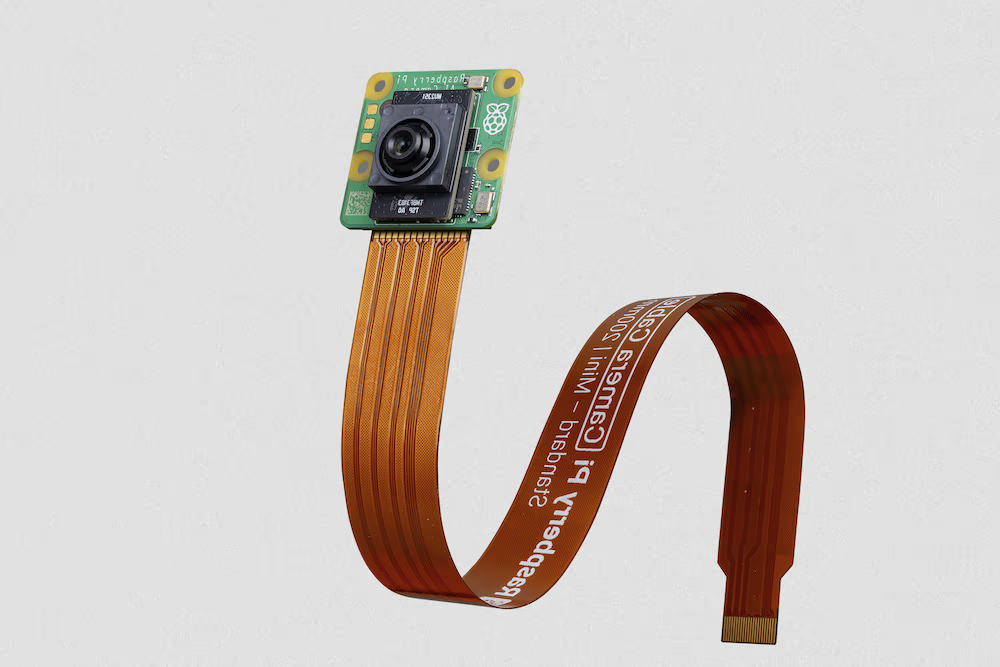
Sony's IMX500 Intelligent Vision Sensor runs AI processing on the sensor itself, which Sony describes as a world first for an intelligent vision sensor. It helps overcome common edge AI challenges, including data processing bottlenecks, privacy concerns, and performance limitations. While conventional sensors only pass along images and frames, the IMX500 interprets what it captures, allowing devices to generate insights in real time.
Sony's IMX500 Export for YOLO11 Models#
The IMX500 is designed to process data directly on the sensor, without sending it to the cloud for processing.
The IMX500 works with quantized models. Quantization makes models smaller and faster without losing much accuracy. It suits the limited resources of edge computing, allowing applications to respond quickly by reducing latency and allowing for quick data processing locally, without cloud dependency. Local processing also keeps user data private and secure since it's not sent to a remote server.
IMX500 Key Features:
- Metadata Output: Instead of transmitting images only, the IMX500 can output both image and metadata (inference result), and can output metadata only for minimizing data size, reducing bandwidth, and lowering costs.
- Addresses Privacy Concerns: By processing data on the device, the IMX500 addresses privacy concerns, making it well suited to human-centric applications like people counting and occupancy tracking.
- Real-time Processing: Fast, on-sensor processing supports real-time decisions for edge AI applications such as autonomous systems.
Before You Begin: For best results, ensure your YOLO11 model is well-prepared for export by following our Model Training Guide, Datasets Overview, and Hyperparameter Tuning Guide.
Supported Tasks#
IMX500 export supports four of the seven Ultralytics tasks, and only for YOLOv8n and YOLO11n: other model families, scales, and architectures are not supported, and exporting a semantic segmentation, OBB, or depth estimation model raises an error.
Usage Examples#
Export an Ultralytics YOLO11 model to IMX500 format and run inference with the exported model.
The IMX500 format supports the Export, Predict, and Validate modes. Ultralytics inference and validation run the exported model_imx.onnx on the host CPU.
Inference here only confirms that the exported model works as expected before deploying it to the Raspberry Pi AI Camera.
from ultralytics import YOLO

# Load a YOLO11n PyTorch model
model = YOLO("yolo11n.pt")

# Export the model
model.export(format="imx", data="coco8.yaml")  # exports with PTQ quantization by default

# Load the exported model
imx_model = YOLO("yolo11n_imx_model")

# Run inference
results = imx_model("https://ultralytics.com/images/bus.jpg")from ultralytics import YOLO
# Load a YOLO11n-pose PyTorch model
model = YOLO("yolo11n-pose.pt")
# Export the model
model.export(format="imx", data="coco8-pose.yaml") # exports with PTQ quantization by default
# Load the exported model
imx_model = YOLO("yolo11n-pose_imx_model")
# Run inference
results = imx_model("https://ultralytics.com/images/bus.jpg")from ultralytics import YOLO
# Load a YOLO11n-cls PyTorch model
model = YOLO("yolo11n-cls.pt")
# Export the model
model.export(format="imx", data="imagenet10") # exports with PTQ quantization by default
# Load the exported model
imx_model = YOLO("yolo11n-cls_imx_model")
# Run inference
results = imx_model("https://ultralytics.com/images/bus.jpg", imgsz=224)from ultralytics import YOLO
# Load a YOLO11n-seg PyTorch model
model = YOLO("yolo11n-seg.pt")
# Export the model
model.export(format="imx", data="coco8-seg.yaml") # exports with PTQ quantization by default
# Load the exported model
imx_model = YOLO("yolo11n-seg_imx_model")
# Run inference
results = imx_model("https://ultralytics.com/images/bus.jpg")from ultralytics import YOLO
# Load the exported IMX500 model
model = YOLO("yolo11n_imx_model")
# Validate accuracy on the COCO8 dataset
metrics = model.val(data="coco8.yaml")IMX export is only supported on Linux with Python 3.10–3.12 and requires Java 17 or later. The Ultralytics package installs additional export dependencies at runtime. The first time you run the export command, you may need to restart your console to ensure it works correctly.
Export Arguments#
| Argument | Type | Default | Description |
|---|---|---|---|
format | str | 'imx' | Target format for the exported model, defining compatibility with various deployment environments. |
imgsz | int or tuple | 640 | Desired image size for the model input. Can be an integer for square images or a tuple (height, width) for specific dimensions. |
quantize | int or str | 8/auto | Quantization precision. 8 (INT8/PTQ) is required and auto-enabled for IMX500. FP32 and FP16-only export are not supported. Replaces the deprecated half/int8 flags. |
data | str | None | Path to the dataset YAML, essential for quantization; classification instead takes a dataset directory or a built-in dataset name. If omitted, Ultralytics selects the default calibration dataset for the model task. |
fraction | float, int, or list | 1.0 | Calibration subset as a ratio, image count, or [train, val, test] ratios/counts. Two-item lists leave test full, while 0 skips it. |
nms | bool, optional | None | Select raw output (None, default), embedded NMS (True), or the NMS-free head (False). IMX requires nms=True for detect, segment and pose and selects it automatically. |
device | str | None | Specifies the device for exporting: GPU (device=0), CPU (device=cpu). |
For more details about the export process, visit the Ultralytics documentation page on exporting.
The export process creates a directory named <model-name>_imx_model. This directory contains model_imx.onnx for quantization validation and the packerOut.zip file, which is essential for packaging the model for deployment on the IMX500 hardware. Additionally, the <model-name>_imx_model folder will contain a text file (labels.txt) listing all the labels associated with the model.
yolo11n_imx_model
├── dnnParams.xml
├── labels.txt
├── packerOut.zip
├── model_imx.onnx
├── model_imx_MemoryReport.json
└── model_imx.pbtxt
Using IMX500 Export in Deployment#
After exporting an Ultralytics YOLO11n model to IMX500 format, you can deploy it to the Raspberry Pi AI Camera for inference.
Hardware Prerequisites#
Make sure you have the following hardware:
- Raspberry Pi 5 or Raspberry Pi 4 Model B
- Raspberry Pi AI Camera
Connect the Raspberry Pi AI Camera to the 15-pin MIPI CSI connector on the Raspberry Pi and power on the Raspberry Pi.
Software Prerequisites#
This guide has been tested with Raspberry Pi OS Bookworm running on a Raspberry Pi 5.
Step 1: Open a terminal window and execute the following commands to update the Raspberry Pi software to the latest version.
sudo apt update && sudo apt full-upgradeStep 2: Install IMX500 firmware which is required to operate the IMX500 sensor.
sudo apt install imx500-allStep 3: Reboot the Raspberry Pi for the changes to take effect.
sudo rebootStep 4: Install the AITRIOS Raspberry Pi application module library
pip install git+https://github.com/SonySemiconductorSolutions/aitrios-rpi-application-module-library.gitStep 5: Run YOLO11 object detection, pose estimation, classification, and segmentation using the following scripts, which are available in aitrios-rpi-application-module-library examples.
Make sure to replace model_file and labels.txt directories according to your environment before running these scripts.
import numpy as np
from modlib.apps import Annotator
from modlib.devices import AiCamera
from modlib.models import COLOR_FORMAT, MODEL_TYPE, Model
from modlib.models.post_processors import pp_od_yolo_ultralytics

class YOLO(Model):
    """YOLO model for IMX500 deployment."""

    def __init__(self):
        """Initialize the YOLO model for IMX500 deployment."""
        super().__init__(
            model_file="yolo11n_imx_model/packerOut.zip",  # replace with proper directory
            model_type=MODEL_TYPE.CONVERTED,
            color_format=COLOR_FORMAT.RGB,
            preserve_aspect_ratio=False,
        )

        self.labels = np.genfromtxt(
            "yolo11n_imx_model/labels.txt",  # replace with proper directory
            dtype=str,
            delimiter="\n",
        )

    def post_process(self, output_tensors):
        """Post-process the output tensors for object detection."""
        return pp_od_yolo_ultralytics(output_tensors)

device = AiCamera(frame_rate=16)  # Optimal frame rate for maximum FPS of the YOLO model running on the AI Camera
model = YOLO()
device.deploy(model)

annotator = Annotator()

with device as stream:
    for frame in stream:
        detections = frame.detections[frame.detections.confidence > 0.55]
        labels = [f"{model.labels[class_id]}: {score:0.2f}" for _, score, class_id, _ in detections]

        annotator.annotate_boxes(frame, detections, labels=labels, alpha=0.3, corner_radius=10)
frame.display()Benchmarks#
YOLOv8n, YOLO11n, YOLOv8n-pose, YOLO11n-pose, YOLOv8n-cls and YOLO11n-cls benchmarks below were run by the Ultralytics team on Raspberry Pi AI Camera with imx model format measuring speed and accuracy.
| Model | Format | Size (pixels) | Size of packerOut.zip (MB) | mAP50-95(B) | Inference time (ms/im) |
|---|---|---|---|---|---|
| YOLOv8n | imx | 640 | 2.1 | 0.470 | 58.79 |
| YOLO11n | imx | 640 | 2.2 | 0.517 | 58.82 |
| YOLOv8n-pose | imx | 640 | 2.0 | 0.687 | 58.79 |
| YOLO11n-pose | imx | 640 | 2.1 | 0.788 | 62.50 |
| Model | Format | Size (pixels) | Size of packerOut.zip (MB) | acc (top1) | acc (top5) | Inference time (ms/im) |
|---|---|---|---|---|---|---|
| YOLOv8n-cls | imx | 224 | 2.3 | 0.25 | 0.5 | 33.31 |
| YOLO11n-cls | imx | 224 | 2.3 | 0.25 | 0.417 | 33.31 |
Validation for the above benchmarks was done using the COCO128 dataset for detection models, the COCO8-Pose dataset for pose estimation models, and ImageNet10 for classification models.
What's Under the Hood?#

Sony Model Compression Toolkit (MCT)#
Sony's Model Compression Toolkit (MCT) is a toolkit for optimizing deep learning models through quantization and pruning. It supports various quantization methods and provides advanced algorithms to reduce model size and computational complexity without significantly sacrificing accuracy. MCT is particularly useful for deploying models on resource-constrained devices, where it enables efficient inference and reduced latency.
Supported Features of MCT#
Sony's MCT offers a range of features designed to optimize neural network models:
- Graph Optimizations: Transforms models into more efficient versions by folding layers like batch normalization into preceding layers.
- Quantization Parameter Search: Minimizes quantization noise using metrics like Mean-Square-Error, No-Clipping, and Mean-Average-Error.
- Advanced Quantization Algorithms:
- Shift Negative Correction: Addresses performance issues from symmetric activation quantization.
- Outliers Filtering: Uses z-score to detect and remove outliers.
- Clustering: Uses non-uniform quantization grids for better distribution matching.
- Mixed-Precision Search: Assigns different quantization bit-widths per layer based on sensitivity.
- Visualization: Use TensorBoard to observe model performance insights, quantization phases, and bit-width configurations.
Quantization#
MCT supports several quantization methods to reduce model size and improve inference speed:
- Post-Training Quantization (PTQ):
- Available via Keras and PyTorch APIs.
- Complexity: Low
- Computational Cost: Low (CPU minutes)
- Gradient-based Post-Training Quantization (GPTQ):
- Available via Keras and PyTorch APIs.
- Complexity: Medium
- Computational Cost: Moderate (2-3 GPU hours)
- Quantization-Aware Training (QAT):
- Complexity: High
- Computational Cost: High (12-36 GPU hours)
MCT also supports various quantization schemes for weights and activations:
- Power-of-Two (hardware-friendly)
- Symmetric
- Uniform
Structured Pruning#
MCT introduces structured, hardware-aware model pruning designed for specific hardware architectures. This technique leverages the target platform's Single Instruction, Multiple Data (SIMD) capabilities by pruning SIMD groups. This reduces model size and complexity while optimizing channel utilization, aligned with the SIMD architecture for targeted resource utilization of weights memory footprint. Available via Keras and PyTorch APIs.
IMX500 Converter Tool (Compiler)#
The IMX500 Converter Tool is integral to the IMX500 toolset, allowing the compilation of models for deployment on Sony's IMX500 sensor (for instance, Raspberry Pi AI Cameras). It compiles quantized Ultralytics YOLO11 models into a form that runs efficiently on the target hardware. After quantization, the export generates binary files containing the model data and device-specific configuration needed for deployment on the Raspberry Pi AI Camera.
Real-World Use Cases#
Export to IMX500 format has wide applicability across industries. Here are some examples:
- Edge AI and IoT: Enable object detection on drones or security cameras, where real-time processing on low-power devices is essential.
- Wearable Devices: Deploy models optimized for small-scale AI processing on health-monitoring wearables.
- Smart Cities: Use IMX500-exported YOLO11 models for traffic monitoring and safety analysis with faster processing and minimal latency.
- Retail Analytics: Enhance in-store monitoring by deploying optimized models in point-of-sale systems or smart shelves.
Conclusion#
Exporting Ultralytics YOLO11 models to Sony's IMX500 format allows you to deploy your models for efficient inference on IMX500-based cameras. Quantization reduces model size and improves inference speed with only a small loss in accuracy.
For more information and detailed guidelines, refer to Sony's IMX500 website.
FAQ#
To export a YOLO11 model to IMX500 format, use either the Python API or CLI command:
from ultralytics import YOLO

model = YOLO("yolo11n.pt")
model.export(format="imx")  # Exports with PTQ quantization by default
The export process will create a directory containing the necessary files for deployment, including
packerOut.zip.The IMX500 format offers several important advantages for edge deployment:
- On-chip AI processing reduces latency and power consumption
- Outputs both image and metadata (inference result) instead of images only
- Enhanced privacy by processing data locally without cloud dependency
- Real-time processing capabilities ideal for time-sensitive applications
- Optimized quantization for efficient model deployment on resource-constrained devices
For deploying IMX500 models, you'll need:
Hardware:
- Raspberry Pi 5 or Raspberry Pi 4 Model B
- Raspberry Pi AI Camera with IMX500 sensor
Software:
- Raspberry Pi OS Bookworm
- IMX500 firmware and tools (
sudo apt install imx500-all)
Based on Ultralytics benchmarks on Raspberry Pi AI Camera:
- YOLO11n achieves 58.82ms inference time per image
- mAP50-95 of 0.517 on COCO128 dataset
- Model size of only 2.2MB after quantization
This demonstrates that IMX500 format provides efficient real-time inference while maintaining good accuracy for edge AI applications.


Comments86
Ask a question, share your results, or help someone else.
 Chad Walsh
where is the best place to get support on the IMX500. I am running into multiple issues: i. my first yolo11n model built fine and exported to imx500, no problem, but my second model with a LOT more training images build fine but crashed the imx500 export. ii. the output of the imx500 during inference is giving a lot of none outputs between solid recognitions. it seems like there is something interfering with or disrupting the inference outputs (e.g., good output, none, none, none, none, good output, ...). where is the best place to get help with these issues?
 Glenn JocherUltralytics
Please continue the discussion here so the Ultralytics team can help; for the export crash, share the exact export command, full text traceback, and output from
yolo checks, and for intermittentNoneresults include a minimal inference script, confidence threshold, and a short reproducible input sample. Note that IMX export uses the calibration dataset specified bydataand defaults to the full dataset, so testing a smallerfractionmay help isolate resource-related failures.
leeprevost
I've made considerable progress by moving conducting this model compression process with a Container using dtcooper/raspberrypi-os:python3.11 after considerable problems with dependencies. Now getting a container most of the way through the process of compressing my yolov11s model and its trained best.pt weights.
At the end of the process - I get a simple "killed" after the Calculation of quantization parameters step. I see memory spiking close to 100% on top and think I'm hitting OOM with my pi4 8gb.
root@a5e132f6b333:/app# yolo export model=./models/yolov11/best.pt data='Billfish-Breeds-1/data.yaml' format=imx verbos>
Ultralytics 8.3.221 🚀 Python-3.11.14 torch-2.9.0+cpu CPU (aarch64)
WARNING ⚠️ IMX export requires nms=True, setting nms=True.
YOLO11s summary (fused): 100 layers, 9,413,187 parameters, 0 gradients, 21.3 GFLOPs

PyTorch: starting from 'models/yolov11/best.pt' with input shape (1, 3, 640, 640) BCHW and output shape(s) ((1, 8400, 4>
IMX: collecting INT8 calibration images from 'data=Billfish-Breeds-1/data.yaml'
Fast image access ✅ (ping: 0.1±0.0 ms, read: 16.1±2.7 MB/s, size: 16.4 KB)
Scanning /app/Billfish-Breeds-1/valid/labels.cache... 268 images, 0 backgrounds, 0 corrupt: 100% ━━━━━━━━━━━━ 268/268 1>
WARNING ⚠️ IMX: >300 images recommended for INT8 calibration, found 268 images.

IMX: starting export with model_compression_toolkit 2.4.4...
representative_data_gen generates a batch size of 1 which can be slow for optimization: consider increasing the batch s>
WARNING:Model Compression Toolkit:OperatorSetNames.DEPTHWISE_CONV is not in model.
Statistics Collection: 268it [1:01:26, 13.76s/it]
Calculating quantization parameters: 100%|█████████████████████████████████████████████████████| 294/294 [12:44<00:00, >
Killed
Would appreciate any suggestion around this but think it probably pushes me over the edge to order my pi5? Or do I try to train on the yolov8 or yolov11n? I've not had very good success with the nano models. I've convinced myself the tradeoffs to the small is well worth it but that may be incompatible with this process?
@glenn-jocher am I posting at the right place? Put this in issues on gh?
- Glenn JocherUltralytics
@leeprevost you’re in the right place for discussion, but the OOM during IMX export is a new issue—please open a new issue for visibility. In the issue, include: the exact export command and full log,
yolo checksoutput (orultralytics.utils.checks.collect_system_info()), Java version (java --version), and the versions of IMX toolchain (pip freeze | grep -E "imx500|model-compression|sony-custom"). As immediate workarounds: export on a Linux x86_64 machine with more RAM, target YOLO11n/YOLOv8n (the IMX path is tuned for “n” models), and reduce calibration load withfraction(e.g., 0.25). Example:yolo export model=best.pt format=imx data=your.yaml imgsz=640 fraction=0.25IMX-specific knobs are summarized in the IMX500 export arguments here: Sony IMX500 export guide – Export arguments, and the exporter function requirements here: export_imx reference.
Thank you. I'll dig into the logs and see if I can add anything before opening new issue.
a few more questions and I will open an issue:
- Note that I was using a model trained on yolov11s rather than n as I've seen large degradation in the number of false positives in my model.
- I assume by "full log" you mean the output from the yolo export command with verbose at default (true). In other words, what I posted above?
- For some reason, I thought I read int he docs that i had to perform the model compression on the target machine. for me, the ultimate target is RpiZero2 but no way the model will export on that footprint . so, I went to the largest pi I have which is a Rpi4 -- that resulted in the OOM. So, am unsure by your guidance pointing me to the larger x86 linux machine. How will the process know the device limits if I perform it on that?
Trying to read these guides as best I can. I have not spent much time on the Sony site yet. If you'll point me, I don't want to start an issue that isn't an issue.
I opened an issue: https://github.com/ultralytics/ultralytics/issues/22512
Just tried the export again with the fraction=0.25 argument and got to "Optimal Solution Found" with objective measure of 0.94, then died with error:
Error x IMX: export failure 12662.7s: No module named 'onnxscript'
https://github.com/pytorch/pytorch/issues/166352 -- adding to my requirements.txt pointed to by Containerfile.
- Glenn JocherUltralytics(edited)
@leeprevost great progress. IMX export/quantization does not need to run on the target; it cross-compiles for IMX500, so doing it on a larger Linux host is recommended. “Full log” means the complete stdout/stderr from the export run.
The “No module named 'onnxscript'” failure is a missing dependency. Current Ultralytics installs the IMX toolchain (including
imx500-converterandmodel-compression-toolkit) itself, so upgrade withpip install -U ultralyticsand re-run the export rather than pinning old versions by hand. Let’s continue the deep-dive in the issue you opened for traceability. Ok -- @glenn-jocher: am moving this to my opened issue. Still trying this on my pi4 but can move to my dev machine with plenty of RAM + Cuda. Got further but still died with a torch error -- will post there.
- Glenn JocherUltralytics
Thanks—let’s continue in the issue for traceability. On the larger Linux host, try GPU-assisted export to reduce RAM pressure and speed up calibration; if needed, temporarily lower
imgszto validate the pipeline:yolo export model=path/to/best.pt format=imx data=path/to/data.yaml device=0 imgsz=640 # if memory is still tight during calibration yolo export model=path/to/best.pt format=imx data=path/to/data.yaml device=0 imgsz=512For a concise list of export options and behavior, see the Export mode docs at Ultralytics YOLO — Export.
Much thanks for posting this guide. Thank you.
I am having very solid success running the standard detection models right out of the box on the RpiZero 2 which is my target platform. I'm actually amazed at the power draw (ran detection/streaming for about 175 minutes on a 4400mahr battery using about 60% of its capacity). Also, very solid top/htop scores showing less than 1/8 of CPU utilization. Memory is still such a problem on a rpiz2 but not any more so than what is being used with streaming only on the pi. Still have about 50% of memory left over as I recall. I've got screen shots of top screens if needed.
But, I need to get a trained model working on my RpiZ2 and am running into problems. As the guide seemed to indicate (or perhaps Sony's), I need to do most of the quantization on my target platform. I assumed that meant my zero. I have a very good model trained with yolov11m or large. I've tried to reduce that to a nano but I'm getting too much loss of MAP scores and too much false positive rates. So, am now trying to get a yolov11s to work. On my quantization process (it was not clear how to do this with a custom model) but am first loading the yolov11s.pt and then loading my best.pt on top of that. Ultralytics successfully loads my data, gives me a warning prompt about my 290 images (< 300 not ideal) and then another about processing speed with 1 batch. The program then goes off the rails with no UI messages. I assume I'm running out of memory on the piz2. So, my next steps seem to be either:
- Start over and try with nano model.
- Do my quantization on a larger pi (i've got a spare pi4).
I guess another option would be to spend more time understanding Sony's under the hood tools to optimize those settings?
Would appreciate some guidance here down the right path.
One thing that would be very helpful is to show how to do this on something other than the target platform. i'm trying to get a small detection model to run on a rpi zero2 and hate to have to download all of my training data to the zero to do the quantization.
Idea: Have a step that allows collection of the "target_platform_capabilities" information using Sony's model compression toolkit you are using under the hood, pickle it, and then use that object to drive the model compression on a larger machine.
I could probably dig in and try to follow your code and follow the "imx" part of your export process...
bohlebots
Wie schaffe ich es, dass das Modell im Speicher des IMX500 bleibt? Die PICAM wurde ja angepriesen mit der Aussage, dass sie selbst an einem Pi zero-2 mit gleicher Geschwindigkeit läuft und in der Tat, das täte sie, aber das Modell muss jedes Mal neu aufgeladen werden, und das dauert beim Pi Zero ewig, ja selbst mit einem Pi5 dauert es Minuten. Grundsätzlich muss die imx500 aber ein Modell auch bei ausgeschaltetem Strom im Speicher halten können, so dass nach dem Anschalten das letzte Modell direkt zur Verfügung steht. Wie bekomme ich das hin?
Gruß Roland
Teo-treny
Hello ! When running object detection (step 5), I get the following error :
Exception in thread Thread-2 (_process_requests_func):
Traceback (most recent call last):
  File "/home/pi/.pyenv/versions/3.11.9/lib/python3.11/threading.py", line 1045, in _bootstrap_inner
    self.run()
  File "/home/pi/.pyenv/versions/3.11.9/lib/python3.11/threading.py", line 982, in run
    self._target(*self._args, **self._kwargs)
  File "/home/pi/Desktop/imx_test/venv/lib/python3.11/site-packages/modlib/devices/ai_camera/ai_camera.py", line 193, in _process_requests_func
    callback()
  File "/home/pi/Desktop/imx_test/venv/lib/python3.11/site-packages/modlib/devices/ai_camera/ai_camera.py", line 207, in _process_requests
    self._parse_request(req)
  File "/home/pi/Desktop/imx_test/venv/lib/python3.11/site-packages/modlib/devices/ai_camera/ai_camera.py", line 256, in _parse_request
    detections = self.model.post_process(outputs)
                 ^^^^^^^^^^^^^^^^^^^^^^^^^^^^^^^^
  File "/home/pi/Desktop/imx_test/Test_1.py", line 23, in post_process
    return pp_od_yolo_ultralytics(output_tensors)
           ^^^^^^^^^^^^^^^^^^^^^^^^^^^^^^^^^^^^^^
  File "/home/pi/Desktop/imx_test/venv/lib/python3.11/site-packages/modlib/models/post_processors/post_processors.py", line 129, in pp_od_yolo_ultralytics
    n_detections = int(output_tensors[3])
                   ^^^^^^^^^^^^^^^^^^^^^^
TypeError: only length-1 arrays can be converted to Python scalars
I'm running Python 3.11.9 and installed all the dependencies following the guide. My Raspberry PI is a 3B+ model with Bookworm 64 bits and is up to date.
aytacsekmen
In the official IMX500 documentation provided by Sony (https://developer.sony.com/tinyml-23/developer-tools/documentation/imx500-evaluation-kit-user-guide?version=2023-11-28&progLang=), they describe the process of generating the network.fpk and network_info.txt files that will be used to deploy the model to IMX500, using the Packager.sh script. However, when I attempt to apply the same procedure to the packerOut.zip file I created by following the tutorial on https://docs.ultralytics.com/integrations/sony-imx500, I am unable to run the model on the IMX500. Also I couldn't run your implementation because it says that some packages are not found which I believe is related to the version of the OS. Currently I use the Pi OS that is provided by SONY for compatibility issues. I could run some other deep learning models following the steps in the (https://developer.sony.com/tinyml-23/developer-tools/documentation/imx500-evaluation-kit-user-guide?version=2023-11-28&progLang=), but I believe, there must be something different related to the creation of packerOut.zip file.
Could you assist in resolving this issue with the conversion process? @glenn-jocher
HelloCigar
Hello, per picamera2 docs, creating apps with "a camera window embedded into the GUI is through Qt", is there no other way to embed the video feed in other GUI frameworks?
skim-sony
Hi, I followed the steps in this page to convert the yolov8n model with imx500 converter and tested it with raspberry ai camera. But I get 29.5 ms for the inference time with 640x640 input tensor size. So I wonder why my inference time is better than your result (58.82ms). Which version of imx500 converter did you use?
Also, how did you measure the inference time? Did you use imx500.get_kpi_info(metadata) or calculate the elapsed time of picam2.capture_metadata()?
- Glenn JocherUltralytics(edited)
@skim-sony congratulations on the faster result! Our documented figure (58.82 ms for YOLO11n, see the Benchmarks) was measured by the Ultralytics team on a Raspberry Pi AI Camera with the
imxformat. Differences can come from the converter version, firmware, hardware (Pi 5 vs Pi 4) or how the time is measured. Would you mind sharing which converter version and Raspberry Pi model you're using? This could help other community members. Hi, I have used Pi5 and tried both 3.14.3 and 3.16.1 for imx500-converter. And both produces 29.5ms for inference time. It seems like you also use Pi5, so I wonder why our results are different. I'd like to reproduce your results 58.82 ms to learn what improves the inference time. So it would be helpful if you could share some info how to sync with your environment. Thanks!
- Glenn JocherUltralytics(edited)
@skim-sony that's interesting you're seeing better performance! The discrepancy could be due to several factors:
- Measurement methodology: end-to-end time (pre/post-processing + inference) differs from model-only inference time
- Firmware and converter versions
- Image resolution and resizing
- Test conditions: background processes, temperature, and power settings
Our published numbers are in the Benchmarks. If you'd like to share more details about your implementation, the community would certainly benefit.
fracipriano
Hello, I'm trying to run the standard YOLOv8n model on a Raspberry Pi AI Camera. I followed the exemple in the documentation
from ultralytics import YOLO

# Load a YOLOv8n PyTorch model
model = YOLO("yolov8n.pt")

# Export the model
model.export(format="imx", data="coco8.yaml")  # exports with PTQ quantization by default

# Load the exported model
imx_model = YOLO("yolov8n_imx_model")

# Run inference
results = imx_model("https://ultralytics.com/images/bus.jpg")
I got a bunch of warnings during the execution (export_log.txt), but the imx_model seemed to work properly in the end.
I then packaged it via IMX500 Packager and test it using the imx500_object_detection_demo.py. The Network Firmware gets uploaded, the application starts, but I get no detection. I tried to lower the detection threshold, but it didn't help. Any idea on what could be the problem? Any suggestion would be much appreciated.
- Glenn JocherUltralytics
Thank you for the detailed issue. Let's troubleshoot step by step. First, ensure your Raspberry Pi AI Camera is correctly connected and recognized by running
libcamera-helloin the terminal. If the camera works, verify that thelabels.txtpath in your demo command matches the exported file. You can also try inference on a static image first withimx_model.predict("test.jpg")to isolate live feed issues. For further assistance, please share the full export log and a screenshot of your camera output.For additional guidance, refer to the Sony IMX500 and AITRIOS integration blog post which demonstrates successful deployment steps.
Hello @glenn-jocher,
libcamera-hello works fine as does the imx500_object_detection_demo.py when using the default model ("/usr/share/imx500-models/imx500_network_ssd_mobilenetv2_fpnlite_320x320_pp.rpk").
There seems to be no problem with the labels.txt file as, if a run the imx500_object_detection_demo.py specifying the path to my label.txt, it works fine.
The imx_model also works fine before the packaging.
Here a screenshot of the camera output:
You can find the full export log file in my first post. Do you think any of the errors and/or warnings there could cause any problem with the packaging process via the IMX500-Packager?
- Glenn JocherUltralytics
Thank you for sharing these details. The warnings in your export log about "No BN layers to fold" and quantization parameters are normal during IMX conversion and shouldn't affect packaging. Since your camera feed works with the default model but not your custom export, please verify:
- Your
imx500-packagecommand uses the exactpackerOut.zipfromyolov8n_imx_model - The input tensor shape in your exported model matches IMX500 expectations (640x640 by default)
If issues persist, we recommend trying the IMX500 conversion process with our pretrained YOLOv8n model from https://github.com/ultralytics/assets/releases as a validation step.
- Your
Hello @glenn-jocher , thank you for your answer.
- Yes, I'm the one specifying the packerOut.zip path when running imx500-package
- I think so. Here is the content of the dnnParams.xml file generated by the export function
<?xml version="1.0" encoding="UTF-8" standalone="yes"?>
<dnnParams>
    <networks>
        <network name="yolov8n_new_imx" ordinal="0" type="">
            <inputTensors>
                <inputTensor persistency="0" ordinal="0" name="Placeholder.input.uid1:0" l2Offset="260480" numOfDimensions="3" bitsPerElement="8" shift="0" scale="0.00390625" format="unsigned">
                    <dimensions>
                        <dimension size="3" serializationOrder="2" ordinal="0" padding="0"/>
                        <dimension size="640" serializationOrder="1" ordinal="1" padding="0"/>
                        <dimension size="640" serializationOrder="0" ordinal="2" padding="0"/>
                    </dimensions>
                </inputTensor>
            </inputTensors>
            <outputTensors>
                <outputTensor ordinal="1" name="transform-83-/MultiClassNMS:0" l2Offset="281984" numOfDimensions="1" bitsPerElement="8" shift="0" scale="0.00390625" format="unsigned">
                    <dimensions>
                        <dimension size="300" serializationOrder="0" ordinal="0" padding="0"/>
                    </dimensions>
                </outputTensor>
                <outputTensor ordinal="2" name="transform-84-/MultiClassNMS:0" l2Offset="280960" numOfDimensions="1" bitsPerElement="16" shift="0" scale="1.0" format="signed">
                    <dimensions>
                        <dimension size="300" serializationOrder="0" ordinal="0" padding="0"/>
                    </dimensions>
                </outputTensor>
                <outputTensor ordinal="3" name="transform-85-/MultiClassNMS:0" l2Offset="279936" numOfDimensions="1" bitsPerElement="16" shift="0" scale="1.0" format="signed">
                    <dimensions>
                        <dimension size="1" serializationOrder="0" ordinal="0" padding="0"/>
                    </dimensions>
                </outputTensor>
                <outputTensor ordinal="0" name="transform-86-/MultiClassNMS:0" l2Offset="260480" numOfDimensions="2" bitsPerElement="16" shift="0" scale="0.03125" format="signed">
                    <dimensions>
                        <dimension size="300" serializationOrder="0" ordinal="0" padding="0"/>
                        <dimension size="4" serializationOrder="1" ordinal="1" padding="0"/>
                    </dimensions>
                </outputTensor>
            </outputTensors>
        </network>
    </networks>
    <l2memory totalSize="8388480" coefficientsSize="2604544" reservedMemorySize="1024" networksRuntimeSize="5523456"/>
</dnnParams>
I downloaded the yolov8n.pt file from the Sep 29, 2024 Release and repeated the process from the beginning. Same result.
I'm adding here the terminal outputs I get when running the imx500-package: imx500-package_log.txt
- Glenn JocherUltralytics(edited)
Thanks for sharing the details. The
dnnParams.xmlshows correct 640x640 input dimensions. Since the default Mobilenet model works but your YOLOv8 export doesn't, please verify that your output tensor dimensions and ordering match the demo's expectations. YOLO IMX exports have a different output layout from Mobilenet, so the demo's post-processing must match. The deployment section of the IMX500 guide uses thepp_od_yolo_ultralyticspost-processor from the AITRIOS module library for Ultralytics YOLO IMX exports. Okay. So the problem was actually related to the output. The ordering is fine, as the scores and the classes. The problem are the bboxes. The values that I obtain are completely out of scale.
Example:
detection label: cup (0.56)
detection box: (396100, 107520, 0, 0)
whereas I would expect something like this:
detection label: cup (0.56)
detection box: (39, 459, 440, 177)
I'm not sure how to interpret this results. Is (396100, 107520, 0, 0) supposed to be the raw output of YOLOv8n? Also, in the dnnParams.xml posted above, I see that there is a scale="0.00390625" associated with the component of the output tensor relative to the bboxes. Should I renormalize my output using this factor?
Thank you for any insight you can provide.
- Glenn JocherUltralytics(edited)
The raw IMX500 outputs are quantized and need post-processing. Rather than decoding them by hand, use the
pp_od_yolo_ultralyticspost-processor shown in the deployment section of the IMX500 guide. Hello @glenn-jocher, a code snippet would be much appreciated for double-checking. Also, I can't find the documentation you mentioned—could you link it to me, please?
- Glenn JocherUltralytics(edited)
The IMX500 outputs are decoded for you by the AITRIOS module library, as shown in the deployment section of the IMX500 guide:
from modlib.models.post_processors import pp_od_yolo_ultralytics


def post_process(self, output_tensors):
    return pp_od_yolo_ultralytics(output_tensors)
Let us know if this resolves the coordinate scaling issue!
I think there’s been a misunderstanding. I thought there were other changes to be made besides rescaling. Scaling alone cannot be the solution since (396100, 107520, 0, 0) cannot become (39, 459, 440, 177) just by a scalar multiplication.
Also, I cannot find the "What's Under the Hood?" section anywhere here https://developer.sony.com/imx500. Could you be more precise about where I should look?
- Glenn JocherUltralytics(edited)
The "What's Under the Hood?" section refers to our Ultralytics IMX500 documentation, not Sony's site, but it describes the quantization and conversion toolchain, not output decoding. For box decoding use the post-processor from the deployment section:
from modlib.models.post_processors import pp_od_yolo_ultralytics def post_process(self, output_tensors): return pp_od_yolo_ultralytics(output_tensors) Hi @glenn-jocher , thank you very much for all the support. It finally works! There was no need to rescale the boxes by 0.03125. I was missing the --bbox-normalization flag when launching the script.
Once I added the flag, everything worked fine.
- Glenn JocherUltralytics(edited)
Great to hear you resolved it! For the current deployment workflow, including post-processing of the model outputs, see the IMX500 deployment guide. Happy detecting with your Raspberry Pi setup! 🚀