MNN Export for YOLO26 Models and Deployment#
MNN#
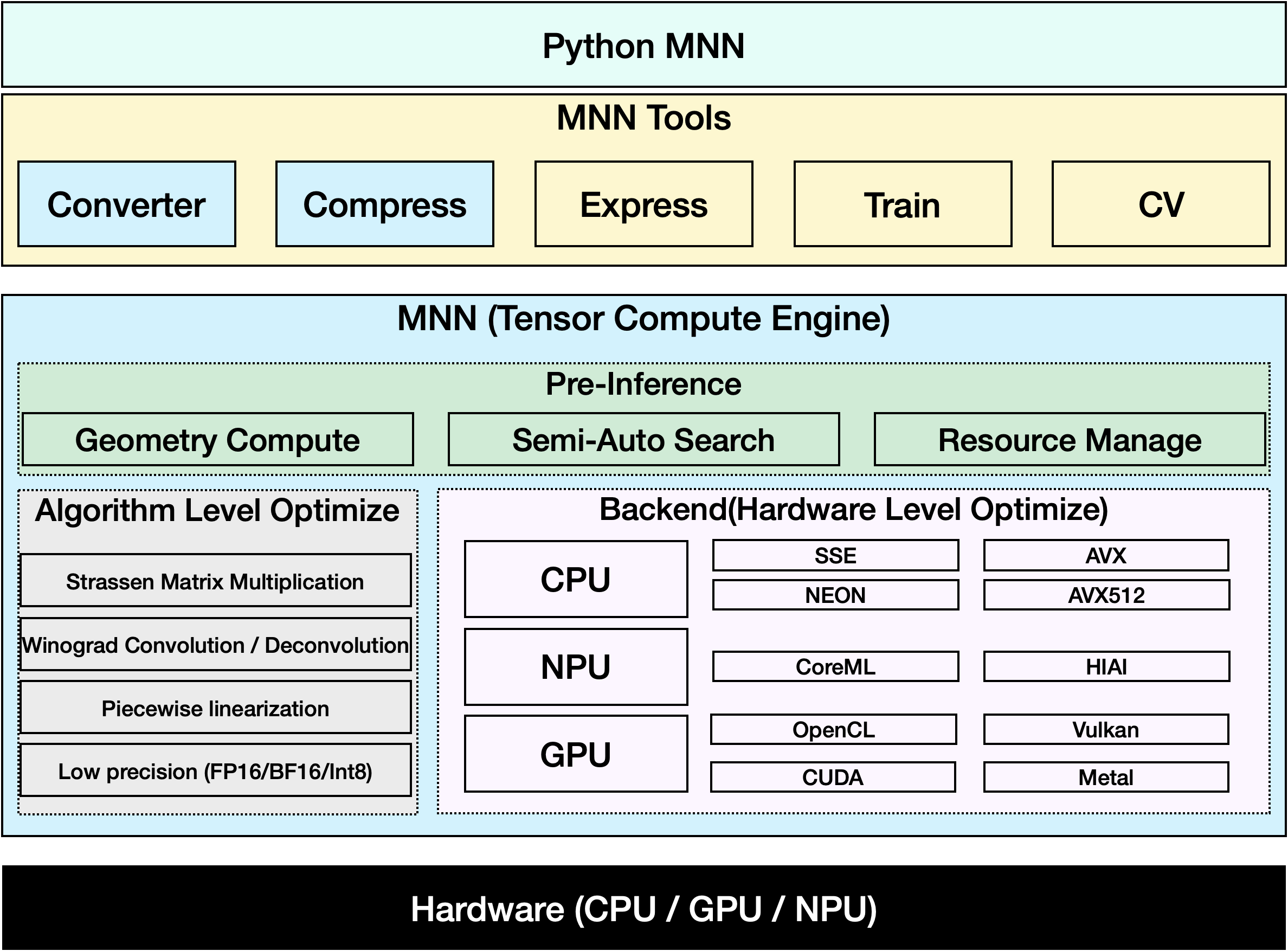
MNN is a highly efficient and lightweight deep learning framework. It supports inference and training of deep learning models and has industry-leading performance for inference and training on-device. At present, MNN has been integrated into more than 30 apps of Alibaba Inc, such as Taobao, Tmall, Youku, DingTalk, Xianyu, etc., covering more than 70 usage scenarios such as live broadcast, short video capture, search recommendation, product searching by image, interactive marketing, equity distribution, security risk control. In addition, MNN is also used on embedded devices, such as IoT.
Watch: How to Export Ultralytics YOLO26 to MNN Format | Speed up Inference on Mobile Devices📱
Supported Tasks#
MNN export supports all seven Ultralytics tasks. Semantic segmentation and depth estimation are available only with YOLO26, the only family that ships those heads.
Export to MNN: Converting Your YOLO26 Model#
You can expand model compatibility and deployment flexibility by converting Ultralytics YOLO models to MNN format. This conversion optimizes your models for mobile and embedded environments, ensuring efficient performance on resource-constrained devices.
Installation#
To install the required packages, run:
# Install the required package for YOLO26 and MNN
pip install ultralytics
pip install MNNUsage#
All Ultralytics YOLO26 models are designed to support export out of the box, making it easy to integrate them into your preferred deployment workflow. You can view the full list of supported export formats and configuration options to choose the best setup for your application.
The MNN format supports the Export, Predict, and Validate modes. Export your model, then load the exported model to run inference or validate its accuracy.
from ultralytics import YOLO

# Load a YOLO26 model
model = YOLO("yolo26n.pt")

# Export the model to MNN format
model.export(format="mnn") # creates 'yolo26n.mnn'from ultralytics import YOLO
# Load the exported MNN model
model = YOLO("yolo26n.mnn")
# Run inference
results = model("https://ultralytics.com/images/bus.jpg")from ultralytics import YOLO
# Load the exported MNN model
model = YOLO("yolo26n.mnn")
# Validate accuracy on the COCO8 dataset
metrics = model.val(data="coco8.yaml")Export Arguments#
| Argument | Type | Default | Description |
|---|---|---|---|
format | str | 'mnn' | Target format for the exported model, defining compatibility with various deployment environments. |
imgsz | int or tuple | 640 | Desired image size for the model input. Can be an integer for square images or a tuple (height, width) for specific dimensions. |
quantize | int or str | None | Quantization precision: 16 (FP16) or 8 (INT8) reduce the exported weights; 32/unset exports FP32 weights, which Ultralytics' MNNBackend still runs at low precision rather than FP32. Replaces the deprecated half/int8 flags. |
simplify | bool | True | Simplifies the intermediate ONNX graph with onnxslim. |
opset | int | None | Specifies the ONNX opset version for the intermediate ONNX graph. If not set, uses the latest supported version. |
batch | int | 1 | Specifies export model batch inference size or the max number of images the exported model will process concurrently in predict mode. |
dynamic | bool | False | Enables dynamic input image dimensions. Cannot be combined with nms=True. |
nms | bool, optional | None | Select raw output (None, default), embedded NMS (True), or the NMS-free head (False). Embedded NMS supports detect and pose with dynamic=False. |
device | str | None | Specifies the device for exporting: GPU (device=0), CPU (device=cpu), MPS for Apple silicon (device=mps). |
For more details about the export process, visit the Ultralytics documentation page on exporting.
MNN-Only Inference#
A function that relies solely on MNN for YOLO26 inference and preprocessing is implemented, providing both Python and C++ versions for easy deployment in any scenario.
import argparse

import MNN
import MNN.cv as cv2
import MNN.numpy as np

def inference(model, img, precision, backend, thread):
    config = {}
    config["precision"] = precision
    config["backend"] = backend
    config["numThread"] = thread
    rt = MNN.nn.create_runtime_manager((config,))
    # net = MNN.nn.load_module_from_file(model, ['images'], ['output0'], runtime_manager=rt)
    net = MNN.nn.load_module_from_file(model, [], [], runtime_manager=rt)
    original_image = cv2.imread(img)
    ih, iw, _ = original_image.shape
    length = max((ih, iw))
    scale = length / 640
    image = np.pad(original_image, [[0, length - ih], [0, length - iw], [0, 0]], "constant")
    image = cv2.resize(
        image, (640, 640), 0.0, 0.0, cv2.INTER_LINEAR, -1, [0.0, 0.0, 0.0], [1.0 / 255.0, 1.0 / 255.0, 1.0 / 255.0]
    )
    image = image[..., ::-1]  # BGR to RGB
    input_var = image[None]
    input_var = MNN.expr.convert(input_var, MNN.expr.NC4HW4)
    output_var = net.forward(input_var)
    output_var = MNN.expr.convert(output_var, MNN.expr.NCHW)
    output_var = output_var.squeeze()
    # output_var shape: [84, 8400]; 84 means: [cx, cy, w, h, prob * 80]
    cx = output_var[0]
    cy = output_var[1]
    w = output_var[2]
    h = output_var[3]
    probs = output_var[4:]
    # [cx, cy, w, h] -> [x0, y0, x1, y1]
    x0 = cx - w * 0.5
    y0 = cy - h * 0.5
    x1 = cx + w * 0.5
    y1 = cy + h * 0.5
    boxes = np.stack([x0, y0, x1, y1], axis=1)
    # get max prob and idx
    scores = np.max(probs, 0)
    class_ids = np.argmax(probs, 0)
    result_ids = MNN.expr.nms(boxes, scores, 100, 0.45, 0.25)
    print(result_ids.shape)
    # nms result box, score, ids
    result_boxes = boxes[result_ids]
    result_scores = scores[result_ids]
    result_class_ids = class_ids[result_ids]
    for i in range(len(result_boxes)):
        x0, y0, x1, y1 = result_boxes[i].read_as_tuple()
        y0 = int(y0 * scale)
        y1 = int(y1 * scale)
        x0 = int(x0 * scale)
        x1 = int(x1 * scale)
        # clamp to the original image size to handle cases where padding was applied
        x1 = min(iw, x1)
        y1 = min(ih, y1)
        print(result_class_ids[i])
        cv2.rectangle(original_image, (x0, y0), (x1, y1), (0, 0, 255), 2)
    cv2.imwrite("res.jpg", original_image)

if __name__ == "__main__":
    parser = argparse.ArgumentParser()
    parser.add_argument("--model", type=str, required=True, help="the yolo26 model path")
    parser.add_argument("--img", type=str, required=True, help="the input image path")
    parser.add_argument("--precision", type=str, default="normal", help="inference precision: normal, low, high, lowBF")
    parser.add_argument(
        "--backend",
        type=str,
        default="CPU",
        help="inference backend: CPU, OPENCL, OPENGL, NN, VULKAN, METAL, TRT, CUDA, HIAI",
    )
    parser.add_argument("--thread", type=int, default=4, help="inference using thread: int")
    args = parser.parse_args()
inference(args.model, args.img, args.precision, args.backend, args.thread)Summary#
In this guide, we introduce how to export the Ultralytics YOLO26 model to MNN and use MNN for inference. The MNN format provides excellent performance for edge AI applications, making it ideal for deploying computer vision models on resource-constrained devices.
For more usage, please refer to the MNN documentation.
FAQ#
To export your Ultralytics YOLO26 model to MNN format, follow these steps:
Exportfrom ultralytics import YOLO # Load a YOLO26 model model = YOLO("yolo26n.pt") # Export to MNN format model.export(format="mnn") # creates 'yolo26n.mnn' with fp32 weight model.export(format="mnn", quantize=16) # creates 'yolo26n.mnn' with fp16 weight model.export(format="mnn", quantize=8) # creates 'yolo26n.mnn' with int8 weightFor detailed export options, check the Export page in the documentation.
To predict with an exported YOLO26 MNN model, use the
predictfunction from the YOLO class.Predictfrom ultralytics import YOLO # Load the YOLO26 MNN model model = YOLO("yolo26n.mnn") # Run inference results = model("https://ultralytics.com/images/bus.jpg") for result in results: result.show() # display to screen result.save(filename="result.jpg") # save to diskMNN is versatile and supports various platforms:
- Mobile: Android, iOS, Harmony.
- Embedded Systems and IoT Devices: Devices like Raspberry Pi and NVIDIA Jetson.
- Desktop and Servers: Linux, Windows, and macOS.
To deploy your YOLO26 models on Mobile devices:
- Build for Android: Follow the MNN Android guide.
- Build for iOS: Follow the MNN iOS guide.
- Build for Harmony: Follow the MNN Harmony guide.