Qualcomm QNN Export for Ultralytics YOLO Models#
Deploying computer vision models on Qualcomm Snapdragon devices requires a model format tuned for the Qualcomm AI Engine Direct (QNN) runtime. Exporting Ultralytics YOLO models to the QNN format lets you run accelerated, on-device inference across Snapdragon CPU, Adreno GPU, and Hexagon NPU hardware found in billions of mobile phones, laptops, automotive systems, and IoT devices. This guide walks through how to export YOLO to Qualcomm QNN and deploy it for fast, low-power inference on Snapdragon hardware.
The official Ultralytics Flutter plugin provides opt-in QNN support for real-time camera inference and single-image prediction across all seven YOLO26 tasks. Enable the QNN runtime and add its ONNX Runtime dependency as described in the plugin README. For iOS deployment, see the Ultralytics YOLO iOS SDK and the CoreML integration.
Export classification models at imgsz=224. Export detect, segment, semantic, depth, pose, and OBB models at
imgsz=640. This 224/640 standard is shared by the official QNN, LiteRT, and CoreML mobile assets.
Ready-to-run v73 and v81 assets for all seven tasks in every size (n to x) are published in the
yolo-flutter-app v0.7.0 release.
What is Qualcomm QNN?#
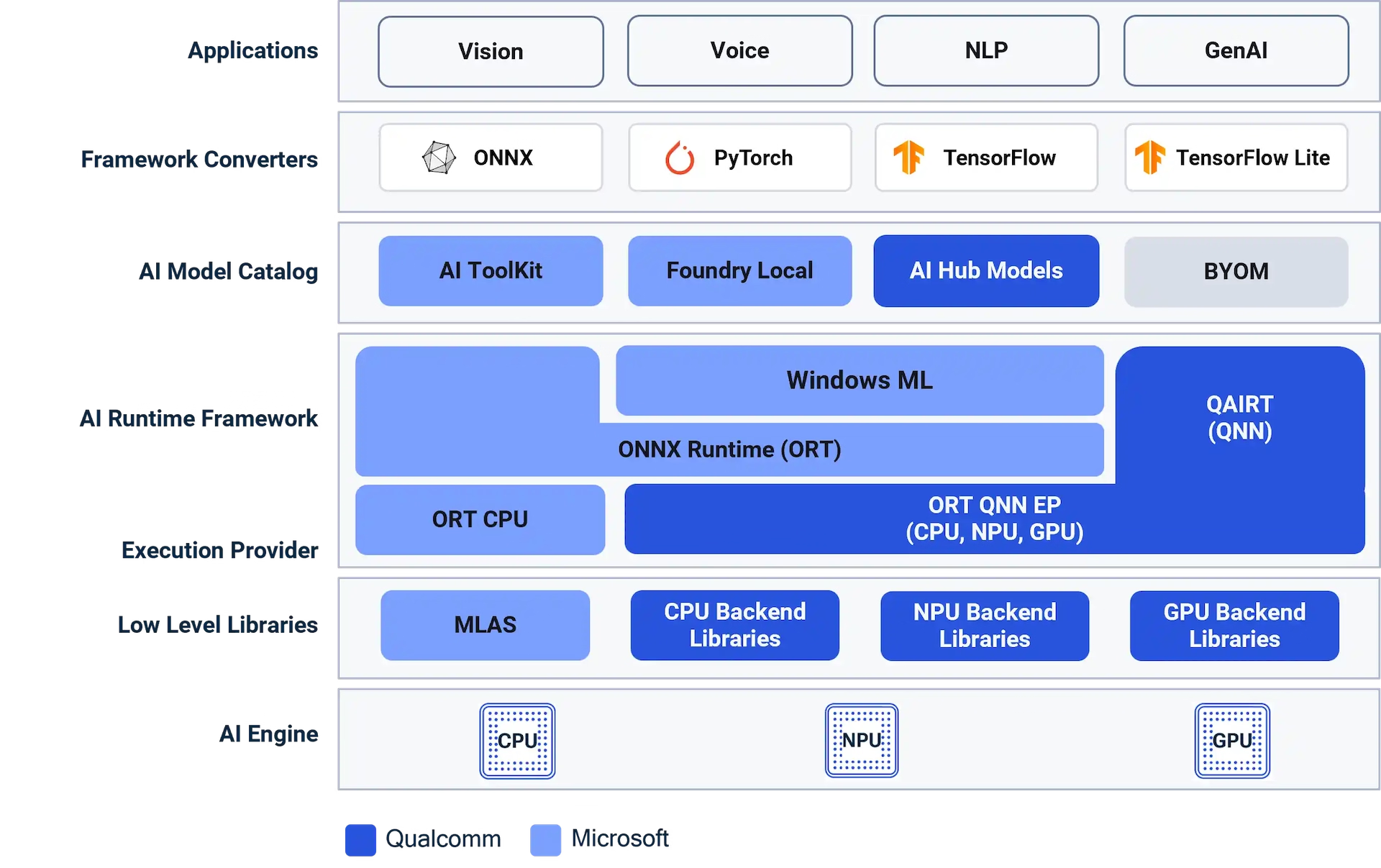
Qualcomm AI Engine Direct — commonly referred to as QNN and distributed as part of the Qualcomm AI Runtime (QAIRT) SDK — is Qualcomm's low-level inference stack for Snapdragon processors. It provides a unified API with backend-specific libraries that target the Snapdragon CPU, the Adreno GPU, and the Hexagon Tensor Processor (HTP), the dedicated neural processing unit (NPU) inside modern Snapdragon SoCs. QNN gives developers full-stack access to these Snapdragon AI accelerators and is the modern successor to the older Snapdragon Neural Processing Engine (SNPE) SDK. It powers on-device AI across the Snapdragon 8 Gen 2, 8 Gen 3, and 8 Elite mobile platforms, Snapdragon X laptops, and automotive and XR products.
Why Export to Qualcomm QNN?#
Snapdragon is one of the most widely deployed mobile compute platforms. Exporting Ultralytics YOLO to the Qualcomm QNN format unlocks the dedicated AI hardware on these devices:
- Hexagon NPU acceleration: Running YOLO on the Hexagon Tensor Processor delivers much higher throughput and lower power than CPU inference, which suits real-time inference and always-on computer vision on Snapdragon.
- On-device and offline: QNN inference runs entirely on the Snapdragon device, so there are no cloud round-trips, latency stays low, and data never leaves the device.
- Quantized efficiency: QNN export quantizes YOLO to INT8 weights with 16-bit activations, the Hexagon NPU's preferred accuracy/performance balance, shrinking model size and maximizing frames per second on battery-powered hardware.
- One format, many devices: A single Qualcomm QNN export targets Snapdragon CPU, Adreno GPU, and Hexagon NPU across the Snapdragon 8 Gen 2, 8 Gen 3, and 8 Elite families and beyond.
- Production-ready Qualcomm AI stack: QNN (Qualcomm AI Engine Direct / QAIRT) is Qualcomm's current, actively maintained on-device AI runtime and the recommended replacement for SNPE.
QNN Export Format#
Ultralytics compiles YOLO models to QNN locally using the ONNX Runtime QNN Execution Provider (the pip-installable onnxruntime-qnn package, which bundles the QAIRT libraries). The exporter converts your model to ONNX, quantizes it with calibration data to 16-bit activations and INT8 weights (the recommended balance for the Hexagon NPU), then initializes an ONNX Runtime session with context-binary caching enabled — this compiles the quantized graph into a QNN context binary embedded in <model>_qnn.onnx. No Qualcomm account, cloud upload, or separate SDK download is required.
Unlike the cloud-based Qualcomm AI Hub, which compiles and profiles models on Qualcomm-hosted Snapdragon devices and requires a Qualcomm account, the Ultralytics QNN export runs entirely on your own machine with a single export(format="qnn", imgsz=640) call (imgsz=224 for classification). You get the same QNN/QAIRT runtime target — Snapdragon CPU, Adreno GPU, and Hexagon NPU — without sign-up, upload limits, or queue times, and it drops straight into the standard YOLO export workflow.
The exported *_qnn.onnx file is self-contained: it embeds the QNN context binary and ONNX metadata such as class names, image size, and task.
Key Features of QNN Models#
- Quantization: The model is quantized to 16-bit activations and INT8 weights with the ONNX Runtime QNN QDQ flow and a calibration dataset, the Hexagon NPU's recommended accuracy/performance balance.
- Fully Local Compilation: The context binary is generated entirely on your host machine — no Qualcomm account, API token, or cloud upload.
- Full Snapdragon Acceleration: Run inference on the Hexagon NPU (HTP), Adreno GPU, or CPU through a single unified runtime.
- Broad Device Reach: Target the wide range of Snapdragon platforms shipping in phones, PCs (Windows on Snapdragon), automotive, XR, and embedded products.
- Precompiled Context Binary: Shipping a context binary minimizes on-device graph compilation, reducing model load latency on the target.
- Self-Contained Output: The exported ONNX file includes the precompiled QNN context binary and metadata for straightforward deployment.
Measured Performance#
Android Phone#
Hardware: Xiaomi 17 with 12 GB LPDDR5X memory and Android 17 / API 37. Its 3 nm Snapdragon 8 Elite Gen 5 (SM8850) has an 8-core Qualcomm Oryon CPU (2 Prime cores up to 4.6 GHz and 6 Performance cores up to 3.62 GHz), Adreno GPU, and Hexagon NPU (HTP v81).
| Model | Task | size (pixels) | CPU w8a32 LiteRT (ms) | GPU w8a32 LiteRT (ms) | NPU QNN W8A16 (ms) |
|---|---|---|---|---|---|
| YOLO26n | Detect | 640 | 36.9 1.9 / 32.6 / 2.3 | 10.6 1.8 / 6.2 / 2.6 | 10.2 1.9 / 6.0 / 2.3 |
| YOLO26n-seg | Segment | 640 | 50.5 1.9 / 42.9 / 5.8 | 18.0 1.9 / 9.5 / 6.6 | 16.2 2.1 / 8.4 / 5.7 |
| YOLO26n-sem | Semantic | 640 | 45.7 1.9 / 35.7 / 8.2 | 30.6 1.9 / 20.5 / 8.3 | 10.8 2.0 / 6.2 / 2.6 |
| YOLO26n-depth | Depth | 640 | 66.8 2.2 / 55.0 / 9.7 | 21.9 2.1 / 10.1 / 9.8 | 19.3 2.2 / 7.4 / 9.7 |
| YOLO26n-cls | Classify | 224 | 3.6 0.3 / 3.3 / 0.0 | 2.0 0.4 / 1.4 / 0.2 | 0.8 0.3 / 0.5 / 0.0 |
| YOLO26n-pose | Pose | 640 | 39.9 2.0 / 36.5 / 1.4 | 10.0 1.8 / 6.7 / 1.4 | 9.7 1.9 / 5.9 / 1.8 |
| YOLO26n-obb | OBB | 640 | 36.3 2.0 / 33.2 / 1.2 | 10.1 2.6 / 5.9 / 1.6 | 8.1 1.9 / 5.1 / 1.0 |
- Speed values are single-image burst latencies — the mean of 15 runs after 3 warmup runs on
bus.jpg, measured with the Flutter plugin's0.7.1on-device benchmark harness and the officialv0.7.0assets (Ultralytics 8.4.188 exports). Backend order rotated between tasks in one sequential sweep. Native logs confirmed that every CPU row used LiteRT CPU/XNNPACK, every GPU row delegated the complete graph to LiteRT OpenCL (LITERT_CL), and every NPU row used the QNN Hexagon HTP backend. - The detailed benchmark record is in the Flutter performance doc.
- Compare other Android devices in the LiteRT integration and Apple devices in the CoreML integration.
Windows on Snapdragon Laptop#
This historical sweep used pre-standard v73 QNN binaries; semantic and OBB used 1024px inputs. It ran on a Lenovo
laptop with 32 GB memory and Windows 11. Its
Snapdragon X Elite
(X1E78100) has a 12-core Qualcomm Oryon CPU, Adreno GPU, and Hexagon NPU (HTP v73); the exact Lenovo model was not
recorded. This Windows-on-Snapdragon comparison runs the native PyTorch FP32 CPU baseline that most desktop
developers start from against the ONNX Runtime QNN Hexagon HTP path. Each cell shows the full
model.predict() wall time with the reported preprocessing / inference / postprocessing timings beneath it; the
total can include framework overhead outside those three stages. CPU numbers are PyTorch FP32 (torch==2.10.0+cpu)
and NPU numbers are ONNX Runtime QNN (onnxruntime-qnn==2.2.0, INT8 weights / 16-bit activations).
| Model | Task | size (pixels) | CPU PT FP32 (ms) | NPU Hexagon QNN W8A16 (ms) |
|---|---|---|---|---|
| YOLO26n | Detect | 640 | 91.4 4.3 / 75.2 / 0.1 | 27.2 4.9 / 19.4 / 0.9 |
| YOLO26n-seg | Segment | 640 | 138.8 4.5 / 127.1 / 2.8 | 34.3 5.0 / 24.0 / 5.1 |
| YOLO26n-sem | Semantic | 1024 | 295.8 9.1 / 189.2 / 94.8 | 133.0 8.8 / 37.4 / 83.9 |
| YOLO26n-cls | Classify | 224 | 15.4 3.0 / 9.8 / 0.0 | 11.7 2.7 / 5.5 / 0.0 |
| YOLO26n-pose | Pose | 640 | 109.6 4.6 / 102.9 / 0.2 | 28.9 5.3 / 23.3 / 0.6 |
| YOLO26n-obb | OBB | 1024 | 267.8 8.1 / 254.6 / 0.1 | 64.8 8.9 / 54.7 / 0.6 |
- Speed values are single-image burst latencies — the mean of 100 runs after 10 warmup runs on
bus.jpg, measured withtime.perf_counter()around the fullmodel.predict()call on a thermally rested device (ultralytics==8.4.67, Python 3.12.10). - The Hexagon NPU runs roughly 2-4x faster than the PyTorch CPU baseline across the 640-1024 px tasks (detection ~3.4x), narrowing to ~1.3x on the 224 px classifier where fixed preprocessing overhead dominates the tiny workload.
Supported Tasks#
Qualcomm QNN export supports all seven Ultralytics tasks. Semantic segmentation and depth estimation are available only with YOLO26, the only family that ships those heads.
Export to QNN: Converting Your YOLO Model#
Export an Ultralytics YOLO model to QNN format for deployment on Qualcomm hardware. The context binary is finalized for a target Hexagon Tensor Processor (HTP) architecture or supported SoC, which you select with the name argument — the same argument used to target a chip in RKNN export.
Supported HTP Targets#
Pass the target architecture or SoC via name (e.g. name="73" or name="iq-8275"). Support is determined by
the HTP target, so the Snapdragon rows below are representative platforms rather than an exhaustive list of every SoC.
Dragonwing devices are listed explicitly.
| Status | name | Hexagon HTP | Example device or platform |
|---|---|---|---|
| ✅ Supported | 68 | v68 | Snapdragon 888 |
| ✅ Supported | 69 | v69 | Snapdragon 8 Gen 1 / 8+ Gen 1 |
| ✅ Supported | 73 | v73 | Snapdragon 8 Gen 2, X Elite (default) |
| ✅ Supported | 75 | v75 | Snapdragon 8 Gen 3 |
| ✅ Supported | 79 | v79 | Snapdragon 8 Elite |
| ✅ Supported | 81 | v81 | Snapdragon 8 Elite Gen 5 |
| ✅ Supported | iq-8275 or qcs8275 | v75 | Dragonwing IQ-8275 / QCS8275 (QNN SoC model 82) |
| ❌ Unsupported | — | v66 | Dragonwing IQ-615 / QCS615 |
Dragonwing IQ-615 cannot use Ultralytics QNN context-binary export because ONNX Runtime does not expose its v66 DSP as an offline HTP target. A standard ONNX export can still be integrated separately with a CPU or GPU execution provider supported by the board BSP.
from ultralytics import YOLO

model = YOLO("best.pt")
model.export(format="qnn", name="iq-8275", imgsz=640)QNN export uses the onnxruntime-qnn package. Version 2.4.0 and later publishes prebuilt wheels for Windows (x64 and ARM64) and Linux (x86-64 and ARM64) on Python 3.11 or later; macOS is not a supported QNN host. QNN context-binary generation runs on an x64 host and does not require a Snapdragon device for the export step.
Installation#
To install the required packages, run:
# Install the required package for YOLO
pip install ultralytics
The onnxruntime-qnn package (which provides the ONNX Runtime QNN Execution Provider and bundles the QAIRT libraries) is installed automatically on first export. For detailed instructions and best practices related to the installation process, check our Ultralytics Installation guide. While installing the required packages for YOLO, if you encounter any difficulties, consult our Common Issues guide for solutions and tips.
Usage#
The QNN format supports the Export, Predict, and Validate modes. Inference and validation run on Qualcomm Snapdragon hardware through ONNX Runtime's QNN Execution Provider (the same onnxruntime-qnn package used for export). Export your model, then load the exported model on a Snapdragon device to run inference or validate its accuracy.
from ultralytics import YOLO

# Load a YOLO26 model
model = YOLO("yolo26n.pt")

# Export to Qualcomm QNN format (INT8, enforced automatically) for the default v73 HTP target
model.export(format="qnn", name="73", imgsz=640) # use imgsz=224 for classificationfrom ultralytics import YOLO
# Load the exported QNN model (on a Snapdragon device with onnxruntime-qnn)
model = YOLO("yolo26n_qnn.onnx")
# Run inference
results = model("https://ultralytics.com/images/bus.jpg")from ultralytics import YOLO
# Load the exported QNN model (on a Snapdragon device with onnxruntime-qnn)
model = YOLO("yolo26n_qnn.onnx")
# Validate accuracy on the COCO8 dataset
metrics = model.val(data="coco8.yaml")Export Arguments#
| Argument | Type | Default | Description |
|---|---|---|---|
format | str | 'qnn' | Target format for the exported model, defining compatibility with the Qualcomm QNN runtime. |
imgsz | int or tuple | 640 | Desired image size for the model input. Can be an integer for square images or a tuple (height, width). |
batch | int | 1 | Specifies the export model batch size, which is baked into the generated QNN context binary. |
name | str | '73' | Target Hexagon HTP architecture (68, 69, 73, 75, 79, or 81) or supported SoC (iq-8275 or qcs8275). The context binary is finalized for this target. |
quantize | int or str | 'w8a16'/auto | Quantization precision. QNN HTP export is quantized to INT8 weights with 16-bit activations ('w8a16') and is auto-enabled if not specified. Replaces the deprecated half/int8 flags. |
simplify | bool | True | Simplifies the intermediate ONNX graph with onnxslim. |
opset | int | None | Specifies the ONNX opset version for the intermediate ONNX graph. If not set, uses opset 18 (lower on PyTorch < 2.4), capped at the installed onnx version. |
data | str | None | Dataset YAML used for INT8 calibration; classification instead takes a dataset directory or a built-in dataset name. If omitted, Ultralytics selects the default calibration dataset for the model task. |
fraction | float, int, or list | 1.0 | Calibration subset as a ratio, image count, or [train, val, test] ratios/counts. Two-item lists leave test full, while 0 skips it. |
device | str | None | Specifies the device for the ONNX export step: GPU (device=0) or CPU (device=cpu). |
QNN export quantizes the model to 16-bit activations and INT8 weights — the recommended accuracy/performance balance for the Hexagon NPU — using the ONNX Runtime QDQ quantization flow with calibration images from data. quantize='w8a16' is enforced automatically.
For more details about the export process, visit the Ultralytics documentation page on exporting.
Output Structure#
After a successful export, a self-contained ONNX file is created:
yolo26n_qnn.onnx # ONNX wrapping the precompiled QNN context binary and metadata
The yolo26n_qnn.onnx file embeds the QNN context binary and is loaded by ONNX Runtime with the QNN Execution Provider on the Snapdragon device. It also carries model metadata such as class names, image size, and task in ONNX metadata_props.
Deploying Exported YOLO QNN Models#
QNN models run on supported Qualcomm hardware, making on-device model deployment straightforward. On a compatible device with onnxruntime-qnn installed, run the exported model directly with the Ultralytics API (yolo predict/yolo val, see Usage above) — Ultralytics loads the HTP context binary through the ONNX Runtime QNN Execution Provider.
For custom pipelines, you can also load the context-binary ONNX directly with ONNX Runtime. onnxruntime-qnn is a plugin Execution Provider, so register it at runtime:
import onnxruntime as ort
import onnxruntime_qnn as qnn_ep

# On the Snapdragon device, register the QNN plugin EP and select its device(s)
ort.register_execution_provider_library("QNNExecutionProvider", qnn_ep.get_library_path())
devices = [d for d in ort.get_ep_devices() if d.ep_name == "QNNExecutionProvider"]

options = ort.SessionOptions()
options.add_provider_for_devices(devices, {"backend_path": qnn_ep.get_qnn_htp_path()})
session = ort.InferenceSession("yolo26n_qnn.onnx", sess_options=options)
input_info = session.get_inputs()[0]
outputs = session.run(None, {input_info.name: input_tensor})  # input_tensor: float32 NHWC
Because the QNN context binary is precompiled, the session loads quickly without recompiling the graph on-device.
Linux and Yocto BSP Requirements#
The target board must provide a mutually compatible Qualcomm runtime and BSP. For HTP inference this includes the ONNX Runtime QNN Execution Provider, libQnnSystem.so, libQnnHtp.so, the v75 HTP stub and skeleton libraries for IQ-8275, FastRPC userspace support such as libcdsprpc.so, the DSP firmware, and the corresponding FastRPC/kernel drivers. The skeleton library must be discoverable through the BSP's DSP library path.
These target-side components come from the board vendor's QAIRT/QNN-enabled BSP; they are not embedded in the exported model. GPU execution instead requires libQnnGpu.so and the matching Adreno userspace driver stack. Ultralytics format=qnn output is an HTP-specific context binary, so GPU or CPU deployment should start from a standard ONNX export rather than the precompiled *_qnn.onnx file.
Recommended Workflow#
- Train your model using Ultralytics Train Mode
- Export to QNN format using
model.export(format="qnn", name="iq-8275", imgsz=640)on a supported platform (useimgsz=224for classification) - Deploy the exported
*_qnn.onnxfile to your Qualcomm device - Run inference with ONNX Runtime and the QNN Execution Provider using the HTP backend
Real-World Applications#
YOLO models running on Qualcomm Snapdragon hardware are well suited for a wide range of edge AI applications:
- Smartphones: Real-time object detection and scene understanding in camera and photo apps with NPU acceleration.
- Windows on Snapdragon: On-device computer vision in Copilot+ PCs without offloading to the cloud.
- Automotive: Driver monitoring, occupant detection, and ADAS features on Snapdragon Digital Chassis platforms.
- XR and Wearables: Low-power, low-latency perception for AR/VR headsets and smart glasses.
- IoT and Robotics: Efficient vision inference on Snapdragon-powered cameras, drones, and embedded systems.
Summary#
In this guide, you've learned how to export Ultralytics YOLO models to the Qualcomm QNN format locally with the ONNX Runtime QNN Execution Provider. The export pipeline converts your model to ONNX, then compiles it into a QNN context binary on your host machine — no Qualcomm account or cloud required — producing a *_qnn.onnx file optimized for Snapdragon CPU, Adreno GPU, and Hexagon NPU hardware via the QNN/QAIRT runtime.
Together, Ultralytics YOLO and Qualcomm's on-device AI stack let you run computer vision workloads across the broad Snapdragon ecosystem.
To compare formats before shipping, use Benchmark mode.
FAQ#
You can export your model using
export(format="qnn", imgsz=640)(imgsz=224for classification) or the equivalent CLI arguments. The export first creates an ONNX model, then compiles it locally into a QNN context binary using the ONNX Runtime QNN Execution Provider. Theonnxruntime-qnnpackage is installed automatically on first export.Examplefrom ultralytics import YOLO model = YOLO("yolo26n.pt") model.export(format="qnn", imgsz=640) # use imgsz=224 for classificationNo. QNN export runs entirely on your local machine using the
onnxruntime-qnnpackage, which bundles the QAIRT libraries. No Qualcomm account, API token, or network access is required.Qualcomm AI Hub is Qualcomm's cloud service for compiling, profiling, and benchmarking models on hosted Snapdragon devices, and it requires a Qualcomm account. Ultralytics QNN export targets the same QNN/QAIRT runtime (Snapdragon CPU, Adreno GPU, and Hexagon NPU) but compiles the context binary locally with the ONNX Runtime QNN Execution Provider — no account, no upload, and no queue. It is a quick way to go from a
.ptmodel to a Snapdragon-ready build directly inside the standard YOLO export workflow.onnxruntime-qnn2.4.0 and later provides prebuilt wheels for Windows (x64 and ARM64) and Linux (x86-64 and ARM64) on Python 3.11 or later; macOS is not a supported QNN host. Context-binary generation runs on an x64 host and does not require a physical Snapdragon device.Export with
model.export(format="qnn", imgsz=640)(imgsz=224for classification), copy the resultingyolo26n_qnn.onnxfile to your Snapdragon device, and runyolo predict model=yolo26n_qnn.onnx source=image.jpg(oryolo val). Ultralytics loads the context binary through the ONNX Runtime QNN Execution Provider and runs it on the Hexagon NPU — see Deploying Exported YOLO QNN Models.QNN (Qualcomm AI Engine Direct, part of the QAIRT SDK) is Qualcomm's current inference stack and the recommended replacement for the older Snapdragon Neural Processing Engine (SNPE) SDK. New deployments should target QNN.
Yes, on a Qualcomm Snapdragon device with
onnxruntime-qnninstalled —YOLO("yolo26n_qnn.onnx")loads the context binary through the QNN Execution Provider and runspredict/vallike any other format. On an x86 host without QNN hardware the model cannot execute, since the context binary targets the Snapdragon NPU.The export creates a self-contained context-binary ONNX file (e.g.,
yolo26n_qnn.onnx) with class names, image size, task, and other model metadata embedded in ONNXmetadata_props.
Comments
Ask a question, share your results, or help someone else.