Export to TF.js Model Format From a YOLO26 Model Format (Deprecated)#
As of Ultralytics 8.4.83, the tfjs (TensorFlow.js) export format has been removed and replaced by the unified Google LiteRT format. LiteRT runs in the browser via LiteRT.js (with WebGPU acceleration) — covering the in-browser and Node.js use cases TF.js handled, alongside mobile, embedded, and edge, from a single .tflite model.
format="tfjs" still works but emits a deprecation warning and exports a LiteRT model instead. Use format="litert" going forward; for current export instructions and the browser deployment path, see the LiteRT export guide.
Deploying machine learning models directly in the browser or on Node.js can be tricky. You'll need to make sure your model format is optimized for faster performance so that the model can be used to run interactive applications locally on the user's device. The TensorFlow.js, or TF.js, model format is designed to use minimal power while delivering fast performance.
Why Should You Export to TF.js?#
Exporting your machine learning models to TensorFlow.js, developed by the TensorFlow team as part of the broader TensorFlow ecosystem, offers numerous advantages for deploying machine learning applications. It helps enhance user privacy and security by keeping sensitive data on the device. The image below shows the TensorFlow.js architecture, and how machine learning models are converted and deployed on both web browsers and Node.js.
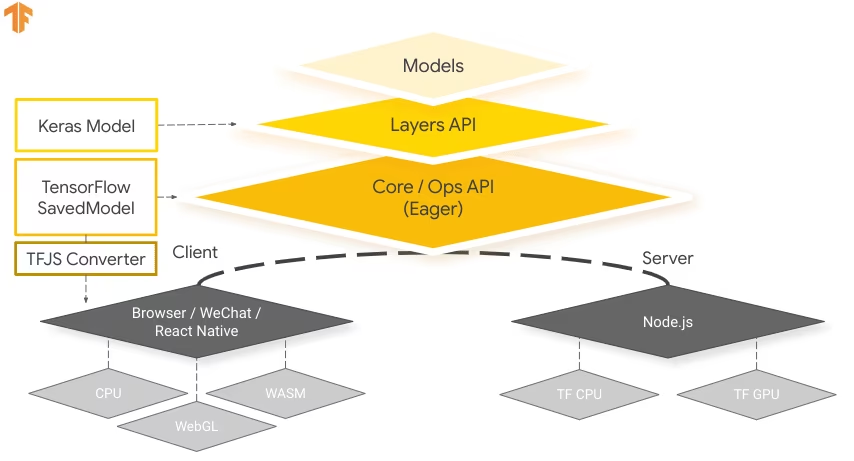
Running models locally also reduces latency and provides a more responsive user experience. TensorFlow.js also comes with offline capabilities, allowing users to use your application even without an internet connection. TF.js is designed for efficient execution of complex models on devices with limited resources as it is engineered for scalability, with GPU acceleration support.
Key Features of TF.js#
Here are the key features that make TF.js a powerful tool for developers:
-
Cross-Platform Support: TensorFlow.js can be used in both browser and Node.js environments, providing flexibility in deployment across different platforms. It lets developers build and deploy applications more easily.
-
Support for Multiple Backends: TensorFlow.js supports various backends for computation including CPU, WebGL for GPU acceleration, WebAssembly (WASM) for near-native execution speed, and WebGPU for advanced browser-based machine learning capabilities.
-
Offline Capabilities: With TensorFlow.js, models can run in the browser without the need for an internet connection, making it possible to develop applications that are functional offline.
Deployment Options with TensorFlow.js#
TF.js provides a range of options to deploy your machine learning models:
-
In-Browser ML Applications: You can build web applications that run machine learning models directly in the browser. The need for server-side computation is eliminated and the server load is reduced.
-
Node.js Applications: TensorFlow.js also supports deployment in Node.js environments, enabling the development of server-side machine learning applications. It is particularly useful for applications that require the processing power of a server or access to server-side data.
-
Chrome Extensions: An interesting deployment scenario is the creation of Chrome extensions with TensorFlow.js. For instance, you can develop an extension that allows users to right-click on an image within any webpage to classify it using a pretrained ML model. TensorFlow.js can be integrated into everyday web browsing experiences to provide immediate insights or augmentations based on machine learning.
Replace TF.js Export with LiteRT#
For new exports, convert your model to LiteRT.
Installation#
To install the required package, run:
# Install the required package for YOLO26
pip install ultralytics
For detailed instructions and best practices related to the installation process, check our Ultralytics Installation guide. While installing the required packages for YOLO26, if you encounter any difficulties, consult our Common Issues guide for solutions and tips.
Usage#
All Ultralytics YOLO26 models are designed to support export out of the box, making it easy to integrate them into your preferred deployment workflow. You can view the full list of supported export formats and configuration options to choose the best setup for your application.
The tfjs argument now exports a LiteRT .tflite model, which supports the Export, Predict, and Validate modes locally and runs in the browser via LiteRT.js. See the LiteRT export guide for the current browser and on-device deployment path.
from ultralytics import YOLO

# Load a YOLO26 model
model = YOLO("yolo26n.pt")

# Export the model to LiteRT format (replaces TF.js)
model.export(format="litert", imgsz=640) # use imgsz=224 for classificationThe exported LiteRT .tflite model loads directly with yolo predict and yolo val, and runs in the browser via LiteRT.js. See the LiteRT export guide.
Export Arguments#
| Argument | Type | Default | Description |
|---|---|---|---|
format | str | 'litert' | Target format for the exported model; the deprecated 'tfjs' value exports LiteRT. |
imgsz | int or tuple | 640 | Desired image size for the model input. Can be an integer for square images or a tuple (height, width) for specific dimensions. |
quantize | int or str | None | Quantization precision: 8 (static INT8, int8 weights + int8 activations; needs calibration data/fraction), 'w8a16' (static, int8 weights + int16 activations; needs calibration data/fraction), 'w8a32' (dynamic INT8, int8 weights + FP32 activations; no calibration needed), or 32/unset (FP32). FP16 is not exported separately — an FP32 model runs in FP16 automatically on GPU delegates. Replaces the deprecated half/int8 flags. |
batch | int | 1 | Specifies export model batch inference size or the max number of images the exported model will process concurrently in predict mode. |
data | str | None | Path to the dataset YAML, essential for quantization; classification instead takes a dataset directory or a built-in dataset name. If omitted with quantize=8 or 'w8a16', Ultralytics selects the default calibration dataset for the model task. |
fraction | float, int, or list | 1.0 | Calibration subset as a ratio, image count, or [train, val, test] ratios/counts. Two-item lists leave test full, while 0 skips it. |
device | str | None | Specifies the device for exporting: CPU (device=cpu), MPS for Apple silicon (device=mps). |
For more details about the export process, visit the Ultralytics documentation page on exporting.
Deploying Exported YOLO26 TensorFlow.js Models#
Now that you have exported your YOLO26 model, the next step is to deploy it. The export produces a LiteRT .tflite model that runs on-device and in the browser via LiteRT.js — see the LiteRT export guide for the current path.
For reference, the legacy TensorFlow.js runtime resources are below:
-
Chrome Extension: Here's the developer documentation for how to deploy your TF.js models to a Chrome extension.
-
Run TensorFlow.js in Node.js: A TensorFlow blog post on running TensorFlow.js in Node.js directly.
-
Deploying TensorFlow.js - Node Project on Cloud Platform: A TensorFlow blog post on deploying a TensorFlow.js model on a Cloud Platform.
Summary#
This guide preserves the legacy TF.js deployment context. Use LiteRT for new exports.
For further details on usage, visit the TensorFlow.js official documentation.
For more information on integrating Ultralytics YOLO26 with other platforms and frameworks, don't forget to check out our integration guide page. It's packed with great resources to help you make the most of YOLO26 in your projects.
FAQ#
Export to LiteRT instead.
format="tfjs"still works but emits a deprecation warning and exports the same LiteRT model:Usagefrom ultralytics import YOLO # Load a YOLO26 model model = YOLO("yolo26n.pt") # Export the model to LiteRT format (replaces TF.js) model.export(format="litert", imgsz=640) # use imgsz=224 for classification # The exported '.tflite' model runs in the browser via LiteRT.js or locally with yolo predict/val.For more details about supported export options, visit the Ultralytics documentation page on deployment options.
TensorFlow.js is specifically designed for efficient execution of ML models in browsers and Node.js environments. Here's how it benefits browser-based applications:
- Reduces Latency: Runs machine learning models locally, providing immediate results without relying on server-side computations.
- Improves Privacy: Keeps sensitive data on the user's device, minimizing security risks.
- Enables Offline Use: Models can operate without an internet connection, ensuring consistent functionality.
- Supports Multiple Backends: Offers flexibility with backends like CPU, WebGL, WebAssembly (WASM), and WebGPU for varying computational needs.
Interested in learning more about TF.js? Check out the official TensorFlow.js guide.