Understand How to Export to TF SavedModel Format From YOLO26#
Deploying machine learning models can be challenging. However, using an efficient and flexible model format can make your job easier. TF SavedModel is TensorFlow's standard serialization format for saving and loading machine-learning models in a consistent way. It packages a TensorFlow model so it can be moved and used across different devices and systems.
Exporting Ultralytics YOLO26 models to TF SavedModel can help you deploy them across different platforms and environments. This guide shows how to convert your models to the TF SavedModel format, simplifying inference with your models on different devices.
Why Should You Export to TF SavedModel?#
The TensorFlow SavedModel format is part of the TensorFlow ecosystem developed by Google as shown below. It is designed to save and serialize TensorFlow models. It encapsulates the complete details of models like the architecture, weights, and even compilation information. This makes it straightforward to share, deploy, and continue training across different environments.
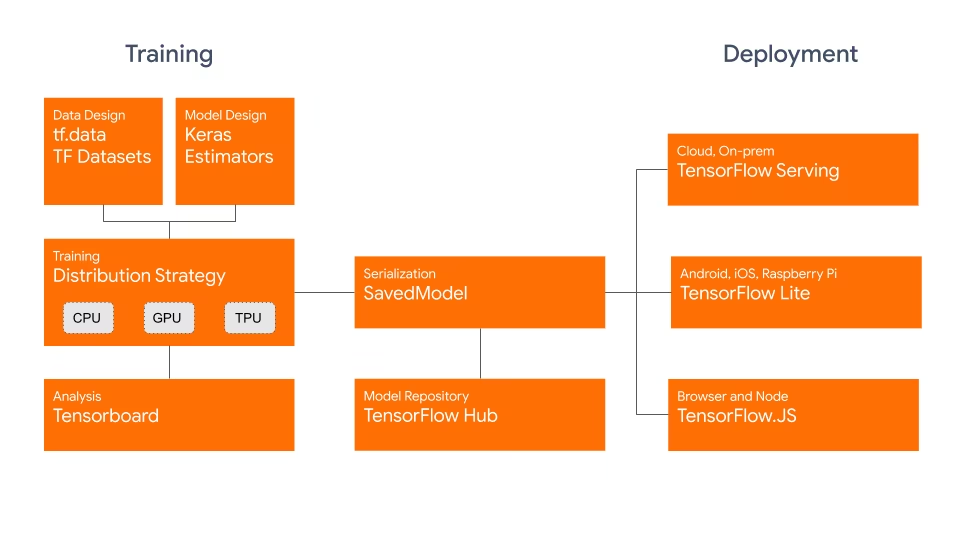
The TF SavedModel has a key advantage: its compatibility. It works well with TensorFlow Serving, LiteRT (formerly TensorFlow Lite), and TensorFlow.js. This compatibility makes it easier to share and deploy models across various platforms, including web and mobile applications. The TF SavedModel format is useful both for research and production. It provides a unified way to manage your models across applications.
Key Features of TF SavedModels#
Here are the key features that make TF SavedModel a strong option for AI developers:
-
Portability: TF SavedModel provides a language-neutral, recoverable, hermetic serialization format. They enable higher-level systems and tools to produce, consume, and transform TensorFlow models. SavedModels can be easily shared and deployed across different platforms and environments.
-
Ease of Deployment: TF SavedModel bundles the computational graph, trained parameters, and necessary metadata into a single package. They can be easily loaded and used for inference without requiring the original code that built the model. This makes the deployment of TensorFlow models straightforward and efficient in various production environments.
-
Asset Management: TF SavedModel supports the inclusion of external assets such as vocabularies, embeddings, or lookup tables. These assets are stored alongside the graph definition and variables, ensuring they are available when the model is loaded. This feature simplifies the management and distribution of models that rely on external resources.
Deployment Options with TF SavedModel#
Before exporting YOLO26 models to the TF SavedModel format, here are some typical deployment scenarios where this format is used.
TF SavedModel provides a range of options to deploy your machine learning models:
-
TensorFlow Serving: TensorFlow Serving is a flexible, high-performance serving system designed for production environments. It natively supports TF SavedModels, making it easy to deploy and serve your models on cloud platforms, on-premises servers, or edge devices such as the Raspberry Pi.
-
Cloud Platforms: Major cloud providers like Google Cloud Platform (GCP), Amazon Web Services (AWS), and Microsoft Azure offer services for deploying and running TensorFlow models, including TF SavedModels. These services provide scalable and managed infrastructure, allowing you to deploy and scale your models easily.
-
Mobile and Embedded Devices: LiteRT (formerly TensorFlow Lite), a lightweight solution for running machine learning models on mobile, embedded, and IoT devices, supports converting TF SavedModels to the LiteRT format. This allows you to deploy your models on a wide range of devices, from smartphones and tablets to microcontrollers and edge devices.
-
TensorFlow Runtime: TensorFlow Runtime (
tfrt) is a high-performance runtime for executing TensorFlow graphs. It provides lower-level APIs for loading and running TF SavedModels in C++ environments. TensorFlow Runtime offers better performance compared to the standard TensorFlow runtime. It is suitable for deployment scenarios that require low-latency inference and tight integration with existing C++ codebases.
Supported Tasks#
TF SavedModel export supports all seven Ultralytics tasks. Semantic segmentation and depth estimation are available only with YOLO26, the only family that ships those heads.
Exporting YOLO26 Models to TF SavedModel#
By exporting YOLO26 models to the TF SavedModel format, you enhance their adaptability and ease of deployment across various platforms.
Installation#
To install the required package, run:
# Install the required package for YOLO26
pip install ultralytics
For detailed instructions and best practices related to the installation process, check our Ultralytics Installation guide. While installing the required packages for YOLO26, if you encounter any difficulties, consult our Common Issues guide for solutions and tips.
TF SavedModel export is not supported on macOS with Python 3.13 or later.
Usage#
All Ultralytics YOLO26 models are designed to support export out of the box, making it easy to integrate them into your preferred deployment workflow. You can view the full list of supported export formats and configuration options to choose the best setup for your application.
The TF SavedModel format supports the Export, Predict, and Validate modes. Export your model, then load the exported model to run inference or validate its accuracy.
from ultralytics import YOLO

# Load a YOLO26 model
model = YOLO("yolo26n.pt")

# Export the model to TF SavedModel format
model.export(format="saved_model") # creates 'yolo26n_saved_model'from ultralytics import YOLO
# Load the exported TF SavedModel model
model = YOLO("./yolo26n_saved_model")
# Run inference
results = model("https://ultralytics.com/images/bus.jpg")from ultralytics import YOLO
# Load the exported TF SavedModel model
model = YOLO("./yolo26n_saved_model")
# Validate accuracy on the COCO8 dataset
metrics = model.val(data="coco8.yaml")Export Arguments#
| Argument | Type | Default | Description |
|---|---|---|---|
format | str | 'saved_model' | Target format for the exported model, defining compatibility with various deployment environments. |
imgsz | int or tuple | 640 | Desired image size for the model input. Can be an integer for square images or a tuple (height, width) for specific dimensions. |
quantize | int or str | None | Quantization precision: 8 keeps the SavedModel FP32 and adds INT8 .tflite files beside it (calibrated with data/fraction), or 32/unset (FP32). FP16 is not supported for SavedModel export. Replaces the deprecated int8 flag. |
opset | int | None | Specifies the ONNX opset version for the intermediate ONNX graph. If not set, uses opset 18 (lower on PyTorch < 2.4), capped at the installed onnx version. RT-DETR uses 19. |
nms | bool, optional | None | Select raw output (None, default), embedded NMS (True), or the NMS-free head (False). |
batch | int | 1 | Specifies export model batch inference size or the max number of images the exported model will process concurrently in predict mode. |
data | str | None | Path to the dataset YAML, essential for quantization; classification instead takes a dataset directory or a built-in dataset name. If omitted with quantize=8, Ultralytics selects the default calibration dataset for the model task. |
fraction | float, int, or list | 1.0 | Calibration subset as a ratio, image count, or [train, val, test] ratios/counts. Two-item lists leave test full, while 0 skips it. |
device | str | None | Specifies the device for exporting: CPU (device=cpu), MPS for Apple silicon (device=mps). |
For more details about the export process, visit the Ultralytics documentation page on exporting.
Deploying Exported YOLO26 TF SavedModel Models#
Now that you have exported your YOLO26 model to the TF SavedModel format, the next step is to deploy it. The primary and recommended first step for running a TF SavedModel model is to use the YOLO("yolo26n_saved_model/") method, as previously shown in the usage code snippet.
For in-depth instructions on deploying your TF SavedModel models, take a look at the following resources:
-
TensorFlow Serving: Developer documentation for deploying your TF SavedModel models with TensorFlow Serving.
-
Run a TensorFlow SavedModel in Node.js: A TensorFlow blog post on running a TensorFlow SavedModel in Node.js directly without conversion.
-
Deploying on Cloud: A TensorFlow blog post on deploying a TensorFlow SavedModel model on the Cloud AI Platform.
Summary#
In this guide, we explored how to export Ultralytics YOLO26 models to the TF SavedModel format. By exporting to TF SavedModel, you gain the flexibility to optimize, deploy, and scale your YOLO26 models on a wide range of platforms.
For further details on usage, visit the TF SavedModel official documentation.
FAQ#
Exporting an Ultralytics YOLO model to the TensorFlow SavedModel format is straightforward. You can use either Python or CLI to achieve this:
Exporting YOLO26 to TF SavedModelfrom ultralytics import YOLO # Load a YOLO26 model model = YOLO("yolo26n.pt") # Export the model to TF SavedModel format model.export(format="saved_model") # creates 'yolo26n_saved_model' # Load the exported TF SavedModel for inference tf_savedmodel_model = YOLO("./yolo26n_saved_model") results = tf_savedmodel_model("https://ultralytics.com/images/bus.jpg")Refer to the Ultralytics Export documentation for more details.
The TensorFlow SavedModel format offers several advantages for model deployment:
- Portability: It provides a language-neutral format, making it easy to share and deploy models across different environments.
- Compatibility: Works with tools like TensorFlow Serving, LiteRT, and TensorFlow.js, which are essential for deploying models on various platforms, including web and mobile applications.
- Complete encapsulation: Encodes the model architecture, weights, and compilation information, allowing for straightforward sharing and training continuation.
For more benefits and deployment options, check out the Ultralytics YOLO model deployment options.
TF SavedModel can be deployed in various environments, including:
- TensorFlow Serving: Ideal for production environments requiring scalable and high-performance model serving.
- Cloud Platforms: Supports major cloud services like Google Cloud Platform (GCP), Amazon Web Services (AWS), and Microsoft Azure for scalable model deployment.
- Mobile and Embedded Devices: Using LiteRT (formerly TensorFlow Lite) to convert TF SavedModels allows for deployment on mobile devices, IoT devices, and microcontrollers.
- TensorFlow Runtime: For C++ environments needing low-latency inference with better performance.
For detailed deployment options, visit the official guides on deploying TensorFlow models.
To export YOLO26 models, you need to install the
ultralyticspackage. Run the following command in your terminal:pip install ultralyticsFor more detailed installation instructions and best practices, refer to our Ultralytics Installation guide. If you encounter any issues, consult our Common Issues guide.
TF SavedModel format is beneficial for AI developers due to the following features:
- Portability: Allows sharing and deployment across various environments.
- Ease of Deployment: Encapsulates the computational graph, trained parameters, and metadata into a single package, which simplifies loading and inference.
- Asset Management: Supports external assets like vocabularies, ensuring they are available when the model loads.
For further details, explore the official TensorFlow documentation.