Semantic Segmentation with Ultralytics YOLO#
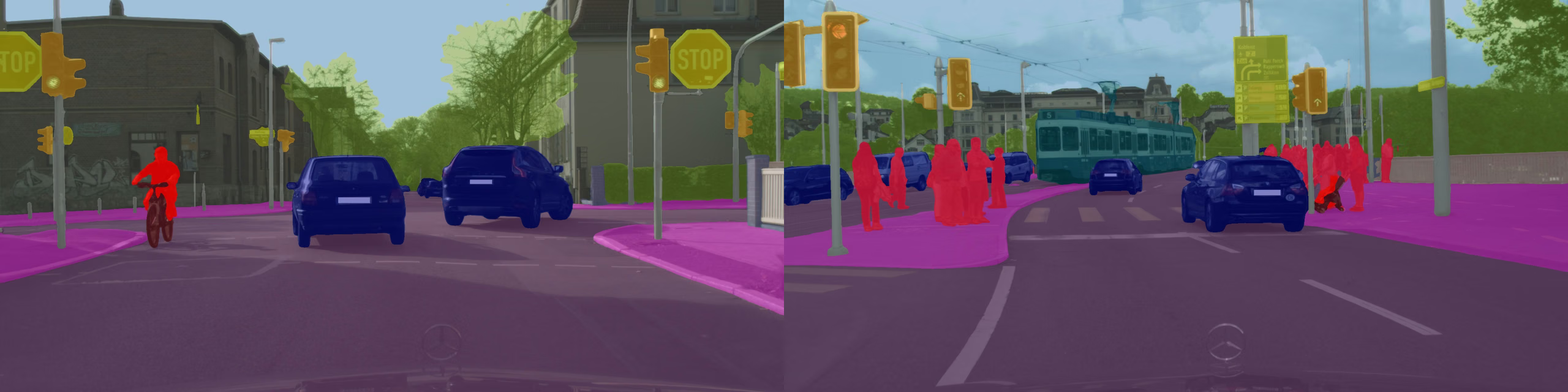
Semantic segmentation assigns a class label to every pixel in an image, producing a dense class map that covers the entire scene. Unlike instance segmentation, which separates individual objects, semantic segmentation groups all pixels of the same class together regardless of how many distinct objects are present.
Watch: Semantic Segmentation with Ultralytics YOLO26 | Quickstart Tutorial
The output of a semantic segmentation model is a single height-by-width class map where each pixel value corresponds to a predicted class ID. This makes semantic segmentation ideal for scene parsing tasks such as autonomous driving, medical imaging, and land-cover mapping.
Use task=semantic or the yolo semantic CLI task for semantic segmentation. YOLO26 semantic segmentation model files use the -sem suffix, such as yolo26n-sem.pt.
Models#
YOLO26 Semantic models pretrained on the Cityscapes dataset are shown below.
Models download automatically from the latest Ultralytics release on first use.
| Model | size (pixels) | mIoUval | Speed RTX3090 PyTorch (ms) | params (M) | FLOPs (B) |
|---|---|---|---|---|---|
| YOLO26n-sem | 1024 × 2048 | 78.3 | 4.4 ± 0.0 | 1.6 | 23.8 |
| YOLO26s-sem | 1024 × 2048 | 80.8 | 8.4 ± 0.0 | 6.5 | 91.0 |
| YOLO26m-sem | 1024 × 2048 | 82.0 | 19.9 ± 0.1 | 14.3 | 305.5 |
| YOLO26l-sem | 1024 × 2048 | 82.9 | 26.5 ± 0.1 | 17.8 | 388.2 |
| YOLO26x-sem | 1024 × 2048 | 83.6 | 48.9 ± 0.2 | 40.1 | 866.9 |
- mIoUval values are for single-model single-scale on the Cityscapes validation set.
Reproduce withyolo semantic val data=cityscapes.yaml device=0 imgsz=2048 - Speed metrics are averaged over Cityscapes validation images using an RTX3090 instance.
Reproduce withyolo semantic val data=cityscapes.yaml batch=1 device=0|cpu imgsz=2048 - Params and FLOPs values are for the fused model after
model.fuse(), which merges Conv and BatchNorm layers. Pretrained checkpoints retain the full training architecture and may show higher counts.
YOLO26 Semantic models pretrained on the ADE20K dataset are shown below.
| Model | size (pixels) | mIoUval | Speed RTX3090 PyTorch (ms) | params (M) | FLOPs (B) |
|---|---|---|---|---|---|
| YOLO26n-sem-ade20k | 640 | 38.8 | 3.9 ± 0.2 | 1.6 | 4.5 |
| YOLO26s-sem-ade20k | 640 | 45.6 | 4.2 ± 0.3 | 6.5 | 17.5 |
| YOLO26m-sem-ade20k | 640 | 47.4 | 4.7 ± 0.3 | 14.4 | 59.6 |
| YOLO26l-sem-ade20k | 640 | 49.7 | 8.3 ± 0.2 | 17.9 | 75.2 |
| YOLO26x-sem-ade20k | 640 | 51.5 | 9.9 ± 0.3 | 40.2 | 168.4 |
- mIoUval values are for single-model single-scale on the ADE20K validation set.
Reproduce withyolo semantic val model=yolo26n-sem-ade20k.pt data=ade20k.yaml device=0 imgsz=640, replacingyolo26n-sem-ade20k.ptwith the desiredyolo26*-sem-ade20k.ptcheckpoint. - Speed metrics are averaged over ADE20K validation images using an RTX3090 instance.
Reproduce withyolo semantic val model=yolo26n-sem-ade20k.pt data=ade20k.yaml batch=1 device=0|cpu imgsz=640, replacingyolo26n-sem-ade20k.ptwith the desiredyolo26*-sem-ade20k.ptcheckpoint. - Params and FLOPs values are for the fused model after
model.fuse(), which merges Conv and BatchNorm layers. Pretrained checkpoints retain the full training architecture and may show higher counts.
See the unreleased YOLO27 preview for preliminary Cityscapes mIoU results.
Train#
Train YOLO26n-sem on the Cityscapes8 dataset for 100 epochs at image size 1024. For a full list of available arguments see the Configuration page.
from ultralytics import YOLO

# Load a model
model = YOLO("yolo26n-sem.yaml")  # build a new model from YAML
model = YOLO("yolo26n-sem.pt")  # load a pretrained model (recommended for training)
model = YOLO("yolo26n-sem.yaml").load("yolo26n-sem.pt")  # build from YAML and transfer weights

# Train the model
results = model.train(data="cityscapes8.yaml", epochs=100, imgsz=1024)
See full train mode details in the Train page. Semantic segmentation models can also be trained with Ultralytics Platform cloud training.
Dataset format#
Semantic segmentation datasets use single-channel mask images, typically PNG, where each pixel value represents a class ID. Pixels with value 255 are treated as "ignore" and excluded from loss computation. The dataset YAML should specify paths to images and their corresponding mask directories. Datasets with YOLO polygon labels train directly, converted to masks on the fly (see Can I use instance segmentation data below). See the Semantic Segmentation Dataset Guide for format details. Supported datasets include Cityscapes and ADE20K. You can manage and label semantic datasets with Ultralytics Platform annotation.
Val#
Validate trained YOLO26n-sem model accuracy on a semantic segmentation dataset. Pass data explicitly so validation uses the intended dataset YAML.
from ultralytics import YOLO

# Load a model
model = YOLO("yolo26n-sem.pt")  # load an official model
model = YOLO("path/to/best.pt")  # load a custom model

# Validate the model
metrics = model.val(data="cityscapes.yaml")
metrics.miou  # mean Intersection over Union
metrics.pixel_accuracy # overall pixel accuracyPredict#
Use a trained YOLO26n-sem model to run predictions on images.
from ultralytics import YOLO

# Load a model
model = YOLO("yolo26n-sem.pt")  # load an official model
model = YOLO("path/to/best.pt")  # load a custom model

# Predict with the model
results = model("https://ultralytics.com/images/bus.jpg")  # predict on an image

# Access the results
for result in results:
    semantic_mask = result.semantic_mask.data  # class map, shape (H,W), integer dtype selected by class count
See full predict mode details in the Predict page.
Results Output#
YOLO semantic segmentation returns one Results object per image. Each result stores one dense class map for the full
image instead of a list of object masks. Pixels with the same predicted class share the same class ID, even when they
belong to separate objects.
| Attribute | Type | Shape | Description |
|---|---|---|---|
result.semantic_mask | SemanticMask | (H,W) | Dense class map. |
result.semantic_mask.data | torch.uint8torch.int16torch.int32 | (H,W) | Class IDs; dtype selected by class count. |
result.masks | - | - | No instance masks. |
result.boxes | - | - | No instance boxes/confidences. |
For task-specific Results fields across every task, see the Predict Results by Task section.
Semantic segmentation predicts a dense class map, then resizes that map back to the image shape for visualization and
downstream use. Very thin structures, such as lane markings, court lines, poles, or wires, can therefore look
stair-stepped when inference runs at a much lower imgsz than the original image resolution. If boundaries appear
jagged, first retest the native PyTorch .pt model with a larger imgsz, such as 1024, 1280, or the closest
practical value to the source image size. Use exported models only after confirming the .pt output is acceptable,
since lower-resolution inputs cannot recover fine detail that was not present in the predicted class map.
Instance vs Semantic Segmentation#
| Aspect | Instance Segmentation (task="segment") | Semantic Segmentation (task="semantic") |
|---|---|---|
| Prediction goal | Segment each detected object separately | Assign one class ID to every pixel |
| Output field | result.masks | result.semantic_mask |
| Main data | result.masks.data | result.semantic_mask.data |
| Shape | (N,H,W) | (H,W) |
| Pixel values | Binary mask values: 0 or 1 | Class IDs: 0, 1, 2, ... |
| Dtype | torch.uint8 | torch.uint8torch.int16torch.int32 |
| Same-class objects | Kept as separate instances | Merged into the same class region |
| Polygons | Yes, through result.masks.xy and result.masks.xyn | No polygon output by default |
| Boxes and confidence | Yes, through result.boxes | No per-instance boxes or confidence scores |
| Typical use | Counting, tracking, cropping, object-level measurement | Dense scene labeling, drivable area, land cover, medical regions |
Export#
Export a YOLO26n-sem model to a different format like ONNX, CoreML, etc.
from ultralytics import YOLO

# Load a model
model = YOLO("yolo26n-sem.pt")  # load an official model
model = YOLO("path/to/best.pt")  # load a custom model

# Export the model
model.export(format="onnx")
Available YOLO26 semantic segmentation export formats are in the table below. You can export to any format using the format argument, i.e., format='onnx' or format='engine'. You can predict or validate directly on exported models, i.e., yolo predict model=yolo26n-sem.onnx. Usage examples are shown for your model after export completes.
| Format | format Argument | Model | Metadata | Arguments |
|---|---|---|---|---|
| PyTorch | - | yolo26n-sem.pt | ✅ | - |
| TorchScript | torchscript | yolo26n-sem.torchscript | ✅ | imgsz, quantize, dynamic, nms, batch, device |
| ONNX | onnx | yolo26n-sem.onnx | ✅ | imgsz, quantize, dynamic, simplify, opset, nms, batch, data, fraction, device |
| OpenVINO | openvino | yolo26n-sem_openvino_model/ | ✅ | imgsz, quantize, dynamic, nms, batch, data, fraction, device |
| TensorRT | engine | yolo26n-sem.engine | ✅ | imgsz, quantize, dynamic, simplify, opset, workspace, nms, batch, data, fraction, device |
| CoreML | coreml | yolo26n-sem.mlpackage | ✅ | imgsz, dynamic, quantize, nms, batch, device |
| Apple Core AI | coreai | yolo26n-sem.aimodel | ✅ | imgsz, batch, quantize |
| TF SavedModel | saved_model | yolo26n-sem_saved_model/ | ✅ | imgsz, quantize, opset, nms, batch, data, fraction, device |
| TF GraphDef | pb | yolo26n-sem.pb | ❌ | imgsz, opset, batch, device |
| TF Edge TPU | edgetpu | yolo26n-sem_edgetpu.tflite | ✅ | imgsz, quantize, opset, data, fraction, device |
| LiteRT | litert | yolo26n-sem.tflite | ✅ | imgsz, quantize, batch, data, fraction, device |
| PaddlePaddle | paddle | yolo26n-sem_paddle_model/ | ✅ | imgsz, batch, device |
| MNN | mnn | yolo26n-sem.mnn | ✅ | imgsz, batch, dynamic, quantize, simplify, opset, nms, device |
| NCNN | ncnn | yolo26n-sem_ncnn_model/ | ✅ | imgsz, quantize, batch, device |
| IMX500 | imx | yolo26n-sem_imx_model/ | ✅ | imgsz, quantize, data, fraction, nms, device |
| RKNN | rknn | yolo26n-sem_rknn_model/ | ✅ | imgsz, batch, name, quantize, simplify, opset, data, fraction, device |
| ExecuTorch | executorch | yolo26n-sem_executorch_model/ | ✅ | imgsz, batch, device |
| Axelera | axelera | yolo26n-sem_axelera_model/ | ✅ | imgsz, batch, quantize, data, fraction, device |
| DEEPX | deepx | yolo26n-sem_deepx_model/ | ✅ | imgsz, quantize, simplify, opset, data, optimize, device |
| Qualcomm QNN | qnn | yolo26n-sem_qnn.onnx | ✅ | imgsz, batch, name, quantize, simplify, opset, data, fraction, device |
| Hailo | hailo | yolo26n-sem_hailo_model/ | ✅ | imgsz, name, quantize, data, fraction, simplify, conf, iou, device |
| Huawei Ascend | ascend | yolo26n-sem_ascend_model/ | ✅ | imgsz, batch, name, quantize, opset, simplify, nms, device |
| AMD Xilinx | xilinx | yolo26n-sem_xilinx_model/ | ✅ | imgsz, name, quantize, data, fraction, opset, simplify, device |
nms=None defaults to raw outputs for external NMS. Set nms=False to select an available NMS-free head; unsupported formats fall back to their native output path. The nms entries above identify formats that can embed NMS with nms=True.
See full export details in the Export page.
FAQ#
To train a YOLO26 semantic segmentation model on a custom dataset, you need to prepare PNG mask images where each pixel value represents a class ID (0, 1, 2, ...) and pixels with value 255 are ignored during training. Create a dataset YAML file pointing to your images and masks directories, then train the model:
Examplefrom ultralytics import YOLO # Load a pretrained YOLO26 semantic segmentation model model = YOLO("yolo26n-sem.pt") # Train the model results = model.train(data="path/to/your_dataset.yaml", epochs=100, imgsz=1024)Check the Configuration page for more available arguments.
Instance segmentation and semantic segmentation are both pixel-level tasks but differ in a key way:
- Semantic segmentation assigns a class label to every pixel but does not distinguish between individual objects of the same class. For example, all cars in a scene share the same class label.
- Instance segmentation identifies each individual object separately, producing distinct masks for each object even if they belong to the same class.
Semantic segmentation is best suited for scene understanding tasks like autonomous driving and land-cover mapping, while instance segmentation is preferred when counting or tracking individual objects matters.
Yes. If your dataset uses Ultralytics YOLO polygon labels (one
.txtper image), omitmasks_dirfrom the dataset YAML, and make sure nomasks/folder exists next to your images at the dataset root (its presence alone triggers PNG-mask mode even withoutmasks_dirset). The loader then converts polygons to per-image semantic masks on the fly. For multi-class datasets (N > 1) an extrabackgroundclass is appended tonamesautomatically. For single-class datasets (N == 1) training stays at 1 class — your declared class becomes1in the mask and uncovered pixels become0. See the Semantic Segmentation Dataset Guide for details.Ultralytics YOLO26 provides built-in configurations for several semantic segmentation datasets:
- Cityscapes: Urban street scenes with 19 classes, widely used for autonomous driving research.
- ADE20K: A large-scale scene parsing dataset with 150 classes.
You can also use any custom dataset that provides PNG mask annotations where pixel values correspond to class IDs.
Validate a pretrained YOLO26 semantic segmentation model with the dataset YAML used for evaluation:
Examplefrom ultralytics import YOLO # Load a pretrained model model = YOLO("yolo26n-sem.pt") # Validate the model metrics = model.val(data="cityscapes.yaml") print("Mean IoU:", metrics.miou) print("Pixel Accuracy:", metrics.pixel_accuracy)These steps will provide you with validation metrics like mean Intersection over Union (mIoU) and pixel accuracy, which are standard measures for assessing semantic segmentation performance.
Export a YOLO26 semantic segmentation model to ONNX format with Python or CLI commands:
Examplefrom ultralytics import YOLO # Load a pretrained model model = YOLO("yolo26n-sem.pt") # Export the model to ONNX format model.export(format="onnx")For more details on exporting to various formats, refer to the Export page.