Мониторинг тренировок с помощью Ultralytics YOLO26

Отслеживание тренировок с помощью оценки позы и Ultralytics YOLO26 повышает точность оценки упражнений благодаря точному отслеживанию ключевых ориентиров и суставов тела в реальном времени. Эта технология мгновенно оценивает технику выполнения упражнений, отслеживает тренировочные программы и измеряет показатели эффективности, помогая пользователям и тренерам оптимизировать занятия.
Смотри: Как отслеживать упражнения с помощью Ultralytics YOLO | Приседания, разгибание ног, отжимания и многое другое
Преимущества мониторинга тренировок#
- Повышение эффективности: адаптация тренировок на основе данных мониторинга для достижения лучших результатов.
- Достижение целей: отслеживание и корректировка фитнес-целей для измеримого прогресса.
- Персонализация: индивидуальные планы тренировок на основе личных данных для повышения эффективности.
- Забота о здоровье: раннее выявление закономерностей, указывающих на проблемы со здоровьем или перетренированность.
- Обоснованные решения: корректировка тренировок и постановка реалистичных целей на основе данных.
Применение в реальных условиях#
| Мониторинг тренировок | Мониторинг тренировок |
|---|---|
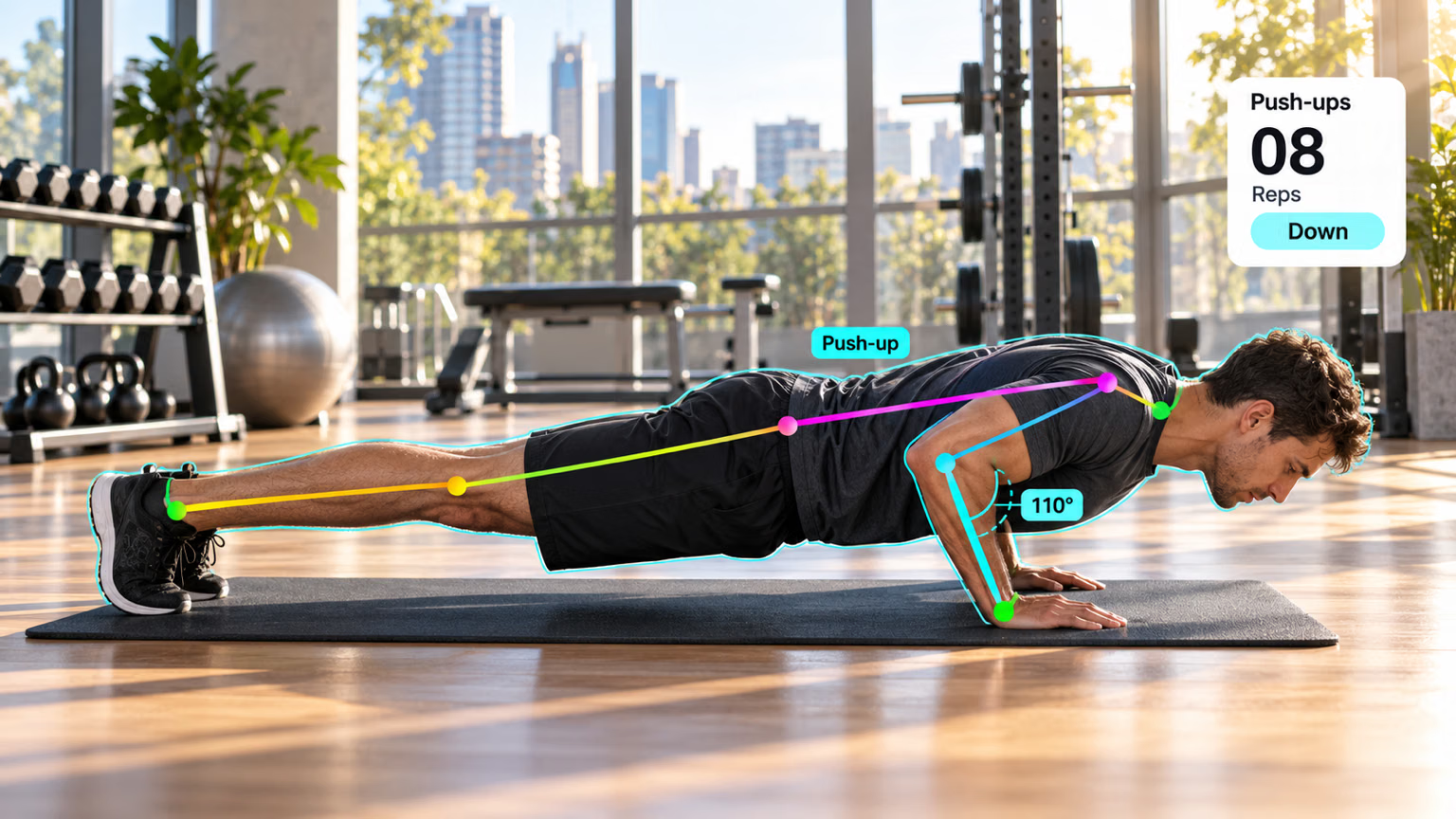 | 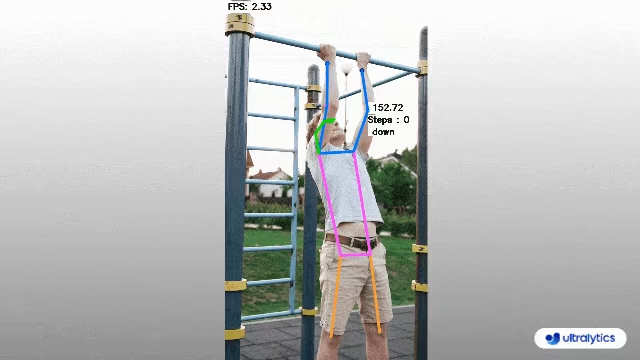 |
| Подсчет отжиманий | Подсчет подтягиваний |
Мониторь тренировки с помощью YOLO26#
Решение AIGym выполняет оценку позы с помощью такой модели, как YOLO26n-pose, и считает повторения, измеряя угол между тремя ключевыми точками, когда конечность перемещается между порогами up_angle и down_angle. Выбери ключевые точки для упражнения, которое нужно отслеживать, с помощью kpts, а затем запусти решение на видео через Python API или CLI.
# Run a workout example
yolo solutions workout show=True

# Pass a source video
yolo solutions workout source="path/to/video.mp4"

# Use keypoints for pushups
yolo solutions workout kpts="[6, 8, 10]"
Карта ключевых точек#
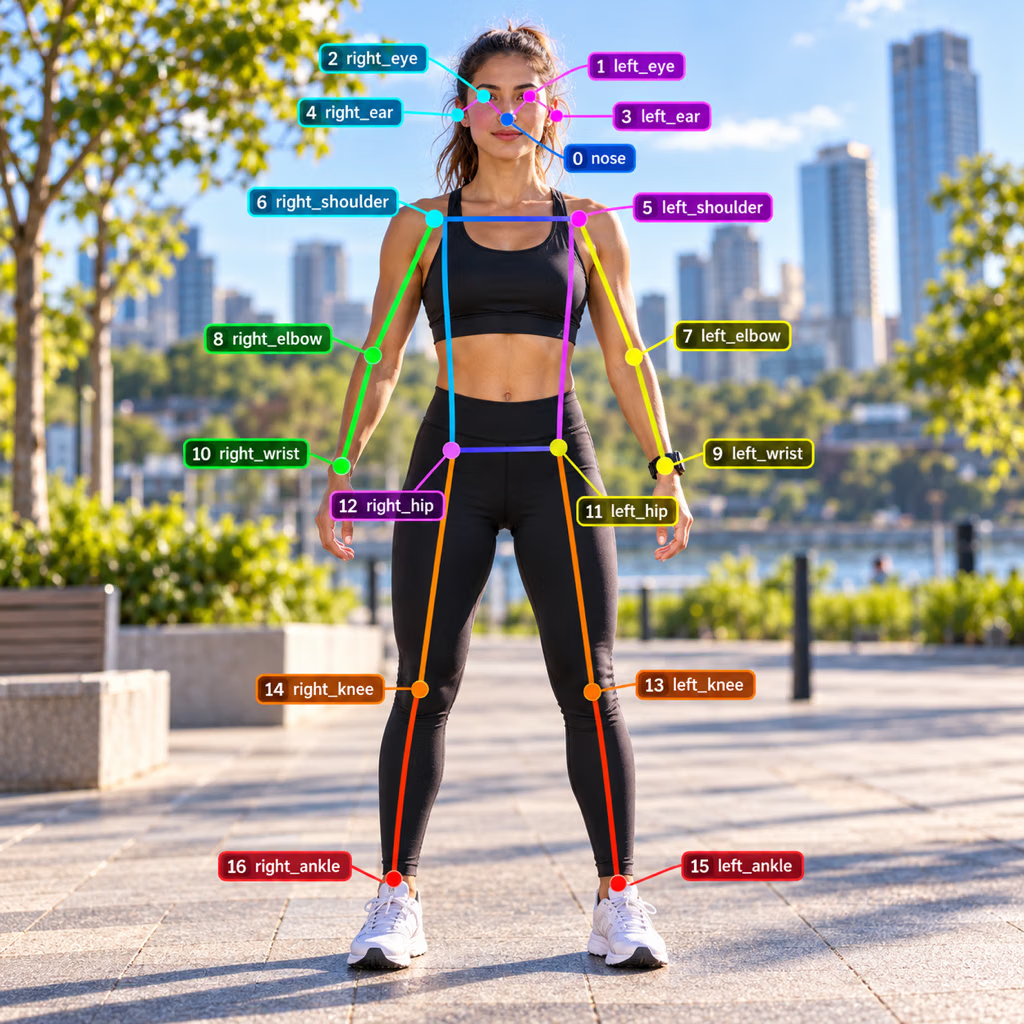
Аргументы AIGym#
Вот таблица с аргументами AIGym:
| Аргумент | Тип | По умолчанию | Описание |
|---|---|---|---|
model | str | None | Путь к файлу модели Ultralytics YOLO. |
up_angle | float | 145.0 | Пороговый угол для позы «вверх». |
down_angle | float | 90.0 | Пороговый угол для позы «вниз». |
kpts | list[int] | [6, 8, 10] | Список из трёх индексов ключевых точек, используемых для отслеживания тренировок. Эти точки соответствуют суставам или частям тела, например плечам, локтям и запястьям, для таких упражнений, как отжимания, подтягивания, приседания и упражнения на пресс. |
line_width | int | 2 | Толщина линий рамок, ключевых точек и счётчиков, которые рисует решение. |
verbose | bool | True | Включает журнал решения для каждого кадра с указанием формы входных данных, количества объектов по классам и скорости обработки. Сам вызов отслеживания всегда выполняется без вывода сообщений. |
Решение AIGym также поддерживает ряд параметров отслеживания объектов:
| Аргумент | Тип | По умолчанию | Описание |
|---|---|---|---|
tracker | str | 'tracktrack.yaml' | Задаёт алгоритм отслеживания. Встроенные варианты: botsort.yaml, bytetrack.yaml, ocsort.yaml, deepocsort.yaml, fasttrack.yaml, tracktrack.yaml. |
conf | float | 0.25 | Задаёт порог уверенности для обнаружений: при более низких значениях можно отслеживать больше объектов, но возрастает вероятность ложноположительных срабатываний. |
iou | float | 0.5 | Задаёт порог пересечения над объединением (IoU) для фильтрации перекрывающихся обнаружений. |
classes | list | None | Фильтрует результаты по индексу класса. Например, classes=[0, 2, 3] отслеживает только указанные классы. |
device | str | None | Задаёт устройство для инференса (например, cpu, cuda:0 или 0). Позволяет выбрать CPU, определённый GPU или другое вычислительное устройство для выполнения модели. |
imgsz | int or tuple | 640 | Целевой размер изображения для инференса: целое число для квадратного изображения или пара (height, width). Размеры корректируются с учётом шага модели. |
max_det | int | 300 | Максимальное количество обнаружений, сохраняемых в каждом кадре перед отслеживанием; ограничивает число объектов, обрабатываемых решением в насыщенных сценах. |
quantize | int or str | None | Точность инференса: 16 (FP16) или 32/unset (FP32) для моделей PyTorch и TorchScript не на CPU; для других форматов точность определяется артефактом модели и средой выполнения. Заменяет устаревший аргумент half. |
Кроме того, можно настроить следующие параметры визуализации:
| Аргумент | Тип | По умолчанию | Описание |
|---|---|---|---|
show | bool | False | Если True, показывает аннотированные изображения или видео в окне. Полезно для мгновенной визуальной проверки во время разработки или тестирования. |
show_labels | bool | True | Показывает метки каждой детекции на визуализации. Помогает сразу понять, какие объекты обнаружены. |
Часто задаваемые вопросы#
Чтобы отслеживать тренировки с помощью Ultralytics YOLO26, используй возможности оценки позы для отслеживания и анализа ключевых ориентиров и суставов тела в реальном времени. Так ты сможешь мгновенно получать обратную связь о технике выполнения упражнений, считать повторения и измерять показатели эффективности. Для начала используй приведенный пример кода для отжиманий, подтягиваний или упражнений на пресс:
import cv2 from ultralytics import solutions cap = cv2.VideoCapture("path/to/video.mp4") assert cap.isOpened(), "Error reading video file" w, h, fps = (int(cap.get(x)) for x in (cv2.CAP_PROP_FRAME_WIDTH, cv2.CAP_PROP_FRAME_HEIGHT, cv2.CAP_PROP_FPS)) gym = solutions.AIGym( line_width=2, show=True, kpts=[6, 8, 10], ) while cap.isOpened(): success, im0 = cap.read() if not success: print("Video frame is empty or processing is complete.") break results = gym(im0) cap.release() cv2.destroyAllWindows()Использование Ultralytics YOLO26 для мониторинга тренировок даёт несколько важных преимуществ:
- Повышение эффективности: адаптируя тренировки на основе данных мониторинга, ты можешь добиться лучших результатов.
- Достижение целей: легко отслеживай и корректируй фитнес-цели, чтобы видеть измеримый прогресс.
- Персонализация: получай индивидуальные планы тренировок на основе личных данных для достижения максимальной эффективности.
- Забота о здоровье: раннее выявление закономерностей, указывающих на потенциальные проблемы со здоровьем или перетренированность.
- Обоснованные решения: корректируй тренировки и ставь реалистичные цели на основе данных.
Посмотри демонстрационное видео на YouTube, чтобы увидеть эти преимущества на практике.
Модели Ultralytics YOLO26 для оценки позы точно отслеживают ключевые ориентиры и суставы тела в реальном времени, обеспечивая надежную обратную связь о технике выполнения упражнений и подсчет повторений. На практике точность также зависит от угла камеры, освещения, перекрытий и выбора подходящих значений
kpts,up_angleиdown_angleдля каждого упражнения.Да, Ultralytics YOLO26 можно адаптировать для индивидуальных тренировочных программ. Класс
AIGymобнаруживает повторения упражнений с помощью аргументовup_angle,down_angleиkpts(аргументы). Можно задать ключевые точки и углы для обнаружения конкретных упражнений. Вот пример настройки:from ultralytics import solutions gym = solutions.AIGym( line_width=2, show=True, kpts=[6, 8, 10], # Для отжиманий — можно настроить для других упражнений )Такая гибкость позволяет отслеживать различные упражнения и настраивать программы в соответствии с твоими фитнес-целями.
Чтобы сохранить результаты мониторинга тренировок, добавь в код видеозаписывающее устройство, которое будет сохранять обработанные кадры. Вот пример:
import cv2

from ultralytics import solutions

cap = cv2.VideoCapture("path/to/video.mp4")
assert cap.isOpened(), "Error reading video file"
w, h, fps = (int(cap.get(x)) for x in (cv2.CAP_PROP_FRAME_WIDTH, cv2.CAP_PROP_FRAME_HEIGHT, cv2.CAP_PROP_FPS))

video_writer = cv2.VideoWriter("workouts.avi", cv2.VideoWriter_fourcc(*"mp4v"), fps, (w, h))

gym = solutions.AIGym(
    line_width=2,
    show=True,
    kpts=[6, 8, 10],
)

while cap.isOpened():
    success, im0 = cap.read()
    if not success:
        print("Video frame is empty or processing is complete.")
        break
    results = gym(im0)
    video_writer.write(results.plot_im)

cap.release()
video_writer.release()
cv2.destroyAllWindows()
При такой настройке видео с мониторингом записывается в выходной файл. Позже ты сможешь оценить результаты тренировки или поделиться видео с тренерами, чтобы получить дополнительную обратную связь.


Комментарии41
Задай вопрос, поделись результатами или помоги кому-нибудь.
 流川疯
May I ask how to obtain the value of step and perform some logical operations, such as counting to 10 times for pop-up reminders,many thanks
1 Glenn JocherUltralytics(изменено)
@wynshiter the
AIGymsolution counts repetitions for you: callresults = gym_object(frame)and readresults.workout_count(one entry per tracked person). Add your own logic on top, for exampleif any(c >= 10 for c in results.workout_count):to trigger a pop-up reminder. For further details, please refer to the documentation on workouts monitoring.nel-mv
Thanks for your answer, Glenn. And the documentation on workouts monitoring is just this same page (https://docs.ultralytics.com/guides/workouts-monitoring) we are commenting on?
And from the comments you gave above, we know that we can get the angles from the gym object: im0, angle_data = gym_object.start_counting(im0, results)
I was expecting we could get the 'step' value similarly via a return variable.
Do you know where we could see a list of return variables that the gym object gives?
- Glenn JocherUltralytics(изменено)
The
AIGymresults provideworkout_count,workout_stageandworkout_anglefor each tracked person (results = gym_object(frame)), so repetitions are counted for you. To act on them, add your own logic in your processing loop, for example whenworkout_countreaches a target. For further details, please refer to the Workouts Monitoring documentation. DanishkhanOp
Where to get the model
- Glenn JocherUltralytics(изменено)
@DanishkhanOp the pose model (
yolo26n-pose.ptby default) is downloaded automatically the first timeAIGymis initialized, or you can download it manually from the Ultralytics YOLO26 Model Documentation. You can also specifymodel="yolo26n-pose.pt"in yourAIGym()constructor as shown in the workout monitoring examples.
AhmedMostafa3m
hello, i guess i came a little late , it ssems that start_counting method is not available any more i want to know how can i use the code above after updating. results = model.predict(frame, verbose=False) frame = gym_object.start_counting(frame, results) thanks alot
- Glenn JocherUltralytics(изменено)
@AhmedMostafa3m
start_countinghas been replaced: the solution is now called directly on the frame and runs pose tracking itself, so no separatemodel.trackcall is needed:from ultralytics import solutions gym = solutions.AIGym(model="yolo26n-pose.pt") # Initialize once results = gym(frame) frame = results.plot_imFor full implementation details, see the AIGym documentation.
Where i can get the model
- Glenn JocherUltralytics(изменено)
@DanishkhanOp the pose estimation model is used automatically when you initialize the
AIGymclass as shown in the code examples. By default it isyolo26n-pose.pt, which you can also set withmodel="yolo26n-pose.pt"in yoursolutions.AIGym()call; it will be downloaded from our servers if not already cached. For more details on pose models, visit our Keypoint Estimation Docs.
AdadAlShabab
Hi. Suppose I'm detecting the angle between [8, 6, 12] and I wanna show text something like: "The angle between Shoulder and Wrist : {detected angle}" using cv2.putText. How3 can I do that?
- Glenn JocherUltralytics
@AdadAlShabab to display the angle using
cv2.putText, you can calculate the angle between the keypoints and then overlay the text on the image. Here's a minimal example:import cv2 import numpy as np # Assuming you have the coordinates of the keypoints shoulder = np.array([x1, y1]) elbow = np.array([x2, y2]) wrist = np.array([x3, y3]) # Calculate the angle angle = np.degrees(np.arctan2(wrist[1] - elbow[1], wrist[0] - elbow[0]) - np.arctan2(shoulder[1] - elbow[1], shoulder[0] - elbow[0])) # Display the angle cv2.putText(im0, f"Angle: {angle:.2f}", (50, 50), cv2.FONT_HERSHEY_SIMPLEX, 0.5, (255, 255, 255), 2)This will show the angle between the shoulder, elbow, and wrist on your video frame. Adjust the coordinates and text position as needed.
1 Hi Glenn. Thanks for your wonderful reply. Can you please tell the about the keypoints [x1, y1]? Like : "shoulder = np.array([x1, y1]) elbow = np.array([x2, y2]) wrist = np.array([x3, y3]" What values should I put here?
- Glenn JocherUltralytics
@AdadAlShabab to determine the values for keypoints like [x1, y1], you need to extract them from the model's output. When you run the model, it provides coordinates for each keypoint. For example,
results[0].keypointswill give you the keypoints, and you can access specific ones using their indices. Adjust these based on your specific use case. This code: " if result[0].keypoints is not None: keypoints = result[0].keypoints.data.cpu().numpy() # Access the actual keypoints data
                # Debugging: Print keypoints shape to understand the issue
                print(f"Keypoints shape: {keypoints.shape}")"
Providing me results for each frame: 0: 384x640 1 person, 45.3ms Speed: 2.0ms preprocess, 45.3ms inference, 0.0ms postprocess per image at shape (1, 3, 384, 640) Keypoints shape: (1, 17, 3) Person keypoints shape: (17, 3) Keypoint 0: (x=1086.50, y=456.84), Confidence=0.97 Keypoint 1: (x=1098.32, y=446.95), Confidence=0.95 Keypoint 2: (x=1077.20, y=450.47), Confidence=0.90 Keypoint 3: (x=1121.03, y=453.73), Confidence=0.87 Keypoint 4: (x=1068.29, y=461.00), Confidence=0.64 Keypoint 5: (x=1147.66, y=499.11), Confidence=0.99 Keypoint 6: (x=1054.84, y=529.72), Confidence=0.98 Keypoint 7: (x=1192.78, y=521.58), Confidence=0.98 Keypoint 8: (x=1061.91, y=577.40), Confidence=0.90 Keypoint 9: (x=1161.27, y=528.25), Confidence=0.95 Keypoint 10: (x=1100.56, y=558.10), Confidence=0.86 Keypoint 11: (x=1189.49, y=611.80), Confidence=0.99 Keypoint 12: (x=1134.91, y=632.54), Confidence=0.98 Keypoint 13: (x=1234.99, y=644.81), Confidence=0.97 Keypoint 14: (x=1194.94, y=665.07), Confidence=0.94 Keypoint 15: (x=1295.68, y=737.43), Confidence=0.88 Keypoint 16: (x=1300.56, y=750.85), Confidence=0.85
Are these the values you were talking about?
- Glenn JocherUltralytics(изменено)
Yes, those are the keypoint values. You can use them to calculate angles between specific joints. For example, use the coordinates of keypoints 8 (elbow), 6 (shoulder), and 12 (hip) to compute the angle and display it with
cv2.putText. If you need further assistance, feel free to ask!
actionTurtle
If I wanted to count how many steps you took running. Would you just set the pose type to "running"? Or do I need to make my own model for running? Thank you
- Glenn JocherUltralytics
@actionTurtle to count steps for running, you'll need to customize the model since "running" isn't a predefined pose type like "pushup" or "pullup." You can adapt the existing model by training it with running-specific keypoints. For more details, please refer to the workouts monitoring guide.
"You can adapt the existing model by training it with running-specific keypoints."
Sorry, I still don't understand. Is there a walk though of how I would do that?
- Glenn JocherUltralytics
@actionTurtle to create a custom model for running, you'll need to train it with running-specific keypoints. Unfortunately, there's no built-in "running" pose type, so you'll need to gather a dataset of running poses and train the model accordingly. For a detailed guide on training custom models, please refer to the Ultralytics documentation.
Hi. The model is working pretty fine. But when I'm running the python file the detected angle data are shown in box. But I want to have the data stored in variable or maybe a list so that I can use them use outside or print in console. Please help.
- Glenn JocherUltralytics(изменено)
@AdadAlShabab to store the detected angle data in a list, read
workout_anglefrom the results the solution returns for each frame. Here's a basic example:import cv2 from ultralytics import solutions cap = cv2.VideoCapture("path/to/video/file.mp4") assert cap.isOpened(), "Error reading video file" gym_object = solutions.AIGym(model="yolo26n-pose.pt", kpts=[6, 8, 10], show=True) angles = [] while cap.isOpened(): success, im0 = cap.read() if not success: break results = gym_object(im0) angles.append(results.workout_angle) # one angle per tracked person cap.release() cv2.destroyAllWindows() print(angles)This will store the angle data in the
angleslist for further use.2 Hi. I want detect angle of two hands simultaneously. So I wrote the code : gym_object = solutions.AIGym( line_thickness=2, view_img=True, pose_type="pushup", kpts_to_check={[8, 6, 12,],[5, 7, 9]}, )
But it giving me error: TypeError: unhashable type: 'list'
How to solve? Please let me know. TIA
- Glenn JocherUltralytics(изменено)
kptsmust be a flat list of three keypoint indices, written with square brackets, for examplekpts=[6, 8, 10]. Curly braces raise the "unhashable type" error, and nested lists such as[[8, 6, 12], [5, 7, 9]]are not supported. To track two sets of keypoints, create oneAIGyminstance for each:gym_left = solutions.AIGym(kpts=[5, 7, 9]) gym_right = solutions.AIGym(kpts=[6, 8, 10]) Hi Glenn! Still it throwing error: im0 = gym_object.start_counting(im0, results) ^^^^^^^^^^^^^^^^^^^^^^^^^^^^^^^^^^^^^^^ File "E:\Bass fish streamlit.venv\Lib\site-packages\ultralytics\solutions\ai_gym.py", line 85, in start_counting k[int(self.kpts_to_check[0])].cpu(), ^^^^^^^^^^^^^^^^^^^^^^^^^^ TypeError: int() argument must be a string, a bytes-like object or a real number, not 'list'
- Glenn JocherUltralytics(изменено)
The error occurs because
kptsshould be a flat list of three integers, not nested lists. To track both hands, create a separateAIGyminstance for each set of keypoints and run both on every frame. If you need further assistance, please check the latest documentation or update your package to the latest version.
 sg zhou
Can we train extra classes for pose prediction?
- Glenn JocherUltralytics
@Shengguang-Zhou yes, you can train extra classes for pose prediction by customizing the
AIGymclass and specifying the keypoints and angles for the exercises you want to monitor. For more details, please refer to the Workouts Monitoring Guide.
MarserHK
Hello, I would like to ask if there are any examples of using YOLOv8 for behavior recognition in electrical power field scenarios?
- Glenn JocherUltralytics
@MarserHK currently, we don't have specific examples for behavior recognition in electrical power field scenarios. However, you can adapt the pose estimation capabilities of YOLOv8 for such tasks by training on relevant datasets. For more details on pose estimation, you can refer to the workouts monitoring guide here.
duncanwaugh
Hello, it seems like it has to be setup for a specific type of workout eg. pushups and then it would track pushups, but if you started squatting it wouldn't track your squats. I'm curious if there is a way where U can have a live video feed where lets say you do 10 pushups, then 10 pullups, it will identify how its a different exercise and count it. Thanks.
- Glenn JocherUltralytics(изменено)
Hello,
Thank you for your insightful question! You're correct that the current setup of the
AIGymsolution in Ultralytics YOLOv8 is designed to track specific types of workouts like pushups, pullups, and ab workouts individually. However, your idea of dynamically identifying and counting different exercises in a single session is quite intriguing and can be approached with some modifications.Dynamic Workout Detection and Counting
To achieve dynamic detection and counting of different exercises, you would need to implement a mechanism that can:
- Identify the type of exercise being performed: This could be done by analyzing the keypoint movements and angles to classify the exercise type.
- Switch the counting logic based on the identified exercise: Once the exercise type is identified, the corresponding counting logic can be applied.
Here's a conceptual approach to get you started:
- Exercise Classification: Use a simple heuristic or a machine learning model to classify the exercise based on keypoint movements.
- Dynamic Counting: Switch between different
AIGymconfigurations based on the classified exercise.
Example Code
Below is a basic example to illustrate this concept. Note that this is a starting point and may require further refinement based on your specific requirements.
import cv2
from ultralytics import YOLO, solutions

# Load the pose estimation model
model = YOLO("yolo26n-pose.pt")
cap = cv2.VideoCapture("path/to/video/file.mp4")
assert cap.isOpened(), "Error reading video file"
w, h, fps = (int(cap.get(x)) for x in (cv2.CAP_PROP_FRAME_WIDTH, cv2.CAP_PROP_FRAME_HEIGHT, cv2.CAP_PROP_FPS))

# Initialize video writer if needed
video_writer = cv2.VideoWriter("workouts.avi", cv2.VideoWriter_fourcc(*"mp4v"), fps, (w, h))

# Define a function to classify the exercise type
def classify_exercise(keypoints):
    # Placeholder logic for exercise classification
    # Replace with actual logic based on keypoint analysis
    if some_condition_based_on_keypoints:
        return "pushup"
    elif some_other_condition_based_on_keypoints:
        return "pullup"
    else:
        return "unknown"

# Initialize the AIGym object
gym_objects = {
    "pushup": solutions.AIGym(show=True, kpts=[6, 8, 10]),
    "pullup": solutions.AIGym(show=True, kpts=[6, 8, 10]),
    # Add other exercises as needed
}

frame_count = 0
current_exercise = "unknown"
while cap.isOpened():
    success, im0 = cap.read()
    if not success:
        print("Video frame is empty or video processing has been successfully completed.")
        break
    frame_count += 1
    results = model.track(im0, verbose=False)  # Tracking recommended

    # Classify the exercise based on keypoints
    keypoints = results[0].keypoints
    exercise_type = classify_exercise(keypoints)

    if exercise_type in gym_objects:
        gym_object = gym_objects[exercise_type]
        im0 = gym_object(im0).plot_im  # AIGym runs its own pose tracking

    video_writer.write(im0)

cv2.destroyAllWindows()
video_writer.release()
Next Steps
- Refine Exercise Classification: Develop a robust method to classify exercises based on keypoint data. This could involve machine learning models trained on labeled exercise data.
- Expand Exercise Types: Add more exercises to the
gym_objectsdictionary and their corresponding keypoint checks. - Optimize Performance: Ensure the solution runs efficiently in real-time, especially if processing live video feeds.
For more detailed guidance and advanced configurations, you can refer to our Workouts Monitoring Guide.
Feel free to experiment with this approach and let us know how it works for you! If you encounter any issues or have further questions, don't hesitate to reach out.
- Glenn JocherUltralytics(изменено)
@duncanwaugh hello,
Thank you for your insightful question! You're correct that the current setup of Ultralytics YOLOv8 for workout monitoring is designed to track specific exercises like pushups, pullups, and ab workouts individually. However, your idea of having a live video feed that can dynamically identify and count different exercises in sequence is fascinating and certainly feasible with some modifications.
Dynamic Exercise Recognition
To achieve dynamic exercise recognition, you would need to implement a mechanism that can classify the type of exercise being performed in real-time and then switch to the matching
AIGymcounter. Here's a high-level approach to how you might achieve this:-
Exercise Classification: Use a classification model to identify the type of exercise being performed. This model can be trained to recognize different exercises based on the input video frames.
-
Counter Switching: Once the exercise type is identified, switch to the
AIGyminstance (keypointskpts) for that exercise. This can be done dynamically within the video processing loop.
Example Implementation
Below is a simplified example to illustrate this concept. This example assumes you have a model for exercise classification;
AIGymruns its own pose model.import cv2 from ultralytics import YOLO, solutions # Load models classification_model = YOLO("exercise_classification_model.pt") cap = cv2.VideoCapture("path/to/video/file.mp4") assert cap.isOpened(), "Error reading video file" w, h, fps = (int(cap.get(x)) for x in (cv2.CAP_PROP_FRAME_WIDTH, cv2.CAP_PROP_FRAME_HEIGHT, cv2.CAP_PROP_FPS)) gym_objects = { "pushup": solutions.AIGym(show=True, kpts=[6, 8, 10]), "pullup": solutions.AIGym(show=True, kpts=[6, 8, 10]), "squat": solutions.AIGym(show=True, kpts=[12, 14, 16]) } current_exercise = None frame_count = 0 while cap.isOpened(): success, im0 = cap.read() if not success: print("Video frame is empty or video processing has been successfully completed.") break frame_count += 1 # Classify exercise type every few frames if frame_count % 30 == 0: # Adjust frequency as needed classification_results = classification_model.predict(im0) current_exercise = classification_model.names[classification_results[0].probs.top1] # class name of the top-1 prediction if current_exercise: gym_object = gym_objects[current_exercise] im0 = gym_object(im0).plot_im # AIGym runs its own pose tracking cv2.imshow("Workout Monitoring", im0) if cv2.waitKey(1) & 0xFF == ord("q"): break cap.release() cv2.destroyAllWindows()Key Points:
- Exercise Classification: The
classification_modelpredicts the type of exercise. - Counter Switching: Based on the predicted exercise, the corresponding
AIGymobject is used. - Dynamic Processing: This setup allows for dynamic switching between different exercises during a workout session.
This approach provides a flexible and scalable solution for monitoring multiple types of exercises in a single session. For more detailed guidance and advanced configurations, you can refer to our Workouts Monitoring Guide.
Feel free to experiment with this setup and adjust it to better fit your specific use case. If you encounter any issues or have further questions, don't hesitate to reach out!
-
awesome thanks
- Glenn JocherUltralytics(изменено)
@duncanwaugh hello,
Thank you for your enthusiasm! 😊
To address your query about dynamically identifying and counting different exercises within a single workout session, such as transitioning from pushups to pullups, you would need to implement a mechanism that can classify the type of exercise being performed in real-time and then switch to the matching
AIGymcounter.Dynamic Exercise Recognition
Here's a high-level approach to achieve this:
- Exercise Classification: Use a classification model to identify the type of exercise being performed. This model can be trained to recognize different exercises based on the input video frames.
- Counter Switching: Once the exercise type is identified, switch to the
AIGyminstance (keypointskpts) for that exercise. This can be done dynamically within the video processing loop.
Example Implementation
Below is a simplified example to illustrate this concept. This example assumes you have a model for exercise classification;
AIGymruns its own pose model.import cv2 from ultralytics import YOLO, solutions # Load models classification_model = YOLO("exercise_classification_model.pt") cap = cv2.VideoCapture("path/to/video/file.mp4") assert cap.isOpened(), "Error reading video file" w, h, fps = (int(cap.get(x)) for x in (cv2.CAP_PROP_FRAME_WIDTH, cv2.CAP_PROP_FRAME_HEIGHT, cv2.CAP_PROP_FPS)) gym_objects = { "pushup": solutions.AIGym(show=True, kpts=[6, 8, 10]), "pullup": solutions.AIGym(show=True, kpts=[6, 8, 10]), "squat": solutions.AIGym(show=True, kpts=[12, 14, 16]) } current_exercise = None frame_count = 0 while cap.isOpened(): success, im0 = cap.read() if not success: print("Video frame is empty or video processing has been successfully completed.") break frame_count += 1 # Classify exercise type every few frames if frame_count % 30 == 0: # Adjust frequency as needed classification_results = classification_model.predict(im0) current_exercise = classification_model.names[classification_results[0].probs.top1] # class name of the top-1 prediction if current_exercise: gym_object = gym_objects[current_exercise] im0 = gym_object(im0).plot_im # AIGym runs its own pose tracking cv2.imshow("Workout Monitoring", im0) if cv2.waitKey(1) & 0xFF == ord("q"): break cap.release() cv2.destroyAllWindows()Key Points:
- Exercise Classification: The
classification_modelpredicts the type of exercise. - Counter Switching: Based on the predicted exercise, the corresponding
AIGymobject is used. - Dynamic Processing: This setup allows for dynamic switching between different exercises during a workout session.
This approach provides a flexible and scalable solution for monitoring multiple types of exercises in a single session. For more detailed guidance and advanced configurations, you can refer to our Workouts Monitoring Guide.
Feel free to experiment with this setup and adjust it to better fit your specific use case. If you encounter any issues or have further questions, don't hesitate to reach out!
1
felipeca2
hello, this is possible whit CLI? thanks
 Paula DerrengerUltralytics(изменено)
Hello,
Yes, you can monitor workouts using the CLI with the
workoutsolution:yolo solutions workout source=path/to/video/file.mp4 kpts="[6, 8, 10]"The
kptsargument selects the three keypoints whose angle is counted ([6, 8, 10]is for pushups). For more detailed information, please refer to the documentation.Happy training! 💪