Xây dựng hệ thống quản lý bãi đỗ xe bằng Ultralytics YOLO26
Hệ thống quản lý bãi đỗ xe là gì?#
Hệ thống quản lý bãi đỗ xe được xây dựng bằng Ultralytics YOLO26 phát hiện phương tiện theo thời gian thực để theo dõi chỗ đỗ nào đang có xe hoặc còn trống, sau đó báo cáo tình trạng sử dụng hiện tại của bãi. Hệ thống kết hợp khả năng phát hiện đối tượng của YOLO26 với sơ đồ bãi đỗ xe được định nghĩa bằng JSON, giúp bạn giám sát toàn bộ bãi từ một luồng video hoặc camera.
Xem: Cách xây dựng hệ thống quản lý bãi đỗ xe bằng Ultralytics YOLO26 | Phát hiện chỗ trống theo thời gian thực 🚗
Ưu điểm của hệ thống quản lý bãi đỗ xe#
- Hiệu quả: Tối ưu hóa việc sử dụng chỗ đỗ xe và giảm ùn tắc trong toàn bộ bãi.
- An toàn và bảo mật: Tăng cường an toàn cho người và phương tiện thông qua hoạt động giám sát liên tục.
- Giảm phát thải: Quản lý luồng giao thông để giảm thời gian phương tiện chạy không tải và lượng khí thải trong bãi đỗ xe.
Ứng dụng thực tế#
| Hệ thống quản lý bãi đỗ xe | Hệ thống quản lý bãi đỗ xe |
|---|---|
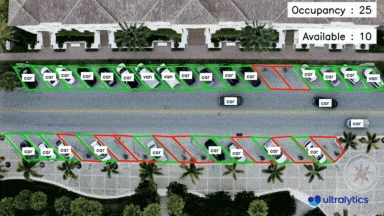 | 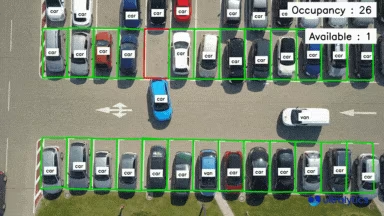 |
| Góc nhìn từ trên không trong quản lý bãi đỗ xe bằng Ultralytics YOLO26 | Góc nhìn từ trên cao trong quản lý bãi đỗ xe bằng Ultralytics YOLO26 |
Quy trình code của hệ thống quản lý bãi đỗ xe#
Giờ đây, việc chọn điểm đã trở nên dễ dàng
Việc tự xác định vị trí đỗ xe rất tốn công và dễ sai sót. Công cụ chú thích ô đỗ xe của Ultralytics (ParkingPtsSelection) cho phép bạn vẽ khu vực đỗ xe trên một khung hình và lưu lại để giải pháp quản lý bãi đỗ xe sử dụng.
Bước 1: Chụp một khung hình từ video hoặc luồng camera tại khu vực bạn muốn quản lý bãi đỗ xe.
Bước 2: Dùng code được cung cấp để mở giao diện đồ họa, tại đó bạn có thể chọn hình ảnh và bắt đầu vẽ các vùng đỗ xe bằng cách nhấp chuột để tạo đa giác.
Bước bổ sung để cài đặt `tkinter`
Thông thường, tkinter được đóng gói sẵn cùng Python. Nếu chưa có, hãy cài đặt theo các bước dưới đây:
- Linux: (Debian/Ubuntu):
sudo apt install python3-tk - Fedora:
sudo dnf install python3-tkinter - Arch:
sudo pacman -S tk - Windows: Cài đặt lại Python và đánh dấu hộp kiểm
tcl/tk and IDLEtrong Tính năng tùy chọn khi cài đặt - macOS: Cài đặt lại Python từ https://www.python.org/downloads/macos/ hoặc
brew install python-tk
from ultralytics import solutions

solutions.ParkingPtsSelection()
Bước 3: Sau khi xác định các khu vực đỗ xe bằng đa giác, nhấp vào save để lưu dữ liệu dưới dạng bounding_boxes.json trong thư mục làm việc — cùng tên tệp mà script quản lý bên dưới sẽ tải.
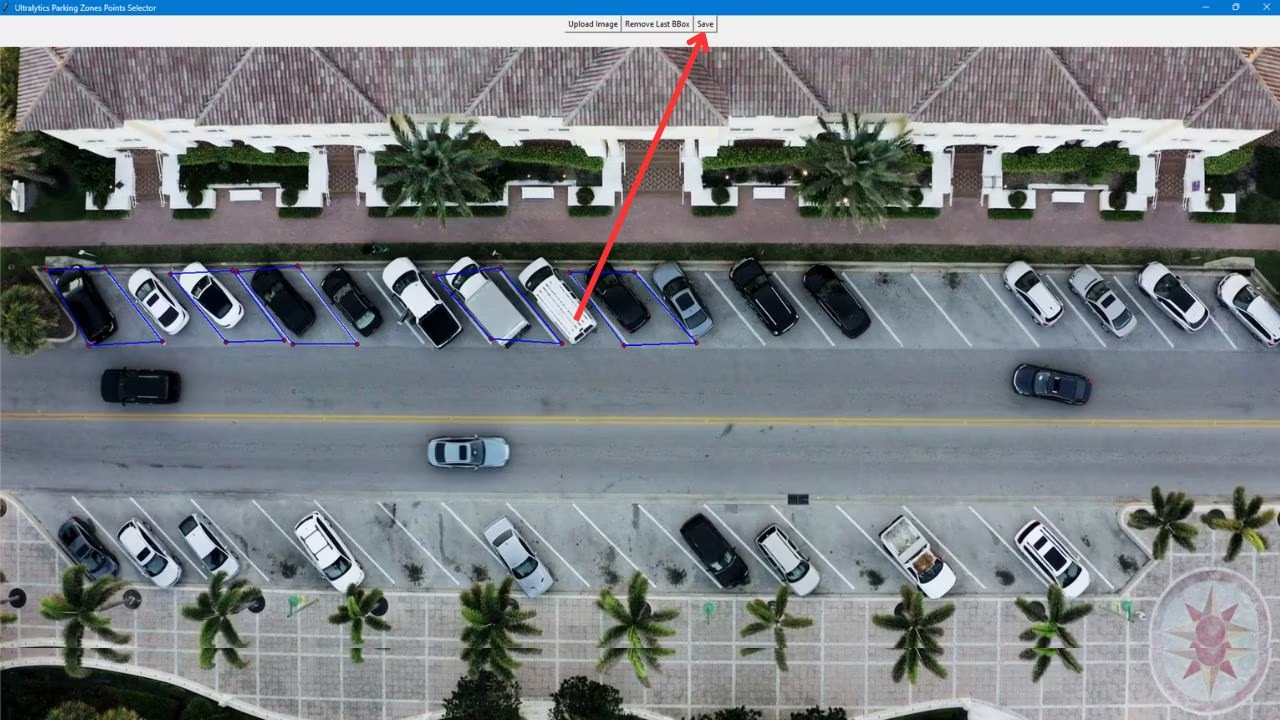
Bước 4: Bây giờ bạn có thể chạy giải pháp quản lý bãi đỗ xe bằng đoạn code bên dưới.
import cv2

from ultralytics import solutions

# Thu nhận video
cap = cv2.VideoCapture("path/to/video.mp4")
assert cap.isOpened(), "Error reading video file"

# Bộ ghi video
w, h, fps = (int(cap.get(x)) for x in (cv2.CAP_PROP_FRAME_WIDTH, cv2.CAP_PROP_FRAME_HEIGHT, cv2.CAP_PROP_FPS))
video_writer = cv2.VideoWriter("parking management.avi", cv2.VideoWriter_fourcc(*"mp4v"), fps, (w, h))

# Khởi tạo đối tượng quản lý bãi đỗ xe
parkingmanager = solutions.ParkingManagement(
    model="yolo26n.pt",  # đường dẫn đến tệp model
    json_file="bounding_boxes.json",  # đường dẫn đến tệp chú thích chỗ đỗ xe
)

while cap.isOpened():
    ret, im0 = cap.read()
    if not ret:
        break

    results = parkingmanager(im0)

    # print(results)  # truy cập kết quả đầu ra

    video_writer.write(results.plot_im)  # ghi khung hình đã xử lý.

cap.release()
video_writer.release()
cv2.destroyAllWindows()  # đóng tất cả cửa sổ đang mở
Các đối số của ParkingManagement#
Dưới đây là bảng các đối số của ParkingManagement:
| Đối số | Kiểu | Mặc định | Mô tả |
|---|---|---|---|
model | str | None | Đường dẫn đến tệp model Ultralytics YOLO. |
json_file | str | None | Đường dẫn đến tệp JSON chứa toàn bộ dữ liệu tọa độ chỗ đỗ xe. |
line_width | int | 2 | Độ dày đường viền của box, keypoint và số đếm mà giải pháp vẽ. |
verbose | bool | True | Bật nhật ký theo từng frame của giải pháp, gồm shape đầu vào, số lượng class và tốc độ xử lý. Bản thân lệnh gọi tracking luôn không ghi nhật ký. |
Giải pháp ParkingManagement cho phép sử dụng một số tham số track:
| Đối số | Kiểu | Mặc định | Mô tả |
|---|---|---|---|
tracker | str | 'tracktrack.yaml' | Chỉ định thuật toán theo dõi cần sử dụng. Các tùy chọn tích hợp sẵn: botsort.yaml, bytetrack.yaml, ocsort.yaml, deepocsort.yaml, fasttrack.yaml, tracktrack.yaml. |
conf | float | 0.25 | Đặt ngưỡng confidence cho các đối tượng được phát hiện; giá trị thấp hơn cho phép theo dõi nhiều đối tượng hơn nhưng có thể bao gồm cả kết quả dương tính giả. |
iou | float | 0.5 | Đặt ngưỡng Intersection over Union (IoU) để lọc các đối tượng phát hiện bị chồng lấn. |
classes | list | None | Lọc kết quả theo chỉ mục class. Ví dụ: classes=[0, 2, 3] chỉ theo dõi các class được chỉ định. |
device | str | None | Chỉ định thiết bị dùng để suy luận (ví dụ: cpu, cuda:0 hoặc 0). Cho phép người dùng chọn CPU, một GPU cụ thể hoặc thiết bị tính toán khác để chạy model. |
imgsz | int or tuple | 640 | Kích thước ảnh suy luận mục tiêu: số nguyên cho ảnh vuông hoặc cặp (height, width). Kích thước sẽ được điều chỉnh theo stride của model. |
max_det | int | 300 | Số lượng đối tượng phát hiện tối đa được giữ lại trong mỗi khung hình trước khi theo dõi, giới hạn số đối tượng mà một giải pháp xử lý trong các cảnh dày đặc. |
quantize | int or str | None | Độ chính xác suy luận: 16 (FP16) hoặc 32/unset (FP32) cho model PyTorch và TorchScript khi chạy ngoài CPU; các định dạng khác sử dụng độ chính xác do artifact và runtime của chúng lựa chọn. Thay thế đối số half đã lỗi thời. |
Ngoài ra, các tùy chọn trực quan hóa sau đây cũng được hỗ trợ:
| Đối số | Kiểu | Mặc định | Mô tả |
|---|---|---|---|
show | bool | False | Nếu True, hiển thị ảnh hoặc video đã được chú thích trong một cửa sổ. Hữu ích để nhận phản hồi trực quan ngay lập tức trong quá trình phát triển hoặc kiểm thử. |
Câu hỏi thường gặp#
Ultralytics YOLO26 cung cấp khả năng phát hiện phương tiện theo thời gian thực và giám sát cho các hệ thống bãi đỗ xe, giúp tối ưu hóa việc sử dụng chỗ đỗ, giảm ùn tắc và cải thiện an toàn thông qua hoạt động giám sát liên tục. Chạy model trên luồng camera trực tiếp cũng giúp quản lý luồng giao thông và giảm thời gian phương tiện chạy không tải. Để xem toàn bộ quy trình thiết lập, hãy tham khảo quy trình code của hệ thống quản lý bãi đỗ xe.
Sử dụng Ultralytics YOLO26 cho bãi đỗ xe thông minh mang lại nhiều lợi ích:
- Hiệu quả: Tối ưu hóa việc sử dụng chỗ đỗ xe và giảm ùn tắc.
- An toàn và bảo mật: Tăng cường giám sát và đảm bảo an toàn cho phương tiện cũng như người đi bộ.
- Tác động đến môi trường: Giúp giảm phát thải bằng cách giảm thời gian phương tiện chạy không tải. Tìm hiểu thêm về các lợi ích trong mục Ưu điểm của hệ thống quản lý bãi đỗ xe.
Việc xác định chỗ đỗ xe bằng Ultralytics YOLO26 rất đơn giản:
- Chụp một khung hình từ video hoặc luồng camera.
- Dùng mã được cung cấp để mở giao diện đồ họa (GUI), chọn ảnh và vẽ đa giác xác định các chỗ đỗ xe.
- Lưu dữ liệu đã gán nhãn ở định dạng JSON để xử lý tiếp.
Thiết lập phụ thuộc nhiều nhất vào từng bãi đỗ xe là
json_file: trỏ thiết lập này đến tệp JSON chứa các vùng đỗ xe mà bạn tạo bằng công cụ chú thích điểm để điều chỉnh giải pháp theo bố cục mới. Bạn có thể tùy chỉnh thêm thông qua các đối số khác — đặtmodelthành bộ phát hiện được huấn luyện tùy chỉnh, giới hạn các lần phát hiện ở nhữngclassesphương tiện cụ thể, điều chỉnh các ngưỡngconfvàiou, chuyển đổitracker, dùngline_widthđể thay đổi tỷ lệ nhãn trên khung hình và thông tin số chỗ đang sử dụng, hoặc chọndevicesuy luận. Để theo dõi theo vùng có liên quan, hãy xem hướng dẫn đếm đối tượng.Ultralytics YOLO26 được sử dụng trong nhiều ứng dụng quản lý bãi đỗ xe thực tế, bao gồm:
- Phát hiện chỗ đỗ xe: Xác định chính xác các chỗ còn trống và đã có xe.
- Giám sát: Tăng cường an ninh thông qua giám sát theo thời gian thực.
- Quản lý lưu lượng giao thông: Giảm thời gian chờ và tình trạng ùn tắc nhờ điều phối giao thông hiệu quả. Bạn có thể xem hình ảnh minh họa các ứng dụng này trong các ứng dụng thực tế.


Bình luận122
Đặt câu hỏi, chia sẻ kết quả hoặc giúp đỡ người khác.
ilyasKerrouche
Hi , when i run the first script i get this error:
File "C:\Users\explo\miniconda3\Lib\site-packages\ultralytics\solutions\parking_management.py", line 71, in upload_image self.canvas.config(width=canvas_width, height=canvas_height) ^^^^^^^^^^^^^^^^^^ AttributeError: 'NoneType' object has no attribute 'config'
How can i solve?
2 Paula DerrengerUltralytics
Hey there! 😊 It looks like you might be encountering an issue due to the
self.canvasobject not being correctly initialized, leading to aNoneTypeerror when you try to use itsconfigmethod.A common reason for this could be that the creation or initialization of the
canvasobject didn't happen as expected beforeupload_imageis called in your script. Double-check to ensure that thecanvasobject is instantiated properly within your class or function before you callupload_image. Here's an example snippet for initializing a canvas in Tkinter:import tkinter as tk class YourClass: def __init__(self, root): # Assuming self.canvas is being created here self.canvas = tk.Canvas(root, width=600, height=400) self.canvas.pack() def upload_image(self): # Your existing logic here pass # Make sure to create an instance of your class and initialize properly root = tk.Tk() app = YourClass(root) root.mainloop()Make sure you've correctly initialized the
canvasbefore trying to configure it. If this doesn't solve your issue, it might help to share more context around how and where you're creating thecanvasobject.Hope this helps, and feel free to reach out if you have more questions!
netpbcl
def upload_image(self): """Upload an image and resize it to fit canvas.""" self.image_path = filedialog.askopenfilename(filetypes=[("Image Files", ".png;.jpg;*.jpeg")]) if not self.image_path: return
self.image = Image.open(self.image_path) self.img_width, self.img_height = self.image.size # Calculate the aspect ratio and resize image aspect_ratio = self.img_width / self.img_height if aspect_ratio > 1: # Landscape orientation canvas_width = min(self.canvas_max_width, self.img_width) canvas_height = int(canvas_width / aspect_ratio) else: # Portrait orientation canvas_height = min(self.canvas_max_height, self.img_height) canvas_width = int(canvas_height * aspect_ratio) # Check if canvas is already initialized if self.canvas: self.canvas.destroy() # Destroy previous canvas self.canvas = tk.Canvas(self.master, bg="white", width=canvas_width, height=canvas_height) self.canvas.pack(side=tk.BOTTOM) self.canvas.bind("<Button-1>", self.on_canvas_click) resized_image = self.image.resize((canvas_width, canvas_height), Image.LANCZOS) self.canvas_image = ImageTk.PhotoImage(resized_image) self.canvas.create_image(0, 0, anchor=tk.NW, image=self.canvas_image) # Reset bounding boxes and current box self.bounding_boxes = [] self.current_box = []1- Paula DerrengerUltralytics
Hi there! It looks like you're encountering an issue where the
canvasobject hasn't been properly initialized before attempting to configure it. Make sure that thecanvasis being created and is notNonewhen you try to configure its properties.Here's a quick check you can add right before you configure the
canvas:if self.canvas is None: print("Canvas not initialized.") else: self.canvas.config(width=canvas_width, height=canvas_height)This snippet helps pinpoint whether the
canvasis indeed initialized at that point. If you see "Canvas not initialized.", you'll need to trace back in your code whereself.canvasshould have been set and ensure this happens beforeupload_image()is called.Check the placement of your
canvasinitialization and make sure it is executed in the right order. Maybe moving thecanvascreation to your class initializer (__init__) if it's not already there could help!Hope this helps you debug the issue! Let me know if there's anything else I can assist you with. 😊
Hello! I suggest to fix the uplad_image function like this: `
      def upload_image(self):
              """Upload an image and resize it to fit canvas."""


              self.image_path = filedialog.askopenfilename(filetypes=[("Image Files", "*.png;*.jpg;*.jpeg")])
              if not self.image_path:
                  return

              self.image = Image.open(self.image_path)
              self.img_width, self.img_height = self.image.size

              # Calculate the aspect ratio and resize image
              aspect_ratio = self.img_width / self.img_height
              if aspect_ratio > 1:
                  # Landscape orientation
                  canvas_width = min(self.canvas_max_width, self.img_width)
                  canvas_height = int(canvas_width / aspect_ratio)
              else:
                  # Portrait orientation
                  canvas_height = min(self.canvas_max_height, self.img_height)
                  canvas_width = int(canvas_height * aspect_ratio)

             # Setup canvas for image display
              self.canvas = tk.Canvas(self.master, bg="white", width=canvas_width, height=canvas_height)
              self.canvas.pack(side=tk.BOTTOM)
              self.canvas.bind("<Button-1>", self.on_canvas_click)


              self.canvas.config(width=canvas_width, height=canvas_height)
              resized_image = self.image.resize((canvas_width, canvas_height), Image.LANCZOS)
              self.canvas_image = ImageTk.PhotoImage(resized_image)
              self.canvas.create_image(0, 0, anchor=tk.NW, image=self.canvas_image)

              # Reset bounding boxes and current box
              self.bounding_boxes = []
              self.current_box = []`
And i tested the code with this video
But the model is not recognizing the cars (cup, microwave ecc instead)
Do you have some videos template to test the code?
- Paula DerrengerUltralytics(đã chỉnh sửa)
@eXplosive57 hello! Thanks for sharing your updated
upload_imagefunction and the scenario you're experimenting with. I appreciate your attention to detail. 😊Regarding the issue of the model not recognizing cars correctly and identifying other objects like cups or microwaves instead, it sounds like it might be a case of model misclassification, which can be due to a variety of factors:
- Model Training: The model may not be trained sufficiently on images similar to those in your video. Consider retraining the model with a more representative dataset of parking lot images.
- Quality and Size of the Input Images: Make sure the images are clear and of sufficient resolution. YOLO models generally perform better with higher-resolution inputs.
- Model Configuration: Check if the right configuration and weights are being used. Ensure that the model is set up to detect objects relevant to parking management.
For testing purposes, you can use standard traffic or parking lot videos which are often used in object detection benchmarks, or you can capture your own dataset from typical parking areas. Here is an example of initializing and using the parking management model:
import cv2

from ultralytics import solutions

# Video capture
cap = cv2.VideoCapture("path/to/your/video.mp4")
assert cap.isOpened(), "Error reading video file"

# Initialize parking management object (json_file is the file created with the point selection tool)
management = solutions.ParkingManagement(model="yolo26n.pt", json_file="path/to/your/bounding_boxes.json")

while cap.isOpened():
    ret, im0 = cap.read()
    if not ret:
        break

    results = management(im0)
    cv2.imshow("Parking Management", results.plot_im)
    cv2.waitKey(1)

cap.release()
cv2.destroyAllWindows()
This setup should help you streamline the detection process. If the issue persists, try fine-tuning the detection model or adjusting the confidence and IOU thresholds. Let me know how it goes or if you need further assistance!
RizwanMunawar
Thank you, @eXplosive57, for providing the prompt solution! I've been able to replicate the issue and will address it promptly. Regarding the model, training it on the visdrone dataset could enhance its ability to detect objects in drone or aerial views. Thanks
VisDrone Dataset Docs: https://docs.ultralytics.com/datasets/detect/visdrone/
Thanks for your answers! @muhammadrizwanmunawar @pderrenger
1@eXplosive57 This issue has been resolved! You can utilize the parking management system by installing the latest ultralytics PYPI package using the command mentioned below!
pip install ultralyticsThanks!
mattiarainieri
Using the ParkingPtsSelection method, and trying to click the Upload image button, this exception is traced and the executable crash.
The platform is macOS. The problem seems to be involved with some Apple library.
*** Terminating app due to uncaught exception 'NSInvalidArgumentException', reason: '*** -[__NSArrayM insertObject:atIndex:]: object cannot be nil'
*** First throw call stack:
(
        0   CoreFoundation                      0x000000019b8e22ec __exceptionPreprocess + 176
        1   libobjc.A.dylib                     0x000000019b3c6158 objc_exception_throw + 60
        2   CoreFoundation                      0x000000019b80d934 -[__NSArrayM insertObject:atIndex:] + 1288
        3   libtk8.6.dylib                      0x00000001414d1964 setAllowedFileTypes + 176
        4   libtk8.6.dylib                      0x00000001414d2370 Tk_GetOpenFileObjCmd + 1408
        5   libtcl8.6.dylib                     0x000000014114fe24 TclNRRunCallbacks + 80
        6   _tkinter.cpython-312-darwin.so      0x0000000117e9c5dc Tkapp_Call + 488
        7   Python                              0x00000001052e66f4 cfunction_call + 108
        8   Python                              0x00000001052959ac _PyObject_Call + 124
        9   Python                              0x000000010538abf8 _PyEval_EvalFrameDefault + 50272
        10  Python                              0x0000000105297d5c method_vectorcall + 372
        11  Python                              0x000000010538abf8 _PyEval_EvalFrameDefault + 50272
        12  Python                              0x0000000105297d5c method_vectorcall + 372
        13  _tkinter.cpython-312-darwin.so      0x0000000117ea14c4 PythonCmd + 208
        14  libtcl8.6.dylib                     0x000000014114fe24 TclNRRunCallbacks + 80
        15  libtk8.6.dylib                      0x00000001414540c4 ButtonWidgetObjCmd + 436
        16  libtcl8.6.dylib                     0x000000014114fe24 TclNRRunCallbacks + 80
        17  libtcl8.6.dylib                     0x0000000141150ba4 TclEvalEx + 1664
        18  libtk8.6.dylib                      0x0000000141428e98 Tk_BindEvent + 4316
        19  libtk8.6.dylib                      0x000000014142e904 TkBindEventProc + 328
        20  libtk8.6.dylib                      0x00000001414361c4 Tk_HandleEvent + 804
        21  libtk8.6.dylib                      0x0000000141436828 WindowEventProc + 112
        22  libtcl8.6.dylib                     0x00000001411fc4d8 Tcl_ServiceEvent + 136
        23  libtcl8.6.dylib                     0x00000001411fc6fc Tcl_DoOneEvent + 136
        24  _tkinter.cpython-312-darwin.so      0x0000000117e9ef64 _tkinter_tkapp_mainloop + 392
        25  Python                              0x00000001052a0c30 method_vectorcall_FASTCALL + 112
        26  Python                              0x000000010538919c _PyEval_EvalFrameDefault + 43524
        27  Python                              0x0000000105294ab8 _PyObject_FastCallDictTstate + 96
        28  Python                              0x000000010530b010 slot_tp_init + 212
        29  Python                              0x00000001053022e8 type_call + 148
        30  Python                              0x0000000105294c94 _PyObject_MakeTpCall + 128
        31  Python                              0x00000001053892fc _PyEval_EvalFrameDefault + 43876
        32  Python                              0x000000010537e528 PyEval_EvalCode + 184
        33  Python                              0x00000001053dfb60 run_eval_code_obj + 88
        34  Python                              0x00000001053ddbf8 run_mod + 132
        35  Python                              0x00000001053dd108 pyrun_file + 156
        36  Python                              0x00000001053dc4e8 _PyRun_SimpleFileObject + 288
        37  Python                              0x00000001053dc134 _PyRun_AnyFileObject + 80
        38  Python                              0x0000000105400f50 pymain_run_file_obj + 164
        39  Python                              0x0000000105400cc8 pymain_run_file + 72
        40  Python                              0x0000000105400250 Py_RunMain + 764
        41  Python                              0x0000000105400740 pymain_main + 304
        42  Python                              0x00000001054007e0 Py_BytesMain + 40
        43  dyld                                0x000000019b403154 start + 2476
)
libc++abi: terminating due to uncaught exception of type NSException
zsh: abort      python3 parking-selector.py
1 Glenn JocherUltralytics
@mattiarainieri thank you for reporting this issue. It appears to be related to macOS-specific library interactions. Please ensure you are using the latest version of the Ultralytics package. If the issue persists, consider running the code on a different platform or environment. For further assistance, you can refer to our parking management guide.
prasadjaywant
When tried to execute {from ultralytics import solutions solutions.ParkingPtsSelection()} , getting following messages;
[ requirements: Ultralytics requirement ['tkinter'] not found, attempting AutoUpdate... ERROR: Could not find a version that satisfies the requirement tkinter (from versions: none) ERROR: No matching distribution found for tkinter Retry 1/2 failed: Command 'pip install --no-cache-dir "tkinter" ' returned non-zero exit status 1. ERROR: Could not find a version that satisfies the requirement tkinter (from versions: none) ERROR: No matching distribution found for tkinter Retry 2/2 failed: Command 'pip install --no-cache-dir "tkinter" ' returned non-zero exit status 1. requirements: ❌ Command 'pip install --no-cache-dir "tkinter" ' returned non-zero exit status 1.]
Please can you help anything needed to install tkinter? Thanks for your attention!
1Additional notes: OS - Windows 11 Home, I noticed that tkinter library files are available in the C:\Python312\Lib\tkinter directory. Env PATH variable is defined as C:\Python312. I tried the steps mentioned by pderrenger in the trail below. Still it is looking for tkinter package to install and produces the error when ParkingPtsSelection() is executed. Is Annotator tool GUI is directly available (like in Roboflow or similar tools) so that we can create polygonic annotations externally, save the file as bounding_boxes.json and carry out the model execution skipping call to the ParkingPtsSelection()?
- Glenn JocherUltralytics(đã chỉnh sửa)
@prasadjaywant hello!
Thank you for reaching out and providing detailed information about your setup and the issue you're encountering. It appears that the
tkinterlibrary is not being recognized by your Python environment, which is necessary for theParkingPtsSelectiontool to function.Steps to Resolve the Issue:
-
Verify
tkinterInstallation: Sincetkinteris included with standard Python installations, it should be available. However, it might not be installed by default in some environments. You can try installing it manually:sudo apt-get install python3-tkFor Windows,
tkintershould be included with the Python installer. Ensure that your Python installation is complete and includes all optional components. -
Check Python Path: Ensure that your Python environment is correctly set up and that the
tkinterlibrary is in the correct path. You can verify this by running:import tkinter print(tkinter.__file__)This should print the path to the
tkintermodule. If it doesn't, there might be an issue with your Python installation. -
Alternative Annotation Tools: If you continue to face issues with
tkinter, you can use external tools like Roboflow to create polygonal annotations. Once you have created the annotations, save them asbounding_boxes.jsonand proceed with the parking management workflow.
Example Workflow Without
ParkingPtsSelection:-
Create Annotations Externally: Use an external tool to create polygonal annotations and save them as
bounding_boxes.json. -
Run Parking Management: Use the following code to execute the parking management system:
import cv2

from ultralytics import solutions

# Video capture
cap = cv2.VideoCapture("Path/to/video/file.mp4")
assert cap.isOpened(), "Error reading video file"
w, h, fps = (int(cap.get(x)) for x in (cv2.CAP_PROP_FRAME_WIDTH, cv2.CAP_PROP_FRAME_HEIGHT, cv2.CAP_PROP_FPS))

# Video writer
video_writer = cv2.VideoWriter("parking_management.avi", cv2.VideoWriter_fourcc(*"mp4v"), fps, (w, h))

# Initialize parking management object (json_file is the file created with the point selection tool)
management = solutions.ParkingManagement(model="yolo26n.pt", json_file="bounding_boxes.json")

while cap.isOpened():
    ret, im0 = cap.read()
    if not ret:
        break

    results = management(im0)
    video_writer.write(results.plot_im)

cap.release()
video_writer.release()
cv2.destroyAllWindows()
For more detailed guidance, please refer to our Parking Management Guide.
If you continue to experience issues, please ensure you are using the latest versions of
torchandultralytics. You can update them using:pip install --upgrade torch ultralyticsFeel free to reach out if you have any further questions or need additional assistance. We're here to help! 😊
-
Thanks glenn-jocher for your effort to look into the problem. The issue with functioning of ParkingPtsSelection tool persists after trying the steps. I tried on local machine as well as in Google Colab. The same error message while installing tkinter appears in both environments.
I did try with roboflow Annotator tool approach and exported the annotated images dataset using COCO JSON format and renamed it as bounding_boxes.json as stated. However, it produces new error as follows while running the Parking Management code as above; " File "..\parking_management.py", line 226, in process_data points = region["points"] ~~~~~~^^^^^^^^^^ TypeError: string indices must be integers, not 'str' . " I think not sure, but some tweaking may be required in JSON file. Please suggest. Thanks again for your help!
- Glenn JocherUltralytics(đã chỉnh sửa)
Hello @prasadjaywant,
Thank you for your detailed follow-up. I'm sorry to hear that the issue with
ParkingPtsSelectionpersists. Let's address the new error you're encountering with the JSON file.JSON File Format
It seems like the JSON format exported from Roboflow might not be directly compatible with the expected format in our
ParkingManagementsystem. The errorTypeError: string indices must be integers, not 'str'suggests that the JSON structure might need some adjustments.Expected JSON Structure
The
ParkingManagementsystem expects a specific structure for the JSON file. Here is an example of the expected format:[ { "region_id": 1, "points": [ [x1, y1], [x2, y2], [x3, y3], [x4, y4] ] }, { "region_id": 2, "points": [ [x1, y1], [x2, y2], [x3, y3], [x4, y4] ] } ]Each region needs a list of
pointsdefining the polygon (extra fields such asregion_idare ignored).Adjusting the JSON File
You can manually adjust the JSON file to match the expected format. Here's a Python snippet to help you convert the COCO JSON format to the required format:
import json

# Load the COCO JSON file
with open('bounding_boxes.json', 'r') as f:
    coco_data = json.load(f)

# Convert to the required format
parking_regions = []
for i, annotation in enumerate(coco_data['annotations']):
    region = {
        "region_id": i + 1,
        "points": annotation['segmentation'][0]  # Assuming segmentation points are in the correct format
    }
    parking_regions.append(region)

# Save the new JSON file
with open('parking_regions.json', 'w') as f:
    json.dump(parking_regions, f, indent=4)
Running the Parking Management Code
After adjusting the JSON file, you can proceed with the parking management code:
import cv2

from ultralytics import solutions

# Video capture
cap = cv2.VideoCapture("Path/to/video/file.mp4")
assert cap.isOpened(), "Error reading video file"
w, h, fps = (int(cap.get(x)) for x in (cv2.CAP_PROP_FRAME_WIDTH, cv2.CAP_PROP_FRAME_HEIGHT, cv2.CAP_PROP_FPS))

# Video writer
video_writer = cv2.VideoWriter("parking_management.avi", cv2.VideoWriter_fourcc(*"mp4v"), fps, (w, h))

# Initialize parking management object (json_file is the file created with the point selection tool)
management = solutions.ParkingManagement(model="yolo26n.pt", json_file="parking_regions.json")

while cap.isOpened():
    ret, im0 = cap.read()
    if not ret:
        break

    results = management(im0)
    video_writer.write(results.plot_im)

cap.release()
video_writer.release()
cv2.destroyAllWindows()
Additional Resources
For more detailed guidance, please refer to our Parking Management Guide.
If you continue to experience issues, please ensure you are using the latest versions of
torchandultralytics. You can update them using:pip install --upgrade torch ultralyticsFeel free to reach out if you have any further questions or need additional assistance. We're here to help! 😊
That's brilliant glenn-jocher. The code absolutely worked good for the conversion. COCO JSON and Parking Regions JSON are quite different. I could also run main code and produced 'parking management.avi'. Some miss-outs and misrepresentation of 'Points of Interest' has happened in the .avi, which I would now probe into. But that's not point of query at the moment. Thanks for your great help. Will keep in touch......
1Dear @glenn-jocher,
Greetings.
We tried the simplest model of Instance Segmentation (yolov8n-seg.pt) as per snippet on the guide page; https://docs.ultralytics.com/guides/instance-segmentation-and-tracking/#samples. We used 2 video paths below viz. https://videos.pexels.com/video-files/5587732/5587732-hd_1280_720_30fps.mp4 and https://videos.pexels.com/video-files/3858833/3858833-hd_1280_720_24fps.mp4 as a source in the snippet. However we couldn't see results as expected. There isn't much for user to parameterize in the code except the video path. Minimum expected results are as follows;
- Every parked or moving vehicle to be marked as 'Car' if not further possible to segment them into subclasses such as 'Truck', 'Van' etc.
- Some movement of people is also seen in the video. Those entities need also to be marked as 'Person' label.
- Other entities such as 'Pet', 'Shop Trolley' etc. that could be possible near a park area, should be in the training data set.
- A few incorrect identities such as 'Board', 'Clock', 'Toilet' were appearing in the generated .avi. These need to be eliminated.
- Query - Is it possible to parameterize yolov8n-seg.pt for desired class labels so that epoch over hundreds of unrelated classes could be saved. Model could then efficiently run only for possible classes in the subject domain. For example in Parking Management use case, classes such as 'Car', 'Van', 'Truck', 'Person', 'Pet', 'Shopping Cart', 'Bag', 'Box and 'Other' could be relevant and be given as label parameters to the model. Rest hundreds of class labels may be irrelevant in this case.
Please help suggest a way to achieve the expected results as above. Thanks for your attention.....
- Glenn JocherUltralytics(đã chỉnh sửa)
Hello @prasadjaywant,
Thank you for reaching out and providing detailed information about your use case and the issues you're encountering. Let's address your concerns step-by-step.
1. Expected Results for Vehicle and Person Detection
To ensure that vehicles and people are correctly identified, please verify that you are using the latest versions of
torchandultralytics. You can update them using:pip install --upgrade torch ultralytics2. Incorrect Class Labels
To filter out irrelevant classes and focus on specific ones like 'Car', 'Van', 'Truck', 'Person', etc., you can use the
classesargument ofParkingManagement. Here’s an example:management = solutions.ParkingManagement(model="yolo26n.pt", json_file="bounding_boxes.json", classes=[0, 1, 2, 3, 15, 16, 17])Replace the class indices with the ones relevant to your use case.
3. Customizing the Model for Specific Classes
If you want to train the model to recognize only specific classes, you can fine-tune the model on a custom dataset that includes only those classes. This will help in reducing the number of epochs and improving efficiency. You can create a custom dataset and train the model as follows:
from ultralytics import YOLO

# Load a model
model = YOLO('yolo26n.pt')  # Load a pretrained model

# Train the model on your custom dataset
model.train(data='path/to/custom_dataset.yaml', epochs=50, imgsz=640)
Ensure your custom dataset YAML file is properly configured with the relevant classes.
4. Handling Incorrect Identifications
To handle incorrect identifications, you can adjust the
confandiouarguments ofParkingManagement. Increasing the confidence threshold can help reduce false positives:management = solutions.ParkingManagement(model="yolo26n.pt", json_file="bounding_boxes.json", conf=0.5, iou=0.6)Example Code
Here’s a revised version of your code snippet incorporating the above suggestions:
import cv2

from ultralytics import solutions

# Video capture
cap = cv2.VideoCapture("Path/to/video/file.mp4")
assert cap.isOpened(), "Error reading video file"
w, h, fps = (int(cap.get(x)) for x in (cv2.CAP_PROP_FRAME_WIDTH, cv2.CAP_PROP_FRAME_HEIGHT, cv2.CAP_PROP_FPS))

# Video writer
video_writer = cv2.VideoWriter("parking_management.avi", cv2.VideoWriter_fourcc(*"mp4v"), fps, (w, h))

# Initialize parking management object (json_file is the file created with the point selection tool)
management = solutions.ParkingManagement(model="yolo26n.pt", json_file="bounding_boxes.json", classes=[0, 1, 2, 3, 15, 16, 17], conf=0.5, iou=0.6)

while cap.isOpened():
    ret, im0 = cap.read()
    if not ret:
        break

    results = management(im0)
    video_writer.write(results.plot_im)

cap.release()
video_writer.release()
cv2.destroyAllWindows()
For more detailed guidance, please refer to our Parking Management Guide.
Feel free to reach out if you have any further questions or need additional assistance. We're here to help! 😊
Thanks @glenn-jocher and @[pderrenger] for your quick help. My further working is summarized as follows. Observations:
- Parking Annotator persists the 'tkinter not found error'. But surprisingly UI widget opens up, it accepts image for upload, allows polygonic annotations and creates bounding_boxes.json successfully as enclosed below.
- For annotation image was created out of one of the frames in the video.
- All code runs successfully. It's executed with pretrained model as-is. No customization with any new dataset is done yet.
- .avi is generated.
- Seemingly followed all steps and also the pip install --upgrade torch ultralytics.
- However, no single object detection/segmentation label is generated during the processing and final .avi. The Python code execution was performed on local CPU and also in Google Colab. Same behavior is observed on both.
- Are we missing something or anything not in order? The case was tried with 1 more video https://videos.pexels.com/video-files/3858833/3858833-hd_1280_720_24fps.mp4 and relevant bounding_boxes points. Result is same.
bounding_boxes_5587732-hd_1280_720_30fps.json:
[ { "points": [ [ 293, 129 ], [ 375, 128 ], [ 375, 159 ], [ 293, 161 ] ] }, { "points": [ [ 291, 195 ], [ 373, 195 ], [ 373, 225 ], [ 290, 225 ] ] }, { "points": [ [ 1214, 144 ], [ 1291, 140 ], [ 1293, 170 ], [ 1209, 173 ] ] }, { "points": [ [ 1315, 367 ], [ 1384, 368 ], [ 1383, 397 ], [ 1315, 395 ] ] }, { "points": [ [ 1297, 591 ], [ 1368, 591 ], [ 1368, 622 ], [ 1296, 619 ] ] }, { "points": [ [ 1770, 368 ], [ 1837, 367 ], [ 1839, 392 ], [ 1768, 394 ] ] }, { "points": [ [ 946, 442 ], [ 980, 440 ], [ 983, 504 ], [ 948, 500 ] ] } ]
import cv2 from ultralytics import solutions
Path to json file created with an external tool
polygon_json_path = "bounding_boxes_5587732-hd_1280_720_30fps.json"
Video capture
cap = cv2.VideoCapture("https://videos.pexels.com/video-files/5587732/5587732-hd_1280_720_30fps.mp4") assert cap.isOpened(), "Error reading video file" w, h, fps = (int(cap.get(x)) for x in (cv2.CAP_PROP_FRAME_WIDTH, cv2.CAP_PROP_FRAME_HEIGHT, cv2.CAP_PROP_FPS))
Video writer
video_writer = cv2.VideoWriter("parking_management_5587732-hd_1280_720_30fps.avi", cv2.VideoWriter_fourcc(*"mp4v"), fps, (w, h))
Initialize parking management object
management = solutions.ParkingManagement(model_path="yolov8n-seg.pt") ''' management = solutions.ParkingManagement( model_path="yolov8n-seg.pt", txt_color=(0, 0, 0), bg_color=(255, 255, 255), occupied_region_color=(0, 255, 0), available_region_color=(0, 0, 255), margin=10 ) '''
while cap.isOpened(): ret, im0 = cap.read() if not ret: breakjson_data = management.parking_regions_extraction(polygon_json_path) results = management.model.track(im0, persist=True, show=False, classes=[0, 1, 2, 3, 7], conf=0.5, iou=0.6)classes=[0-person, 1-bicycle, 2-car, 3-motorcycle, 7-truck, 15-cat, 16-dog, 17-horse, 26-handbag, 28-suitcase]
if results[0].boxes.id is not None:
    boxes = results[0].boxes.xyxy.cpu().tolist()
    clss = results[0].boxes.cls.cpu().tolist()
    management.process_data(json_data, im0, boxes, clss)

management.display_frames(im0)
video_writer.write(im0)
cap.release() video_writer.release() cv2.destroyAllWindows()
- Glenn JocherUltralytics(đã chỉnh sửa)
Hello @prasadjaywant,
Thank you for your detailed summary and for providing the JSON file and code snippet. Let's address the issues you're encountering:
Observations and Issues:
tkinterError: It's good to know that despite the error, the UI widget opens and functions correctly. This might be a minor issue with the environment setup but doesn't seem to affect the functionality.- No Object Detection/Segmentation Labels: The main issue appears to be that no objects are being detected or segmented in your video.
Steps to Resolve:
-
Verify Model and Dependencies: Ensure you are using the latest versions of
torchandultralytics. You can update them using:pip install --upgrade torch ultralytics -
Check Class Labels: Ensure that the class labels you are filtering for are correct. The COCO dataset class indices are as follows:
- 0: 'person'
- 1: 'bicycle'
- 2: 'car'
- 3: 'motorcycle'
- 7: 'truck'
- 15: 'cat'
- 16: 'dog'
- 17: 'horse'
- 26: 'handbag'
- 28: 'suitcase'
Make sure these indices match the classes you expect in your video.
-
Adjust Confidence and IoU Thresholds: Sometimes, adjusting the confidence and IoU thresholds can help in detecting objects more accurately. You can try lowering the confidence threshold to see if it helps:
management = solutions.ParkingManagement(model="yolo26n.pt", json_file="bounding_boxes.json", classes=[0, 1, 2, 3, 7], conf=0.3, iou=0.5) -
Debugging: Add some print statements to check if any detections are being made:
results = management(im0)
print(f"Detected boxes: {management.boxes}")
print(f"Detected classes: {management.clss}")
Example Code:
Here’s the revised code snippet incorporating the above suggestions:
import cv2

from ultralytics import solutions

# Video capture
cap = cv2.VideoCapture("https://videos.pexels.com/video-files/5587732/5587732-hd_1280_720_30fps.mp4")
assert cap.isOpened(), "Error reading video file"
w, h, fps = (int(cap.get(x)) for x in (cv2.CAP_PROP_FRAME_WIDTH, cv2.CAP_PROP_FRAME_HEIGHT, cv2.CAP_PROP_FPS))

# Video writer
video_writer = cv2.VideoWriter("parking_management_5587732-hd_1280_720_30fps.avi", cv2.VideoWriter_fourcc(*"mp4v"), fps, (w, h))

# Initialize parking management object (json_file is the file created with the point selection tool)
management = solutions.ParkingManagement(model="yolo26n.pt", json_file="bounding_boxes_5587732-hd_1280_720_30fps.json", classes=[0, 1, 2, 3, 7], conf=0.3, iou=0.5)

while cap.isOpened():
    ret, im0 = cap.read()
    if not ret:
        break

    results = management(im0)
    print(f"Detected boxes: {management.boxes}")
    print(f"Detected classes: {management.clss}")
    video_writer.write(results.plot_im)

cap.release()
video_writer.release()
cv2.destroyAllWindows()
Additional Resources:
For more detailed guidance, please refer to our Parking Management Guide.
Feel free to reach out if you have any further questions or need additional assistance. We're here to help! 😊
Dear @glenn-jocher and @pederrenger,
Terminal is showing preprocessing and postprocessing execution with class names as 'car', 'person' etc. but at very low scores of conf=0.05 and iou=0.1. The .avi doesn't show any detection label, box, mask or segment etc. for any of the objects. It just forms a vanilla clip same as source video. Also no execution of print() statements seen in the terminal. Any clue for rendering the annotations properly? Thanks very much......
- Glenn JocherUltralytics(đã chỉnh sửa)
Hello @prasadjaywant,
Thank you for your detailed report and for providing the context. Let's address the issue you're encountering with the annotations not rendering properly in the
.avifile.Steps to Resolve:
-
Verify Package Versions: Ensure you are using the latest versions of
torchandultralytics. You can update them using:pip install --upgrade torch ultralytics -
Adjust Confidence and IoU Thresholds: Since you mentioned that the terminal shows low confidence scores, try adjusting the confidence and IoU thresholds to higher values to filter out low-confidence detections:
management = solutions.ParkingManagement(model="yolo26n.pt", json_file="bounding_boxes.json", classes=[0, 1, 2, 3, 7], conf=0.5, iou=0.6) -
Check for Detections: Add print statements to check if any detections are being made and to ensure the results are being processed correctly:
results = management(im0) print(f"Detected boxes: {management.boxes}") print(f"Detected classes: {management.clss}") -
Rendering Annotations: Ensure that
results.plot_imcontains the annotations. You can also try displaying the frames directly to verify:cv2.imshow("Frame", results.plot_im) cv2.waitKey(1)
Example Code:
Here’s the revised code snippet incorporating the above suggestions:
import cv2

from ultralytics import solutions

# Video capture
cap = cv2.VideoCapture("https://videos.pexels.com/video-files/5587732/5587732-hd_1280_720_30fps.mp4")
assert cap.isOpened(), "Error reading video file"
w, h, fps = (int(cap.get(x)) for x in (cv2.CAP_PROP_FRAME_WIDTH, cv2.CAP_PROP_FRAME_HEIGHT, cv2.CAP_PROP_FPS))

# Video writer
video_writer = cv2.VideoWriter("parking_management_5587732-hd_1280_720_30fps.avi", cv2.VideoWriter_fourcc(*"mp4v"), fps, (w, h))

# Initialize parking management object (json_file is the file created with the point selection tool)
management = solutions.ParkingManagement(model="yolo26n.pt", json_file="bounding_boxes_5587732-hd_1280_720_30fps.json", classes=[0, 1, 2, 3, 7], conf=0.5, iou=0.6)

while cap.isOpened():
    ret, im0 = cap.read()
    if not ret:
        break

    results = management(im0)
    print(f"Detected boxes: {management.boxes}")
    print(f"Detected classes: {management.clss}")
    cv2.imshow("Parking Management", results.plot_im)
    cv2.waitKey(1)
    video_writer.write(results.plot_im)

cap.release()
video_writer.release()
cv2.destroyAllWindows()
Additional Resources:
For more detailed guidance, please refer to our Parking Management Guide.
Feel free to reach out if you have any further questions or need additional assistance. We're here to help! 😊
-
connorsharpmckinnis
Hello, and thanks for making this great tool! I'm building a prototype system that uses this solution to monitor parking space usage in a mid-size municipal lot. It's been working well and returning counts of occupied spaces and available spaces, which is excellent for my first use-case. However, I've thought about another possible use-case that would be helpful, but I'm not sure if it is feasible with the out-of-the-box solution.
I'd like to be able to track occupancy of individual parking spaces by id, so that I can store data as 'space #101 is Occupied at 01/20/2026-10:00:00AM'. That would require storing the JSON bounding boxes with an id and returning a dictionary of ids and occupancy values. Is this something that has been done by you or others, and if so, any advice on how to implement this would be great.
Thanks!
- Glenn JocherUltralytics
Yes—per-slot occupancy is feasible, it’s just not returned out-of-the-box today; the simplest approach is to add an
idfield per region in your JSON (or treat the region list index as the id), then afterresults = parkingmanager(im0)compute adict[id] -> boolusing the same polygon test used inParkingManagement.process()(see the implementation in the ParkingManagement reference and the end-to-end flow in the Parking Management guide).import json import cv2 import numpy as np from datetime import datetime from ultralytics import solutions def add_ids(in_json="bounding_boxes.json", out_json="bounding_boxes_with_ids.json", start_id=101): data = json.load(open(in_json, encoding="utf-8")) for i, r in enumerate(data, start=start_id): r["id"] = str(i) json.dump(data, open(out_json, "w", encoding="utf-8"), indent=4) def slot_status(parkingmanager, json_file): regions = json.load(open(json_file, encoding="utf-8")) status = {} for idx, region in enumerate(regions): rid = region.get("id", str(idx)) poly = np.array(region["points"], dtype=np.int32).reshape((-1, 1, 2)) occupied = False for box in parkingmanager.boxes: xc, yc = int((box[0] + box[2]) / 2), int((box[1] + box[3]) / 2) if cv2.pointPolygonTest(poly, (xc, yc), False) >= 0: occupied = True break status[rid] = occupied return status add_ids() parkingmanager = solutions.ParkingManagement(model="yolo26n.pt", json_file="bounding_boxes_with_ids.json") results = parkingmanager(im0) # your frame ts = datetime.now().strftime("%m/%d/%Y-%I:%M:%S%p") status = slot_status(parkingmanager, "bounding_boxes_with_ids.json") print(ts, status)If you want this mapping returned directly inside
SolutionResults, please open a feature request (or drop the desired output format here) so we can consider adding a standardslot_statusfield to the solution. SHAHFAISAL80
Per-slot parking occupancy detection is feasible, although it is not provided by default in the current implementation. A practical approach is to assign a unique ID to each parking region in the JSON configuration file, or alternatively use the region index as the identifier. After executing results = parkingmanager(im0), you can compute a dictionary that maps each slot ID to its occupancy status. This is done by applying the same polygon containment logic used internally in the ParkingManagement.process() method. For each detected vehicle bounding box, the center point is calculated. The function cv2.pointPolygonTest() is then used to determine whether that center point lies inside a parking polygon. If the point falls within a region, the corresponding slot is marked as occupied. The final output becomes a structured mapping such as {slot_id: True/False}. This method provides a simple and efficient way to track individual slot availability. For future improvements, this mapping could be integrated directly into SolutionResults as a standardized slot_status field.
- Glenn JocherUltralytics
That’s the right approach, and one useful detail is that
solutions.ParkingManagementcurrently readsregion["points"]from the JSON, so adding extra fields likeid,name, orcamera_idshould not break the default flow shown in the ParkingManagement reference; if you’d like native per-slot output inSolutionResults, please open a feature request with the exactslot_statusformat you want returned.
Caoo7
Hi, what camera do you recommend for working with this model?
- Glenn JocherUltralytics
@greviewer-edt Para datos de ejemplo, puedes crear tu propio conjunto de prueba capturando un frame de cualquier video de parking y usando el anotador de plazas incluido. También puedes encontrar videos de muestra en el repositorio de Ultralytics o usar cualquier video de parking disponible públicamente para tus pruebas iniciales.
@Caoo7 For parking management, I recommend cameras with at least 1080p resolution, wide-angle lens (to cover more parking spaces), good low-light performance, and stable mounting. IP cameras with RTSP streams work well with YOLO11, and the specific model depends on your installation height and coverage area requirements.
UltralyticsAssistantUltralytics
👋 Hola, ¡gracias por compartir tu interés en Ultralytics y las soluciones de gestión de aparcamiento con YOLO11! 🚗🔍 Te recomendamos visitar la documentación oficial donde encontrarás información detallada sobre la optimización de plazas de aparcamiento y la detección inteligente de vehículos en tiempo real.
Si este es un 🐛 Reporte de Bug, por favor proporciona un ejemplo mínimo reproducible para ayudarnos a diagnosticar y resolver el problema.
Si tienes dudas sobre entrenamiento personalizado ❓, incluye la mayor cantidad de información posible, como ejemplos de imágenes del dataset y logs de entrenamiento. Además, asegúrate de seguir nuestros consejos para mejores resultados.
Únete a la comunidad de Ultralytics donde prefieras. Para chat en tiempo real, visita Discord 🎧. Si prefieres debates más extensos, revisa Discourse, o comparte experiencias en nuestro Subreddit.
Actualización
Actualiza el paquete
ultralyticsy todos los requisitos en un entorno Python>=3.8 con PyTorch>=1.8 para verificar que tu problema no esté ya resuelto en la última versión:pip install -U ultralyticsEntornos
YOLO puede ejecutarse en cualquiera de los siguientes entornos verificados y actualizados (con todas las dependencias incluidas CUDA/CUDNN, Python y PyTorch preinstalados):
- Notebooks con GPU gratis:


- Google Cloud Deep Learning VM. Consulta la Guía de inicio rápido en GCP
- Amazon Deep Learning AMI. Consulta la Guía de inicio rápido en AWS
- Imagen Docker. Consulta la Guía de inicio rápido en Docker
Estado

Si esta insignia está en verde, todas las pruebas de Ultralytics CI están pasando actualmente. Estas pruebas verifican el funcionamiento correcto de todos los Modos y Tareas de YOLO en macOS, Windows y Ubuntu cada 24 horas y en cada commit.
ℹ️ Esta es una respuesta automatizada. Un ingeniero de Ultralytics también te asistirá pronto.
greviewer-edt
gracias, podrian por favor poner los videos de ejemplo, gracias
- Notebooks con GPU gratis:
buen día, podrias indicar unos videos y json de input para replicar los experimentos, esta genial, pero antes de grabar, quisiera probarlo
por ciero, buen trabajo con todas estas soluciones
Thanks for the tip.
On Sun, Feb 16, 2025 at 10:47 AM Glenn Jocher @.***> wrote:
@SHAHFAISAL80 https://github.com/SHAHFAISAL80 for static video processing in parking management, ensure your JSON annotations align perfectly with the camera view. If using a fixed camera, try setting persist=True in model.track() to maintain object IDs between frames. You can find specific implementation details in our Parking Management guide https://docs.ultralytics.com/guides/parking-management/#parking-management-system-code-workflow .
— Reply to this email directly, view it on GitHub https://github.com/orgs/ultralytics/discussions/11093#discussioncomment-12213407, or unsubscribe https://github.com/notifications/unsubscribe-auth/A6MTUN5BHP3PZTHUMJ3NZFL2QAQ6LAVCNFSM6AAAAABHCDMGSGVHI2DSMVQWIX3LMV43URDJONRXK43TNFXW4Q3PNVWWK3TUHMYTEMRRGM2DANY . You are receiving this because you were mentioned.Message ID: @.*** com>
- Glenn JocherUltralytics(đã chỉnh sửa)
@SHAHFAISAL80 for additional help with parking management configurations, you can explore adjusting tracking parameters like
tracker(trybytetrack.yaml) or confidence thresholds in yourParkingManagementarguments. The full parameter details are available in our Parking Management guide: https://docs.ultralytics.com/guides/parking-management/#parkingmanagement-arguments
I think are you single the moving streaming video can you try the static video not moving etx
On Mon, Feb 10, 2025, 22:26 Peymankar @.***> wrote:
unfortunately it doesn't work even by changing the confident threshold also the video resolution is good and in the specified criteria, do you have another solution?
— Reply to this email directly, view it on GitHub https://github.com/orgs/ultralytics/discussions/11093#discussioncomment-12124392, or unsubscribe https://github.com/notifications/unsubscribe-auth/A6MTUN3PF4CMJKAMQS73JZL2PDOKXAVCNFSM6AAAAABHCDMGSGVHI2DSMVQWIX3LMV43URDJONRXK43TNFXW4Q3PNVWWK3TUHMYTEMJSGQZTSMQ . You are receiving this because you were mentioned.Message ID: @.*** com>
- Glenn JocherUltralytics(đã chỉnh sửa)
@SHAHFAISAL80 for static video processing in parking management, ensure your JSON annotations align perfectly with the camera view.
ParkingManagementalready tracks objects between frames internally, so you don't need to callmodel.track()yourself. You can find specific implementation details in our Parking Management guide.
Ok, will do that.
On Sat, Feb 8, 2025, 02:58 Glenn Jocher @.***> wrote:
@SHAHFAISAL80 https://github.com/SHAHFAISAL80 thanks for sharing the details. For inconsistent detection across videos, first verify that all videos meet the 1920x1080 resolution limit mentioned in our docs. If detection fails in specific cases, try adjusting the confidence threshold ( conf=0.25) and enable persistence (persist=True) in your tracker arguments. Ensure your parking region polygons in bounding_boxes.json precisely match the camera perspective in each video. For further debugging, please share specific examples of problematic frames and your exact code/arguments used.
— Reply to this email directly, view it on GitHub https://github.com/orgs/ultralytics/discussions/11093#discussioncomment-12099180, or unsubscribe https://github.com/notifications/unsubscribe-auth/A6MTUN5I66HFLNY46D27T4D2OUUATAVCNFSM6AAAAABHCDMGSGVHI2DSMVQWIX3LMV43URDJONRXK43TNFXW4Q3PNVWWK3TUHMYTEMBZHEYTQMA . You are receiving this because you were mentioned.Message ID: @.*** com>
