使用 Ultralytics YOLO26 进行距离计算#
什么是距离计算?#
距离计算是测量图像或视频帧中两个检测目标之间距离的过程。对于 Ultralytics YOLO26,系统会使用边界框质心,计算用户选定边界框之间的距离。
观看: 如何使用 Ultralytics YOLO 以像素为单位估算检测目标之间的距离 🚀
可视化效果#
| 使用 Ultralytics YOLO26 进行距离计算 |
|---|
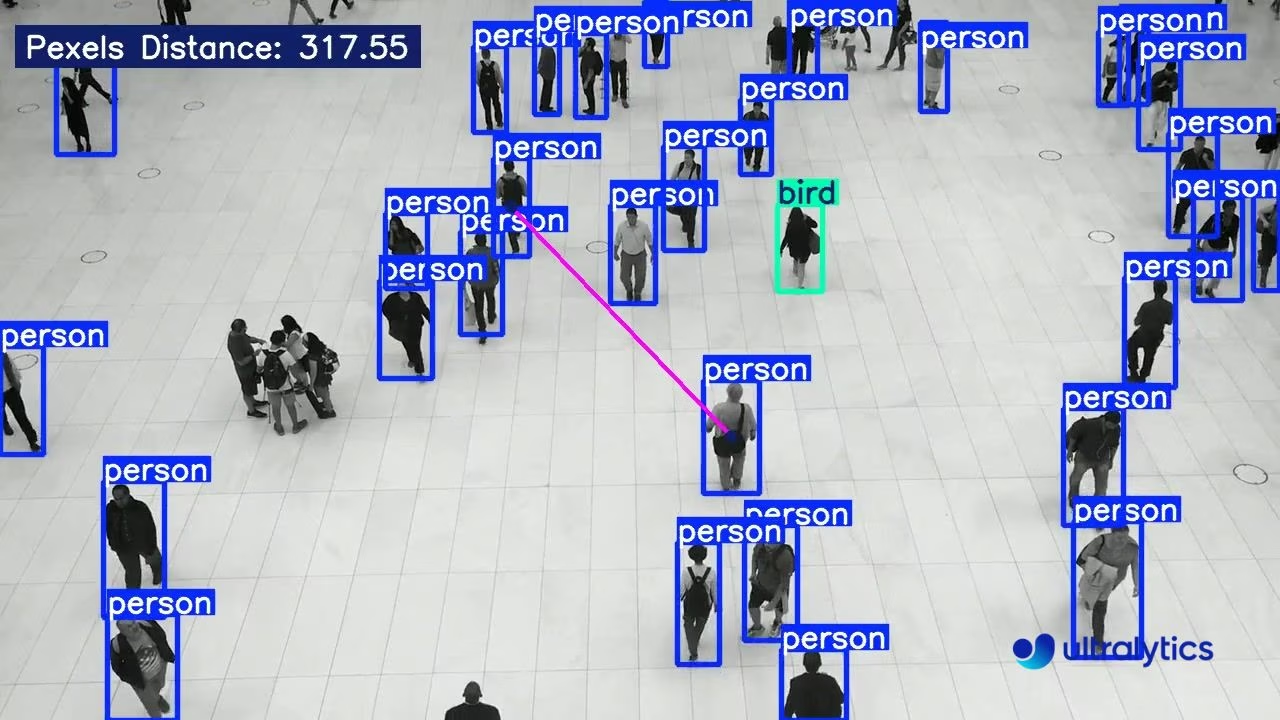 |
距离计算的优势#
- 定位精度: 提升计算机视觉任务中的空间定位准确性。
- 尺寸估算: 估算目标尺寸,帮助更好地理解上下文。
- 场景理解: 提升对 3D 场景的理解能力,从而改善自动驾驶车辆和监控系统等应用中的决策效果。
- 碰撞规避: 通过监测运动目标之间的距离,帮助系统检测潜在碰撞。
- 空间分析: 便于分析受监控环境中目标之间的关系和交互。
距离计算
- 按住鼠标左键,点击任意两个边界框即可计算距离。
- 使用鼠标右键删除所有绘制的点。
距离为估算值
距离为估算值,可能不完全准确,因为计算使用的是缺少深度信息的 2D 数据。
使用 YOLO26 计算距离#
DistanceCalculation 解决方案会跨帧跟踪目标,并以像素为单位,测量你用鼠标选定的任意两个边界框质心之间的欧氏距离。运行下面的示例,然后用鼠标左键单击两个目标,绘制连接线并读取距离;用鼠标右键清除选择。
import cv2

from ultralytics import solutions

cap = cv2.VideoCapture("path/to/video.mp4")
assert cap.isOpened(), "Error reading video file"

# 视频写入器
w, h, fps = (int(cap.get(x)) for x in (cv2.CAP_PROP_FRAME_WIDTH, cv2.CAP_PROP_FRAME_HEIGHT, cv2.CAP_PROP_FPS))
video_writer = cv2.VideoWriter("distance_output.avi", cv2.VideoWriter_fourcc(*"mp4v"), fps, (w, h))

# 初始化距离计算对象
distancecalculator = solutions.DistanceCalculation(
    model="yolo26n.pt",  # YOLO26 模型文件的路径。
    show=True,  # 显示输出
)

# 处理视频
while cap.isOpened():
    success, im0 = cap.read()

    if not success:
        print("Video frame is empty or processing is complete.")
        break

    results = distancecalculator(im0)

    print(results)  # 访问输出

    video_writer.write(results.plot_im)  # 写入处理后的帧。

cap.release()
video_writer.release()
cv2.destroyAllWindows()  # 关闭所有已打开的窗口
DistanceCalculation() 参数#
下面是 DistanceCalculation 参数表:
| 参数 | 类型 | 默认值 | 说明 |
|---|---|---|---|
model | str | None | Ultralytics YOLO 模型文件的路径。 |
line_width | int | 2 | 解决方案绘制的框、关键点和计数的线条粗细。 |
verbose | bool | True | 启用逐帧日志,记录输入形状、类别计数和处理速度。跟踪调用本身始终不会输出日志。 |
你也可以在 DistanceCalculation 解决方案中使用各种 track 参数。
| 参数 | 类型 | 默认值 | 说明 |
|---|---|---|---|
tracker | str | 'tracktrack.yaml' | 指定要使用的跟踪算法。内置选项:botsort.yaml、bytetrack.yaml、ocsort.yaml、deepocsort.yaml、fasttrack.yaml、tracktrack.yaml。 |
conf | float | 0.25 | 设置检测的置信度阈值;较低的值允许跟踪更多物体,但可能会包含误检。 |
iou | float | 0.7 | 设置用于筛除重叠检测结果的交并比 (IoU) 阈值。 |
classes | list | None | 按类别索引筛选结果。例如,classes=[0, 2, 3] 只跟踪指定类别。 |
device | str | None | 指定推理设备(例如 cpu、cuda:0 或 0)。用户可以选择 CPU、特定 GPU 或其他计算设备来运行模型。 |
imgsz | int or tuple | 640 | 目标推理图像尺寸:正方形图像使用整数,或使用 (height, width) 对。图像尺寸会调整为模型步幅的整数倍。 |
max_det | int | 300 | 跟踪前每帧保留的最大检测数量,用于限制解决方案在密集场景中处理的物体数量。 |
quantize | int or str | None | 推理精度:对于非 CPU 上运行的 PyTorch 和 TorchScript 模型,使用 16 (FP16) 或 32/unset (FP32) 进行选择;其他格式使用其模型文件和运行时所选的精度。此参数替代已弃用的 half 参数。 |
此外,还可以使用以下可视化参数:
| 参数 | 类型 | 默认值 | 说明 |
|---|---|---|---|
show | bool | False | 如果 True,则在窗口中显示带标注的图像或视频。适用于在开发或测试期间即时查看结果。 |
show_conf | bool | True | 在每个检测结果的标签旁显示置信度分数,帮助了解模型对该检测结果的确信程度。 |
show_labels | bool | True | 在可视化输出中显示每个检测结果的标签,便于立即了解检测到的对象。 |
实现细节#
DistanceCalculation 类通过跨视频帧跟踪目标,并计算所选边界框质心之间的欧氏距离来实现功能。当你点击两个目标时,该解决方案会:
- 提取所选边界框的质心(中心点)
- 计算这些质心之间以像素为单位的欧氏距离
- 在帧中显示距离,并用连接线标出两个目标
该实现使用 mouse_event_for_distance 方法处理鼠标交互,让用户可以根据需要选择目标和清除选择。process 方法负责逐帧处理、跟踪目标并计算距离。
应用场景#
使用 YOLO26 计算距离有许多实际应用:
- 零售分析: 测量顾客与商品之间的距离,并分析店铺布局效果
- 工业安全: 监控工人与机器之间的安全距离
- 交通管理: 分析车辆间距并检测跟车过近的情况
- 体育分析: 计算球员、球和场地关键位置之间的距离
- 医疗保健: 确保候诊区内保持适当距离,并监测患者的移动
- 机器人: 让机器人与障碍物和人员保持适当距离
常见问题#
要使用 Ultralytics YOLO26 计算目标之间的距离,你需要确定检测目标的边界框质心。此过程包括从 Ultralytics 的
solutions模块初始化DistanceCalculation类,并使用模型的跟踪输出计算距离。要删除使用 Ultralytics YOLO26 进行距离计算时绘制的点,可以单击鼠标右键。此操作会清除你绘制的所有点。有关详情,请参阅距离计算示例下方的备注部分。
在 Ultralytics YOLO26 中初始化
DistanceCalculation类时,关键参数包括:model:YOLO26 模型文件的路径。tracker:要使用的跟踪算法(解决方案默认使用tracktrack.yaml)。conf:检测置信度阈值。show:用于显示输出的标志。
完整列表和默认值请参阅 DistanceCalculation 的参数。