使用 ExecuTorch 在移动设备和边缘设备上部署 YOLO26#
在智能手机、平板电脑和嵌入式系统等边缘设备上部署计算机视觉模型,需要一种能够平衡性能与资源限制的优化运行时。ExecuTorch 是 PyTorch 面向边缘计算的解决方案,可在设备上高效运行Ultralytics YOLO模型推理。
本指南介绍如何将 Ultralytics YOLO 模型导出为 ExecuTorch 格式,让你能够以优化后的性能将模型部署到移动设备和边缘设备上。
为什么要导出为 ExecuTorch?#
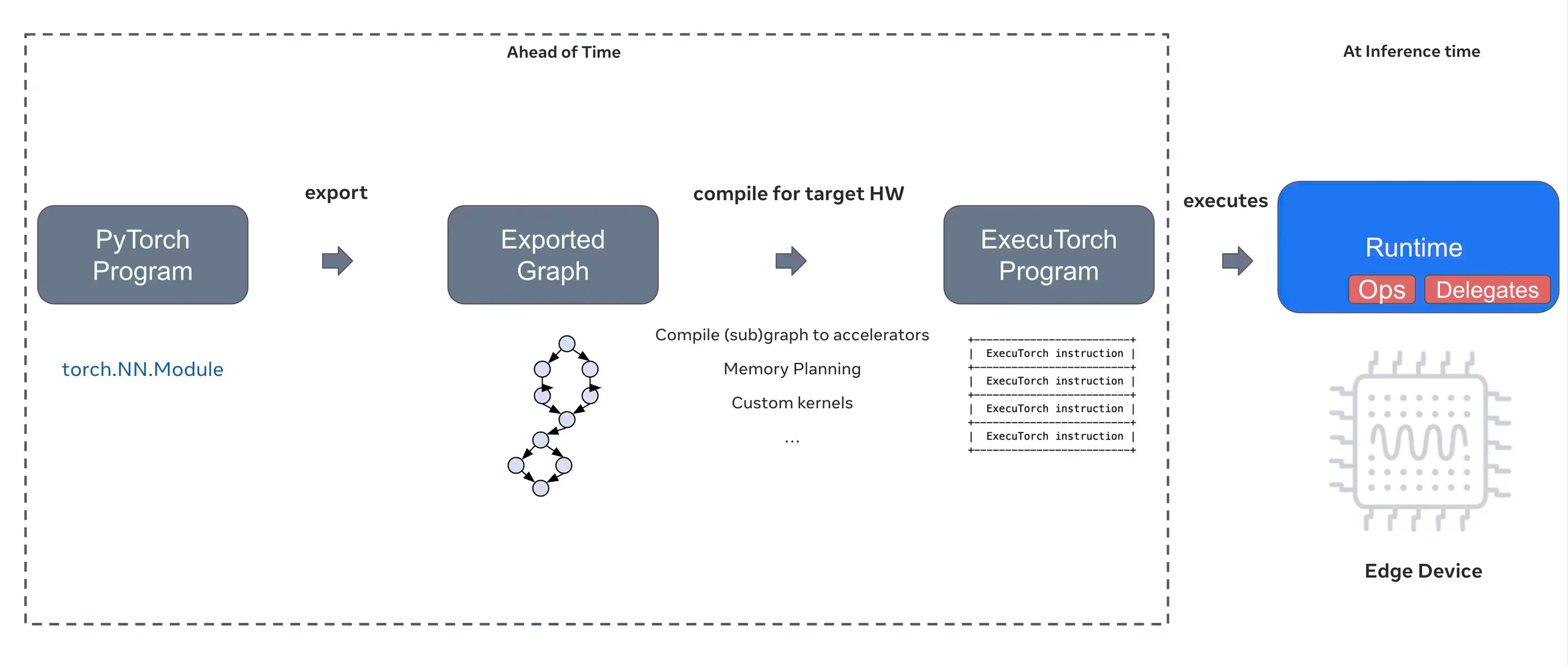
ExecuTorch 是 PyTorch 提供的端到端解决方案,可在移动设备和边缘设备上实现端侧推理。ExecuTorch 旨在实现可移植性和高效率,可用于在各种计算平台上运行 PyTorch 程序。
ExecuTorch 的主要功能#
ExecuTorch 提供多项强大功能,可将 Ultralytics YOLO 模型部署到边缘设备:
-
可移植模型格式:ExecuTorch 使用
.pte(PyTorch ExecuTorch) 格式,该格式针对资源受限设备上的体积和加载速度进行了优化。 -
XNNPACK 后端:默认集成的 XNNPACK 可在移动 CPU 上实现高度优化的推理,无需专用硬件即可提供出色的性能。
-
支持量化:ExecuTorch 生态系统支持量化技术,可减小模型体积并提升推理速度;目前,Ultralytics 通过 XNNPACK 后端导出 FP32 模型。
-
内存效率:优化的内存管理可降低运行时内存占用,因此适用于 RAM 有限的设备。
-
模型元数据:导出的模型会将元数据(图像尺寸、类别名称等)包含在单独的 YAML 文件中,便于集成。
ExecuTorch 部署选项#
ExecuTorch 模型可以部署到各种边缘平台和移动平台:
-
移动应用:以原生性能部署到 iOS 和 Android 应用中,从而在移动应用中实现实时目标检测。
-
嵌入式系统:以优化后的性能运行于 Raspberry Pi、NVIDIA Jetson 等嵌入式 Linux 设备及其他基于 ARM 的系统。
-
边缘 AI 设备:使用自定义委托将模型部署到专用边缘 AI 硬件上,加速推理。
-
物联网设备:集成到物联网设备中,无需连接云端即可在设备上运行推理。
支持的任务#
ExecuTorch 导出支持 Ultralytics 的全部七种任务。语义分割和深度估计仅适用于 YOLO26,因为只有 YOLO26 系列配备了这些任务头。
将 Ultralytics YOLO26 模型导出为 ExecuTorch#
将 Ultralytics YOLO26 模型转换为 ExecuTorch 格式,可在移动设备和边缘设备上高效部署模型。
安装#
ExecuTorch 导出需要 Python 3.10–3.14 和 PyTorch >= 2.9.0。导出或加载 ExecuTorch 模型时,Ultralytics 会安装兼容的 executorch 软件包;对于 PyTorch 低于 2.13 的版本,该软件包会固定为 executorch<1.5,因此不要手动升级。
# Install Ultralytics package
pip install ultralytics
有关安装流程的详细说明和最佳实践,请查看我们的 YOLO26 安装指南。安装 YOLO26 所需软件包时,如果遇到困难,请参阅我们的常见问题指南,获取解决方案和建议。
用法#
将 YOLO26 模型导出为 ExecuTorch 非常简单:
ExecuTorch 格式支持导出、预测和验证模式。导出模型后,加载导出的模型即可运行推理或验证其准确率。
from ultralytics import YOLO

# 加载 YOLO26 模型
model = YOLO("yolo26n.pt")

# 将模型导出为 ExecuTorch 格式
model.export(format="executorch") # creates 'yolo26n_executorch_model'from ultralytics import YOLO
# 加载导出的 ExecuTorch 模型
model = YOLO("yolo26n_executorch_model")
# 运行推理
results = model("https://ultralytics.com/images/bus.jpg")from ultralytics import YOLO
# 加载导出的 ExecuTorch 模型
model = YOLO("yolo26n_executorch_model")
# 在 COCO8 数据集上验证准确率
metrics = model.val(data="coco8.yaml")ExecuTorch 导出会生成一个目录,其中包含 .pte 文件和元数据。使用移动应用或嵌入式应用中的 ExecuTorch 运行时加载 .pte 模型并运行推理。
导出参数#
导出为 ExecuTorch 格式时,可以指定以下参数:
| 参数 | 类型 | 默认值 | 说明 |
|---|---|---|---|
format | str | 'executorch' | 导出模型的目标格式,用于定义与各种部署环境的兼容性。 |
imgsz | int 或 tuple | 640 | 模型输入所需的图像尺寸。正方形图像可使用整数;若要指定具体尺寸,则可使用元组 (height, width)。 |
quantize | int 或 str | None | 固定为 FP32 导出。ExecuTorch 导出不支持在导出时进行 FP16、INT8 或 W8A16 精度转换。 |
batch | int | 1 | 指定导出模型的批量推理大小,或导出模型在 predict 模式下可同时处理的最大图像数。 |
device | str | None | 指定导出设备:GPU(device=0)、CPU(device=cpu)、Apple 芯片的 MPS(device=mps)。 |
输出结构#
ExecuTorch 导出会创建一个包含模型和元数据的目录:
yolo26n_executorch_model/
├── model.pte               # ExecuTorch model file
└── metadata.yaml           # Model metadata (classes, image size, etc.)
使用导出的 ExecuTorch 模型#
导出模型后,你需要使用 ExecuTorch 运行时将模型集成到目标应用中。
移动端集成#
对于移动应用 (iOS/Android),你需要:
- 添加 ExecuTorch 运行时:将 ExecuTorch 运行时库加入移动项目
- 加载模型:在应用中加载
.pte文件 - 运行推理:处理图像并获取预测结果
iOS#
iOS 集成示例(Objective-C/C++):
// iOS uses C++ APIs for model loading and inference
// See https://pytorch.org/executorch/stable/using-executorch-ios.html for complete examples

#include <executorch/extension/module/module.h>

using namespace ::executorch::extension;

// Load the model
Module module("/path/to/model.pte");

// Create input tensor
float input[1 * 3 * 640 * 640];
auto tensor = from_blob(input, {1, 3, 640, 640});

// Run inference
const auto result = module.forward(tensor);Android#
从 Maven Central 添加 ExecuTorch Android AAR:
dependencies {
    implementation("org.pytorch:executorch-android:<version>")
}
Android 集成示例(Kotlin):
import org.pytorch.executorch.EValue
import org.pytorch.executorch.Module
import org.pytorch.executorch.Tensor

// Load the model
val module = Module.load("/path/to/model.pte")

// Prepare input tensor
val inputTensor = Tensor.fromBlob(floatData, longArrayOf(1, 3, 640, 640))
val inputEValue = EValue.from(inputTensor)

// Run inference
val outputs = module.forward(inputEValue)
val scores = outputs[0].toTensor().dataAsFloatArray
嵌入式 Linux#
对于嵌入式 Linux 系统,请使用 ExecuTorch C++ API:
#include <executorch/extension/module/module.h>
#include <executorch/extension/tensor/tensor.h>

using namespace ::executorch::extension;

// Load model
Module module("model.pte");

// Prepare input
std::vector<float> input_data = preprocessImage(image);
auto input_tensor = from_blob(input_data.data(), {1, 3, 640, 640});

// Run inference
const auto outputs = module.forward(input_tensor);
如需了解将 ExecuTorch 集成到应用中的更多详情,请访问 ExecuTorch 文档。
性能优化#
模型尺寸优化#
要减小部署时的模型尺寸:
- 使用更小的模型:从 YOLO26n (nano) 开始,以获得最小的占用空间
- 降低输入分辨率:使用更小的图像尺寸(例如
imgsz=320或imgsz=416) - 量化:在 Ultralytics 之外应用 ExecuTorch 量化技术(Ultralytics ExecuTorch 导出仅支持 FP32)
推理速度优化#
若要加快推理速度:
- XNNPACK 后端:默认的 XNNPACK 后端可提供优化后的 CPU 推理
- 硬件加速:使用特定于平台的委托(例如,iOS 上的 CoreML)
- 批处理:尽可能一次处理多张图像
基准测试#
Ultralytics 团队对 YOLO26 模型进行了基准测试,比较了 PyTorch 和 ExecuTorch 的速度与精度。
| 模型 | 格式 | 状态 | 大小 (MB) | metrics/mAP50-95(B) | 推理时间 (ms/im) |
|---|---|---|---|---|---|
| YOLO26n | PyTorch | ✅ | 5.3 | 0.4790 | 314.80 |
| YOLO26n | ExecuTorch | ✅ | 9.4 | 0.4800 | 142 |
| YOLO26s | PyTorch | ✅ | 19.5 | 0.5730 | 930.90 |
| YOLO26s | ExecuTorch | ✅ | 36.5 | 0.5780 | 376.1 |
推理时间不包括预处理和后处理。
故障排除#
常见问题#
问题:Python version error
解决方案:ExecuTorch 需要 Python 3.10 至 3.14。请使用受支持的版本创建环境:
# Using conda
conda create -n executorch python=3.14
conda activate executorch
如需更多故障排除帮助,请访问 Ultralytics GitHub Issues 或 ExecuTorch 文档。
总结#
将 YOLO26 模型导出为 ExecuTorch 格式,可在移动设备和边缘设备上高效部署。凭借与 PyTorch 的原生集成、跨平台支持和优化的性能,ExecuTorch 是边缘 AI 应用的绝佳选择。
要点:
- ExecuTorch 可通过原生支持 PyTorch 的方式实现边缘部署,并提供出色的性能
- 使用
format='executorch'参数即可轻松导出 - 模型通过 XNNPACK 后端针对移动 CPU 进行了优化
- 支持 iOS、Android 和嵌入式 Linux 平台
- 需要 Python 3.10–3.14 和 PyTorch >= 2.9.0
常见问题#
可以使用 Python 或 CLI 将 YOLO26 模型导出为 ExecuTorch 格式:
from ultralytics import YOLO

model = YOLO("yolo26n.pt")
model.export(format="executorch")
或
yolo export model=yolo26n.pt format=executorchExecuTorch 导出需要:
- Python 3.10 至 3.14
executorch包(会自动安装;对于低于 2.13 的 PyTorch 版本,则安装executorch<1.5,较新的 ExecuTorch 运行时不支持该版本)- PyTorch(随 ultralytics 自动安装)
注意:
executorch包附带预构建的 wheel(含 XNNPACK 后端),因此导出时无需额外编译。可以直接使用
YOLO()加载 ExecuTorch 模型,以便在 Python 中进行推理和验证(请参阅上文的预测/验证示例);也可以使用 ExecuTorch 运行时库将模型部署到移动设备和边缘设备上。ExecuTorch 支持:
- 移动设备:iOS 和 Android
- 嵌入式 Linux:Raspberry Pi、NVIDIA Jetson 和其他 ARM 设备
- 桌面:Linux、macOS 和 Windows(用于开发)
ExecuTorch 和 LiteRT 都非常适合移动部署:
- ExecuTorch:与 PyTorch 的集成更好,采用原生 PyTorch 工作流,生态系统不断发展
- LiteRT:更加成熟,硬件支持更广,部署示例更多,并且可在 Android、iOS 和浏览器上运行同一模型
如果你已经在使用 PyTorch,并希望采用原生部署路径,请选择 ExecuTorch。如果你追求最大的兼容性和成熟的工具链,请选择 LiteRT。
可以!ExecuTorch 通过多种后端支持硬件加速:
- 移动 GPU:通过 Vulkan、Metal 或 OpenCL 委托实现
- NPU/DSP:通过特定于平台的委托实现
- 默认:使用 XNNPACK 优化 CPU 推理
有关特定后端的设置,请参阅 ExecuTorch 文档。