Neptune 已达成被 OpenAI 收购的协议,并将在 2026 年 3 月 4 日结束的过渡期后停止托管服务(SaaS)。请查看官方公告并相应地规划迁移或导出。
使用 Neptune 进行实验跟踪#
Neptune 是一个面向 MLOps 的元数据存储库,专为运行大量实验的团队构建。它为你提供了一个集中化的地方来记录、存储、显示、组织、比较和查询所有的模型构建元数据。
Ultralytics YOLO26 与 Neptune 集成,以简化实验跟踪。此集成允许你自动记录训练指标、可视化模型预测并存储模型构件,而无需编写自定义日志代码。
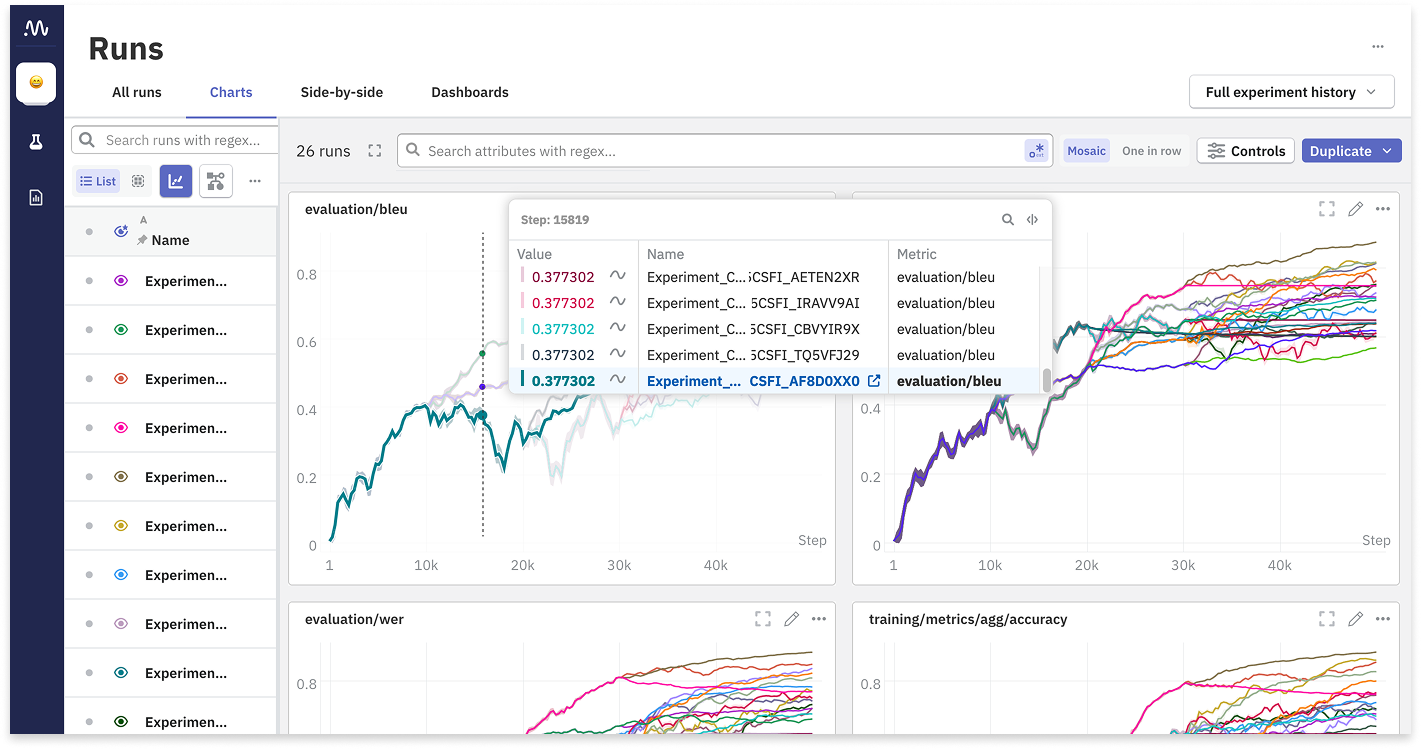
主要特性#
- 自动记录:自动记录关键训练指标,例如框损失、分类损失和 mAP。
- 图像可视化:直接在 Neptune 仪表板中查看训练马赛克图和验证预测结果。
- 模型检查点:在训练结束时自动上传并版本控制你的训练模型权重 (
best.pt)。 - 超参数跟踪:记录所有配置参数,以确保实验的完全可复现性。
- 交互式图表:可视化混淆矩阵和精确率-召回率曲线,以分析模型性能。
安装#
要将 Neptune 与 Ultralytics 配合使用,你需要安装 neptune 客户端包以及 ultralytics。
# Install the required packages
pip install ultralytics neptune

# Enable Neptune integration in Ultralytics settings
yolo settings neptune=True配置#
在开始训练之前,你需要将本地环境连接到你的 Neptune 项目。你需要从 Neptune 仪表板获取你的 API Token 和 Project Name。
获取你的凭据#
- 登录到 Neptune.ai。
- 创建一个新项目(或选择一个现有项目)。
- 前往你的用户菜单并获取你的 API Token。
设置环境变量#
处理凭据最安全的方式是通过环境变量。请注意,Ultralytics Neptune 回调会读取 YOLO project 参数,而不会使用 NEPTUNE_PROJECT。请在你的训练命令中通过 project= 传递完整的 Neptune 标识(例如 workspace/name);否则 Neptune 将尝试使用默认字面量 "Ultralytics",从而导致运行失败。
export NEPTUNE_API_TOKEN="your_long_api_token_here" # required用法#
配置完成后,你就可以开始训练你的 YOLO26 模型。当安装了 neptune 包并在设置中启用了集成时,Neptune 集成会自动工作。
训练示例#
from ultralytics import YOLO

# Load a model
model = YOLO("yolo26n.pt")

# Train the model
# Pass the Neptune project slug as the 'project' argument (workspace/name)
results = model.train(data="coco8.yaml", epochs=10, project="my-workspace/my-project", name="experiment-1")了解集成#
下图展示了 Ultralytics 训练流水线如何与 Neptune 交互以记录各种工件和指标。
graph LR
    A[YOLO Training Loop]:::start --> B{Neptune Callback}:::decide
    B -->|Log Scalars| C[Loss, mAP, LR]:::proc
    B -->|Log Images| D[Mosaics, Preds]:::proc
    B -->|Log Artifacts| E[Model Weights]:::proc
    B -->|Log Metadata| F[Hyperparameters]:::proc

    C --> G[Neptune Server]:::extern
    D --> G
    E --> G
    F --> G

    G --> H[Neptune Web Dashboard]:::out

    classDef start fill:#4CAF50,color:#fff
    classDef proc fill:#2196F3,color:#fff
    classDef decide fill:#FF9800,color:#fff
    classDef out fill:#9C27B0,color:#fff
classDef extern fill:#607D8B,color:#fff记录了什么?#
当你运行训练命令时,Neptune 集成会自动在你的运行中捕获以下数据结构:
- 配置/超参数:所有训练参数(epochs、lr0、optimizer 等)都记录在 Configuration 部分下。
- 配置/模型:模型架构和定义。
- 指标:
- 训练:
box_loss、cls_loss、dfl_loss、lr(学习率)。 - 指标:
precision、recall、mAP50、mAP50-95。
- 训练:
- 图像:
Mosaic:显示数据增强的训练批次。Validation:验证数据上的真实标签和模型预测。Plots:混淆矩阵、精确率-召回率曲线。
- 权重:最终训练的模型 (
best.pt) 会上传到 Neptune 运行中的weights文件夹。
高级用法#
组织运行#
你可以使用标准的 Ultralytics project 和 name 参数来组织你在 Neptune 中的运行。
project:必须是 Neptune 项目标识符workspace/name;这就是回调传递给neptune.init_run的内容。name:用作特定运行的标识符。
自定义记录#
如果你需要在自动记录之外记录额外的自定义指标,可以访问 Neptune 运行实例。请注意,由于 Ultralytics 集成在内部处理运行生命周期,你需要修改训练器逻辑或创建自定义回调来访问特定的运行对象。
常见问题解答#
如何禁用 Neptune 记录?#
如果你已经安装了 neptune 但希望为特定会话或全局禁用日志记录,你可以修改 YOLO 设置。
# Disable Neptune integration
yolo settings neptune=False我的图像没有上传,出了什么问题?#
确保你的网络允许连接到 Neptune 的服务器。此外,图像日志记录通常在特定时间间隔(例如,历元结束或训练结束时)发生。如果你使用 Ctrl+C 提前中断训练,某些最终构件(如混淆矩阵或最佳模型权重)可能无法上传。
我可以记录到特定的 Neptune 运行 ID 吗?#
目前的集成会自动为每次训练会话创建一个新的运行。要恢复记录到现有的运行,你通常需要在 Python 代码中手动处理 Neptune 初始化,这超出了自动集成的范围。不过,Ultralytics 支持在本地恢复训练,这将在 Neptune 中创建一个新的运行来跟踪恢复的 epoch。
在哪里可以在 Neptune 中找到模型权重?#
在你的 Neptune 仪表板中,导航到 Artifacts 或 All Metadata 部分。你会找到一个包含 best.pt 文件的 weights 文件夹,你可以将其下载用于部署。