Meituan YOLOv6
نظرة عامة#
يُعد YOLOv6 من Meituan، الذي أُصدر عام 2022، نموذجًا لـالكشف عن الأجسام يحقق توازنًا قويًا بين السرعة والدقة، ما يجعله خيارًا شائعًا للتطبيقات الآنية. يقدّم هذا النموذج عدة تحسينات ملحوظة على بنيته ومخطط تدريبه، تشمل تنفيذ وحدة BiC (التوصيل ثنائي الاتجاه)، واستراتيجية AAT (التدريب بمساعدة المراسي)، وتصميمًا محسّنًا لـالشبكة الأساسية وعنق النموذج لتحقيق دقة عالية على مجموعة بيانات COCO.
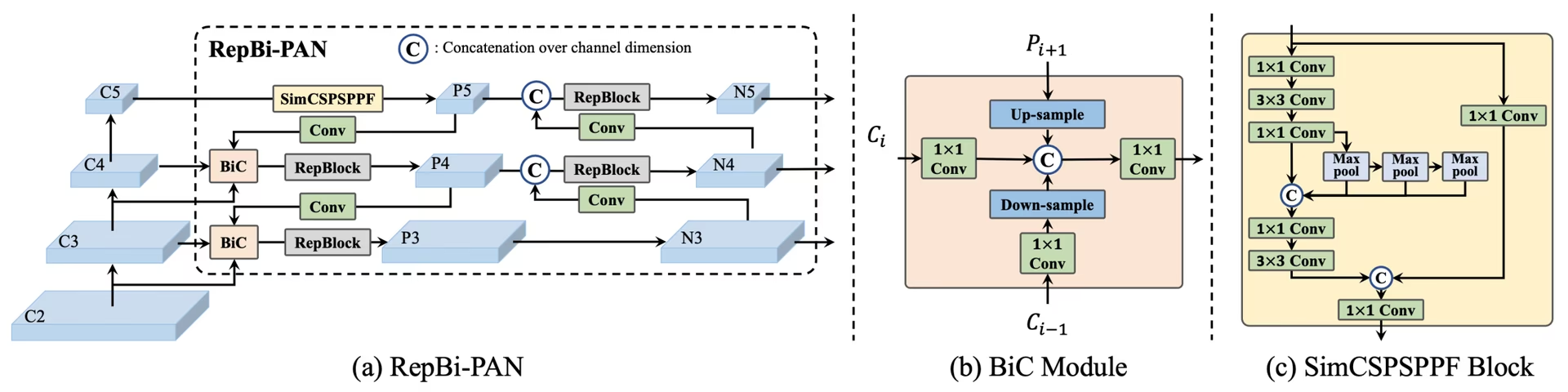 نظرة عامة على YOLOv6. مخطط لبنية النموذج يوضّح مكونات الشبكة المعاد تصميمها واستراتيجيات التدريب التي أدت إلى تحسينات كبيرة في الأداء. (a) عنق YOLOv6 (موضحاً الإصداران N وS). ملاحظة: في الإصدارين M وL، يُستبدل RepBlocks بـ CSPStackRep. (b) بنية وحدة BiC. (c) كتلة SimCSPSPPF. (المصدر).
الميزات الرئيسية#
- وحدة الدمج ثنائي الاتجاه (BiC): يقدّم YOLOv6 وحدة BiC في عنق الكاشف، لتعزيز إشارات تحديد المواضع وتحقيق مكاسب في الأداء مع تراجع ضئيل للغاية في السرعة.
- استراتيجية AAT (التدريب بمساعدة المراسي): تجمع AAT مزايا كل من النهجين المعتمد على المراسي والخالي من المراسي دون التأثير سلبًا في كفاءة الاستدلال.
- تحسين تصميم العمود الفقري والعنق: من خلال تعميق YOLOv6 بإضافة مرحلة أخرى إلى العمود الفقري والعنق، حقق هذا النموذج أداءً قوياً على مجموعة بيانات COCO عند استخدام مدخلات عالية الدقة وقت صدوره.
- استراتيجية التقطير الذاتي: نُفذت استراتيجية جديدة لـالتقطير الذاتي لتعزيز أداء نماذج YOLOv6 الأصغر، وذلك بتحسين فرع الانحدار المساعد أثناء التدريب وإزالته عند الاستدلال لتجنب انخفاض ملحوظ في السرعة.
مقاييس الأداء#
يوفّر YOLOv6 نماذج متعددة مدرّبة مسبقاً بمقاييس مختلفة:
- YOLOv6-N: 37.5% AP على COCO val2017 بمعدل 1187 FPS باستخدام وحدة GPU من نوع NVIDIA T4.
- YOLOv6-S: 45.0% AP بمعدل 484 FPS.
- YOLOv6-M: 50.0% AP بمعدل 226 FPS.
- YOLOv6-L: 52.8% AP بمعدل 116 FPS.
- YOLOv6-L6: دقة متطورة في الزمن الفعلي.
يوفر YOLOv6 أيضًا نماذج مكمّمة بدرجات دقة عددية مختلفة، ونماذج محسّنة للمنصات المحمولة.
أمثلة الاستخدام#
يقدم هذا المثال أمثلة بسيطة على تدريب YOLOv6 والاستدلال به.
يمكن تمرير ملفات YOLOv6 *.yaml إلى الفئة YOLO() لإنشاء النموذج المقابل في Python:
from ultralytics import YOLO
# إنشاء نموذج YOLOv6n من الصفر
model = YOLO("yolov6n.yaml")
# عرض معلومات النموذج (اختياري)
model.info()
# تدريب النموذج على مجموعة بيانات المثال COCO8 لمدة 100 حقبة
results = model.train(data="coco8.yaml", epochs=100, imgsz=640)
# إجراء الاستدلال باستخدام نموذج YOLOv6n على الصورة 'bus.jpg'
results = model("path/to/bus.jpg")المهام والأوضاع المدعومة#
تضم سلسلة YOLOv6 مجموعة من النماذج، حُسّن كل منها من أجل الكشف عن الأجسام، لتلبية نطاق واسع من الميزانيات الحاسوبية ومتطلبات الدقة.
| النموذج | أسماء الملفات | المهام | التدريب | التحقق | الاستدلال | التصدير |
|---|---|---|---|---|---|---|
| YOLOv6-N | yolov6n.yaml | كشف الكائنات | ✅ | ✅ | ✅ | ✅ |
| YOLOv6-S | yolov6s.yaml | كشف الكائنات | ✅ | ✅ | ✅ | ✅ |
| YOLOv6-M | yolov6m.yaml | كشف الكائنات | ✅ | ✅ | ✅ | ✅ |
| YOLOv6-L | yolov6l.yaml | كشف الكائنات | ✅ | ✅ | ✅ | ✅ |
| YOLOv6-X | yolov6x.yaml | كشف الكائنات | ✅ | ✅ | ✅ | ✅ |
يلخّص هذا الجدول متغيرات نماذج YOLOv6 ودعمها لأوضاع التدريب والتحقق والاستدلال والتصدير. توفر Ultralytics ملفات YAML لنماذج YOLOv6 فقط، لذا تُدرَّب النماذج من الصفر.
الاستشهادات والشكر والتقدير#
نودّ الإشادة بالمؤلفين لإسهاماتهم المهمة في مجال اكتشاف الأجسام في الزمن الفعلي:
@misc{li2023yolov6,
      title={YOLOv6 v3.0: A Full-Scale Reloading},
      author={Chuyi Li and Lulu Li and Yifei Geng and Hongliang Jiang and Meng Cheng and Bo Zhang and Zaidan Ke and Xiaoming Xu and Xiangxiang Chu},
      year={2023},
      eprint={2301.05586},
      archivePrefix={arXiv},
      primaryClass={cs.CV}
}
يمكن العثور على ورقة YOLOv6 الأصلية على arXiv. أتاح المؤلفون عملهم للجمهور، ويمكن الوصول إلى قاعدة الشيفرة على GitHub. نقدّر جهودهم في تطوير هذا المجال وإتاحة عملهم للمجتمع الأوسع.
الأسئلة الشائعة#
Meituan YOLOv6، الذي صدر عام 2022، كاشف للأجسام يوازن بين السرعة والدقة، وصُمّم للتطبيقات في الزمن الفعلي. ويتميّز بتحسينات معمارية بارزة، مثل وحدة الدمج ثنائي الاتجاه (BiC) واستراتيجية التدريب بمساعدة المراسي (AAT). تحقق هذه الابتكارات مكاسب كبيرة في الأداء مع تراجع طفيف في السرعة، ما يجعل YOLOv6 خياراً منافساً لمهام اكتشاف الأجسام.
تعزّز وحدة الدمج ثنائي الاتجاه (BiC) في YOLOv6 إشارات تحديد المواضع في عنق الكاشف، وتحسّن الأداء مع تأثير ضئيل للغاية على السرعة. وتجمع هذه الوحدة بفعالية بين خرائط السمات المختلفة، ما يزيد قدرة النموذج على اكتشاف الأجسام بدقة. لمزيد من التفاصيل حول ميزات YOLOv6، راجع قسم الميزات الأساسية.
يمكنك تدريب نموذج YOLOv6 باستخدام Ultralytics عبر أوامر Python أو CLI بسيطة. على سبيل المثال:
مثالfrom ultralytics import YOLO # إنشاء نموذج YOLOv6n من الصفر model = YOLO("yolov6n.yaml") # تدريب النموذج على مجموعة بيانات المثال COCO8 لمدة 100 حقبة results = model.train(data="coco8.yaml", epochs=100, imgsz=640)لمزيد من المعلومات، تفضّل بزيارة صفحة التدريب.
يوفّر YOLOv6 إصدارات متعددة، صُمّم كل منها لتلبية متطلبات أداء مختلفة:
- YOLOv6-N: 37.5% AP بمعدل 1187 FPS
- YOLOv6-S: 45.0% AP بمعدل 484 FPS
- YOLOv6-M: 50.0% AP بمعدل 226 FPS
- YOLOv6-L: 52.8% AP بمعدل 116 FPS
- YOLOv6-L6: دقة متطورة في سيناريوهات الزمن الفعلي
تُقيّم هذه النماذج على مجموعة بيانات COCO باستخدام وحدة GPU من نوع NVIDIA T4. للاطلاع على مزيد من المعلومات حول مقاييس الأداء، راجع قسم مقاييس الأداء.
يجمع التدريب بمساعدة المراسي (AAT) في YOLOv6 بين عناصر من نهجَي التدريب القائم على المراسي والخالي من المراسي، ما يعزّز قدرات النموذج على الاكتشاف دون المساس بكفاءة الاستدلال. وتستفيد هذه الاستراتيجية من المراسي أثناء التدريب لتحسين تنبؤات مربعات الإحاطة، ما يجعل YOLOv6 فعالاً في مهام متنوعة لاكتشاف الأجسام.
يدعم YOLOv6 أوضاع التدريب والتحقق والاستدلال والتصدير.


التعليقات14
اطرح سؤالًا، وشارك نتائجك، أو ساعد شخصًا آخر.
AkaashSamson
Hey, So I have actually trained my YOLOv6 model with the original repo, now I have a .pt file. using this file is there any way of getting my model in ultralytics format. mainly I want to run the ultralytics validation on my model as the original repo eval.py doesn't provide sufficient metrics.
 Glenn JocherUltralytics
Direct conversion of Meituan YOLOv6 .pt checkpoints to Ultralytics format isn’t supported; to use Ultralytics metrics, either train/fine-tune the matching yolov6*.yaml in Ultralytics and run validation, or export your Meituan model’s detections to COCO JSON and compute P/R via the COCO API; the metrics Ultralytics reports are outlined in the Val mode docs at Ultralytics validation.
tino926(تم التعديل)
I want to replicate your training accuracy of the YOLOv6-N model. Is this the correct command:
yolo train model=yolov6n.yaml data=coco.yaml epochs=400 optimizer=SGD cos_lr=True lr0=0.02? According to YOLOv6's repo https://github.com/meituan/YOLOv6/blob/main/docs/Train_coco_data.md, they have to use anchor-aid and distilling techniques to achieve this accuracy. But I can't find the corresponding parameters in ultralytics'.- Glenn JocherUltralytics
@tino926 to achieve the training accuracy of the YOLOv6-N model as described in the YOLOv6 repository, you would indeed use the anchor-aided training (AAT) and self-distillation strategies, which are not explicitly parameterized in the Ultralytics YOLO interface. Ensure you are using the latest version and check the YOLOv6 documentation for any updates on incorporating these strategies. For precise replication, consider following the original YOLOv6 GitHub instructions alongside Ultralytics for any additional settings or configurations.
@glenn-jocher, thanks for your response.
I apologize if I misunderstood your explanation, as I am not a native English speaker. Could you please clarify if the phrase "which are not explicitly parameterized in the Ultralytics YOLO interface" means that AAT and self-distillation cannot currently be implemented solely through the Ultralytics YOLO interface? Therefore I should manually add anchor branches and implement distillation with additional code?
- Glenn JocherUltralytics
Thank you for your question. Yes, that's correct. The current Ultralytics YOLO interface does not explicitly support anchor-aided training (AAT) and self-distillation, so you would need to implement these strategies manually by modifying the code to include anchor branches and self-distillation techniques. If you need further guidance on implementing these, referring to the original YOLOv6 repository might be helpful.
kadirnar
Does ultralytics library support yolov6 model?
ModuleNotFoundError: No module named 'yolov6'
 Paula DerrengerUltralytics(تم التعديل)
@kadirnar hi there!
Yes, the Ultralytics library does support YOLOv6 models. It seems like you might be encountering a
ModuleNotFoundErrorbecause the YOLOv6 model isn't being recognized. Let's ensure you're using the latest versions oftorchandultralytics. Please update your packages and try again:pip install --upgrade torch ultralyticsHere's a quick example to get you started with YOLOv6 using the Ultralytics library:
Python
from ultralytics import YOLO

# Load a YOLOv6n model
model = YOLO("yolov6n.yaml")

# Train the model on the COCO8 example dataset for 100 epochs
results = model.train(data="coco8.yaml", epochs=100, imgsz=640)

# Run inference with the trained model on an image
results = model("path/to/bus.jpg")
CLI
# Train YOLOv6n model
yolo train model=yolov6n.yaml data=coco8.yaml epochs=100 imgsz=640

# Run inference with your trained weights
yolo predict model=path/to/best.pt source=path/to/bus.jpg
If you continue to face issues, please provide a minimum reproducible example so we can better assist you. You can refer to our guide on creating a minimum reproducible example here: Minimum Reproducible Example.
Feel free to reach out if you have any more questions! 😊
akhilesh99sharma
There are AP and AR values for results but not precision and recall. I need to compare precision and recall values for different YOLO versions (v5,v6,v7 etc.) on my custom dataset. How to get precision and recall values for YOLOv6 evaluation?
- Paula DerrengerUltralytics(تم التعديل)
Hey there! 👋
You don't need to compute precision and recall by hand: validation already reports them. After
model.val(), the results object holds them directly:from ultralytics import YOLO # Load your trained model model = YOLO("path/to/your/custom-yolov6-model.pt") # Run validation results = model.val(data="path/to/your/dataset.yaml") print(f"Precision: {results.box.mp}, Recall: {results.box.mr}") # mean over all classes print(results.box.p, results.box.r) # per-class precision and recallHope this helps, and happy comparing across YOLO versions! 🚀
Hello , I tried but was still not able to get these values, could you please help me with that?
- Paula DerrengerUltralytics(تم التعديل)
Hey there! 😊
Precision and recall are reported by Ultralytics validation, so you don't need to count TP/FP/FN yourself. After
results = model.val(data="path/to/dataset.yaml"), useresults.box.mp(mean precision),results.box.mr(mean recall), andresults.box.p/results.box.rfor per-class values.If you need them computed from raw counts, precision = TP / (TP + FP) and recall = TP / (TP + FN), where the counts come from matching predictions to ground-truth boxes at an IoU threshold.
Hope this helps! Let me know if there's anything else I can do for you. Happy modeling! 🚀
Hello, I tried doing it but was not able to do so. I get the predictions json file in the val folder but don't know how to compare it with the labels to get TP, FP etc. Can you please help me with that? I need to compare results of YOLOv6 with v8, v9 but I am not getting precision and recall values in v6 , I get average precision and average recall
- Paula DerrengerUltralytics(تم التعديل)
@akhilesh99sharma hey there! 🌞
You can get precision and recall directly from validation without processing the predictions JSON yourself. After
results = model.val(data="path/to/dataset.yaml"), useresults.box.mp(mean precision),results.box.mr(mean recall), andresults.box.p/results.box.rfor per-class values.If you still need TP, FP and FN counts from the saved predictions JSON, you will have to match predicted boxes to ground-truth boxes per image using an IoU threshold. The confusion matrix saved in the run folder (
confusion_matrix.png, ormodel.val(plots=True)) also shows these counts per class.For comparing across YOLO versions, run each model with consistent settings on your custom dataset and read the same metrics from each.
I hope this simplifies the process for you! 🚀 Let me know if you need further assistance.