Ultralytics YOLO26
Übersicht#
Ultralytics YOLO26 ist eine einheitliche Familie von Echtzeitmodellen für Computer Vision, die im Ultralytics-YOLO26-Paper beschrieben wird. Sie bietet native End-to-End-Inferenz, einen leichteren Erkennungskopf, ein aktualisiertes Trainingsrezept und aufgabenspezifische Köpfe für Erkennung, Segmentierung, Klassifizierung, Pose-Schätzung und gedrehte Erkennung.
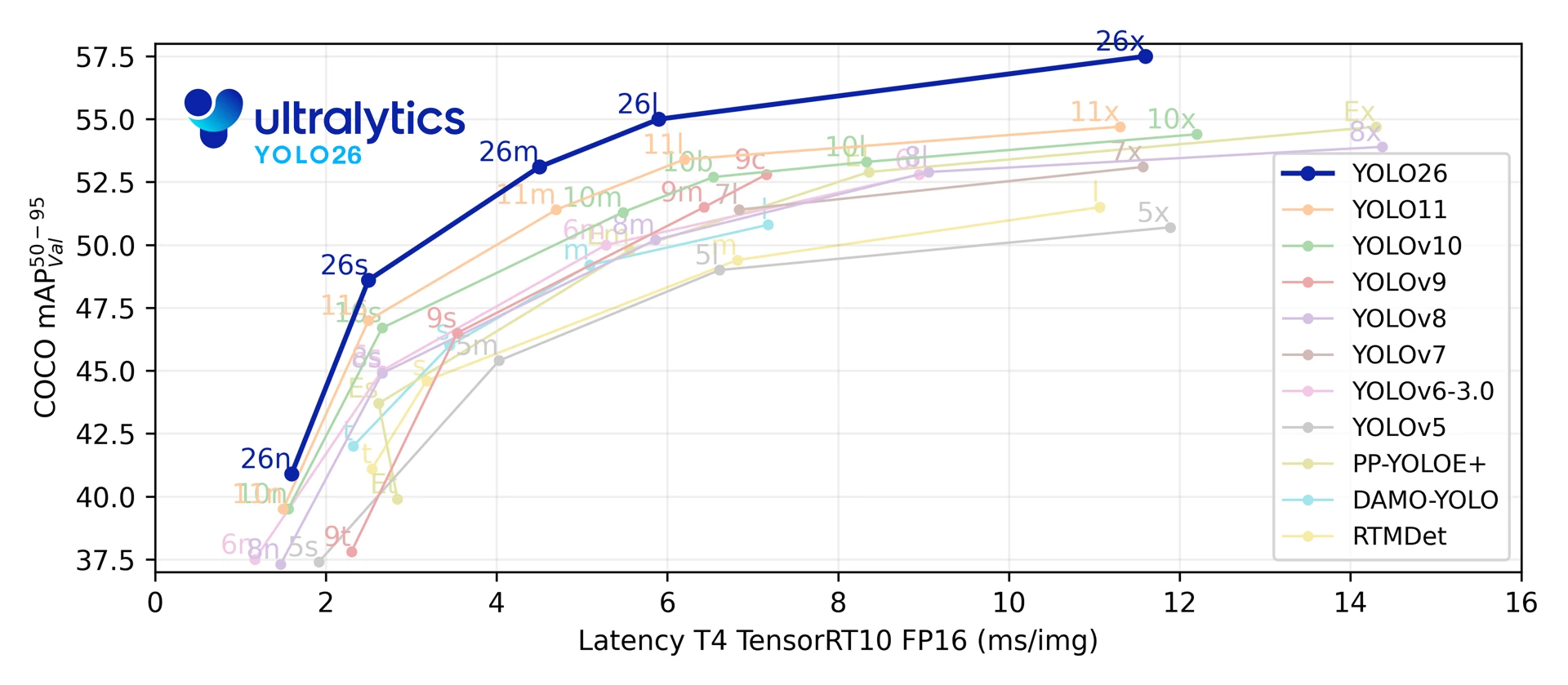
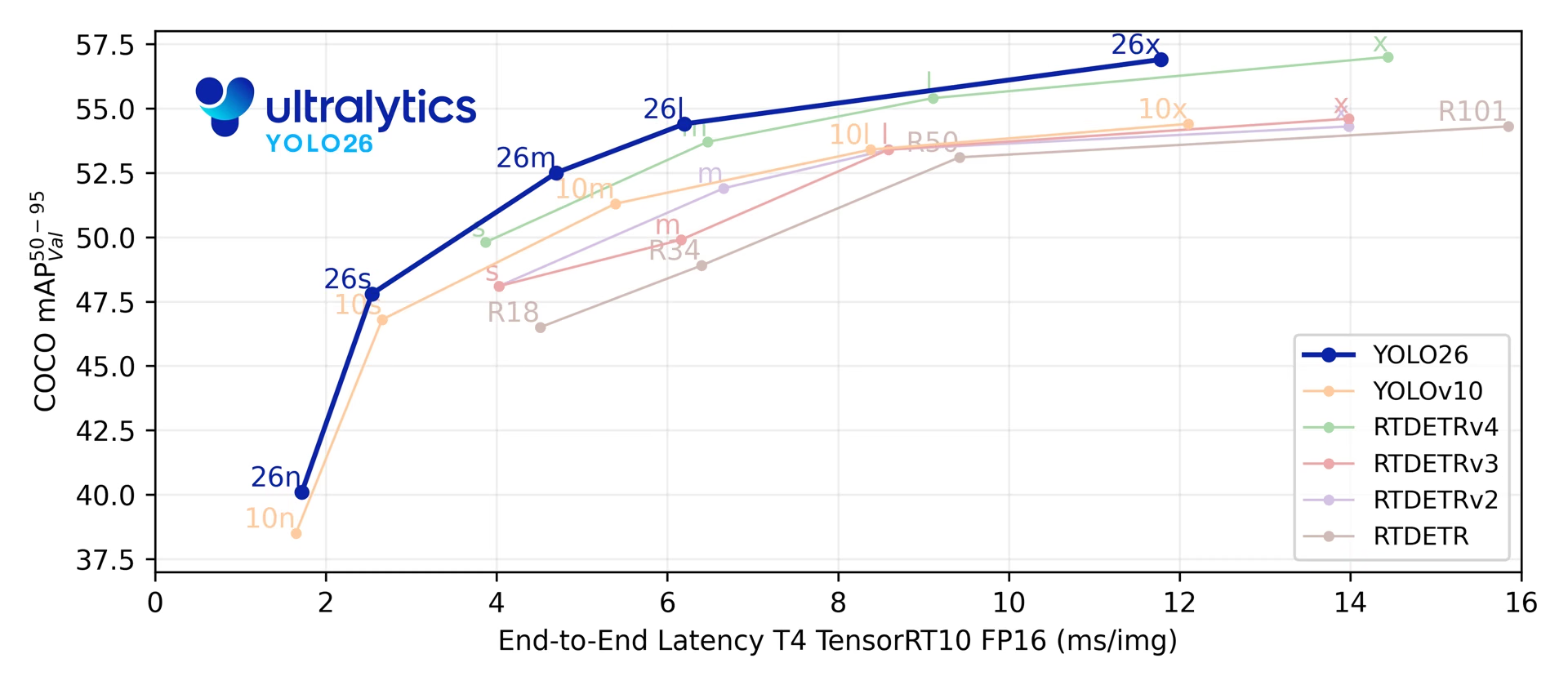
Über die fünf Erkennungsskalen hinweg erreicht YOLO26 40.9–57.5 mAP auf COCO bei einer T4-TensorRT-Latenz von 1.7–11.8 ms. Das Paper berichtet außerdem, dass YOLO26n bei der CPU-ONNX-Inferenz auf einer Intel Xeon CPU @ 2.00 GHz bis zu 43 % schneller ist als YOLO11n.
Weitere Informationen zu geplanter Architektur, Aufgaben und vorläufigen Benchmark-Ergebnissen findest du in der Vorschau auf das noch nicht veröffentlichte YOLO27.
from ultralytics import YOLO

model = YOLO("yolo26n.pt")  # Ein vortrainiertes YOLO26n-Modell laden
results = model("path/to/bus.jpg") # Inferenz ausführenEntdecke YOLO26-Modelle und führe sie direkt auf der Ultralytics Platform aus.
Die YOLO26-Modellfamilie basiert auf vier Gestaltungsbereichen:
- Native End-to-End-Inferenz: Der optionale One-to-One-Erkennungskopf erzeugt Vorhersagen ohne Non-Maximum Suppression (NMS), was die Bereitstellung vereinfacht und die Nachbearbeitung verringert.
- Vereinfachte Box-Regression: YOLO26 entfernt den Distribution Focal Loss (DFL), wodurch die Komplexität des Erkennungskopfs sinkt und gleichzeitig ein uneingeschränkter Regressionsbereich erhalten bleibt.
- Aktualisierungen des Trainingsrezepts: Die Trainingspipeline kombiniert MuSGD (einen hybriden Muon- und SGD-Optimierer), Progressive Loss und STAL (Small-Target-Aware Label Assignment), um die Optimierung zu verbessern, die Überwachung stärker auf den Inferenzkopf auszurichten und eine positive Labelabdeckung für kleine Objekte zu erhalten. Die vollständigen Hyperparameter der veröffentlichten Checkpoints sind im Leitfaden zum YOLO26-Trainingsrezept dokumentiert.
- Aufgabenspezifische Köpfe und Verlustfunktionen: YOLO26 ergänzt gezielte Verfahren für Instanzsegmentierung, Varianten der semantischen Segmentierung, Posenschätzung und orientierte Erkennung und behält dabei eine einheitliche Modellpipeline für alle Aufgaben bei.
Zusammengenommen verbessern diese Aktualisierungen das Verhältnis zwischen Genauigkeit und Latenz über verschiedene Modellgrößen und Bereitstellungsziele hinweg.
Wichtige Funktionen#
-
Regression ohne DFL YOLO26 entfernt den Distribution Focal Loss (DFL), wodurch die Komplexität des Erkennungskopfs sinkt und der Export vereinfacht wird.
-
End-to-End-Inferenz ohne NMS YOLO26 unterstützt eine native End-to-End-Inferenz mit
nms=Falseund erzeugt Vorhersagen ohne einen separaten NMS-Durchlauf. Der standardmäßige One-to-Many-Pfad verwendet NMS, um die Genauigkeit zu verbessern. -
Progressive Loss + STAL Progressive Loss verlagert den Schwerpunkt des Trainings auf den Inferenzkopf, während STAL die positive Labelabdeckung für kleine Objekte verbessert.
-
MuSGD-Optimierer Ein hybrider Optimierer, der SGD mit Muon kombiniert und Optimierungsansätze aus dem Training großer Sprachmodelle auf die Bildverarbeitung überträgt.
-
Effiziente Bereitstellung Der vereinfachte Kopf und der optionale Pfad ohne NMS verringern den Inferenzaufwand bei verschiedenen Exportzielen und Hardwareprofilen. Dazu gehört auch die im Paper angegebene höhere CPU-ONNX-Geschwindigkeit von YOLO26n gegenüber YOLO11n.
-
Verbesserungen bei der Instanzsegmentierung Führt einen Verlust für semantische Segmentierung ein, um die Modellkonvergenz zu verbessern, und aktualisiert das Proto-Modul, das mehrskalige Informationen für eine bessere Maskenqualität nutzt. Das Paper berichtet für die COCO-Instanzsegmentierung von Verbesserungen gegenüber YOLO11 von bis zu +2.5 Box AP und +3.7 Mask AP.
-
Präzise Posenschätzung Integriert die Schätzung der Residual-Log-Likelihood (RLE) für eine genauere Lokalisierung von Keypoints und optimiert den Dekodierungsprozess für eine höhere Inferenzgeschwindigkeit. Das Paper berichtet bei der COCO-Posenschätzung von einer Verbesserung gegenüber YOLO11 um bis zu +7.2 AP.
-
Verbesserte OBB-Dekodierung Führt eine spezielle Winkelfunktion ein, um die Erkennungsgenauigkeit bei quadratischen Objekten zu verbessern, und optimiert die OBB-Dekodierung, um Probleme mit Diskontinuitäten an Grenzen zu beheben. Das Paper berichtet bei der orientierten Erkennung auf DOTA-v1.0 von einer Verbesserung gegenüber YOLO11 um bis zu +3.4 mAP.
Unterstützte Aufgaben und Modi#
YOLO26 unterstützt den standardmäßigen Ultralytics-Aufgabensatz in fünf Modellgrößen:
| Modell | Dateinamen | Aufgabe | Training | Validierung | Inferenz | Exportieren |
|---|---|---|---|---|---|---|
| YOLO26 | yolo26n.pt yolo26s.pt yolo26m.pt yolo26l.pt yolo26x.pt | Erkennung | ✅ | ✅ | ✅ | ✅ |
| YOLO26-seg | yolo26n-seg.pt yolo26s-seg.pt yolo26m-seg.pt yolo26l-seg.pt yolo26x-seg.pt | Instanzsegmentierung | ✅ | ✅ | ✅ | ✅ |
| YOLO26-sem | yolo26n-sem.pt yolo26s-sem.pt yolo26m-sem.pt yolo26l-sem.pt yolo26x-sem.pt | Semantische Segmentierung | ✅ | ✅ | ✅ | ✅ |
| YOLO26-depth | yolo26n-depth.pt yolo26s-depth.pt yolo26m-depth.pt yolo26l-depth.pt yolo26x-depth.pt | Tiefenschätzung | ✅ | ✅ | ✅ | ✅ |
| YOLO26-cls | yolo26n-cls.pt yolo26s-cls.pt yolo26m-cls.pt yolo26l-cls.pt yolo26x-cls.pt | Klassifizierung | ✅ | ✅ | ✅ | ✅ |
| YOLO26-pose | yolo26n-pose.pt yolo26s-pose.pt yolo26m-pose.pt yolo26l-pose.pt yolo26x-pose.pt | Pose/Schlüsselpunkte | ✅ | ✅ | ✅ | ✅ |
| YOLO26-obb | yolo26n-obb.pt yolo26s-obb.pt yolo26m-obb.pt yolo26l-obb.pt yolo26x-obb.pt | Erkennung orientierter Objekte | ✅ | ✅ | ✅ | ✅ |
Dieses einheitliche Framework deckt Echtzeit-Erkennung, Instanzsegmentierung, semantische Segmentierung, monokulare Tiefenschätzung, Klassifizierung, Posenschätzung und orientierte Objekterkennung ab und unterstützt Training, Validierung, Inferenz und Export.
yolo26-p2.yaml und yolo26-p6.yaml ergänzen einen P2-Erkennungskopf (für kleine Objekte) beziehungsweise einen P6-Erkennungskopf (für große Eingaben) und werden ausschließlich als YAML-Architekturen bereitgestellt. Es werden keine größenabhängigen Gewichte yolo26*-p2.pt oder yolo26*-p6.pt veröffentlicht. Erstelle eine skalierte Konfiguration aus YAML (zum Beispiel YOLO("yolo26n-p6.yaml")) und trainiere oder feinabstimme sie nach Bedarf.
Leistungskennzahlen#
Unter Dokumentation zur Erkennung findest du Anwendungsbeispiele für diese mit COCO trainierten Modelle, die 80 vortrainierte Klassen umfassen.
| Modell | Größe (Pixel) | mAPval50-95 | mAPval50-95 (e2e) | Geschwindigkeit CPU ONNX (ms) | Geschwindigkeit T4 TensorRT10 (ms) | Parameter (M) | FLOPs (B) |
|---|---|---|---|---|---|---|---|
| YOLO26n | 640 | 40.9 | 40.1 | 38.9 ± 0.7 | 1.7 ± 0.0 | 2.4 | 5.5 |
| YOLO26s | 640 | 48.6 | 47.8 | 87.2 ± 0.9 | 2.5 ± 0.0 | 9.5 | 20.9 |
| YOLO26m | 640 | 53.1 | 52.5 | 220.0 ± 1.4 | 4.7 ± 0.1 | 20.4 | 68.4 |
| YOLO26l | 640 | 55.0 | 54.4 | 286.2 ± 2.0 | 6.2 ± 0.2 | 24.8 | 86.8 |
| YOLO26x | 640 | 57.5 | 56.9 | 525.8 ± 4.0 | 11.8 ± 0.2 | 55.7 | 194.4 |
Die Werte für Parameter und FLOPs beziehen sich auf das zusammengeführte Modell nach dem Zusammenfassen von Conv/BatchNorm und dem Entfernen des nicht verwendeten Erkennungszweigs. Bei den Geschwindigkeitsmessungen wird der NMS-freie Kopf mit nms=False ausgewählt. Vortrainierte Checkpoints behalten die vollständige Trainingsarchitektur bei und können daher höhere Werte aufweisen.
Anwendungsbeispiele#
Dieser Abschnitt enthält einfache Beispiele für Training und Inferenz mit YOLO26.
Das folgende Beispiel trainiert ein YOLO26-Modell vom Typ Detect für die Objekterkennung auf dem Beispieldatensatz COCO8.
Vortrainierte PyTorch-Modelle *.pt sowie Konfigurationsdateien *.yaml kannst du an die Klasse YOLO() übergeben, um eine Modellinstanz in Python zu erstellen:
from ultralytics import YOLO

# Ein mit COCO vortrainiertes YOLO26n-Modell laden
model = YOLO("yolo26n.pt")

# Mit dem YOLO26n-Modell eine Inferenz auf dem Bild 'bus.jpg' ausführen
results = model("path/to/bus.jpg")

# Das Modell 100 Epochen lang mit dem COCO8-Beispieldatensatz trainieren
results = model.train(data="coco8.yaml", epochs=100, imgsz=640)YOLO26-Erkennungsmodelle verwenden eine Dual-Head-Architektur, die Flexibilität für unterschiedliche Bereitstellungsszenarien bietet:
- One-to-Many-Head (Standard): Erzeugt herkömmliche YOLO-Ausgaben, für die eine NMS-Nachverarbeitung erforderlich ist. Die Ausgabe hat die Form
(N, nc + 4, 8400), wobeincdie Anzahl der Klassen angibt. Dieser Head erreicht in der Regel eine etwas höhere Genauigkeit, erfordert dafür aber zusätzliche Verarbeitung. - One-to-One-Head (
nms=False): Erzeugt End-to-End-Vorhersagen ohne NMS. Die Ausgabe hat die Form(N, 300, 6)und umfasst maximal 300 Erkennungen pro Bild. Dieser Head ist auf schnelle Inferenz und eine vereinfachte Bereitstellung ausgelegt.
Du kannst beim Export, bei der Vorhersage oder bei der Validierung zwischen den Heads wechseln:
from ultralytics import YOLO

model = YOLO("yolo26n.pt")

# One-to-Many-Head verwenden (Standard; Ultralytics wendet NMS an)
results = model.predict("image.jpg")  # inference
metrics = model.val(data="coco.yaml")  # validation
model.export(format="onnx")  # export

# Den NMS-freien One-to-One-Head aktivieren
results = model.predict("image.jpg", nms=False)  # inference
metrics = model.val(data="coco.yaml", nms=False)  # validation
model.export(format="onnx", nms=False)  # export
Bei Vorhersage und Validierung wird standardmäßig aus Genauigkeitsgründen der One-to-Many-Head verwendet. Nutze nms=False für NMS-freie Inferenz oder nms=True, um NMS in einen unterstützten Export einzubinden. Beide Heads werden unabhängig von dieser Auswahl trainiert. Im Leitfaden zur End-to-End-Erkennung findest du Informationen zu Ausgabeformaten und Exportkompatibilität.
YOLOE-26: Erkennung und Segmentierung mit offenem Vokabular#
YOLO26 ist auch die Grundlage von YOLOE-26, einer Variante mit offenem Vokabular, die Objektkategorien anhand von Text-Prompts, visuellen Prompts oder in einem Prompt-freien Modus erkennt und segmentiert, anstatt eine feste, während des Trainings erlernte Klassenliste zu verwenden. YOLOE-26 behält den optionalen NMS-freien End-to-End-Kopf (e2e) von YOLO26 bei, sodass die Inferenz mit offenem Vokabular schnell genug für dynamische Umgebungen bleibt, in denen sich die Zielkategorien im Laufe der Zeit ändern. YOLOE-26x erreicht auf dem LVIS-Minival mit Text-Prompts 40.6 AP, mit visuellen Prompts 38.5 AP und im Prompt-freien Modus 31.1 AP – das sind die Non-E2E-Werte des Papers; der End-to-End-Kopf liegt um 1.1, 2.3 beziehungsweise 1.2 AP darunter.
Die YOLOE-Dokumentation enthält Leistungstabellen für die einzelnen Modellgrößen, Prompt-freie Varianten und vollständige Anwendungsbeispiele.
Zitate und Danksagungen#
Eine vollständige technische Beschreibung der YOLO26-Architektur, des Trainingsverfahrens, der Aufgaben-Heads und der YOLOE-26-Erweiterung mit offenem Vokabular findest du in Ultralytics YOLO26: Einheitliche Echtzeit-Visionmodelle mit End-to-End-Verarbeitung. Wenn du YOLO26 in deiner Forschung verwendest, zitiere bitte:
@misc{jocher2026ultralyticsyolo26unifiedrealtime,
  title = {Ultralytics YOLO26: Unified Real-Time End-to-End Vision Models},
  author = {Glenn Jocher and Jing Qiu and Mengyu Liu and Shuai Lyu and Fatih Cagatay Akyon and Muhammet Esat Kalfaoglu},
  year = {2026},
  eprint = {2606.03748},
  archivePrefix = {arXiv},
  primaryClass = {cs.CV},
  doi = {10.48550/arXiv.2606.03748},
  url = {https://arxiv.org/abs/2606.03748},
}
YOLO26-Code, Modelle und Dokumentation findest du im Ultralytics-GitHub-Repository und in der Ultralytics-Dokumentation. Sie stehen unter den Lizenzen AGPL-3.0 und Enterprise zur Verfügung.
Häufig gestellte Fragen#
- Regression ohne DFL: Vereinfacht den Erkennungs-Head und den Exportpfad
- End-to-End-Inferenz ohne NMS: Unterstützt NMS-freie Inferenz mit
nms=False - Progressive Loss + STAL: Verbessert die Abstimmung beim Training und die Abdeckung kleiner Objekte mit Labels
- MuSGD-Optimierer: Verbindet SGD mit einer von Muon inspirierten Optimierung für stabiles Training
- Aufgabenspezifische Heads und Loss-Funktionen: Verbessert die Unterstützung für Segmentierung, Pose und orientierte Objekterkennung
YOLO26 ist eine einheitliche Modellfamilie, die mehrere Computer-Vision-Aufgaben durchgängig unterstützt:
- Objekterkennung
- Instanzsegmentierung
- Semantische Segmentierung
- Monokulare Tiefenschätzung
- Bildklassifizierung
- Posenschätzung
- Erkennung orientierter Objekte (OBB)
Jede Größenvariante (n, s, m, l, x) unterstützt alle Aufgaben. Über YOLOE-26 sind außerdem Versionen mit offenem Vokabular verfügbar.
YOLO26 steigert die Effizienz bei der Bereitstellung durch:
- Optionale native End-to-End-Inferenz ohne NMS (
nms=False) - Regression ohne DFL und einen leichteren Erkennungs-Head
- Export des zusammengeführten Modells, bei dem ausschließlich fürs Training benötigte Hilfskomponenten entfernt werden
- Bis zu 43 % schnellere CPU-Inferenz mit ONNX für YOLO26n im Vergleich zu YOLO11n auf einer Intel Xeon CPU mit 2.00 GHz
- Flexible Exportformate, darunter TensorRT, ONNX, CoreML, LiteRT und OpenVINO
- Optionale native End-to-End-Inferenz ohne NMS (
YOLO26-Modelle kannst du über das Paket
ultralyticsherunterladen. Installiere oder aktualisiere das Paket und lade ein Modell:from ultralytics import YOLO # Ein vortrainiertes YOLO26-Nano-Modell laden model = YOLO("yolo26n.pt") # Eine Inferenz auf einem Bild ausführen results = model("image.jpg")Im Abschnitt Anwendungsbeispiele findest du Anleitungen für Training, Validierung und Export.


Kommentare117
Stell eine Frage, teile deine Ergebnisse oder hilf jemand anderem.
hongzhuoxx
除了监督模型,我还期待着ultralytics可以推出高效准确易用的非监督瑕疵检测模型!
4Syedshajib55
How do I modify the architectural components (Head and Neck) of YOLOv26?
What is the process for inserting a Dropout layer at the end of the backbone in the YOLOv26 configuration?
2 Glenn JocherUltralytics
YOLO26 (no “v”) architecture edits are done in the model YAML, so start by copying
ultralytics/cfg/models/26/yolo26.yamlinto your project, modify thebackbone:/head:layer lists (the “neck” is part ofhead:), and train from that YAML following the Model YAML Configuration Guide.# yolo26_custom.yaml backbone: # ... existing backbone layers ... - [-1, 1, nn.Dropout, [0.2]] # add dropout at end of backbone (train-time only) head: # ... existing head/neck layers ...yolo train model=yolo26_custom.yaml data=your_dataset.yaml imgsz=640If you share which task model you’re editing (
detect/seg/pose/obb) and which variant (n/s/m/l/x), we can point you to the exact YAML to start from and where to insert the change in that graph.1Hi Glenn,
Thank you for the quick response and guidance! To answer your question: I am focusing on the detect task, and I will be experimenting with both the s (small) and m (medium) variants.
For context, I am working on a paper targeting a Q1 journal. My project focuses on Emotion Detection (5 classes: Angry, Happy, Sad, Neutral, Surprised) using the RAVDESS dataset. I have extracted peak emotion frames from the videos and augmented the dataset to roughly 21k images (640x640 resolution). My core research objective is to demonstrate that a customized YOLO26 architecture can outperform the standard baseline for detecting subtle facial micro-expressions. To achieve this, I want to modify the backbone—specifically by adding Batch Normalization and Dropout layers (potentially after the C2f blocks or may be after c3k2 blocks of that yolo26 architechtural images) to improve regularization and prevent overfitting on facial features.
Could you help me with the following?
-
Could you point me to the exact base YAML files for the yolo26s and yolo26m detection models to use as my starting point?
-
From an architectural standpoint, where exactly in the backbone would you theoretically recommend inserting these Dropout/BN layers? (e.g., after which specific layer index or block) to maximize accuracy without degrading the spatial feature maps necessary for facial detection?
Any insights on how to best structure this custom YAML would be incredibly helpful. Thanks again for your time!
-
- Baseline Reference: Finally, could you share the raw YAML configuration code that details the standard YOLO26 backbone and head? I would like to include this exact baseline structure in my paper’s methodology section to clearly contrast it with my proposed modifications.
hbzylilin
延迟了10天了,还没动静
1lwplw
真不错,期待开源
1- Glenn JocherUltralytics(bearbeitet)
@etemical 感谢建议!目前未原生支持行为识别/多目标行为检测;建议先用 YOLO26 组合
detect+track多目标跟踪与可选pose关键点作为上游信号,并在 GitHub 提交详细需求(数据标注格式与评测指标)为 Feature Request 模板 便于评估;参考 Track 模式文档 与 Pose 任务文档。yolo track model=yolo26n.pt source=your_video.mp4 tracker=bytetrack.yaml show=True yolo pose predict model=yolo26n-pose.pt source=your_video.mp4 show=True@lwplw 谢谢关注!YOLO26 现已发布,可阅读我们的 YOLO26 介绍博客 了解功能。
Jiahao Chen
请问如果我想要引用本页面的YOLO26和其他模型的对比曲线图,已经在文中索引了来源。但是期刊要求需要拿到作者的授权,请问如何申请授权呢?
 Paula DerrengerUltralytics
您好,针对期刊要求的图片书面授权,建议联系 Ultralytics 法务团队,说明申请转载 YOLO26 对比曲线图,并附上页面链接、具体图片、论文题目、期刊名称、是否修改图片,以及期刊的授权模板(如有),请求确认版权归属并提供书面许可。目前未找到该图专门的公开授权流程,因此这里不能代为授予许可;请以收到的正式书面回复为准。
cyberpunk-edgerunner
maybe
CIFAR-10-LTdataset can help. you do not need background images because our initial conversation started without that, for an image, there can be one to 15 object in one image The cause of the shared-memory increase will remain unconfirmed unless you runpython train.pyin your computer with an rtx gpuOn Sat, Oct 10, 2026 at 6:15 AM Paula Derrenger @.***> wrote:
Understood—you don’t need to interrupt your work for the batch=16 comparison. Could you name a public long-tailed dataset you consider representative and share your approximate class counts, background-image proportion, and typical/maximum objects per image? That would help define a reproduction using the configuration you already shared, without requiring your company’s data or another production run. The cause of the shared-memory increase remains unconfirmed.
— Reply to this email directly, view it on GitHub https://github.com/orgs/ultralytics/discussions/26446?email_source=notifications&email_token=BSIM7DUZ6A5KFG7YKF2H6KT5TGBBRA5CNFSNUABIM5UWIORPF5TWS5BNNB2WEL2ENFZWG5LTONUW63SDN5WW2ZLOOQXTCOBYGQ2DONBZUZZGKYLTN5XKOY3PNVWWK3TUUVSXMZLOOSWGM33PORSXEX3DNRUWG2Y#discussioncomment-18844749, or unsubscribe https://github.com/notifications/unsubscribe-auth/BSIM7DTBK4XV3HXIPMFHVXT5TGBBRAVCNFSNUABIKJSXA33TNF2G64TZHM2TGNJTGYYDINBVHNCGS43DOVZXG2LPNY5TCMBZGE3TMNRUUF3AE . Triage notifications, keep track of coding agent tasks and review pull requests on the go with GitHub Mobile for iOS https://github.com/notifications/mobile/ios/BSIM7DST66YNYHAKPWPY3PT5TGBBRA5CNFSNUABIM5UWIORPF5TWS5BNNB2WEL2ENFZWG5LTONUW63SDN5WW2ZLOOQXTCOBYGQ2DONBZUZZGKYLTN5XKOY3PNVWWK3TUUVSXMZLOOSVGM33PORSXEX3JN5ZQ and Android https://github.com/notifications/mobile/android/BSIM7DRDX2BJPHP7PHHKRG35TGBBRA5CNFSNUABIM5UWIORPF5TWS5BNNB2WEL2ENFZWG5LTONUW63SDN5WW2ZLOOQXTCOBYGQ2DONBZUZZGKYLTN5XKOY3PNVWWK3TUUVSXMZLOOSXGM33PORSXEX3BNZSHE33JMQ. Download it today! You are receiving this because you commented.Message ID: @.*** com>
- Paula DerrengerUltralytics
Thanks for clarifying the 1–15 objects per image; we can keep background-only images out of the reproduction.
CIFAR-10-LTis a long-tailed classification benchmark, so it would not directly reproduce your multi-object detection setup. I can’t executepython train.pyon an RTX GPU here, and I haven’t reproduced the shared-memory increase. Could you share a public-data version of the script, including dataset preparation, so someone with suitable hardware can run the same test without your company’s data?
I cannot run the same code with batch=16, reasons:
- I work in a company and have my own KPI to meet and improve
- I have added background image data in the dataset so it is no longer same.
- I am planning to add more images in future.
I suggest you download a long tailed distributed dataset to mimic my experiment.
thank you
On Fri, Oct 9, 2026 at 5:15 AM Paula Derrenger @.***> wrote:
Thanks for clarifying that it was 15 GB of shared GPU memory and sharing the configuration; sorry for requesting the script again. To test whether batch-related memory pressure contributes, could you compare your batch=64 run with batch=16, keeping all other settings unchanged? See the batch-size guidance https://docs.ultralytics.com/guides/model-training-tips#batch-size-and-gpu-utilization. Please share epoch 2–3 text logs and dedicated/shared GPU memory readings from the comparison; this will help narrow down the cause without assuming the memory change is a bug.
— Reply to this email directly, view it on GitHub https://github.com/orgs/ultralytics/discussions/26446?email_source=notifications&email_token=BSIM7DWLJ3KRNTXM7Y6Q4O35TARKLA5CNFSNUABIM5UWIORPF5TWS5BNNB2WEL2ENFZWG5LTONUW63SDN5WW2ZLOOQXTCOBYGI2TINRTUZZGKYLTN5XKOY3PNVWWK3TUUVSXMZLOOSWGM33PORSXEX3DNRUWG2Y#discussioncomment-18825463, or unsubscribe https://github.com/notifications/unsubscribe-auth/BSIM7DQLZ4KWCGA6TEUDIS35TARKLAVCNFSNUABIKJSXA33TNF2G64TZHM2TGNJTGYYDINBVHNCGS43DOVZXG2LPNY5TCMBZGE3TMNRUUF3AE . Triage notifications, keep track of coding agent tasks and review pull requests on the go with GitHub Mobile for iOS https://github.com/notifications/mobile/ios/BSIM7DV53PCZWPENVMYYNYT5TARKLA5CNFSNUABIM5UWIORPF5TWS5BNNB2WEL2ENFZWG5LTONUW63SDN5WW2ZLOOQXTCOBYGI2TINRTUZZGKYLTN5XKOY3PNVWWK3TUUVSXMZLOOSVGM33PORSXEX3JN5ZQ and Android https://github.com/notifications/mobile/android/BSIM7DX2XUXERTKYLIDJ2C35TARKLA5CNFSNUABIM5UWIORPF5TWS5BNNB2WEL2ENFZWG5LTONUW63SDN5WW2ZLOOQXTCOBYGI2TINRTUZZGKYLTN5XKOY3PNVWWK3TUUVSXMZLOOSXGM33PORSXEX3BNZSHE33JMQ. Download it today! You are receiving this because you commented.Message ID: @.*** com>
- Paula DerrengerUltralytics
Understood—you don’t need to interrupt your work for the
batch=16comparison. Could you name a public long-tailed dataset you consider representative and share your approximate class counts, background-image proportion, and typical/maximum objects per image? That would help define a reproduction using the configuration you already shared, without requiring your company’s data or another production run. The cause of the shared-memory increase remains unconfirmed.
- I have shared you exact code in this email thread(check my second reply) and the command to run it was `python .\det_yoloM_5-10.py' .
- yes, it was 15GB of shared GPU
- sorry, I do not have
separate dedicated/shared memory readings at comparable batch positions in each epoch, but there was a steady consumption of about 15GB of shared memory throughout the training. however I can provide you argos.yaml
task: detect mode: train model: yolo26m.pt data: yoloDet_clsAgnostic_split/data.yaml epochs: 200 time: null patience: 20 batch: 64 imgsz: 640 save: true save_period: -1 cache: false device: '0' workers: 6 project: null name: train-2 exist_ok: false pretrained: true cls_remap: true optimizer: auto verbose: false seed: 0 deterministic: true single_cls: false rect: false cos_lr: false close_mosaic: 10 resume: false amp: true fraction: 1.0 profile: false freeze: null multi_scale: 0.0 compile: false channels_last: null overlap_mask: true mask_ratio: 4 dropout: 0.0 val: true split: val save_json: false conf: null iou: 0.7 max_det: 300 quantize: null dnn: false plots: true nms: null source: null vid_stride: 1 stream_buffer: false visualize: false augment: false agnostic_nms: false classes: null retina_masks: false embed: null show: false save_frames: false save_txt: false save_conf: false save_crop: false show_labels: true show_conf: true show_boxes: true line_width: null format: torchscript keras: false optimize: false dynamic: false simplify: true opset: null workspace: null lr0: 0.01 lrf: 0.01 momentum: 0.937 weight_decay: 0.0005 warmup_epochs: 3.0 warmup_momentum: 0.8 warmup_bias_lr: 0.1 distill_model: null dis: 6.0 box: 7.5 cls: 0.5 cls_pw: 0.0 dfl: 1.5 pose: 12.0 kobj: 1.0 rle: 1.0 angle: 1.0 dlog: 1.0 dgrad: 0.5 dlam: 1.0 nbs: 64 hsv_h: 0.015 hsv_s: 0.7 hsv_v: 0.4 degrees: 0.0 translate: 0.1 scale: 0.5 shear: 0.0 perspective: 0.0 flipud: 0.0 fliplr: 0.5 bgr: 0.0 mosaic: 1.0 mixup: 0.0 cutmix: 0.0 copy_paste: 0.0 copy_paste_mode: flip auto_augment: randaugment erasing: 0.4 cfg: null tracker: tracktrack.yaml save_dir: C:\Training9\runs\detect\train-2On Thu, Oct 8, 2026 at 6:07 AM Paula Derrenger @.***> wrote:
Thanks for the complete checks and text logs. Epoch 2 is faster (14:27 versus 1:02:39), despite GPU_mem dropping from 28.6G to 17.4G, so these readings alone don’t establish GPU underutilization. Could you paste your exact training command or script, including the model and training settings? Also, does “around 15 epoch” mean 15 GB of shared GPU memory in both epochs? Please provide separate dedicated/shared memory readings at comparable batch positions in each epoch so we can investigate the discrepancy.
— Reply to this email directly, view it on GitHub https://github.com/orgs/ultralytics/discussions/26446?email_source=notifications&email_token=BSIM7DQKA3GIYQSCDVEWEJ35S3OWHA5CNFSNUABIM5UWIORPF5TWS5BNNB2WEL2ENFZWG5LTONUW63SDN5WW2ZLOOQXTCOBYGAZTKNJWUZZGKYLTN5XKOY3PNVWWK3TUUVSXMZLOOSWGM33PORSXEX3DNRUWG2Y#discussioncomment-18803556, or unsubscribe https://github.com/notifications/unsubscribe-auth/BSIM7DX34MSUWFFX5WDRXW35S3OWHAVCNFSNUABIKJSXA33TNF2G64TZHM2TGNJTGYYDINBVHNCGS43DOVZXG2LPNY5TCMBZGE3TMNRUUF3AE . Triage notifications, keep track of coding agent tasks and review pull requests on the go with GitHub Mobile for iOS https://github.com/notifications/mobile/ios/BSIM7DSVPQ3LAONGDZOZWWD5S3OWHA5CNFSNUABIM5UWIORPF5TWS5BNNB2WEL2ENFZWG5LTONUW63SDN5WW2ZLOOQXTCOBYGAZTKNJWUZZGKYLTN5XKOY3PNVWWK3TUUVSXMZLOOSVGM33PORSXEX3JN5ZQ and Android https://github.com/notifications/mobile/android/BSIM7DQHEDECXNLNQEWJLC35S3OWHA5CNFSNUABIM5UWIORPF5TWS5BNNB2WEL2ENFZWG5LTONUW63SDN5WW2ZLOOQXTCOBYGAZTKNJWUZZGKYLTN5XKOY3PNVWWK3TUUVSXMZLOOSXGM33PORSXEX3BNZSHE33JMQ. Download it today! You are receiving this because you commented.Message ID: @.*** com>
- Paula DerrengerUltralytics
Thanks for clarifying that it was 15 GB of shared GPU memory and sharing the configuration; sorry for requesting the script again. To test whether batch-related memory pressure contributes, could you compare your
batch=64run withbatch=16, keeping all other settings unchanged? See the batch-size guidance. Please share epoch 2–3 text logs and dedicated/shared GPU memory readings from the comparison; this will help narrow down the cause without assuming the memory change is a bug.
here are my yolo checks yolo checks Ultralytics 8.4.155 Python-3.13.12 torch-2.12.0.dev20260408+cu128 CUDA:0 (NVIDIA GeForce RTX 5090, 32607MiB) Setup complete (24 CPUs, 63.5 GB RAM, 1738.9/1881.5 GB disk)
OS Windows-11-10.0.26200-SP0 Environment Windows Python 3.13.12 Install pip Path C:\Users\devth\miniconda3\Lib\site-packages\ultralytics RAM 63.46 GB Disk 1738.9/1881.5 GB CPU Intel Core Ultra 9 285K CPU count 24 GPU NVIDIA GeForce RTX 5090, 32607MiB GPU count 1 CUDA 12.8
cloudpickle 3.1.2>=3.1.1 filelock 3.29.0>=3.16.1 numpy 2.4.4>=1.23.0; platform_system != "Darwin" numpy 2.4.4!=2.0.,!=2.1.,!=2.2.*,!=2.3.0,!=2.3.1,!=2.3.2,!=2.3.3,!=2.3.4,>=1.23.0; platform_system == "Darwin" matplotlib 3.10.8>=3.3.0 opencv-python 4.13.0.92!=4.13.0.90,>=4.7.0 pillow 12.2.0>=7.1.2 pyyaml 6.0.3>=5.3.1 requests 2.32.5>=2.23.0 torch 2.12.0.dev20260408+cu128>=1.8.0 torch 2.12.0.dev20260408+cu128!=2.4.0,>=1.8.0; sys_platform == "win32" torchvision 0.27.0.dev20260407+cu128>=0.9.0 psutil 7.2.2>=5.8.0 polars 1.40.1>=0.20.0 nvidia-ml-py 13.610.43>=12.0.0 ultralytics-thop 2.1.6>=2.1.6 ultralytics-platform 0.1.48>=0.1.45; python_version >= "3.11"
(shared memory used in first and second epoch was around 15 epoch) these are the first two epoch details in Text
 Epoch    GPU_mem   box_loss   cls_loss    l1_loss  Instances       Size
  1/200      28.6G      1.174      1.891    0.01363         90
640: 33% ━━━╸──────── 1561/4702 1.1it/s 23:55<49:25libpng warning: iCCP: known incorrect sRGB profile 1/200 28.6G 1.15 1.582 0.01327 91 640: 56% ━━━━━━╸───── 2674/4702 1.3it/s 40:45<26:43libpng warning: iCCP: known incorrect sRGB profile 1/200 28.6G 1.144 1.475 0.01325 77 640: 72% ━━━━━━━━╸─── 3419/4702 1.3it/s 49:44<16:45libpng warning: iCCP: known incorrect sRGB profile 1/200 28.6G 1.144 1.471 0.01325 84 640: 73% ━━━━━━━━╸─── 3451/4702 1.4it/s 50:07<14:41libpng warning: iCCP: known incorrect sRGB profile 1/200 28.6G 1.146 1.395 0.01332 84 640: 92% ━━━━━━━━━━━─ 4370/4702 5.0it/s 1:01:16<1:07libpng warning: iCCP: known incorrect sRGB profile 1/200 28.6G 1.146 1.373 0.01335 74 640: 100% ━━━━━━━━━━━━ 4702/4702 1.3it/s 1:02:39 Class Images Instances Box(P R mAP50 mAP50-95): 22% ━━╸───────── 57/256 2.5it/s 26.7s<1:19libpng warning: iCCP: known incorrect sRGB profile Class Images Instances Box(P R mAP50 mAP50-95): 47% ━━━━━╸────── 122/256 2.3it/s 1:10<59.4slibpng warning: iCCP: known incorrect sRGB profile Class Images Instances Box(P R mAP50 mAP50-95): 100% ━━━━━━━━━━━━ 256/256 1.9it/s 2:17 all 32677 47931 0.863 0.726 0.818 0.584
Epoch GPU_mem box_loss cls_loss l1_loss InstancesSize 2/200 17.4G 1.183 1.123 0.01413 74 640: 29% ━━━╸──────── 1380/4702 5.1it/s 4:16<10:45libpng warning: iCCP: known incorrect sRGB profile 2/200 17.4G 1.196 1.133 0.01441 107 640: 55% ━━━━━━╸───── 2615/4702 5.8it/s 8:09<6:02libpng warning: iCCP: known incorrect sRGB profile 2/200 17.4G 1.193 1.126 0.01434 99 640: 64% ━━━━━━━╸──── 3020/4702 5.5it/s 9:20<5:06libpng warning: iCCP: known incorrect sRGB profile 2/200 17.4G 1.193 1.125 0.01435 106 640: 67% ━━━━━━━━──── 3179/4702 5.6it/s 9:50<4:33libpng warning: iCCP: known incorrect sRGB profile 2/200 17.4G 1.192 1.121 0.01434 109 640: 81% ━━━━━━━━━╸── 3847/4702 5.5it/s 11:52<2:36libpng warning: iCCP: known incorrect sRGB profile 2/200 17.4G 1.195 1.12 0.01437 86 640: 100% ━━━━━━━━━━━━ 4702/4702 5.4it/s 14:27 Class Images Instances Box(P R mAP50 mAP50-95): 22% ━━╸───────── 57/256 2.5it/s 20.6s<1:21libpng warning: iCCP: known incorrect sRGB profile Class Images Instances Box(P R mAP50 mAP50-95): 47% ━━━━━╸────── 122/256 2.1it/s 50.3s<1:04libpng warning: iCCP: known incorrect sRGB profile Class Images Instances Box(P R mAP50 mAP50-95): 100% ━━━━━━━━━━━━ 256/256 2.3it/s 1:51 all 32677 47931 0.889 0.778 0.87 0.638
On Tue, Oct 6, 2026 at 10:29 AM Paula Derrenger @.***> wrote:
No—by “yolo checks output,” I mean the terminal’s software/hardware summary, not results.csv. Please activate the same Python environment used for training, run yolo checks in PowerShell, and paste its complete text output; it reports your Ultralytics, Python, PyTorch, and GPU details (environment checks reference https://docs.ultralytics.com/reference/utils/checks#ultralytics.utils.checks.check_yolo). (docs.ultralytics.com https://docs.ultralytics.com/reference/utils/checks) Thanks for sharing the driver information. Please also provide separate dedicated/shared GPU-memory readings at matching points in epochs 1 and 2, plus your training command or configuration, so we can investigate without assuming the memory drop indicates hardware underutilization.
— Reply to this email directly, view it on GitHub https://github.com/orgs/ultralytics/discussions/26446?email_source=notifications&email_token=BSIM7DSK7MKPVE56RJJGI435SR33BA5CNFSNUABIM5UWIORPF5TWS5BNNB2WEL2ENFZWG5LTONUW63SDN5WW2ZLOOQXTCOBXG4YDKNJSUZZGKYLTN5XKOY3PNVWWK3TUUVSXMZLOOSWGM33PORSXEX3DNRUWG2Y#discussioncomment-18770552, or unsubscribe https://github.com/notifications/unsubscribe-auth/BSIM7DRBVYTDNBPWAZRUQXL5SR33BAVCNFSNUABIKJSXA33TNF2G64TZHM2TGNJTGYYDINBVHNCGS43DOVZXG2LPNY5TCMBZGE3TMNRUUF3AE . Triage notifications, keep track of coding agent tasks and review pull requests on the go with GitHub Mobile for iOS https://github.com/notifications/mobile/ios/BSIM7DXMRZI3YZR75VFDAGT5SR33BA5CNFSNUABIM5UWIORPF5TWS5BNNB2WEL2ENFZWG5LTONUW63SDN5WW2ZLOOQXTCOBXG4YDKNJSUZZGKYLTN5XKOY3PNVWWK3TUUVSXMZLOOSVGM33PORSXEX3JN5ZQ and Android https://github.com/notifications/mobile/android/BSIM7DRXQCNW5JUZNGVDHU35SR33BA5CNFSNUABIM5UWIORPF5TWS5BNNB2WEL2ENFZWG5LTONUW63SDN5WW2ZLOOQXTCOBXG4YDKNJSUZZGKYLTN5XKOY3PNVWWK3TUUVSXMZLOOSXGM33PORSXEX3BNZSHE33JMQ. Download it today! You are receiving this because you commented.Message ID: @.*** com>
- Paula DerrengerUltralytics
Thanks for the complete checks and text logs. Epoch 2 is faster (14:27 versus 1:02:39), despite
GPU_memdropping from 28.6G to 17.4G, so these readings alone don’t establish GPU underutilization. Could you paste your exact training command or script, including the model and training settings? Also, does “around 15 epoch” mean 15 GB of shared GPU memory in both epochs? Please provide separate dedicated/shared memory readings at comparable batch positions in each epoch so we can investigate the discrepancy.
pls explain what is yolo checks output? what do you mean by that ? are you referring to results.csv from runs folder??
here is my driver detail PS C:\Training9> nvidia-smi Tue Oct 6 09:22:05 2026 +-----------------------------------------------------------------------------------------+ | NVIDIA-SMI 610.60 KMD Version: 610.60 CUDA UMD Version: 13.3 | +-----------------------------------------+------------------------+----------------------+ | GPU Name Driver-Model | Bus-Id Disp.A | Volatile Uncorr. ECC | | Fan Temp Perf Pwr:Usage/Cap | Memory-Usage | GPU-Util Compute M. | | | | MIG M. | |=========================================+========================+======================| | 0 NVIDIA GeForce RTX 5090 WDDM | 00000000:01:00.0 On | N/A | | 57% 73C P1 479W / 575W | 19362MiB / 32607MiB | 80% Default | | | | N/A | +-----------------------------------------+------------------------+----------------------+
PS C:\Training9> nvcc --version nvcc: NVIDIA (R) Cuda compiler driver Copyright (c) 2005-2025 NVIDIA Corporation Built on Wed_Jan_15_19:38:46_Pacific_Standard_Time_2025 Cuda compilation tools, release 12.8, V12.8.61 Build cuda_12.8.r12.8/compiler.35404655_0
epoch 1 vram usage(in terminal) = 28.6 GB and in task manager ~29.1 GB epoch 2 to epoch 73 vram usage (in terminal) = 17.4 GB and in task manager vram usage is 18.1 GB
73rd epoch
Epoch GPU_mem box_loss cls_loss l1_loss InstancesSize 73/200 17.4G 0.9935 0.7903 0.01002 86 640: 0% ──────────── 4/4702 4.4it/s 1.0s<17:51libpng warning: iCCP: known incorrect sRGB profile 73/200 17.4G 1.023 0.7368 0.01159 84 640: 9% ━─────────── 446/4702 5.8it/s 1:17<12:17libpng warning: iCCP: known incorrect sRGB profile 73/200 17.4G 1.024 0.7397 0.01152 93 640: 63% ━━━━━━━╸──── 2990/4702 5.6it/s 8:41<5:06libpng warning: iCCP: known incorrect sRGB profile 73/200 17.4G 1.024 0.7402 0.01151 119 640: 65% ━━━━━━━╸──── 3080/4702 5.3it/s 8:57<5:06libpng warning: iCCP: known incorrect sRGB profile 73/200 17.4G 1.026 0.7422 0.01152 113 640: 76% ━━━━━━━━━─── 3586/4702 5.6it/s 10:28<3:20libpng warning: iCCP: known incorrect sRGB profile 73/200 17.4G 1.029 0.7459 0.01156 78 640: 100% ━━━━━━━━━━━━ 4702/4702 5.7it/s 13:46 Class Images Instances Box(P R mAP50 mAP50-95): 22% ━━╸───────── 57/256 2.7it/s 20.9s<1:13libpng warning: iCCP: known incorrect sRGB profile Class Images Instances Box(P R mAP50 mAP50-95): 47% ━━━━━╸────── 122/256 2.1it/s 48.9s<1:02libpng warning: iCCP: known incorrect sRGB profile Class Images Instances Box(P R mAP50 mAP50-95): 100% ━━━━━━━━━━━━ 256/256 2.4it/s 1:47 all 32677 47931 0.927 0.855 0.93 0.724
since you are trying to replicate my detection code , I must tell you in my train folder I have around 150000 images with txt files, 32000 in val and 31000 in test
while you are at it, I need a change in the ultralytics package, since it can detect and restore corrupt JPG(and many more errors), would it possible for you to make this change permanent? since it a type of fix and everyone wants that and no one wants to ultralytics package to just internally fix the images i know it won't be implemented by of security reasons by just keep in future todo list
to be honest , in my view, the ultralytics package does not fully utilise the hardware. I have run barebone code that using just the pytorch and few more basic codes and they utilise
thank you in advance
On Mon, Oct 5, 2026 at 10:42 PM Paula Derrenger @.***> wrote:
Thanks for sharing the script. A plausible explanation for the drop from 28.6G to 17.4G is cache cleanup between epochs: the training loop https://docs.ultralytics.com/reference/engine/trainer#ultralytics.engine.trainer.BaseTrainer._do_train conditionally clears reserved memory before validation and at epoch end when usage exceeds 50% of device capacity. This could explain the drop, but does not establish why Windows reports shared-memory usage. ( docs.ultralytics.com https://docs.ultralytics.com/reference/engine/trainer) Please share yolo checks output, your NVIDIA driver version, and dedicated/shared GPU-memory readings as text at matching points in both epochs so we can check your installed version and distinguish the two observations.
— Reply to this email directly, view it on GitHub https://github.com/orgs/ultralytics/discussions/26446?email_source=notifications&email_token=BSIM7DSOVWTY24AP4M6GU5D5SPI7FA5CNFSNUABIM5UWIORPF5TWS5BNNB2WEL2ENFZWG5LTONUW63SDN5WW2ZLOOQXTCOBXGYZTCOJVUZZGKYLTN5XKOY3PNVWWK3TUUVSXMZLOOSWGM33PORSXEX3DNRUWG2Y#discussioncomment-18763195, or unsubscribe https://github.com/notifications/unsubscribe-auth/BSIM7DUUEOVQC4A4Q7SCGUL5SPI7FAVCNFSNUABIKJSXA33TNF2G64TZHM2TGNJTGYYDINBVHNCGS43DOVZXG2LPNY5TCMBZGE3TMNRUUF3AE . Triage notifications, keep track of coding agent tasks and review pull requests on the go with GitHub Mobile for iOS https://github.com/notifications/mobile/ios/BSIM7DVWK73UY4PTSMIRTTL5SPI7FA5CNFSNUABIM5UWIORPF5TWS5BNNB2WEL2ENFZWG5LTONUW63SDN5WW2ZLOOQXTCOBXGYZTCOJVUZZGKYLTN5XKOY3PNVWWK3TUUVSXMZLOOSVGM33PORSXEX3JN5ZQ and Android https://github.com/notifications/mobile/android/BSIM7DW6Q4F7VJMCOTRDMPD5SPI7FA5CNFSNUABIM5UWIORPF5TWS5BNNB2WEL2ENFZWG5LTONUW63SDN5WW2ZLOOQXTCOBXGYZTCOJVUZZGKYLTN5XKOY3PNVWWK3TUUVSXMZLOOSXGM33PORSXEX3BNZSHE33JMQ. Download it today! You are receiving this because you commented.Message ID: @.*** com>
- Paula DerrengerUltralytics
No—by “
yolo checksoutput,” I mean the terminal’s software/hardware summary, notresults.csv. Please activate the same Python environment used for training, runyolo checksin PowerShell, and paste its complete text output; it reports your Ultralytics, Python, PyTorch, and GPU details (environment checks reference). (docs.ultralytics.com) Thanks for sharing the driver information. Please also provide separate dedicated/shared GPU-memory readings at matching points in epochs 1 and 2, plus your training command or configuration, so we can investigate without assuming the memory drop indicates hardware underutilization.