Inférence thread-safe avec les modèles YOLO
Pour exécuter en toute sécurité l’inférence Ultralytics YOLO sur plusieurs threads Python, instancie un modèle YOLO distinct dans chaque thread au lieu de partager la même instance entre plusieurs threads. Le partage d’une même instance de modèle provoque des conditions de concurrence qui corrompent son état interne et produisent des résultats imprévisibles, car le module threading de Python exécute simultanément les threads sur le même objet. Ce guide explique pourquoi le partage échoue, présente le modèle sûr avec une instance par thread et décrit le décorateur ThreadingLocked pour les cas où tu dois partager une instance.
Accède directement aux sections Pourquoi le partage d’un modèle échoue, Modèle thread-safe ou décorateur ThreadingLocked.
À regarder : Comment effectuer une inférence thread-safe avec les modèles Ultralytics YOLO en Python | Multithreading 🚀
Comprendre le multithreading en Python#
Les threads Python permettent à ton programme d'exécuter plusieurs opérations simultanément. Toutefois, le verrou global de l'interpréteur Python (GIL) signifie qu'un seul thread peut exécuter du bytecode Python à la fois.
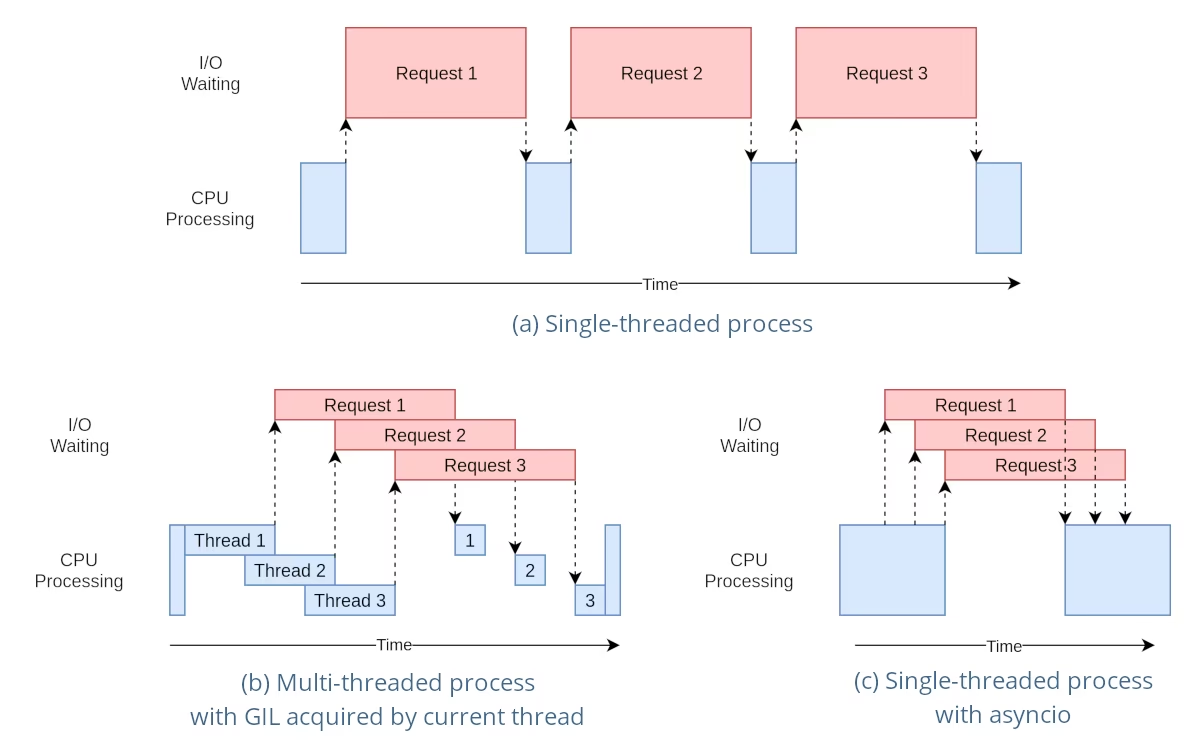
Même si cela peut sembler limitant, les threads permettent tout de même la concurrence, en particulier pour les opérations liées aux E/S ou celles qui libèrent le GIL, comme les opérations effectuées par les bibliothèques C sous-jacentes de YOLO.
Les risques liés au partage d’instances de modèle#
Instancier un modèle YOLO en dehors de tes threads et partager cette instance entre plusieurs threads peut entraîner des conditions de concurrence, où l’état interne du modèle est modifié de manière incohérente en raison d’accès simultanés. Cela pose particulièrement problème lorsque le modèle ou ses composants contiennent un état qui n’est pas conçu pour être thread-safe.
Exemple non thread-safe : une seule instance de modèle#
Lorsque tu utilises des threads en Python, il est important de repérer les modèles susceptibles d’entraîner des problèmes de concurrence. Voici ce que tu dois éviter : partager une seule instance du modèle YOLO26 entre plusieurs threads.
# Dangereux : partager une seule instance de modèle entre les threads
from threading import Thread

from ultralytics import YOLO

# Instancier le modèle en dehors du thread
shared_model = YOLO("yolo26n.pt")

def predict(image_path):
    """Predicts objects in an image using a preloaded YOLO model, take path string to image as argument."""
    results = shared_model.predict(image_path)
    # Traiter les résultats

# Démarrer des threads qui partagent la même instance de modèle
Thread(target=predict, args=("image1.jpg",)).start()
Thread(target=predict, args=("image2.jpg",)).start()
Dans l’exemple ci-dessus, les deux threads partagent shared_model. Chaque appel à predict conserve ses propres arguments, comme conf, iou et imgsz, mais les appels qui utilisent le même prédicteur s’exécutent l’un après l’autre derrière son verrou, si bien que les threads bénéficient de peu de parallélisme. L’état conservé sur l’instance, comme l’état du tracker, les vocabulaires YOLOE set_classes ou les prompts de SAM, FastSAM et YOLOE, reste partagé par tous les threads ; donne donc une instance distincte à chaque thread.
Exemple sûr : une instance dédiée par thread#
Plusieurs instances de modèle distinctes conviennent, à condition que chaque thread possède sa propre instance et ne la partage jamais avec un autre thread. Peu importe que les instances ci-dessous soient créées avant le démarrage des threads : le seul modèle dangereux consiste à partager une instance entre plusieurs threads.
# Sûr : chaque thread utilise sa propre instance de modèle dédiée
from threading import Thread

from ultralytics import YOLO

# Instancier un modèle par thread
model_1 = YOLO("yolo26n.pt")
model_2 = YOLO("yolo26n.pt")

def predict(model, image_path):
    """Runs prediction on an image using a specified YOLO model, returning the results."""
    results = model.predict(image_path)
    # Traiter les résultats

# Chaque thread utilise une instance de modèle distincte et dédiée
Thread(target=predict, args=(model_1, "image1.jpg")).start()
Thread(target=predict, args=(model_2, "image2.jpg")).start()
Comme chaque thread utilise sa propre instance dédiée, aucun état de modèle n’est partagé entre les threads, qui ne peuvent donc pas le corrompre. Instancier le modèle dans chaque thread, comme indiqué ci-dessous, est simplement le moyen le plus simple de garantir qu’une instance ne sera jamais partagée par inadvertance.
Inférence thread-safe#
Pour effectuer des inférences thread-safe, tu dois instancier un modèle YOLO distinct dans chaque thread. Ainsi, chaque thread dispose de sa propre instance de modèle isolée, ce qui élimine le risque de conditions de concurrence.
Exemple thread-safe#
Voici comment instancier un modèle YOLO dans chaque thread pour effectuer des inférences parallèles en toute sécurité :
# Sûr : instancier un seul modèle dans chaque thread
from threading import Thread

from ultralytics import YOLO

def thread_safe_predict(image_path):
    """Predict on an image using a new YOLO model instance in a thread-safe manner; takes image path as input."""
    local_model = YOLO("yolo26n.pt")
    results = local_model.predict(image_path)
    # Traiter les résultats

# Démarrer des threads ayant chacun leur propre instance de modèle
Thread(target=thread_safe_predict, args=("image1.jpg",)).start()
Thread(target=thread_safe_predict, args=("image2.jpg",)).start()
Dans cet exemple, chaque thread crée sa propre instance YOLO. Cela empêche tout thread d’interférer avec l’état du modèle d’un autre thread et garantit ainsi que chaque thread effectue ses inférences en toute sécurité, sans interactions inattendues avec les autres threads.
Utiliser le décorateur ThreadingLocked#
Ultralytics fournit un décorateur ThreadingLocked qui permet de garantir l’exécution thread-safe des fonctions. Ce décorateur utilise un verrou pour garantir qu’un seul thread à la fois peut exécuter la fonction décorée.
from ultralytics import YOLO
from ultralytics.utils import ThreadingLocked

# Créer une instance de modèle
model = YOLO("yolo26n.pt")

# Décorer la fonction de prédiction pour la rendre thread-safe
@ThreadingLocked()
def thread_safe_predict(image_path):
    """Thread-safe prediction using a shared model instance."""
    results = model.predict(image_path)
    return results

# Tu peux maintenant appeler cette fonction en toute sécurité depuis plusieurs threads
Le décorateur ThreadingLocked est particulièrement utile lorsque tu dois partager une instance de modèle entre plusieurs threads tout en garantissant qu’un seul thread à la fois puisse y accéder.
Partager une instance de modèle protégée par un verrou économise de la mémoire par rapport au chargement d’un modèle dans chaque thread, mais réduit la concurrence, car les threads se succèdent en attendant leur tour pour accéder au verrou. Privilégie le modèle avec une instance par thread si tu disposes de suffisamment de mémoire et souhaites maximiser le parallélisme ; utilise ThreadingLocked lorsque la mémoire nécessaire au modèle constitue un goulot d’étranglement.
Conclusion#
Lorsque tu utilises des modèles YOLO avec threading de Python, attribue à chaque thread sa propre instance de modèle dédiée et ne partage jamais une instance entre plusieurs threads. Instancier le modèle dans le thread qui l’utilise est le moyen le plus simple de garantir cela, d’éviter les conditions de concurrence et de fiabiliser tes tâches d’inférence.
Pour les scénarios plus avancés et pour optimiser davantage les performances de tes inférences multithread, envisage le parallélisme fondé sur des processus avec multiprocessing ou l’utilisation d’une file de tâches avec des processus de travail dédiés.
FAQ#
Pour éviter les conditions de concurrence lors de l'utilisation de modèles Ultralytics YOLO dans un environnement Python multithread, instancie un modèle YOLO distinct dans chaque thread. Ainsi, chaque thread dispose de sa propre instance isolée du modèle, ce qui évite toute modification simultanée de l'état du modèle.
Exemple :
from threading import Thread from ultralytics import YOLO def thread_safe_predict(image_path): """Predict on an image in a thread-safe manner.""" local_model = YOLO("yolo26n.pt") results = local_model.predict(image_path) # Traiter les résultats Thread(target=thread_safe_predict, args=("image1.jpg",)).start() Thread(target=thread_safe_predict, args=("image2.jpg",)).start()Pour effectuer des inférences multithread avec un modèle YOLO en toute sécurité en Python, suis ces bonnes pratiques :
- Instancie les modèles YOLO dans chaque thread au lieu de partager une seule instance de modèle entre plusieurs threads.
- Utilise le module
multiprocessingde Python pour le traitement parallèle afin d’éviter les problèmes liés au Global Interpreter Lock (GIL). - N’oublie pas que les bibliothèques C sous-jacentes de YOLO (PyTorch, OpenCV) libèrent automatiquement le GIL lors des calculs intensifs, ce qui permet aux threads d’effectuer des inférences simultanément.
- Envisage d’utiliser le décorateur
ThreadingLockedpour les instances de modèle partagées lorsque la mémoire est une préoccupation.
Exemple d’instanciation thread-safe d’un modèle :
from threading import Thread

from ultralytics import YOLO

def thread_safe_predict(image_path):
    """Runs inference in a thread-safe manner with a new YOLO model instance."""
    local_model = YOLO("yolo26n.pt")
    results = local_model.predict(image_path)
    # Traiter les résultats

# Lancer plusieurs threads
Thread(target=thread_safe_predict, args=("image1.jpg",)).start()
Thread(target=thread_safe_predict, args=("image2.jpg",)).start()
Pour plus de contexte, consulte la section sur les inférences thread-safe.
Chaque thread devrait disposer de sa propre instance de modèle YOLO pour éviter les conditions de concurrence. Lorsqu’une seule instance de modèle est partagée entre plusieurs threads, les accès simultanés peuvent entraîner un comportement imprévisible et modifier l’état interne du modèle. En utilisant des instances distinctes, tu assures l’isolation des threads et la fiabilité et la sécurité de tes tâches multithread.
Pour obtenir des instructions détaillées, consulte les sections Exemple non thread-safe : une seule instance de modèle et Exemple thread-safe.
Le Global Interpreter Lock (GIL) de Python n’autorise qu’un seul thread à exécuter du bytecode Python à la fois, ce qui peut limiter les performances des tâches multithread gourmandes en CPU. Cependant, les opérations liées aux E/S ou les processus qui utilisent des bibliothèques libérant le GIL, comme les bibliothèques C sous-jacentes de YOLO, permettent tout de même d’atteindre la concurrence. Pour améliorer les performances, envisage le parallélisme fondé sur des processus avec le module
multiprocessingde Python.Pour en savoir plus sur le multithreading en Python, consulte la section Comprendre le multithreading en Python.
Oui, utiliser le module
multiprocessingde Python est plus sûr et souvent plus efficace pour effectuer des inférences avec un modèle YOLO en parallèle. Le parallélisme fondé sur des processus crée des espaces mémoire distincts, évitant le Global Interpreter Lock (GIL) et réduisant le risque de problèmes de concurrence. Chaque processus fonctionne indépendamment avec sa propre instance de modèle YOLO.


Commentaires12
Pose une question, partage tes résultats ou aide quelqu’un d’autre.
amani784
I used a YOLOv8 model optimized with TensorRT on an AWS machine with a Tesla T4 GPU to detect people in multiple videos. The model is loaded once per process using an initializer function. To improve performance, I parallelized the video processing using 4 processes from the multiprocessing module, where each process handles one video and performs inference using model.predict() on frames sampled at regular intervals. However, this approach led to a decrease in overall performance, with slower processing time per frame and reduced FPS. Is this normal, and if not, what is the solution?
warptengood
I have a few questions:
- Does the rules about thread-safety apply in the same way to TensorRT/ONNX inference of YOLO?
- Should I have the shared model for all threads when using TensorRT YOLO? (In case the answer for the 1st question is 'No'.)
- Is it true that it is better to have
streamparameter to be set toFalsewhen performing inference on TensorRT (inpredict()) - How
torch.cuda.Stream()affects the performance of multi-threading/multi-processing when used onpredict()/track()functions? - Should I have any sort of warm up for TensorRT inference before utilizing a model in any thread/process? (Like making inference on dummy input)
P.S: I want to thank all the Ultralytics team for their kindness and open-mindedness when it comes to help and support their community. You guys are always eager to help. And I don't care if it is some AI agent that's replying or a real person, I am very grateful for you for what you guys doing :D
 Glenn JocherUltralytics
@KenesYerassyl Thank you for your great questions about thread safety with TensorRT/ONNX models. Let me address each one:
-
Yes, the thread-safety principles apply similarly to TensorRT/ONNX models, but with important distinctions. TensorRT engines have their own memory management which can introduce additional concurrency concerns.
-
For TensorRT models, it's generally safer to use separate engine instances per thread or use a thread locking mechanism like our
ThreadingLockeddecorator. TensorRT engines maintain internal state during inference that can cause issues with concurrent access. -
Setting
stream=Falsefor TensorRT inference is often beneficial as it ensures complete processing of each input before handling another, which can help avoid resource conflicts in multi-threaded environments. -
Using
torch.cuda.Stream()with multi-threading can improve performance by allowing parallel execution of CUDA operations across different streams. However, you need to carefully manage synchronization points to prevent race conditions. Each thread should ideally use a separate CUDA stream. -
Yes, warming up TensorRT models is highly recommended. The first inference typically takes longer due to CUDA context initialization and memory allocations. Running inference on a dummy input before deploying in production or multi-threaded environments ensures consistent performance.
Thank you for your kind words about our team! We're committed to supporting the community with helpful resources and guidance.
-
Thank you very much for such a comprehensive reply!
mrbulb
Hello, is there any example code that uses Python's multiprocessing for YOLO model inference?
 Paula DerrengerUltralytics
@mrbulb for using Python's multiprocessing with YOLO model inference, you should instantiate a separate YOLO model within each process to avoid race conditions. This ensures each process has its own isolated model instance. For detailed guidance, please refer to our Thread-Safe Inference with YOLO Models page. If you need a specific code example, feel free to ask!
farrostaufiqur
how to use results differently for each thread?
- Paula DerrengerUltralytics
To use results differently for each thread, ensure each thread instantiates its own YOLO model instance. This prevents race conditions and ensures thread safety. For more details, please refer to our Thread-Safe Inference with YOLO Models guide.
ghost
Hello. Thanks for the info. I have a question, If I run in two terminals the same python script, but to two different videos, both processes still suffer from GIL ?
- Glenn JocherUltralytics
@cawilchesp running the same Python script in two separate terminals for different videos won't suffer from GIL issues, as each process has its own Python interpreter and memory space. This effectively bypasses the GIL, allowing true parallel execution. For more details, you can check out our guide on thread-safe inference: https://docs.ultralytics.com/guides/yolo-thread-safe-inference/.
abysshal
So what is the best practice for single-threaded processing with asyncio? For example, gunicron+gevent+flask is used to deal with highly concurrent requests, and only one Yolo model instance will be created in each worker process. Here we do not handle threads manually, we only provide the predict function for callback from gevent. Then will the predict function of the same model instance be called again on the next request when it is not completed due to an I/O wait operation on the current request? How we handle this safely? Does it matter if cpu of gpu is used for inference?
- Glenn JocherUltralytics(modifié)
@abysshal when using an asynchronous server like Gunicorn with Gevent and Flask, you're dealing with a cooperative multitasking environment. In such an environment, the context switches occur at well-defined points, typically I/O operations or explicit yield points. This means that your predict function will not be preempted in the middle of execution by another request unless it hits an I/O wait or a yield.
Here's how you can handle this safely:
-
Single Model Instance: Since you're creating only one YOLO model instance per worker process, you need to ensure that the predict function is designed to be re-entrant. This means that if the function is called again while a previous call is waiting for I/O, it should not cause any conflicts or unexpected behavior.
-
Asyncio Compatibility: If you're using asyncio, you should ensure that the predict function and any other code that might run concurrently are compatible with asyncio's event loop. This means using
awaitfor I/O-bound operations and ensuring that any libraries you use within the predict function are also compatible with asyncio. -
Thread Safety: Even though you're not manually handling threads, the underlying implementation of some libraries (like PyTorch) may use threads for certain operations. A single Ultralytics
YOLOmodel instance is not thread-safe, so do not share one instance across threads. Use one instance per thread or worker, or wrap the shared call with theThreadingLockeddecorator (see the thread-safe inference guide). -
Resource Locking: If there are shared resources that need to be accessed or modified during the predict function, you should use appropriate locking mechanisms to prevent race conditions. However, in an async environment, you should use async-compatible locks like
asyncio.Lock. -
CPU vs. GPU Inference: The choice between CPU and GPU can affect performance but should not affect the thread safety or the async behavior of your application. However, if you're using a GPU, you need to ensure that the library you're using for YOLO supports concurrent model inference on the GPU without conflicts.
-
Testing: Test your application under load to ensure that it behaves correctly with concurrent requests. You can use tools like
locustorab(Apache Bench) to simulate high concurrency and check for any race conditions or deadlocks.
In summary, when using Gunicorn with Gevent and Flask, you should ensure that your predict function is re-entrant and compatible with asyncio, use async-compatible locks if necessary, and test your application under load. The choice of CPU or GPU should not affect the thread safety of your application, but you should ensure that your YOLO model library supports concurrent inference on your chosen hardware.
1 -