Ultralytics YOLO26 on Intel Core Ultra Series 3 using DL Streamer Pipeline Framework and OpenVINO™#
This comprehensive guide provides a detailed walkthrough for deploying Ultralytics YOLO26 on Intel Core Ultra Series 3 platforms using DL Streamer Pipeline Framework and OpenVINO™ toolkit. Here we use OpenVINO™ to maximize inference performance on Intel CPUs, integrated and discrete GPUs, and NPUs.
Contents: What is Intel DL Streamer? • Prerequisites • YOLO26 Model Preparation • Running Inference with YOLO26 • Multi-Stream Setup • FAQ
What is Intel DL Streamer?#
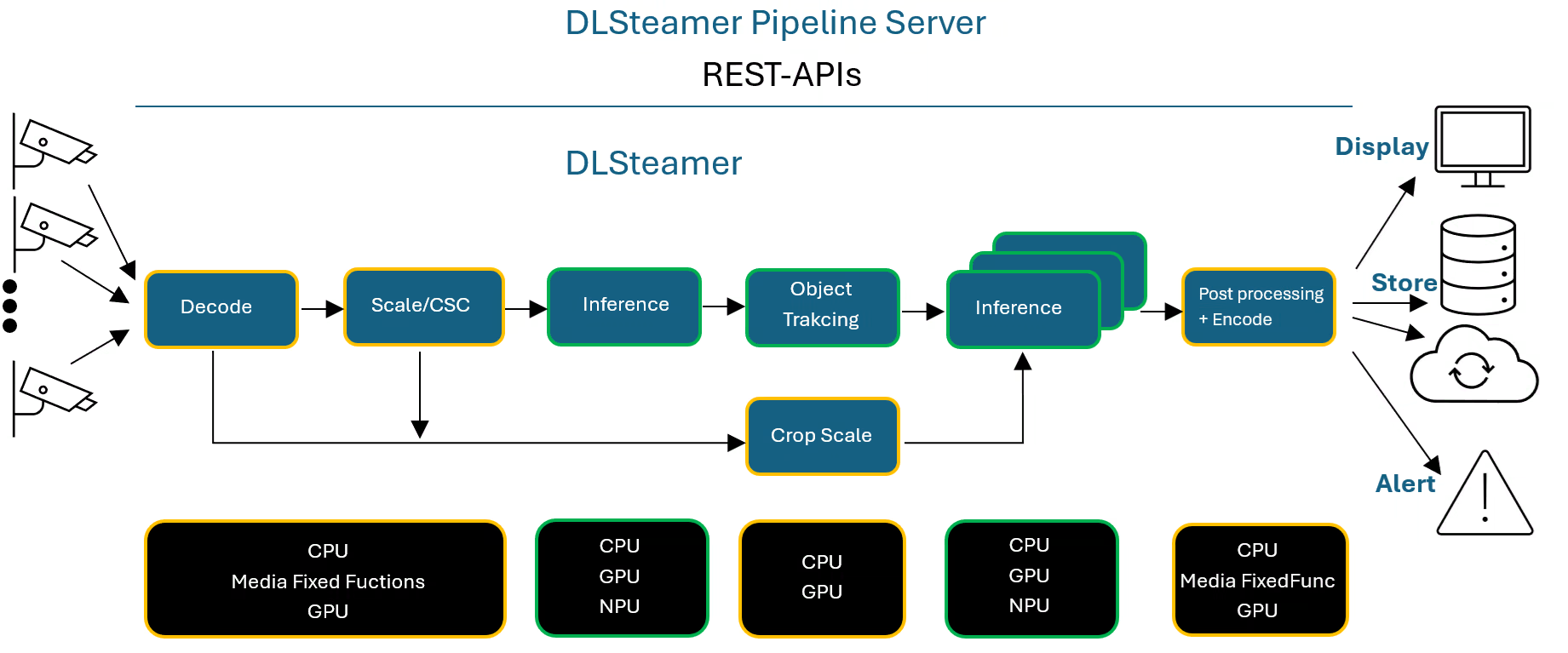
Deep Learning Streamer (DL Streamer) Pipeline Framework is an open-source streaming media analytics framework based on the GStreamer multimedia framework, designed for creating complex media analytics pipelines for the Cloud or at the Edge.
DL Streamer enables analysis of audio and video streams to detect, classify, track, identify, and count objects, events, and people. It is optimized for Intel hardware and provides interoperability between GStreamer plugins built on various backend libraries:
- Inference: OpenVINO™ inference engine, optimized for Intel CPU, GPU, and NPU
- Video Encoding/Decoding: GPU-acceleration via VA-API
- Image Processing: GPU-acceleration via VA-API
- Metadata: GStreamer Analytics for structured inference results
- Ecosystem: Hundreds of GStreamer plugins for media I/O, muxing/demuxing, codec support, and more
DL Streamer supports many AI models including the full Ultralytics YOLO family (YOLOv5 through YOLO26) all in OpenVINO™ format.
DL Streamer is being regularly validated with systems provided on System Requirements — Open Edge Platform Documentation
Prerequisites#
Before you begin, ensure the following are installed and configured on your Intel system:
-
Ubuntu 24.04 with Intel GPU/NPU drivers installed (check installation guide)
-
docker engine (check installation guide)
YOLO26 Model Preparation#
DL Streamer uses models in OpenVINO™ IR format. Ultralytics YOLO26 models are exported from PyTorch to OpenVINO™ IR using the Ultralytics exporter. DL Streamer leverages the official Ultralytics OpenVINO™ integration, which provides optimized export and inference capabilities for Intel hardware.
- Create
~/intel/dlstreamer_demofolder and install OpenVINO™ and Ultralytics in virtual environment
mkdir -p ~/intel/dlstreamer_demo && cd ~/intel/dlstreamer_demo
python3 -m venv .dls-venv && source .dls-venv/bin/activate
pip install openvino==2026.2.0 ultralytics==8.4.92- Download the PyTorch YOLO26s model from Ultralytics, convert it to OpenVINO™ IR format, and generate an INT8 precision variant.
yolo export model=yolo26s.pt format=openvino dynamic=True quantize=8 data=coco128.yamlThe model is exported to the ~/intel/dlstreamer_demo/yolo26s_int8_openvino_model folder.
Model Precision#
DL Streamer supports FP32, FP16, and INT8 precision models. Each requires a separate export step:
# FP32 (default precision, highest accuracy)
yolo export model=yolo26s.pt format=openvino dynamic=True

# FP16 (recommended for GPU inference, good accuracy/performance balance)
yolo export model=yolo26s.pt format=openvino dynamic=True quantize=16

# INT8 (maximum performance, requires calibration dataset)
yolo export model=yolo26s.pt format=openvino dynamic=True quantize=8 data=coco128.yaml
The examples below use the INT8 model exported in the preparation step. To use FP32 or FP16 models, replace the model path accordingly (e.g. yolo26s_openvino_model/yolo26s.xml).
Running Inference with YOLO26#
Before running DL Streamer YOLO26 inference detection pipeline, run the DL Streamer Docker image in interactive mode. Make sure you followed YOLO26 Model Preparation step and download the following video file from Pexels database.
curl -L https://videos.pexels.com/video-files/1192116/1192116-sd_640_360_30fps.mp4 --output ~/intel/dlstreamer_demo/video1.mp4Run DL Streamer docker image in the interactive mode.
This command is intended for systems equipped with Intel Core Ultra Series 3 processors with integrated GPU (iGPU) and NPU onboard.
docker run -it --rm \
  -v ~/intel/dlstreamer_demo:/home/dlstreamer/demo \
  -v "$HOME/.Xauthority:/root/.Xauthority:rw" \
  -e DISPLAY=$DISPLAY \
  -e XDG_RUNTIME_DIR=/tmp \
  -v /tmp/.X11-unix:/tmp/.X11-unix \
  --device /dev/dri \
  --group-add $(stat -c "%g" /dev/dri/render*) \
  --device /dev/accel \
  --group-add $(stat -c "%g" /dev/accel/accel*) \
  -e ZE_ENABLE_ALT_DRIVERS=libze_intel_npu.so \
  intel/dlstreamer:latest
INT8 Precision (Maximum Performance)#
INT8 quantization delivers the highest throughput by reducing model weights to 8-bit integers. The Ultralytics exporter handles calibration automatically.
Run YOLO26s with INT8 on GPU#
gst-launch-1.0 filesrc location=/home/dlstreamer/demo/video1.mp4 ! decodebin3 ! gvadetect model=/home/dlstreamer/demo/yolo26s_int8_openvino_model/yolo26s.xml device=GPU ! queue ! vapostproc ! gvawatermark ! gvafpscounter ! autovideosink sync=false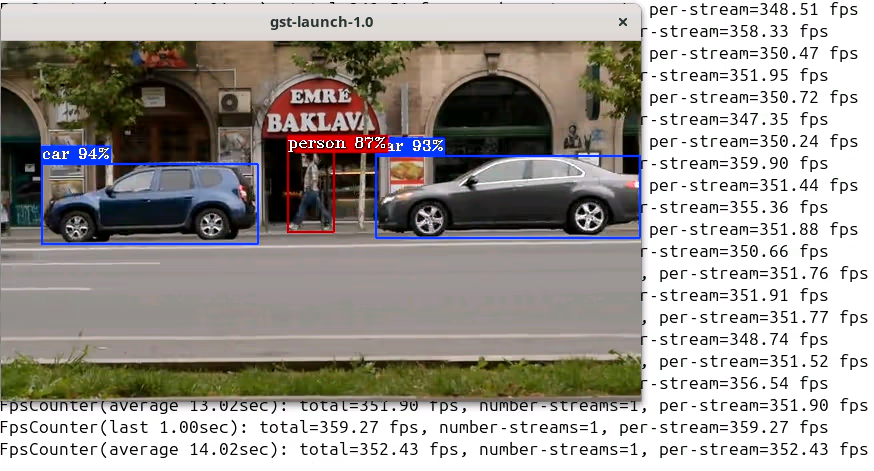
Run YOLO26s with INT8 on GPU and save the output to a video file#
gst-launch-1.0 filesrc location=/home/dlstreamer/demo/video1.mp4 ! decodebin3 ! gvadetect model=/home/dlstreamer/demo/yolo26s_int8_openvino_model/yolo26s.xml device=GPU ! queue ! vapostproc ! gvawatermark ! gvafpscounter ! vah264enc ! h264parse ! mp4mux ! filesink location=/home/dlstreamer/demo/yolo_video1_yolo26s_INT8_GPU.mp4Run YOLO26s with INT8 on NPU#
gst-launch-1.0 filesrc location=/home/dlstreamer/demo/video1.mp4 ! decodebin3 ! gvadetect model=/home/dlstreamer/demo/yolo26s_int8_openvino_model/yolo26s.xml device=NPU ! queue ! vapostproc ! gvawatermark ! gvafpscounter ! autovideosink sync=false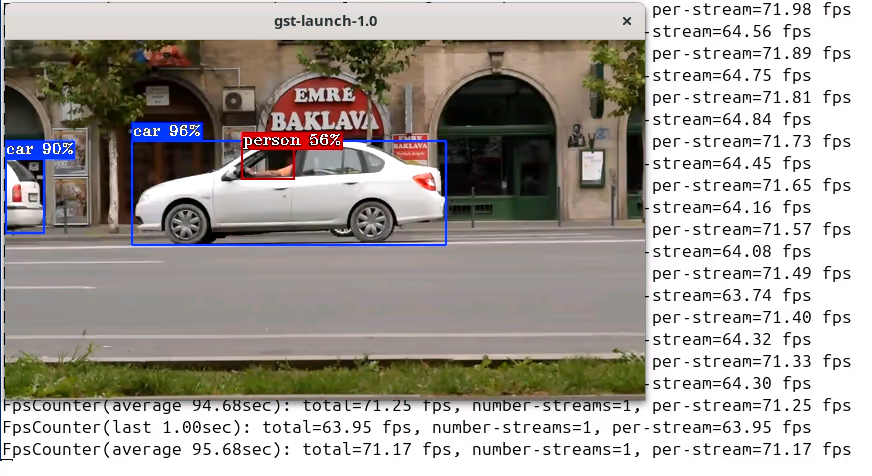
Multi-Stream Setup#
DL Streamer supports multi-stream processing, where multiple video sources are decoded and inferred simultaneously. You can launch multiple pipelines in parallel using GStreamer's vacompositor element to combine multiple streams.
Running Multiple Pipelines (4 streams) in Parallel (GPU)#
gst-launch-1.0 vacompositor name=comp sink_0::xpos=0 sink_0::ypos=0 sink_1::xpos=660 sink_1::ypos=0 sink_2::xpos=0 sink_2::ypos=380 sink_3::xpos=660 sink_3::ypos=380 ! autovideosink sync=false \
  filesrc location=/home/dlstreamer/demo/video1.mp4 ! decodebin3 ! gvadetect model=/home/dlstreamer/demo/yolo26s_int8_openvino_model/yolo26s.xml device=GPU model-instance-id=inf0 scheduling-policy="latency" ! queue ! gvawatermark ! gvafpscounter ! comp.sink_0 \
  filesrc location=/home/dlstreamer/demo/video1.mp4 ! decodebin3 ! gvadetect model=/home/dlstreamer/demo/yolo26s_int8_openvino_model/yolo26s.xml device=GPU model-instance-id=inf0 scheduling-policy="latency" ! queue ! gvawatermark ! gvafpscounter ! comp.sink_1 \
  filesrc location=/home/dlstreamer/demo/video1.mp4 ! decodebin3 ! gvadetect model=/home/dlstreamer/demo/yolo26s_int8_openvino_model/yolo26s.xml device=GPU model-instance-id=inf0 scheduling-policy="latency" ! queue ! gvawatermark ! gvafpscounter ! comp.sink_2 \
  filesrc location=/home/dlstreamer/demo/video1.mp4 ! decodebin3 ! gvadetect model=/home/dlstreamer/demo/yolo26s_int8_openvino_model/yolo26s.xml device=GPU model-instance-id=inf0 scheduling-policy="latency" ! queue ! gvawatermark ! gvafpscounter ! comp.sink_3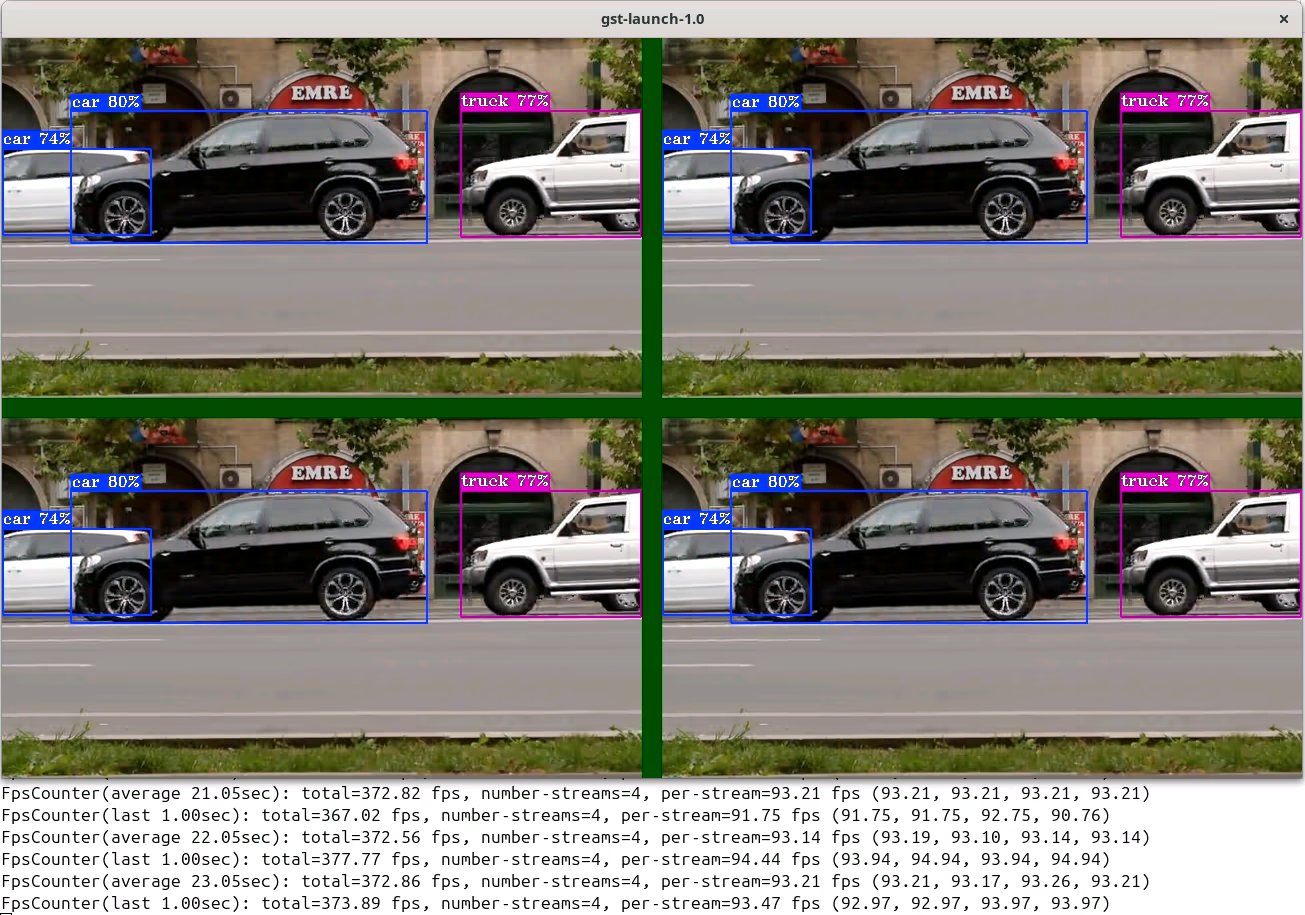
Additional Resources#
- DL Streamer GitHub Repository
- DL Streamer Documentation
- DL Streamer Elements
- OpenVINO™ Toolkit
- Ultralytics YOLO26
- GStreamer Framework
- Supported Models Table
FAQ#
Install DL Streamer following the Installation Guide, set up the environment with
source /opt/intel/dlstreamer/scripts/setup_dls_env.sh, install Ultralytics and OpenVINO™, download models usingdownload_ultralytics_models.sh. Then run inference with the DL Streamer sample applicationyolo_detect.shthat provides a ready-to-use script for running YOLO26 inference pipelines. Check the short tutorial how to run it.OpenVINO™ optimizes the YOLO26 model specifically for Intel hardware through techniques such as graph optimization, layer fusion, and hardware-specific kernel tuning. Combined with DL Streamer's VA-API accelerated decode and zero-copy
va-surface-sharingpre-processing, the full video analytics pipeline achieves significantly higher throughput than unoptimized frameworks.Yes. DL Streamer supports inference on Intel CPUs (Core, Core Ultra, Xeon), integrated GPUs (Iris Xe, Arc), discrete GPUs (Arc A-Series, B-Series), and NPUs (AI Boost) across multiple Intel platform generations. Simply change the
deviceproperty ofgvadetecttoCPU,GPU, orNPU.- FP16 is recommended as the default for GPU inference — it provides near-FP32 accuracy with approximately 2x throughput improvement.
- INT8 delivers the highest performance (2–3x over FP32) with a small accuracy trade-off and is ideal when maximum throughput is the priority. INT8 models are automatically calibrated during Ultralytics export.
DL Streamer supports all YOLO26 task variants:
- Detection: yolo26n, yolo26s, yolo26m, yolo26l, yolo26x
- Oriented Bounding Box (OBB): yolo26s-obb (and all size variants)
- Instance Segmentation: yolo26s-seg (and all size variants)
- Pose Estimation: yolo26s-pose (and all size variants)
- Classification: yolo26s-cls (composite pipeline with detection)
Use the
jsonoutput option to write detection results as JSON-lines to a file:./yolo_detect.sh yolo26s GPU input_video.mp4 json va-surface-sharing INT8Alternatively, use the
gvametapublishelement in custom pipelines to publish metadata to files, MQTT, or Kafka.