Quick Start Guide: NVIDIA DGX Spark with Ultralytics YOLO26#
This comprehensive guide provides a detailed walkthrough for deploying Ultralytics YOLO26 on NVIDIA DGX Spark, NVIDIA's compact desktop AI supercomputer. Additionally, it showcases performance benchmarks to demonstrate the capabilities of YOLO26 on this powerful system.
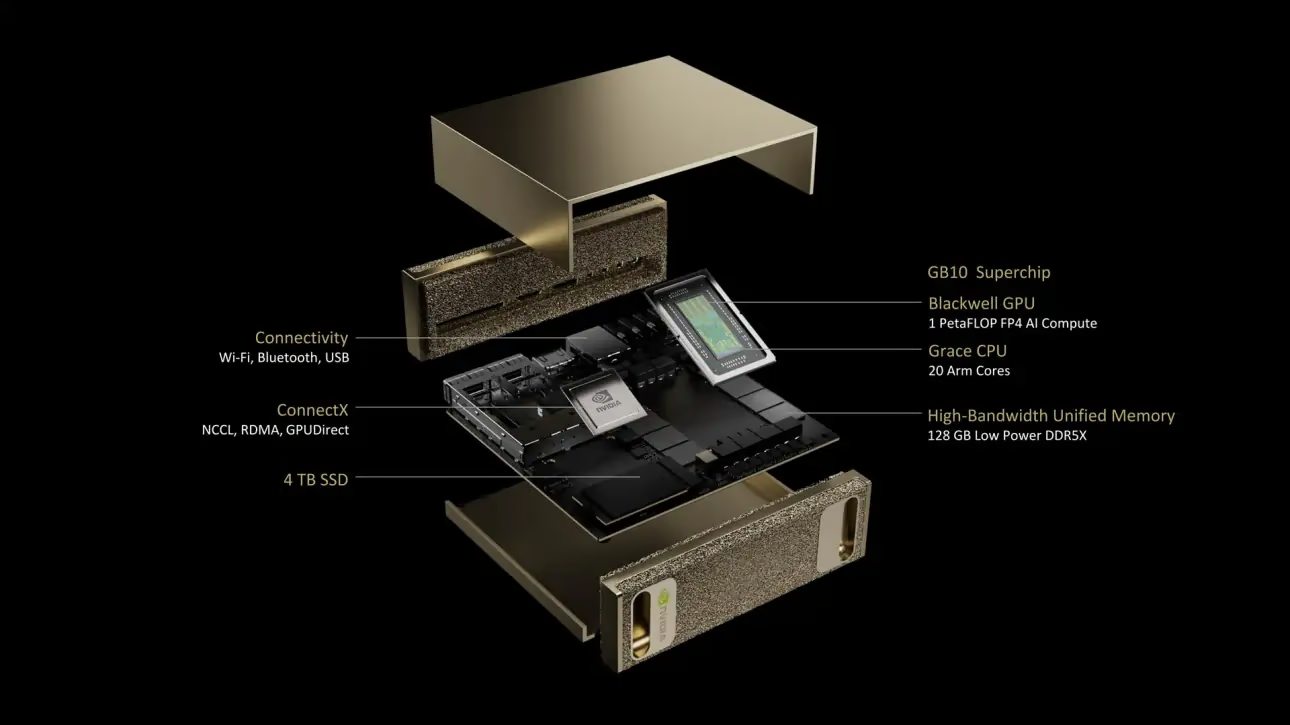
This guide has been tested with NVIDIA DGX Spark Founders Edition running DGX OS based on Ubuntu. It is expected to work with the latest DGX OS releases.
What is NVIDIA DGX Spark?#
NVIDIA DGX Spark is a compact desktop AI supercomputer powered by the NVIDIA GB10 Grace Blackwell Superchip. It delivers up to 1 petaFLOP of AI computing performance with FP4 precision, making it ideal for developers, researchers, and data scientists who need powerful AI capabilities in a desktop form factor.
Watch: How to Get up to 1000 FPS with Ultralytics YOLO26 on NVIDIA DGX Spark | TensorRT & Batch Inference
Key Specifications#
| Specification | Details |
|---|---|
| AI Performance | Up to 1 PFLOP (FP4) |
| GPU | NVIDIA Blackwell Architecture with 5th Generation Tensor Cores, 4th Generation RT Cores |
| CPU | 20-core Arm processor (10 Cortex-X925 + 10 Cortex-A725) |
| Memory | 128 GB LPDDR5x unified system memory, 256-bit interface, 4266 MHz, 273 GB/s bandwidth |
| Storage | 1 TB or 4 TB NVMe M.2 with self-encryption |
| Network | 1x RJ-45 (10 GbE), ConnectX-7 Smart NIC, Wi-Fi 7, Bluetooth 5.4 |
| Connectivity | 4x USB Type-C, 1x HDMI 2.1a, HDMI multichannel audio |
| Video Processing | 1x NVENC, 1x NVDEC |
DGX OS#
NVIDIA DGX OS is a customized Linux distribution that provides a stable, tested, and supported operating system foundation for running AI, machine learning, and analytics applications on DGX systems. It includes:
- A robust Linux foundation optimized for AI workloads
- Pre-configured drivers and system settings for NVIDIA hardware
- Security updates and system maintenance capabilities
- Compatibility with the broader NVIDIA software ecosystem
DGX OS follows a regular release schedule with updates typically provided twice per year (around February and August), with additional security patches provided between major releases.
DGX Dashboard#
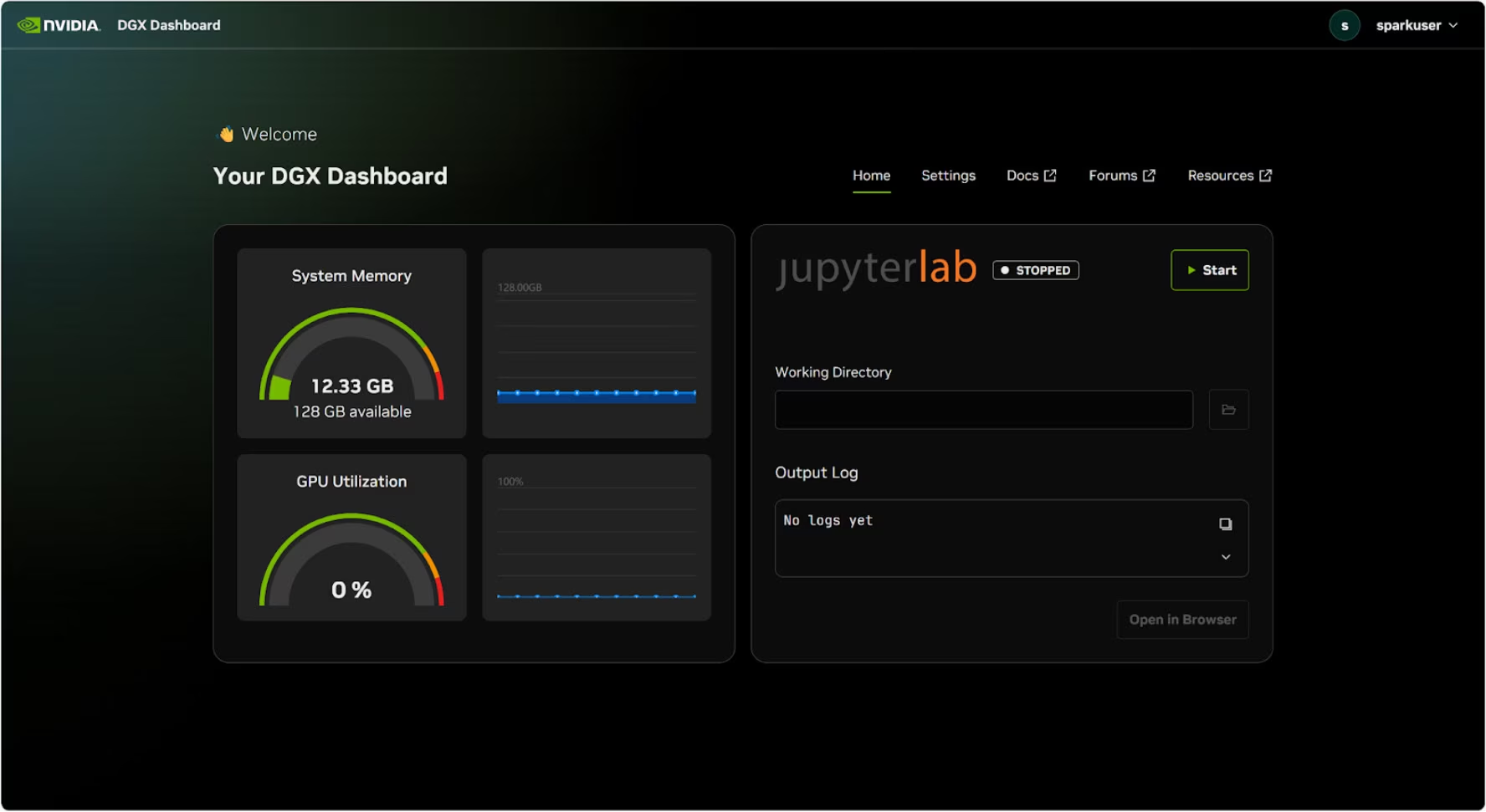
DGX Spark comes with a built-in DGX Dashboard that provides:
- Real-time System Monitoring: Overview of the system's current operational metrics
- System Updates: Ability to apply updates directly from the dashboard
- System Settings: Change device name and other configurations
- Integrated JupyterLab: Access local Jupyter Notebooks for development
Accessing the Dashboard#
Click the "Show Apps" button in the bottom left corner of the Ubuntu desktop, then select "DGX Dashboard" to open it in your browser.
The dashboard includes an integrated JupyterLab instance that automatically creates a virtual environment and installs recommended packages when started. Each user account is assigned a dedicated port for JupyterLab access.
Quick Start with Docker#
The fastest way to get started with Ultralytics YOLO26 on NVIDIA DGX Spark is to run with pre-built docker images. The NVIDIA ARM64 image supports DGX Spark with DGX OS.
t=ultralytics/ultralytics:latest-nvidia-arm64
sudo docker pull $t && sudo docker run -it --ipc=host --device nvidia.com/gpu=all $t
The CDI device request above applies to DGX Spark running DGX OS. For PyTorch workloads on Jetson AGX Thor, see the separate host requirements and TensorRT restriction in the NVIDIA Jetson guide.
This image uses NVIDIA PyTorch 26.08, CUDA 13.4, and TensorRT 11.2. Update the DGX OS host driver to a version supported by NVIDIA PyTorch 26.08, and rebuild TensorRT engines after changing the image or target GPU.
After this is done, skip to Use TensorRT on NVIDIA DGX Spark section.
Start with Native Installation#
For a native installation without Docker, follow these steps.
Install Ultralytics Package#
Here we will install the Ultralytics package on DGX Spark. Export dependencies are installed automatically the first time you export a model, so only the base package is needed here. We will mainly focus on NVIDIA TensorRT exports because TensorRT will make sure we can get the maximum performance out of the DGX Spark.
-
Update packages list, install pip and upgrade to latest
sudo apt update sudo apt install python3-pip -y pip install -U pip -
Install
ultralyticspip packagepip install ultralytics -
Reboot the device
sudo reboot
Install PyTorch and Torchvision#
The above ultralytics installation will install Torch and Torchvision. However, these packages installed via pip may not be fully optimized for the DGX Spark's ARM64 architecture with CUDA 13. Therefore, we recommend installing the CUDA 13 compatible versions:
pip install torch torchvision --index-url https://download.pytorch.org/whl/cu130When running PyTorch 2.9.1 on NVIDIA DGX Spark, you may encounter the following UserWarning when initializing CUDA (e.g. running yolo checks, yolo predict, etc.):
UserWarning: Found GPU0 NVIDIA GB10 which is of cuda capability 12.1.
Minimum and Maximum cuda capability supported by this version of PyTorch is (8.0) - (12.0)
This warning can be safely ignored. To address this permanently, a fix has been submitted in PyTorch PR #164590 which will be included in the PyTorch 2.10 release.
Install onnxruntime-gpu#
Current ONNX Runtime GPU releases provide Linux ARM64 wheels, including Python 3.12. The NVIDIA ARM64 Docker image installs the official package; for native CUDA 13 installations, use:
pip install onnxruntime-gpuUse TensorRT on NVIDIA DGX Spark#
Among all the model export formats supported by Ultralytics, TensorRT offers the highest inference performance on NVIDIA DGX Spark, making it our top recommendation for deployments. For setup instructions and advanced usage, see our dedicated TensorRT integration guide.
Convert Model to TensorRT and Run Inference#
The YOLO26n model in PyTorch format is converted to TensorRT to run inference with the exported model.
from ultralytics import YOLO

# Load a YOLO26n PyTorch model
model = YOLO("yolo26n.pt")

# Export the model to TensorRT
model.export(format="engine")  # creates 'yolo26n.engine'

# Load the exported TensorRT model
trt_model = YOLO("yolo26n.engine")

# Run inference
results = trt_model("https://ultralytics.com/images/bus.jpg")Visit the Export page to access additional arguments when exporting models to different model formats
NVIDIA DGX Spark YOLO11 Benchmarks#
YOLO11 benchmarks were run by the Ultralytics team on multiple model formats measuring speed and accuracy: PyTorch, TorchScript, ONNX, OpenVINO, TensorRT, TF SavedModel, TF GraphDef, TF Lite, MNN, NCNN, ExecuTorch. Benchmarks were run on NVIDIA DGX Spark at FP32 precision with default input image size of 640.
Detailed Comparison Table#
The below table represents the benchmark results for five different models (YOLO11n, YOLO11s, YOLO11m, YOLO11l, YOLO11x) across multiple formats, giving us the status, size, mAP50-95(B) metric, and inference time for each combination.
| Format | Status | Size on disk (MB) | mAP50-95(B) | Inference time (ms/im) |
|---|---|---|---|---|
| PyTorch | ✅ | 5.4 | 0.5071 | 2.67 |
| TorchScript | ✅ | 10.5 | 0.5083 | 2.62 |
| ONNX | ✅ | 10.2 | 0.5074 | 5.92 |
| OpenVINO | ✅ | 10.4 | 0.5058 | 14.95 |
| TensorRT (FP32) | ✅ | 12.8 | 0.5085 | 1.95 |
| TensorRT (FP16) | ✅ | 7.0 | 0.5068 | 1.01 |
| TensorRT (INT8) | ✅ | 18.6 | 0.4880 | 1.62 |
| TF SavedModel | ✅ | 25.7 | 0.5076 | 36.39 |
| TF GraphDef | ✅ | 10.3 | 0.5076 | 41.06 |
| TF Lite | ✅ | 10.3 | 0.5075 | 64.36 |
| MNN | ✅ | 10.1 | 0.5075 | 12.14 |
| NCNN | ✅ | 10.2 | 0.5041 | 12.31 |
| ExecuTorch | ✅ | 10.2 | 0.5075 | 27.61 |
Benchmarked with Ultralytics 8.3.249
Reproduce Our Results#
To reproduce the above Ultralytics benchmarks on all export formats run this code:
from ultralytics import YOLO

# Load a YOLO26n PyTorch model
model = YOLO("yolo26n.pt")

# Benchmark YOLO26n speed and accuracy on the COCO128 dataset for all export formats
results = model.benchmark(data="coco128.yaml", imgsz=640)
Note that benchmarking results might vary based on the exact hardware and software configuration of a system, as well as the current workload of the system at the time the benchmarks are run. For the most reliable results, use a dataset with a large number of images, e.g., data='coco.yaml' (5000 val images).
Best Practices for NVIDIA DGX Spark#
When using NVIDIA DGX Spark, there are a couple of best practices to follow in order to enable maximum performance running YOLO26.
-
Monitor System Performance
Use NVIDIA's monitoring tools to track GPU and CPU utilization:
nvidia-smi -
Optimize Memory Usage
With 128GB of unified memory, DGX Spark can handle large batch sizes and models. Consider increasing batch size for improved throughput:
from ultralytics import YOLO model = YOLO("yolo26n.engine") results = model.predict(source="path/to/images", batch=16) -
Use TensorRT with FP16 or INT8
For best performance, export models with FP16 or INT8 precision:
yolo export model=yolo26n.pt format=engine quantize=16 # FP16
yolo export model=yolo26n.pt format=engine quantize=8  # INT8
System Updates (Founders Edition)#
Keeping your DGX Spark Founders Edition up to date is crucial for performance and security. NVIDIA provides two primary methods for updating the system OS, drivers, and firmware.
Using DGX Dashboard (Recommended)#
The DGX Dashboard is the recommended way to perform system updates ensuring compatibility. It allows you to:
- View available system updates
- Install security patches and system updates
- Manage NVIDIA driver and firmware updates
Manual System Updates#
For advanced users, updates can be performed manually via terminal:
sudo apt update
sudo apt dist-upgrade
sudo fwupdmgr refresh
sudo fwupdmgr upgrade
sudo rebootEnsure your system is connected to a stable power source and you have backed up critical data before performing updates.
Next Steps#
For further learning and support, see the Ultralytics YOLO26 Docs.
FAQ#
Deploying Ultralytics YOLO26 on NVIDIA DGX Spark is straightforward. You can use the pre-built Docker image for quick setup or manually install the required packages. Detailed steps for each approach can be found in sections Quick Start with Docker and Start with Native Installation.
YOLO26 models deliver excellent performance on DGX Spark thanks to the GB10 Grace Blackwell Superchip. The TensorRT format provides the best inference performance. Check the Detailed Comparison Table section for YOLO11 benchmark results on DGX Spark across different model sizes and formats.
TensorRT is highly recommended for deploying YOLO26 models on DGX Spark due to its optimal performance. It accelerates inference by leveraging the Blackwell GPU capabilities, ensuring maximum efficiency and speed. Learn more in the Use TensorRT on NVIDIA DGX Spark section.
DGX Spark offers up to 1 PFLOP of AI performance and 128GB unified memory, compared to Jetson AGX Thor's 2070 TFLOPS and 128GB memory. DGX Spark is designed as a desktop AI supercomputer, while Jetson devices are embedded systems optimized for edge deployment.
For PyTorch workloads,
ultralytics/ultralytics:latest-nvidia-arm64supports DGX Spark with DGX OS and Thor with JetPack 7.1. The bundled TensorRT 11.2 does not support JetPack, so Jetson TensorRT workflows must use the supported TensorRT 10.x runtime for their JetPack release. See the Jetson Docker requirements.