TT100Kデータセット#
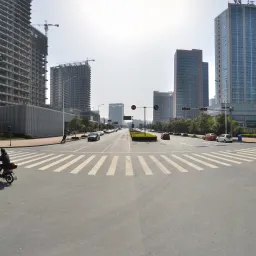
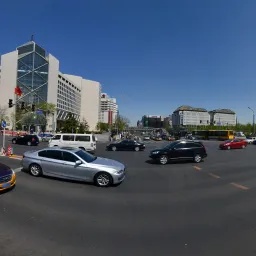
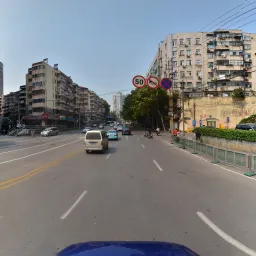
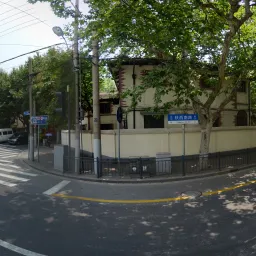
清華・テンセント100K(TT100K)データセットは、CVPR 2016の論文Traffic-Sign Detection and Classification in the WildのためにZhuらが作成した、物体検出用の交通標識ベンチマークです。UltralyticsのTT100K設定には、16,817枚の画像(トレーニング6,105枚/検証7,641枚/テスト3,071枚)が含まれ、221種類の交通標識カテゴリにわたります。元のベンチマークでは標識インスタンスが30,000件以上報告されています。名称の「100K」は、ベンチマークの作成に使用された約100,000枚のTencent Street View画像を指しており、ダウンロードしてトレーニングに使用する画像数ではありません。元の論文ではトレーニング用インスタンスが100件以上あるカテゴリのみを採用しているため、一般的に使用される45クラスのサブセットもありますが、Ultralyticsの設定では、アノテーションが付いた221カテゴリすべて(データが少ないカテゴリも多数)を保持しています。
高解像度のストリートビュー画像には、照明、天候、視点、距離の大きなばらつきが写っています。そのためTT100Kは、実環境の運転シーンにおける小物体検出の難易度の高いベンチマークとなっています。
主な機能#
- マルチクラス検出: 中国の速度制限、禁止、警告、高さ・幅制限、案内標識を網羅する221種類の交通標識カテゴリです。
- 高解像度: 画像は2048×2048ピクセルで、標識は大きく写ったものから遠くの小さな標識までさまざまです。微細な違いの検出が求められます。
- 実環境の条件: 天候、照明、視点、オクルージョンに大きなばらつきがあります。
- バウンディングボックスのアノテーション: 各標識にはクラスとバウンディングボックスが付与されており、自動変換後の形式はYOLO形式です。
- 事前定義された分割: 一貫した評価のために、トレーニング/検証/テストの分割(画像数は6,105/7,641/3,071枚)が固定されています。
データセットの構成#
UltralyticsのTT100K設定は3つのサブセットに分割されており、すべて同じ221カテゴリを共有しています。
| 分割 | 画像 | 説明 |
|---|---|---|
| 学習 | 6,105 | 検出器のトレーニングに使用するアノテーション付き交通シーン画像 |
| 検証 | 7,641 | データセットの元の「other」分割。評価に使用します。 |
| テスト | 3,071 | トレーニング済みモデルの最終評価に使用するホールドアウト画像 |
221カテゴリは、いくつかの主要なグループに分類されています。
- 速度制限標識 — 速度制限を示す禁止標識
pl*(例: pl5~pl120)と最低速度標識pm*(例: pm5~pm55)。 - 禁止標識 — 一般的な禁止標識
p1~p29、進入禁止/駐車禁止標識pn/pne、および規制標識pr*(pr10~pr100)。 - 警告標識 — 交差点、急カーブ、滑りやすい道路、工事などの道路上の危険を示す
w1~w67。 - 高さ・幅制限標識 — 高さ制限標識
ph*(例: ph2~ph5.5)と幅制限標識pb/pw*。 - 案内標識 — 一般案内
i1~i15、速度制限案内il*(il50~il110)、その他の案内io、補助標識ip。
用途#
TT100Kは、実環境での交通標識認識の構築とベンチマークに広く使用されています。一般的な用途は次のとおりです。
- 自動運転の認識システム
- 先進運転支援システム(ADAS)
- 交通監視と道路インフラ分析
- 都市計画と交通流の研究
- 高解像度画像における小物体を対象としたコンピュータービジョン研究
データセットYAML#
TT100K.yamlファイルでは、データセットのパス、クラス名、自動ダウンロードおよび変換スクリプトなど、データセットの設定を定義します。このファイルは、https://github.com/ultralytics/ultralytics/blob/main/ultralytics/cfg/datasets/TT100K.yamlにあるUltralyticsリポジトリで管理されています。
# Ultralytics 🚀 AGPL-3.0 License - https://ultralytics.com/license

# Tsinghua-Tencent 100K (TT100K) dataset https://cg.cs.tsinghua.edu.cn/traffic-sign/ by Tsinghua University
# Documentation: https://cg.cs.tsinghua.edu.cn/traffic-sign/tutorial.html
# Paper: Traffic-Sign Detection and Classification in the Wild (CVPR 2016)
# License: CC BY-NC 2.0 license for non-commercial use only
# Example usage: yolo train data=TT100K.yaml
# parent
# ├── ultralytics
# └── datasets
#     └── TT100K ← downloads here (~18 GB)

# Train/val/test sets as 1) dir: path/to/imgs, 2) file: path/to/imgs.txt, or 3) list: [path/to/imgs1, path/to/imgs2, ..]
path: TT100K # dataset root dir
train: images/train # train images (relative to 'path') 6105 images
val: images/val # val images (relative to 'path') 7641 images (original 'other' split)
test: images/test # test images (relative to 'path') 3071 images

# Classes (221 traffic sign categories, 45 with sufficient training instances)
names:
  0: i1
  1: i10
  2: i11
  3: i12
  4: i13
  5: i14
  6: i15
  7: i2
  8: i3
  9: i4
  10: i5
  11: il100
  12: il110
  13: il50
  14: il60
  15: il70
  16: il80
  17: il90
  18: io
  19: ip
  20: p1
  21: p10
  22: p11
  23: p12
  24: p13
  25: p14
  26: p15
  27: p16
  28: p17
  29: p18
  30: p19
  31: p2
  32: p20
  33: p21
  34: p22
  35: p23
  36: p24
  37: p25
  38: p26
  39: p27
  40: p28
  41: p3
  42: p4
  43: p5
  44: p6
  45: p7
  46: p8
  47: p9
  48: pa10
  49: pa12
  50: pa13
  51: pa14
  52: pa8
  53: pb
  54: pc
  55: pg
  56: ph1.5
  57: ph2
  58: ph2.1
  59: ph2.2
  60: ph2.4
  61: ph2.5
  62: ph2.8
  63: ph2.9
  64: ph3
  65: ph3.2
  66: ph3.5
  67: ph3.8
  68: ph4
  69: ph4.2
  70: ph4.3
  71: ph4.5
  72: ph4.8
  73: ph5
  74: ph5.3
  75: ph5.5
  76: pl10
  77: pl100
  78: pl110
  79: pl120
  80: pl15
  81: pl20
  82: pl25
  83: pl30
  84: pl35
  85: pl40
  86: pl5
  87: pl50
  88: pl60
  89: pl65
  90: pl70
  91: pl80
  92: pl90
  93: pm10
  94: pm13
  95: pm15
  96: pm1.5
  97: pm2
  98: pm20
  99: pm25
  100: pm30
  101: pm35
  102: pm40
  103: pm46
  104: pm5
  105: pm50
  106: pm55
  107: pm8
  108: pn
  109: pne
  110: po
  111: pr10
  112: pr100
  113: pr20
  114: pr30
  115: pr40
  116: pr45
  117: pr50
  118: pr60
  119: pr70
  120: pr80
  121: ps
  122: pw2
  123: pw2.5
  124: pw3
  125: pw3.2
  126: pw3.5
  127: pw4
  128: pw4.2
  129: pw4.5
  130: w1
  131: w10
  132: w12
  133: w13
  134: w16
  135: w18
  136: w20
  137: w21
  138: w22
  139: w24
  140: w28
  141: w3
  142: w30
  143: w31
  144: w32
  145: w34
  146: w35
  147: w37
  148: w38
  149: w41
  150: w42
  151: w43
  152: w44
  153: w45
  154: w46
  155: w47
  156: w48
  157: w49
  158: w5
  159: w50
  160: w55
  161: w56
  162: w57
  163: w58
  164: w59
  165: w60
  166: w62
  167: w63
  168: w66
  169: w8
  170: wo
  171: i6
  172: i7
  173: i8
  174: i9
  175: ilx
  176: p29
  177: w29
  178: w33
  179: w36
  180: w39
  181: w4
  182: w40
  183: w51
  184: w52
  185: w53
  186: w54
  187: w6
  188: w61
  189: w64
  190: w65
  191: w67
  192: w7
  193: w9
  194: pax
  195: pd
  196: pe
  197: phx
  198: plx
  199: pmx
  200: pnl
  201: prx
  202: pwx
  203: w11
  204: w14
  205: w15
  206: w17
  207: w19
  208: w2
  209: w23
  210: w25
  211: w26
  212: w27
  213: pl0
  214: pl4
  215: pl3
  216: pm2.5
  217: ph4.4
  218: pn40
  219: ph3.3
  220: ph2.6

# Download script/URL (optional) ---------------------------------------------------------------------------------------
download: |
  import json
  import shutil
  from pathlib import Path

  from PIL import Image

  from ultralytics.utils import TQDM
  from ultralytics.utils.downloads import download

  def tt100k2yolo(dir):
      """Convert TT100K annotations to YOLO format with images/{split} and labels/{split} structure."""
      data_dir = dir / "data"
      anno_file = data_dir / "annotations.json"

      print("Loading annotations...")
      with open(anno_file, encoding="utf-8") as f:
          data = json.load(f)

      # Build class name to index mapping from yaml
      names = yaml["names"]
      class_to_idx = {v: k for k, v in names.items()}

      # Create directories
      for split in ["train", "val", "test"]:
          (dir / "images" / split).mkdir(parents=True, exist_ok=True)
          (dir / "labels" / split).mkdir(parents=True, exist_ok=True)

      print("Converting annotations to YOLO format...")
      skipped = 0
      for img_id, img_data in TQDM(data["imgs"].items(), desc="Processing"):
          img_path_str = img_data["path"]
          if "train" in img_path_str:
              split = "train"
          elif "test" in img_path_str:
              split = "test"
          else:
              split = "val"

          # Source and destination paths
          src_img = data_dir / img_path_str
          if not src_img.exists():
              continue

          dst_img = dir / "images" / split / src_img.name

          # Get image dimensions
          try:
              with Image.open(src_img) as img:
                  img_width, img_height = img.size
          except Exception as e:
              print(f"Error reading {src_img}: {e}")
              continue

          # Copy image to destination
          shutil.copy2(src_img, dst_img)

          # Convert annotations
          label_file = dir / "labels" / split / f"{src_img.stem}.txt"
          lines = []

          for obj in img_data.get("objects", []):
              category = obj["category"]
              if category not in class_to_idx:
                  skipped += 1
                  continue

              bbox = obj["bbox"]
              xmin, ymin = bbox["xmin"], bbox["ymin"]
              xmax, ymax = bbox["xmax"], bbox["ymax"]

              # Convert to YOLO format (normalized center coordinates and dimensions)
              x_center = ((xmin + xmax) / 2.0) / img_width
              y_center = ((ymin + ymax) / 2.0) / img_height
              width = (xmax - xmin) / img_width
              height = (ymax - ymin) / img_height

              # Clip to valid range
              x_center = max(0, min(1, x_center))
              y_center = max(0, min(1, y_center))
              width = max(0, min(1, width))
              height = max(0, min(1, height))

              cls_idx = class_to_idx[category]
              lines.append(f"{cls_idx} {x_center:.6f} {y_center:.6f} {width:.6f} {height:.6f}\n")

          # Write label file
          if lines:
              label_file.write_text("".join(lines), encoding="utf-8")

      if skipped:
          print(f"Skipped {skipped} annotations with unknown categories")
      print("Conversion complete!")

  # Download
  dir = Path(yaml["path"])  # dataset root dir
  urls = ["https://cg.cs.tsinghua.edu.cn/traffic-sign/data_model_code/data.zip"]
  download(urls, dir=dir, curl=True, threads=1)

  # Convert
tt100k2yolo(dir)使用方法#
TT100Kは初回のトレーニング時に自動的にダウンロードされ、約18 GBの空きディスク容量が必要です。初回使用時には、ダウンロードスクリプトが元のデータを取得し、アノテーションをYOLO形式に変換するため、数分かかることがあります。
TT100KデータセットでYOLO26nモデルを画像サイズ640、100エポックでトレーニングするには、次のコードスニペットを使用できます。利用可能な引数の一覧については、モデルのトレーニングページをご覧ください。
from ultralytics import YOLO

# モデルを読み込む
model = YOLO("yolo26n.pt")  # 事前トレーニング済みモデルを読み込みます(トレーニングにはこちらを推奨します)

# モデルをトレーニングします - データセットは初回実行時に自動ダウンロードされます
results = model.train(data="TT100K.yaml", epochs=100, imgsz=640)追加の交通標識画像にラベルを付け、ブラウザー上でTT100Kのトレーニング実行を管理するには、Ultralytics Platformをご利用ください。
サンプルデータとアノテーション#
TT100Kの画像は2048×2048の街路風景で、交通標識がフレームのごく一部しか占めないことがよくあります。1枚の画像に、サイズや距離が異なる複数の標識が写っている場合があり、車両、植生、構造物に一部が隠れていたり、昼夜や晴天・雨天の条件で撮影されていたりします。小さな物体と難しい撮影条件の組み合わせにより、このデータセットは検出器の堅牢性を評価する優れたテストとなっています。
引用と謝辞#
TT100Kデータセットを研究または開発に使用する場合は、次の論文を引用してください。
@InProceedings{Zhu_2016_CVPR,
    author = {Zhu, Zhe and Liang, Dun and Zhang, Songhai and Huang, Xiaolei and Li, Baoli and Hu, Shimin},
    title = {Traffic-Sign Detection and Classification in the Wild},
    booktitle = {The IEEE Conference on Computer Vision and Pattern Recognition (CVPR)},
    month = {June},
    year = {2016}
}コンピュータビジョンおよび自動運転コミュニティにとって貴重なこのリソースを作成・維持している、清華大学とTencentの連携に感謝いたします。TT100Kデータセットの詳細については、公式データセットウェブサイトをご覧ください。
よくある質問#
Tsinghua-Tencent 100K(TT100K)データセットは、実環境での交通標識の検出と分類に使用されます。221種類のカテゴリと高解像度のストリートビュー画像を含むため、自動運転の認識、高度運転支援システム(ADAS)、小物体検出の研究で一般的なベンチマークとなっています。
UltralyticsのTT100K設定には16,817枚の画像が含まれています。内訳は、トレーニング用が6,105枚、検証用が7,641枚(データセットの元の「other」分割)、テスト用が3,071枚です。詳しい内訳はデータセット構成セクションをご覧ください。
「100K」は、元のベンチマークの作成元となったTencent Street Viewの約100,000枚の画像を指します。Ultralyticsの検出設定では、そのうち16,817枚にYOLO形式のラベルを付けて提供しています。この名称はトレーニングセットのサイズではなく、元の画像コレクションを表しています。
TT100Kでは、速度制限、通行禁止、警戒、高さ・幅制限、案内標識など、221種類のカテゴリが定義されています。元の論文ではトレーニングデータが100件以上ある45カテゴリのみを使用していますが、Ultralyticsの設定では221カテゴリすべてを保持しています。カテゴリのグループごとの内訳はデータセット構成をご覧ください。
TT100Kは約18 GBで、
data="TT100K.yaml"を使用して初めてトレーニングすると自動的にダウンロードされるため、手動でダウンロードする必要はありません。スクリプトは初回実行時に、元のアノテーションもYOLO形式に変換します。画像サイズ640、100エポックでTT100K上のYOLO26nモデルをトレーニングします。
トレーニング例from ultralytics import YOLO # モデルを読み込む model = YOLO("yolo26n.pt") # 事前トレーニング済みモデルを読み込みます(トレーニングにはこちらを推奨します) # モデルをトレーニングする results = model.train(data="TT100K.yaml", epochs=100, imgsz=640)詳しい設定については、トレーニングページとモデルのトレーニングのヒントをご覧ください。
まず
imgsz=640で初期実験を行い、GPUメモリに余裕があれば、imgsz=1280に引き上げてください(batchは小さくします)。解像度を上げると、小さく遠くにある標識を検出しやすくなります。model.train(data="TT100K.yaml", imgsz=1280, batch=4) # 小さな標識に対応するため解像度を上げるデータ拡張を調整したり、非常に小さな物体にはタイル分割の手法を検討したりすることもできます。詳細はモデルのトレーニングに関するヒントをご覧ください。