SAM 2: Segment Anything Model 2

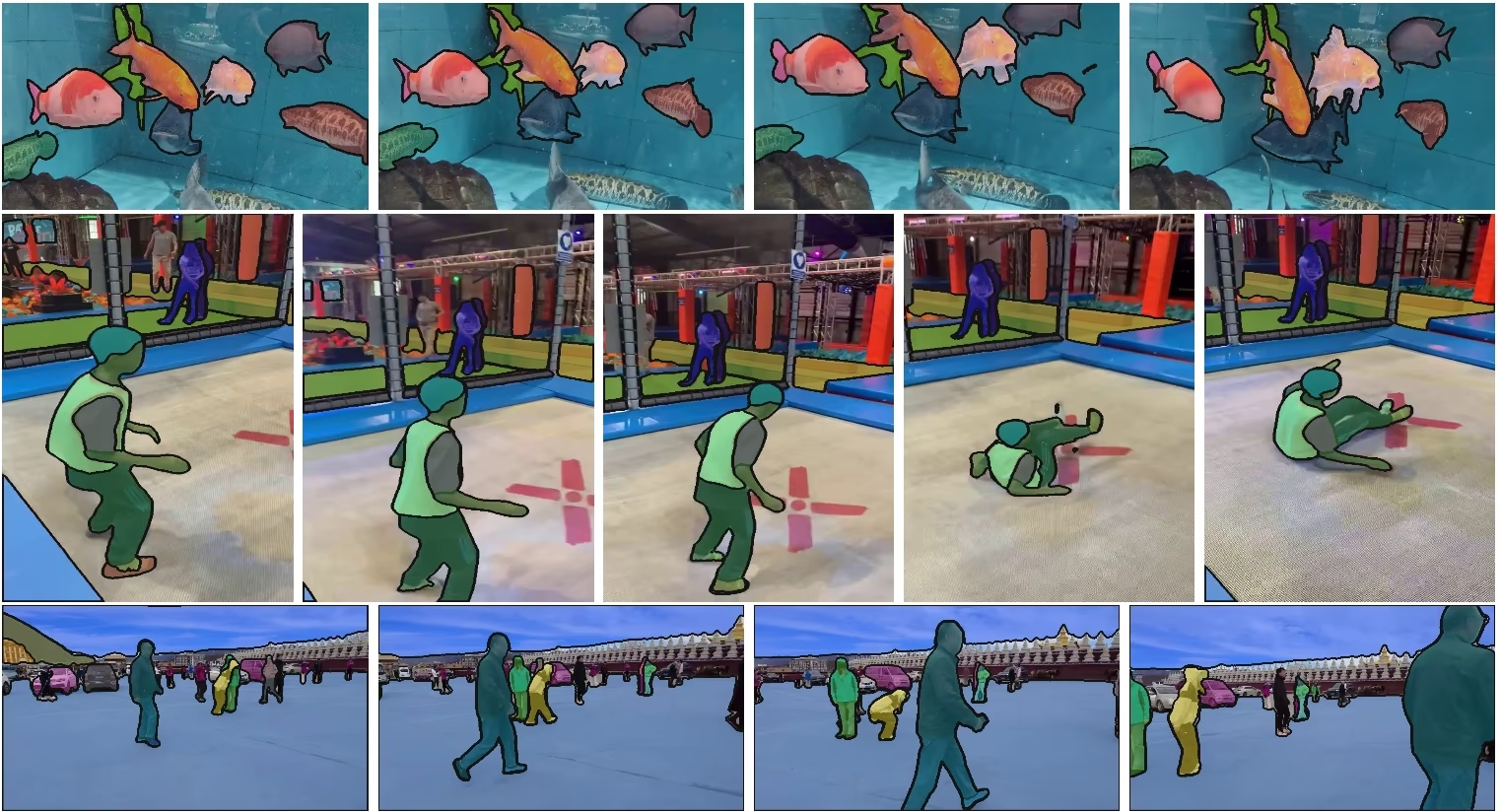
SAM 2は、MetaのSegment Anything Model(SAM)の後継であり、画像と動画の両方におけるプロンプト対応の物体セグメンテーションを実現する統合モデルです。単一のプロンプト対応アーキテクチャでリアルタイム処理とゼロショット汎化をサポートします。
SAM 2.1モデルは、Ultralytics Platformのスマートアノテーション機能を支えており、クリックベースのセグメンテーションでデータセットのラベル付けを効率化します。詳細については、アノテーションガイドをご覧ください。
主な機能#
視聴する: Ultralyticsを使用してMetaのSAM2で推論を実行する方法 | ステップバイステップガイド
統一されたモデルアーキテクチャ#
SAM 2は、画像と動画のセグメンテーション機能を単一のモデルに統合しています。この統合によりデプロイが簡素化され、異なるメディア形式で一貫した性能を実現できます。柔軟なプロンプトベースのインターフェースを備えており、点、バウンディングボックス、マスクなど、さまざまな種類のプロンプトで対象物を指定できます。
リアルタイム性能#
このモデルは、毎秒約44フレームを処理するリアルタイムの推論速度を実現します。そのため、動画編集や拡張現実など、即時のフィードバックが求められる用途にSAM 2を活用できます。
ゼロショット汎化#
SAM 2は、これまで遭遇したことのないオブジェクトもセグメンテーションでき、優れたゼロショット汎化性能を示します。これは、事前定義されたカテゴリではあらゆるオブジェクトを網羅できない可能性がある、多様または変化し続ける視覚領域で特に有用です。
インタラクティブな調整#
ユーザーはプロンプトを追加してセグメンテーション結果を反復的に調整でき、出力を正確に制御できます。このインタラクティブ性は、動画アノテーションや医用画像などのアプリケーションで結果を調整するうえで重要です。
視覚的な課題への高度な対応#
SAM 2には、物体のオクルージョンや再出現など、動画セグメンテーションでよくある課題に対処する仕組みが備わっています。メモリ機構を使ってフレーム間で物体を追跡し、物体が一時的に隠れたり、画面から退出して再び現れたりしても連続性を保ちます。
SAM 2のアーキテクチャと機能をより深く理解するには、SAM 2の研究論文をご覧ください。
パフォーマンスと技術的詳細#
Metaによると、SAM 2はいくつかの指標で従来のモデルを上回っています。
| 指標 | SAM 2 | 従来の最高性能 |
|---|---|---|
| インタラクティブ動画セグメンテーション | 最高 | - |
| 必要な人間の操作 | 3分の1に削減 | ベースライン |
| 画像セグメンテーション精度 | 向上 | SAM |
| 推論速度 | 6倍高速 | SAM |
モデルアーキテクチャ#
主要コンポーネント#
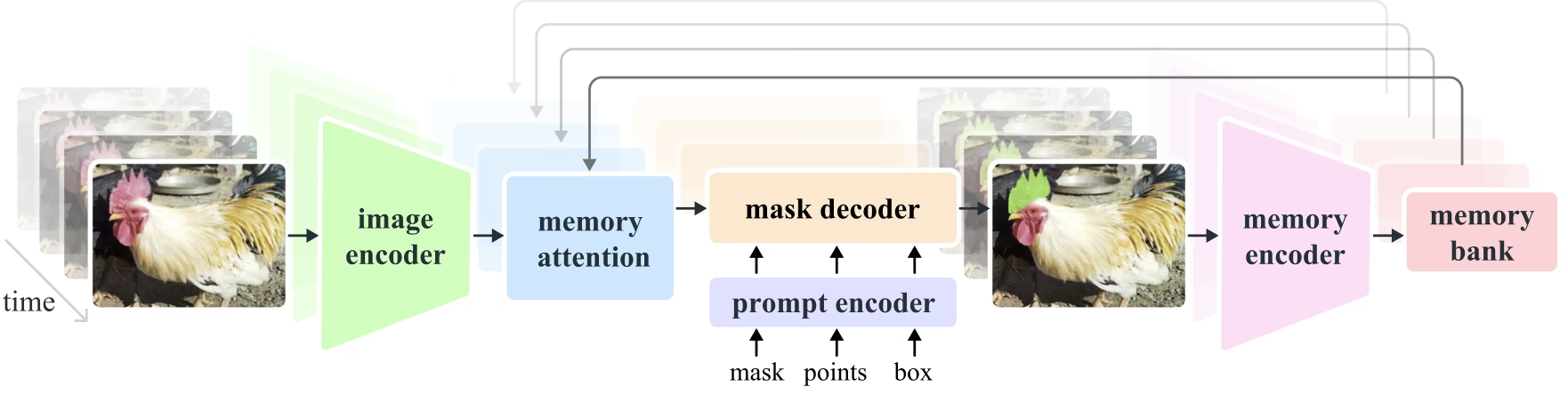
- 画像・動画エンコーダー: Transformerベースのアーキテクチャを使用し、画像と動画フレームの両方から高レベルの特徴を抽出します。このコンポーネントは、各タイムステップにおける視覚コンテンツの理解を担います。
- プロンプトエンコーダー: ユーザーが指定したプロンプト(ポイント、ボックス、マスク)を処理し、セグメンテーションタスクを誘導します。これにより、SAM 2はユーザー入力に適応し、シーン内の特定のオブジェクトを対象にできます。
- メモリ機構: メモリエンコーダー、メモリバンク、メモリアテンションモジュールを備えています。これらのコンポーネントが過去のフレームの情報をまとめて保存・活用し、時間経過に伴う一貫した物体追跡を可能にします。
- マスクデコーダー: エンコードされた画像特徴とプロンプトに基づいて、最終的なセグメンテーションマスクを生成します。動画ではメモリコンテキストも使用して、フレーム間の正確な追跡を実現します。
メモリ機構とオクルージョンへの対応#
メモリ機構により、SAM 2は動画データの時間的依存関係やオクルージョンに対応できます。オブジェクトの移動や相互作用に伴い、SAM 2はその特徴をメモリバンクに記録します。オブジェクトが隠れた場合、モデルはこのメモリを基に、再出現時の位置や外観を予測できます。オクルージョンヘッドは、オブジェクトが見えない状況に特化して対応し、オブジェクトが隠れている可能性を予測します。
複数マスクの曖昧さの解消#
物体が重なり合う場合など、曖昧な状況では、SAM 2は複数のマスク予測を生成できます。これにより、単一のマスクでは対象物を適切に表現できない複雑なシーンを表現できます。
SA-Vデータセット#
SAM 2のトレーニング用に開発されたSA-Vデータセットは、現在利用可能な動画セグメンテーションデータセットの中でも最大級かつ最も多様なものの一つです。以下の内容が含まれています。
- 51,000本以上の動画: 47か国で撮影され、幅広い実世界のシナリオを含みます。
- 600,000件以上のマスクアノテーション: 「masklet」と呼ばれる詳細な時空間マスクアノテーションで、オブジェクト全体とその部分を対象としています。
- データセットの規模: これまでで最大の動画セグメンテーションデータセットと比べて、動画数は4.5倍、アノテーション数は53倍です。
ベンチマーク#
動画オブジェクトセグメンテーション#
SAM 2は、主要な動画セグメンテーションベンチマークで次の結果を報告しています。
| データセット | J&F | J | F |
|---|---|---|---|
| DAVIS 2017 | 82.5 | 79.8 | 85.2 |
| YouTube-VOS | 81.2 | 78.9 | 83.5 |
インタラクティブセグメンテーション#
インタラクティブセグメンテーションタスクでは、SAM 2は次の結果を達成しています。
| データセット | NoC@90 | AUC |
|---|---|---|
| DAVISインタラクティブ | 1.54 | 0.872 |
インストール#
SAM 2はultralyticsパッケージに含まれています。次のコマンドでインストールしてください。SAM 2の重みは初回使用時に自動でダウンロードされます。
pip install ultralyticsSAM 2の使い方: 画像と動画のセグメンテーションにおける汎用性#
次の表では、利用可能なSAM 2モデル、事前学習済み重み、対応タスク、および学習、検証、推論、エクスポートなど、各種動作モードとの互換性について詳しく説明します。
| モデルタイプ | 事前学習済み重み | サポートされるタスク | トレーニング | 検証 | 推論 | エクスポート |
|---|---|---|---|---|---|---|
| SAM 2 tiny | sam2_t.pt | インスタンスセグメンテーション | ❌ | ❌ | ✅ | ❌ |
| SAM 2 small | sam2_s.pt | インスタンスセグメンテーション | ❌ | ❌ | ✅ | ❌ |
| SAM 2 base | sam2_b.pt | インスタンスセグメンテーション | ❌ | ❌ | ✅ | ❌ |
| SAM 2 large | sam2_l.pt | インスタンスセグメンテーション | ❌ | ❌ | ✅ | ❌ |
| SAM 2.1 tiny | sam2.1_t.pt | インスタンスセグメンテーション | ❌ | ❌ | ✅ | ❌ |
| SAM 2.1 small | sam2.1_s.pt | インスタンスセグメンテーション | ❌ | ❌ | ✅ | ❌ |
| SAM 2.1 base | sam2.1_b.pt | インスタンスセグメンテーション | ❌ | ❌ | ✅ | ❌ |
| SAM 2.1 large | sam2.1_l.pt | インスタンスセグメンテーション | ❌ | ❌ | ✅ | ❌ |
SAM 2の予測例#
SAM 2は、リアルタイム動画編集、医用画像、自律システムなど、幅広いタスクで使用できます。静的および動的な視覚データの両方をセグメント化できるため、研究者や開発者にとって汎用性の高いツールです。
プロンプトを使用したセグメンテーション#
プロンプトを使用して、画像や動画内の特定のオブジェクトをセグメンテーションします。
from ultralytics import SAM

# モデルを読み込む
model = SAM("sam2.1_b.pt")

# モデル情報を表示(任意)
model.info()

# bboxesプロンプトを使用して推論を実行
results = model("path/to/image.jpg", bboxes=[100, 100, 200, 200])

# 単一ポイントを使用して推論を実行
results = model(points=[900, 370], labels=[1])

# 複数のポイントを使用して推論を実行
results = model(points=[[400, 370], [900, 370]], labels=[1, 1])

# オブジェクトごとに複数のポイントプロンプトを使用して推論を実行
results = model(points=[[[400, 370], [900, 370]]], labels=[[1, 1]])

# ネガティブポイントプロンプトを使用して推論を実行
results = model(points=[[[400, 370], [900, 370]]], labels=[[1, 0]])すべてをセグメンテーション#
特定のプロンプトを指定せずに、画像または動画のコンテンツ全体をセグメンテーションします。
from ultralytics import SAM

# モデルを読み込む
model = SAM("sam2.1_b.pt")

# モデル情報を表示(任意)
model.info()

# 推論を実行
model("path/to/video.mp4")- この例では、プロンプト(bboxes/ポイント/マスク)を指定しない場合に、SAM 2を使用して画像または動画のコンテンツ全体をセグメンテーションする方法を示します。
動画のセグメンテーションとオブジェクトの追跡#
特定のプロンプトを使用して動画のコンテンツ全体をセグメンテーションし、オブジェクトを追跡します。
from ultralytics.models.sam import SAM2VideoPredictor

# Create SAM2VideoPredictor
overrides = {"conf": 0.25, "task": "segment", "mode": "predict", "imgsz": 1024, "model": "sam2_b.pt"}
predictor = SAM2VideoPredictor(overrides=overrides)

# 単一ポイントを使用して推論を実行
results = predictor(source="test.mp4", points=[920, 470], labels=[1])

# 複数のポイントを使用して推論を実行
results = predictor(source="test.mp4", points=[[920, 470], [909, 138]], labels=[1, 1])

# オブジェクトごとに複数のポイントプロンプトを使用して推論を実行
results = predictor(source="test.mp4", points=[[[920, 470], [909, 138]]], labels=[[1, 1]])

# ネガティブポイントプロンプトを使用して推論を実行
results = predictor(source="test.mp4", points=[[[920, 470], [909, 138]]], labels=[[1, 0]])動的なインタラクティブセグメンテーションと追跡#
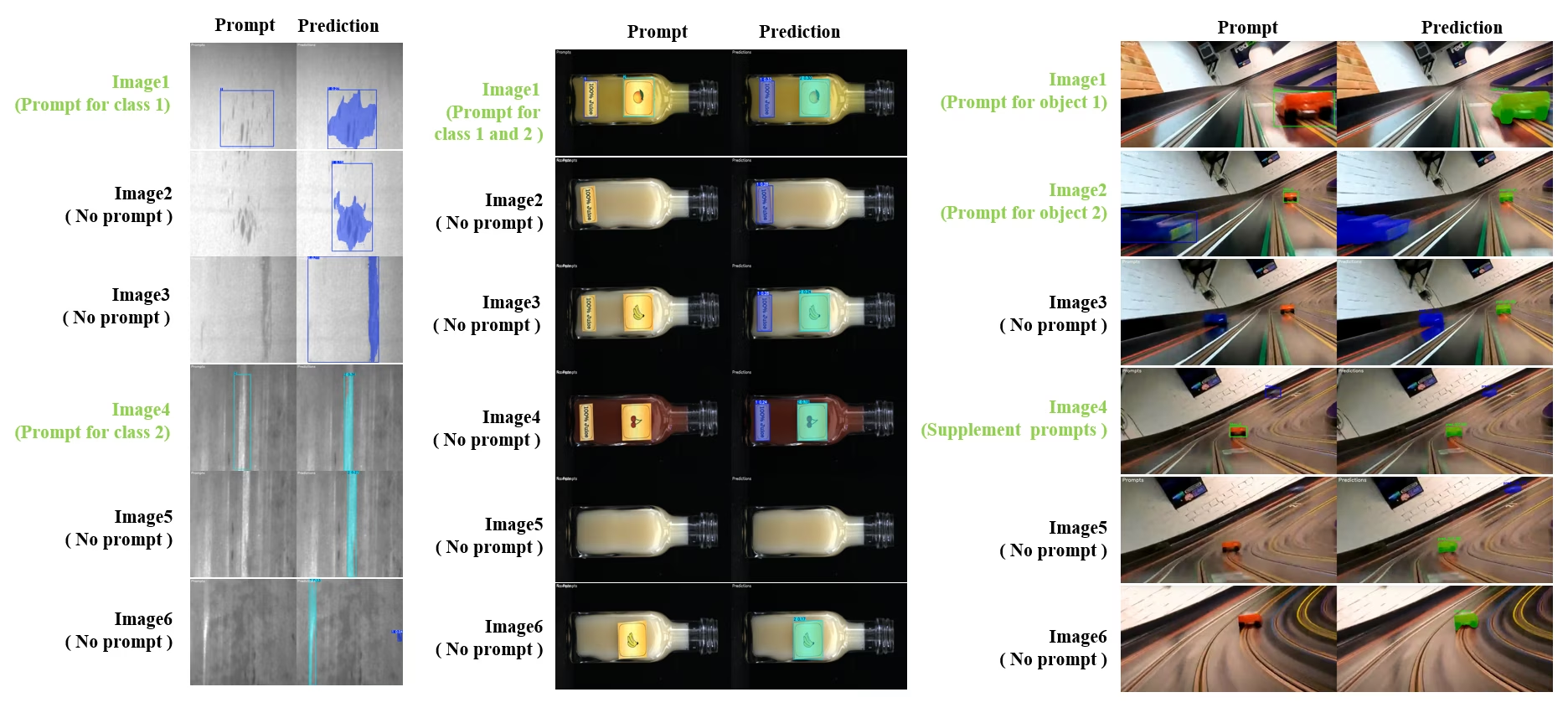
SAM2DynamicInteractivePredictorは、複数フレームとの動的なインタラクションと継続学習機能を可能にする、学習不要のSAM 2拡張機能です。この予測器は、画像シーケンス全体で追跡性能を向上させるため、リアルタイムのプロンプト更新とメモリ管理に対応しています。元のSAM 2と比べて、SAM2DynamicInteractivePredictorは追加学習を必要とせずに事前学習済みSAM 2モデルを最大限に活用できるよう、推論フローを再構築しています。
主な機能#
次の3つの機能強化を提供します。
- 動的なインタラクション: 動画処理中いつでも、後続フレームに新しい未追跡インスタンスのプロンプトを追加できます
- 継続学習: 既存のインスタンスに新しいプロンプトを追加し、時間の経過に伴ってモデルの性能を向上させることができます。
- 独立した複数画像への対応: メモリ共有と画像間のオブジェクト追跡を用いて、動画シーケンスに含まれているとは限らない複数の独立した画像を処理できます。
主な機能#
- 柔軟なプロンプト: バウンディングボックス、ポイント、マスクをプロンプトとして受け付けます。
- メモリバンク管理: フレーム間でオブジェクトの状態を保存するため、動的なメモリバンクを維持します。
- マルチオブジェクト追跡: 個別のオブジェクトIDを使用して、複数のオブジェクトを同時に追跡できます。
- リアルタイム更新: 前のフレームを再処理せずに、推論中に新しいプロンプトを追加できます。
- 独立した画像処理: 共有メモリコンテキストを使用して単独の画像を処理し、画像間でオブジェクトの一貫性を保ちます。
from ultralytics.models.sam import SAM2DynamicInteractivePredictor

# Create SAM2DynamicInteractivePredictor
overrides = {"conf": 0.01, "task": "segment", "mode": "predict", "imgsz": 1024, "model": "sam2_t.pt", "save": False}
predictor = SAM2DynamicInteractivePredictor(overrides=overrides, max_obj_num=10)

# ボックスプロンプトでカテゴリを定義
predictor(source="image1.jpg", bboxes=[[100, 100, 200, 200]], obj_ids=[0], update_memory=True)

# 新しい画像でこの特定のオブジェクトを検出
results = predictor(source="image2.jpg")

# 新しいオブジェクトIDでカテゴリを追加
results = predictor(
    source="image4.jpg",
    bboxes=[[300, 300, 400, 400]],  # 新しいオブジェクト
    obj_ids=[1],  # 新しいオブジェクトID
    update_memory=True,  # メモリに追加
)
# 推論を実行
results = predictor(source="image5.jpg")

# パフォーマンスを向上させるため、同じカテゴリに絞り込みプロンプトを追加
# これは、オブジェクトの外観が大きく変化する場合に役立ちます
results = predictor(
    source="image6.jpg",
    points=[[150, 150]],  # 絞り込みポイント
    labels=[1],  # ポジティブポイント
    obj_ids=[1],  # 同じオブジェクトID
    update_memory=True,  # 新しい情報でメモリを更新
)
# 新しい画像で推論を実行
results = predictor(source="image7.jpg")SAM2DynamicInteractivePredictorはSAM 2モデルで動作するように設計されており、SAM 2がネイティブでサポートするすべてのボックス、ポイント、マスクのプロンプトを使用して、カテゴリを追加および絞り込むことができます。動画アノテーションやインタラクティブ編集タスクなど、オブジェクトが時間とともに出現したり変化したりするシナリオで特に役立ちます。
引数#
| 名前 | デフォルト値 | データ型 | 説明 |
|---|---|---|---|
max_obj_num | 3 | int | プリセットされたカテゴリの最大数 |
update_memory | False | bool | 新しいプロンプトでメモリを更新するかどうか |
obj_ids | None | List[int] | プロンプトに対応するオブジェクトIDのリスト |
ユースケース#
SAM2DynamicInteractivePredictorは、次の用途に最適です。
- シーケンス中に新しいオブジェクトが出現する動画アノテーションのワークフロー
- オブジェクトをリアルタイムで追加・絞り込む必要があるインタラクティブな動画編集
- 動的なオブジェクト追跡が必要な監視アプリケーション
- 時系列にわたって解剖学的構造を追跡する医用画像処理
- 適応型の物体検出と追跡を必要とする自律システム
- 独立した画像間で一貫したオブジェクトセグメンテーションを行う複数画像のデータセット
- 異なるシーン間でオブジェクトを追跡する必要がある画像コレクションの分析
- 多様な画像コンテキストのメモリを活用するクロスドメインセグメンテーション
- 手作業を最小限に抑えて効率的にデータセットを作成する半自動アノテーション
SAMとYOLOの比較#
ここでは、SAM2-tの最小バリアントを含むMetaのSAM 2モデルと、YOLO26を含むUltralyticsのセグメンテーションモデルを比較します。
| モデル | サイズ (MB) | パラメーター (M) | 速度(CPU) (ms/im) |
|---|---|---|---|
| Meta SAM-b | 375 | 93.7 | 41703 |
| Meta SAM2-b | 162 | 80.8 | 28867 |
| Meta SAM2-t | 78.1 | 38.9 | 23430 |
| MobileSAM | 40.7 | 10.1 | 23802 |
| FastSAM-sとYOLOv8のバックボーン | 23.9 | 11.8 | 58.0 |
| Ultralytics YOLOv8n-seg | 7.1(11.0倍小型) | 3.4(11.4倍少ない) | 24.8(945倍高速) |
| Ultralytics YOLO11n-seg | 6.2(12.6倍小型) | 2.9(13.4倍少ない) | 24.3(964倍高速) |
| Ultralytics YOLO26n-seg | 6.7(11.7倍小型) | 2.7(14.4倍少ない) | 25.2(930倍高速) |
この比較から、SAMの各バリアントとYOLOのセグメンテーションモデルでは、モデルサイズと速度に大きな違いがあることがわかります。SAMは独自の自動セグメンテーション機能を備えていますが、YOLOモデル、特にYOLOv8n-seg、YOLO11n-seg、YOLO26n-segは、大幅に小型で高速かつ計算効率に優れています。
SAMの速度はPyTorchで、YOLOの速度はONNX Runtimeで測定しました。テストは16GBのRAMを搭載した2025年製Apple M4 Airで、torch==2.10.0、ultralytics==8.4.31、onnxruntime==1.24.4を使用して実施しました。このテストを再現するには、次の手順を実行してください。
from ultralytics import ASSETS, SAM, YOLO, FastSAM

# SAM2-t、SAM2-b、SAM-b、MobileSAMのプロファイルを取得
for file in ["sam_b.pt", "sam2_b.pt", "sam2_t.pt", "mobile_sam.pt"]:
    model = SAM(file)
    model.info()
    model(ASSETS)

# FastSAM-sのプロファイルを取得
model = FastSAM("FastSAM-s.pt")
model.info()
model(ASSETS)

# YOLOモデル(ONNX)のプロファイルを取得
for file_name in ["yolov8n-seg.pt", "yolo11n-seg.pt", "yolo26n-seg.pt"]:
    model = YOLO(file_name)
    model.info()
    onnx_path = model.export(format="onnx", dynamic=True, nms=False)  # YOLO26のNMSフリーヘッド。YOLOv8/YOLO11では何もしません
    model = YOLO(onnx_path)
model(ASSETS)自動アノテーション:効率的なデータセット作成#
自動アノテーションでは、SAM 2と事前学習済みの検出モデルを組み合わせ、手作業でのラベル付けを大幅に減らしながら、セグメンテーションデータセットをすばやく生成できます。Ultralytics Platformでは、ホスト型の視覚モデルを使用したブラウザベースの自動アノテーションも利用できます。VLMリーダーボードで、検出精度、コスト、速度を比較してください。
SAM 2による自動アノテーションの方法#
視聴: Ultralytics で Meta の Segment Anything 2 モデルを使った自動アノテーション | データラベリング
YOLO26x検出器とSAM 2を使ってデータセットに自動でアノテーションを付けるには、次の例に従ってください。
from ultralytics.data.annotator import auto_annotate

auto_annotate(data="path/to/images", det_model="yolo26x.pt", sam_model="sam2_b.pt")| 引数 | 種類 | デフォルト | 説明 |
|---|---|---|---|
data | str | 必須 | アノテーションまたはセグメンテーションの対象画像を含むディレクトリへのパス。 |
det_model | str | 'yolo26x.pt' | 初期の物体検出に使用するYOLO検出モデルのパス。 |
sam_model | str | 'sam_b.pt' | セグメンテーションに使用するSAMモデルのパス(SAM、SAM 2、MobileSAM、SAM 3の重みに対応)。 |
device | str | '' | 計算デバイス(例:'cuda:0'、'cpu'、またはデバイスを自動検出する場合は'')。 |
conf | float | 0.25 | 信頼度の低い検出結果を除外するためのYOLO検出信頼度しきい値。 |
iou | float | 0.5 | 重複するボックスを除外するための非最大値抑制のIoUしきい値。 |
imgsz | int | 640 | 画像のリサイズに使用する入力サイズ(必要に応じて32の倍数に切り上げられます)。 |
max_det | int | 300 | メモリ効率を高めるための、画像ごとの検出数の最大値。 |
classes | list[int] | None | 検出するクラスインデックスのリスト(例:人物と自転車の場合は[0, 1])。 |
output_dir | str | None | アノテーションの保存ディレクトリ(デフォルト:兄弟ディレクトリの<data>_auto_annotate_labels)。 |
この関数を使うと、ラベルのない画像フォルダーを、手作業を最小限に抑えてセグメンテーションデータセットに変換できます。
制限事項#
優れた点がある一方で、SAM 2には次のような制限があります。
- 追跡の安定性:長いシーケンスや大幅な視点の変化があると、SAM 2はオブジェクトを見失うことがあります。
- オブジェクトの混同:特に混雑したシーンでは、モデルが外観の似たオブジェクトを混同することがあります。
- 複数オブジェクト処理の効率:オブジェクト間の通信機能がないため、複数のオブジェクトを同時に処理するとセグメンテーションの効率が低下します。
- 細部の精度:特に動きの速いオブジェクトでは、細部を見落とすことがあります。追加のプロンプトでこの問題をある程度軽減できますが、時間方向の滑らかさは保証されません。
引用と謝辞#
研究または開発でSAM 2を使用する場合は、以下の形式で引用してください。
@article{ravi2024sam2,
  title={SAM 2: Segment Anything in Images and Videos},
  author={Ravi, Nikhila and Gabeur, Valentin and Hu, Yuan-Ting and Hu, Ronghang and Ryali, Chaitanya and Ma, Tengyu and Khedr, Haitham and R{\"a}dle, Roman and Rolland, Chloe and Gustafson, Laura and Mintun, Eric and Pan, Junting and Alwala, Kalyan Vasudev and Carion, Nicolas and Wu, Chao-Yuan and Girshick, Ross and Doll{\'a}r, Piotr and Feichtenhofer, Christoph},
  journal={arXiv preprint},
  year={2024}
}
このモデルとデータセットをAIコミュニティに公開してくださったMeta AIに感謝します。
よくある質問#
MetaのSegment Anything Model(SAM)の後継であるSAM 2は、画像と動画の両方でオブジェクトをセグメント化する、統合型のプロンプト対応モデルです。SAM 2には、初代SAMから次のような複数の改良が加えられています。
- 統合モデルアーキテクチャ:画像と動画のセグメンテーション機能を単一のモデルに統合しています。
- リアルタイム性能:毎秒約44フレームを処理できるため、即時のフィードバックが求められるアプリケーションに適しています。
- ゼロショット汎化:これまで見たことのないオブジェクトもセグメント化でき、多様な視覚領域で役立ちます。
- インタラクティブな絞り込み:追加のプロンプトを入力することで、セグメンテーション結果を繰り返し絞り込めます。
- 視覚的な課題への高度な対応:オブジェクトの遮蔽や再出現など、動画セグメンテーションでよくある課題に対応します。
SAM 2のアーキテクチャと機能の詳細については、SAM 2の研究論文をご覧ください。
SAM 2は、プロンプト対応インターフェースと高速な推論により、リアルタイムの動画セグメンテーションをサポートします。基本的な例を以下に示します。
プロンプトを使用したセグメンテーションプロンプトを使用して、画像や動画内の特定のオブジェクトをセグメンテーションします。
from ultralytics import SAM # モデルを読み込む model = SAM("sam2_b.pt") # モデル情報を表示(任意) model.info() # バウンディングボックスのプロンプトでセグメント化 results = model("path/to/image.jpg", bboxes=[100, 100, 200, 200]) # ポイントのプロンプトでセグメント化 results = model("path/to/image.jpg", points=[150, 150], labels=[1])詳しい使用方法については、SAM 2の使用方法のセクションをご覧ください。
SAM 2は、現在利用可能な中でも最大級かつ多様性に富む動画セグメンテーションデータセットの1つであるSA-Vデータセットでトレーニングされています。SA-Vデータセットには、以下が含まれます。
- 51,000本以上の動画: 47か国で撮影され、幅広い実世界のシナリオを含みます。
- 600,000件以上のマスクアノテーション: 「masklet」と呼ばれる詳細な時空間マスクアノテーションで、オブジェクト全体とその部分を対象としています。
- データセットの規模:従来最大のデータセットと比べて動画数が4.5倍、アノテーション数が53倍で、前例のない多様性と複雑さを備えています。
このデータセットによって、SAM 2は主要な動画セグメンテーションベンチマークで高い性能を達成し、ゼロショット汎化能力も向上します。
SAM 2には、動画データにおける時間的依存関係とオクルージョンを管理するメモリ機構が含まれています。このメモリ機構は、次の要素で構成されています。
- メモリエンコーダーとメモリバンク:過去のフレームの特徴を保存します。
- メモリアテンションモジュール:保存した情報を活用し、時間経過に伴う一貫したオブジェクト追跡を維持します。
- 遮蔽ヘッド:オブジェクトが見えない状況に特化して対応し、オブジェクトが遮蔽されている可能性を予測します。
この機構により、オブジェクトが一時的に隠れたり、シーンから退出して再び出現したりしても、連続性が維持されます。詳細については、メモリ機構と遮蔽への対応のセクションをご覧ください。
MetaのSAM2-tやSAM2-bなどのSAM 2モデルは、強力なゼロショットセグメンテーション機能を備えていますが、YOLOモデルと比べると大幅に大きく、低速です。たとえば、YOLO26n-segはCPU上でSAM2-bより約24倍小さく、1145倍以上高速です。SAM 2は汎用性の高いプロンプトベースおよびゼロショットのセグメンテーションに優れています。一方、YOLO26はNMSを使用しないエンドツーエンド推論により、速度、効率、リアルタイムアプリケーション向けに最適化されているため、リソースが限られた環境へのデプロイに適しています。


コメント150
質問したり、結果を共有したり、ほかの人をサポートしたりできます。
 Glenn JocherUltralytics
Hey everyone! We wanted to give you a quick update: our team is currently busy integrating SAM 2 (Segment Anything Model 2) into the Ultralytics package. This new model is super exciting, with features like real-time performance and the ability to segment objects it’s never seen before.
We're really pumped about what SAM2 can do, but it's still in the works. Thanks for your patience as we get everything set up! We'll keep you posted as we make progress. Stay tuned!
10- Glenn JocherUltralytics
Update: SAM 2 is now fully integrated! Update your package to
ultralytics>=8.2.70withpip install -U ultralyticsand then for example:from ultralytics import ASSETS, SAM # Load a model model = SAM("sam2_s.pt") # Segment with point prompt results = model(ASSETS / "bus.jpg", points=[150, 150], labels=[1], device="cpu")1
avasanjesh
Hello,
Can i use sam2.1 for real time segmentation? i want to specify the object on the first frame of live video webcam then sam2.1 shows the segmentation and continue to track and show the result of segmentation of that object. Is it possible to do this?
1thedatamask
Breaking News: 🚨 SAM 1.0 outperforms SAM 2.0 on low-contrast images like CT Scan and MRI images! Check out this insightful video from Data Mask YouTube channel where they dive deep into the architecture, demos, and limitations of both Meta's segmentation models. Discover when to use SAM 1.0 for superior results on challenging images.
Use case with ultralytics
https://www.youtube.com/watch?v=vMI-TnyNLYU
Please do like and subscribe for exciting video like above .
#SAM #SAM2.0 #MetaAI #ImageSegmentation #AI #MachineLearning #DeepLearning #DataMask #BreakingNews
1- Glenn JocherUltralytics
@thedatamask thank you for sharing the video. For insights on SAM 2's capabilities and its comparison with other models, you can explore our documentation. If you have specific questions about using SAM 2 with Ultralytics, feel free to ask!
ram-from-tvl
Hi Team,
the below is the code I have been using to annotate some items in a folder of several images. I am planning to segment everything first and then try to cherry pick the ones that are to be annotated for a downstream segmentation task. Could you please tailor the code for the same. I am not getting any help from the docs regarding the same. i have tried auto annotate but its not working for my use case. So please help me in this approach
` from ultralytics import SAM
Load a model
model = SAM("sam2.1_b.pt")
Display model information (optional)
model.info()
Run inference
model("/kaggle/working/10_random_frames") `
Thankyou
Regards Ram
 Onuralp SezerUltralytics
Hi Team,
the below is the code I have been using to annotate some items in a folder of several images. I am planning to segment everything first and then try to cherry pick the ones that are to be annotated for a downstream segmentation task. Could you please tailor the code for the same. I am not getting any help from the docs regarding the same. i have tried auto annotate but its not working for my use case. So please help me in this approach
` from ultralytics import SAM
Load a model
model = SAM("sam2.1_b.pt")
Display model information (optional)
model.info()
Run inference
model("/kaggle/working/10_random_frames") `
Thankyou
Regards Ram
You may want check out here https://docs.ultralytics.com/reference/data/annotator/#ultralytics.data.annotator.auto_annotate
zhaowangalready
Hello, dear doctor, I encountered some problems in the automatic annotation segmentation. I used the successfully annotated data for verification and found that the data of each species has a serial number border. How can I remove the serial number border? I hope to hear from you.
- Glenn JocherUltralytics
auto_annotate()生成的是标准 YOLO-seg 标签:每一行开头的“数字”是类别class_id(必需字段,不能删),如果你看到的是验证/预测保存出来的图片上带编号的边框/轮廓,那只是可视化绘图,不会写进数据本身;你可以按 SAM 2 文档 继续用同一套数据训练/验证,同时关掉这些 plot:yolo val model=yolo26n-seg.pt data=path/to/data.yaml plots=False yolo predict model=sam2.1_b.pt source=path/to/images show_labels=False show_boxes=False方便的话把“带序号边框”的截图 + 对应的一行标签
.txt内容贴在这个 discussion 里,我帮你确认你看到的到底是class_id还是绘图叠加效果。
cyberpunk-edgerunner
I have to question related to SAM2 :
- How to use text-prompt for segmentation using SAM ?
- Along with the bounding box coordinates, is there a way to tell SAM what not to segment ?
I have two questions regarding segmentation with SAM2 and YOLOv11:
1. Visualization and Editing with SAM2 I've used the
auto_annotatefeature and I'm wondering:- How can I visualize the segmentations produced by the SAM2 model?
- Is there a way to manually inspect or edit these segmentations?
I'm aiming to verify the outputs before proceeding further.
2. Saving and Cropping Segmentations I'm using the following code to detect and segment images with YOLOv11 and SAM2:
from ultralytics import YOLO
from ultralytics import SAM

model = YOLO(r"runs\detect\train2\weights\best.pt")
sam_model = SAM("sam2_b.pt")

results = model("more_test_images", save=True)

for result in results:
    class_ids = result.boxes.cls.int().tolist()

    if len(class_ids):
        boxes = result.boxes.xyxy
        sam_results = sam_model(result.orig_img, bboxes=boxes, verbose=False, save=True)
The detection results from YOLOv11 are saved correctly, but only one segmented result is saved by SAM2.
Questions:
- How can I ensure all SAM2 segmentations are saved for each image?
- How can I crop and save only the segmented parts (i.e., masked regions) from each image? I need these as separate images, containing only the segmented pixels.
Any help or pointers would be greatly appreciated!
fangyuZ1025
Hello, dear doctor, I encountered some problems in the automatic annotation segmentation. The automatic annotation automatically marked various marks on my output, but in fact, this is not the correct mark of my picture, and even some pictures cannot recognise the objects in it. How can I make it change the label uniform? For example, all of them are labelled as "fruit", "vehicle" and so on? I hope to get your reply.
from ultralytics.data.annotator import auto_annotate
auto_annotate(data=r"D:\graduation.thesis\mydata\mt_label\images", det_model="yolov8n.pt", sam_model="sam2_b.pt")
image 19/461 D:\graduation.thesis\mydata\mt_label\images\IMG_20241003_112848.jpg: 640x640 (no detections), 33.4ms image 20/461 D:\graduation.thesis\mydata\mt_label\images\IMG_20241003_112858.jpg: 640x640 1 orange, 31.9ms image 21/461 D:\graduation.thesis\mydata\mt_label\images\IMG_20241003_112907.jpg: 640x640 1 apple, 35.3ms image 22/461 D:\graduation.thesis\mydata\mt_label\images\IMG_20241003_112916.jpg: 640x640 (no detections), 34.0ms image 23/461 D:\graduation.thesis\mydata\mt_label\images\IMG_20241003_112938.jpg: 640x640 (no detections), 35.3ms image 24/461 D:\graduation.thesis\mydata\mt_label\images\IMG_20241003_112947.jpg: 640x640 1 donut, 32.1ms image 25/461 D:\graduation.thesis\mydata\mt_label\images\IMG_20241003_113004.jpg: 640x640 (no detections), 28.6ms image 26/461 D:\graduation.thesis\mydata\mt_label\images\IMG_20241003_113014.jpg: 640x640 1 donut, 33.9ms image 27/461 D:\graduation.thesis\mydata\mt_label\images\IMG_20241003_113028.jpg: 640x640 1 apple, 1 donut, 35.8ms
- Glenn JocherUltralytics(編集済み)
@fangyuZ1025 to improve label consistency in auto-annotation, you'll need to train a custom detection model with your specific classes ("fruit", "vehicle") first. The auto_annotate function relies on your detection model's class definitions - it doesn't rename labels but uses whatever classes your det_model was trained on. For immediate improvement, try a newer detection model such as YOLO26 (for example
det_model="yolo26n.pt"), which is more accurate than YOLOv8.
Fatima-khanjar
Hello, I am using SAM2 with my fine-tuned YOLOv11 on my custom dataset to perform auto-annotation for an object detection task. However, the annotations in the .txt file are not in the YOLO format (class_label x_center y_center width height).
Could you clarify the format of the labels generated when using both SAM2 and YOLOv11 for auto-annotation?
- Glenn JocherUltralytics
@Fatima-khanjar the auto-annotation function generates segmentation masks in YOLO segmentation format (polygon points normalized 0-1), not bounding boxes. For object detection tasks, you'll need to convert these masks to bounding boxes using
masks.xyfrom Results objects. We recommend reviewing the Auto-Annotation with SAM2 documentation for implementation details and conversion examples.1
danieltudosiu(編集済み)
How does one use SAM2 with a numpy input? I saw how to do it with SAM but SAM2 does not have a preprocess method like SAM.
- Glenn JocherUltralytics(編集済み)
@danieltudosiu you can pass numpy arrays directly as the source to
SAM. Here's a minimal example:import numpy as np from ultralytics import SAM model = SAM("sam2.1_b.pt") img = np.random.randint(0, 255, (640, 640, 3), dtype=np.uint8) # Your numpy array results = model(img, points=[100, 100], labels=[1])For more details, see the SAM 2 documentation.
But what about the Image one? Or just use the Video one for Images as well?
- Glenn JocherUltralytics(編集済み)
You can pass numpy arrays or file paths directly to
SAM("sam2.1_b.pt"), for examplemodel(img_array, points=[100, 100], labels=[1]).SAM2VideoPredictoris only needed for video. For image-specific examples, see the SAM 2 documentation.