Ultralytics YOLO26을 사용한 거리 계산
거리 계산이란 무엇인가요?#
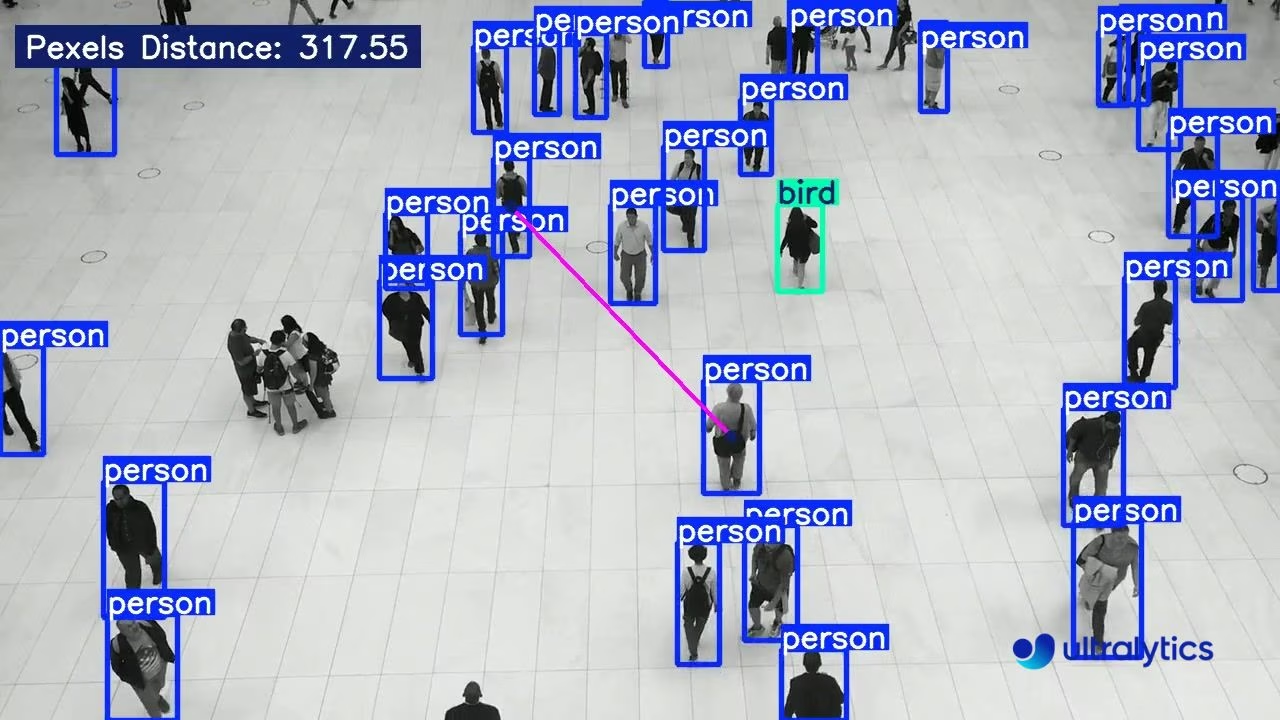
거리 계산은 이미지나 비디오 프레임 내에서 탐지된 두 객체 사이의 거리를 측정하는 과정입니다. Ultralytics YOLO26 솔루션은 사용자가 선택한 두 경계 상자의 중심점 사이 거리를 측정합니다.
시청: Ultralytics YOLO로 감지된 객체 간 거리를 픽셀 단위로 추정하는 방법 🚀
시각 자료#
| Ultralytics YOLO26을 사용한 거리 계산 |
|---|
 |
거리 계산의 장점#
- 위치 정밀도: 컴퓨터 비전 작업에서 정확한 공간 위치 파악을 향상합니다.
- 크기 추정: 객체 크기를 추정하여 맥락을 더 잘 파악할 수 있습니다.
- 장면 이해: 자율주행 차량 및 감시 시스템과 같은 애플리케이션에서 더 나은 의사 결정을 내릴 수 있도록 3D 장면 이해도를 높입니다.
- 충돌 방지: 움직이는 객체 사이의 거리를 모니터링하여 잠재적인 충돌을 감지할 수 있습니다.
- 공간 분석: 모니터링 환경 내 객체 간의 관계와 상호작용을 분석할 수 있습니다.
거리 계산
- 마우스 왼쪽 버튼으로 바운딩 박스 두 개를 클릭하면 거리를 계산합니다.
- 마우스 오른쪽 버튼을 눌러 그린 점을 모두 삭제합니다.
거리는 추정값입니다
거리는 2D 데이터를 사용해 계산하므로 깊이 정보가 없어 완전히 정확하지 않을 수 있습니다. 픽셀별 깊이를 얻으려면 깊이 추정 모델을 사용하세요.
YOLO26으로 거리 계산하기#
DistanceCalculation 솔루션은 프레임 간 객체를 추적하고, 마우스로 선택한 바운딩 박스 두 개의 중심점 사이 유클리드 거리를 픽셀 단위로 측정합니다. 아래 예제를 실행한 다음 객체 두 개를 마우스 왼쪽 버튼으로 클릭하면 두 객체를 잇는 선이 그려지고 거리가 표시됩니다. 마우스 오른쪽 버튼을 누르면 선택 항목이 지워집니다.
import cv2

from ultralytics import solutions

cap = cv2.VideoCapture("path/to/video.mp4")
assert cap.isOpened(), "Error reading video file"

# 비디오 작성기
w, h, fps = (int(cap.get(x)) for x in (cv2.CAP_PROP_FRAME_WIDTH, cv2.CAP_PROP_FRAME_HEIGHT, cv2.CAP_PROP_FPS))
video_writer = cv2.VideoWriter("distance_output.avi", cv2.VideoWriter_fourcc(*"mp4v"), fps, (w, h))

# 거리 계산 객체 초기화
distancecalculator = solutions.DistanceCalculation(
    model="yolo26n.pt",  # YOLO26 모델 파일의 경로입니다.
    show=True,  # 출력을 표시합니다.
)

# 비디오 처리
while cap.isOpened():
    success, im0 = cap.read()

    if not success:
        print("Video frame is empty or processing is complete.")
        break

    results = distancecalculator(im0)

    print(results)  # 출력에 액세스합니다

    video_writer.write(results.plot_im)  # 처리된 프레임을 저장합니다.

cap.release()
video_writer.release()
cv2.destroyAllWindows()  # 열려 있는 모든 창 닫기
DistanceCalculation() 인수#
다음은 DistanceCalculation 인수 표입니다:
| 인수 | 유형 | 기본값 | 설명 |
|---|---|---|---|
model | str | None | Ultralytics YOLO 모델 파일의 경로입니다. |
line_width | int | 2 | Solution에서 그리는 상자, 키포인트 및 개수 표시의 선 두께입니다. |
verbose | bool | True | 프레임별 입력 형태, 클래스 개수 및 처리 속도 로그를 활성화합니다. 추적 호출 자체는 항상 로그를 출력하지 않습니다. |
DistanceCalculation 솔루션에서도 track 인수를 사용할 수 있습니다.
| 인수 | 유형 | 기본값 | 설명 |
|---|---|---|---|
tracker | str | 'tracktrack.yaml' | 사용할 추적 알고리즘을 지정합니다. 기본 제공 옵션: botsort.yaml, bytetrack.yaml, ocsort.yaml, deepocsort.yaml, fasttrack.yaml, tracktrack.yaml. |
conf | float | 0.25 | 탐지에 대한 신뢰도 임계값을 설정합니다. 값을 낮추면 추적할 수 있는 객체가 늘어나지만 오탐이 포함될 수 있습니다. |
iou | float | 0.5 | 중복 탐지를 필터링하기 위한 교집합 대비 합집합 (IoU) 임계값을 설정합니다. |
classes | list | None | 클래스 인덱스로 결과를 필터링합니다. 예를 들어 classes=[0, 2, 3]은 지정된 클래스만 추적합니다. |
device | str | None | 추론에 사용할 장치를 지정합니다(예: cpu, cuda:0 또는 0). 사용자는 모델 실행에 사용할 CPU, 특정 GPU 또는 기타 연산 장치를 선택할 수 있습니다. |
imgsz | int or tuple | 640 | 추론 대상 이미지 크기입니다. 정사각형을 나타내는 정수 또는 (height, width) 쌍을 지정합니다. 모델 stride에 맞춰 형태가 조정됩니다. |
max_det | int | 300 | 추적 전에 프레임별로 유지할 최대 탐지 수를 지정하여 밀집된 장면에서 솔루션이 처리하는 객체 수를 제한합니다. |
quantize | int or str | None | 추론 정밀도: CPU 이외의 환경에서 PyTorch 및 TorchScript 모델은 16(FP16) 또는 32/unset(FP32)을 사용하며, 다른 형식은 아티팩트와 런타임이 선택하는 정밀도를 사용합니다. 더 이상 사용되지 않는 half 인수를 대체합니다. |
또한 다음 시각화 인수를 사용할 수 있습니다:
| 인수 | 유형 | 기본값 | 설명 |
|---|---|---|---|
show | bool | False | True이면 주석이 추가된 이미지나 비디오를 창에 표시합니다. 개발 또는 테스트 중 즉각적인 시각적 피드백을 얻는 데 유용합니다. |
show_conf | bool | True | 각 감지 결과의 레이블 옆에 신뢰도 점수를 표시합니다. 각 감지 결과에 대한 모델의 확신도를 파악할 수 있습니다. |
show_labels | bool | True | 시각화 출력에 각 감지 결과의 레이블을 표시합니다. 감지된 객체를 즉시 파악할 수 있습니다. |
구현 세부 정보#
DistanceCalculation 클래스는 비디오 프레임 간 객체를 추적하고 선택된 바운딩 박스의 중심점 사이 유클리드 거리를 계산합니다. 객체 두 개를 클릭하면 솔루션은 다음 작업을 수행합니다:
- 선택한 바운딩 박스의 중심점(중앙 지점)을 추출합니다
- 이 중심점 사이의 유클리드 거리를 픽셀 단위로 계산합니다
- 객체 사이를 잇는 선과 함께 프레임에 거리를 표시합니다
이 구현은 마우스 상호작용을 처리하기 위해 mouse_event_for_distance 메서드를 사용하며, 사용자가 필요에 따라 객체를 선택하고 선택 항목을 지울 수 있도록 합니다. process 메서드는 프레임별 처리, 객체 추적 및 거리 계산을 담당합니다.
응용 분야#
YOLO26을 사용한 거리 계산은 다양한 실제 애플리케이션에 활용할 수 있습니다:
- 리테일 분석: 고객과 제품 사이의 거리를 측정하고 매장 레이아웃의 효과를 분석합니다
- 산업 안전: 작업자와 기계 사이의 안전 거리를 모니터링합니다
- 교통 관리: 차량 간격을 분석하고 안전거리 미확보를 감지합니다
- 스포츠 분석: 선수, 공 및 경기장의 주요 위치 사이 거리를 계산합니다
- 헬스케어: 대기 공간에서 적절한 거리를 유지하고 환자의 이동을 모니터링합니다
- 로보틱스: 로봇이 장애물 및 사람과 적절한 거리를 유지하도록 합니다
자주 묻는 질문#
Ultralytics YOLO26을 사용해 객체 사이의 거리를 계산하려면 감지된 객체의 바운딩 박스 중심점을 찾아야 합니다. 이 과정에서는 Ultralytics의
solutions모듈에서DistanceCalculation클래스를 초기화하고, 모델의 추적 출력을 사용해 거리를 계산합니다.예, Ultralytics YOLO26으로 실시간 비디오 스트림에서 거리를 계산할 수 있습니다. 이 과정에서는 OpenCV를 사용해 비디오 프레임을 캡처하고, YOLO26 객체 감지를 실행한 다음,
DistanceCalculation클래스를 사용해 연속된 프레임의 객체 사이 거리를 계산합니다. 자세한 구현 방법은 비디오 스트림 예제를 참조하세요.Ultralytics YOLO26으로 거리 계산 중에 그린 점을 삭제하려면 마우스 오른쪽 버튼을 클릭하면 됩니다. 이 동작으로 그린 점이 모두 지워집니다. 자세한 내용은 거리 계산 예제의 참고 섹션을 참조하세요.
Ultralytics YOLO26에서
DistanceCalculation클래스를 초기화하는 데 필요한 주요 인수는 다음과 같습니다:model: YOLO26 모델 파일의 경로입니다.tracker: 사용할 추적 알고리즘입니다(솔루션의 기본값은tracktrack.yaml입니다).conf: 감지 신뢰도 임계값입니다.show: 출력을 표시할지 지정하는 플래그입니다.
전체 인수 목록과 기본값은 DistanceCalculation 인수를 참조하세요.


댓글195
질문을 하거나 결과를 공유하거나 다른 사람을 도와주세요.
muhammadwildangoni
hallo, I am processing a men's 100 meter sprint video using YOLO and SpeedEstimator (Ultralytics) to detect runners, estimate their speed, and track their progress. However, the output statistics are incorrect. My code detects 16 runners, while there should only be 8 (those on the track), and the maximum speed reported is 0.00 m/s, which is clearly not correct for a sprint race. The furthest distance covered is about 96.7 meters, which seems off.
import cv2 import math import numpy as np from ultralytics import YOLO from ultralytics.solutions import speed_estimation
--- SETTINGS ---
video_path = "WHAT A RACE! _ Men s 100m Final! _ #Paris2024 highlights (online-video-cutter.com).mp4" # Change to your video path model_path = "yolo11n.pt" # Path to your YOLO model (could be yolov11n.pt if available) output_path = "output_sprint.avi" # Output video file name
meter_per_pixel = 0.05 # Calibration result for track (e.g., 0.05 for a 100m lane) center_point = (0, 720) # Track start point (adjust to your video height)
--- INITIALIZATION ---
cap = cv2.VideoCapture(video_path) assert cap.isOpened(), "Error reading video file"
w, h, fps = (int(cap.get(x)) for x in (cv2.CAP_PROP_FRAME_WIDTH, cv2.CAP_PROP_FRAME_HEIGHT, cv2.CAP_PROP_FPS)) out = cv2.VideoWriter(output_path, cv2.VideoWriter_fourcc(*"MJPG"), fps, (w, h))
model = YOLO(model_path) names = model.model.names if hasattr(model.model, "names") else ["person"]
speed_obj = speed_estimation.SpeedEstimator( names=names, reg_pts=[(0, int(h/2)), (w, int(h/2))], # Speed estimation line (across track, adjust as needed) view_img=False, meter_per_pixel=meter_per_pixel # Convert pixel to meters )
frame_count = 0 speed_over_time, distance_over_time = {}, {}
while cap.isOpened(): success, frame = cap.read() if not success: break frame_count += 1
# Detect and track runners on each frame
tracks = model.track(frame, persist=True, show=False)

# Estimate runners' speed and update visualization on frame
frame = speed_obj.estimate_speed(frame)

# Extract runner IDs, position, speed, and distance
# Make sure .boxes.id/cls property exists:
if tracks and hasattr(tracks[0], "boxes") and tracks[0].boxes.id is not None:
    boxes = tracks[0].boxes.xyxy.cpu()
    track_ids = tracks[0].boxes.id.int().cpu().tolist()
    clss = tracks[0].boxes.cls.cpu().tolist()
    for box, track_id, cls in zip(boxes, track_ids, clss):
        if cls == 0:  # 'person' class (runners)
            # Calculate runner's distance from start
            x1, y1 = int((box[0] + box[2]) // 2), int((box[1] + box[3]) // 2)
            distance = (math.sqrt((x1 - center_point[0]) ** 2 + (y1 - center_point[1]) ** 2)) * meter_per_pixel

            # Store statistics in dictionary
            if track_id not in distance_over_time:
                distance_over_time[track_id] = [0] * (frame_count - 1)
            distance_over_time[track_id].append(distance)

            speed = speed_obj.speeds.get(track_id, 0) if hasattr(speed_obj, "speeds") else 0
            if track_id not in speed_over_time:
                speed_over_time[track_id] = [0] * (frame_count - 1)
            speed_over_time[track_id].append(speed)

            # Overlay runner's speed and distance information directly on video frame
            text_speed = f"Speed: {speed:.2f} m/s"
            text_dist = f"Distance: {distance:.2f} m"
            cv2.putText(frame, f"ID:{track_id} {text_speed}, {text_dist}", (x1, y1 - 10),
                        cv2.FONT_HERSHEY_SIMPLEX, 0.8, (0,255,0), 2)

# Save frame to output video
out.write(frame)

# Display real-time video preview
cv2.imshow("Sprint Runner Detection Preview", frame)
if cv2.waitKey(1) & 0xFF == ord("q"):
    break
cap.release() out.release() cv2.destroyAllWindows()
--- Final statistics: print results to terminal ---
best_speed = max((max(speeds) for speeds in speed_over_time.values()), default=0) best_distance = max((max(distances) for distances in distance_over_time.values()), default=0) total_runners = len(distance_over_time)
print(f"Total runners detected: {total_runners}") print(f"Highest speed: {best_speed:.2f} m/s") print(f"Furthest distance covered: {best_distance:.2f} meters")
maribalke(수정됨)
Hi! I have tried to do a test on the distance calculation on a single image, but I keep getting the attribute error: 'DistanceCalculation' object has no attribute 'start_process'. I have basis in the YOLO11n-model, further trained on images from a different dataset.
model_path = "../runs/detect/train2/weights/best.pt" model = YOLO(model_path) dist_obj = distance_calculation.DistanceCalculation() frame = cv2.imread("../images/s73/raw_images/10.jpg") # Detect objects results = model(frame) # Run object tracking tracks = model.track(frame, persist=True, show = False) # process the image image_with_distances = dist_obj.start_process(frame, tracks) # Display the frame cv2.imshow('Distance Calculation', image_with_distances) cv2.waitKey(0) cv2.destroyAllWindows() Glenn JocherUltralytics(수정됨)
@maribalke thanks for reaching out!
start_process()has been removed.DistanceCalculationis now called directly on the frame and returns a results object with the annotated image inplot_im. It also runs tracking itself, so no separatemodel.track()call is needed. Here's the minimal fix for your single-image case:dist_obj = solutions.DistanceCalculation(model=model_path, show=False) results = dist_obj(frame) cv2.imshow("Distance Calculation", results.plot_im)Note that the distance is measured between two objects you select by clicking them in a display window, so a single static image only shows a distance once two boxes have been selected. For full implementation details, see our Distance Calculation Guide. Let us know if you encounter any other issues!
dgnovo
Is it possible to know the distance from an object and another object without using mouse?
- Glenn JocherUltralytics
@dgnovo yes, it's possible. You can calculate distances programmatically by using bounding box centroids from YOLO11 detections and computing the Euclidean distance between them without relying on mouse clicks. Refer to the
DistanceCalculationimplementation to customize the process for your needs: https://docs.ultralytics.com/guides/distance-calculation/.1
Muhammad-237
How can we find the distance of in the bounding box like from one point to another point in the bounding box to measure the size of object
- Glenn JocherUltralytics
@Muhammad-237 to measure the size of an object within a bounding box using Ultralytics YOLO11, you can calculate the distance between two points (e.g., edges or centroid) within that bounding box. This can be achieved using the
DistanceCalculationclass, which allows you to click on specific points to measure distances. Keep in mind, these calculations are approximations as they rely on 2D data without depth information. For more details, refer to the Distance Calculation Docs.
gg120wolf
Hi, I am using the example code of Distance Calculation using YOLO11 Example, but there is a problem of File "f:\fyp yolo\ultralytics-main\distance test1.py", line 13, in distance = solutions.DistanceCalculation() ^^^^^^^^^^^^^^^^^^^^^^^^^^^^^^^ TypeError: DistanceCalculation.init() missing 1 required positional argument: 'names' So what is this names should i set?
RizwanMunawar
@gg120wolf Hi, the correct way to use the Ultralytics distance calculation module is mentioned below.
import cv2

from ultralytics import solutions

cap = cv2.VideoCapture("Path/to/video/file.mp4")
assert cap.isOpened(), "Error reading video file"
w, h, fps = (int(cap.get(x)) for x in (cv2.CAP_PROP_FRAME_WIDTH, cv2.CAP_PROP_FRAME_HEIGHT, cv2.CAP_PROP_FPS))

# Video writer
video_writer = cv2.VideoWriter("distance_calculation.avi", cv2.VideoWriter_fourcc(*"mp4v"), fps, (w, h))

# Init distance-calculation obj
distance = solutions.DistanceCalculation(model="yolo11n.pt", show=True)

# Process video
while cap.isOpened():
    success, im0 = cap.read()
    if not success:
        print("Video frame is empty or video processing has been successfully completed.")
        break
    im0 = distance.calculate(im0)
    video_writer.write(im0)

cap.release()
video_writer.release()
cv2.destroyAllWindows()
Thanks :) The Ultralytics Team!
tylerfrisinger01
Hey there, I have a model that is trained for object detection not tracking. We are detecting two animals that are inside a cage. What we want to do is import a mp4 video then calculate the distance between the two objects while also showing the bounding boxes. However when i use the VideoStream code snippet from above, the popup window is larger then my screen. How could i adjust that code to make it a different window size so that I am able to track them in real time.
Also after this is done and the distances are calculated is there anyway to save the whole video with the bounding boxes and the distance calculations that were done in real time? Or would I have to save the video by doing the results = model.predict(save=true) and also do the VideoStream code snippet from above at the same time? and not have the distances shown in the saved video?
Get back to me as soon as possible as this is for a project for school! Thank You!!
I am also using YOLOv11, i'm not sure if that will change anything or not. And i have tried creating my own window using cv2 but that didnt work when i attempted it.
- Glenn JocherUltralytics
@tylerfrisinger01 to adjust the window size in OpenCV, you can use
cv2.namedWindow()andcv2.resizeWindow()to set a custom size. For saving the video with bounding boxes and distances, you can modify the code to include distance annotations and usecv2.VideoWriterto save the processed frames. Here's a quick example on resizing the window:cv2.namedWindow('Video', cv2.WINDOW_NORMAL) cv2.resizeWindow('Video', 800, 600) # Adjust the dimensions as neededRegarding saving the video with distances, you can overlay the distance on the frames before writing them out with
cv2.VideoWriter. If you need further assistance, feel free to ask! @glenn-jocher when I do this, it still pops open its own window that I am assuming is built into the solutions.DistanceCalculator function (since that is the name of the window) So then it does not work. Any workaround for this?
- Glenn JocherUltralytics(수정됨)
@tylerfrisinger01 to prevent the
DistanceCalculationfunction from opening its own window, you can set theshowparameter toFalsewhen initializing it, like so:distance = solutions.DistanceCalculation(model="yolo26n.pt", show=False). This should stop the automatic display window. For saving the video, continue usingcv2.VideoWriter. Let me know if you need further assistance!
Abtinz
Hello everyone, I want to deploy an yolov8-application on the edge device and estimate the distance through the user's camera without having to click on the detected object, how can I find the distance of the objects to the camera without need to click?
- Glenn JocherUltralytics
@Abtinz to estimate object distances without clicking, you'll need to use depth estimation techniques, as YOLOv8 primarily provides 2D bounding boxes. Consider integrating depth sensors or stereo cameras to obtain depth information. For more details, you can refer to the distance calculation guide.
gaodaren47297
Hi,Is there a method to calculate the distance between the camera and the objects?
- Glenn JocherUltralytics(수정됨)
@gaodaren47297 the
DistanceCalculationsolution measures the pixel distance between the centroids of two objects you select in the frame; it does not estimate the distance between the camera and an object. A 2D bounding box has no depth information, so camera-to-object distance needs extra information such as a depth sensor or stereo camera, or a calibration using an object of known size. For measuring between objects, see the distance calculation documentation on our website. If you have further questions, feel free to ask here.
Dmitrii-Smirnov
Hi Guys, Guys, I have a video with multiple objects(people) on the video. I need to calculate distance between each detected person on the each frame and to save results to csv file. Can you help me with that task? It will be really cool if you will share documentation=) As I understood relevant method for my task is DistanceCalculation(names=names[0], view_img=True).calculate_distance(obj1, obj2), am I correct?
- Glenn JocherUltralytics(수정됨)
@Dmitrii-Smirnov there is no
calculate_distance(obj1, obj2)method onDistanceCalculationin current versions. The solution is called on each frame (results = dist_obj(im0)), you left-click two tracked objects, and it reports the pixel distance inresults.pixels_distance. For distances between every pair of people on each frame and a CSV export, compute the centroid distances from the tracking boxes yourself. For details, see our documentation: https://docs.ultralytics.com/guides/distance-calculation/. Thank you!
- Glenn JocherUltralytics(수정됨)
@Dmitrii-Smirnov to calculate distances between all detected people in each frame and save the results to a CSV file, compute the centroid distances from the tracking results. The
DistanceCalculationsolution only measures between two objects you click, so for all pairs here's a basic implementation:import csv import math from itertools import combinations import cv2 from ultralytics import YOLO model = YOLO("yolo26n.pt") cap = cv2.VideoCapture("path/to/video/file.mp4") assert cap.isOpened(), "Error reading video file" with open("distances.csv", mode="w", newline="") as file: writer = csv.writer(file) writer.writerow(["Frame", "Object1", "Object2", "Distance"]) frame_count = 0 while cap.isOpened(): success, im0 = cap.read() if not success: break results = model.track(im0, persist=True, show=False, classes=[0]) # class 0 = person boxes = results[0].boxes if boxes.id is not None: centroids = dict(zip(boxes.id.int().tolist(), boxes.xywh[:, :2].tolist())) for (id1, c1), (id2, c2) in combinations(centroids.items(), 2): writer.writerow([frame_count, id1, id2, math.dist(c1, c2)]) frame_count += 1 cap.release()This script captures video frames, calculates pixel distances between detected people, and writes the results to a CSV file. For more details, refer to our documentation: https://docs.ultralytics.com/guides/distance-calculation/.
zgr1446741194
Hello author, I would like to propose a scenario similar to this: using monocular distance measurement to calculate the distance from the distant water level line (similar to the shoreline) in the video stream obtained by the camera to my camera (a kind of early warning of the water level), how can I use the solution? At present, the difficulty can be determined that we need to complete distance conversion similar to 3D to 2D, because of perspective space, instead of using fixed linear distance conversion similar to visionEye (from pixels to realistic distance). Another difficulty is that we do not know the true physical properties of the observed water line, which means that we cannot use the traditional method of monocular distance measurement to deduce the distance from the true length or height of the observed object. If you have any viable solutions, thank you very much for adding the code demo in your reply.
- Glenn JocherUltralytics
For calculating distances to a waterline using monocular vision, consider using depth estimation techniques or stereo vision for more accurate results. YOLO models can assist in object detection, but for precise distance measurement, integrating additional sensors or methods might be necessary. For more details, please refer to our distance calculation guide.