Ultralytics YOLO26을 사용한 Streamlit 애플리케이션 실시간 추론
소개#
Streamlit을 사용하면 인터랙티브 웹 애플리케이션을 간편하게 구축하고 배포할 수 있습니다. Ultralytics YOLO26과 결합하면 브라우저에서 바로 실시간 객체 감지와 분석을 수행할 수 있습니다. YOLO26은 속도와 정확도가 뛰어나 보안 및 소매업 등의 애플리케이션에서 라이브 비디오 스트림을 처리하는 데 적합합니다.
시청: Ultralytics YOLO26 및 Streamlit으로 실시간 추론 앱을 구축하는 방법 | 감지 및 분할 🚀
| 양식업 | 축산업 |
|---|---|
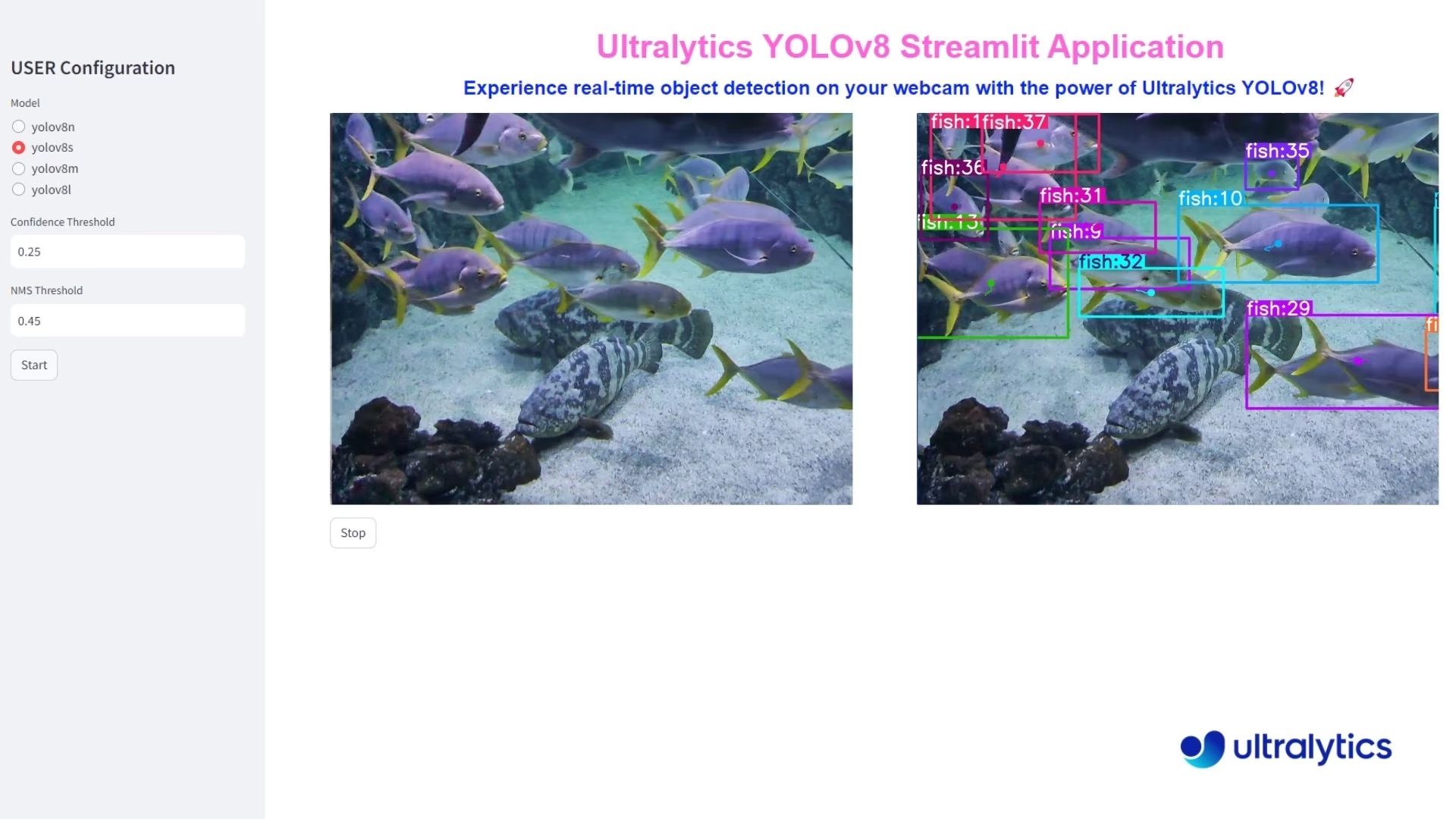 | 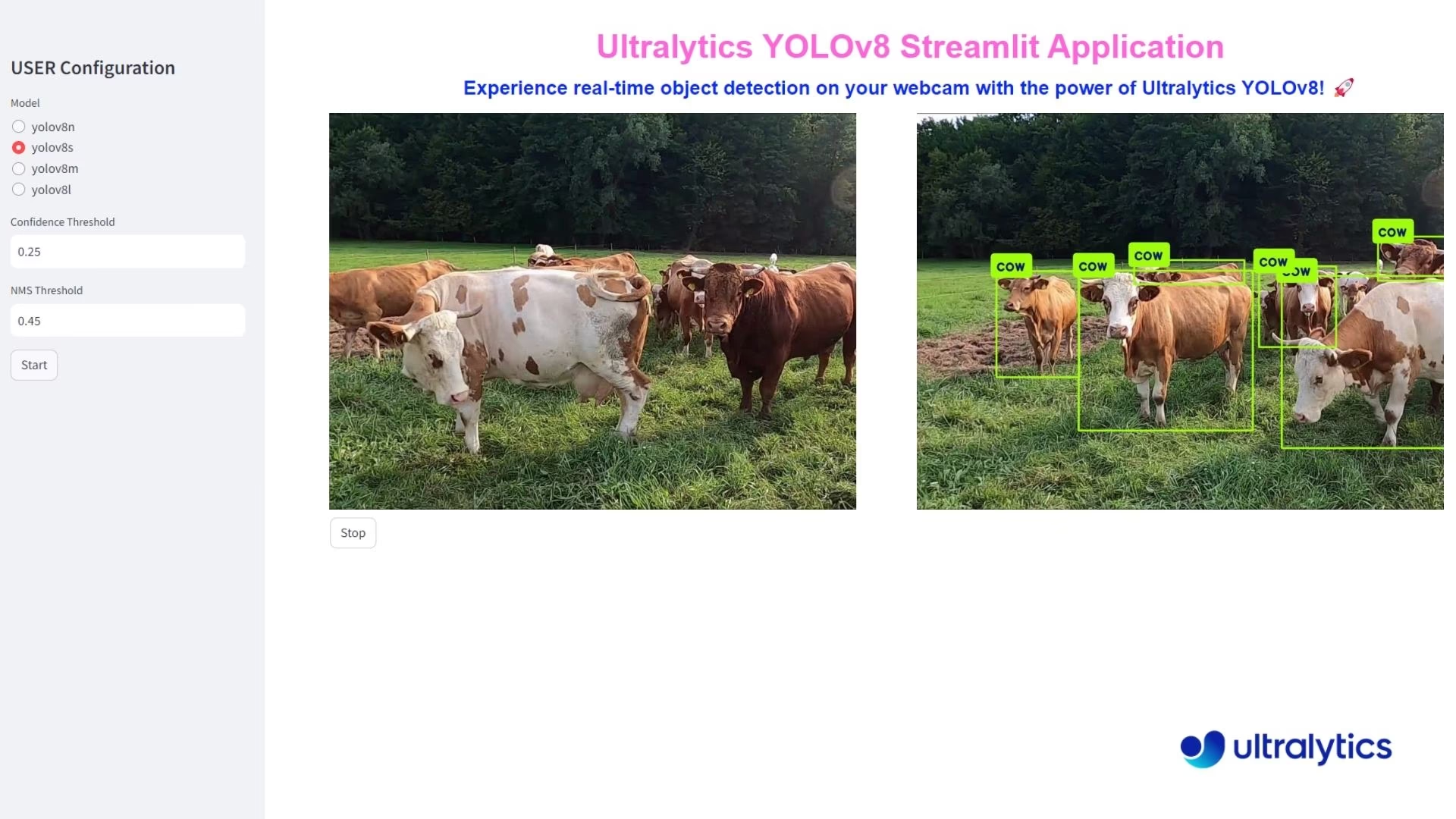 |
| Ultralytics YOLO26을 사용한 물고기 감지 | Ultralytics YOLO26을 사용한 동물 감지 |
실시간 추론의 장점#
- 실시간 객체 감지: Streamlit과 YOLO26을 결합하면 웹캠 피드에서 바로 실시간 객체 감지를 수행할 수 있습니다. 이를 통해 즉각적으로 분석하고 인사이트를 얻을 수 있으므로 즉각적인 피드백이 필요한 애플리케이션에 적합합니다.
- 사용하기 쉬운 배포: Streamlit의 대화형 인터페이스를 사용하면 폭넓은 기술 지식 없이도 애플리케이션을 쉽게 배포하고 사용할 수 있습니다. 사용자는 간단한 클릭만으로 실시간 추론을 시작할 수 있어 접근성과 사용성이 향상됩니다.
- 효율적인 리소스 활용: YOLO26의 최적화된 알고리즘은 최소한의 컴퓨팅 리소스로 고속 처리를 보장합니다. 이러한 효율성 덕분에 일반 하드웨어에서도 웹캠 추론을 원활하고 안정적으로 수행할 수 있어 고급 컴퓨터 비전을 더 많은 사용자가 이용할 수 있습니다.
Streamlit 애플리케이션 코드#
애플리케이션을 구축하기 전에 Ultralytics Python 패키지가 설치되어 있는지 확인하세요.
pip install ultralyticsyolo solutions inference
yolo solutions inference model="path/to/model.pt"
yolo solutions help # list the available solution commands and arguments이 명령을 실행하면 Ultralytics에 포함된 기본 Streamlit 인터페이스가 시작됩니다.
이 명령을 실행하면 기본 웹 브라우저에서 Streamlit 애플리케이션이 시작됩니다. 기본 제목과 부제목, 구성 옵션이 있는 사이드바가 표시됩니다. 원하는 YOLO26 모델을 선택하고 신뢰도 및 NMS 임계값을 설정한 다음 "Start" 버튼을 클릭하여 실시간 객체 감지를 시작하세요.
작동 방식#
내부적으로 Streamlit 애플리케이션은 대화형 인터페이스를 만들기 위해 Ultralytics 솔루션 모듈을 사용합니다. 추론을 시작하면 애플리케이션은 다음 작업을 수행합니다.
- 웹캠, 업로드한 동영상 파일 또는 업로드한 이미지에서 프레임을 캡처합니다.
- 각 프레임을 YOLO26 모델로 처리합니다.
- 지정한 신뢰도 및 IoU 임계값을 사용해 객체 감지를 적용합니다.
- 원본 프레임과 주석이 추가된 프레임을 모두 실시간으로 표시합니다.
- 선택한 경우 객체 추적을 활성화할 수 있습니다.
애플리케이션은 모델 매개변수를 조정하고 언제든지 추론을 시작하거나 중지할 수 있는 컨트롤을 갖춘 깔끔하고 사용하기 쉬운 인터페이스를 제공합니다.
결론#
이 가이드를 따라 Streamlit과 Ultralytics YOLO26을 사용하는 실시간 객체 감지 애플리케이션을 만들었습니다. 간단한 인터페이스를 통해 웹캠, 비디오 또는 이미지 입력에 YOLO26을 실행하며, 언제든지 스트림을 중지할 수 있습니다.
기능을 더 확장하려면 동영상 스트림 녹화, 주석이 추가된 프레임 저장, 다른 컴퓨터 비전 라이브러리와의 통합 등의 기능을 추가해 보세요.
자주 묻는 질문#
Streamlit과 Ultralytics YOLO26으로 실시간 객체 감지 애플리케이션을 간단하게 설정할 수 있습니다. 먼저 다음 명령을 사용하여 Ultralytics Python 패키지가 설치되어 있는지 확인하세요.
pip install ultralytics그런 다음 실시간 추론을 실행하는 기본 Streamlit 애플리케이션을 만들 수 있습니다.
Streamlit 애플리케이션from ultralytics import solutions inf = solutions.Inference( model="yolo26n.pt", # Ultralytics에서 지원하는 모든 모델을 사용할 수 있습니다. 예를 들어 YOLO26이나 직접 학습한 모델을 사용할 수 있습니다. ) inf.inference() # `streamlit run path/to/file.py` 명령으로 파일을 실행하세요.실제 설정에 대한 자세한 내용은 문서의 Streamlit 애플리케이션 코드 섹션을 참조하세요.
실시간 객체 감지에 Ultralytics YOLO26과 Streamlit을 사용하면 다음과 같은 여러 이점이 있습니다.
- 실시간 감지: 웹캠 피드에서 바로 높은 정확도의 실시간 객체 감지를 수행합니다.
- 사용하기 쉬운 인터페이스: Streamlit의 직관적인 인터페이스를 통해 전문적인 기술 지식이 없어도 쉽게 사용하고 배포할 수 있습니다.
- 리소스 효율성: YOLO26의 최적화된 알고리즘은 최소한의 컴퓨팅 리소스로 고속 처리를 보장합니다.
이러한 이점에 대한 자세한 내용은 실시간 추론의 장점 섹션을 참조하세요.
Ultralytics YOLO26을 통합한 Streamlit 애플리케이션을 작성한 후 다음 명령을 실행하여 배포할 수 있습니다.
streamlit run path/to/file.py이 명령은 기본 웹 브라우저에서 애플리케이션을 실행합니다. 클릭 한 번으로 YOLO26 모델을 선택하고, confidence 및 IoU 임계값을 설정한 다음, 실시간 객체 감지를 시작할 수 있습니다.
Streamlit과 Ultralytics YOLO26을 사용한 실시간 객체 감지는 다양한 분야에 적용할 수 있습니다.
- 보안: 무단 접근을 실시간으로 모니터링하고 보안 경보 시스템을 운영할 수 있습니다.
- 소매: 고객 수 집계, 진열대 관리 및 재고 추적에 활용할 수 있습니다.
- 야생동물 및 농업: 보존 활동을 위해 동물과 작물 상태를 모니터링할 수 있습니다.
더 자세한 활용 사례와 예시는 Ultralytics 솔루션을 살펴보세요.
Ultralytics YOLO26은 YOLOv5 및 R-CNN 계열 감지기와 같은 이전 모델에 비해 여러 가지 개선 사항을 제공합니다:
- 더 높은 속도와 정확도: 실시간 애플리케이션의 성능이 향상되었습니다.
- 사용 편의성: 인터페이스와 배포 과정이 간소화되었습니다.
- 리소스 효율성: 최소한의 컴퓨팅 리소스로 더 빠르게 처리하도록 최적화되었습니다.


댓글26
질문을 하거나 결과를 공유하거나 다른 사람을 도와주세요.
j3dd4h
the manual execution using rknn model (yolo predict model='./best_rknn_model' source='ppe.jpg') is working but got an error when running under Streamlit.
TypeError: model='best_rknn_model/best-rk3588.rknn' is not a supported model format. Ultralytics supports: ('PyTorch', 'TorchScript', 'ONNX', 'OpenVINO', 'TensorRT', 'CoreML', 'TensorFlow SavedModel', 'TensorFlow GraphDef', 'TensorFlow Lite', 'TensorFlow Edge TPU', 'TensorFlow.js', 'PaddlePaddle', 'MNN', 'NCNN', 'IMX', 'RKNN') See https://docs.ultralytics.com/modes/predict for help.
1RizwanMunawar
@j3dd4h Hi, thanks for sharing the details. We currently don't support the rknn model, but you can adjust this check in code to make the application work for rknn models. We will add support for this soon.
Ok, got it
@j3dd4h opened the Pull request here: https://github.com/ultralytics/ultralytics/pull/22212
NNQHuong
AttributeError: module 'torch' has no attribute '__version__' Traceback: File "C:\Users\myname\AppData\Local\Packages\PythonSoftwareFoundation.Python.3.11_qbz5n2kfra8p0\LocalCache\local-packages\Python311\site-packages\streamlit\runtime\scriptrunner\exec_code.py", line 88, in exec_func_with_error_handling result = func() ^^^^^^ File "C:\Users\myname\AppData\Local\Packages\PythonSoftwareFoundation.Python.3.11_qbz5n2kfra8p0\LocalCache\local-packages\Python311\site-packages\streamlit\runtime\scriptrunner\script_runner.py", line 579, in code_to_exec exec(code, module.__dict__) File "C:\WasteSegregation\app.py", line 1, in <module> from ultralytics import solutions File "C:\Users\myname\AppData\Local\Packages\PythonSoftwareFoundation.Python.3.11_qbz5n2kfra8p0\LocalCache\local-packages\Python311\site-packages\ultralytics\__init__.py", line 11, in <module> from ultralytics.models import NAS, RTDETR, SAM, YOLO, FastSAM, YOLOWorld File "C:\Users\myname\AppData\Local\Packages\PythonSoftwareFoundation.Python.3.11_qbz5n2kfra8p0\LocalCache\local-packages\Python311\site-packages\ultralytics\models\__init__.py", line 3, in <module> from .fastsam import FastSAM File "C:\Users\myname\AppData\Local\Packages\PythonSoftwareFoundation.Python.3.11_qbz5n2kfra8p0\LocalCache\local-packages\Python311\site-packages\ultralytics\models\fastsam\__init__.py", line 3, in <module> from .model import FastSAM File "C:\Users\myname\AppData\Local\Packages\PythonSoftwareFoundation.Python.3.11_qbz5n2kfra8p0\LocalCache\local-packages\Python311\site-packages\ultralytics\models\fastsam\model.py", line 5, in <module> from ultralytics.engine.model import Model File "C:\Users\myname\AppData\Local\Packages\PythonSoftwareFoundation.Python.3.11_qbz5n2kfra8p0\LocalCache\local-packages\Python311\site-packages\ultralytics\engine\model.py", line 11, in <module> from ultralytics.cfg import TASK2DATA, get_cfg, get_save_dir File "C:\Users\myname\AppData\Local\Packages\PythonSoftwareFoundation.Python.3.11_qbz5n2kfra8p0\LocalCache\local-packages\Python311\site-packages\ultralytics\cfg\__init__.py", line 12, in <module> from ultralytics.utils import ( File "C:\Users\myname\AppData\Local\Packages\PythonSoftwareFoundation.Python.3.11_qbz5n2kfra8p0\LocalCache\local-packages\Python311\site-packages\ultralytics\utils\__init__.py", line 51, in <module> TORCH_VERSION = torch.__version__ ^^^^^^^^^^^^^^^^^This is the error I encountered when usingfrom ultralytics import solutionssolutions.inference(model =r'C:path\to\my\model.pt')method (VSCode), can you please explain it to me? For further information, I've tried using the method for CLI and it works, but not with VSCode. I wonder if there's any method for CLI that allows me to use my custom trained model? It's YOLO11n-cls version. Thank you for reading this!1 Glenn JocherUltralytics
@NNQHuong the error you're encountering suggests a possible issue with your PyTorch installation. Please verify that PyTorch is properly installed and compatible with your Python version by running:
import torch
print(torch.__version__)
If the error persists, ensure you're using the latest version of PyTorch and Ultralytics with:
pip install --upgrade torch ultralyticsRegarding your CLI query, you can use your custom-trained YOLO11 model by specifying the model path directly, like so:
yolo predict model=path/to/your/model.pt source=your_inputFor detailed examples, check the documentation here. Let me know if additional assistance is required!
2Hi @NNQHuong, thank you for sharing the error log! It appears that the issue might be related to your PyTorch version. You may need to upgrade or downgrade it to ensure everything works correctly.
However, if this still doesn't resolve the issue, please share your code here for further testing.
Thanks, Ultralytics Team!
1Thanks for your infomative reply, it worked smoothly! I'm kind of new to this field anyway, about 6 months , I bet you can see it in my words haha, so thanks for your patience too!
1
Tech-Watt
Is it posible to use different camera index ?. It picks up the default computer webcam and there's no means of changing it.
- Glenn JocherUltralytics(수정됨)
The
Inferenceclass has nosourceargument: selecting "webcam" in the sidebar always opens camera index0(self.vid_file_name = 0inultralytics/solutions/streamlit_inference.py). To use a different camera, make it your system's default camera or change that index in the file:inf = solutions.Inference(model="yolo26n.pt") inf.inference()Run it with
streamlit run <file-name.py>.
Vectorvin
streamlit 这个解决方案可以使用tensorRT格式或者onnx格式吗?似乎程序被写死了
- Glenn JocherUltralytics(수정됨)
@Vectorvin 您好!Streamlit 方案现在也支持导出的模型格式:除了
.pt,还可以把.onnx、.torchscript、.mlpackage、.engine(TensorRT)、OpenVINO 或 RKNN 模型路径传给solutions.Inference(model="yolo26n.engine")。导出步骤请参考导出文档。需要企业级部署支持请访问ultralytics.com/license。
sathyanarayanaRP
how does the streamlit gets is input , is it possible to push frames or is it possible to integrate machine vision cameras that does not support RTSP protocals. i need comprehensive knowledge how does it work as a streaming device
- Glenn JocherUltralytics
@sathyanarayanaRP streamlit can receive input directly from a webcam or video file. For cameras that don't support RTSP, you can use USB or other compatible connections. The Streamlit app processes frames in real-time, allowing for seamless integration with various camera types. For more details, please refer to the Streamlit documentation.
Cheikh-Ahmedand
hey!
Once I run the app my Laptop camera turns on, instead of My webcam. How to use my external webcam instead of my LAPTOP camera?
Best Regards!
- Glenn JocherUltralytics(수정됨)
@Cheikh-Ahmedand the Streamlit app has no
sourceargument: choosing "webcam" in the sidebar always opens camera index0(self.vid_file_name = 0inultralytics/solutions/streamlit_inference.py). To use your external webcam, make it the system's default camera, or change that index to1(or the index of your webcam) in the file.Run the app with
yolo solutions inference, or withstreamlit run <file-name.py>for your own script. Hey ! Thanks lot for your response, but the code couldn't work with streamlit code. I pasted the following code on my Laptop anconda PowerShell Prompt:
yolo streamlit-predict solutions.inference(source=1)
Still, my Webcam can't run, but my Laptop 's Camera.
Also, I tried the below code in jupyter notebook, but the problem still persists.
from ultralytics import solutions
solutions.inference() solutions.inference(source=1)
Make sure to run the file using command
streamlit run <file-name.py>Any help either from the Respectful Staff or others would be appreciated!!!
- Glenn JocherUltralytics(수정됨)
@Cheikh-Ahmedand the Streamlit app has no
sourceargument: choosing "webcam" in the sidebar always opens camera index0(self.vid_file_name = 0inultralytics/solutions/streamlit_inference.py). To use an external webcam, set it as your system's default camera or change that index in the file. Run the app withyolo solutions inference, orstreamlit run <file-name.py>for your own script. If issues persist, please check your system's camera settings.
AdadAlShabab
Can you please provide the stramlit .py file that we need to run?
- Glenn JocherUltralytics(수정됨)
@AdadAlShabab you can use the following code to run the Streamlit application for live inference:
from ultralytics import solutions

inf = solutions.Inference(model="yolo26n.pt")
inf.inference()
Run the file with the command
streamlit run <file-name.py>. For more details, please refer to the Streamlit Live Inference Guide.
ghost
Thank you for your quick and kind response and the problem is sorted. But there is another issue while switching model to different task like pose,seg or cls and getting error of open cv not having func()
- Glenn JocherUltralytics
@Charan2128 i'm glad to hear the initial issue is resolved. Regarding the error with OpenCV when switching tasks (pose, seg, cls), please ensure you have the latest versions of both the Ultralytics package and OpenCV. You can update them using:
pip install --upgrade ultralytics opencv-pythonIf the issue persists, please provide more details about the error message and the specific function that is causing the problem. This will help us diagnose and address the issue more effectively. For further guidance, you can also refer to our Streamlit Live Inference Guide.
That was a Quick Replay and Quick fix ,Thanks for your kind support on my issues. The problem is fixed now.
- Glenn JocherUltralytics
@Charan2128 i'm glad to hear the initial issue is resolved. For the new issue with switching tasks and encountering OpenCV errors, please ensure you have the latest versions of both the Ultralytics package and OpenCV installed. You can update them using
pip install --upgrade ultralytics opencv-python. If the problem persists, please provide the specific error message and function causing the issue so we can assist you further. For more detailed guidance, you can refer to our Streamlit Live Inference Guide.
AttributeError: module 'ultralytics.solutions' has no attribute 'inference' Traceback: File "C:\Users\DELL\AppData\Local\Programs\Python\Python312\Lib\site-packages\streamlit\runtime\scriptrunner\exec_code.py", line 75, in exec_func_with_error_handling result = func() ^^^^^^ File "C:\Users\DELL\AppData\Local\Programs\Python\Python312\Lib\site-packages\streamlit\runtime\scriptrunner\script_runner.py", line 574, in code_to_exec exec(code, module.dict) File "D:\YOLO\infer.py", line 3, in solutions.inference() ^^^^^^^^^^^^^^^^^^^ This is the error im getting while running this and i have installed necessary packages.
 Paula DerrengerUltralytics(수정됨)
@Charan2128 it looks like you're encountering an
AttributeErrorbecausesolutions.inferenceis not an attribute of theultralytics.solutionsmodule. Please ensure you are using the latest version of the Ultralytics package by runningpip install --upgrade ultralytics. Then launch the Streamlit app directly from the CLI withyolo solutions inference, or from Python withsolutions.Inference(model="yolo26n.pt").inference()run viastreamlit run <file-name.py>. For more details, you can refer to our Streamlit Live Inference Guide.