Ultralytics YOLO용 MLflow 통합
소개#
실험 추적은 머신러닝 워크플로의 핵심 요소입니다. 실험 추적은 지표, 매개변수 및 아티팩트를 기록하여 결과를 재현하고 문제를 디버깅하며 모델 성능을 개선할 수 있도록 합니다. 실시간 객체 감지 기능으로 잘 알려진 Ultralytics YOLO는 전체 머신러닝 수명 주기를 관리하는 오픈 소스 플랫폼인 MLflow와 통합됩니다.
이 가이드에서는 Ultralytics YOLO 프로젝트에서 MLflow 로깅을 설정하고 사용하는 방법을 설명합니다.
MLflow란 무엇인가요?#
MLflow는 머신러닝 수명 주기를 엔드 투 엔드로 관리하기 위해 Databricks가 개발한 오픈 소스 플랫폼입니다. 실험 추적, 재현 가능한 실행을 위한 코드 패키징, 모델 공유 및 배포 도구를 포함합니다. MLflow는 모든 머신러닝 라이브러리 및 프로그래밍 언어와 함께 작동하도록 설계되었습니다.
기능#
- 지표 로깅: 각 에포크가 끝날 때 학습률, 학습 손실 및 검증 지표를 기록합니다.
- 매개변수 로깅: 학습에 사용된 모든 매개변수를 기록합니다.
- 아티팩트 로깅: 학습이 끝날 때 가중치와 구성 파일을 포함한 모델 아티팩트를 기록합니다.
설정 및 사전 요구 사항#
MLflow가 설치되어 있는지 확인하세요. 설치되어 있지 않다면 pip를 사용해 설치합니다.
pip install mlflowMLflow 로깅은 Ultralytics 설정의 mlflow 키를 통해 기본적으로 활성화됩니다. 비활성화한 경우 다시 활성화하세요:
Python 환경에서 settings 객체의 update 메서드를 호출해 설정을 변경합니다.
from ultralytics import settings

# 설정 업데이트
settings.update({"mlflow": True})

# 설정을 기본값으로 재설정
settings.reset()
사용 방법#
명령#
-
프로젝트 이름 설정: 환경 변수를 통해 프로젝트 이름을 설정할 수 있습니다.
export MLFLOW_EXPERIMENT_NAME=YOUR_EXPERIMENT_NAMEYOLO 모델을 학습할 때
project=<project>인수를 사용할 수도 있습니다. 예:yolo train project=my_project. -
실행 이름 설정: 프로젝트 이름을 설정하는 것과 마찬가지로 환경 변수를 통해 실행 이름을 설정할 수 있습니다.
export MLFLOW_RUN=YOUR_RUN_NAMEYOLO 모델을 학습할 때
name=<name>인수를 사용할 수도 있습니다. 예:yolo train project=my_project name=my_name. -
로컬 MLflow 서버 시작:
MLFLOW_TRACKING_URI이 없으면 실행 기록은 학습을 수행하는 디렉터리에 있는 MLflow의 기본 로컬 저장소에 기록됩니다(MLflow 3.7 이상에서는 해당 디렉터리에mlruns/이력이 이미 있는 경우가 아니라면mlflow.db, 이전 버전에서는mlruns/). 실행 기록을 보려면 같은 디렉터리에서 다음 명령을 실행합니다:mlflow ui기본적으로 로컬 서버가
http://127.0.0.1:5000에서 시작됩니다. 학습 실행을 다른 추적 서버에 연결하려면 학습 전에MLFLOW_TRACKING_URI을 내보냅니다:export MLFLOW_TRACKING_URI=http://127.0.0.1:5000 -
학습 후에도 MLflow 실행 활성 상태 유지: 기본적으로 Ultralytics는 학습이 끝나면 시작한 MLflow 실행을 종료합니다. 실행이 닫히기 전에 학습 오류가 발생하면 상태는
FAILED으로 설정됩니다. 학습 전에 직접 시작한 실행은 재사용되며 열린 상태로 유지됩니다. 실행을 열린 상태로 유지하려면(예: 동일한 노트북에서 추가 지표나 아티팩트를 기록하려는 경우) 학습 전에MLFLOW_KEEP_RUN_ACTIVE을True로 설정합니다:export MLFLOW_KEEP_RUN_ACTIVE=True1,true,yes,on,y,t값은 이 동작을 활성화합니다(대소문자 구분 없음). 설정되지 않은 변수를 포함한 다른 값은 기본 동작인 run 종료를 유지합니다. 이후mlflow.end_run()을 사용해 수동으로 종료해야 합니다.
로깅#
기록은 on_pretrain_routine_end, on_train_epoch_end, on_fit_epoch_end, on_train_end 콜백 함수에서 처리합니다. 이러한 함수는 학습 프로세스의 해당 단계에서 자동으로 호출되며, 매개변수, 메트릭 및 아티팩트 기록을 처리합니다. teardown 콜백은 학습 실패로 인해 열린 상태로 남은 실행을 종료합니다.
예제#
-
사용자 지정 메트릭 로깅:
on_fit_epoch_end이 호출되기 전에trainer.metrics딕셔너리를 수정하여 로깅할 사용자 지정 메트릭을 추가할 수 있습니다. -
실험 보기: 로그를 보려면 MLflow 서버(일반적으로
http://127.0.0.1:5000)로 이동한 다음 실험과 run을 선택합니다.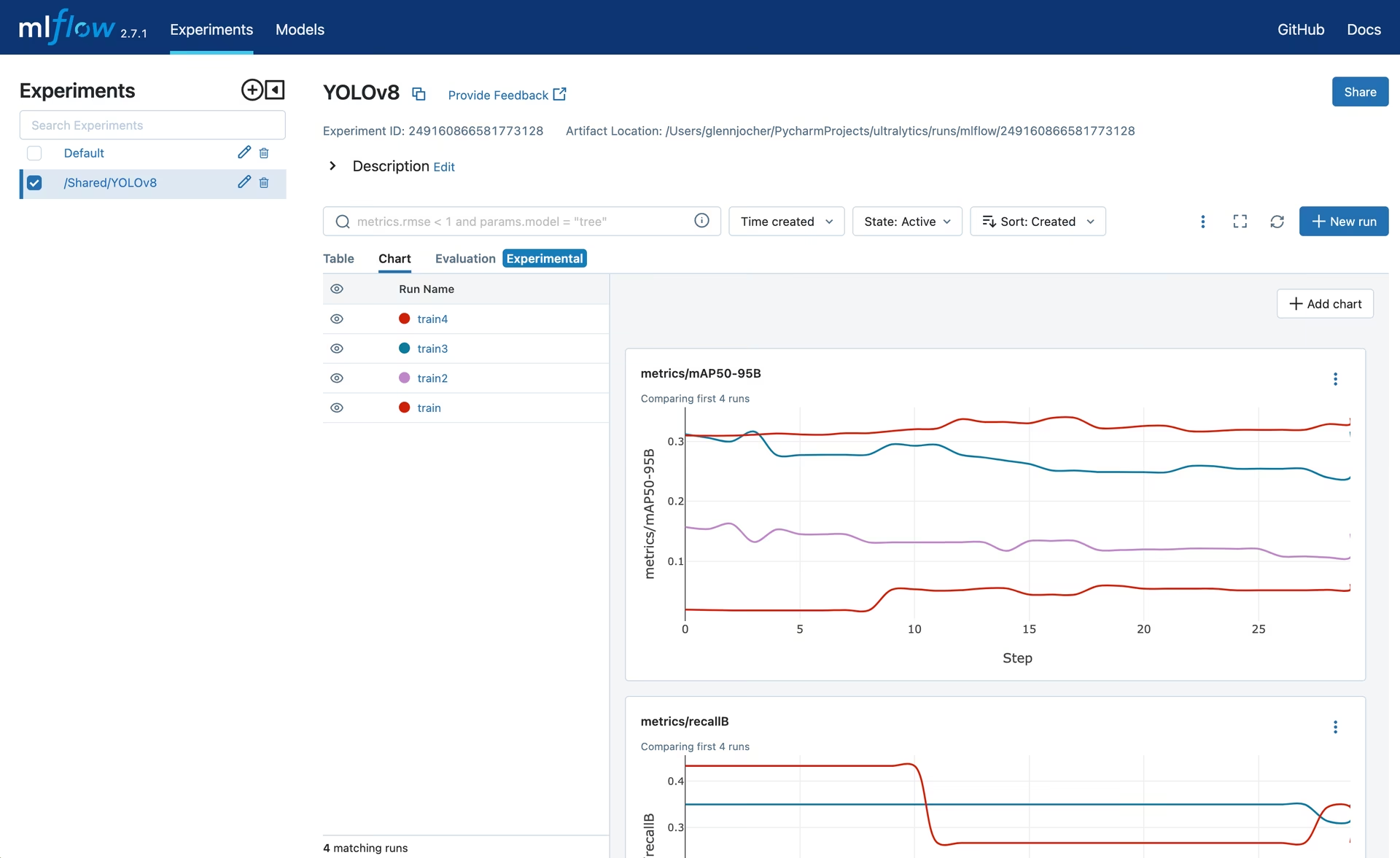
-
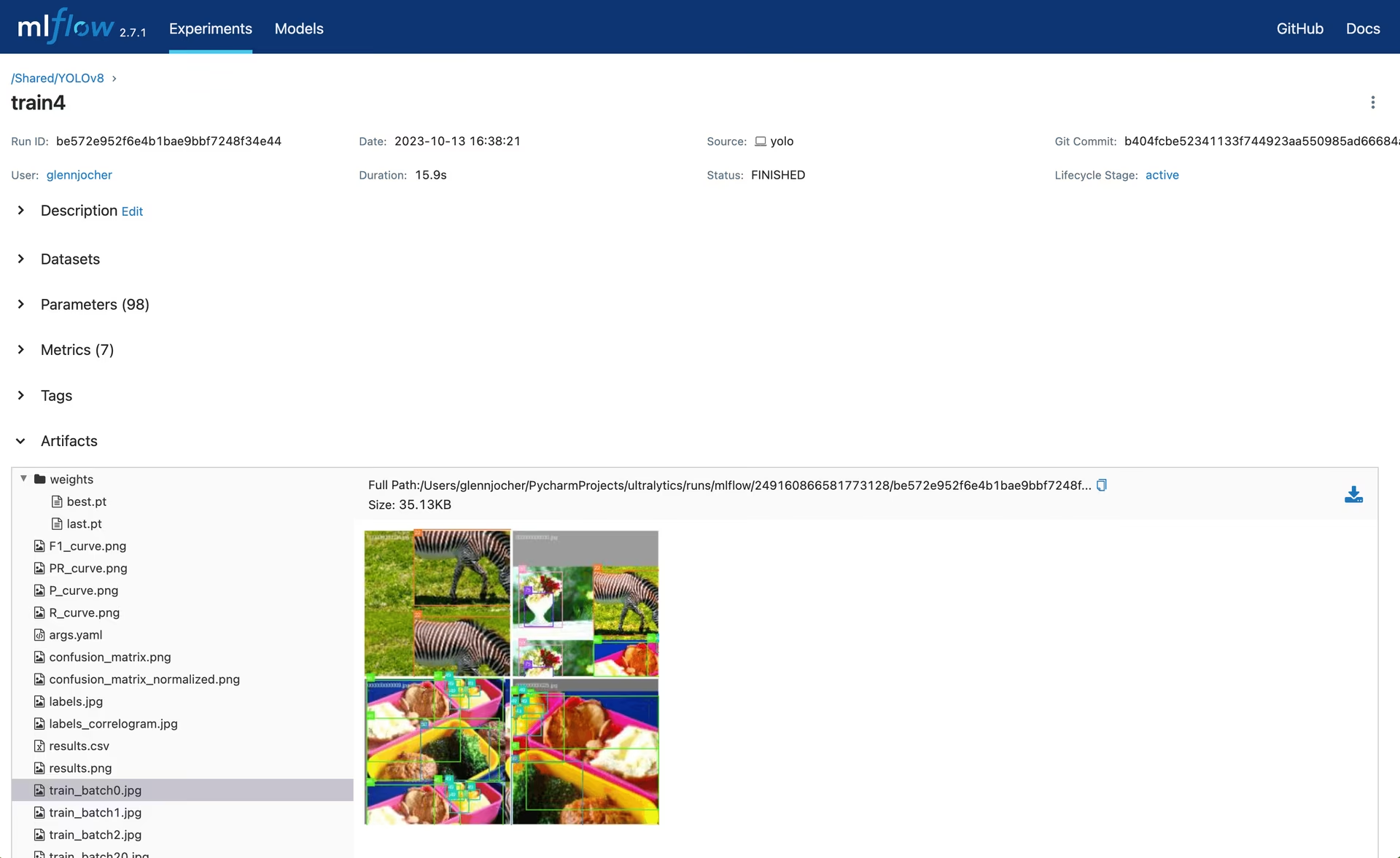
실행 보기: 실행은 실험에 포함된 개별 모델입니다. 실행을 클릭하면 업로드된 아티팩트와 모델 가중치를 비롯한 세부 정보를 확인할 수 있습니다.
MLflow 비활성화#
MLflow 로깅을 끄려면 다음을 수행합니다:
yolo settings mlflow=False결론#
MLflow와 Ultralytics YOLO의 로깅 통합을 사용하면 머신러닝 실험을 간편하게 추적할 수 있습니다. 모델 개발 및 배포 과정 전반에서 성능 지표를 모니터링하고 아티팩트를 관리할 수 있습니다.
자주 묻는 질문#
Ultralytics YOLO에서 MLflow 로깅을 설정하려면 먼저 MLflow가 설치되어 있는지 확인해야 합니다. pip를 사용해 설치할 수 있습니다:
pip install mlflowMLflow 로깅은 Ultralytics 설정의
mlflow키를 통해 기본적으로 활성화됩니다. 비활성화한 경우 다시 활성화하세요:Ultralytics MLflow 설정 업데이트from ultralytics import settings # 설정 업데이트 settings.update({"mlflow": True}) # 설정을 기본값으로 재설정 settings.reset()마지막으로 학습을 마친 후 실행 기록을 보려면 학습을 수행한 디렉터리에서 로컬 MLflow 서버를 시작합니다:
mlflow uiMLflow를 사용하는 Ultralytics YOLO는 학습 과정 전반에 걸쳐 다양한 지표, 매개변수 및 아티팩트 로깅을 지원합니다.
- 메트릭 로깅: 각 에포크가 끝날 때와 학습이 완료될 때 메트릭을 추적합니다.
- 파라미터 로깅: 학습 프로세스에 사용된 모든 파라미터를 로깅합니다.
- 아티팩트 로깅: 학습 후 가중치 및 구성 파일과 같은 모델 아티팩트를 저장합니다.
예, 설정을 업데이트하면 Ultralytics YOLO의 MLflow 로깅을 비활성화할 수 있습니다. CLI를 사용하면 다음과 같이 설정할 수 있습니다:
yolo settings mlflow=False설정을 추가로 사용자 지정하거나 초기화하려면 설정 가이드를 참조하세요.
로컬 MLflow 서버에서 Ultralytics YOLO 실험을 보려면 학습을 수행한 디렉터리에서 다음 명령을 실행합니다:
mlflow ui이 명령은 기본적으로
http://127.0.0.1:5000에서 로컬 서버를 시작합니다. 서버를 중지하려면 해당 터미널에서Ctrl+C을 누릅니다.추가 명령 옵션은 명령 섹션을 참조하세요.
학습을 시작하기 전에
MLFLOW_KEEP_RUN_ACTIVE환경 변수를True로 설정합니다:export MLFLOW_KEEP_RUN_ACTIVE=True기본값은
False이므로 학습이 완료되면 Ultralytics는 시작한 실행에서mlflow.end_run()을 호출합니다.MLFLOW_KEEP_RUN_ACTIVE=True를 사용하면 실행이 열린 상태로 유지되므로 동일한 Python 세션에서 추가 지표, 매개변수 또는 아티팩트를 기록할 수 있습니다. 작업이 끝나면mlflow.end_run()으로 직접 실행을 종료하세요.1,true,yes,on,y,t값은 이 동작을 활성화합니다(대소문자 구분 없음).MLflow를 Ultralytics YOLO와 통합하면 머신러닝 실험을 관리할 때 여러 이점이 있습니다:
- 향상된 실험 추적: 다양한 실행과 그 결과를 추적하고 비교할 수 있습니다.
- 개선된 모델 재현성: 모든 파라미터와 아티팩트를 로깅하여 실험을 재현할 수 있도록 합니다.
- 성능 모니터링: 시간에 따른 성능 메트릭을 시각화하여 데이터에 기반한 모델 개선 결정을 내릴 수 있습니다.
- 간소화된 워크플로: 로깅 프로세스를 자동화하여 수동 추적보다 모델 개발에 더 집중할 수 있습니다.
- 협업 개발: 팀원과 실험 결과를 공유하여 협업과 지식 공유를 강화할 수 있습니다.


댓글30
질문을 하거나 결과를 공유하거나 다른 사람을 도와주세요.
UltralyticsAssistantUltralytics
👋 Bonjour, merci pour votre intérêt pour Ultralytics 🚀! Nous vous recommandons de consulter notre documentation complète sur les Intégrations MLflow pour découvrir comment configurer et utiliser MLflow avec Ultralytics YOLO afin d'améliorer le suivi des expériences et la reproductibilité des modèles.
Si ceci est un 🐛 Rapport de bug, veuillez fournir un exemple minimal reproductible pour nous aider à résoudre le problème.
Si vous avez une ❓ Question ou besoin d’aide avec la configuration MLflow, n'hésitez pas à partager plus de détails, tels que votre environnement d'exécution, les étapes effectuées et les éventuels messages d'erreur rencontrés.
Mise à jour
Assurez-vous que vous utilisez la version la plus récente d’
ultralyticsavec toutes les dépendances dans un environnement Python>=3.8 et PyTorch>=1.8. Vous pouvez mettre à jour avec la commande suivante :pip install -U ultralyticsEnvironnements
Vous pouvez exécuter YOLO dans les environnements suivants avec MLflow :
- Notebooks avec GPU gratuit :


- Cloud : Consultez nos guides rapides pour GCP et AWS.
- Docker Image : Consultez notre guide Docker
.
Communauté
Rejoignez la communauté Ultralytics où cela vous convient le mieux ! Pour des discussions en temps réel, rendez-vous sur notre Discord 🎧. Pour des discussions approfondies, visitez notre Discourse, ou échangez avec la communauté sur notre Subreddit.
Statut

Si ce badge est vert, tous les tests Ultralytics CI sont actuellement réussis, garantissant le bon fonctionnement de toutes les Modes et Tâches sur macOS, Windows et Ubuntu.
Ceci est une réponse automatisée 🤖. Un ingénieur Ultralytics examinera également votre discussion prochainement. 😊
 Glenn JocherUltralytics
Bonjour! Cette discussion est dédiée à l'intégration de MLflow avec Ultralytics YOLO. MLflow est un excellent outil pour suivre vos expériences, mesurer les performances et gérer les artefacts de vos modèles YOLO.
N'hésitez pas à poser vos questions sur cette intégration dans les commentaires ci-dessous. Notre équipe Ultralytics sera ravie de vous aider avec la configuration, le suivi des expériences ou tout problème que vous pourriez rencontrer.
Si vous utilisez déjà MLflow avec Ultralytics, nous serions également intéressés par vos retours d'expérience et vos cas d'utilisation.
- Notebooks avec GPU gratuit :
BlitzBricksterYY-db
For multiple GPU training a YOLO model, with autolog enabled and also I manually logged a few items by using mlflow.log_xxx() and I also logged the customized PyFunc model, it turns out to be multiple runs are generated per training.
I want to only have 1 run and it better have all the logged artifacts.
- Can you give a best practice advice?
- which GPU rank in a multiple GPU training is used for autologging purpose? I suppose is it the highest rank GPU?
Thanks Best, Yang
my code example:
from pyspark.ml.torch.distributor import TorchDistributor settings.update({"mlflow":True}) # if you do want to autolog. mlflow.autolog(disable = False) def train_fn(): from ultralytics import YOLO import torch import mlflow import torch.distributed as dist from ultralytics import settings from mlflow.types.schema import Schema, ColSpec from mlflow.models.signature import ModelSignature model = YOLO(f"{project_location}/raw_model/yolov8n.pt") model.train( batch=8, device=[0, 1], data="./coco8.yaml", # ref: https://github.com/ultralytics/ultralytics/blob/main/ultralytics/cfg/datasets/coco8.yaml epochs=5, project=f'{tmp_project_location}', exist_ok=True, fliplr=1, flipud=1, perspective=0.001, degrees=.45 ) # after training is done. if not dist.is_initialized(): # import torch.distributed as dist dist.init_process_group("nccl") rank = dist.get_rank() # we divert all other manual logging to the last GPU with max rank. if rank == torch.cuda.device_count() - 1: mlflow.log_params({"rank":rank}) yolo_wrapper = YOLOC(model.trainer.best) mlflow.pyfunc.log_model( artifact_path="model", artifacts={'model_path': str(model.trainer.save_dir), "best_point": str(model.trainer.best)}, python_model=yolo_wrapper, signature=signature ) mlflow.end_run() experiment_name = "/Users/yang.yang@databricks.com/ConvaTec Workshop Computer Vision/Experiments_YOLO_CoCo" mlflow.set_experiment(experiment_name) experiment_id = mlflow.get_experiment_by_name(experiment_name).experiment_id # os.environ['MLFLOW_EXPERIMENT_NAME'] = experiment_name os.environ['MLFLOW_EXPERIMENT_ID'] = experiment_id os.environ['MLFLOW_ENABLE_SYSTEM_METRICS_LOGGING'] = "true" with mlflow.start_run(experiment_id = experiment_id) as run: print("Active run_id: {}".format(run.info.run_id)) os.environ['MLFLOW_RUN_ID'] = run.info.run_id # try to register under the same run distributor = TorchDistributor(num_processes=2, local_mode=True, use_gpu=True ) distributor.run(train_fn)Also, is it possible to enable multi-GPU training to use the project folder on Databricks Unity Catalog Volume directory?
e.g.,
project=f'{tmp_project_location}',from above code in themodel.train()args.- Glenn JocherUltralytics
To achieve a single MLflow run during multi-GPU training, ensure manual logging is executed only once, typically on the main GPU (rank 0). For project directories, you can specify the Unity Catalog Volume directory by setting the
projectparameter to your desired path. This should work as expected on Databricks. If you encounter issues, verify the permissions and path configurations for the Unity Catalog Volume. I have tested, in multi-GPU settings,
- dbfs path wont work in
project= - Unity Catalog path wont work in
project= - VM path such as
project='/tmp/project/'works.
I have included in the
train_fn()the os.environ() for both databricks_host and databricks_pat (token). This doesn't help.In a single GPU setting, these all work.
I suspect the credential env vars are not passed correctly to worker GPUs or threads. Could you verify?
- dbfs path wont work in
2nd Issue: for autologging system metrics, there are confusions of logging each node, each GPU's system metrics into the MLflow run.
What is the best practice if I have two nodes and each node has two GPUs? for each node, it has GPU 0 and GPU 1 as local rank.
-
Plan A I tried: Logging all into the same MLflow run will yield 2 GPUs. Looks like overwritten issues happened between two nodes.
-
Logging into 4 different mlflow runs (each GPU created a run), then each run has its own GPU 0 and GPU 1, in total, I have 2*4 = 8 GPU system metrics, there must be duplications there.
What is the right way to do that?
-
- Glenn JocherUltralytics
@BlitzBricksterYY-db to avoid overwriting issues during multi-GPU and multi-node training with MLflow autologging, the best practice is usually to log system metrics from only the primary GPU (rank 0) on each node. This ensures unique entries and avoids duplication or conflicts. Configure logging in your script such that only rank 0 GPUs per node execute the logging logic. Let us know if further clarification is needed!
For system metrics like memory and network bandwidth usage, it is automatically done in the .train() function. I have the need to monitor each GPU on each node, i.e., [[0,1],[0,1]], what is the best way to achieve that? Automatically logging system metrics will overwritten each other cause only record GPU_0 and GPU_1, no matter it is node_0 or node_1.
I know for now single node with multiGPU is a clear solution as it is [0,1,2,3], logged perfectly by your auto logging within .train()
- Glenn JocherUltralytics
@BlitzBricksterYY-db to monitor system metrics for each GPU on each node in a multi-node, multi-GPU setup, the best approach is to disable automatic MLflow autologging for system metrics and implement custom logging. You can use GPU-specific identifiers (e.g., node rank and GPU local rank) to avoid overwriting and ensure distinct logs for each GPU. For assistance with custom implementations, refer to the MLflow documentation. Let us know if further clarification is needed!
1
vini-c-costa
Hey
I'm facing a strange situation between yolov8 and mlflow. I created a local container to run a postgres environment, and then I tried the following script:
import pandas as pd
from ultralytics import YOLO, settings
import os
import json
import mlflow


settings.reset()

settings.update({
    'mlflow': True,
    'clearml': False,
    'comet': False,
    'dvc': False,
    'hub': False,
    'neptune': False,
    'raytune': False,
    'tensorboard': False,
    'wandb': False
})

mlflow.set_experiment("Teste 01")
mlflow.set_tracking_uri("postgresql://user:senha@localhost:5432/postgres")

model_name = "yolov8n-cls.pt"
model = YOLO(model_name)
epochs = 3
image_size = 128

with mlflow.start_run(run_name=f'{model_name}-{epochs}-{image_size}'):
    model.train(name=f'{model_name}-{epochs}-{image_size}', data='dataset', epochs=epochs, imgsz=image_size, hsv_h=1, hsv_s=1, hsv_v=1)
The reason I maintained some mlflow configs out of with statement is because I would like to preserve all parameters, metrics and artifacts generated automatically by yolo-mlflow settings.
And the error I found was during the db creation: the experiment_id generated by yolo is bigger than serial4 type, which is the type used as postgres-mlflow default (a bigint type would solve I suppose). So, due to that, I'm facing the following error:
Traceback (most recent call last):
  File "/home/viniciusconti/miniconda3/envs/carbigdata_py310/lib/python3.10/site-packages/sqlalchemy/engine/base.py", line 1969, in _exec_single_context
    self.dialect.do_execute(
  File "/home/viniciusconti/miniconda3/envs/carbigdata_py310/lib/python3.10/site-packages/sqlalchemy/engine/default.py", line 922, in do_execute
    cursor.execute(statement, parameters)
psycopg2.errors.NumericValueOutOfRange: value "653626019723855191" is out of range for type integer
LINE 3: WHERE experiments.experiment_id = '653626019723855191' AND e...
                                          ^


The above exception was the direct cause of the following exception:

Traceback (most recent call last):
  File "/home/viniciusconti/miniconda3/envs/carbigdata_py310/lib/python3.10/site-packages/mlflow/store/db/utils.py", line 141, in make_managed_session
    yield session
  File "/home/viniciusconti/miniconda3/envs/carbigdata_py310/lib/python3.10/site-packages/mlflow/store/tracking/sqlalchemy_store.py", line 386, in get_experiment
    return self._get_experiment(
  File "/home/viniciusconti/miniconda3/envs/carbigdata_py310/lib/python3.10/site-packages/mlflow/store/tracking/sqlalchemy_store.py", line 360, in _get_experiment
    .one_or_none()
  File "/home/viniciusconti/miniconda3/envs/carbigdata_py310/lib/python3.10/site-packages/sqlalchemy/orm/query.py", line 2774, in one_or_none
    return self._iter().one_or_none()  # type: ignore
  File "/home/viniciusconti/miniconda3/envs/carbigdata_py310/lib/python3.10/site-packages/sqlalchemy/orm/query.py", line 2847, in _iter
    result: Union[ScalarResult[_T], Result[_T]] = self.session.execute(
  File "/home/viniciusconti/miniconda3/envs/carbigdata_py310/lib/python3.10/site-packages/sqlalchemy/orm/session.py", line 2308, in execute
    return self._execute_internal(
  File "/home/viniciusconti/miniconda3/envs/carbigdata_py310/lib/python3.10/site-packages/sqlalchemy/orm/session.py", line 2190, in _execute_internal
    result: Result[Any] = compile_state_cls.orm_execute_statement(
  File "/home/viniciusconti/miniconda3/envs/carbigdata_py310/lib/python3.10/site-packages/sqlalchemy/orm/context.py", line 293, in orm_execute_statement
    result = conn.execute(
  File "/home/viniciusconti/miniconda3/envs/carbigdata_py310/lib/python3.10/site-packages/sqlalchemy/engine/base.py", line 1416, in execute
    return meth(
  File "/home/viniciusconti/miniconda3/envs/carbigdata_py310/lib/python3.10/site-packages/sqlalchemy/sql/elements.py", line 517, in _execute_on_connection
    return connection._execute_clauseelement(
  File "/home/viniciusconti/miniconda3/envs/carbigdata_py310/lib/python3.10/site-packages/sqlalchemy/engine/base.py", line 1639, in _execute_clauseelement
    ret = self._execute_context(
  File "/home/viniciusconti/miniconda3/envs/carbigdata_py310/lib/python3.10/site-packages/sqlalchemy/engine/base.py", line 1848, in _execute_context
    return self._exec_single_context(
  File "/home/viniciusconti/miniconda3/envs/carbigdata_py310/lib/python3.10/site-packages/sqlalchemy/engine/base.py", line 1988, in _exec_single_context
    self._handle_dbapi_exception(
  File "/home/viniciusconti/miniconda3/envs/carbigdata_py310/lib/python3.10/site-packages/sqlalchemy/engine/base.py", line 2344, in _handle_dbapi_exception
    raise sqlalchemy_exception.with_traceback(exc_info[2]) from e
  File "/home/viniciusconti/miniconda3/envs/carbigdata_py310/lib/python3.10/site-packages/sqlalchemy/engine/base.py", line 1969, in _exec_single_context
    self.dialect.do_execute(
  File "/home/viniciusconti/miniconda3/envs/carbigdata_py310/lib/python3.10/site-packages/sqlalchemy/engine/default.py", line 922, in do_execute
    cursor.execute(statement, parameters)
sqlalchemy.exc.DataError: (psycopg2.errors.NumericValueOutOfRange) value "653626019723855191" is out of range for type integer
LINE 3: WHERE experiments.experiment_id = '653626019723855191' AND e...
                                          ^

[SQL: SELECT experiments.experiment_id AS experiments_experiment_id, experiments.name AS experiments_name, experiments.artifact_location AS experiments_artifact_location, experiments.lifecycle_stage AS experiments_lifecycle_stage, experiments.creation_time AS experiments_creation_time, experiments.last_update_time AS experiments_last_update_time
FROM experiments
WHERE experiments.experiment_id = %(experiment_id_1)s AND experiments.lifecycle_stage IN (%(lifecycle_stage_1_1)s, %(lifecycle_stage_1_2)s)]
[parameters: {'experiment_id_1': '653626019723855191', 'lifecycle_stage_1_1': 'active', 'lifecycle_stage_1_2': 'deleted'}]
(Background on this error at: https://sqlalche.me/e/20/9h9h)

During handling of the above exception, another exception occurred:

Traceback (most recent call last):
  File "/home/viniciusconti/carbigdata/repos/color-ml/yolo-test/yolo_impl.py", line 32, in <module>
    with mlflow.start_run(run_name=f'{model_name}-3-128'):
  File "/home/viniciusconti/miniconda3/envs/carbigdata_py310/lib/python3.10/site-packages/mlflow/tracking/fluent.py", line 377, in start_run
    active_run_obj = client.create_run(
  File "/home/viniciusconti/miniconda3/envs/carbigdata_py310/lib/python3.10/site-packages/mlflow/tracking/client.py", line 339, in create_run
    return self._tracking_client.create_run(experiment_id, start_time, tags, run_name)
  File "/home/viniciusconti/miniconda3/envs/carbigdata_py310/lib/python3.10/site-packages/mlflow/tracking/_tracking_service/client.py", line 132, in create_run
    return self.store.create_run(
  File "/home/viniciusconti/miniconda3/envs/carbigdata_py310/lib/python3.10/site-packages/mlflow/store/tracking/sqlalchemy_store.py", line 462, in create_run
    experiment = self.get_experiment(experiment_id)
  File "/home/viniciusconti/miniconda3/envs/carbigdata_py310/lib/python3.10/site-packages/mlflow/store/tracking/sqlalchemy_store.py", line 385, in get_experiment
    with self.ManagedSessionMaker() as session:
  File "/home/viniciusconti/miniconda3/envs/carbigdata_py310/lib/python3.10/contextlib.py", line 153, in __exit__
    self.gen.throw(typ, value, traceback)
  File "/home/viniciusconti/miniconda3/envs/carbigdata_py310/lib/python3.10/site-packages/mlflow/store/db/utils.py", line 155, in make_managed_session
    raise MlflowException(message=e, error_code=BAD_REQUEST)
mlflow.exceptions.MlflowException: (psycopg2.errors.NumericValueOutOfRange) value "653626019723855191" is out of range for type integer
LINE 3: WHERE experiments.experiment_id = '653626019723855191' AND e...
                                          ^

[SQL: SELECT experiments.experiment_id AS experiments_experiment_id, experiments.name AS experiments_name, experiments.artifact_location AS experiments_artifact_location, experiments.lifecycle_stage AS experiments_lifecycle_stage, experiments.creation_time AS experiments_creation_time, experiments.last_update_time AS experiments_last_update_time
FROM experiments
WHERE experiments.experiment_id = %(experiment_id_1)s AND experiments.lifecycle_stage IN (%(lifecycle_stage_1_1)s, %(lifecycle_stage_1_2)s)]
[parameters: {'experiment_id_1': '653626019723855191', 'lifecycle_stage_1_1': 'active', 'lifecycle_stage_1_2': 'deleted'}]
(Background on this error at: https://sqlalche.me/e/20/9h9h)
I was wondering if I could just define the experiment_id as a serial4, maintaining it in MLFlow patterns (numerical order e.g 1, 2, 3, 4...). I thought about fix it manually by changing the type directly on my database, but I believe that there's a smarter way to fix it.
Does anyone know how to solve it?
- Glenn JocherUltralytics
@vini-c-costa it seems the issue is related to the experiment_id exceeding the integer range in PostgreSQL. You might consider altering the database schema to use a
bigintfor the experiment_id. This should resolve the out-of-range error. For further details on MLflow integration, please visit the Ultralytics documentation.
MoAbbasid
@pderrenger Ive set the tracking uri correctly to point to the sqlite database but the db itself created after the Yolo training run is empty and has experiments or run, this is automatically generated by Ultralytics right? so this is an issue on Ultralytics side?
 Paula DerrengerUltralytics
Hi @MoAbbasid,
Thanks for reaching out! The creation and management of the SQLite database for MLflow is generally handled by MLflow itself rather than directly by Ultralytics. If the database is empty after a training run, it's possible that the MLflow tracking URI might not be set correctly, or the logging calls are not being executed as expected.
Here are a few things you can check:
- Ensure that MLflow is correctly installed and that the MLflow server is running during your training sessions.
- Verify that the
MLFLOW_TRACKING_URIis correctly pointing to your SQLite database. - Confirm that MLflow logging is enabled in your Ultralytics settings and that the logging functions (
on_pretrain_routine_end,on_fit_epoch_end, andon_train_end) are being triggered.
If these steps don't resolve the issue, it might be helpful to check the MLflow logs for any errors or warnings that could provide more insight.
Let us know how it goes or if you need further assistance!
how to set mlflow to true using CLI?
Im trying to log YOLO experiments using mlflow on a remote server, any idea how to do that?
do I have to use python and with mlflow.start run()? or can I do something similar from the command line?
- Paula DerrengerUltralytics
You can enable MLflow logging directly from the command line without needing to use
mlflow.start_run(). Simply update the settings using the CLI:yolo settings mlflow=TrueThen, you can set the project and run names when training your model:
yolo train project=my_project name=my_runThis will handle the logging of metrics, parameters, and artifacts automatically. For more detailed guidance, please refer to the documentation. Happy logging! 🚀
@pderranger, when I run this and check my mlflow server running locally I dont see the experiment results, only when I specify it in python mlflow.start run() do I see the run
and mlflow.autolog doesnt work, could you provide a working example of all segmentation results logged to mlflow?
- Paula DerrengerUltralytics(수정됨)
Thank you for your feedback! To ensure all segmentation results are logged to MLflow, you can follow these steps:
-
Enable MLflow Logging:
yolo settings mlflow=True -
Set Project and Run Names:
export MLFLOW_EXPERIMENT_NAME=my_experiment export MLFLOW_RUN=my_run -
Train Your Model:
yolo segment train project=my_project name=my_run
If
mlflow.autologisn't working as expected, you can manually log metrics and artifacts using themlflowlibrary within your training script. Here’s a basic example:import mlflow from ultralytics import YOLO # Start an MLflow run with mlflow.start_run(): # Load and train your model model = YOLO('yolov8n-seg.pt') results = model.train(data='coco128-seg.yaml', epochs=100, imgsz=640) # Log metrics and artifacts mlflow.log_metrics({'mAP50_95': results.box.map}) mlflow.log_artifacts(str(model.trainer.save_dir))This approach ensures all relevant data is logged to your MLflow server. For more detailed guidance, please refer to the MLflow Integration Documentation. If you have any further questions, feel free to ask! 😊
-
@pderranger, hi thanks I managed to get it to run for training with your code, but my val runs dont show up, any idea how I can log val mode in mlflow?
@pderranger, also it is reading from "runs/mlflow" directory fine but when I try to set up a sqlite db it fails to read the logged files
@pderranger, hi when setting mlflow=True, Yolov8 logs it under runs/mlflow, which includes the experiments, runs, and artifacts and there is an mlflow.db file, if I want these logs to be an sqlite format and have mlflow read them, what can I do? USING CLI
even tho --backend-store-uri runs the logged experiments correctly, the "runs/mlflow.db" database folder has empty experiments and runs, this means it an Ultralytics logging issue not an mlflow issue, please advise
@pderranger, how do I get yolov8 to automatically log to sqlite database?
- Paula DerrengerUltralytics(수정됨)
Hello @MoAbbasid,
For logging validation runs in MLflow, you can manually log the metrics after validation. Here's a basic example:
import mlflow
from ultralytics import YOLO

model = YOLO('yolov8n-seg.pt')
results = model.val(data='coco128-seg.yaml')

# Log the validation metrics you need, for example mAP50-95
mlflow.log_metrics({'mAP50_95': results.box.map})
Regarding your issue with setting up a SQLite database for MLflow, ensure that your MLflow server is correctly configured to use the SQLite backend. You might need to specify the SQLite URI when starting the MLflow server:
mlflow server --backend-store-uri sqlite:///mlflow.db --default-artifact-root ./artifactsMake sure the path to the SQLite database (
mlflow.db) is correct and accessible. If you continue to face issues, checking the MLflow server logs for any error messages could provide more insights.If you need further assistance, feel free to ask!
@pderranger, I initiated the server using your code: "mlflow server --backend-store-uri sqlite:///mlflow.db --default-artifact-root ./artifacts", and I have set mlflow=True in yolo settings but after I train the results are still logged to directory runs/mlflow and not the sqlite database, I also tried setting "export SET_TRACKING_URI=/runs/mlflow.db" but that threw an error. any advise about how to have the logs stored in an sql database in the CLI automatically?
- Paula DerrengerUltralytics
Hello @MoAbbasid,
It seems like there might be a misunderstanding in setting the MLflow tracking URI. The
SET_TRACKING_URIenvironment variable you tried setting is not recognized by MLflow. Instead, you should set theMLFLOW_TRACKING_URIenvironment variable to point to your SQLite database. Here’s how you can do it:-
Set the MLflow Tracking URI:
export MLFLOW_TRACKING_URI=sqlite:///mlflow.db -
Start the MLflow Server: Ensure you start the MLflow server with the correct backend store URI if you are using a server:
mlflow server --backend-store-uri sqlite:///mlflow.db --default-artifact-root ./artifacts -
Run Your Training: With the environment variable set, start your training as usual. MLflow should now log directly to the SQLite database specified.
If you continue to face issues, please ensure that the path to the SQLite database is correct and accessible, and that there are no permission issues. Also, verify that the MLflow version you are using supports the features and configurations you are trying to use.
Let me know if this helps or if you need further assistance!
-