带 OBB 的 DOTA 数据集
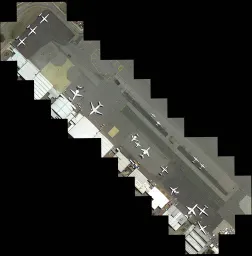
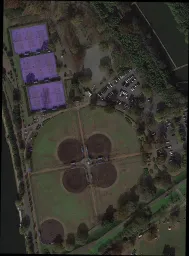
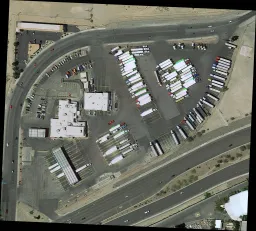
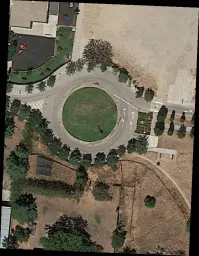
DOTA 数据集是航空影像目标检测的大规模基准测试集,发布了三个版本(v1.0、v1.5、v2.0),涵盖 18 个类别、最多 170 万个有向边界框(OBB)标注,图像采集自各种航空传感器和平台。
在 Ultralytics Platform 上探索官方托管的 DOTA v1.5 和 DOTA v1.0 数据集,预览有向标注、查看统计信息,并克隆数据集用于训练。
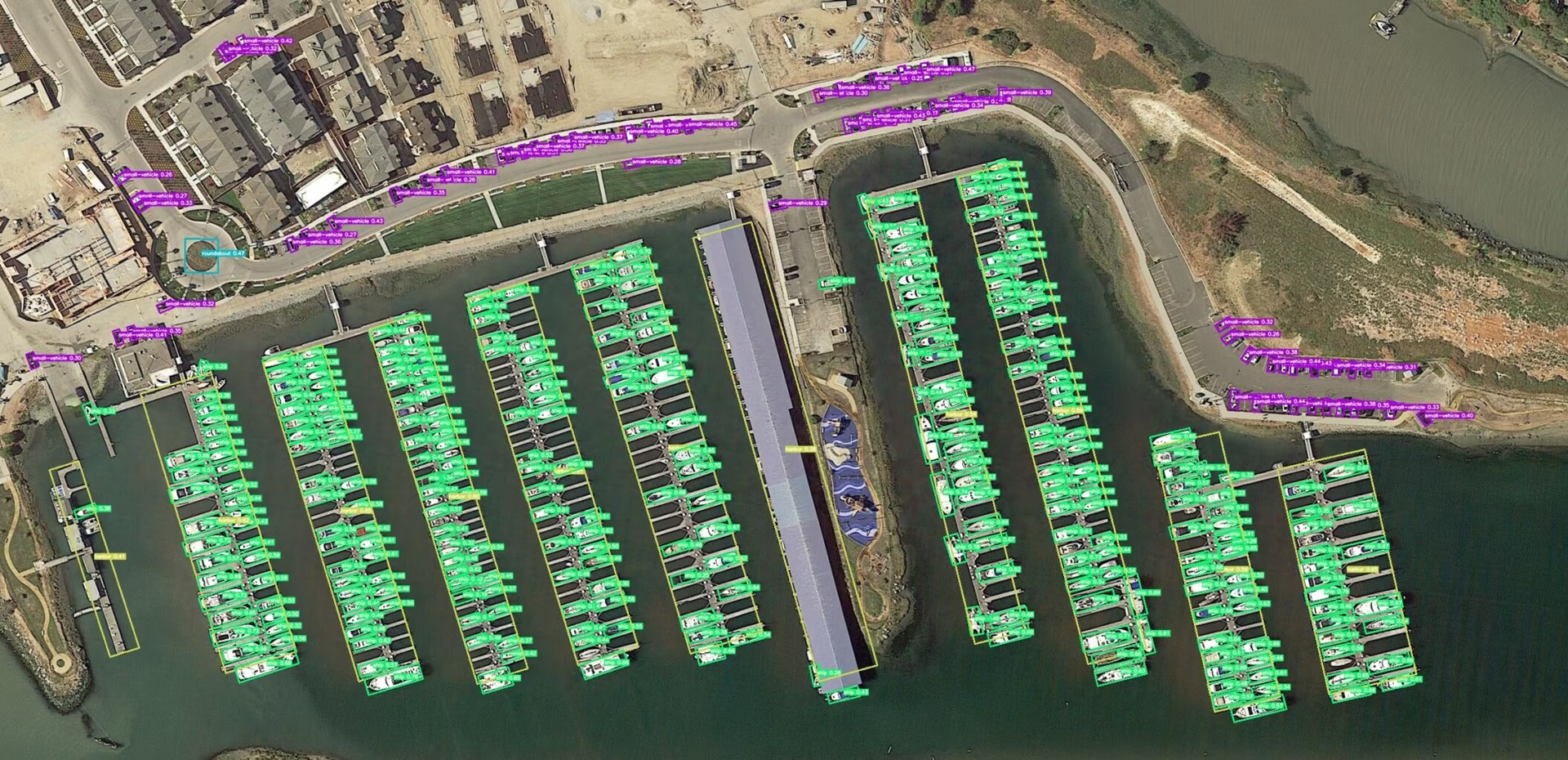
主要功能#
观看: 如何在 Google Colab 中使用 Ultralytics YOLO 在 DOTA 数据集上训练定向边界框模型
- 数据采集自各种传感器和平台,图像尺寸从 800 × 800 到 20,000 × 20,000 像素不等。
- 包含 18 个类别、超过 170 万个有向边界框。
- 由于每张图像中的物体尺寸范围广泛,支持多尺度目标检测。
- 由专家使用任意形状的四边形(8 个自由度)标注实例,以捕捉不同尺寸、朝向和形状的物体。
数据集版本#
DOTA-v1.0#
- 包含 15 个常见类别。
- 共包含 2806 张图像和 188282 个实例。
- 划分比例:1/2 用于训练(1411 张图像),1/6 用于验证(458 张图像),1/3 用于测试(937 张图像)。
DOTA-v1.5#
- 包含与 DOTA-v1.0 相同的图像。
- 还标注了非常小的实例(小于 10 像素)。
- 新增一个类别:“集装箱起重机”。
- 共计 403318 个实例。
- 为参加2019 年航空影像目标检测 DOAI 挑战赛而发布。
DOTA-v2.0#
- 图像采集自 Google Earth、GF-2 卫星和其他航空影像。
- 包含 18 个常见类别。
- 包含 11,268 张图像和 1,793,658 个实例。
- 新增类别:“机场”和“直升机停机坪”。
- 图像划分:
- 训练集:1,830 张图像,包含 268,627 个实例。
- 验证集:593 张图像,包含 81,048 个实例。
- 测试开发集:2,792 张图像,包含 353,346 个实例。
- 测试挑战集:6,053 张图像,包含 1,090,637 个实例。
数据集结构#
DOTA 采用结构化布局,专为 OBB 目标检测任务设计:
- 图像:大量高分辨率航拍图像,涵盖各种地形和建筑结构。
- 有向边界框:以旋转矩形的形式标注目标,无论目标朝向如何都能将其框定,非常适合捕捉飞机、船舶和建筑物等目标。
应用场景#
DOTA 可用作训练和评估航拍图像分析模型的基准。其有向边界框标注让它成为对旋转且密集分布的航拍目标进行目标检测模型测试的严苛基准。该数据集广泛用于遥感、监控和环境监测。
数据集 YAML#
数据集 YAML 文件用于指定图像/标签根目录、类别名称和其他重要元数据。Ultralytics 为最常用的两个版本维护了官方 YAML 文件:
使用与你下载的版本相匹配的 YAML;如果你使用的是 DOTA-v2 或其他衍生版本,也可以自行编写 YAML。首次训练时,两个版本都会从 Ultralytics GitHub 资源自动下载(2 GB)。
# Ultralytics 🚀 AGPL-3.0 License - https://ultralytics.com/license

# DOTA 1.0 dataset https://captain-whu.github.io/DOTA/index.html for object detection in aerial images by Wuhan University
# Documentation: https://docs.ultralytics.com/datasets/obb/dota-v2
# Example usage: yolo train model=yolov8n-obb.pt data=DOTAv1.yaml
# parent
# ├── ultralytics
# └── datasets
#     └── DOTAv1 ← downloads here (2 GB)

# Train/val/test sets as 1) dir: path/to/imgs, 2) file: path/to/imgs.txt, or 3) list: [path/to/imgs1, path/to/imgs2, ..]
path: DOTAv1 # dataset root dir
train: images/train # train images (relative to 'path') 1411 images
val: images/val # val images (relative to 'path') 458 images
test: images/test # test images (optional) 937 images

# Classes for DOTA 1.0
names:
  0: plane
  1: ship
  2: storage tank
  3: baseball diamond
  4: tennis court
  5: basketball court
  6: ground track field
  7: harbor
  8: bridge
  9: large vehicle
  10: small vehicle
  11: helicopter
  12: roundabout
  13: soccer ball field
  14: swimming pool

# Download script/URL (optional)
download: https://github.com/ultralytics/assets/releases/download/v0.0.0/DOTAv1.zip
切分 DOTA 图像#
原始图像的单边尺寸通常超过 10,000 像素,因此建议在将数据输入 YOLO 前进行切片。使用下面的辅助工具,可将原始图像切成多个尺度下相互重叠的 1024 × 1024 裁剪图,同时保持标注同步。
from ultralytics.data.split_dota import split_test, split_trainval

# 切分训练集和验证集,并保留标签。
split_trainval(
    data_root="path/to/DOTAv1.0/",
    save_dir="path/to/DOTAv1.0-split/",
    rates=[0.5, 1.0, 1.5],  # multiscale
    gap=500,
)
# 切分测试集,不包含标签。
split_test(
    data_root="path/to/DOTAv1.0/",
    save_dir="path/to/DOTAv1.0-split/",
    rates=[0.5, 1.0, 1.5],  # multiscale
    gap=500,
)请按照标准 YOLO 目录结构整理输出目录(images/train、labels/train 等),这样你就可以在数据集 YAML 中直接引用它。
用法#
要在 DOTA v1 数据集上训练 YOLO26n-obb 模型,请使用以下代码片段。请务必参阅模型文档,了解可用参数的完整列表。如果想先用较小的子集进行实验,可以考虑使用 DOTA8 数据集,其中仅包含 8 张图像,适合快速测试,并且可在 Ultralytics Platform 上浏览。
DOTAv1 数据集中的所有图像及相关标注仅可用于学术目的;禁止商业使用。Ultralytics 将这些限制解释为适用于源数据集,而非预训练或微调后的模型权重。请查看 DOTA 条款,确认是否适用于你的预期用途。
from ultralytics import YOLO

# 加载预训练的 YOLO26n-OBB 模型
model = YOLO("yolo26n-obb.pt")

# 在 DOTAv1 数据集上训练模型
results = model.train(data="DOTAv1.yaml", epochs=100, imgsz=1024)示例数据和标注#
下面的示例展示了典型的 DOTA 场景和标注:
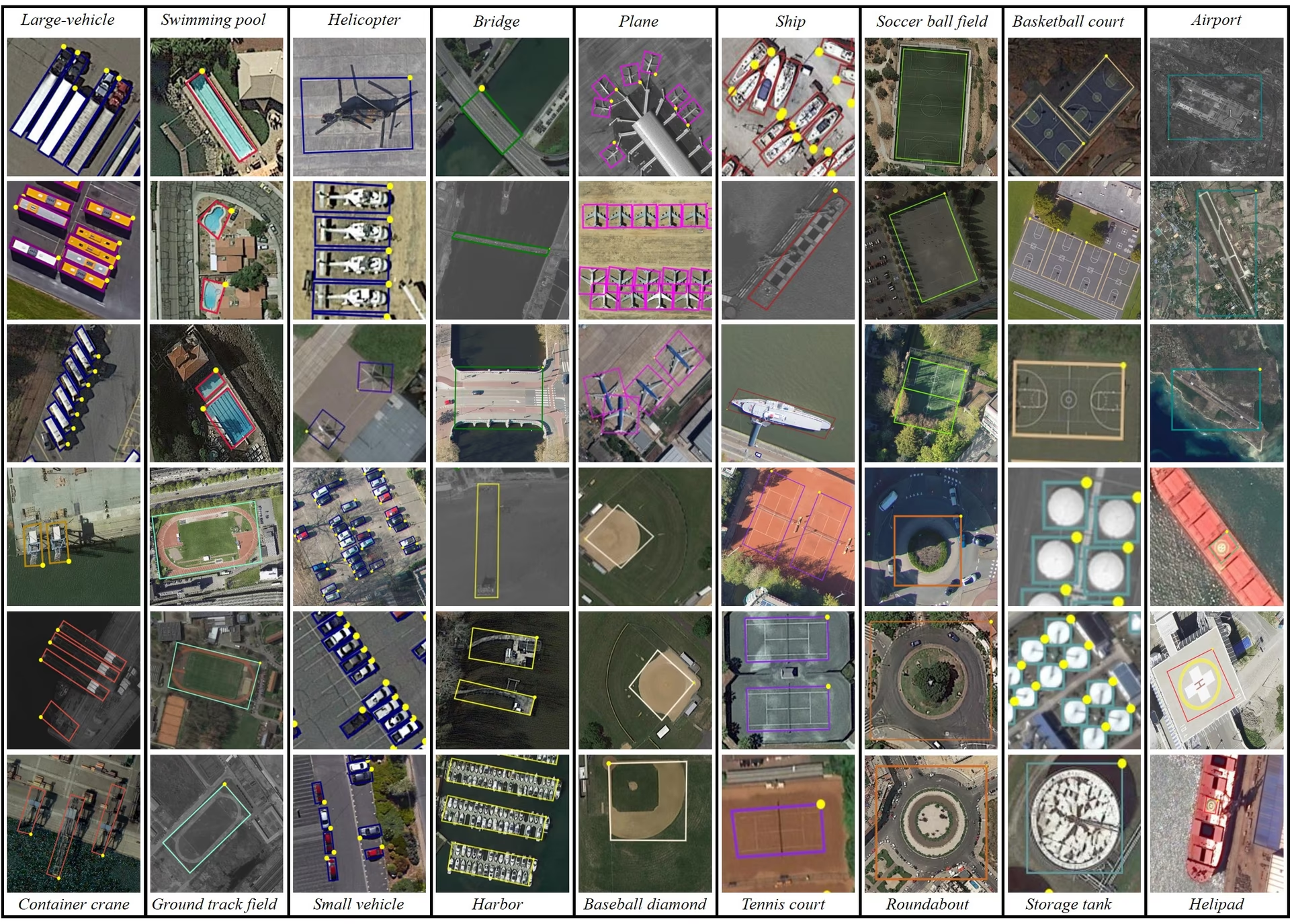
- DOTA 示例:这个快照突显了航拍场景的复杂性,以及有向边界框标注的重要性;此类标注能够捕捉目标的自然朝向。
这些场景凸显了航拍图像特有的检测挑战。DOTA-v2.0 凭借全面的标注和多样的目标类别,广泛用于遥感和航空监控项目。
引用与致谢#
如果你在工作中使用 DOTA,请引用相关研究论文:
@article{9560031,
  author={Ding, Jian and Xue, Nan and Xia, Gui-Song and Bai, Xiang and Yang, Wen and Yang, Michael and Belongie, Serge and Luo, Jiebo and Datcu, Mihai and Pelillo, Marcello and Zhang, Liangpei},
  journal={IEEE Transactions on Pattern Analysis and Machine Intelligence},
  title={Object Detection in Aerial Images: A Large-Scale Benchmark and Challenges},
  year={2022},
  volume={44},
  number={11},
  pages={7778-7796},
  doi={10.1109/TPAMI.2021.3117983}
}
我们感谢 DOTA 数据集背后的团队对数据集进行整理。有关数据集的完整详情,请访问 DOTA 官方网站。
常见问题#
DOTA 数据集是一个专注于航拍图像目标检测的专用数据集。它采用有向边界框(OBB),为各种航拍场景中的图像提供标注。DOTA 的 170 万个标注和 18 个类别涵盖了多种目标朝向、尺度和形状,因此非常适合开发和评估针对航拍图像分析的模型,可用于监控、环境监测和灾害管理等场景。
DOTA 使用有向边界框(OBB)进行标注,即用旋转矩形框出对象,无论对象朝向如何。这种方法确保准确捕捉对象,即使对象较小或角度各异也不例外。该数据集的多尺度图像尺寸从 800 × 800 到 20,000 × 20,000 像素不等,进一步支持有效检测大小不同的对象。这种方法对航拍图像尤其有价值,因为其中的对象会以不同角度和尺度出现。
要在 DOTA 数据集上训练模型,可以参考以下使用 Ultralytics YOLO 的示例:
训练示例from ultralytics import YOLO # 加载预训练的 YOLO26n-OBB 模型 model = YOLO("yolo26n-obb.pt") # 在 DOTAv1 数据集上训练模型 results = model.train(data="DOTAv1.yaml", epochs=100, imgsz=1024)有关如何切分和预处理 DOTA 图像的更多详情,请参阅切分 DOTA 图像部分。
- DOTA-v1.0:包含 2,806 张图像中的 15 个常见类别,共有 188,282 个实例。数据集分为训练集、验证集和测试集。
- DOTA-v1.5:在 DOTA-v1.0 的基础上标注了极小实例(小于 10 像素),并新增“集装箱起重机”类别,共计 403,318 个实例。
- DOTA-v2.0:进一步加入来自 Google Earth 和 GF-2 Satellite 的标注,包含 11,268 张图像和 1,793,658 个实例。该版本新增了“机场”和“直升机停机坪”等类别。
如需详细比较和更多信息,请查看数据集版本部分。
DOTA 图像可能非常大,因此会被切分成较小尺寸,以便进行可管理的训练。下面是一个用于切分图像的 Python 代码片段:
示例from ultralytics.data.split_dota import split_test, split_trainval # 切分训练集和验证集,并保留标签。 split_trainval( data_root="path/to/DOTAv1.0/", save_dir="path/to/DOTAv1.0-split/", rates=[0.5, 1.0, 1.5], # multiscale gap=500, ) # 切分测试集,不包含标签。 split_test( data_root="path/to/DOTAv1.0/", save_dir="path/to/DOTAv1.0-split/", rates=[0.5, 1.0, 1.5], # multiscale gap=500, )此流程有助于提升训练效率和模型性能。详细说明请参阅切分 DOTA 图像部分。


评论17
提出问题、分享结果,或帮助其他人。
XWP-PPP
May I ask how you converted the inference results from YOLOV8 OBB into inference results that can be uploaded to DOTA's Task 1 server? I saved the final inference results of the model in the form of xyxyxy and uploaded them via email. However, the mAP results provided on YOLO's official website differ significantly. I would like to know the reason for this. Can you provide me with a conversion code to convert the test image set into a result that can be uploaded to DOTA's Task 1 server? Thank you very much for your help!
1 Paula DerrengerUltralytics(已编辑)
@XWP-PPP hi there!
DOTA's Task 1 server expects a zip of one text file per class (
Task1_plane.txt,Task1_storage-tank.txt, ...), where each line isimgname score x1 y1 x2 y2 x3 y3 x4 y4, with the image name given without extension. OBB results are stored inresult.obb, notresult.boxes. Here is a snippet that builds those files:import shutil from collections import defaultdict from pathlib import Path from ultralytics import YOLO # Load your trained YOLO26-OBB model model = YOLO("path/to/your/yolo26n-obb.pt") # Collect one DOTA Task1 line per detection: imgname score x1 y1 x2 y2 x3 y3 x4 y4 (pixels) category_results = defaultdict(list) for r in model.predict(source="path/to/test/images", stream=True): img_name = Path(r.path).stem for cls, conf, pts in zip(r.obb.cls.int().tolist(), r.obb.conf.tolist(), r.obb.xyxyxyxy.flatten(1).tolist()): coords = " ".join(f"{p:.1f}" for p in pts) category_results[f"Task1_{model.names[cls].replace(' ', '-')}.txt"].append(f"{img_name} {conf:.6f} {coords}\n") # Save one file per category and zip the submission folder output_dir = Path("submission") output_dir.mkdir(exist_ok=True) for category_file, lines in category_results.items(): (output_dir / category_file).write_text("".join(lines)) shutil.make_archive("submission", "zip", output_dir)Upload
submission.zipto the DOTA Task 1 server. If your mAP differs from your local validation, check that image names match the test set and that the coordinates are in pixels of the original (unsplit) images. For more details, see the DOTA Dataset Documentation. Happy coding! 😊
Taufiq-Ahmed-pranto
Hi, I want to use the DOTA dataset only for YOLOv11 Nano. I don't want to use the model with oriented bounding boxes (OBB). What is the procedure?
 Jie Liu
I have download dotav1 form
https://github.com/ultralytics/assets/releases/download/v0.0.0/DOTAv1.zipand use script split dataset.from ultralytics.data.split_dota import split_test, split_trainval # split train and val set, with labels. split_trainval( data_root="/dataset/coco/DOTAv1", save_dir="/dataset/coco/DOTAv1.0-split/", rates=[0.5, 1.0, 1.5], # multiscale gap=500, ) # split test set, without labels. split_test( data_root="/dataset/coco/DOTAv1/", save_dir="/dataset/coco/DOTAv1.0-split/", rates=[0.5, 1.0, 1.5], # multiscale gap=500, )how to reproduce yolov11 obb result, please show me the command like
yolo train model=ultralytics-8.3.13/ultralytics/cfg/models/11/yolo11n-obb.yaml data=DOTAv1/DOTAv1.yaml epochs=500 batch=32*4 imgsz=640 device=4,5,6,7 cache=disk amp=True Glenn JocherUltralytics(已编辑)
@keeper-jie for training YOLO26-OBB on DOTAv1 after splitting, use this command with your 4 GPUs:
yolo obb train data=DOTAv1.yaml model=yolo26n-obb.pt epochs=500 imgsz=1024 batch=128 device=4,5,6,7Key parameters from our DOTA documentation:
imgsz=1024(matches dataset's multiscale split)- Use official model name
yolo26n-obb.ptrather than YAML path - Batch size 128 (32*4 GPUs) via
batch=128
Ensure your dataset YAML paths point to the split images directory.
huynhkhoa44
I have labeled data in YOLOv8 object detection format, our label data format is already rotated rectangles to the correct angle of the object, however since it is in YOLOv8 object detection format, the "angle" parameter is missing. I no longer keep the label folder on CVAT so I cannot export to a different label format. Is there a way to add the angle value from the 4 pre-existing <x_center> <y_center> values?
- Glenn JocherUltralytics
To add the angle value from your existing YOLOv8 labels, you'll need to calculate it based on the coordinates. Unfortunately, without the original CVAT labels, this requires manual computation or using a tool that supports angle annotations. For guidance on datasets with oriented bounding boxes, you can refer to the DOTA dataset documentation at https://docs.ultralytics.com/datasets/obb/dota-v2/.
jack-ready
Recently, I've been using YOLOv8 to train the DOTAv1 dataset and encountered some issues. I was wondering if I could seek advice. 1.To train the DOTA dataset, we split the original DOTA images with high-resolution into images with 1024x1024. I noticed that the provided segmentation code provides three sizes, rates=[0.5, 1.0, 1.5]. In order to obtain 1024×1024 images, it seems that we should choose rates=1, but I noticed that some images in the segmentation results of the validation set are smaller than 1024×1024, such as 1024×1023, 824*1024, etc. What is the reason for this?Will it affect the experiment? 2.Another issue arises during the training process. I noticed that the training process conducts validation after each epoch. I attempted to disable validation by setting val=False, but it seems to have no effect. What could be the reason for this? The training code snippet is as follows: results = model.train(data="DOTAv1.yaml", epochs=100, imgsz=640, batch=10, workers=0, val=False). Additionally, during validation, it seems that the images are not being resized to 640. Printing the results in the code yields torch.Size([10, 3, 672, 672]), whereas during the training process, images are correctly resized to 640. Could someone help me understand this?
- Glenn JocherUltralytics(已编辑)
@jack-ready hi there!
Thank you for reaching out with your questions regarding training the DOTA dataset with YOLOv8. Let's address each of your concerns:
-
Image Splitting and Sizes: When splitting high-resolution DOTA images into 1024x1024 segments using
rates=[0.5, 1.0, 1.5], you might notice some resulting images are slightly smaller than 1024x1024 (e.g., 1024x1023 or 824x1024). This occurs due to the way the splitting algorithm handles the edges of the original images. If the original image dimensions are not perfectly divisible by 1024, the last segment in each row or column might be smaller. This should not significantly affect your experiment as long as the majority of your data maintains the expected size. However, you can ensure consistency by padding these smaller images to 1024x1024 if necessary. -
Disabling Validation: The
val=Falseargument should indeed disable validation during training. If it doesn't seem to work, please ensure you are using the latest version of the Ultralytics package. You can update it using:pip install --upgrade ultralyticsIf the issue persists, providing a minimum reproducible example would be very helpful for us to diagnose the problem. You can find guidance on creating one here: Minimum Reproducible Example.
-
Image Resizing During Validation: The discrepancy in image sizes during validation (e.g.,
torch.Size([10, 3, 672, 672])instead of 640) might be due to the model's internal resizing logic. Ensure that theimgszparameter is correctly set for both training and validation. Validation uses the sameimgszas training, so set it explicitly in your training script:results = model.train(data="DOTAv1.yaml", epochs=100, imgsz=640, batch=10, workers=0, val=True)
I hope this helps! If you have any further questions or need additional assistance, feel free to ask. Happy training! 🚀
-
Thank you very much for your help. I have another question regarding the YOLOV8 training on the DOTA v1.0 dataset. I would like to know how to set the training parameters, such as learning rate, optimizer, and loss function. When I try to reproduce the results, my mAP50 is about 74%, but it does not reach 78%. I would greatly appreciate any assistance you can provide.Below is my training code. from ultralytics import YOLO model = YOLO("yolov8n-obb.yaml") model.load("yolov8n-obb.pt") model = YOLO("yolov8n-obb.yaml").load("yolov8n.pt") results = model.train(data="DOTAv1.yaml", epochs=100, imgsz=640, batch=48, workers=0,project="runs/DOTAV1.0",val=True,resume=True)
- Glenn JocherUltralytics(已编辑)
Hi there! Glad to help with your training setup. To fine-tune your training parameters for better mAP50 results, you can adjust the learning rate, optimizer, and loss function. For instance, you might try a lower learning rate or switch to a different optimizer like Adam. Here's a quick example:
from ultralytics import YOLO

model = YOLO("yolo26n-obb.yaml").load("yolo26n-obb.pt")
results = model.train(
    data="DOTAv1.yaml",
    epochs=100,
    imgsz=640,
    batch=48,
    workers=0,
    project="runs/DOTAV1.0",
    val=True,
    lr0=0.001,  # Adjust learning rate
    optimizer='Adam'  # Change optimizer
)
Ensure you're using the latest version of the Ultralytics package to avoid any bugs. If you still face issues, feel free to share more details. Happy training! 🚀
Tintin26100
How can I find the number of instances per class in DOTA v1.5 ? I've been searching for this information for a moment and I can't find any answers
- Paula DerrengerUltralytics
@Tintin26100 hello!
The number of instances per class in DOTA v1.5 isn't directly listed in the dataset's summary. However, you can obtain this information by analyzing the annotation files provided with the dataset. Each object instance in these files is labeled with a class, and you can count the number of times each class appears.
If you need further guidance on how to process these annotation files or any other assistance with the DOTA dataset, feel free to ask!
Happy coding! 😊
Hi, thanks for your quick answer, I will gladly accept your help because I don't really know what to do to extract those informations, where do you find the annotation files ? Is it on the github ? If it is what's it's path ? Thanks for the time you spend helping
- Paula DerrengerUltralytics
@Tintin26100 hello!
The annotation files for the DOTA dataset are typically included within the dataset download itself. These files contain the details for each instance, including class labels and oriented bounding box coordinates.
For the DOTA v1.5 dataset, you can find these files in the dataset directory after you download it from the official DOTA dataset page or the provided download link in the dataset's YAML configuration file. The path to the annotations will usually be structured under the
labelsorannotationsdirectory within the main dataset folder.If you've already downloaded the dataset, you should look for
.txtor.jsonfiles corresponding to each image in the dataset, which contain the annotations. If you need further assistance navigating these files or extracting specific data, feel free to ask!Thank you for reaching out, and happy analyzing! 😊
hencai
how to test DOTA datatests online using YOLOv8-obb? somebody help me ?
- Glenn JocherUltralytics(已编辑)
Hey there! 😊 Testing the DOTA dataset online using YOLO26-obb is quite straightforward. If you've already prepared your dataset according to the Ultralytics guidelines and split the images, here's a simple example to get you started with training:
# Train a YOLO26n-OBB model on the DOTA v1 dataset
yolo obb train data=DOTAv1.yaml model=yolo26n-obb.pt epochs=100 imgsz=640
This command uses DOTA v1 and the corresponding
.yamlfile (DOTAv1.yaml) describing your dataset paths and classes. Adjustepochsandimgszbased on your needs.Just make sure to check out the DOTA dataset page on Ultralytics docs for more info on dataset preparation and additional configurations! Happy detecting! 🚀