SAM 2:万物皆可分割模型 2

SAM 2 是 Meta 的 Segment Anything Model(万物分割模型,SAM)的后续版本,是一个统一模型,可通过提示对图像和视频中的对象进行分割。其单一的可提示架构支持实时处理和零样本泛化。
SAM 2.1 模型为 智能标注功能提供支持。该功能位于 Ultralytics Platform 上,可通过点击进行分割,从而快速标注数据集。详情请参阅标注指南。
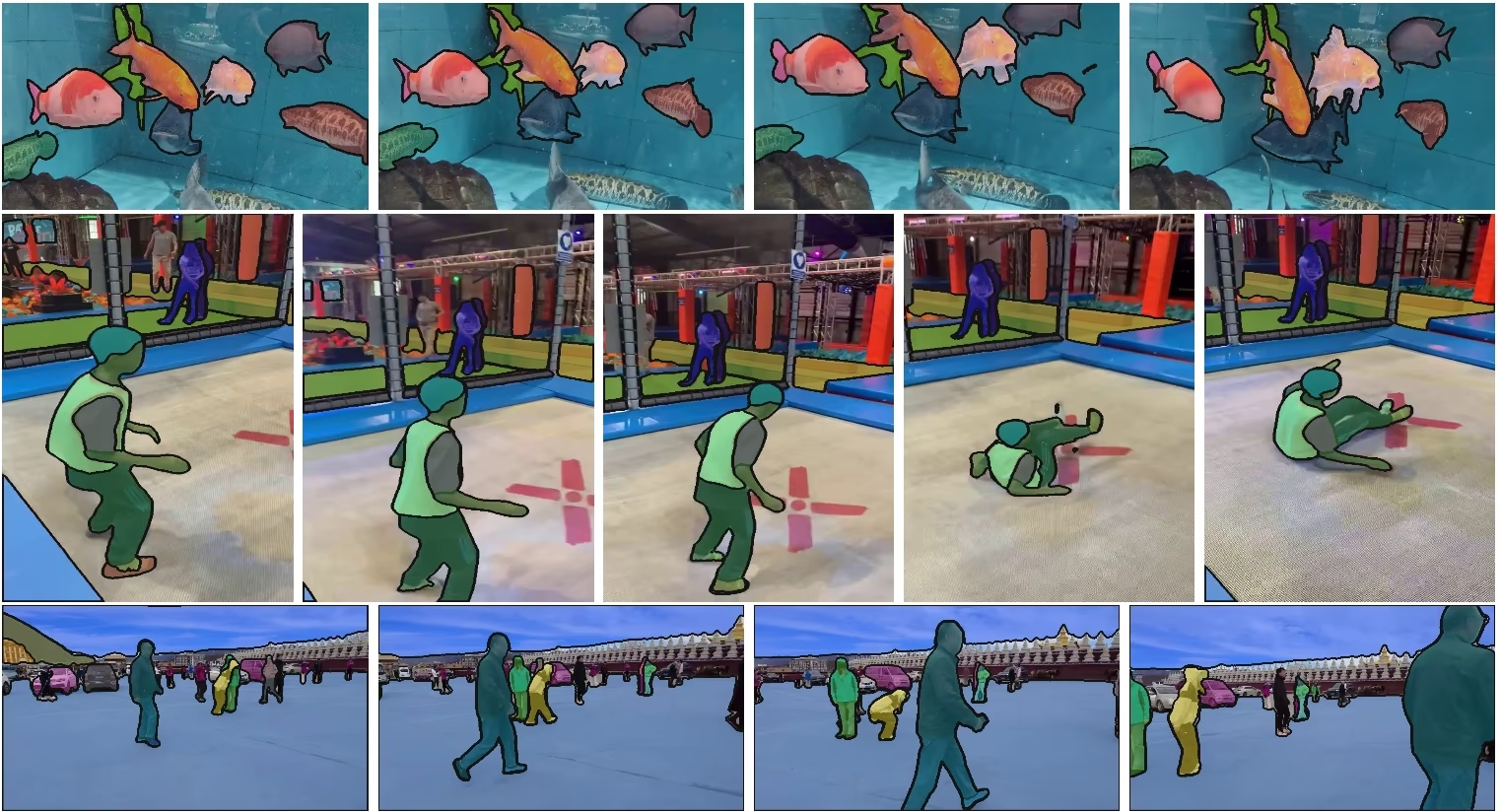
主要功能#
观看:如何使用 Ultralytics 运行 Meta SAM2 推理 | 分步指南
统一模型架构#
SAM 2 将图像和视频分割能力整合到一个模型中。这种统一简化了部署,并能在不同媒体类型中保持一致的性能。它采用灵活的基于提示界面,用户可以通过点、边界框或掩码等多种提示类型指定感兴趣的对象。
实时性能#
该模型可实现实时推理,处理速度约为每秒 44 帧。因此,SAM 2 适用于需要即时反馈的应用场景,例如视频编辑和增强现实。
零样本泛化#
SAM 2 能够分割此前从未见过的对象,展现出强大的零样本泛化能力。这在多样或不断变化的视觉领域中特别有用,因为预定义类别可能无法涵盖所有可能的对象。
交互式优化#
用户可以通过提供更多提示来逐步优化分割结果,从而精准控制输出。这种交互能力对于优化视频标注或医学影像等应用中的结果至关重要。
应对视觉挑战的高级方法#
SAM 2 包含用于处理常见视频分割挑战的机制,例如对象遮挡和重新出现。它使用记忆机制跟踪不同帧中的对象,即使对象暂时被遮挡、离开场景后又重新进入,也能确保跟踪连续性。
要深入了解 SAM 2 的架构和功能,请阅读 SAM 2 研究论文。
性能与技术细节#
根据 Meta 的说法,SAM 2 在多项指标上优于以往模型:
| 指标 | SAM 2 | 此前的 SOTA |
|---|---|---|
| 交互式视频分割 | 最佳 | - |
| 所需人工交互次数 | 减少 3 倍 | 基线 |
| 图像分割准确率 | 更优 | SAM |
| 推理速度 | 快 6 倍 | SAM |
模型架构#
核心组件#
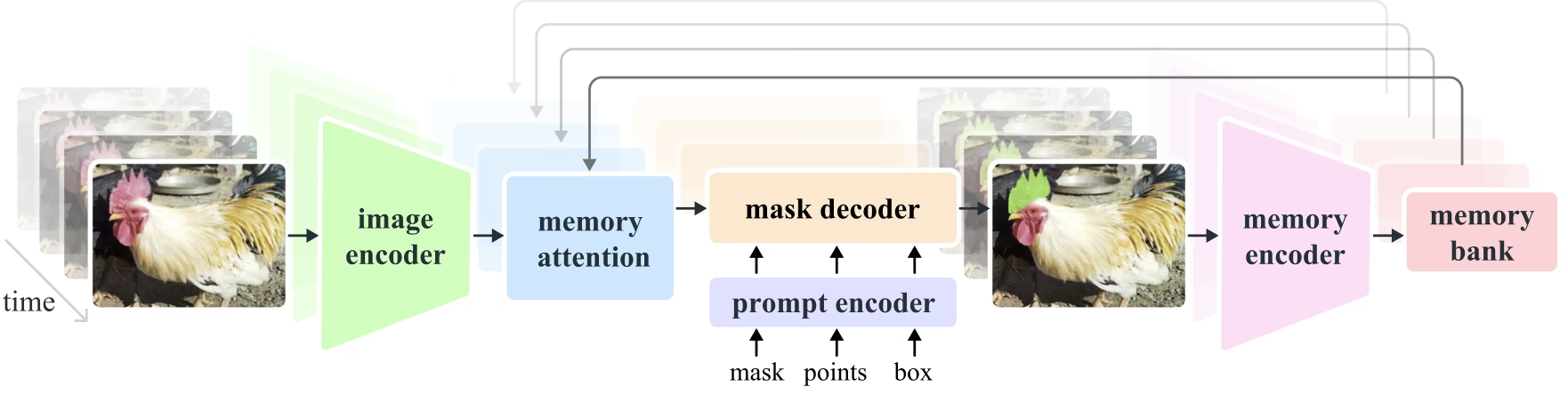
- 图像和视频编码器:采用基于 Transformer 的架构,从图像和视频帧中提取高级特征。该组件负责理解每个时间步的视觉内容。
- 提示编码器:处理用户提供的提示(点、框、掩码),以引导分割任务。这使 SAM 2 能够适应用户输入,并定位场景中的特定对象。
- 记忆机制:包含记忆编码器、记忆库和记忆注意力模块。这些组件共同存储并利用过去帧的信息,使模型能够持续进行一致的目标跟踪。
- 掩码解码器:根据编码后的图像特征和提示生成最终分割掩码。在视频中,它还会利用记忆上下文,确保跨帧准确跟踪对象。
记忆机制与遮挡处理#
记忆机制使 SAM 2 能够处理视频数据中的时间依赖关系和遮挡情况。对象移动和交互时,SAM 2 会将对象特征记录在记忆库中。当对象被遮挡时,模型可以依靠这些记忆,在对象重新出现时预测其位置和外观。遮挡头专门处理对象不可见的情况,并预测对象被遮挡的可能性。
多掩码歧义消解#
在存在歧义的情况下(例如对象重叠),SAM 2 可以生成多个掩码预测。这有助于表示复杂场景,因为单个掩码可能无法准确表达目标对象。
SA-V 数据集#
为 SAM 2 训练而开发的 SA-V 数据集,是目前规模最大、种类最丰富的视频分割数据集之一。它包含:
- 超过 51,000 个视频:采集自 47 个国家/地区,涵盖广泛的真实场景。
- 超过 600,000 个掩码标注:详细的时空掩码标注,称为“masklets”,覆盖完整对象及其部分。
- 数据集规模:视频数量是此前最大视频分割数据集的 4.5 倍,标注数量是其 53 倍。
基准测试#
视频对象分割#
SAM 2 在主要视频分割基准测试中取得了以下结果:
| 数据集 | J&F | J | F |
|---|---|---|---|
| DAVIS 2017 | 82.5 | 79.8 | 85.2 |
| YouTube-VOS | 81.2 | 78.9 | 83.5 |
交互式分割#
在交互式分割任务中,SAM 2 取得了以下结果:
| 数据集 | NoC@90 | AUC |
|---|---|---|
| DAVIS 交互式 | 1.54 | 0.872 |
安装#
SAM 2 已包含在 ultralytics 软件包中。使用以下命令安装;首次使用时会自动下载 SAM 2 权重。
pip install ultralytics如何使用 SAM 2:图像与视频分割的多功能性#
下表详细列出了可用的 SAM 2 模型、预训练权重、支持的任务,以及与训练、验证、推理和导出等不同运行模式的兼容性。
| 模型类型 | 预训练权重 | 支持的任务 | 训练 | 验证 | 推理 | 导出 |
|---|---|---|---|---|---|---|
| SAM 2 tiny | sam2_t.pt | 实例分割 | ❌ | ❌ | ✅ | ❌ |
| SAM 2 small | sam2_s.pt | 实例分割 | ❌ | ❌ | ✅ | ❌ |
| SAM 2 base | sam2_b.pt | 实例分割 | ❌ | ❌ | ✅ | ❌ |
| SAM 2 large | sam2_l.pt | 实例分割 | ❌ | ❌ | ✅ | ❌ |
| SAM 2.1 tiny | sam2.1_t.pt | 实例分割 | ❌ | ❌ | ✅ | ❌ |
| SAM 2.1 small | sam2.1_s.pt | 实例分割 | ❌ | ❌ | ✅ | ❌ |
| SAM 2.1 base | sam2.1_b.pt | 实例分割 | ❌ | ❌ | ✅ | ❌ |
| SAM 2.1 large | sam2.1_l.pt | 实例分割 | ❌ | ❌ | ✅ | ❌ |
SAM 2 预测示例#
SAM 2 可用于广泛的任务,包括实时视频编辑、医学影像和自主系统。它能够分割静态和动态视觉数据,因此是研究人员和开发者的多功能工具。
使用提示进行分割#
使用提示分割图像或视频中的特定对象。
from ultralytics import SAM

# 加载模型
model = SAM("sam2.1_b.pt")

# 显示模型信息(可选)
model.info()

# 使用边界框提示运行推理
results = model("path/to/image.jpg", bboxes=[100, 100, 200, 200])

# 使用单个点运行推理
results = model(points=[900, 370], labels=[1])

# 使用多个点运行推理
results = model(points=[[400, 370], [900, 370]], labels=[1, 1])

# 为每个对象使用多个点提示运行推理
results = model(points=[[[400, 370], [900, 370]]], labels=[[1, 1]])

# 使用负点提示运行推理
results = model(points=[[[400, 370], [900, 370]]], labels=[[1, 0]])分割所有内容#
无需特定提示,即可分割图像或视频中的全部内容。
from ultralytics import SAM

# 加载模型
model = SAM("sam2.1_b.pt")

# 显示模型信息(可选)
model.info()

# 运行推理
model("path/to/video.mp4")- 此示例展示了在未提供提示(边界框/点/掩码)的情况下,如何使用 SAM 2 分割图像或视频中的全部内容。
分割视频并跟踪对象#
使用特定提示分割视频中的全部内容并跟踪对象。
from ultralytics.models.sam import SAM2VideoPredictor

# Create SAM2VideoPredictor
overrides = {"conf": 0.25, "task": "segment", "mode": "predict", "imgsz": 1024, "model": "sam2_b.pt"}
predictor = SAM2VideoPredictor(overrides=overrides)

# 使用单个点运行推理
results = predictor(source="test.mp4", points=[920, 470], labels=[1])

# 使用多个点运行推理
results = predictor(source="test.mp4", points=[[920, 470], [909, 138]], labels=[1, 1])

# 为每个对象使用多个点提示运行推理
results = predictor(source="test.mp4", points=[[[920, 470], [909, 138]]], labels=[[1, 1]])

# 使用负点提示运行推理
results = predictor(source="test.mp4", points=[[[920, 470], [909, 138]]], labels=[[1, 0]])动态交互式分割与跟踪#
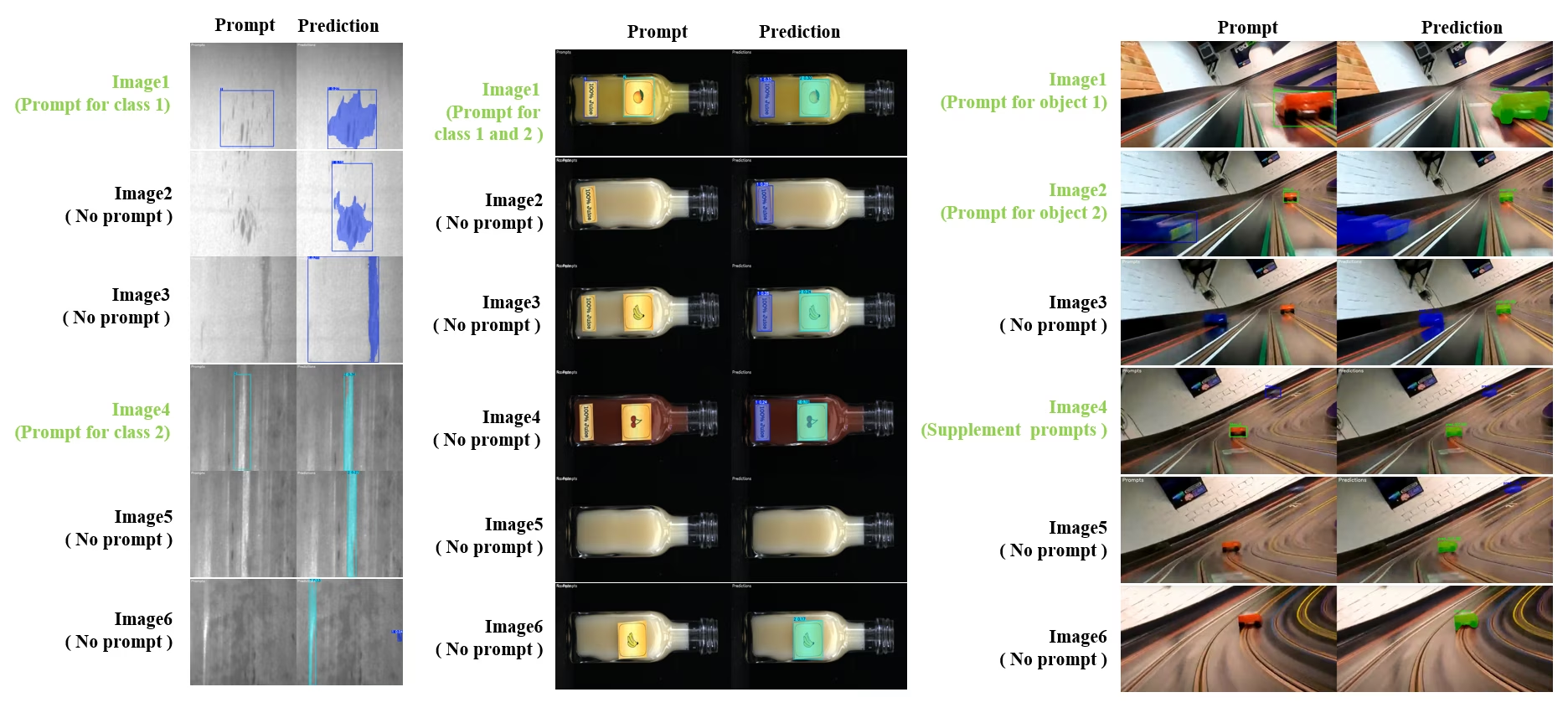
SAM2DynamicInteractivePredictor 是 SAM 2 的免训练扩展,支持与多帧动态交互并具备持续学习能力。此预测器支持实时更新提示和管理记忆,从而提升图像序列中的跟踪性能。与原版 SAM 2 相比,SAM2DynamicInteractivePredictor 重构了推理流程,以充分利用预训练 SAM 2 模型,无需额外训练。
主要功能#
它带来三项改进:
- 动态交互:在视频处理期间的任意时刻,都可以为后续帧中的新实例或尚未跟踪的实例添加提示
- 持续学习:为现有实例添加新提示,逐步提升模型性能
- 独立多图像支持:处理多张彼此独立的图像(不一定来自同一视频序列),并支持记忆共享和跨图像对象跟踪
核心功能#
- 提示灵活性:支持将边界框、点和掩码用作提示
- 记忆库管理:维护动态记忆库,以跨帧存储对象状态
- 多对象跟踪:支持同时跟踪多个对象,并为每个对象分配独立 ID
- 实时更新:推理期间可添加新提示,无需重新处理之前的帧
- 独立图像处理:处理独立图像,并使用共享记忆上下文确保跨图像对象的一致性
from ultralytics.models.sam import SAM2DynamicInteractivePredictor

# Create SAM2DynamicInteractivePredictor
overrides = {"conf": 0.01, "task": "segment", "mode": "predict", "imgsz": 1024, "model": "sam2_t.pt", "save": False}
predictor = SAM2DynamicInteractivePredictor(overrides=overrides, max_obj_num=10)

# 通过框提示定义类别
predictor(source="image1.jpg", bboxes=[[100, 100, 200, 200]], obj_ids=[0], update_memory=True)

# 在新图像中检测此特定对象
results = predictor(source="image2.jpg")

# 使用新的对象 ID 添加类别
results = predictor(
    source="image4.jpg",
    bboxes=[[300, 300, 400, 400]],  # 新对象
    obj_ids=[1],  # 新对象 ID
    update_memory=True,  # 添加到记忆中
)
# 执行推理
results = predictor(source="image5.jpg")

# 将细化提示添加到同一类别,以提升性能
# 当对象外观发生显著变化时,这会很有帮助
results = predictor(
    source="image6.jpg",
    points=[[150, 150]],  # 细化点
    labels=[1],  # 正向点
    obj_ids=[1],  # 相同的对象 ID
    update_memory=True,  # 使用新信息更新记忆
)
# 对新图像执行推理
results = predictor(source="image7.jpg")SAM2DynamicInteractivePredictor 专为 SAM 2 模型设计,支持使用 SAM 2 原生支持的所有框、点和掩码提示添加和细化类别。它尤其适用于对象随时间出现或变化的场景,例如视频标注或交互式编辑任务。
参数#
| 名称 | 默认值 | 数据类型 | 说明 |
|---|---|---|---|
max_obj_num | 3 | int | 预设的最大类别数 |
update_memory | False | bool | 是否使用新提示更新记忆 |
obj_ids | None | List[int] | 与提示对应的对象 ID 列表 |
使用场景#
SAM2DynamicInteractivePredictor 适用于:
- 视频标注工作流:序列中会出现新对象
- 交互式视频编辑:需要实时添加和细化对象
- 监控应用:需要跟踪动态对象
- 医学影像:跨时间序列跟踪解剖结构
- 自主系统:需要自适应对象检测与跟踪
- 多图像数据集:在独立图像中保持对象分割的一致性
- 图像集分析:需要跨不同场景跟踪对象
- 跨域分割:利用来自多样图像上下文的记忆
- 半自动标注:以最少的人工干预高效创建数据集
SAM 与 YOLO 对比#
这里将 Meta 的 SAM 2 模型(包括最小的 SAM2-t 变体)与 Ultralytics 分割模型(包括 YOLO26)进行比较:
| 模型 | 大小 (MB) | 参数 (M) | 速度(CPU) (毫秒/图像) |
|---|---|---|---|
| Meta SAM-b | 375 | 93.7 | 41703 |
| Meta SAM2-b | 162 | 80.8 | 28867 |
| Meta SAM2-t | 78.1 | 38.9 | 23430 |
| MobileSAM | 40.7 | 10.1 | 23802 |
| FastSAM-s 搭配 YOLOv8 主干网络 | 23.9 | 11.8 | 58.0 |
| Ultralytics YOLOv8n-seg | 7.1(小 11.0 倍) | 3.4(少 11.4 倍) | 24.8(快 945 倍) |
| Ultralytics YOLO11n-seg | 6.2(小 12.6 倍) | 2.9(少 13.4 倍) | 24.3(快 964 倍) |
| Ultralytics YOLO26n-seg | 6.7(小 11.7 倍) | 2.7(少 14.4 倍) | 25.2(快 930 倍) |
这项比较展示了 SAM 各变体与 YOLO 分割模型在模型大小和速度方面的显著差异。SAM 具备独特的自动分割能力,而 YOLO 模型,尤其是 YOLOv8n-seg、YOLO11n-seg 和 YOLO26n-seg,则更小、更快,计算效率也更高。
SAM 速度使用 PyTorch 测量,YOLO 速度使用 ONNX Runtime 测量。测试在配备 16GB RAM 的 2025 款 Apple M4 Air 上进行,使用了 torch==2.10.0、ultralytics==8.4.31 和 onnxruntime==1.24.4。复现此测试的方法:
from ultralytics import ASSETS, SAM, YOLO, FastSAM

# 分析 SAM2-t、SAM2-b、SAM-b、MobileSAM 的性能
for file in ["sam_b.pt", "sam2_b.pt", "sam2_t.pt", "mobile_sam.pt"]:
    model = SAM(file)
    model.info()
    model(ASSETS)

# 分析 FastSAM-s 的性能
model = FastSAM("FastSAM-s.pt")
model.info()
model(ASSETS)

# 分析 YOLO 模型的性能(ONNX)
for file_name in ["yolov8n-seg.pt", "yolo11n-seg.pt", "yolo26n-seg.pt"]:
    model = YOLO(file_name)
    model.info()
    onnx_path = model.export(format="onnx", dynamic=True, nms=False)  # YOLO26 的 NMS-free 头;对 YOLOv8/YOLO11 无操作
    model = YOLO(onnx_path)
model(ASSETS)自动标注:高效创建数据集#
自动标注将 SAM 2 与预训练检测模型配合使用,无需大量人工标注即可快速生成分割数据集。Ultralytics Platform 还提供基于浏览器的自动标注功能,并使用托管的视觉模型;你可以在 VLM leaderboard上比较这些模型的检测精度、成本和速度。
如何使用 SAM 2 进行自动标注#
观看: 如何使用 Ultralytics 和 Meta 的 Segment Anything 2 模型进行自动标注 | 数据标注
按照此示例,使用 YOLO26x 检测器和 SAM 2 自动标注数据集:
from ultralytics.data.annotator import auto_annotate

auto_annotate(data="path/to/images", det_model="yolo26x.pt", sam_model="sam2_b.pt")| 参数 | 类型 | 默认值 | 说明 |
|---|---|---|---|
data | str | 必需 | 包含待标注或分割目标图像的目录路径。 |
det_model | str | 'yolo26x.pt' | 用于初始对象检测的 YOLO 检测模型路径。 |
sam_model | str | 'sam_b.pt' | 用于分割的 SAM 模型路径(支持 SAM、SAM 2、MobileSAM 和 SAM 3 权重)。 |
device | str | '' | 计算设备(例如 'cuda:0'、'cpu',或 '' 表示自动检测设备)。 |
conf | float | 0.25 | 用于过滤低置信度检测结果的 YOLO 检测置信度阈值。 |
iou | float | 0.5 | 用于通过非极大值抑制过滤重叠框的 IoU 阈值。 |
imgsz | int | 640 | 图像缩放输入尺寸(如有需要,会向上取整为 32 的倍数)。 |
max_det | int | 300 | 为提高内存效率,每张图像的最大检测数。 |
classes | list[int] | None | 要检测的类别索引列表(例如,[0, 1] 表示人和自行车)。 |
output_dir | str | None | 标注结果的保存目录(默认:同级目录中的 <data>_auto_annotate_labels)。 |
此函数可以将包含未标注图像的文件夹转换为分割数据集,只需极少的人工操作。
局限性#
尽管 SAM 2 优势突出,但仍有一些局限:
- 跟踪稳定性:在较长的序列或视角发生显著变化时,SAM 2 可能会丢失对象跟踪。
- 对象混淆:模型有时会混淆外观相似的对象,尤其是在拥挤场景中。
- 多对象处理效率:由于对象之间缺乏通信,同时处理多个对象时,分割效率会降低。
- 细节准确率:可能会遗漏细节,尤其是对象快速移动时。额外提示可以部分解决此问题,但无法保证时间平滑性。
引用与致谢#
如果你在研究或开发工作中使用 SAM 2,请使用以下参考文献引用它:
@article{ravi2024sam2,
  title={SAM 2: Segment Anything in Images and Videos},
  author={Ravi, Nikhila and Gabeur, Valentin and Hu, Yuan-Ting and Hu, Ronghang and Ryali, Chaitanya and Ma, Tengyu and Khedr, Haitham and R{\"a}dle, Roman and Rolland, Chloe and Gustafson, Laura and Mintun, Eric and Pan, Junting and Alwala, Kalyan Vasudev and Carion, Nicolas and Wu, Chao-Yuan and Girshick, Ross and Doll{\'a}r, Piotr and Feichtenhofer, Christoph},
  journal={arXiv preprint},
  year={2024}
}
感谢 Meta AI 向 AI 社区发布这个模型和数据集。
常见问题#
SAM 2 是 Meta 的分割一切模型(SAM)的继任者,是一个统一的、可通过提示进行交互的模型,可用于图像和视频中的对象分割。与原版 SAM 相比,SAM 2 有多项改进,包括:
- 统一模型架构:在单个模型中结合图像和视频分割能力。
- 实时性能:每秒处理约 44 帧,适用于需要即时反馈的应用。
- 零样本泛化:能够分割从未见过的对象,适用于多种视觉领域。
- 交互式细化:用户可以通过提供额外提示,迭代细化分割结果。
- 应对复杂视觉挑战:能够处理视频分割中的常见挑战,例如对象遮挡和重新出现。
如需详细了解 SAM 2 的架构和功能,请查阅 SAM 2 研究论文。
SAM 2 通过可交互提示界面和快速推理支持实时视频分割。下面是一个基本示例:
使用提示进行分割使用提示分割图像或视频中的特定对象。
from ultralytics import SAM # 加载模型 model = SAM("sam2_b.pt") # 显示模型信息(可选) model.info() # 使用边界框提示进行分割 results = model("path/to/image.jpg", bboxes=[100, 100, 200, 200]) # 使用点提示进行分割 results = model("path/to/image.jpg", points=[150, 150], labels=[1])如需了解更全面的用法,请参阅如何使用 SAM 2部分。
SAM 2 基于 SA-V 数据集训练,该数据集是目前规模最大、种类最丰富的视频分割数据集之一。SA-V 数据集包括:
- 超过 51,000 个视频:采集自 47 个国家/地区,涵盖广泛的真实场景。
- 超过 600,000 个掩码标注:详细的时空掩码标注,称为“masklets”,覆盖完整对象及其部分。
- 数据集规模:视频数量是以往最大数据集的 4.5 倍,标注数量是其 53 倍,提供了前所未有的多样性和复杂度。
该数据集让 SAM 2 能够在主要的视频分割基准测试中取得出色结果,并增强其零样本泛化能力。
SAM 2 包含一种记忆机制,用于管理视频数据中的时间依赖关系和遮挡。该记忆机制由以下部分组成:
- 记忆编码器和记忆库:存储过去帧中的特征。
- 记忆注意力模块:利用存储的信息,持续跟踪对象并保持一致性。
- 遮挡头:专门处理对象不可见的场景,并预测对象被遮挡的可能性。
即使对象暂时被遮挡,或离开场景后重新进入,该机制也能确保跟踪连续性。如需了解更多详情,请参阅记忆机制与遮挡处理部分。
Meta 的 SAM2-t 和 SAM2-b 等 SAM 2 模型具备强大的零样本分割能力,但与 YOLO 模型相比,它们的体积大得多、速度也慢得多。例如,在 CPU 上,YOLO26n-seg的体积约为 SAM2-b 的 1/24,速度则快 1145 倍以上。SAM 2 擅长多用途、基于提示和零样本分割场景,而 YOLO26 针对速度、效率和实时应用进行了优化,采用无需 NMS 的端到端推理,因此更适合部署在资源受限的环境中。


评论150
提出问题、分享结果,或帮助其他人。
 Glenn JocherUltralytics
Hey everyone! We wanted to give you a quick update: our team is currently busy integrating SAM 2 (Segment Anything Model 2) into the Ultralytics package. This new model is super exciting, with features like real-time performance and the ability to segment objects it’s never seen before.
We're really pumped about what SAM2 can do, but it's still in the works. Thanks for your patience as we get everything set up! We'll keep you posted as we make progress. Stay tuned!
10- Glenn JocherUltralytics
Update: SAM 2 is now fully integrated! Update your package to
ultralytics>=8.2.70withpip install -U ultralyticsand then for example:from ultralytics import ASSETS, SAM # Load a model model = SAM("sam2_s.pt") # Segment with point prompt results = model(ASSETS / "bus.jpg", points=[150, 150], labels=[1], device="cpu")1
avasanjesh
Hello,
Can i use sam2.1 for real time segmentation? i want to specify the object on the first frame of live video webcam then sam2.1 shows the segmentation and continue to track and show the result of segmentation of that object. Is it possible to do this?
1thedatamask
Breaking News: 🚨 SAM 1.0 outperforms SAM 2.0 on low-contrast images like CT Scan and MRI images! Check out this insightful video from Data Mask YouTube channel where they dive deep into the architecture, demos, and limitations of both Meta's segmentation models. Discover when to use SAM 1.0 for superior results on challenging images.
Use case with ultralytics
https://www.youtube.com/watch?v=vMI-TnyNLYU
Please do like and subscribe for exciting video like above .
#SAM #SAM2.0 #MetaAI #ImageSegmentation #AI #MachineLearning #DeepLearning #DataMask #BreakingNews
1- Glenn JocherUltralytics
@thedatamask thank you for sharing the video. For insights on SAM 2's capabilities and its comparison with other models, you can explore our documentation. If you have specific questions about using SAM 2 with Ultralytics, feel free to ask!
ram-from-tvl
Hi Team,
the below is the code I have been using to annotate some items in a folder of several images. I am planning to segment everything first and then try to cherry pick the ones that are to be annotated for a downstream segmentation task. Could you please tailor the code for the same. I am not getting any help from the docs regarding the same. i have tried auto annotate but its not working for my use case. So please help me in this approach
` from ultralytics import SAM
Load a model
model = SAM("sam2.1_b.pt")
Display model information (optional)
model.info()
Run inference
model("/kaggle/working/10_random_frames") `
Thankyou
Regards Ram
 Onuralp SezerUltralytics
Hi Team,
the below is the code I have been using to annotate some items in a folder of several images. I am planning to segment everything first and then try to cherry pick the ones that are to be annotated for a downstream segmentation task. Could you please tailor the code for the same. I am not getting any help from the docs regarding the same. i have tried auto annotate but its not working for my use case. So please help me in this approach
` from ultralytics import SAM
Load a model
model = SAM("sam2.1_b.pt")
Display model information (optional)
model.info()
Run inference
model("/kaggle/working/10_random_frames") `
Thankyou
Regards Ram
You may want check out here https://docs.ultralytics.com/reference/data/annotator/#ultralytics.data.annotator.auto_annotate
zhaowangalready
Hello, dear doctor, I encountered some problems in the automatic annotation segmentation. I used the successfully annotated data for verification and found that the data of each species has a serial number border. How can I remove the serial number border? I hope to hear from you.
- Glenn JocherUltralytics
auto_annotate()生成的是标准 YOLO-seg 标签:每一行开头的“数字”是类别class_id(必需字段,不能删),如果你看到的是验证/预测保存出来的图片上带编号的边框/轮廓,那只是可视化绘图,不会写进数据本身;你可以按 SAM 2 文档 继续用同一套数据训练/验证,同时关掉这些 plot:yolo val model=yolo26n-seg.pt data=path/to/data.yaml plots=False yolo predict model=sam2.1_b.pt source=path/to/images show_labels=False show_boxes=False方便的话把“带序号边框”的截图 + 对应的一行标签
.txt内容贴在这个 discussion 里,我帮你确认你看到的到底是class_id还是绘图叠加效果。
cyberpunk-edgerunner
I have to question related to SAM2 :
- How to use text-prompt for segmentation using SAM ?
- Along with the bounding box coordinates, is there a way to tell SAM what not to segment ?
I have two questions regarding segmentation with SAM2 and YOLOv11:
1. Visualization and Editing with SAM2 I've used the
auto_annotatefeature and I'm wondering:- How can I visualize the segmentations produced by the SAM2 model?
- Is there a way to manually inspect or edit these segmentations?
I'm aiming to verify the outputs before proceeding further.
2. Saving and Cropping Segmentations I'm using the following code to detect and segment images with YOLOv11 and SAM2:
from ultralytics import YOLO
from ultralytics import SAM

model = YOLO(r"runs\detect\train2\weights\best.pt")
sam_model = SAM("sam2_b.pt")

results = model("more_test_images", save=True)

for result in results:
    class_ids = result.boxes.cls.int().tolist()

    if len(class_ids):
        boxes = result.boxes.xyxy
        sam_results = sam_model(result.orig_img, bboxes=boxes, verbose=False, save=True)
The detection results from YOLOv11 are saved correctly, but only one segmented result is saved by SAM2.
Questions:
- How can I ensure all SAM2 segmentations are saved for each image?
- How can I crop and save only the segmented parts (i.e., masked regions) from each image? I need these as separate images, containing only the segmented pixels.
Any help or pointers would be greatly appreciated!
fangyuZ1025
Hello, dear doctor, I encountered some problems in the automatic annotation segmentation. The automatic annotation automatically marked various marks on my output, but in fact, this is not the correct mark of my picture, and even some pictures cannot recognise the objects in it. How can I make it change the label uniform? For example, all of them are labelled as "fruit", "vehicle" and so on? I hope to get your reply.
from ultralytics.data.annotator import auto_annotate
auto_annotate(data=r"D:\graduation.thesis\mydata\mt_label\images", det_model="yolov8n.pt", sam_model="sam2_b.pt")
image 19/461 D:\graduation.thesis\mydata\mt_label\images\IMG_20241003_112848.jpg: 640x640 (no detections), 33.4ms image 20/461 D:\graduation.thesis\mydata\mt_label\images\IMG_20241003_112858.jpg: 640x640 1 orange, 31.9ms image 21/461 D:\graduation.thesis\mydata\mt_label\images\IMG_20241003_112907.jpg: 640x640 1 apple, 35.3ms image 22/461 D:\graduation.thesis\mydata\mt_label\images\IMG_20241003_112916.jpg: 640x640 (no detections), 34.0ms image 23/461 D:\graduation.thesis\mydata\mt_label\images\IMG_20241003_112938.jpg: 640x640 (no detections), 35.3ms image 24/461 D:\graduation.thesis\mydata\mt_label\images\IMG_20241003_112947.jpg: 640x640 1 donut, 32.1ms image 25/461 D:\graduation.thesis\mydata\mt_label\images\IMG_20241003_113004.jpg: 640x640 (no detections), 28.6ms image 26/461 D:\graduation.thesis\mydata\mt_label\images\IMG_20241003_113014.jpg: 640x640 1 donut, 33.9ms image 27/461 D:\graduation.thesis\mydata\mt_label\images\IMG_20241003_113028.jpg: 640x640 1 apple, 1 donut, 35.8ms
- Glenn JocherUltralytics(已编辑)
@fangyuZ1025 to improve label consistency in auto-annotation, you'll need to train a custom detection model with your specific classes ("fruit", "vehicle") first. The auto_annotate function relies on your detection model's class definitions - it doesn't rename labels but uses whatever classes your det_model was trained on. For immediate improvement, try a newer detection model such as YOLO26 (for example
det_model="yolo26n.pt"), which is more accurate than YOLOv8.
Fatima-khanjar
Hello, I am using SAM2 with my fine-tuned YOLOv11 on my custom dataset to perform auto-annotation for an object detection task. However, the annotations in the .txt file are not in the YOLO format (class_label x_center y_center width height).
Could you clarify the format of the labels generated when using both SAM2 and YOLOv11 for auto-annotation?
- Glenn JocherUltralytics
@Fatima-khanjar the auto-annotation function generates segmentation masks in YOLO segmentation format (polygon points normalized 0-1), not bounding boxes. For object detection tasks, you'll need to convert these masks to bounding boxes using
masks.xyfrom Results objects. We recommend reviewing the Auto-Annotation with SAM2 documentation for implementation details and conversion examples.1
danieltudosiu(已编辑)
How does one use SAM2 with a numpy input? I saw how to do it with SAM but SAM2 does not have a preprocess method like SAM.
- Glenn JocherUltralytics(已编辑)
@danieltudosiu you can pass numpy arrays directly as the source to
SAM. Here's a minimal example:import numpy as np from ultralytics import SAM model = SAM("sam2.1_b.pt") img = np.random.randint(0, 255, (640, 640, 3), dtype=np.uint8) # Your numpy array results = model(img, points=[100, 100], labels=[1])For more details, see the SAM 2 documentation.
But what about the Image one? Or just use the Video one for Images as well?
- Glenn JocherUltralytics(已编辑)
You can pass numpy arrays or file paths directly to
SAM("sam2.1_b.pt"), for examplemodel(img_array, points=[100, 100], labels=[1]).SAM2VideoPredictoris only needed for video. For image-specific examples, see the SAM 2 documentation.