TT100K Dataset#
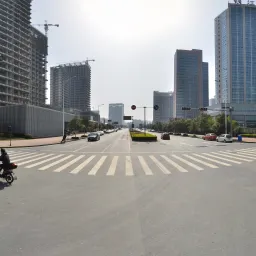
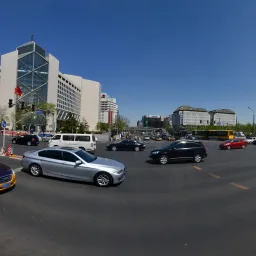
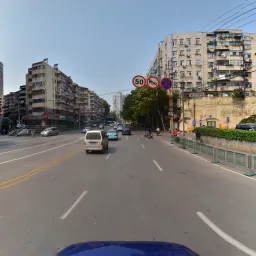
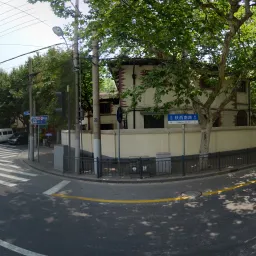
The Tsinghua-Tencent 100K (TT100K) dataset is a traffic-sign benchmark for object detection, created by Zhu et al. for the CVPR 2016 paper Traffic-Sign Detection and Classification in the Wild. The Ultralytics TT100K configuration provides 16,817 images (6,105 train / 7,641 val / 3,071 test) across 221 traffic-sign categories, with the source benchmark reporting over 30,000 sign instances. The "100K" in the name refers to the roughly 100,000 Tencent Street View images the benchmark was created from — not the number of images you download and train on. Because the original paper keeps only categories with at least 100 training instances, a commonly used 45-class subset exists, but the Ultralytics configuration retains all 221 annotated categories (many of them sparse).
The high-resolution street-view imagery captures large variations in illumination, weather, viewing angle, and distance, making TT100K a demanding benchmark for small-object detection in real-world driving scenes.
Key Features#
- Multi-class detection: 221 traffic-sign categories covering Chinese speed-limit, prohibitory, warning, height/width-limit, and informative signs.
- High resolution: 2048×2048-pixel images, so signs range from large close-ups to tiny distant markers that stress fine-grained detection.
- Real-world conditions: Large variations in weather, illumination, viewing angle, and occlusion.
- Bounding-box annotations: Each sign is labeled with a class and a bounding box in YOLO format after automatic conversion.
- Pre-defined splits: Fixed train / val / test splits (6,105 / 7,641 / 3,071 images) for consistent evaluation.
Dataset Structure#
The Ultralytics TT100K configuration is split into three subsets, all sharing the same 221 categories:
| Split | Images | Description |
|---|---|---|
| Train | 6,105 | Labeled traffic-scene images used to train the detector |
| Validation | 7,641 | The dataset's original "other" split, used for evaluation |
| Test | 3,071 | Held-out images for final evaluation of the trained model |
The 221 categories are organized into several major groups:
- Speed-limit signs — prohibitory limits
pl*(e.g., pl5–pl120) and minimum speedspm*(e.g., pm5–pm55). - Prohibitory signs — general prohibitions
p1–p29, no-entry/no-parkingpn/pne, and restrictionspr*(pr10–pr100). - Warning signs —
w1–w67for road hazards such as crossings, sharp turns, slippery roads, and construction. - Height/width-limit signs — height limits
ph*(e.g., ph2–ph5.5) and width limitspb/pw*. - Informative signs — general info
i1–i15, speed-limit infoil*(il50–il110), otherio, and information platesip.
Applications#
TT100K is widely used for building and benchmarking traffic-sign recognition in real-world conditions. Common applications include:
- Autonomous driving perception systems
- Advanced driver-assistance systems (ADAS)
- Traffic monitoring and road-infrastructure analysis
- Urban planning and traffic-flow studies
- Computer vision research on small objects in high-resolution imagery
Dataset YAML#
The TT100K.yaml file defines the dataset configuration — the dataset paths, class names, and the automatic download-and-convert script. It is maintained in the Ultralytics repository at https://github.com/ultralytics/ultralytics/blob/main/ultralytics/cfg/datasets/TT100K.yaml.
# Ultralytics 🚀 AGPL-3.0 License - https://ultralytics.com/license

# Tsinghua-Tencent 100K (TT100K) dataset https://cg.cs.tsinghua.edu.cn/traffic-sign/ by Tsinghua University
# Documentation: https://cg.cs.tsinghua.edu.cn/traffic-sign/tutorial.html
# Paper: Traffic-Sign Detection and Classification in the Wild (CVPR 2016)
# License: CC BY-NC 2.0 license for non-commercial use only
# Example usage: yolo train data=TT100K.yaml
# parent
# ├── ultralytics
# └── datasets
#     └── TT100K ← downloads here (~18 GB)

# Train/val/test sets as 1) dir: path/to/imgs, 2) file: path/to/imgs.txt, or 3) list: [path/to/imgs1, path/to/imgs2, ..]
path: TT100K # dataset root dir
train: images/train # train images (relative to 'path') 6105 images
val: images/val # val images (relative to 'path') 7641 images (original 'other' split)
test: images/test # test images (relative to 'path') 3071 images

# Classes (221 traffic sign categories, 45 with sufficient training instances)
names:
  0: i1
  1: i10
  2: i11
  3: i12
  4: i13
  5: i14
  6: i15
  7: i2
  8: i3
  9: i4
  10: i5
  11: il100
  12: il110
  13: il50
  14: il60
  15: il70
  16: il80
  17: il90
  18: io
  19: ip
  20: p1
  21: p10
  22: p11
  23: p12
  24: p13
  25: p14
  26: p15
  27: p16
  28: p17
  29: p18
  30: p19
  31: p2
  32: p20
  33: p21
  34: p22
  35: p23
  36: p24
  37: p25
  38: p26
  39: p27
  40: p28
  41: p3
  42: p4
  43: p5
  44: p6
  45: p7
  46: p8
  47: p9
  48: pa10
  49: pa12
  50: pa13
  51: pa14
  52: pa8
  53: pb
  54: pc
  55: pg
  56: ph1.5
  57: ph2
  58: ph2.1
  59: ph2.2
  60: ph2.4
  61: ph2.5
  62: ph2.8
  63: ph2.9
  64: ph3
  65: ph3.2
  66: ph3.5
  67: ph3.8
  68: ph4
  69: ph4.2
  70: ph4.3
  71: ph4.5
  72: ph4.8
  73: ph5
  74: ph5.3
  75: ph5.5
  76: pl10
  77: pl100
  78: pl110
  79: pl120
  80: pl15
  81: pl20
  82: pl25
  83: pl30
  84: pl35
  85: pl40
  86: pl5
  87: pl50
  88: pl60
  89: pl65
  90: pl70
  91: pl80
  92: pl90
  93: pm10
  94: pm13
  95: pm15
  96: pm1.5
  97: pm2
  98: pm20
  99: pm25
  100: pm30
  101: pm35
  102: pm40
  103: pm46
  104: pm5
  105: pm50
  106: pm55
  107: pm8
  108: pn
  109: pne
  110: po
  111: pr10
  112: pr100
  113: pr20
  114: pr30
  115: pr40
  116: pr45
  117: pr50
  118: pr60
  119: pr70
  120: pr80
  121: ps
  122: pw2
  123: pw2.5
  124: pw3
  125: pw3.2
  126: pw3.5
  127: pw4
  128: pw4.2
  129: pw4.5
  130: w1
  131: w10
  132: w12
  133: w13
  134: w16
  135: w18
  136: w20
  137: w21
  138: w22
  139: w24
  140: w28
  141: w3
  142: w30
  143: w31
  144: w32
  145: w34
  146: w35
  147: w37
  148: w38
  149: w41
  150: w42
  151: w43
  152: w44
  153: w45
  154: w46
  155: w47
  156: w48
  157: w49
  158: w5
  159: w50
  160: w55
  161: w56
  162: w57
  163: w58
  164: w59
  165: w60
  166: w62
  167: w63
  168: w66
  169: w8
  170: wo
  171: i6
  172: i7
  173: i8
  174: i9
  175: ilx
  176: p29
  177: w29
  178: w33
  179: w36
  180: w39
  181: w4
  182: w40
  183: w51
  184: w52
  185: w53
  186: w54
  187: w6
  188: w61
  189: w64
  190: w65
  191: w67
  192: w7
  193: w9
  194: pax
  195: pd
  196: pe
  197: phx
  198: plx
  199: pmx
  200: pnl
  201: prx
  202: pwx
  203: w11
  204: w14
  205: w15
  206: w17
  207: w19
  208: w2
  209: w23
  210: w25
  211: w26
  212: w27
  213: pl0
  214: pl4
  215: pl3
  216: pm2.5
  217: ph4.4
  218: pn40
  219: ph3.3
  220: ph2.6

# Download script/URL (optional) ---------------------------------------------------------------------------------------
download: |
  import json
  import shutil
  from pathlib import Path

  from PIL import Image

  from ultralytics.utils import TQDM
  from ultralytics.utils.downloads import download

  def tt100k2yolo(dir):
      """Convert TT100K annotations to YOLO format with images/{split} and labels/{split} structure."""
      data_dir = dir / "data"
      anno_file = data_dir / "annotations.json"

      print("Loading annotations...")
      with open(anno_file, encoding="utf-8") as f:
          data = json.load(f)

      # Build class name to index mapping from yaml
      names = yaml["names"]
      class_to_idx = {v: k for k, v in names.items()}

      # Create directories
      for split in ["train", "val", "test"]:
          (dir / "images" / split).mkdir(parents=True, exist_ok=True)
          (dir / "labels" / split).mkdir(parents=True, exist_ok=True)

      print("Converting annotations to YOLO format...")
      skipped = 0
      for img_id, img_data in TQDM(data["imgs"].items(), desc="Processing"):
          img_path_str = img_data["path"]
          if "train" in img_path_str:
              split = "train"
          elif "test" in img_path_str:
              split = "test"
          else:
              split = "val"

          # Source and destination paths
          src_img = data_dir / img_path_str
          if not src_img.exists():
              continue

          dst_img = dir / "images" / split / src_img.name

          # Get image dimensions
          try:
              with Image.open(src_img) as img:
                  img_width, img_height = img.size
          except Exception as e:
              print(f"Error reading {src_img}: {e}")
              continue

          # Copy image to destination
          shutil.copy2(src_img, dst_img)

          # Convert annotations
          label_file = dir / "labels" / split / f"{src_img.stem}.txt"
          lines = []

          for obj in img_data.get("objects", []):
              category = obj["category"]
              if category not in class_to_idx:
                  skipped += 1
                  continue

              bbox = obj["bbox"]
              xmin, ymin = bbox["xmin"], bbox["ymin"]
              xmax, ymax = bbox["xmax"], bbox["ymax"]

              # Convert to YOLO format (normalized center coordinates and dimensions)
              x_center = ((xmin + xmax) / 2.0) / img_width
              y_center = ((ymin + ymax) / 2.0) / img_height
              width = (xmax - xmin) / img_width
              height = (ymax - ymin) / img_height

              # Clip to valid range
              x_center = max(0, min(1, x_center))
              y_center = max(0, min(1, y_center))
              width = max(0, min(1, width))
              height = max(0, min(1, height))

              cls_idx = class_to_idx[category]
              lines.append(f"{cls_idx} {x_center:.6f} {y_center:.6f} {width:.6f} {height:.6f}\n")

          # Write label file
          if lines:
              label_file.write_text("".join(lines), encoding="utf-8")

      if skipped:
          print(f"Skipped {skipped} annotations with unknown categories")
      print("Conversion complete!")

  # Download
  dir = Path(yaml["path"])  # dataset root dir
  urls = ["https://cg.cs.tsinghua.edu.cn/traffic-sign/data_model_code/data.zip"]
  download(urls, dir=dir, curl=True, threads=1)

  # Convert
tt100k2yolo(dir)Usage#
TT100K downloads automatically the first time you train and requires about 18 GB of free disk space. On first use the download script fetches the original data and converts the annotations to YOLO format, which can take several minutes.
To train a YOLO26n model on the TT100K dataset for 100 epochs with an image size of 640, you can use the following code snippets. For a comprehensive list of available arguments, refer to the model Training page.
from ultralytics import YOLO

# Load a model
model = YOLO("yolo26n.pt")  # load a pretrained model (recommended for training)

# Train the model - dataset will auto-download on first run
results = model.train(data="TT100K.yaml", epochs=100, imgsz=640)
To label additional traffic-sign images and manage TT100K training runs in your browser, use Ultralytics Platform.
Sample Data and Annotations#
TT100K images are 2048×2048 street scenes in which traffic signs often occupy only a small fraction of the frame. A single image can contain multiple signs at different scales and distances, some partially occluded by vehicles, vegetation, or structures, and captured under day/night and clear/rainy conditions. This mix of small objects and challenging conditions is what makes the dataset a strong test of detector robustness.
Citations and Acknowledgments#
If you use the TT100K dataset in your research or development work, please cite the following paper:
@InProceedings{Zhu_2016_CVPR,
    author = {Zhu, Zhe and Liang, Dun and Zhang, Songhai and Huang, Xiaolei and Li, Baoli and Hu, Shimin},
    title = {Traffic-Sign Detection and Classification in the Wild},
    booktitle = {The IEEE Conference on Computer Vision and Pattern Recognition (CVPR)},
    month = {June},
    year = {2016}
}
We would like to acknowledge the Tsinghua University and Tencent collaboration for creating and maintaining this valuable resource for the computer vision and autonomous driving communities. For more information about the TT100K dataset, visit the official dataset website.
FAQ#
The Tsinghua-Tencent 100K (TT100K) dataset is used for traffic-sign detection and classification in real-world conditions. Its 221 categories and high-resolution street-view imagery make it a common benchmark for autonomous-driving perception, advanced driver-assistance systems (ADAS), and small-object detection research.
The Ultralytics TT100K configuration contains 16,817 images: 6,105 for training, 7,641 for validation (the dataset's original "other" split), and 3,071 for testing. See the Dataset Structure section for the full breakdown.
The "100K" refers to the roughly 100,000 Tencent Street View images the original benchmark was created from. The Ultralytics detection configuration provides 16,817 of those images with YOLO-format labels; the name reflects the source collection, not the training-set size.
TT100K defines 221 categories spanning speed-limit, prohibitory, warning, height/width-limit, and informative signs. The original paper keeps only the 45 categories with at least 100 training instances, but the Ultralytics configuration retains all 221. See Dataset Structure for the group breakdown.
TT100K is about 18 GB and downloads automatically the first time you train with
data="TT100K.yaml"— no manual download is required. The script also converts the original annotations to YOLO format on first run.Train a YOLO26n model on TT100K for 100 epochs at an image size of 640:
Train Examplefrom ultralytics import YOLO # Load a model model = YOLO("yolo26n.pt") # load a pretrained model (recommended for training) # Train the model results = model.train(data="TT100K.yaml", epochs=100, imgsz=640)For detailed configurations, see the Training page and model training tips.
Start with
imgsz=640for initial experiments, then raise toimgsz=1280(with a smallerbatch) if you have enough GPU memory, since the higher resolution helps recover small, distant signs:model.train(data="TT100K.yaml", imgsz=1280, batch=4) # higher resolution for small signsYou can also tune data augmentation and consider tiling strategies for very small objects. See Tips for Model Training for more.