Esportazione RKNN per Rockchip dei modelli Ultralytics YOLO26
Quando distribuisci modelli di computer vision su dispositivi integrati, soprattutto quelli basati su processori Rockchip, è essenziale disporre di un formato di modello compatibile. Esportare i modelli Ultralytics YOLO26 nel formato RKNN offre prestazioni ottimizzate e compatibilità con l'hardware Rockchip. Questa guida illustra la conversione dei modelli YOLO26 nel formato RKNN, incluse le esportazioni in virgola mobile e quantizzate INT8, per una distribuzione efficiente sulle piattaforme Rockchip.
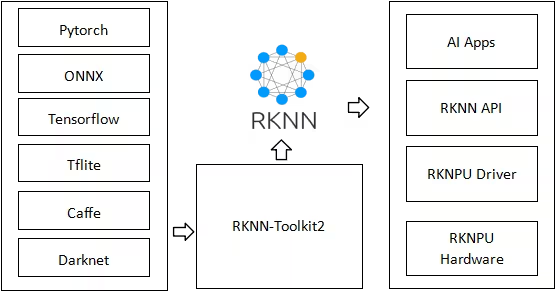
Questa guida è stata testata con Radxa Rock 5B, basato su Rockchip RK3588, e Radxa Zero 3W, basato su Rockchip RK3566. Si prevede che funzioni anche su altri dispositivi basati su Rockchip che supportano rknn-toolkit2, come RK3576, RK3568, RK3562, RK2118, RV1126B, RV1103, RV1106, RV1103B e RV1106B. I dispositivi che supportano solo INT8, come RV1103 e RV1106, richiedono quantize=8.
Che cos'è Rockchip?#
Rockchip progetta System-on-Chip (SoC) efficienti dal punto di vista energetico, utilizzati in un'ampia gamma di prodotti elettronici di consumo, applicazioni industriali e prodotti AI. Grazie all'architettura basata su ARM, alle unità di elaborazione neurale (NPU) integrate e al supporto multimediale ad alta risoluzione, i SoC Rockchip alimentano dispositivi come tablet, smart TV, sistemi IoT e applicazioni edge AI. Aziende come Radxa, ASUS, Pine64, Orange Pi, Odroid, Khadas e Banana Pi offrono diversi prodotti basati su SoC Rockchip.
RKNN Toolkit#
RKNN Toolkit è un insieme di strumenti e librerie forniti da Rockchip per facilitare la distribuzione di modelli di deep learning sulle proprie piattaforme hardware. RKNN, ovvero Rockchip Neural Network, è il formato proprietario utilizzato da questi strumenti. I modelli RKNN sono progettati per sfruttare appieno l'accelerazione hardware offerta dalla NPU (Neural Processing Unit) di Rockchip, garantendo prestazioni elevate nelle attività di IA su dispositivi come RK3588, RK3566, RV1103, RV1106 e altri sistemi basati su Rockchip.
Caratteristiche principali dei modelli RKNN#
I modelli RKNN offrono diversi vantaggi per la distribuzione sulle piattaforme Rockchip:
- Ottimizzazione per NPU: i modelli RKNN sono ottimizzati specificamente per essere eseguiti sulle NPU Rockchip, garantendo prestazioni ed efficienza massime.
- Latenza ridotta: il formato RKNN riduce al minimo la latenza di inferenza, un aspetto fondamentale per le applicazioni in tempo reale sui dispositivi edge.
- Personalizzazione specifica per piattaforma: i modelli RKNN possono essere adattati a specifiche piattaforme Rockchip, consentendo un migliore utilizzo delle risorse hardware.
- Efficienza energetica: grazie all'hardware NPU dedicato, i modelli RKNN consumano meno energia rispetto all'elaborazione basata su CPU o GPU, prolungando la durata della batteria dei dispositivi portatili.
Installare il sistema operativo sull'hardware Rockchip#
Il primo passo dopo aver acquistato un dispositivo basato su Rockchip è installare un sistema operativo affinché l'hardware possa avviarsi in un ambiente funzionante. Di seguito trovi i collegamenti alle guide introduttive per i due dispositivi testati, Radxa Rock 5B e Radxa Zero 3W.
Attività supportate#
L'esportazione RKNN supporta tutte e sette le attività Ultralytics. La segmentazione semantica e la stima della profondità sono disponibili solo con YOLO26, l'unica famiglia che include queste head.
| Attività | YOLOv8 | YOLO11 | YOLO26 |
|---|---|---|---|
| Rilevamento | ✅ | ✅ | ✅ |
| Segmentazione | ✅ | ✅ | ✅ |
| Semantica | ❌ | ❌ | ✅ |
| Profondità | ❌ | ❌ | ✅ |
| Classificazione | ✅ | ✅ | ✅ |
| Stima della posa | ✅ | ✅ | ✅ |
| OBB | ✅ | ✅ | ✅ |
Esportazione in RKNN: conversione del tuo modello YOLO26#
Esporta un modello Ultralytics YOLO26 nel formato RKNN ed esegui l'inferenza con il modello esportato.
Assicurati di utilizzare un PC Linux basato su X86 per esportare il modello in RKNN, perché l'esportazione sui dispositivi basati su Rockchip (ARM64) non è supportata.
Installazione#
Per installare i pacchetti necessari, esegui:
# Install the required package for YOLO26
pip install ultralytics
Per istruzioni dettagliate e best practice sulla procedura di installazione, consulta la nostra guida all'installazione di Ultralytics. Se durante l'installazione dei pacchetti necessari per YOLO26 riscontri difficoltà, consulta la nostra guida ai problemi comuni per trovare soluzioni e suggerimenti.
Utilizzo#
L’esportazione FP16 e INT8 è supportata per tutte le attività. Le build INT8 per i target compatibili con FP16 mantengono in FP16 gli strati con un errore elevato (RKNN Toolkit auto_hybrid); i target compatibili solo con INT8, come RV1103 e RV1106, saltano questo passaggio. Per i modelli di rilevamento, segmentazione, posa e OBB, il file INT8 .rknn termina alle convoluzioni di output della head e restituisce i tensori grezzi della head per ogni livello; la decodifica dei box viene eseguita sulla CPU host in virgola mobile usando il file tail.onnx nella directory esportata. Ultralytics esegue tail.onnx con ONNX Runtime (installato automaticamente se non è già presente); i runtime personalizzati devono eseguire tail.onnx o implementare la stessa decodifica. Riesporta i modelli INT8 di rilevamento, segmentazione, posa e OBB esportati con versioni precedenti di Ultralytics, poiché i loro output contengono coordinate normalizzate rispetto all’input che le versioni attuali non riscalano più. La precisione INT8 per tutte le attività è stata convalidata con il simulatore rknn-toolkit2, ma non ancora su hardware Rockchip. Le build INT8 per la profondità vengono calibrate su immagini del dataset di profondità abbinate alle rispettive mappe di profondità. Scegli immagini di calibrazione che coprano l’intervallo di profondità vicino e lontano della scena di distribuzione, poiché le profondità oltre l’intervallo calibrato perdono precisione.
Il formato RKNN supporta le modalità Esportazione, Previsione e Convalida. L'inferenza e la convalida vengono eseguite sull'hardware NPU Rockchip. Esporta il tuo modello, quindi carica il modello esportato per eseguire inferenze o convalidarne l'accuratezza. Per impostazione predefinita, l'esportazione RKNN usa il percorso di compilazione in virgola mobile (quantize=16) per i target Rockchip compatibili con FP16. Usa quantize=8 per creare un modello RKNN quantizzato INT8 con i dati di calibrazione. L'esportazione RKNN non espone una modalità FP32 separata; l'impostazione predefinita FP16 non richiede FP32.
from ultralytics import YOLO

# Carica un modello YOLO26 (sostituiscilo con un modello di qualsiasi attività supportata)
model = YOLO("yolo26n-obb.pt")

# Esporta il modello nel formato RKNN
model.export(format="rknn", name="rk3588")  # creates 'yolo26n-obb_rknn_model'

# Esporta un modello RKNN quantizzato INT8 con dati di calibrazione
model = YOLO("yolo26n.pt")
model.export(format="rknn", name="rk3588", quantize=8, data="coco8.yaml") # creates 'yolo26n_rknn_model'from ultralytics import YOLO
# Carica il modello RKNN esportato
model = YOLO("./yolo26n-obb_rknn_model")
# Esegui l'inferenza
results = model("https://ultralytics.com/images/boats.jpg")from ultralytics import YOLO
# Carica il modello RKNN esportato
model = YOLO("./yolo26n-obb_rknn_model")
# Convalida la precisione sul dataset DOTA8
metrics = model.val(data="dota8.yaml")Argomenti di esportazione#
| Argomento | Tipo | Predefinito | Descrizione |
|---|---|---|---|
format | str | 'rknn' | Formato target per il modello esportato, che ne definisce la compatibilità con gli ambienti di distribuzione Rockchip. |
imgsz | int o tuple | 640 | Dimensione dell'immagine desiderata per l'input del modello. Può essere un intero per immagini quadrate o una tupla (height, width) per dimensioni specifiche. |
batch | int | 1 | Specifica la dimensione batch per l'inferenza del modello esportato o il numero massimo di immagini che il modello esportato elaborerà contemporaneamente in modalità predict. |
name | str | 'rk3588' | Specifica il target Rockchip. rk3588, rk3576, rk3566, rk3568, rk3562, rk2118 e rv1126b supportano FP16 (quantize=16 o non specificato) e INT8 (quantize=8); rv1103, rv1106, rv1103b e rv1106b supportano solo INT8 (quantize=8 o non specificato). |
quantize | int o str | None | Precisione di quantizzazione: se non impostata o 16, crea una build FP16 per i target compatibili con FP16; se non impostata, abilita automaticamente INT8 per i target compatibili solo con INT8; 8 crea una build INT8. L’esportazione RKNN non prevede una modalità FP32 separata. Sostituisce i flag deprecati half/int8. |
simplify | bool | True | Semplifica il grafo ONNX intermedio con onnxslim. |
opset | int | None | Specifica la versione opset ONNX per il grafo ONNX intermedio. Se non specificata, il valore predefinito è 19; i valori superiori a 19 vengono ridotti a 19. |
data | str | None | File YAML del dataset usato per la calibrazione INT8. Se omesso con quantize=8, Ultralytics usa il dataset predefinito del task (ad es. coco8.yaml per il rilevamento, depth8.yaml per la profondità). |
fraction | float, int o list | 1.0 | Sottoinsieme di calibrazione espresso come rapporto, numero di immagini o rapporti/conteggi [train, val, test]. Gli elenchi di due elementi lasciano completo test, mentre 0 lo esclude. |
device | str | None | Specifica il dispositivo per l'esportazione: GPU (device=0), CPU (device=cpu). |
Per l'esportazione in RKNN, usa una macchina Linux x86.
Per ulteriori dettagli sul processo di esportazione, visita la pagina della documentazione Ultralytics dedicata all'esportazione.
Distribuzione dei modelli YOLO26 RKNN esportati#
Dopo aver esportato correttamente i tuoi modelli Ultralytics YOLO26 nel formato RKNN, il passo successivo consiste nel distribuirli sui dispositivi basati su Rockchip.
Installazione#
Per installare i pacchetti necessari, esegui:
# Install the required package for YOLO26
pip install ultralytics
Una volta installato, esegui l'inferenza e la convalida sul tuo dispositivo Rockchip esattamente come indicato nella sezione Utilizzo qui sopra: il modello esportato _rknn_model si carica direttamente con YOLO(...).
Se nei log compare un messaggio che indica una mancata corrispondenza tra la versione del runtime RKNN e quella di RKNN Toolkit e l'inferenza non riesce, sostituisci /usr/lib/librknnrt.so con il file ufficiale librknnrt.so.

Applicazioni nel mondo reale#
I dispositivi basati su Rockchip con modelli YOLO26 RKNN possono essere utilizzati in diverse applicazioni:
- Videosorveglianza intelligente: distribuisci sistemi efficienti di rilevamento degli oggetti per il monitoraggio della sicurezza con consumi energetici ridotti.
- Automazione industriale: implementa il controllo qualità e il rilevamento dei difetti direttamente sui dispositivi embedded.
- Analisi per il commercio al dettaglio: monitora in tempo reale il comportamento dei clienti e la gestione delle scorte, senza dipendere dal cloud.
- Agricoltura intelligente: monitora la salute delle colture e rileva i parassiti usando la visione artificiale in agricoltura.
- Robotica autonoma: abilita la navigazione basata sulla visione e il rilevamento degli ostacoli su piattaforme con risorse limitate.
Benchmark#
I benchmark di YOLO26 riportati qui sotto sono stati eseguiti dal team Ultralytics su Radxa Rock 5B, basato su Rockchip RK3588, usando il formato modello rknn per misurare velocità e precisione.
| Modello | Formato | Precisione | Stato | Dimensione (MB) | mAP50-95(B) | Tempo di inferenza (ms/im) |
|---|---|---|---|---|---|---|
| YOLO26n | rknn | FP16 | ✅ | 7.2 | 0.477 | 58.5 |
| YOLO26n | rknn | INT8 | ✅ | 4.1 | 0.463 | 41.2 |
| YOLO26s | rknn | FP16 | ✅ | 21.0 | 0.569 | 93.8 |
| YOLO26s | rknn | INT8 | ✅ | 12.0 | 0.554 | 61.9 |
| YOLO26m | rknn | FP16 | ✅ | 43.0 | 0.608 | 226.3 |
| YOLO26m | rknn | INT8 | ✅ | 22.0 | 0.603 | 122.0 |
| YOLO26l | rknn | FP16 | ✅ | 53.0 | 0.628 | 264.7 |
| YOLO26l | rknn | INT8 | ✅ | 28.0 | 0.617 | 145.3 |
| YOLO26x | rknn | FP16 | ✅ | 113.0 | 0.664 | 655.4 |
| YOLO26x | rknn | INT8 | ✅ | 58.0 | 0.649 | 287.4 |
Testato con ultralytics 8.4.60
La convalida dei benchmark qui sopra è stata eseguita usando il dataset COCO128. Il tempo di inferenza non include la preelaborazione e la postelaborazione. I risultati INT8 verranno aggiornati una volta convalidato su hardware Rockchip l'attuale percorso di esportazione INT8 (decodifica lato host e auto_hybrid).
Riepilogo#
In questa guida hai imparato a esportare i modelli Ultralytics YOLO26 nel formato RKNN per distribuirli sulle piattaforme Rockchip. Hai anche scoperto RKNN Toolkit e i vantaggi specifici dei modelli RKNN per le applicazioni edge AI.
La combinazione di Ultralytics YOLO26 e della tecnologia NPU di Rockchip offre una soluzione efficiente per eseguire attività di computer vision su dispositivi integrati. Questo approccio consente il rilevamento degli oggetti in tempo reale e altre applicazioni di AI per la visione con consumi ridotti.
Per ulteriori dettagli sull'utilizzo, consulta la documentazione ufficiale RKNN.
Domande frequenti#
Puoi esportare il tuo modello Ultralytics YOLO nel formato RKNN usando il metodo
export()del pacchetto Ultralytics Python oppure tramite l'interfaccia a riga di comando (CLI). Per il processo di esportazione, assicurati di usare un PC Linux basato su x86, poiché i dispositivi ARM64 come Rockchip non sono supportati. Puoi specificare la piattaforma Rockchip di destinazione con l'argomentoname, ad esempiork3588,rk3566o altri. Questo processo genera un modello RKNN ottimizzato, pronto per la distribuzione sul tuo dispositivo Rockchip, sfruttandone l'unità di elaborazione neurale (NPU) per accelerare l'inferenza.Esempiofrom ultralytics import YOLO # Carica il tuo modello YOLO model = YOLO("yolo26n.pt") # Esporta nel formato RKNN per una piattaforma Rockchip specifica model.export(format="rknn", name="rk3588")I modelli RKNN sono progettati specificamente per sfruttare le capacità di accelerazione hardware delle unità di elaborazione neurale (NPU) di Rockchip. Questa ottimizzazione consente inferenze più rapide e una latenza inferiore rispetto all'esecuzione di formati di modello generici come ONNX o LiteRT sullo stesso hardware. I modelli RKNN permettono di usare le risorse del dispositivo in modo più efficiente, riducendo i consumi e migliorando le prestazioni complessive: un aspetto particolarmente importante per le applicazioni in tempo reale sui dispositivi edge. Convertendo i tuoi modelli Ultralytics YOLO in RKNN, puoi ottenere prestazioni ottimali sui dispositivi basati su SoC Rockchip come RK3588, RK3566 e altri.
I modelli RKNN sono ottimizzati specificamente per le piattaforme Rockchip e le relative NPU integrate. Per ottenere prestazioni ottimali su altre piattaforme, ti consigliamo di esportare i modelli Ultralytics YOLO in formati progettati appositamente per tali piattaforme, come TensorRT per le GPU NVIDIA o Edge TPU per i dispositivi Coral di Google. Ultralytics supporta l'esportazione in un'ampia gamma di formati, garantendo la compatibilità con diversi acceleratori hardware.
L'esportazione dei modelli Ultralytics YOLO nel formato RKNN supporta le piattaforme Rockchip con compilazioni RKNN in virgola mobile, tra cui RK3588, RK3576, RK3566, RK3568, RK3562, RK2118 e RV1126B. Supporta anche l'esportazione RKNN quantizzata INT8 con
quantize=8, necessaria per i target che supportano solo INT8, come RV1103, RV1106, RV1103B e RV1106B. Queste piattaforme si trovano comunemente nei dispositivi di produttori come Radxa, ASUS, Pine64, Orange Pi, Odroid, Khadas e Banana Pi, permettendoti di distribuire i tuoi modelli RKNN ottimizzati su una vasta gamma di dispositivi basati su Rockchip, dai computer a scheda singola ai sistemi industriali.Sui dispositivi Rockchip, i modelli RKNN in genere superano formati come ONNX o LiteRT perché sono ottimizzati per le NPU Rockchip. Per esempio, i benchmark su Radxa Rock 5B (RK3588) mostrano che YOLO26n in formato RKNN raggiunge un tempo di inferenza di 58.5 ms/immagine in FP16 e 41.2 ms/immagine in INT8. I risultati per tutte le dimensioni dei modelli YOLO26 sono elencati nella sezione benchmark. Eseguendo i modelli RKNN sull'hardware NPU dedicato, si riduce al minimo la latenza e si massimizza il throughput per le applicazioni in tempo reale sui dispositivi edge basati su Rockchip.


Commenti45
Fai una domanda, condividi i tuoi risultati o aiuta qualcun altro.
as-jackson
We are pleased to confirm that the following ArmSoM boards based on Rockchip RK3576 have been successfully tested with Ultralytics projects (e.g., YOLO11n):
Validation Scope:
Model training/inference pipeline
1yizi72
I tried to convert the yolo11n.pt into a rknn model through codes below: from ultralytics import YOLO model = YOLO("yolo11n.pt") model.export(format="rknn", name="rk3588") and everything went correct. A rknn model named yolo11n-rk3588.rknn was build and used to infer a very traditional yolo demo image "bus"(a blue bus with several people in front of it), but no detection result was obtained.
I tried to convert the yolol11n.pt into onnx model through above codes firstly, and then used a convert.py offered by rknn_model_zoo/examples/yolo11/python,
import sys from rknn.api import RKNN
DATASET_PATH = '../../../datasets/COCO/coco_subset_20.txt' DEFAULT_RKNN_PATH = '/home/yizi/model/yolo11/yolodet.rknn' DEFAULT_QUANT = False
def parse_arg(): if len(sys.argv) < 3: print("Usage: python3 {} onnx_model_path [platform] [dtype(optional)] [output_rknn_path(optional)]".format(sys.argv[0])) print(" platform choose from [rk3562,rk3566,rk3568,rk3588,rk3576,rk1808,rv1109,rv1126]") print(" dtype choose from [i8, fp] for [rk3562,rk3566,rk3568,rk3588,rk3576]") print(" dtype choose from [u8, fp] for [rk1808,rv1109,rv1126]") exit(1)
model_path = sys.argv[1]
platform = sys.argv[2]

do_quant = DEFAULT_QUANT
if len(sys.argv) > 3:
    model_type = sys.argv[3]
    if model_type not in ['i8', 'u8', 'fp']:
        print("ERROR: Invalid model type: {}".format(model_type))
        exit(1)
    elif model_type in ['i8', 'u8']:
        do_quant = True
    else:
        do_quant = False

if len(sys.argv) > 4:
    output_path = sys.argv[4]
else:
    output_path = DEFAULT_RKNN_PATH

return model_path, platform, do_quant, output_path
if name == 'main': model_path, platform, do_quant, output_path = parse_arg()
# Create RKNN object
rknn = RKNN(verbose=False)

# Pre-process config
print('--> Config model')
rknn.config(mean_values=[[0, 0, 0]], std_values=[[255, 255, 255]], target_platform=platform)
print('done')

# Load model
print('--> Loading model')
ret = rknn.load_onnx(model=model_path)
if ret != 0:
    print('Load model failed!')
    exit(ret)
print('done')

# Build model
print('--> Building model')
ret = rknn.build(do_quantization=do_quant, dataset=DATASET_PATH)
if ret != 0:
    print('Build model failed!')
    exit(ret)
print('done')

# Export rknn model
print('--> Export rknn model')
ret = rknn.export_rknn(output_path)
if ret != 0:
    print('Export rknn model failed!')
    exit(ret)
print('done')

# Release
rknn.release()
Still everything went correct. A rknn model was created and applied to "bus.jpg", and there was no detection at all. I wonder what's wrong in the whole process?
1 Glenn JocherUltralytics
@yizi72 thanks for the detailed report. For RKNN inference issues with YOLO11, please ensure:
- You're using matching RKNN Toolkit and runtime versions (update both if needed)
- Input images are 640x640 with pixel values normalized 0-255
- You load models via
YOLO('./yolo11n_rknn_model')as shown in our RKNN deployment docs
If issues persist, please share your full environment details and validation results from both export methods.
1、I used rknn-toolkit2-2.3.0 which is the latest version ,bu I still did "pip install rknn-toolkit2 --upgrade" again. 2、The input image is 640*640, uchar, 0-255. 3. I used the following setting to transfer yolo11n.pt to onnx, from ultralytics import YOLO
加载一个模型,路径为 YOLO 模型的 .pt 文件
model = YOLO("yolo11n.pt")
导出模型,设置多种参数
model.export( format="onnx", imgsz=(640, 640),
keras=False,
optimize=True,
half=False,
int8=False,
dynamic=False,
simplify=True,
opset=12,
#workspace=4.0,
nms=False,
batch=1
) and applied the following codes to verify yolo11n.onnx model:from ultralytics import YOLO from PIL import Image
Load a model
model = YOLO("/home/yizi/models/yolo11/yolo11n.onnx") # load an official model
Predict with the model
results = model("bus.jpg") # predict on an image #results = rknn_model("bus.jpg")
Access the results
for result in results: xywh = result.boxes.xywh # center-x, center-y, width, height xywhn = result.boxes.xywhn # normalized xyxy = result.boxes.xyxy # top-left-x, top-left-y, bottom-right-x, bottom-right-y xyxyn = result.boxes.xyxyn # normalized names = [result.names[cls.item()] for cls in result.boxes.cls.int()] # class name of each box confs = result.boxes.conf # confidence score of each box
The results are good. All objects in bus.jpg were detected. Then I run the following code to transfer onnx to rknn:
from rknn.api import RKNN import cv2 import numpy as np
if name == 'main': rknn = RKNN(verbose=True,verbose_file="log.txt") rknn.config( mean_values=[[0, 0, 0]], std_values=[[255, 255, 255]], target_platform="rk3588", optimization_level=3 )
rknn.load_onnx(
    model="/home/yizi/models/yolo11/yolo11n.onnx",
    input_size_list=[[1,3,640,640]],
)
rknn.build(
    do_quantization=False
)

rknn.export_rknn(
    export_path="/home/yizi/models/yolo11/yolo11n.rknn"
)

rknn.release()
The transferring process went smooth, two problems appeared.
Firstly,when this rknn model was pushed into a rk3588 tablet, and run with a binary executable file generated by cross-compilation, no result was detected.
Secondly, I tried to run the following codes:
from ultralytics import YOLO from PIL import Image
rknn_model = YOLO("/home/yizi/models/yolo11/yolo11n.rknn", task=detect)
results = model("bus.jpg")
An error message, "model='/home/yizi/models/yolo11/yolo11n.rknn' is not a supported model format. Ultralytics supports: ('PyTorch', 'TorchScript', 'ONNX', 'OpenVINO', 'TensorRT', 'CoreML', 'TensorFlow SavedModel', 'TensorFlow GraphDef', 'TensorFlow Lite', 'TensorFlow Edge TPU', 'TensorFlow.js', 'PaddlePaddle', 'MNN', 'NCNN', 'IMX', 'RKNN') See https://docs.ultralytics.com/modes/predict for help. " appeared.
Last question, how many outputs does yolo11 yield? one or six?
- Glenn JocherUltralytics
@yizi72 thank you for the detailed report. For RKNN deployment issues:
- When using Ultralytics RKNN export, load models via the exported directory (not .rknn file), as shown in our RKNN deployment docs:
model = YOLO('./yolo11n_rknn_model') # directory path-
Ensure your RK3588 runtime uses matching librknnrt.so versions with your RKNN Toolkit 2.3.0 installation
-
YOLO11 detection models output 3 tensors by default (different from older YOLO versions). For conversion issues, we recommend using our native
model.export(format='rknn')rather than manual ONNX conversion.
Let me know if you still face issues after verifying these points.
Thanks for replies. I did verify all points you've mentioned above. When running model("bus.jpg"), error messages show:
File "/home/yizi/anaconda3/envs/rknn/lib/python3.9/site-packages/ultralytics/engine/model.py", line 182, in call return self.predict(source, stream, **kwargs) File "/home/yizi/anaconda3/envs/rknn/lib/python3.9/site-packages/ultralytics/engine/model.py", line 543, in predict self.predictor.setup_model(model=self.model, verbose=is_cli) File "/home/yizi/anaconda3/envs/rknn/lib/python3.9/site-packages/ultralytics/engine/predictor.py", line 378, in setup_model self.model = AutoBackend( File "/home/yizi/anaconda3/envs/rknn/lib/python3.9/site-packages/torch/utils/_contextlib.py", line 116, in decorate_context return func(*args, **kwargs) File "/home/yizi/anaconda3/envs/rknn/lib/python3.9/site-packages/ultralytics/nn/autobackend.py", line 495, in init raise OSError("RKNN inference is only supported on Rockchip devices.") OSError: RKNN inference is only supported on Rockchip devices.
It's very strange because I did connect a RK3588 tablet with my virtual machine.
I still have a quesiton on yolo11n output: yolo11n.pt has one output with shape (1, 84, 8400), and yolo11n-rk3588.rknn has one output with shape (1,84, 8400, 0). Are they correct? If so, can I use the similar codes to analyze rknn output, such as :
for result in results: xywh = result.boxes.xywh # center-x, center-y, width, height xywhn = result.boxes.xywhn # normalized xyxy = result.boxes.xyxy # top-left-x, top-left-y, bottom-right-x, bottom-right-y xyxyn = result.boxes.xyxyn # normalized names = [result.names[cls.item()] for cls in result.boxes.cls.int()] # class name of each box confs = result.boxes.conf
- Glenn JocherUltralytics
@yizi72 thanks for the details. For the RKNN inference error: ensure your Python script is running directly on the RK3588 hardware (not through a VM) as RKNN models require native Rockchip NPU access. Regarding outputs, YOLO11 detection models produce 3 output tensors by default (see our RKNN deployment docs), but your code should work if using the exported RKNN directory with the included postprocessing. Let me know if you still face issues after verifying native hardware execution.
 Yufeng Wu
Hello, Ultralytics team. I wonder if it's possible to port yolo26n-pose to rknn? I'm not sure if it's difficult to work out on my own? Is there any model architecture problems that prevent porting the pose models to rknn?
- Glenn JocherUltralytics
@kamosmkey exports fine. See https://platform.ultralytics.com/glenn-jocher/example-project/exp-24?tab=export
2
montemadjo
It appears it does not support rv1106 platform yet
When I try to export the model using this command
model.export(format="rknn", name="rv1106", imgsz=320)It gives the following error
E build: Current target_platform(rv1106) not support do_quantization = False!
E export_rknn: RKNN model does not exist, please load & build model first!
🤔
- Glenn JocherUltralytics(modificato)
rv1106is an INT8-only target, so it needs a quantized RKNN build. Older Ultralytics releases always built withdo_quantization=False, which fails with the message you saw. Current releases support it: upgrade withpip install -U ultralyticsand export withquantize=8plus calibration data:model.export(format="rknn", name="rv1106", imgsz=320, quantize=8, data="coco8.yaml")See the Rockchip RKNN export guide. If it still fails, share your
!yolo checksoutput andrknn-toolkit2version here and we can sanity-check the environment.1 Here's the quick workaround for those who want to work with yolo26 on RV1106 chip (like Luckfox pico etc). I ran into a couple of issues there, including quantization erasing my confidence results.
Long story short - first you need to monkey-patch head.Detect.forward function in order to get two tensors - one for bboxes and one for scores. That way you escape all the heavy non-supported tensor functions. Then you export your yolo26 model to onnx format and finally to rknn like this
import torch
from ultralytics.nn.modules import head

# 1. First we monkey-patch the forward function
def patched_forward(self, x):
    if self.end2end:
        h = self.one2one
    else:
        h = self.one2many

    box_head = h["box_head"]
    cls_head = h["cls_head"]

    if box_head is None or cls_head is None:
        raise RuntimeError("Head moduls are None")

    bs = x[0].shape[0]
    boxes = torch.cat([box_head[i](x[i]).view(bs, 4 * self.reg_max, -1) for i in range(self.nl)], dim=-1)
    scores = torch.cat([cls_head[i](x[i]).view(bs, self.nc, -1) for i in range(self.nl)], dim=-1)

    preds = {"boxes": boxes, "scores": scores, "feats": x}
    y = self._inference(preds)

    # We are splitting into 2 tensors - both gets its own scale/zp at INT8 quantization
    bboxes = y[:, :4, :]   # [1, 4, 2100] — range 0-640
    scores = y[:, 4:, :]   # [1, 1, 2100] — range 0-1 (already sigmoid-ed)
    score_max_idx = scores[0, 0, :].argmax()
    return bboxes, scores

head.Detect.forward = patched_forward

# 2. Then we export to onnx model (we got best.pt model from ultralytics platform)
from ultralytics import YOLO
model = YOLO("best.pt")
model.export(format="onnx", dynamic=False, opset=12, imgsz=320)

# 3. Then we export to RKNN format
from rknn.api import RKNN

rknn = RKNN()

# 3.1. Konfiguracija specifična za RV1106
rknn.config(
    mean_values=[[0, 0, 0]],
    std_values=[[255, 255, 255]],
    target_platform='rv1106',
    quantized_algorithm='normal', # Ili 'mmse' za bolju preciznost
    quantized_dtype='asymmetric_quantized-8'
)

# 3.2. Load the ONNX model
print("Loading ONNX model...")
rknn.load_onnx(model='best.onnx')

# 3.3. Build modela sa INT8 kvantizacijom
# calib.txt should contain paths to calibration images
print("Building RKNN model with quantization...")
rknn.build(do_quantization=True, dataset='./calib.txt')

# 3.4. Exporting final .rknn file
print("Exporting RKNN model...")
rknn.export_rknn('./yolo26_rv1106_model_optimized.rknn')

rknn.release()
After this you need to postprocess those two outputs like this
yolo26_postprocess.h
/**
 * YOLO26 Post-processing header for Fish Counter
 *
 * Supports YOLO26 2-output format: boxes [1, 4, N] + scores [1, nc, N]
 *
 * Based on the working rknn_minimal_test example.
 */

#ifndef _YOLO26_POSTPROCESS_H_
#define _YOLO26_POSTPROCESS_H_

#include <stdint.h>
#include <vector>
#include "rknn_api.h"
#include "rknn_detector.h"

// YOLO26 model configuration defaults
#define YOLO26_CONF_THRESHOLD 0.25f
#define YOLO26_NMS_THRESHOLD 0.45f

// Detection result (same structure as postprocess.h for compatibility)
typedef struct
{
    float x1, y1, x2, y2; // Bounding box (in model coordinates)
    float confidence;
    int class_id;
} yolo26_detection_t;

// YOLO26 context for format detection and caching
typedef struct
{
    int num_predictions;
    int num_classes;
    bool boxes_transposed; // true = [1, 4, N], false = [1, N, 4]
} yolo26_context_t;

/**
 * Initialize YOLO26 post-processing
 * Detects the output format from model attributes
 *
 * @param app_ctx The RKNN app context with model info
 * @param yolo26_ctx Output: YOLO26 context for format info
 * @return 0 on success, -1 on error
 */
int yolo26_init_postprocess(rknn_app_context_t *app_ctx, yolo26_context_t *yolo26_ctx);

/**
 * Deinitialize YOLO26 post-processing
 */
void yolo26_deinit_postprocess();

/**
 * YOLO26 post_process: processes model outputs and returns detections
 * Uses 2-output format: boxes [1, 4, N] + scores [1, nc, N]
 *
 * @param app_ctx The RKNN app context
 * @param yolo26_ctx YOLO26 context from init
 * @param outputs Pointer to output tensor memory array
 * @param letter_box Letterbox transform info for coordinate mapping
 * @param conf_threshold Confidence threshold
 * @param nms_threshold NMS threshold
 * @param od_results Output: detection results (compatible with existing code)
 * @return 0 on success, -1 on error
 */
int yolo26_post_process(rknn_app_context_t *app_ctx, yolo26_context_t *yolo26_ctx,
                        void *outputs, letterbox_t *letter_box,
                        float conf_threshold, float nms_threshold,
                        object_detect_result_list *od_results);

#endif // _YOLO26_POSTPROCESS_H_
yolo26_postprocess.cc
/**
 * YOLO26 Post-processing for Fish Counter on RV1106
 *
 * Supports YOLO26 2-output format: boxes [1, 4, N] + scores [1, nc, N]
 *
 * Based on the working rknn_minimal_test example.
 */

#include "yolo26_postprocess.h"

#include <math.h>
#include <stdint.h>
#include <stdio.h>
#include <stdlib.h>
#include <string.h>
#include <algorithm>
#include <vector>

// Clamp value to range
inline static int clamp(float val, int min, int max)
{
    return val > min ? (val < max ? val : max) : min;
}

// Dequantize INT8 to float
static inline float dequantize(int8_t qnt, int32_t zp, float scale)
{
    return ((float)qnt - (float)zp) * scale;
}

// Sigmoid function
static inline float sigmoid(float x)
{
    return 1.0f / (1.0f + expf(-x));
}

// Calculate IoU between two boxes
static float calculate_iou(float x1_a, float y1_a, float x2_a, float y2_a,
                           float x1_b, float y1_b, float x2_b, float y2_b)
{
    float x1 = std::max(x1_a, x1_b);
    float y1 = std::max(y1_a, y1_b);
    float x2 = std::min(x2_a, x2_b);
    float y2 = std::min(y2_a, y2_b);

    float inter_w = std::max(0.0f, x2 - x1);
    float inter_h = std::max(0.0f, y2 - y1);
    float inter_area = inter_w * inter_h;

    float area_a = (x2_a - x1_a) * (y2_a - y1_a);
    float area_b = (x2_b - x1_b) * (y2_b - y1_b);
    float union_area = area_a + area_b - inter_area;

    return union_area > 0 ? inter_area / union_area : 0;
}

// Non-Maximum Suppression for YOLO26 detections
static std::vector<yolo26_detection_t> yolo26_nms(std::vector<yolo26_detection_t> &detections, float nms_threshold)
{
    // Sort by confidence (descending)
    std::sort(detections.begin(), detections.end(),
              [](const yolo26_detection_t &a, const yolo26_detection_t &b)
              { return a.confidence > b.confidence; });

    std::vector<yolo26_detection_t> result;
    std::vector<bool> suppressed(detections.size(), false);

    for (size_t i = 0; i < detections.size(); i++)
    {
        if (suppressed[i])
            continue;

        result.push_back(detections[i]);

        for (size_t j = i + 1; j < detections.size(); j++)
        {
            if (suppressed[j])
                continue;

            // Only suppress same class
            if (detections[i].class_id != detections[j].class_id)
                continue;

            float iou = calculate_iou(
                detections[i].x1, detections[i].y1, detections[i].x2, detections[i].y2,
                detections[j].x1, detections[j].y1, detections[j].x2, detections[j].y2);

            if (iou > nms_threshold)
            {
                suppressed[j] = true;
            }
        }
    }

    return result;
}

// Parse YOLO26 2-output format: boxes [1, 4, N] + scores [1, nc, N]
static std::vector<yolo26_detection_t> parse_yolo26_2output(
    rknn_tensor_mem **output_mems,
    rknn_tensor_attr *output_attrs,
    int model_width, int model_height,
    float conf_threshold, int num_classes,
    bool boxes_transposed)
{
    std::vector<yolo26_detection_t> detections;

    int8_t *boxes_data = (int8_t *)output_mems[0]->virt_addr;
    int32_t boxes_zp = output_attrs[0].zp;
    float boxes_scale = output_attrs[0].scale;

    int8_t *scores_data = (int8_t *)output_mems[1]->virt_addr;
    int32_t scores_zp = output_attrs[1].zp;
    float scores_scale = output_attrs[1].scale;

    // Determine number of anchors
    int num_anchors;
    if (boxes_transposed)
    {
        num_anchors = output_attrs[0].dims[2];
    }
    else
    {
        num_anchors = output_attrs[0].dims[1];
    }

    // Check if scores are already sigmoid or logits
    float scores_min = 9999, scores_max = -9999;
    for (int i = 0; i < (int)output_attrs[1].n_elems; i++)
    {
        float val = dequantize(scores_data[i], scores_zp, scores_scale);
        if (val < scores_min)
            scores_min = val;
        if (val > scores_max)
            scores_max = val;
    }
    bool scores_are_sigmoid = (scores_min >= -0.1f && scores_max <= 1.1f);

    for (int i = 0; i < num_anchors; i++)
    {
        // Get box coordinates
        float x1, y1, x2, y2;
        if (boxes_transposed)
        {
            // [1, 4, N] - channel first
            x1 = dequantize(boxes_data[0 * num_anchors + i], boxes_zp, boxes_scale);
            y1 = dequantize(boxes_data[1 * num_anchors + i], boxes_zp, boxes_scale);
            x2 = dequantize(boxes_data[2 * num_anchors + i], boxes_zp, boxes_scale);
            y2 = dequantize(boxes_data[3 * num_anchors + i], boxes_zp, boxes_scale);
        }
        else
        {
            // [1, N, 4] - anchor first
            x1 = dequantize(boxes_data[i * 4 + 0], boxes_zp, boxes_scale);
            y1 = dequantize(boxes_data[i * 4 + 1], boxes_zp, boxes_scale);
            x2 = dequantize(boxes_data[i * 4 + 2], boxes_zp, boxes_scale);
            y2 = dequantize(boxes_data[i * 4 + 3], boxes_zp, boxes_scale);
        }

        // Check if format is xywh instead of xyxy
        if (x2 < x1 || y2 < y1)
        {
            // Assume xywh format: convert to xyxy
            float cx = x1, cy = y1, w = x2, h = y2;
            x1 = cx - w / 2.0f;
            y1 = cy - h / 2.0f;
            x2 = cx + w / 2.0f;
            y2 = cy + h / 2.0f;
        }

        // Find max class score
        float max_score = -9999;
        int max_class = 0;
        for (int c = 0; c < num_classes; c++)
        {
            float score;
            if (boxes_transposed)
            {
                // [1, nc, N]
                score = dequantize(scores_data[c * num_anchors + i], scores_zp, scores_scale);
            }
            else
            {
                // [1, N, nc]
                score = dequantize(scores_data[i * num_classes + c], scores_zp, scores_scale);
            }

            if (!scores_are_sigmoid)
            {
                score = sigmoid(score);
            }

            if (score > max_score)
            {
                max_score = score;
                max_class = c;
            }
        }

        if (max_score < conf_threshold)
            continue;

        // Clamp to model bounds
        x1 = std::max(0.0f, std::min(x1, (float)model_width));
        y1 = std::max(0.0f, std::min(y1, (float)model_height));
        x2 = std::max(0.0f, std::min(x2, (float)model_width));
        y2 = std::max(0.0f, std::min(y2, (float)model_height));

        // Skip invalid boxes
        if (x2 <= x1 || y2 <= y1)
            continue;

        yolo26_detection_t det;
        det.x1 = x1;
        det.y1 = y1;
        det.x2 = x2;
        det.y2 = y2;
        det.confidence = max_score;
        det.class_id = max_class;

        detections.push_back(det);
    }

    return detections;
}

int yolo26_init_postprocess(rknn_app_context_t *app_ctx, yolo26_context_t *yolo26_ctx)
{
    if (!app_ctx || !yolo26_ctx)
    {
        printf("[YOLO26] ERROR: Invalid parameters\n");
        return -1;
    }

    memset(yolo26_ctx, 0, sizeof(yolo26_context_t));

    int n_output = app_ctx->io_num.n_output;

    printf("[YOLO26] Initializing 2-output format (%d outputs)...\n", n_output);

    // Print output tensor info
    for (int i = 0; i < n_output; i++)
    {
        printf("  Output %d: dims=[%d,%d,%d,%d], size=%d\n", i,
               app_ctx->output_attrs[i].dims[0],
               app_ctx->output_attrs[i].dims[1],
               app_ctx->output_attrs[i].dims[2],
               app_ctx->output_attrs[i].dims[3],
               app_ctx->output_attrs[i].size);
    }

    if (n_output != 2)
    {
        printf("[YOLO26] ERROR: Expected 2 outputs (boxes + scores), got %d\n", n_output);
        return -1;
    }

    // Parse 2-output format: boxes + scores
    int boxes_dim1 = app_ctx->output_attrs[0].dims[1];
    int boxes_dim2 = app_ctx->output_attrs[0].dims[2];
    int scores_dim1 = app_ctx->output_attrs[1].dims[1];
    int scores_dim2 = app_ctx->output_attrs[1].dims[2];

    if (boxes_dim1 == 4)
    {
        // [1, 4, N] boxes format
        yolo26_ctx->num_predictions = boxes_dim2;
        yolo26_ctx->boxes_transposed = true;
        yolo26_ctx->num_classes = scores_dim1;
        printf("[YOLO26] Format: boxes [1,4,%d], scores [1,%d,%d]\n",
               boxes_dim2, scores_dim1, scores_dim2);
    }
    else if (boxes_dim2 == 4)
    {
        // [1, N, 4] boxes format
        yolo26_ctx->num_predictions = boxes_dim1;
        yolo26_ctx->boxes_transposed = false;
        yolo26_ctx->num_classes = scores_dim2;
        printf("[YOLO26] Format: boxes [1,%d,4], scores [1,%d,%d]\n",
               boxes_dim1, scores_dim1, scores_dim2);
    }
    else
    {
        printf("[YOLO26] ERROR: Invalid boxes dimensions [1,%d,%d], expected [1,4,N] or [1,N,4]\n",
               boxes_dim1, boxes_dim2);
        return -1;
    }

    printf("[YOLO26] Predictions: %d, Classes: %d\n",
           yolo26_ctx->num_predictions, yolo26_ctx->num_classes);

    return 0;
}

void yolo26_deinit_postprocess()
{
    // Nothing to cleanup currently
}

int yolo26_post_process(rknn_app_context_t *app_ctx, yolo26_context_t *yolo26_ctx,
                        void *outputs, letterbox_t *letter_box,
                        float conf_threshold, float nms_threshold,
                        object_detect_result_list *od_results)
{
    if (!app_ctx || !yolo26_ctx || !outputs || !letter_box || !od_results)
    {
        return -1;
    }

    rknn_tensor_mem **output_mems = (rknn_tensor_mem **)outputs;

    int model_width = app_ctx->model_width;
    int model_height = app_ctx->model_height;

    // Parse 2-output format
    std::vector<yolo26_detection_t> raw_detections = parse_yolo26_2output(
        output_mems,
        app_ctx->output_attrs,
        model_width, model_height,
        conf_threshold,
        yolo26_ctx->num_classes > 0 ? yolo26_ctx->num_classes : 1,
        yolo26_ctx->boxes_transposed);

    // Apply NMS
    std::vector<yolo26_detection_t> final_detections = yolo26_nms(raw_detections, nms_threshold);

    // Convert to output format with letterbox coordinate mapping
    memset(od_results, 0, sizeof(object_detect_result_list));
    int count = 0;

    for (const auto &det : final_detections)
    {
        if (count >= OBJ_NUMB_MAX_SIZE)
            break;

        // Map coordinates back to original image space
        float x1 = det.x1 - letter_box->x_pad;
        float y1 = det.y1 - letter_box->y_pad;
        float x2 = det.x2 - letter_box->x_pad;
        float y2 = det.y2 - letter_box->y_pad;

        // Scale back to original coordinates
        od_results->results[count].box.left = (int)(clamp(x1, 0, model_width) / letter_box->scale);
        od_results->results[count].box.top = (int)(clamp(y1, 0, model_height) / letter_box->scale);
        od_results->results[count].box.right = (int)(clamp(x2, 0, model_width) / letter_box->scale);
        od_results->results[count].box.bottom = (int)(clamp(y2, 0, model_height) / letter_box->scale);
        od_results->results[count].prop = det.confidence;
        od_results->results[count].cls_id = det.class_id;

        count++;
    }

    od_results->count = count;

    return 0;
}
And you're good to go! 🚀
- Glenn JocherUltralytics(modificato)
Thanks for sharing this—splitting the head into 2 outputs (boxes + scores) is a sensible RV1106 workaround to keep RKNN-friendly ops and avoid INT8 scale/zero-point coupling issues; just note that monkey-patching
head.Detect.forwardis inherently version-fragile. Current Ultralytics already provides an INT8 flow for RV1106 viaquantize=8withdata=calibration images (see the Rockchip RKNN export guide), so please try that first. If you still need your custom split, open a GitHub issue linking back to this thread and include!yolo checks, yourrknn-toolkit2version, and a minimal calibration set description so we can evaluate it.
dttvn0010
99ms per image is too bad. Using rknn native with 3 npu cores, I can achieve ~11ms per image
NikolayKash
Hi, what did you done to achieve this performance?
- Glenn JocherUltralytics
@Arshapjoy thanks for the detailed info; for YOLO11 detection heads the export output shape is
(1, nc + 4, 8400)(4 box coords plusncclass scores), so with 2 classes(1, 6, 8400)is expected and both classes are present, whereas a postprocessor assuming5 + nc(old YOLO layout with an extra objectness channel) will effectively drop one class. I’d suggest updating your RKNN-side decoder to treat channels[0:4]as[x, y, w, h]and[4:]as class logits for allncclasses; if you still see a true(1, 7, 8400)PyTorch output on the same checkpoint, please share yourultralyticsversion andyolo checksoutput so we can dig deeper. The overall YOLO11 head behaviour is also outlined in the YOLO11 model documentation.@BakhtiariB the high-level
YOLO("./yolo11n_rknn_model")interface is designed to keep preprocessing, NPU inference and postprocessing together, so if you need to run only the core RKNN inference on the NPU while fully controlling pre/post on the CPU you’ll need to load the exported.rknnwith Rockchip’sRKNNAPI directly and implement your own preprocessing and YOLO11 postprocessing around it.@dttvn0010 the ~99 ms figure is a conservative end-to-end pipeline measurement on our RK3588 test setup, so seeing ~11 ms from a highly tuned RKNN deployment using all three NPU cores is quite reasonable; if you are open to sharing your exact model variant, quantization mode, input size and NPU core configuration, we can use that to cross-check and better explain the gap between baseline and fully optimized numbers.
@NikolayKash in practice, large gains like that usually come from combining INT8-quantized RKNN models, all three NPU cores enabled, a suitable input resolution and very lean Python-side pre/postprocessing, so it would be great if @dttvn0010 can share their exact script and RK3588 configuration for others to replicate.
guojieli
he YOLO11 benchmark was run by the Ultralytics team on a Radxa Rock 5B based on the Rockchip RK3588, using the RKNN model format to evaluate speed and accuracy. Could you please clarify whether this was an INT8-quantized model?
- Glenn JocherUltralytics(modificato)
Those RKNN benchmarks were not INT8-quantized; they used the floating-point RKNN build. INT8 RKNN export is now available with
quantize=8anddata=for calibration; see the Rockchip RKNN export guide.
BakhtiariB
I used ultralytics for rk3588 by below code, but i want do inference in NPU and do preprocess and postprocess in CPU, how can separate them. while, in below code, line: "results = rknn_model("https://ultralytics.com/images/bus.jpg")" just all of them!
from ultralytics import YOLO
Load the exported RKNN model
rknn_model = YOLO("./yolo11n_rknn_model")
Run inference
results = rknn_model("https://ultralytics.com/images/bus.jpg")
Arshapjoy
Exported RKNN/ONNX model only has 1 output class instead of 2
Overview
I’m using Ultralytics YOLOv11s with two custom classes and exporting it to ONNX and RKNN formats. After conversion, inference on the RKNN device only detects a single class, and the output tensor shape is
(1, 6, 8400)instead of the expected(1, 7, 8400). I’ve validated that the source.ptmodel correctly reports 2 classes, but both ONNX and RKNN exports drop one class.
Model Details
- Checkpoint path:
path/to/yolo11s_custom.pt - Number of classes: 2
- Input size: 640×640
from ultralytics import YOLO
Load the YOLO11 model
model = YOLO("custom_yolo11s.pt")
Export the model to RKNN format
rknn_path = model.export(format="rknn", name="rk3588") print(f"RKNN model saved to: {rknn_path}")
Actual Behavior
- Received ONNX , RKNN and metadata.yaml after conversion
- Exported ONNX model output shape:
(1, 6, 8400) - Exported RKNN model output shape:
(1, 6, 8400) - Only one class is detected during inference on the RK3588 board.
7. Logs & Metadata
- metadata.yaml generated alongside the RKNN model:
model: name: yolo11s_custom format: rknn input_shape: [1, 3, 640, 640] output_shape: [1, 6, 8400] classes: 2 - ONNX graph info: Attached minimal
onnx.shape_inferencelog shows only 6 channels in the final layer.
8. Additional Notes
- Manual ONNX export yields the same issue, so it’s unlikely to be an Ultralytics export bug alone.
- I’ve confirmed that the PyTorch forward pass on the
.ptcheckpoint produces a shape(1, 7, 8400).
9. Request Could you please:
- Confirm whether there’s an option/flag in the YOLO-Ultralytics or RKNN export pipeline I’m missing to preserve all classes.
- Suggest any workarounds or patches to ensure correct output-channel dimensionality.
- Identify if this might be a known issue in RKNN-Toolkit 1.5.0 or Ultralytics YOLO v11.
Thank you for your assistance!
- Checkpoint path:
WeiIIzz
Hello, when I exported the rknn model, I performed int8 quantization, but I had an error like this: E build: If set do_quantization = True, dataset file need be provided. But it`s value is None! E export_rknn: RKNN model does not exist, please load build model first! My export code is: from ultralytics import YOLO
model = YOLO("/home/ky/dfxw/runs/detect/train3/weights/best.pt") model.export(format="rknn", name="rk3576", int8=True, data="/home/ky/rknn_yolo_test/data.yaml") The path pointed to by data is the same as the training dataset. How to solve it
The content of data.yaml is as follows path: /home/ky/dfxw/split_jiaqian # dataset root dir train: images/train val: images/val
names: 0: 0 1: 1
- Glenn JocherUltralytics(modificato)
@WeiIIzz INT8 export for RKNN is supported with
quantize=8(it replaces the deprecatedint8=True) together withdatapointing to a dataset YAML, which Ultralytics converts into the calibration image list that RKNN needs:from ultralytics import YOLO model = YOLO("/home/ky/dfxw/runs/detect/train3/weights/best.pt") model.export(format="rknn", name="rk3576", quantize=8, data="/home/ky/rknn_yolo_test/data.yaml")The error you saw comes from an older version that did not pass a calibration dataset to RKNN, so run
pip install -U ultralyticsand retry. Make sure the YAML points to existing images. Let us know if this resolves your issue! @glenn-jocher I followed your steps to modify the code as follows. But I still encountered the same problem.
from ultralytics import YOLO

model = YOLO("/home/ky/dfxw/runs/detect/train3/weights/best.pt")
model.export(format="rknn", name="rk3576", int8=True, data="/home/ky/rknn_yolo_test/images")
Is there only images in the data path?
- Glenn JocherUltralytics(modificato)
@WeiIIzz older releases ignored
int8=Truefor RKNN and built the model without quantization. Current Ultralytics supports INT8 RKNN export, so afterpip install -U ultralyticsyou can export with:model.export(format="rknn", name="rk3576", quantize=8, data="data.yaml")Here
datais used for the calibration images. Withoutquantize, the export builds a floating-point (FP16) model.
VictorAboba
Good day,
Is RKNN available for obb tasks? I tried to use it directly, but got an error saying that some operations (cos) are not available in RKNN. As a fix, RKNN suggested adding disable_rules = ['reduce_reshape_op_around_concat'] to my configuration. I actually did this inside the YOLO library. Model was exported first to ONNX and then from ONNX to RKNN works and returns the responses in the format (1,6,21504), which seems what I expected. However, if I use this model through YOLO ("path_to_rknn_model", task = 'obb'), will I still get the results in the standard YOLO format? I just don't want to prescribe pre - and post-processing on my own :)
Thank you!
- Glenn JocherUltralytics(modificato)
@VictorAboba thank you for your question! RKNN export now supports all seven Ultralytics tasks, including OBB, so you can export OBB models directly with
format="rknn"and load the exported_rknn_modeldirectory withYOLO(...)to get standard YOLO results without writing your own pre- and post-processing. See the Rockchip RKNN guide for details. Spidrre
Hey! Did you notice any significant decrease in quality of your model after conversion? I am also trying to find a way to convert from OBB onnx to RKNN without 'reduce_reshape_op_around_concat'.
Hey! Did you notice any significant decrease in quality of your model after conversion? I am also trying to find a way to convert from OBB onnx to RKNN without 'reduce_reshape_op_around_concat'.
Hello, after @glenn-jocher answer, I didn't attempt to convert the OBB model. We have a few other models, and all of them except YOLO were converted to the RKNN format. We will try using this stuff (YOLO without an NPU and others with it) ^_^ After conversion, the OCR model, for example, has almost the same quality, but it doesn't need 'reduce_reshape_op_around_concat' to be used.