
Mobile Segment Anything(MobileSAM)
MobileSAMは、モバイルおよびエッジデバイス向けに開発された、コンパクトで効率的な画像セグメンテーションモデルです。MetaのSegment Anything Model(SAM)を計算リソースが限られた環境でも利用できるようにし、元のSAMパイプラインとの互換性を維持しながら、GPU上で約12ミリ秒で画像をセグメント化します。小型であるため、リアルタイムアプリケーションや軽量なデプロイに適しています。
視聴: UltralyticsでMobileSAMを使って推論を実行する方法 | ステップごとのガイド
MobileSAMは、Grounding-SAM、AnyLabeling、Segment Anything in 3Dなど、さまざまなプロジェクトに採用されています。
MobileSAMは、10万枚の画像データセット(元のSA-1B画像の1%)を使用し、単一のGPUで1日以内に学習されました。
利用可能なモデル、サポート対象タスク、動作モード#
以下の表では、利用可能なMobileSAMモデル、事前学習済みの重み、対応タスク、および学習、検証、推論、エクスポートなどの各モードとの互換性を示します。対応モードは✅、非対応モードは❌で示します。
| モデルタイプ | 事前学習済み重み | サポートされるタスク | トレーニング | 検証 | 推論 | エクスポート |
|---|---|---|---|---|---|---|
| MobileSAM | mobile_sam.pt | インスタンスセグメンテーション | ❌ | ❌ | ✅ | ❌ |
MobileSAMとYOLOの比較#
以下の比較では、MetaのSAMバリアント、MobileSAM、およびYOLO26を含むUltralyticsのセグメンテーションモデルの違いを示します。
| モデル | サイズ (MB) | パラメーター (M) | 速度(CPU) (ms/im) |
|---|---|---|---|
| Meta SAM-b | 375 | 93.7 | 41703 |
| Meta SAM2-b | 162 | 80.8 | 28867 |
| Meta SAM2-t | 78.1 | 38.9 | 23430 |
| MobileSAM | 40.7 | 10.1 | 23802 |
| YOLOv8のバックボーンを使用したFastSAM-s | 23.9 | 11.8 | 58.0 |
| Ultralytics YOLOv8n-seg | 7.1(11.0倍小型) | 3.4(11.4倍少ない) | 24.8(945倍高速) |
| Ultralytics YOLO11n-seg | 6.2(12.6倍小型) | 2.9(13.4倍少ない) | 24.3(964倍高速) |
| Ultralytics YOLO26n-seg | 6.7(11.7倍小型) | 2.7(14.4倍少ない) | 25.2(930倍高速) |
この比較では、SAMの各バリアントとYOLOのセグメンテーションモデルの間にある、モデルサイズと速度の大きな違いを示しています。SAMモデルは独自の自動セグメンテーション機能を備えていますが、YOLOモデル、特にYOLOv8n-seg、YOLO11n-seg、YOLO26n-segは、大幅に小型かつ高速で、計算効率にも優れています。
SAMの速度はPyTorchで測定し、YOLOの速度はONNX Runtimeで測定しました。16GBのRAMを搭載した2025年モデルのApple M4 Airを使用し、torch==2.10.0、ultralytics==8.4.31、onnxruntime==1.24.4でテストを実施しました。これらの結果を再現するには、次の手順に従ってください。
from ultralytics import ASSETS, SAM, YOLO, FastSAM

# SAM2-t、SAM2-b、SAM-b、MobileSAMのプロファイルを取得
for file in ["sam_b.pt", "sam2_b.pt", "sam2_t.pt", "mobile_sam.pt"]:
    model = SAM(file)
    model.info()
    model(ASSETS)

# FastSAM-sのプロファイルを取得
model = FastSAM("FastSAM-s.pt")
model.info()
model(ASSETS)

# YOLOモデル(ONNX)のプロファイルを取得
for file_name in ["yolov8n-seg.pt", "yolo11n-seg.pt", "yolo26n-seg.pt"]:
    model = YOLO(file_name)
    model.info()
    onnx_path = model.export(format="onnx", dynamic=True, nms=False)  # YOLO26のNMSフリーヘッド。YOLOv8/YOLO11では何もしません
    model = YOLO(onnx_path)
model(ASSETS)SAMからMobileSAMへの移行#
MobileSAMは、前処理、後処理、すべてのインターフェースを含め、元のSAMと同じパイプラインを維持します。そのため、ワークフローを最小限変更するだけで、SAMからMobileSAMに移行できます。
主な違いは画像エンコーダーです。MobileSAMでは、元のViT-Hエンコーダー(パラメーター数6億3,700万)を、はるかに小型のTiny-ViTエンコーダー(パラメーター数500万)に置き換えています。単一のGPUで、MobileSAMは画像を約12ms(エンコーダーが8ms、マスクデコーダーが4ms)で処理します。
ViTベースの画像エンコーダーの比較#
| 画像エンコーダー | 元のSAM | MobileSAM |
|---|---|---|
| パラメーター数 | 637M | 500万 |
| 速度 | 452ms | 8ms |
プロンプトガイド型マスクデコーダー#
| マスクデコーダー | 元のSAM | MobileSAM |
|---|---|---|
| パラメーター数 | 387万6,000 | 387万6,000 |
| 速度 | 4ms | 4ms |
パイプライン全体の比較#
| パイプライン全体(エンコーダー+デコーダー) | 元のSAM | MobileSAM |
|---|---|---|
| パラメーター数 | 641M | 966万 |
| 速度 | 456ms | 12ms |
以下では、ポイントプロンプトとボックスプロンプトを使用して、MobileSAMと元のSAMの性能を示します。

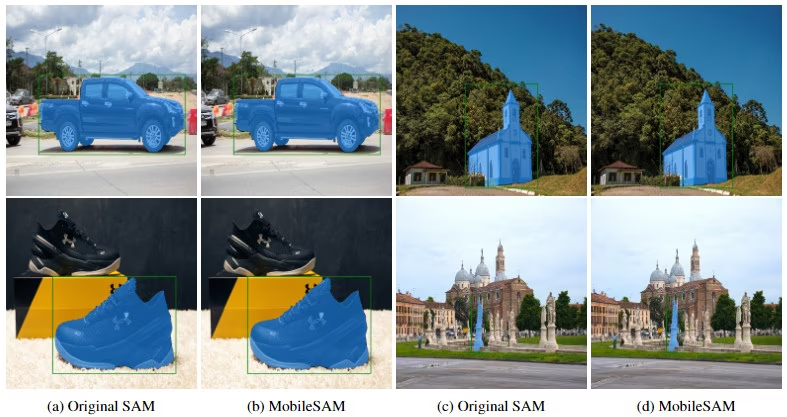
MobileSAMの論文に掲載されたGPUベンチマークでは、MobileSAMはFastSAMより約7倍小型で、約5倍高速です。
UltralyticsでのMobileSAMのテスト#
元のSAMと同様に、Ultralyticsは点プロンプトとボックスプロンプトの両方でMobileSAMをテストするためのシンプルなインターフェースを提供しています。
モデルのダウンロード#
UltralyticsのアセットからMobileSAMの事前学習済み重みをダウンロードしてください。
ポイントプロンプト#
from ultralytics import SAM

# モデルを読み込みます
model = SAM("mobile_sam.pt")

# 単一のポイントプロンプトに基づいてセグメントを予測します
model.predict("ultralytics/assets/zidane.jpg", points=[900, 370], labels=[1])

# 複数のポイントプロンプトに基づいて複数のセグメントを予測します
model.predict("ultralytics/assets/zidane.jpg", points=[[400, 370], [900, 370]], labels=[1, 1])

# オブジェクトごとに複数のポイントプロンプトに基づいてセグメントを予測します
model.predict("ultralytics/assets/zidane.jpg", points=[[[400, 370], [900, 370]]], labels=[[1, 1]])

# 正のプロンプトと負のプロンプトの両方を使用してセグメントを予測します。
model.predict("ultralytics/assets/zidane.jpg", points=[[[400, 370], [900, 370]]], labels=[[1, 0]])ボックスプロンプト#
from ultralytics import SAM

# モデルを読み込みます
model = SAM("mobile_sam.pt")

# 単一のボックスプロンプトに基づいてセグメントを予測します
model.predict("ultralytics/assets/zidane.jpg", bboxes=[439, 437, 524, 709])

# 複数のボックスプロンプトに基づいて複数のセグメントを予測します
model.predict("ultralytics/assets/zidane.jpg", bboxes=[[439, 437, 524, 709], [114, 196, 313, 708]])MobileSAMとSAMは同じAPIを共有しています。使用方法の詳細については、SAMのドキュメントをご覧ください。
検出モデルを使用したセグメンテーションデータセットの自動作成#
Ultralyticsフレームワークでデータセットに自動アノテーションするには、YOLO26xなどの検出モデルとMobileSAMを組み合わせるauto_annotate関数を使用します。
from ultralytics.data.annotator import auto_annotate

auto_annotate(data="path/to/images", det_model="yolo26x.pt", sam_model="mobile_sam.pt")| 引数 | 種類 | デフォルト | 説明 |
|---|---|---|---|
data | str | 必須 | アノテーションまたはセグメンテーションの対象画像を含むディレクトリへのパス。 |
det_model | str | 'yolo26x.pt' | 初期の物体検出に使用するYOLO検出モデルのパス。 |
sam_model | str | 'sam_b.pt' | セグメンテーションに使用するSAMモデルのパス(SAM、SAM 2、MobileSAM、SAM 3の重みに対応)。 |
device | str | '' | 計算デバイス(例:'cuda:0'、'cpu'、またはデバイスを自動検出する場合は'')。 |
conf | float | 0.25 | 信頼度の低い検出結果を除外するためのYOLO検出信頼度しきい値。 |
iou | float | 0.5 | 重複するボックスを除外するための非最大値抑制のIoUしきい値。 |
imgsz | int | 640 | 画像のリサイズに使用する入力サイズ(必要に応じて32の倍数に切り上げられます)。 |
max_det | int | 300 | メモリ効率を高めるための、画像ごとの検出数の最大値。 |
classes | list[int] | None | 検出するクラスインデックスのリスト(例:人物と自転車の場合は[0, 1])。 |
output_dir | str | None | アノテーションの保存ディレクトリ(デフォルト:兄弟ディレクトリの<data>_auto_annotate_labels)。 |
引用と謝辞#
MobileSAMが研究や開発に役立つ場合は、以下の論文を引用してください。
@article{mobile_sam,
  title={Faster Segment Anything: Towards Lightweight SAM for Mobile Applications},
  author={Zhang, Chaoning and Han, Dongshen and Qiao, Yu and Kim, Jung Uk and Bae, Sung Ho and Lee, Seungkyu and Hong, Choong Seon},
  journal={arXiv preprint arXiv:2306.14289},
  year={2023}
}よくある質問#
MobileSAMは、モバイルおよびエッジ用途に最適化された軽量で高速な画像セグメンテーションモデルです。オリジナルのSAMと同じパイプラインを維持しながら、大型のViT-Hエンコーダー(6億3,700万パラメーター)をコンパクトなTiny-ViTエンコーダー(500万パラメーター)に置き換えています。その結果、MobileSAMのパイプライン全体はオリジナルのSAMより約66倍小さく(966万対6億4,100万パラメーター)、約38倍高速になり、画像1枚あたり約12ミリ秒で動作します。SAMは画像1枚あたり456ミリ秒です。
UltralyticsでのMobileSAMのテストは簡単です。ポイントプロンプトとボックスプロンプトを使ってセグメントを予測できます。たとえば、ポイントプロンプトを使う場合は次のとおりです。
from ultralytics import SAM # モデルを読み込みます model = SAM("mobile_sam.pt") # ポイントプロンプトに基づいてセグメントを予測します model.predict("ultralytics/assets/zidane.jpg", points=[900, 370], labels=[1])詳しくは、UltralyticsでのMobileSAMのテストのセクションをご覧ください。
MobileSAMは軽量設計と高速な推論により、モバイルおよびエッジアプリケーションに最適です。元のSAMと比べてパラメーター数は約66分の1で、約38倍高速に動作するため、計算リソースが限られたデバイスでのリアルタイムセグメンテーションに適しています。高い効率により、モバイルデバイスでも大きな遅延なくリアルタイム画像セグメンテーションを実行できます。Ultralyticsでは、MobileSAMは推論のみをサポートしており、学習、検証、エクスポートは利用できません。
MobileSAMは、10万枚の画像データセット(元のSA-1B画像の1%)を使用し、単一のGPUで1日足らずで学習されました。この過程で、SAMのViT-H画像エンコーダーをTiny-ViTエンコーダーに蒸留しています。事前学習済みの重みと実装の詳細は、MobileSAM GitHubリポジトリで確認できます。
MobileSAMは、モバイルおよびエッジ環境での高速かつ効率的な画像セグメンテーション向けに設計されています。主なユースケースは次のとおりです。
- モバイルアプリ向けのリアルタイムインタラクティブセグメンテーション
- 計算リソースが限られたデバイスでの低遅延画像処理
- AR(拡張現実)、分析などを目的としたAI搭載モバイルアプリケーションへの統合


コメント27
質問したり、結果を共有したり、ほかの人をサポートしたりできます。
czbphoto
请问是否有遇到多线程情况下使用同一个sam实例推理分割时,出现显存占用持续增长,直到报错:显存无法分配问题?
 Glenn JocherUltralytics
@czbphoto 会的;请勿在多线程中共享同一个
SAM/SAMPredictor实例——为每个线程各自创建预测器或改为单线程队列;每张图像后调用predictor.reset_image()释放编码特征;若使用 SAM 2,其跨帧 memory bank 也会累积,需在批次结束后reset_image()清空,见SAM 2 内存机制说明。# 每线程各自持有预测器,避免共享 from threading import Thread import cv2 from ultralytics.models.sam import Predictor as SAMPredictor def worker(device, paths, boxes): pred = SAMPredictor(overrides=dict(model="mobile_sam.pt", device=device, imgsz=1024, task="segment", mode="predict")) for p, bb in zip(paths, boxes): im = cv2.imread(p) pred.set_image(im) _ = pred(bboxes=[bb]) # 推理 pred.reset_image() # 立即释放图像特征 # 示例:将不同样本分配到不同线程 Thread(target=worker, args=("cuda:0", ["a.jpg","b.jpg"], [[100,100,200,200]]*2)).start()若仍出现显存持续增长,请附上最小可复现脚本、完整文本日志与系统信息,便于我们复现与定位:
yolo checks非常感谢,问题已经解决
nowander(編集済み)
inference time cost too much here is my inference code:
from ultralytics import SAM
model = SAM("/mnt/pt/mobile_sam.pt")
model.info() source = "/home/sf/Pictures/images/"
results = model.predict(source,imgsz=640, save=True,project="mobile_sam",device="cuda",bboxes=[100, 100, 200, 200])#,points=[[600,600],[700,1000]])
------- log image 198/200 /home/sf/Pictures/images/camera_307_preposition_20240307_094542.jpg: 640x640 1 0, 1 1, 1 2, 1 3, 1 4, 1 5, 1 6, 1 7, 1 8, 1 9, 1 10, 1 11, 1 12, 1 13, 522.9ms image 199/200 /home/sf/Pictures/images/camera_307_preposition_20240307_095714.jpg: 640x640 1 0, 1 1, 1 2, 1 3, 1 4, 1 5, 1 6, 1 7, 1 8, 1 9, 1 10, 519.0ms image 200/200 /home/sf/Pictures/images/camera_307_preposition_20240307_100339.jpg: 640x640 1 0, 1 1, 1 2, 1 3, 1 4, 1 5, 1 6, 1 7, 1 8, 1 9, 1 10, 1 11, 572.9ms Speed: 0.8ms preprocess, 516.1ms inference, 0.5ms postprocess per image at shape (1, 3, 640, 640) Results saved to mobile_sam/predict3
my gpu is RTX5080.why it cost so much
RizwanMunawar(編集済み)
@nowander, could you please share the complete logs? In my testing, the performance is slightly slower than FastSAM, but still noticeably faster than the SAM models. What’s the size of your original image? Larger images can naturally affect speed. You might also want to try FastSAM, as it’s typically very quick in most cases. Thanks.
my code: from ultralytics import SAM model = SAM("/mnt/pt/mobile_sam.pt") model.info() results = model("/home/sf/Pictures/one_image/car.jpg", bboxes=[226, 278, 683, 499],imgsz=640)
the log : Model summary: 246 layers, 10,130,092 parameters, 10,130,092 gradients
image 1/1 /home/sf/Pictures/one_image/car.jpg: 640x640 1 0, 272.1ms Speed: 16.0ms preprocess, 272.1ms inference, 28.9ms postprocess per image at shape (1, 3, 640, 640)
i only test one image(car.jpg) this time ,the size of image is 870*573,it cost 272.1ms inference
but when i use this code(write myself):
""" yolo_sam2_annotate_with_time.py 基于 ultralytics.data.annotator.auto_annotate
- 检测 + 分割
- 掩膜着色 + 类别文字
- 实时显示耗时 """
from pathlib import Path import time import cv2 import numpy as np from ultralytics.data.annotator import auto_annotate from ultralytics import YOLO, SAM, FastSAM
"""---------------- 参数 ----------------""" IMAGE_DIR = Path("/home/sf/Pictures/one_image") # 输入图片 """ 结果保存""" DET_MODEL = "/mnt/pt/yolov5x.pt" SAM_MODEL = ("/mnt/pt/mobile_sam.pt") label_dir =Path("/home/sf/Pictures/images_auto_annotate_labels") save_di1 = DET_MODEL.split("/")[-1].split(".pt",1)[0] save_di2 = SAM_MODEL.split("/")[-1].split(".pt",1)[0] OUT_DIR = Path(f"runs/{save_di1}{save_di2}/seg_vis") # 或 sam2_t.pt / sam2_l.pt """ -------------------------------------"""
OUT_DIR.mkdir(parents=True, exist_ok=True)
"""1. 先运行 auto_annotate,让它在 images/labels 下生成 .txt""" t0 = time.perf_counter() auto_annotate( data=str(IMAGE_DIR), det_model=DET_MODEL, sam_model=SAM_MODEL, output_dir=str(label_dir) """标签输出到 images/labels/*.txt""" ) anno_time = (time.perf_counter() - t0) * 1000 """ anno_time1 = (time.time() - t0)""" print(f"auto_annotate 总耗时: {anno_time:.1f} ms") """ print(f"auto_annotate1 总耗时: {anno_time1:.1f} ms")"""
""" 2. 加载模型(用于计时)""" yolo = YOLO(DET_MODEL) if Path(SAM_MODEL).stem.startswith("Fast"): """ sam_model = FastSAM(sam_model)""" sam = FastSAM(SAM_MODEL) else: """ sam_model = SAM(sam_model)""" sam = SAM(SAM_MODEL) """ sam = SAM(SAM_MODEL)""" """sam=FastSAM(SAM_MODEL)""" sum_time=0 num = 0 """ 3. 可视化:逐张读取原图 + 标签,叠加掩膜和类别"""
label_dir =Path("/home/sf/Pictures/images")
class_names = yolo.names
for img_path in IMAGE_DIR.glob("*"): if img_path.suffix.lower() not in {".jpg", ".png", ".jpeg", ".bmp"}: continue """print("aaaaaaa")""" img = cv2.imread(str(img_path)) h, w = img.shape[:2] label_path = label_dir / f"{img_path.stem}.txt" if not label_path.exists(): # print("bbbbb") continue
""" 3-1 读取 YOLO-seg 标签"""
bboxes, masks_raw, cls_ids = [], [], []
with open(label_path, "r") as f:
    for row in f:
        parts = row.strip().split()
        cls_id = int(parts[0])
        poly = list(map(float, parts[1:]))
        """ 还原成像素坐标(x,y)"""
        polygon = [(poly[i] * w, poly[i + 1] * h)
                   for i in range(0, len(poly), 2)]
        polygon = np.array(polygon, np.int32)
        """ 简易 bbox"""
        x1, y1, x2, y2 = polygon[:, 0].min(), polygon[:, 1].min(), \
                         polygon[:, 0].max(), polygon[:, 1].max()
        bboxes.append([x1, y1, x2, y2])
        cls_ids.append(cls_id)

""" 3-2 用 SAM 生成掩膜(用于计时)"""
t0 = time.perf_counter()
""" print("img[..., ::-1]",img[..., ::-1].shape)#(573, 860, 3)"""
results = sam(img[..., ::-1], bboxes=bboxes)   # RGB
""" print("bboxes",bboxes)""" seg_time = (time.perf_counter() - t0) * 1000 sum_time += seg_time num += 1 """ print("num",num)""" masks = results[0].masks # list[np.ndarray(H,W)] colors = [np.random.randint(0, 255, 3).tolist() for _ in cls_ids]
vis = img.copy()


###################     FASTSAM   ####################
if save_di2.startswith("Fast"):

    h_orig, w_orig = img.shape[:2]

    """ 掩膜 tensor: [N, H_sam, W_sam]"""
    masks_tensor = results[0].masks.data  # torch.Tensor
    h_sam, w_sam = masks_tensor.shape[1:]

    """ 逐张处理"""
    for mask_t, cls_id, color in zip(masks_tensor, cls_ids, colors):
        """ 1) 先变成 numpy"""
        mask_np = mask_t.cpu().numpy()  # [H_sam, W_sam]  float/uint8
        """ 2) resize 回原图尺寸"""
        mask_resized = cv2.resize(mask_np, (w_orig, h_orig),
                                  interpolation=cv2.INTER_NEAREST)
        mask_bool = mask_resized.astype(bool)

        """3) 上色"""
        vis[mask_bool] = (vis[mask_bool] * 0.5 + np.array(color, dtype=np.uint8) * 0.5)

        """ 4) 画轮廓"""
        contours, _ = cv2.findContours(mask_bool.astype(np.uint8),
                                       cv2.RETR_EXTERNAL,
                                       cv2.CHAIN_APPROX_SIMPLE)
        cv2.drawContours(vis, contours, -1, color, 2)

        x, y, w, h = cv2.boundingRect(contours[0])
        cv2.putText(vis, class_names[cls_id], (x, max(y - 5, 15)),
                    cv2.FONT_HERSHEY_SIMPLEX, 0.8, color, 2)


"""           SAM2    """
else:

    for mask, cls_id, color in zip(masks, cls_ids, colors):
        """ 原来的报错两行"""
        """vis[mask] = (vis[mask] * 0.5 + np.array(color, dtype=np.uint8) * 0.5)"""
""" 假设 results = sam(img[..., ::-1], bboxes=bboxes)""" masks_tensor = results[0].masks.data # torch.Tensor [N, H, W] masks_np = masks_tensor.cpu().numpy() # ndarray [N, H, W]
        colors = [np.random.randint(0, 255, 3, dtype=np.uint8).tolist() for _ in cls_ids]

        for mask_2d, cls_id, color in zip(masks_np, cls_ids, colors):
            mask_2d = mask_2d.astype(bool)           # 转成布尔
            vis[mask_2d] = (vis[mask_2d] * 0.5 + np.array(color, dtype=np.uint8) * 0.5)

           """画轮廓"""
            contours, _ = cv2.findContours(mask_2d.astype(np.uint8),
                                           cv2.RETR_EXTERNAL,
                                           cv2.CHAIN_APPROX_SIMPLE)
            cv2.drawContours(vis, contours, -1, color, 2)

            x, y, w, h = cv2.boundingRect(contours[0])
            cv2.putText(vis, class_names[cls_id], (x, max(y - 5, 15)),
                        cv2.FONT_HERSHEY_SIMPLEX, 0.8, color, 2)
##########################################################################################
""" 3-3 在左上角叠加耗时""" cv2.putText(vis, f"Detect: {anno_time/len(list(IMAGE_DIR.glob('*'))):.1f} ms", (10, 30), cv2.FONT_HERSHEY_SIMPLEX, 0.8, (0, 255, 0), 2) cv2.putText(vis, f"Segment: {seg_time:.1f} ms", (10, 60), cv2.FONT_HERSHEY_SIMPLEX, 0.8, (0, 255, 0), 2)
""" 3-4 弹窗 + 保存"""
win_name = f"YOLO+SAM-2  {img_path.name}"
"""cv2.imshow(win_name, vis)""" save_path = OUT_DIR / f"{img_path.stem}_vis.jpg" cv2.imwrite(str(save_path), vis) """ print(f"[Done] {img_path.name} Segment={seg_time:.1f}ms")""" """cv2.waitKey(0)""" """ cv2.destroyWindow(win_name)""" """ print("nummm",num)""" print(f"avg segment inferenct time {sum_time/num:.1f} ms") """cv2.destroyAllWindows()"""
the log as follow: PRO TIP 💡 Replace 'model=/mnt/pt/yolov5x.pt' with new 'model=/mnt/pt/yolov5xu.pt'. YOLOv5 'u' models are trained with https://github.com/ultralytics/ultralytics and feature improved performance vs standard YOLOv5 models trained with https://github.com/ultralytics/yolov5.
image 1/1 /home/sf/Pictures/one_image/car.jpg: 448x640 1 car, 13.9ms Speed: 1.7ms preprocess, 13.9ms inference, 91.0ms postprocess per image at shape (1, 3, 448, 640) auto_annotate 总耗时: 1614.3 ms PRO TIP 💡 Replace 'model=/mnt/pt/yolov5x.pt' with new 'model=/mnt/pt/yolov5xu.pt'. YOLOv5 'u' models are trained with https://github.com/ultralytics/ultralytics and feature improved performance vs standard YOLOv5 models trained with https://github.com/ultralytics/yolov5.
0: 1024x1024 1 0, 15.6ms Speed: 3.0ms preprocess, 15.6ms inference, 0.3ms postprocess per image at shape (1, 3, 1024, 1024) avg segment inferenct time 28.7 ms
it only cost 15.6ms inference. looking forward for your reply and thx.
i found when i run auto_annotates function,it call sam_model(line 64 annotator.py),and it cost 117ms,when i run sam() again,it Loaded intoGPU in advance,so it only cost 15.6 ms inference.. is it true. and if that is the true,the mobile_sam will cost about 500ms with RTX5080(use demo code)
To test my conjecture, I did the following experiment:
from pathlib import Path import time import cv2 import numpy as np from ultralytics.data.annotator import auto_annotate from ultralytics import YOLO, SAM, FastSAM from ultralytics import SAM SAM_MODEL = ("/mnt/pt/mobile_sam.pt") sam = SAM(SAM_MODEL)
import time img_path = "/home/sf/Pictures/one_image/car.jpg" img = cv2.imread(str(img_path)) t0 = time.perf_counter() ”“”print("img[..., ::-1]",img[..., ::-1].shape)#(573, 860, 3)”“” bboxes = [[np.int32(226), np.int32(278), np.int32(683), np.int32(499)]] results = sam(img[..., ::-1], bboxes=bboxes) # RGB ”“”print("bboxes",bboxes)”“” seg_time = (time.perf_counter() - t0) * 1000 print("11111---ssssseg_time",seg_time) t0 = time.perf_counter() “”“ print("img[..., ::-1]",img[..., ::-1].shape)#(573, 860, 3) bboxes = [[np.int32(226), np.int32(278), np.int32(683), np.int32(499)]] results = sam(img[..., ::-1], bboxes=bboxes) # RGB ”“” print("bboxes",bboxes)”“” seg_time = (time.perf_counter() - t0) * 1000 print("22222--ssssseg_time",seg_time)
and log: Segment: 256.2 ms 0: 1024x1024 1 0, 256.3ms Speed: 26.1ms preprocess, 256.3ms inference, 27.3ms postprocess per image at shape (1, 3, 1024, 1024) 11111---ssssseg_time 544.9139869888313
Segment: 15.3 ms 0: 1024x1024 1 0, 15.4ms Speed: 5.1ms preprocess, 15.4ms inference, 0.2ms postprocess per image at shape (1, 3, 1024, 1024) 22222--ssssseg_time 21.185592049732804
- Glenn JocherUltralytics
@nowander Your analysis is right: the first SAM call includes one‑time GPU setup (CUDA context, weights transfer, cuDNN autotune), so it’s much slower; subsequent calls are the steady‑state (~15–30 ms on your RTX). Also note that when you pass a folder plus
bboxesonce, the prompt is consumed on the first image and the rest fall back to “segment everything” (hence many masks and slower runs). Use per‑image prompts orSAMPredictorand warm up before timing:from pathlib import Path import cv2, time, torch from ultralytics.models.sam import Predictor as SAMPredictor overrides = dict(model="mobile_sam.pt", device="cuda", imgsz=1024, task="segment", mode="predict", conf=0.25) pred = SAMPredictor(overrides=overrides) # warmup im = cv2.imread("path/to/one.jpg") pred.set_image(im) pred(bboxes=[100, 100, 200, 200]) pred.reset_image() # per-image prompts (avoid segment-everything) src = Path("/path/to/images") for p in src.glob("*.jpg"): im = cv2.imread(str(p)) pred.set_image(im) torch.cuda.synchronize(); t0 = time.perf_counter() r = pred(bboxes=[[x1, y1, x2, y2]]) # supply bbox for this image torch.cuda.synchronize(); print(f"{(time.perf_counter()-t0)*1000:.1f} ms") pred.reset_image()See the SAMPredictor example in the SAM docs and the
auto_annotateAPI here for reference on how prompts are used per image: auto_annotate reference. If you still see >200 ms after warmup and per‑image prompts, please shareyolo checksoutput and the full text logs so we can dig deeper:yolo checks Thank you very much for your reply, you are right, when set a folde as source r, finally call self.generate (models/sam/predict.py) on lines 202 and 203, when set source as an image, the parameter takes effect, call line 205 self.prompt_inference (models/sam/predict.py).when i use this: src = Path("/path/to/images") for p in src.glob("*.jpg"): im = cv2.imread(str(p)) pred.set_image(im) torch.cuda.synchronize(); t0 = time.perf_counter() r = pred(bboxes=[[x1, y1, x2, y2]]) # supply bbox for this image torch.cuda.synchronize(); print(f"{(time.perf_counter()-t0)*1000:.1f} ms") pred.reset_image() it only cost about 20ms in my GPU,and thx again for your reply.
- Glenn JocherUltralytics
Great to hear your timings are down to ~20 ms; for even higher throughput across multiple prompts on the same image, reuse encoder features by calling
SAMPredictor.set_image()once and issuing additional prompt calls beforereset_image()—see the SAMPredictor reference for details: ultralytics.models.sam.predict.Predictor.
 User
good
tunahsu
Hi! Is it possible to filter out low-quality masks during inference using confidence/score?
- Glenn JocherUltralytics
@tunahsu yes, you can filter out low-quality masks during inference by adjusting the confidence threshold using the
confparameter when running the model. For more details on setting this parameter, you can refer to the MobileSAM documentation. Let us know if you have further questions!
ismailwale
How can I make an inference of a video using frame by frame in loop using Mobilesam ?because I tried multiple times making inference directly with video predictor I constantly running out of memory despite setting stream =True since SAM is trying to keep the memory of 2000 frames of the video at ones . I will appreciate any ideal on how to predict and segment the video as a single frame image at every instance and put everything in a loop.
- Glenn JocherUltralytics
@ismailwale to process video frame-by-frame with MobileSAM and avoid memory overflow, load the video using OpenCV, iterate through each frame in a loop, perform inference using
MobileSAMon individual frames, and release unused memory after each iteration. Make sure not to enable streaming mode. Here is a basic example structure:import cv2 from ultralytics import SAM # Initialize the VideoCapture and load the model cap = cv2.VideoCapture("path/to/video.mp4") model = SAM("mobile_sam.pt") while cap.isOpened(): ret, frame = cap.read() if not ret: break # Perform inference on the current frame results = model.predict(frame) # Process results or save outputs # ... cap.release() # Release the videoThis approach minimizes memory usage by processing frames sequentially. Let us know if you need further clarification!
Thanks so much , your lines of code really jump-start my thinking. I sincerely appreciate. Please keep on with your good work . Be blessed
gopalkatushar
This is great. Is there a way to segment everything like we have in fastsam, without prompting?
- Glenn JocherUltralytics(編集済み)
@gopalkatushar yes, MobileSAM can segment everything without prompts, like FastSAM. Call it without
bboxesorpoints, e.g.SAM("mobile_sam.pt")("path/to/image.jpg"). For more details, please refer to the SAM documentation.
Kunal8020
How can I use this for multi class segmentation. I am detecting the multiple objects using YOLO-World. I want to use the bounding box results from YOLO-World as prompt to MobileSAM. How can I use to segment different objects in the same image??
 Paula DerrengerUltralytics
Hello!
To use MobileSAM for segmenting multiple objects in the same image using bounding box results from YOLO-World, you can follow these steps:
-
Run YOLO-World Detection: First, use YOLO-World to detect objects in your image. This will provide you with bounding boxes for each detected object.
-
Prepare Bounding Box Inputs: Extract the bounding box coordinates from the YOLO-World output. These coordinates will be used as prompts for MobileSAM.
-
Segment with MobileSAM: For each bounding box, use the MobileSAM model to segment the object within that box. You can do this by passing the bounding box coordinates to MobileSAM's predict function, similar to the box prompt example:
from ultralytics import SAM

# Load the model
model = SAM("mobile_sam.pt")

# Predict a segment based on a box prompt
model.predict("path/to/image.jpg", bboxes=[x1, y1, x2, y2])
Repeat this for each bounding box provided by YOLO-World.
This approach allows you to segment each detected object individually. If you need further assistance or have more specific requirements, feel free to ask!
1-
FlySka
Hi, Do you have any notebook or repository for fine-tuning mobileSAM? Could it be done in the same way as with the regular SAM?
- Paula DerrengerUltralytics
Hi there,
Yes, fine-tuning MobileSAM can generally be approached in the same manner as with the regular SAM. Since MobileSAM retains the same pipeline, including pre-processing, post-processing, and interfaces, adaptations for MobileSAM from SAM should be minimal.
Here's a quick Python snippet that illustrates how you could load and use MobileSAM for predictions, which mirrors the usage for SAM:
from ultralytics import SAM

# Load the MobileSAM model
model = SAM('mobile_sam.pt')

# Predict a segment based on a point prompt
result = model.predict('path/to/your/image.jpg', points=[x, y], labels=[label_id])
You can apply any fine-tuning procedures used for SAM in a similar fashion for MobileSAM. If you need more detailed steps or specific adjustments for fine-tuning, feel free to ask!
Best regards!
AnandSingh-0619
Hey! How can I run batch inference with multiple images and bounding boxes on the Mobile SAM model?
- Glenn JocherUltralytics
Hey there! 👋
Running batch inference with multiple images and bounding boxes on MobileSAM is quite straightforward. Here’s a quick example of how you could do that:
from ultralytics import SAM

# Load the MobileSAM model
model = SAM('mobile_sam.pt')

# List of images and their corresponding boxes
images = ['path/to/image1.jpg', 'path/to/image2.jpg']
boxes = [[439, 437, 524, 709], [500, 400, 550, 720]]  # Example boxes for each image

# Predict segments based on box prompts for each image
for image, box in zip(images, boxes):
    result = model.predict(image, bboxes=[box])
    # You can now process the result as needed
This code loads the model, iterates over your images and boxes, and then performs prediction for each image using the specified boxes. Don't forget to adjust the image paths and box coordinates according to your data. 😊
Let us know if you need more help!
I'm working with the Ultralytics Mobile SAM model and need to perform batch inference for multiple images, each with its own set of bounding boxes, without using a for loop to iterate over each image. How can I efficiently run batch inference on the Mobile SAM model with this setup?
- Glenn JocherUltralytics(編集済み)
Hi there!
predictdoes not take animages=tensor, so for several images with their own boxes loop over them and pass each image's boxes (XYXY):from ultralytics import SAM model = SAM("mobile_sam.pt") for image, box in zip(images, boxes): results = model.predict(image, bboxes=[box])Each call can take several boxes for the same image, e.g.
bboxes=[[x1, y1, x2, y2], [x3, y3, x4, y4]]. 😊-1