YOLO-NAS
Deci, criadora original de YOLO-NAS, foi adquirida pela NVIDIA, e estes modelos já não são mantidos ativamente pela Deci. A Ultralytics continua a suportar a sua utilização, mas não são esperadas mais atualizações da equipa original.
Visão geral#
Desenvolvido pela Deci AI, YOLO-NAS é um modelo de deteção de objetos criado através de pesquisa de arquitetura neuronal e concebido para resolver as limitações dos modelos YOLO anteriores. Melhora o suporte à quantização e o compromisso entre precisão e latência.
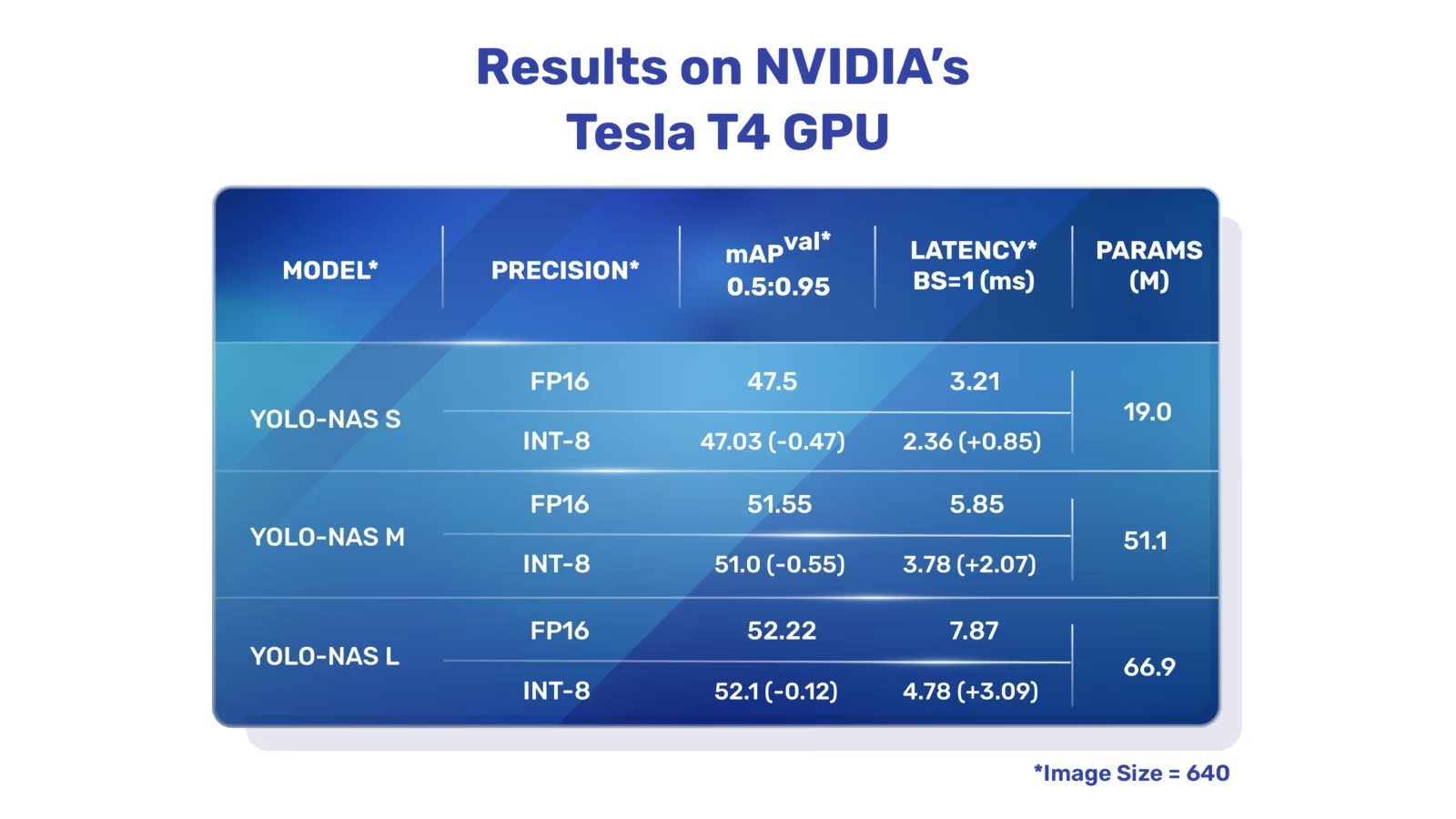 Descrição geral do YOLO-NAS. YOLO-NAS utiliza blocos preparados para quantização e quantização seletiva para preservar a precisão após a quantização. Quando convertido para a versão quantizada INT8, o modelo perde pouca precisão, uma melhoria em relação aos modelos YOLO anteriores.
Principais funcionalidades#
- Bloco básico compatível com quantização: o YOLO-NAS introduz um novo bloco básico compatível com quantização, abordando uma das limitações significativas dos modelos YOLO anteriores.
- Treino e quantização avançados: YOLO-NAS utiliza esquemas de treino avançados e quantização pós-treino para melhorar o desempenho.
- Otimização AutoNAC e pré-treino: YOLO-NAS utiliza a otimização AutoNAC e é pré-treinado em conjuntos de dados como COCO, Objects365 e Roboflow 100. Este pré-treino torna-o adequado para tarefas subsequentes de deteção de objetos em produção.
Modelos pré-treinados#
A Ultralytics disponibiliza modelos YOLO-NAS pré-treinados em três tamanhos, cada um com um equilíbrio diferente entre velocidade e precisão:
| Modelo | mAP50-95 | Latência (ms) |
|---|---|---|
| YOLO-NAS S | 47.5 | 3.21 |
| YOLO-NAS M | 51.55 | 5.85 |
| YOLO-NAS L | 52.22 | 7.87 |
| YOLO-NAS S INT-8 | 47.03 | 2.36 |
| YOLO-NAS M INT-8 | 51.0 | 3.78 |
| YOLO-NAS L INT-8 | 52.1 | 4.78 |
Cada variante do modelo foi projetada para equilibrar precisão média média (mAP) e latência, ajudando você a otimizar suas tarefas de detecção de objetos em desempenho e velocidade.
Exemplos de uso#
O pacote Python ultralytics disponibiliza uma API Python e uma CLI para executar modelos YOLO-NAS.
Os modelos YOLO-NAS precisam do pacote super-gradients, que requer um ambiente Python 3.10:
pip install ultralytics super-gradients "setuptools<81"Os exemplos a seguir mostram como usar os modelos YOLO-NAS com o pacote ultralytics para inferência e validação:
Exemplos de inferência e validação#
Neste exemplo, validamos YOLO-NAS-s no conjunto de dados COCO8.
Este exemplo apresenta código simples de inferência e validação para YOLO-NAS. YOLO-NAS também suporta exportação, mas o pacote ultralytics não suporta o seu treino.
Os arquivos de modelo *.pt pré-treinados em PyTorch podem ser passados à classe NAS() para criar uma instância do modelo em Python:
from ultralytics import NAS

# Carregar um modelo YOLO-NAS-s pré-treinado no COCO
model = NAS("yolo_nas_s.pt")

# Exibir informações do modelo (opcional)
model.info()

# Validar o modelo no conjunto de dados de exemplo COCO8
results = model.val(data="coco8.yaml")

# Executar inferência com o modelo YOLO-NAS-s na imagem 'bus.jpg'
results = model("path/to/bus.jpg")
Tarefas e modos compatíveis#
YOLO-NAS está disponível em três variantes: Small (s), Medium (m) e Large (l). Cada variante foi concebida para responder a diferentes necessidades de desempenho e capacidade computacional:
- YOLO-NAS-s: otimizado para ambientes com recursos computacionais limitados, nos quais a eficiência é essencial.
- YOLO-NAS-m: Oferece uma abordagem equilibrada, adequada para deteção de objetos de uso geral com maior precisão.
- YOLO-NAS-l: desenvolvido para cenários que exigem a máxima precisão, nos quais os recursos computacionais são menos limitados.
Abaixo está uma visão geral detalhada de cada modelo, incluindo links para seus pesos pré-treinados, as tarefas compatíveis e a compatibilidade com diferentes modos de operação.
| Tipo de modelo | Pesos pré-treinados | Tarefas suportadas | Treinamento | Validação | Inferência | Exportar |
|---|---|---|---|---|---|---|
| YOLO-NAS-s | yolo_nas_s.pt | Deteção de objetos | ❌ | ✅ | ✅ | ✅ |
| YOLO-NAS-m | yolo_nas_m.pt | Deteção de objetos | ❌ | ✅ | ✅ | ✅ |
| YOLO-NAS-l | yolo_nas_l.pt | Deteção de objetos | ❌ | ✅ | ✅ | ✅ |
Citações e agradecimentos#
Se utilizares YOLO-NAS no teu trabalho de investigação ou desenvolvimento, cita SuperGradients:
@misc{supergradients,
      doi = {10.5281/ZENODO.7789328},
      url = {https://zenodo.org/records/7789328},
      author = {Aharon,  Shay and {Louis-Dupont} and {Ofri Masad} and Yurkova,  Kate and {Lotem Fridman} and {Lkdci} and Khvedchenya,  Eugene and Rubin,  Ran and Bagrov,  Natan and Tymchenko,  Borys and Keren,  Tomer and Zhilko,  Alexander and {Eran-Deci}},
      title = {Super-Gradients},
      publisher = {GitHub},
      journal = {GitHub repository},
      year = {2021},
}
Agradecemos à equipa SuperGradients da Deci AI pelo trabalho de criação e manutenção deste recurso valioso para a comunidade de visão computacional.
Perguntas frequentes#
O YOLO-NAS, desenvolvido pela Deci AI, é um modelo de deteção de objetos concebido com Pesquisa de Arquitetura Neural (NAS). Aborda as limitações dos modelos YOLO anteriores ao introduzir características como blocos básicos compatíveis com quantização e esquemas avançados de treino, que melhoram o desempenho, sobretudo em ambientes com recursos computacionais limitados. O YOLO-NAS também suporta quantização, mantendo uma elevada precisão mesmo quando convertido para a versão INT8, o que o torna mais adequado para ambientes de produção.
Podes integrar modelos YOLO-NAS na tua aplicação Python com o pacote
ultralytics. Eis um exemplo simples de como carregar um modelo YOLO-NAS pré-treinado e executar inferência:from ultralytics import NAS # Carregar um modelo YOLO-NAS-s pré-treinado no COCO model = NAS("yolo_nas_s.pt") # Validar o modelo no conjunto de dados de exemplo COCO8 results = model.val(data="coco8.yaml") # Executar inferência com o modelo YOLO-NAS-s na imagem 'bus.jpg' results = model("path/to/bus.jpg")Para mais informações, consulte Exemplos de inferência e validação.
YOLO-NAS oferece várias funcionalidades importantes que o tornam uma excelente opção para deteção de objetos quantizada:
- Bloco básico compatível com quantização: Arquitetura melhorada que preserva a precisão após a quantização.
- Treino e quantização avançados: Utiliza esquemas de treino avançados e técnicas de quantização pós-treino.
- Otimização AutoNAC e pré-treino: Utiliza a otimização AutoNAC e é pré-treinado em conjuntos de dados como COCO, Objects365 e Roboflow 100.
Esses recursos contribuem para sua alta precisão, seu desempenho eficiente e sua adequação à implantação em ambientes de produção. Saiba mais na seção Principais recursos.
Os modelos YOLO-NAS suportam a deteção de objetos nos modos de validação, inferência e exportação. Não suportam o treino. Os modelos suportados incluem YOLO-NAS-s, YOLO-NAS-m e YOLO-NAS-l, cada um adaptado a diferentes capacidades computacionais e necessidades de desempenho.
Sim, a Ultralytics disponibiliza modelos YOLO-NAS pré-treinados a que podes aceder diretamente. Estes modelos são pré-treinados em conjuntos de dados como COCO. Podes transferi-los através das ligações na secção Tarefas e modos suportados. Eis alguns exemplos:


Comentários21
Faz uma pergunta, partilha os teus resultados ou ajuda alguém.
riobastian09
Hi. i want to know is there any pre-configured of YOLO-NAS model? i want to use this to my experiment using the custom architecture YOLO-NAS model. Thank you!
 Glenn JocherUltralytics
@riobastian09 thank you for your question! Yes, pre-configured YOLO-NAS models, such as YOLO-NAS-s, YOLO-NAS-m, and YOLO-NAS-l, are available and optimized for inference, validation, and export. You can access these pre-trained models and easily integrate them into your experiments using the Ultralytics Python package. Unfortunately, custom architecture modifications or training directly with YOLO-NAS are not supported. For more, refer to the YOLO-NAS documentation: https://docs.ultralytics.com/models/yolo-nas/
 User
您好,我使用如下脚本将torch模型转成onnx模型时,出现如下错误: raise AttributeError(f"'{type(self).name}' object has no attribute '{name}'") AttributeError: 'YoloNAS_S' object has no attribute 'args'我该如何解决?
- User
from ultralytics import NAS model = NAS('yolo_nas_s') model.export( imgsz = [480,640], format = "onnx", simplify = True, opset = 17 )
- Glenn JocherUltralytics
@Stephen-Hao it seems like the error you're encountering is due to the 'args' attribute not being present in the 'YoloNAS_S' object. This might be related to the specific version of the model or the Ultralytics package you are using. Please ensure you have the latest version of the Ultralytics package installed. If the issue persists, consider checking the model's documentation or reaching out to the community for further assistance.
NoviceAlchemist
我训练使用的代码是:import torch import warnings from ultralytics import YOLO
忽略与“deterministic”和“non-deterministic”相关的所有警告
warnings.filterwarnings("ignore", category=UserWarning, message=".deterministic.")
if name == 'main': # 关闭PyTorch的确定性算法 torch.use_deterministic_algorithms(False)
# 初始化YOLO模型
# model_path = r'D:\ultralytics-main\ultralytics\cfg\models\v8\yolov8_attiton.yaml'
model_path = r'D:\ultralytics-main\model train\model\yolo_nas_s.pt'
model = YOLO(model_path)

# 设置正确的数据集路径
data_path = r"C:\Users\13579\Downloads\etiketlenmis_3.v6i.yolov8\data.yaml"

# 训练模型配置信息
model.train(data=data_path,
            imgsz=640,
            batch=32,
            epochs=200,
            name='NAS_S',
            )

# 设置验证集验证效果
# model.val()
但是会出现D:\Anaconda3\envs\yolov8\python.exe "D:\ultralytics-main\model train\My train\yolo nas.py" The console stream is logged into C:\Users\13579\sg_logs\console.log [2024-09-06 10:23:49] INFO - crash_tips_setup.py - Crash tips is enabled. You can set your environment variable to CRASH_HANDLER=FALSE to disable it [2024-09-06 10:23:49,572] torch.distributed.elastic.multiprocessing.redirects: [WARNING] NOTE: Redirects are currently not supported in Windows or MacOs. [WARNING]No module named 'pycocotools' [2024-09-06 10:23:51] WARNING - env_sanity_check.py - Failed to verify operating system: Deci officially supports only Linux kernels. Some features may not work as expected. WARNING ⚠️ The file 'D:\ultralytics-main\model train\model\yolo_nas_s.pt' appears to be improperly saved or formatted. For optimal results, use model.save('filename.pt') to correctly save YOLO models. Traceback (most recent call last): File "D:\ultralytics-main\model train\My train\yolo nas.py", line 15, in model = YOLO(model_path) File "D:\ultralytics-main\ultralytics\models\yolo\model.py", line 23, in init super().init(model=model, task=task, verbose=verbose) File "D:\ultralytics-main\ultralytics\engine\model.py", line 149, in init self._load(model, task=task) File "D:\ultralytics-main\ultralytics\engine\model.py", line 230, in _load self.model, self.ckpt = attempt_load_one_weight(weights) File "D:\ultralytics-main\ultralytics\nn\tasks.py", line 855, in attempt_load_one_weight ckpt, weight = torch_safe_load(weight) # load ckpt File "D:\ultralytics-main\ultralytics\nn\tasks.py", line 809, in torch_safe_load ckpt = {"model": ckpt.model} File "D:\Anaconda3\envs\yolov8\lib\site-packages\torch\nn\modules\module.py", line 1695, in getattr raise AttributeError(f"'{type(self).name}' object has no attribute '{name}'") AttributeError: 'YoloNAS_S' object has no attribute 'model'
进程已结束,退出代码为 1
这个怎么解决呀
- Glenn JocherUltralytics(editado)
@NoviceAlchemist YOLO-NAS models in Ultralytics are pretrained and support only validation, inference and export, not training (see the Training column in the YOLO-NAS docs), so
model.train()isn't available foryolo_nas_s.pt. To train on your own dataset, use a model with training support such as YOLO26 (e.g.yolo26s.pt). If you hit model-loading errors, verify thatpycocotoolsis installed and try the latest version of the Ultralytics package.
dota2015
from ultralytics import NAS import cv2
Load a COCO-pretrained YOLO-NAS-s model
model = NAS('yolo_nas_s.pt')
Display model information (optional)
model.info() results = model.predict('000000000009.jpg')
run reslult:
C:\Users\makef.conda\envs\yolov8\python.exe -X pycache_prefix=C:\Users\makef\AppData\Local\JetBrains\PyCharm2023.3\cpython-cache "C:/Program Files/JetBrains/PyCharm 2023.3.4/plugins/python/helpers/pydev/pydevd.py" --multiprocess --qt-support=auto --client 127.0.0.1 --port 62105 --file D:\02Code\code\yolov8\v8_2\yolo_nas.py Connected to pydev debugger (build 233.15026.15) The console stream is logged into C:\Users\makef\sg_logs\console.log [2024-04-28 16:29:38] INFO - crash_tips_setup.py - Crash tips is enabled. You can set your environment variable to CRASH_HANDLER=FALSE to disable it [2024-04-28 16:29:39] WARNING - redirects.py - NOTE: Redirects are currently not supported in Windows or MacOs. [WARNING]No module named 'pycocotools' [2024-04-28 16:29:45] WARNING - env_sanity_check.py - Failed to verify operating system: Deci officially supports only Linux kernels. Some features may not work as expected. Model summary: 685 layers, 19053888 parameters, 19053888 gradients
Traceback (most recent call last): File "C:\Users\makef.conda\envs\yolov8\lib\site-packages\torch\autograd\grad_mode.py", line 43, in generator_context response = gen.send(None) File "C:\Users\makef.conda\envs\yolov8\lib\site-packages\ultralytics\engine\predictor.py", line 228, in stream_inference self.model.warmup(imgsz=(1 if self.model.pt or self.model.triton else self.dataset.bs, 3, *self.imgsz)) File "C:\Users\makef.conda\envs\yolov8\lib\site-packages\ultralytics\nn\autobackend.py", line 624, in warmup self.forward(im) # warmup File "C:\Users\makef.conda\envs\yolov8\lib\site-packages\ultralytics\nn\autobackend.py", line 450, in forward y = self.model(im, augment=augment, visualize=visualize, embed=embed) File "C:\Users\makef.conda\envs\yolov8\lib\site-packages\torch\nn\modules\module.py", line 1194, in _call_impl return forward_call(*input, **kwargs) TypeError: forward() got an unexpected keyword argument 'augment' python-BaseException
Process finished with exit code 1
 Paula DerrengerUltralytics
Hey there! 👋 It looks like you're encountering a
TypeErrorrelated to theaugmentkeyword argument when running inference with the YOLO-NAS model. The error suggests that theforward()method in the model doesn't recognize theaugmentargument. This could be due to an oversight in the code or an issue with the model's compatibility with the Ultralytics framework.Let's try running the model without any additional arguments that aren't expected. Here's how you can do it:
from ultralytics import NAS

# Load a COCO-pretrained YOLO-NAS-s model
model = NAS('yolo_nas_s.pt')

# Run inference with the YOLO-NAS-s model on the 'bus.jpg' image
results = model('path/to/bus.jpg')
This simplifies the call to the model's inference method by removing the
augmentargument, which seems to be causing the issue.If you continue to face problems or if the issue is due to something else, it might be a good idea to check the Ultralytics documentation for YOLO-NAS compatibility or raise an issue on the GitHub repository for more specific help! Hope this sorts it out for you! 😊
Hey there! So, I've decked out my project with all the latest packages, but guess what? The issue is still lurking like it's on a vacation!
Here's the riveting tale of the pip upgrade:
Downloading ultralytics-8.2.4-py3-none-any.whl (752 kB) ━━━━━━━━━━━━━━━━━━━━━━━━━━━━━━━━━━━━━━━━ 752.1/752.1 kB 28.1 kB/s eta 0:00:00 Installing collected packages: ultralytics Attempting uninstall: ultralytics Found existing installation: ultralytics 8.2.1 Uninstalling ultralytics-8.2.1: Successfully uninstalled ultralytics-8.2.1 Successfully installed ultralytics-8.2.4
Behold, the saga of the runtime logs unfolds below:
C:\Users\makef.conda\envs\yolov8\python.exe D:\02Code\code\yolov8\v8_2\yolo_nas.py The console stream is logged into C:\Users\makef\sg_logs\console.log [2024-04-29 10:42:17] INFO - crash_tips_setup.py - Crash tips is enabled. You can set your environment variable to CRASH_HANDLER=FALSE to disable it [2024-04-29 10:42:18] WARNING - redirects.py - NOTE: Redirects are currently not supported in Windows or MacOs. [WARNING]No module named 'pycocotools' [2024-04-29 10:42:21] WARNING - env_sanity_check.py - Failed to verify operating system: Deci officially supports only Linux kernels. Some features may not work as expected. Model summary: 685 layers, 19053888 parameters, 19053888 gradients
Behold, the saga of the runtime logs unfolds below: Traceback (most recent call last): File "D:\02Code\code\yolov8\v8_2\yolo_nas.py", line 10, in results = model.predict('000000000009.jpg') File "C:\Users\makef.conda\envs\yolov8\lib\site-packages\ultralytics\engine\model.py", line 452, in predict return self.predictor.predict_cli(source=source) if is_cli else self.predictor(source=source, stream=stream) File "C:\Users\makef.conda\envs\yolov8\lib\site-packages\ultralytics\engine\predictor.py", line 168, in call return list(self.stream_inference(source, model, *args, **kwargs)) # merge list of Result into one File "C:\Users\makef.conda\envs\yolov8\lib\site-packages\torch\autograd\grad_mode.py", line 43, in generator_context response = gen.send(None) File "C:\Users\makef.conda\envs\yolov8\lib\site-packages\ultralytics\engine\predictor.py", line 228, in stream_inference self.model.warmup(imgsz=(1 if self.model.pt or self.model.triton else self.dataset.bs, 3, *self.imgsz)) File "C:\Users\makef.conda\envs\yolov8\lib\site-packages\ultralytics\nn\autobackend.py", line 627, in warmup self.forward(im) # warmup File "C:\Users\makef.conda\envs\yolov8\lib\site-packages\ultralytics\nn\autobackend.py", line 453, in forward y = self.model(im, augment=augment, visualize=visualize, embed=embed) File "C:\Users\makef.conda\envs\yolov8\lib\site-packages\torch\nn\modules\module.py", line 1194, in _call_impl return forward_call(*input, **kwargs) TypeError: forward() got an unexpected keyword argument 'augment'
Process finished with exit code 1
- Paula DerrengerUltralytics(editado)
Hey there! 😄 It looks like you're having a bit of a rough ride with the
augmentargument not being recognized during prediction. No worries, let's tidy this up!The error message you're seeing is due to the
augmentargument being passed where it was not expected. It's a simple fix; you just need to ensure you're using the prediction functionality without this argument, like so:from ultralytics import NAS # Load the COCO-pretrained YOLO-NAS-s model model = NAS('yolo_nas_s.pt') # Run inference on an image results = model('path/to/000000000009.jpg') # To visualize the results, you can do: results[0].show()This should run smoothly and get your project back on track! If issues persist or you have further questions, feel free to reach out. And remember, for the latest and greatest on usage, our docs page is always there to help you out. Happy coding! 🚀
I used your code, but the problem still persists, like a mischievous little gremlin playing hide and seek.
- Paula DerrengerUltralytics(editado)
Hey there! 🌟 It looks like that mischievous gremlin of an issue is quite stubborn. Not to worry, let's tackle it together.
Based on your feedback and the details from the YOLO-NAS docs, it seems like you're on the right track. However, if you're still encountering issues with predictions or validation, it's possible there might be a version mismatch or a missing dependency, especially
pycocotoolswhich is crucial for dataset operations and was flagged in your logs.Firstly, please ensure you've installed
pycocotoolsby running:pip install pycocotools-windowsIf you're not on Windows, just
pycocotoolsshould work.Moreover, the error regarding the
augmentargument not being expected might suggest an incompatibility issue or an outdated piece of code. Let's try simplifying the inference code snippet to not use this argument, as shown in the Ultralytics YOLO-NAS docs:from ultralytics import NAS # Load the COCO-pretrained YOLO-NAS-s model model = NAS('yolo_nas_s.pt') # Run inference with the YOLO-NAS-s model on a local image file results = model('path/to/bus.jpg') # Visualize the results results[0].show()This code directly uses the model without additional settings that may not be supported, like
augment.If the problem continues, it could be helpful to check for updates to the Ultralytics package or consider reaching out on the GitHub issues page for more targeted support. Sometimes, issues like these have been encountered and solved by others in the community!
Don't let those gremlins get you down; you're closer to a solution than you think! 🚀
C:\Users\makef.conda\envs\yolov8\python.exe D:\02Code\code\yolov8\v8_2\yolo_nas.py The console stream is logged into C:\Users\makef\sg_logs\console.log [2024-04-28 16:27:19] INFO - crash_tips_setup.py - Crash tips is enabled. You can set your environment variable to CRASH_HANDLER=FALSE to disable it [2024-04-28 16:27:20] WARNING - redirects.py - NOTE: Redirects are currently not supported in Windows or MacOs. [WARNING]No module named 'pycocotools' [2024-04-28 16:27:23] WARNING - env_sanity_check.py - Failed to verify operating system: Deci officially supports only Linux kernels. Some features may not work as expected. Model summary: 685 layers, 19053888 parameters, 19053888 gradients Traceback (most recent call last): File "D:\02Code\code\yolov8\v8_2\yolo_nas.py", line 10, in results = model.predict('000000000009.jpg') File "C:\Users\makef.conda\envs\yolov8\lib\site-packages\ultralytics\engine\model.py", line 452, in predict return self.predictor.predict_cli(source=source) if is_cli else self.predictor(source=source, stream=stream) File "C:\Users\makef.conda\envs\yolov8\lib\site-packages\ultralytics\engine\predictor.py", line 168, in call return list(self.stream_inference(source, model, *args, **kwargs)) # merge list of Result into one File "C:\Users\makef.conda\envs\yolov8\lib\site-packages\torch\autograd\grad_mode.py", line 43, in generator_context response = gen.send(None) File "C:\Users\makef.conda\envs\yolov8\lib\site-packages\ultralytics\engine\predictor.py", line 228, in stream_inference self.model.warmup(imgsz=(1 if self.model.pt or self.model.triton else self.dataset.bs, 3, *self.imgsz)) File "C:\Users\makef.conda\envs\yolov8\lib\site-packages\ultralytics\nn\autobackend.py", line 624, in warmup self.forward(im) # warmup File "C:\Users\makef.conda\envs\yolov8\lib\site-packages\ultralytics\nn\autobackend.py", line 450, in forward y = self.model(im, augment=augment, visualize=visualize, embed=embed) File "C:\Users\makef.conda\envs\yolov8\lib\site-packages\torch\nn\modules\module.py", line 1194, in _call_impl return forward_call(*input, **kwargs) TypeError: forward() got an unexpected keyword argument 'augment'
Process finished with exit code 1
from ultralytics import NAS import cv2
Load a COCO-pretrained YOLO-NAS-s model
model = NAS('yolo_nas_s.pt')
Display model information (optional)
model.info()
results = model.predict('000000000009.jpg')
- Paula DerrengerUltralytics
Hey there! 👋 It looks like you're trying to run predictions with the YOLO-NAS model and encountered an issue regarding the
augmentargument in theforward()method. This error typically occurs if there's a version mismatch or if the model and method usage doesn't align with the expected input parameters.Based on your usage:
from ultralytics import NAS
import cv2

# Load a COCO-pretrained YOLO-NAS-s model
model = NAS('yolo_nas_s.pt')

# Display model information (optional)
model.info()

results = model.predict('000000000009.jpg')
It seems correct on the surface, suggesting it might be related to the version of Ultralytics library you're using or specific to the model's implementation.
Here are a couple of steps you might want to try:
- Ensure you have the latest version of the Ultralytics package by running:
pip install --upgrade ultralytics - Check if the YOLO-NAS model you are using is compatible with the predict function in terms of its expected arguments. You can refer to the official Ultralytics documentation for the YOLO-NAS model and verify the correct method usage.
If you're still facing issues, feel free to share more details, such as the specific error messages and your environment setup. Hopefully, this helps you move forward! 🚀
- Ensure you have the latest version of the Ultralytics package by running:
Pragyy-G
How to train out this Yolo-nas model? like fine tune it on custom dataset?
- Glenn JocherUltralytics(editado)
@Pragyy-G hey there! 🙌 YOLO-NAS in Ultralytics is limited to pretrained weights for inference, validation and export; training and fine-tuning aren't supported (see the Training column in the YOLO-NAS docs), and there is no
Datasetclass to import.To train on a custom dataset, use a model with full training support such as YOLO26:
from ultralytics import YOLO

model = YOLO("yolo26n.pt")
model.train(data="path/to/data.yaml", epochs=100, imgsz=640)
Your dataset should follow the expected format, with a YAML file defining the train/val paths and classes.
Tottowich
@Pragyy-G Any results on this?
ashish-reddy26
Hi Glenn,
I tried training with the provided information, but I am getting the error that says 'Dataset' cannot be imported from ultralytics. Is Ultralytics not providing the resources to Dataset?
Can you clarify this and also please provide your inputs for training yolo-nas for object detection tasks (I am using yolov8 & yolov9, but I also want to try with yolo-nas as well).
Thank you, Ashish
- Glenn JocherUltralytics(editado)
Hi Ashish,
Datasetisn't a directly importable class from theultralyticspackage. For custom training datasets, you structure your data in the expected format and use a YAML file to define paths and classes.YOLO-NAS in Ultralytics supports inference, validation and export only, not training, so to train on a custom dataset use a model like YOLO26. To validate YOLO-NAS:
from ultralytics import NAS

# Load the model
model = NAS("yolo_nas_s.pt")

# Validate the model
results = model.val(data="path/to/your/data.yaml")
Please ensure your dataset follows the structure expected by the Ultralytics framework and that the YAML file correctly points to your train and validation images and labels.