Модель сегментации любых объектов (SAM)

Модель Meta «Сегментация всего» (SAM) представила сегментацию изображений по запросу: получив запрос в виде точки, рамки или маски, модель возвращает маску указанного объекта. При этом легковесный декодер работает достаточно быстро для интерактивного использования.
Введение в SAM: модель сегментации любых объектов#
Модель «Сегментация всего», или SAM, предназначена для сегментации изображений по запросам и подходит для широкого спектра задач анализа изображений. SAM — основа проекта Meta «Сегментация всего», в рамках которого были представлены новая модель, задача и датасет для сегментации изображений.
Архитектура SAM позволяет модели адаптироваться к новым распределениям изображений и задачам без предварительных знаний — эта возможность называется переносом в режиме zero-shot. Обученная на датасете SA-1B, который содержит более 1 миллиарда масок для 11 миллионов отобранных изображений, SAM демонстрирует высокие результаты в режиме zero-shot, часто не уступая предыдущим результатам полностью контролируемого обучения и даже превосходя их.
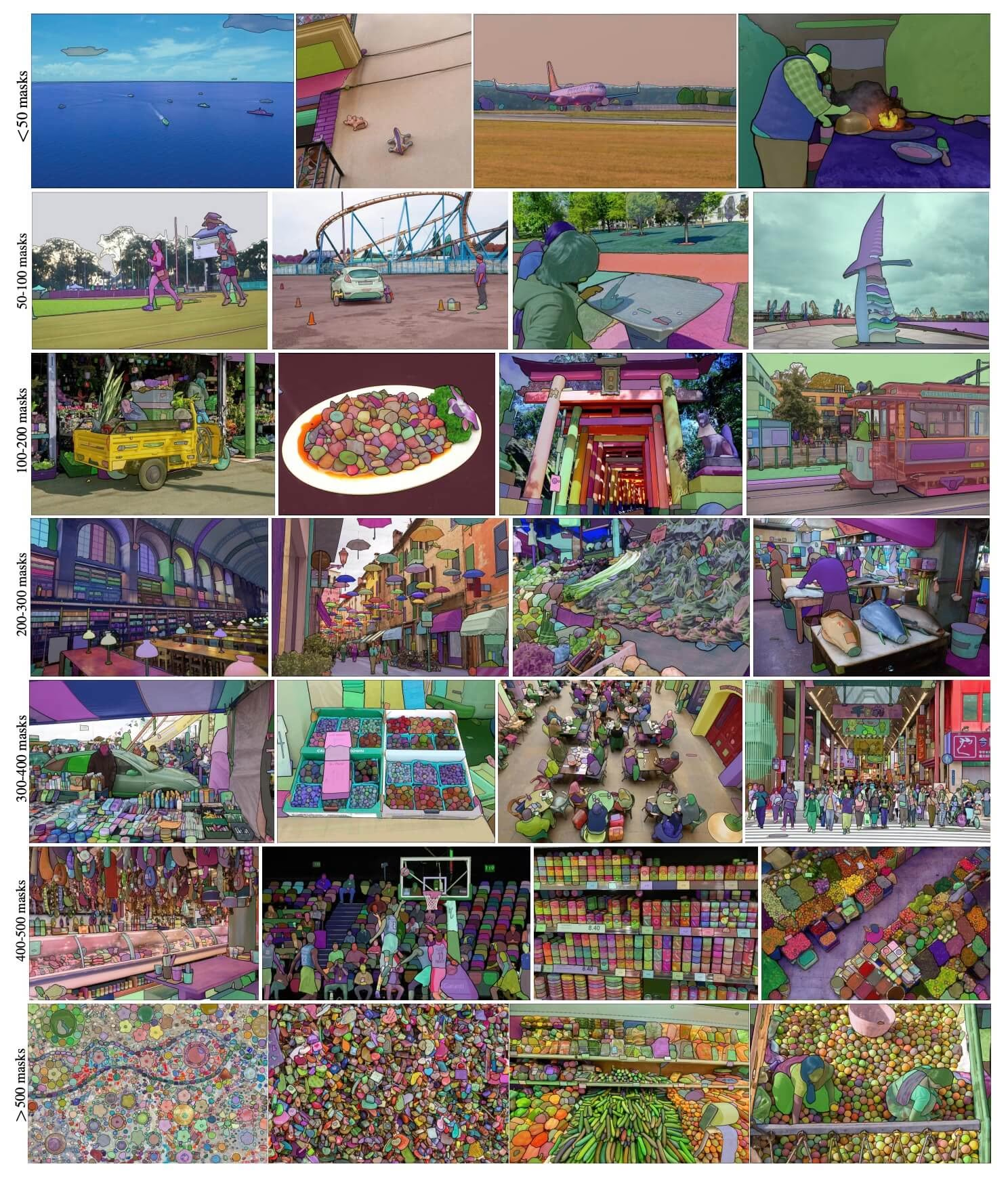 Примеры изображений из SA-1B. Изображения из датасета SA-1B с наложенными масками. SA-1B содержит 11 млн разнообразных лицензированных изображений высокого разрешения, обеспечивающих защиту конфиденциальности, и 1,1 млрд высококачественных масок сегментации. Эти маски были полностью размечены автоматически с помощью SAM. Согласно оценкам людей и многочисленным экспериментам, маски отличаются высоким качеством и разнообразием. Для наглядности изображения сгруппированы по числу масок на изображении (в среднем на одно изображение приходится ∼100 масок).
Ключевые особенности модели сегментации любых объектов (SAM)#
- Задача сегментации по подсказкам: SAM создана для сегментации по подсказкам и позволяет генерировать корректные маски сегментации на основе любой заданной подсказки, например пространственных или текстовых указаний, обозначающих объект.
- Продвинутая архитектура: модель «Сегментация всего» использует ресурсоёмкий кодировщик изображений, кодировщик запросов и легковесный декодер масок. Такая архитектура обеспечивает гибкую работу с запросами, вычисление масок в реальном времени и учет неоднозначности при решении задач сегментации.
- Датасет SA-1B: представленный в рамках проекта «Сегментация всего» датасет SA-1B содержит более 1 миллиарда масок для 11 миллионов изображений. На момент выпуска это был крупнейший датасет для сегментации; он предоставляет SAM разнообразные данные для обучения в большом масштабе.
- Результаты в режиме zero-shot: SAM демонстрирует высокие результаты в режиме zero-shot на различных задачах сегментации, поэтому модель готова к использованию в самых разных приложениях и почти не требует настройки запросов.
Чтобы подробнее узнать о модели сегментации любых объектов и наборе данных SA-1B, посети репозиторий Segment Anything на GitHub и ознакомься с исследовательской статьёй Segment Anything.
Модели семейства SAM (SAM 2.1, SAM 3 и SAM 3.1) обеспечивают работу функции интеллектуальной разметки на платформе Ultralytics, позволяя быстро размечать датасеты масками с помощью щелчков мышью.
Доступные модели, поддерживаемые задачи и режимы работы#
В этой таблице представлены доступные модели, соответствующие им предварительно обученные веса, поддерживаемые задачи и совместимость с различными режимами работы: обучением, валидацией, инференсом и экспортом. Поддерживаемые режимы отмечены ✅, а неподдерживаемые — ❌.
| Тип модели | Предобученные веса | Поддерживаемые задачи | Обучение | Валидация | Инференс | Экспорт |
|---|---|---|---|---|---|---|
| SAM base | sam_b.pt | Сегментация экземпляров | ❌ | ❌ | ✅ | ❌ |
| SAM large | sam_l.pt | Сегментация экземпляров | ❌ | ❌ | ✅ | ❌ |
Как использовать SAM: универсальность и эффективность сегментации изображений#
Модель «Сегментация всего» подходит для множества последующих задач, выходящих за рамки обучающих данных, включая обнаружение границ, генерацию объектных предложений, сегментацию экземпляров и предварительное предсказание масок по тексту. С помощью настройки запросов SAM может адаптироваться к новым задачам и распределениям данных в режиме zero-shot.
Пример предсказания SAM#
Сегментация изображения по заданным подсказкам.
from ultralytics import SAM

# Загрузить модель
model = SAM("sam_b.pt")

# Показать информацию о модели (необязательно)
model.info()

# Выполнить инференс с подсказкой в виде bboxes
results = model("ultralytics/assets/zidane.jpg", bboxes=[439, 437, 524, 709])

# Выполнить инференс с одной точкой
results = model(points=[900, 370], labels=[1])

# Выполнить инференс с несколькими точками
results = model(points=[[400, 370], [900, 370]], labels=[1, 1])

# Выполнить инференс с подсказкой в виде нескольких точек для каждого объекта
results = model(points=[[[400, 370], [900, 370]]], labels=[[1, 1]])

# Выполнить инференс с подсказкой в виде отрицательных точек
results = model(points=[[[400, 370], [900, 370]]], labels=[[1, 0]])Сегментировать всё изображение.
from ultralytics import SAM

# Загрузить модель
model = SAM("sam_b.pt")

# Показать информацию о модели (необязательно)
model.info()

# Выполнить инференс
model("path/to/image.jpg")- SAM сегментирует всё изображение, если не передать запросы (bbox/точки/маски).
Задай изображение один раз, а затем запускай инференс с запросами несколько раз, не запуская кодировщик изображения повторно.
import cv2

from ultralytics.models.sam import Predictor as SAMPredictor

# Создание SAMPredictor
overrides = {"conf": 0.25, "task": "segment", "mode": "predict", "imgsz": 1024, "model": "mobile_sam.pt"}
predictor = SAMPredictor(overrides=overrides)

# Настройка изображения
predictor.set_image("ultralytics/assets/zidane.jpg")  # Задать файл изображения
predictor.set_image(cv2.imread("ultralytics/assets/zidane.jpg"))  # Задать np.ndarray
results = predictor(bboxes=[439, 437, 524, 709])

# Запуск инференса с подсказкой в виде одной точки
results = predictor(points=[900, 370], labels=[1])

# Запуск инференса с подсказкой в виде нескольких точек
results = predictor(points=[[400, 370], [900, 370]], labels=[1, 1])

# Выполнить инференс с подсказкой в виде отрицательных точек
results = predictor(points=[[[400, 370], [900, 370]]], labels=[[1, 0]])

# Сброс изображения
predictor.reset_image()
Сегментация всего изображения с дополнительными аргументами.
from ultralytics.models.sam import Predictor as SAMPredictor

# Создание SAMPredictor
overrides = {"conf": 0.25, "task": "segment", "mode": "predict", "imgsz": 1024, "model": "mobile_sam.pt"}
predictor = SAMPredictor(overrides=overrides)

# Сегментация с дополнительными аргументами
results = predictor(source="ultralytics/assets/zidane.jpg", crop_n_layers=1, points_stride=64, min_mask_region_area=100)Все объекты results, возвращаемые в примерах выше, — это объекты Results, которые предоставляют доступ к предсказанным маскам и исходному изображению.
- Дополнительные аргументы
Segment everythingсмотри в справочникеPredictor/generate.
Сравнение SAM и YOLO#
Здесь мы сравниваем модель SAM-b от Meta с моделями сегментации Ultralytics, включая YOLO26:
| Модель | Размер (МБ) | Параметры (M) | Скорость (CPU) (мс/изобр.) |
|---|---|---|---|
| SAM-b от Meta | 375 | 93.7 | 41703 |
| MobileSAM | 40.7 | 10.1 | 23802 |
| FastSAM-s с бэкбоном YOLOv8 | 23.9 | 11.8 | 58.0 |
| Ultralytics YOLOv8n-seg | 7.1 (в 52.8 раза меньше) | 3.4 (на 27.6 меньше) | 24.8 (в 1682 раза быстрее) |
| Ultralytics YOLO11n-seg | 6.2 (в 60.5 раза меньше) | 2.9 (на 32.3 меньше) | 24.3 (в 1716 раз быстрее) |
| Ultralytics YOLO26n-seg | 6.7 (в 56.0 раза меньше) | 2.7 (на 34.7 меньше) | 25.2 (в 1655 раз быстрее) |
Это сравнение показывает существенные различия в размере и скорости моделей вариантов SAM и моделей сегментации YOLO. Хотя SAM предоставляет уникальные возможности автоматической сегментации, модели YOLO, особенно YOLOv8n-seg, YOLO11n-seg и YOLO26n-seg, значительно компактнее, быстрее и эффективнее используют вычислительные ресурсы.
Скорость SAM измерялась с помощью PyTorch, скорость YOLO — с помощью ONNX Runtime. Тесты проводились на Apple M4 Air 2025 года с 16 ГБ оперативной памяти с использованием torch==2.10.0, ultralytics==8.4.31 и onnxruntime==1.24.4. Чтобы воспроизвести этот тест:
from ultralytics import ASSETS, SAM, YOLO, FastSAM

# Профилирование SAM-b, MobileSAM
for file in ["sam_b.pt", "mobile_sam.pt"]:
    model = SAM(file)
    model.info()
    model(ASSETS)

# Профилирование FastSAM-s
model = FastSAM("FastSAM-s.pt")
model.info()
model(ASSETS)

# Профилировать модели YOLO (ONNX)
for file_name in ["yolov8n-seg.pt", "yolo11n-seg.pt", "yolo26n-seg.pt"]:
    model = YOLO(file_name)
    model.info()
    onnx_path = model.export(format="onnx", dynamic=True, nms=False)  # Голова YOLO26 без NMS; ничего не делает для YOLOv8/YOLO11
    model = YOLO(onnx_path)
    model(ASSETS)
Автоматическая разметка: быстрый способ создать наборы данных для сегментации#
Автоматическая разметка — одна из ключевых функций SAM. Она позволяет создавать датасеты для сегментации с помощью предварительно обученной модели обнаружения объектов. Эта функция ускоряет разметку большого числа изображений и избавляет от необходимости тратить время на ручную разметку.
Создание набора данных для сегментации с помощью модели обнаружения#
Чтобы автоматически разметить датасет с помощью фреймворка Ultralytics, используй функцию auto_annotate, которая объединяет детектор, например YOLO26x, с SAM:
from ultralytics.data.annotator import auto_annotate

auto_annotate(data="path/to/images", det_model="yolo26x.pt", sam_model="sam_b.pt")| Аргумент | Тип | По умолчанию | Описание |
|---|---|---|---|
data | str | обязательно | Путь к каталогу с изображениями, которые нужно аннотировать или сегментировать. |
det_model | str | 'yolo26x.pt' | Путь к модели обнаружения YOLO для первоначального обнаружения объектов. |
sam_model | str | 'sam_b.pt' | Путь к модели SAM для сегментации (поддерживаются веса SAM, SAM 2, MobileSAM и SAM 3). |
device | str | '' | Вычислительное устройство (например, 'cuda:0', 'cpu' или '' для автоматического определения устройства). |
conf | float | 0.25 | Порог уверенности модели обнаружения YOLO для фильтрации слабых детекций. |
iou | float | 0.5 | Порог IoU для подавления немаксимумов, чтобы отфильтровать перекрывающиеся рамки. |
imgsz | int | 640 | Размер входных изображений (при необходимости округляется вверх до ближайшего числа, кратного 32). |
max_det | int | 300 | Максимальное число детекций на изображение для экономии памяти. |
classes | list[int] | None | Список индексов классов для обнаружения (например, [0, 1] для человека и велосипеда). |
output_dir | str | None | Каталог для сохранения аннотаций (по умолчанию: соседний каталог <data>_auto_annotate_labels). |
Функция auto_annotate принимает путь к изображениям и необязательные аргументы для указания предварительно обученных моделей обнаружения и сегментации SAM, устройства для запуска моделей и выходного каталога для сохранения результатов разметки.
Автоматическая разметка с помощью предварительно обученных моделей значительно сокращает время и усилия, необходимые для создания датасетов сегментации. Благодаря этому команды, работающие с большими коллекциями изображений, могут сосредоточиться на разработке и оценке моделей, а не на ручной разметке.
Цитирование и благодарности#
Если SAM полезна в твоих исследованиях или разработке, рекомендуем процитировать эту статью:
@misc{kirillov2023segment,
      title={Segment Anything},
      author={Alexander Kirillov and Eric Mintun and Nikhila Ravi and Hanzi Mao and Chloe Rolland and Laura Gustafson and Tete Xiao and Spencer Whitehead and Alexander C. Berg and Wan-Yen Lo and Piotr Dollár and Ross Girshick},
      year={2023},
      eprint={2304.02643},
      archivePrefix={arXiv},
      primaryClass={cs.CV}
}
Мы хотели бы поблагодарить Meta AI за создание и поддержку этого ценного ресурса для сообщества компьютерного зрения.
Часто задаваемые вопросы#
Модель Meta «Сегментация всего» (SAM) предназначена для сегментации изображений по запросам. Она объединяет кодировщики изображений и запросов с легковесным декодером масок, который создает маски сегментации на основе запросов в виде точек, рамок или масок. Обученная на датасете SA-1B, SAM хорошо справляется с задачами в режиме zero-shot и адаптируется к новым распределениям изображений и задачам без предварительных знаний.
Для сегментации изображений можно запускать инференс модели сегментации любых объектов (SAM) с различными подсказками, например ограничивающими рамками или точками. Вот пример на Python:
from ultralytics import SAM

# Загрузить модель
model = SAM("sam_b.pt")

# Сегментация с промптом в виде ограничивающей рамки
model("ultralytics/assets/zidane.jpg", bboxes=[439, 437, 524, 709])

# Сегментация по подсказке-точке
model("ultralytics/assets/zidane.jpg", points=[900, 370], labels=[1])

# Сегментация по подсказке с несколькими точками
model("ultralytics/assets/zidane.jpg", points=[[400, 370], [900, 370]], labels=[1, 1])

# Сегментация каждого объекта по подсказке с несколькими точками
model("ultralytics/assets/zidane.jpg", points=[[[400, 370], [900, 370]]], labels=[[1, 1]])

# Сегментация по подсказке с отрицательными точками.
model("ultralytics/assets/zidane.jpg", points=[[[400, 370], [900, 370]]], labels=[[1, 0]])
Также можно запустить инференс SAM через интерфейс командной строки (CLI):
yolo predict model=sam_b.pt source=path/to/image.jpgПо сравнению с моделями YOLO варианты SAM, такие как SAM-b, MobileSAM и FastSAM-s, обычно крупнее и медленнее, но обладают уникальными возможностями сегментации с нулевым обучением. Например, YOLO26n-seg в 56 раз меньше и более чем в 1650 раз быстрее оригинальной модели SAM-b от Meta при запуске на CPU. Поэтому модели YOLO идеально подходят для приложений, которым нужна быстрая, компактная и вычислительно эффективная сегментация, а модели SAM отлично справляются с гибкой сегментацией по подсказкам и с нулевым обучением.
SAM от Ultralytics поддерживает автоматическую разметку, позволяющую создавать наборы данных для сегментации с помощью предварительно обученной модели обнаружения. Вот пример на Python:
from ultralytics.data.annotator import auto_annotate

auto_annotate(data="path/to/images", det_model="yolo26x.pt", sam_model="sam_b.pt")
Эта функция принимает путь к изображениям и необязательные аргументы для предварительно обученных моделей обнаружения и сегментации SAM, а также параметры устройства и выходного каталога. Полное руководство смотри в разделе «Автоматическая разметка».
SAM обучается на датасете SA-1B, который содержит более 1 миллиарда масок для 11 миллионов изображений. На момент выпуска SA-1B был крупнейшим датасетом для сегментации: он предоставил качественные и разнообразные данные для обучения, ставшие основой zero-shot-эффективности SAM в задачах сегментации.


Комментарии27
Задай вопрос, поделись результатами или помоги кому-нибудь.
kh-diab
can we use SAM to process labeled images with bounding box to segment the object inside the box and generate new labels files like yolo or coco format if yes how please
1 Paula DerrengerUltralytics
Yes, you can use SAM to process labeled images with bounding boxes to segment the objects inside and generate new label files in formats like YOLO or COCO. You can achieve this by using the
auto_annotatefunction in the Ultralytics framework. This function allows you to auto-annotate your dataset using a pre-trained detection model and SAM for segmentation. For more details, you can refer to the Segment Anything Model documentation. If you need further assistance, feel free to ask!Hello @pderrenger
Thanks I tried to run the below but I face error all the time
import os import cv2 import numpy as np from ultralytics import SAM
Load the SAM model
model = SAM("sam_b.pt") # Update the model path if needed
Function to load YOLO annotations
def load_yolo_annotations(annotation_path, image_width, image_height): bboxes = [] try: with open(annotation_path, 'r') as file: lines = file.readlines() for line in lines: parts = line.strip().split() class_id = int(parts[0]) x_center = float(parts[1]) * image_width y_center = float(parts[2]) * image_height width = float(parts[3]) * image_width height = float(parts[4]) * image_height x = x_center - width / 2 y = y_center - height / 2 bboxes.append((x, y, x + width, y + height)) # Update to [x1, y1, x2, y2] except Exception as e: print(f"Error reading annotation file {annotation_path}: {e}") return bboxes
Paths
images_folder = r'E:\MSc\tesi\20210901_Herrenpuent_Taenikon_Matrice_300_15m_1.6m_s\500 D' annotations_folder = r'C:\Users\Khaled\OneDrive - OST\Study Material\Msc Thesis\dataset\Group D yolo format\obj_train_data' output_folder = r'C:\Users\Khaled\OneDrive - OST\Study Material\Msc Thesis\dataset\test output sam'
if not os.path.exists(output_folder): os.makedirs(output_folder)
Process each image and its corresponding annotation
total_images = len(os.listdir(images_folder)) processed_images = 0
for image_filename in os.listdir(images_folder): if image_filename.endswith(('.JPG', '.jpg', '.png')): image_path = os.path.join(images_folder, image_filename) annotation_path = os.path.join(annotations_folder, image_filename.replace('.JPG', '.txt').replace('.jpg', '.txt').replace('.png', '.txt'))
    print(f"Processing {image_filename}...")

    # Check if annotation file exists
    if not os.path.exists(annotation_path):
        print(f"Annotation file not found for {image_filename}")
        continue

    # Load the image
    image = cv2.imread(image_path)
    if image is None:
        print(f"Failed to load image {image_path}")
        continue

    image_rgb = cv2.cvtColor(image, cv2.COLOR_BGR2RGB)
    height, width, _ = image.shape

    # Load YOLO annotations
    bboxes = load_yolo_annotations(annotation_path, width, height)
    if not bboxes:
        print(f"No bounding boxes found in {annotation_path}")
        continue

    # Perform segmentation using SAM model
    results = model(image_rgb, bboxes=bboxes)

    for idx, result in enumerate(results):
        if hasattr(result, 'masks') and result.masks is not None:
            masks = result.masks.cpu().numpy()  # Convert to numpy array
            for m_idx, mask in enumerate(masks):
                chw_mask = mask.astype(np.uint8)  # Ensure mask is in uint8 format
                hwc_mask = np.transpose(chw_mask, (1, 2, 0))  # Convert CHW to HWC
                contours, _ = cv2.findContours(hwc_mask, cv2.RETR_EXTERNAL, cv2.CHAIN_APPROX_SIMPLE)

                segmented_image = cv2.bitwise_and(image, image, mask=hwc_mask)

                # Save the segmented image
                output_path = os.path.join(output_folder, image_filename.replace('.JPG', f'_segmented_{idx}_{m_idx}.jpg').replace('.jpg', f'_segmented_{idx}_{m_idx}.jpg').replace('.png', f'_segmented_{idx}_{m_idx}.png'))
                cv2.imwrite(output_path, segmented_image)
                print(f"Saved segmented image to {output_path}")

    processed_images += 1
    print(f"Processed {processed_images}/{total_images} images.")
print("Processing completed.")
error is
AttributeError: 'Masks' object has no attribute 'astype'. See valid attributes below.
A class for storing and manipulating detection masks.

    xy (list): A list of segments in pixel coordinates.
    xyn (list): A list of normalized segments.

Methods:
    cpu(): Returns the masks tensor on CPU memory.
    numpy(): Returns the masks tensor as a numpy array.
    cuda(): Returns the masks tensor on GPU memory.
    to(device, dtype): Returns the masks tensor with the specified device and dtype.
PS C:\Users\Khaled> & C:/MSc_Workspace/anaconda3/envs/GenEnv/python.exe "c:/Users/Khaled/OneDrive - OST/Study Material/Msc Thesis/coding/sam segment.py" Processing DJI_20210901122818_0695.JPG...
0: 1024x1024 67330.4ms Speed: 48.0ms preprocess, 67330.4ms inference, 8095.5ms postprocess per image at shape (1, 3, 1024, 1024) Traceback (most recent call last): File "c:\Users\Khaled\OneDrive - OST\Study Material\Msc Thesis\coding\sam segment.py", line 75, in chw_mask = mask.astype(np.uint8) # Ensure mask is in uint8 format File "C:\MSc_Workspace\anaconda3\envs\GenEnv\lib\site-packages\ultralytics\utils_init_.py", line 162, in getattr raise AttributeError(f"'{name}' object has no attribute '{attr}'. See valid attributes below.\n{self.doc}") AttributeError: 'Masks' object has no attribute 'astype'. See valid attributes below.
A class for storing and manipulating detection masks.

Attributes:
    xy (list): A list of segments in pixel coordinates.
    xyn (list): A list of normalized segments.

Methods:
    cpu(): Returns the masks tensor on CPU memory.
    numpy(): Returns the masks tensor as a numpy array.
    cuda(): Returns the masks tensor on GPU memory.
    to(device, dtype): Returns the masks tensor with the specified device and dtype.
do you have idea how to solve it thanks
evans rojas
Hola me gustaría usar SAM para clasificar vegetación a partir de una imagen. ¿Qué recomendaciones me sugieren?
- Paula DerrengerUltralytics
Hola, Evans. SAM puede ayudarte a delimitar la vegetación, pero el SAM original no identifica por sí solo especies ni tipos de cobertura. Te sugiero comenzar con puntos positivos sobre la vegetación y negativos sobre el fondo, revisar las máscaras y asignarles tus clases manualmente. Si buscas automatizar la clasificación en más imágenes, puedes usar esas anotaciones para entrenar un modelo de segmentación por instancias para plantas individuales o de segmentación semántica para coberturas del terreno. ¿Quieres separar vegetación del fondo o distinguir especies, y trabajas con fotografías terrestres, de dron o satelitales?
meenakshi71
I've been trying to export the SAM model (which i had trained on my custom dataset) into ONNX but the output is always wrong. It is just generating a grid instead of a proper segmentation mask every time even after providing multiple kinds of prompts.
 Glenn JocherUltralytics
@meenakshi71 it seems the issue may stem from the export process or configuration. Ensure you are using the correct export parameters and supported formats. SAM models are primarily designed for real-time inference and not all functionalities may transfer seamlessly to ONNX. Refer to the SAM export documentation for guidance. If the problem persists, consider testing the ONNX model with simpler prompts to isolate the issue.
MeenakshiKK236
Why are my segmentation results being automatically saved into this directory while using the SAM model to perform segmentation on my custom dataset? "Results saved to runs/segment/predict4"
- Glenn JocherUltralytics
@MeenakshiKK236 the results are saved to the
runs/segment/predict4directory by default. You can change the save directory by specifying theprojectandnamearguments in your command. For more details, please refer to the SAM documentation.
NasserAlqeifi
Correct me if I'm wrong, when I use the auto_annotate function I will only get labels for my dataset with the classes in Yolo pre-trained? What if I need classes that are not available within Yolo? For example, I want to get a label for the road, and this is not available in any version of Yolo, but it is available in SAM?
- Glenn JocherUltralytics
@NasserAlqeifi you are correct. The
auto_annotatefunction uses YOLO's pre-trained classes for labeling. If you need classes not available in YOLO, like "road," you can use SAM directly for segmentation. For more details, please refer to the Segment Anything Model documentation. - Glenn JocherUltralytics
@NasserAlqeifi but also remember SAM identifies segments but not classes, so it may find a sign or a road, but it won't be able to assign a class to them by itself.
Thank you for your quick response. Indeed, I tried to use SAM directly and found that it does not save the class names in the name, but the class number.
from ultralytics import SAM
Load a model
model = SAM("sam2_l.pt")
Predict results
results = model.predict(source=r"/testSAM/image.png", stream=True, bboxes=None, points=None, labels=None, show=False)
Iterate over results, print names, and save each result to a file
for i, result in enumerate(results): # Print the names detected in the result print(f"Result {i}: Detected Names - {result.names}")
# Save the result as an image file
result.save(f"output_{i}.jpg")
------------- output ---------
image 1/1 /testSAM/image.png: 1024x1024 1 0, 1 1, 1 2, 1 3, 1 4, 1 5, 1 6, 1 7, 1 8, 1 9, 1 10, 1 11, 1 12, 1 13, 1 14, 1 15, 1 16, 1 17, 1 18, 1 19, 1 20, 1 21, 1 22, 1 23, 1 24, 1 25, 1 26, 1 27, 1 28, 1 29, 1 30, 1 31, 1 32, 23758.2ms Result 0: Detected Names - {0: '0', 1: '1', 2: '2', 3: '3', 4: '4', 5: '5', 6: '6', 7: '7', 8: '8', 9: '9', 10: '10', 11: '11', 12: '12', 13: '13', 14: '14', 15: '15', 16: '16', 17: '17', 18: '18', 19: '19', 20: '20', 21: '21', 22: '22', 23: '23', 24: '24', 25: '25', 26: '26', 27: '27', 28: '28', 29: '29', 30: '30', 31: '31', 32: '32'} Speed: 20.3ms preprocess, 23758.2ms inference, 7.1ms postprocess per image at shape (1, 3, 1024, 1024)
- Glenn JocherUltralytics
Thank you for your feedback. Currently, SAM does not assign class names, only class numbers. If you need specific class names, you may need to implement a custom mapping or post-processing step to assign the desired class names based on your requirements.
dreambit
I have images where a single object (such as a car) is partially covered by small trees, resulting in the object being divided into multiple visible fragments. In coco it could look like { "id": 1, "image_id": 1, "category_id": 1, "bbox": [x, y, width, height], "segmentation": [ [polygon1_x1, polygon1_y1, polygon1_x2, polygon1_y2, ...], [polygon2_x1, polygon2_y1, polygon2_x2, polygon2_y2, ...] ], "area": 500, "iscrowd": 0 } Each polygon is an array of coordinates defining a closed shape
Is it possible with auto_annotate and yolo format?
- Glenn JocherUltralytics(изменено)
@dreambit hi there!
Thank you for your detailed question. Yes, you can use the
auto_annotatefunction in the Ultralytics framework to handle images where objects are partially occluded and appear as multiple fragments. This function can generate segmentation masks for such complex scenarios.Here's how you can achieve this:
- Prepare Your Dataset: Ensure your images are organized in a directory.
- Use the
auto_annotateFunction: This function will use a pre-trained YOLO detection model and the SAM segmentation model to annotate your images.
Here's a code example to get you started:
from ultralytics.data.annotator import auto_annotate

# Path to your images
data_path = "path/to/your/images"

# Auto-annotate using YOLO26 and SAM models
auto_annotate(data=data_path, det_model="yolo26x.pt", sam_model="sam_b.pt")
Explanation:
data: Path to the folder containing your images.det_model: The pre-trained YOLO detection model, which defaults toyolo26x.pt.sam_model: The pre-trained SAM segmentation model, which defaults tosam_b.pt.
This setup will generate segmentation masks for your images, even if the objects are partially occluded.
For more detailed information on using SAM and its capabilities, you can refer to the Segment Anything Model (SAM) documentation.
If you encounter any issues or need further assistance, please provide a reproducible example so we can better understand and address your specific scenario. You can find more information on creating a minimum reproducible example here.
Feel free to update to the latest versions of the packages to ensure you have the latest features and fixes.
Best of luck with your project! 🚀
Glenn thanks, but as I see in docs https://docs.ultralytics.com/datasets/segment/#ultralytics-yolo-format ... In this format, is the index of the class for the object, and ... are the bounding coordinates of the object's segmentation mask. The coordinates are separated by spaces.
So it means that I could have only one segmentation mask?
0 0.681 0.485 0.670 0.487 0.676 0.487 1 0.504 0.000 0.501 0.004 0.498 0.004 0.493 0.010 0.492 0.0104
Glen, i ran the command you specified, and used an image from coco data set to test, as you can see segmentations are not correct, only half of the objects are segmented:
Here is original image from coco with car mask https://ibb.co/RjYyRdk
- Glenn JocherUltralytics(изменено)
Hi @dreambit,
Thank you for sharing the images and details. I understand the challenge you're facing with partial segmentations. The
auto_annotatefunction should ideally handle such cases, but it seems like the segmentation results are not as expected.Steps to Troubleshoot and Improve Segmentation:
-
Verify Latest Versions: Ensure you are using the latest versions of the Ultralytics and SAM models. This can help avoid any bugs that might have been fixed in recent updates.
-
Reproducible Example: If the issue persists, providing a minimum reproducible example would be very helpful. This allows us to better understand and diagnose the problem. You can find guidance on creating a reproducible example here.
-
Adjusting Prompts: Sometimes, adjusting the prompts (bounding boxes or points) can improve segmentation results. Here’s an example of how you can use different prompts:
from ultralytics import SAM # Load a model model = SAM("sam_b.pt") # Run inference with bounding boxes prompt results = model("path/to/image.jpg", bboxes=[[x1, y1, x2, y2], [x3, y3, x4, y4]]) # Run inference with points prompt results = model("path/to/image.jpg", points=[[x1, y1], [x2, y2]], labels=[1, 1]) -
Segment Everything: If specific prompts are not yielding the desired results, you can try segmenting the entire image without prompts:
from ultralytics import SAM # Load a model model = SAM("sam_b.pt") # Segment the whole image results = model("path/to/image.jpg") -
Multiple Masks Handling: If your object is divided into multiple fragments, ensure that the segmentation model is capable of handling multiple masks per object. The YOLO format typically supports one segmentation mask per object, but you can adapt the output to handle multiple masks by combining them post-processing.
Example of Handling Multiple Masks:
If you need to combine multiple masks into a single annotation, you can do this post-processing:
# `results[0].masks.data` holds all masks of the image, shape (N, H, W)
combined_mask = results[0].masks.data.cpu().numpy().max(axis=0)

# Save or use the combined mask
Documentation and Resources:
For more detailed information on using SAM and its capabilities, please refer to the Segment Anything Model (SAM) documentation.
If you continue to face issues, please share a reproducible example, and we’ll be happy to assist further. Your feedback is valuable, and we aim to provide the best support possible.
-
kshweikeh
is there anyway where I can train YOLO SAM on a custom dataset?
- Paula DerrengerUltralytics(изменено)
@kshweikeh hi there!
Currently, the Segment Anything Model (SAM) from Ultralytics is designed primarily for inference and does not support training on custom datasets. However, you can leverage SAM's powerful zero-shot capabilities for various segmentation tasks without the need for additional training.
If you're looking to create a segmentation dataset using SAM, you can use the auto-annotation feature. This allows you to generate segmentation masks using a pre-trained detection model. Here's a quick example:
from ultralytics.data.annotator import auto_annotate

auto_annotate(data="path/to/images", det_model="yolo26x.pt", sam_model="sam_b.pt")
This function will help you annotate your images quickly and efficiently, bypassing the need for manual labeling.
For more detailed information on using SAM, you can visit our Segment Anything Model (SAM) documentation.
If you have any further questions or need additional assistance, feel free to ask! 😊
Blessing988
@pderrenger It looks like auto_annotate for SAM only gives out the segmentation masks. What if you want to generate the bounding boxes in additionto the masks to verify if the results are right. Thanks.
Also, how will one visualise the segmentation masks after the auto_annotate which have been saved in a directory of txt files.
- Paula DerrengerUltralytics(изменено)
Hi @Blessing988,
auto_annotatewrites one YOLO segmentation polygon per line (class_id x1 y1 x2 y2 ..., normalized) to its output folder (output_dir, by default<images folder>_auto_annotate_labels). Here is a script to draw those polygons on the images:from pathlib import Path import cv2 import numpy as np def visualize_annotations(image_dir, label_dir, output_dir): Path(output_dir).mkdir(parents=True, exist_ok=True) for image_path in Path(image_dir).glob("*.jpg"): image = cv2.imread(str(image_path)) h, w = image.shape[:2] label_path = Path(label_dir) / f"{image_path.stem}.txt" if not label_path.exists(): continue for line in label_path.read_text().splitlines(): values = line.split() polygon = (np.array(values[1:], dtype=float).reshape(-1, 2) * [w, h]).astype(np.int32) cv2.polylines(image, [polygon], isClosed=True, color=(0, 255, 0), thickness=2) cv2.imwrite(str(Path(output_dir) / image_path.name), image) visualize_annotations("path/to/images", "path/to/labels", "path/to/output")For more detailed information on using SAM and its features, you can refer to the Segment Anything Model (SAM) documentation.
Feel free to reach out if you have any further questions or need additional assistance! 😊
pabentse
Would be fantastic with support for the "H" size as well!
- Paula DerrengerUltralytics
@pabentse absolutely, the addition of an "H" size model would be a great enhancement to the range of model sizes we offer, catering to different computational needs and use cases. The YOLO community's feedback is invaluable, and suggestions like yours help guide future developments. Keep an eye on our updates! 👀🚀