Model YOLO-World
YOLO-World là phương pháp phát hiện từ vựng mở theo thời gian thực, dựa trên Ultralytics YOLOv8. Model phát hiện đối tượng trong ảnh từ văn bản mô tả. Nhờ giảm nhu cầu tính toán mà vẫn duy trì độ chính xác cạnh tranh, YOLO-World phù hợp với nhiều ứng dụng thị giác.
Xem: Quy trình huấn luyện YOLO World trên dataset tùy chỉnh
Tổng quan#
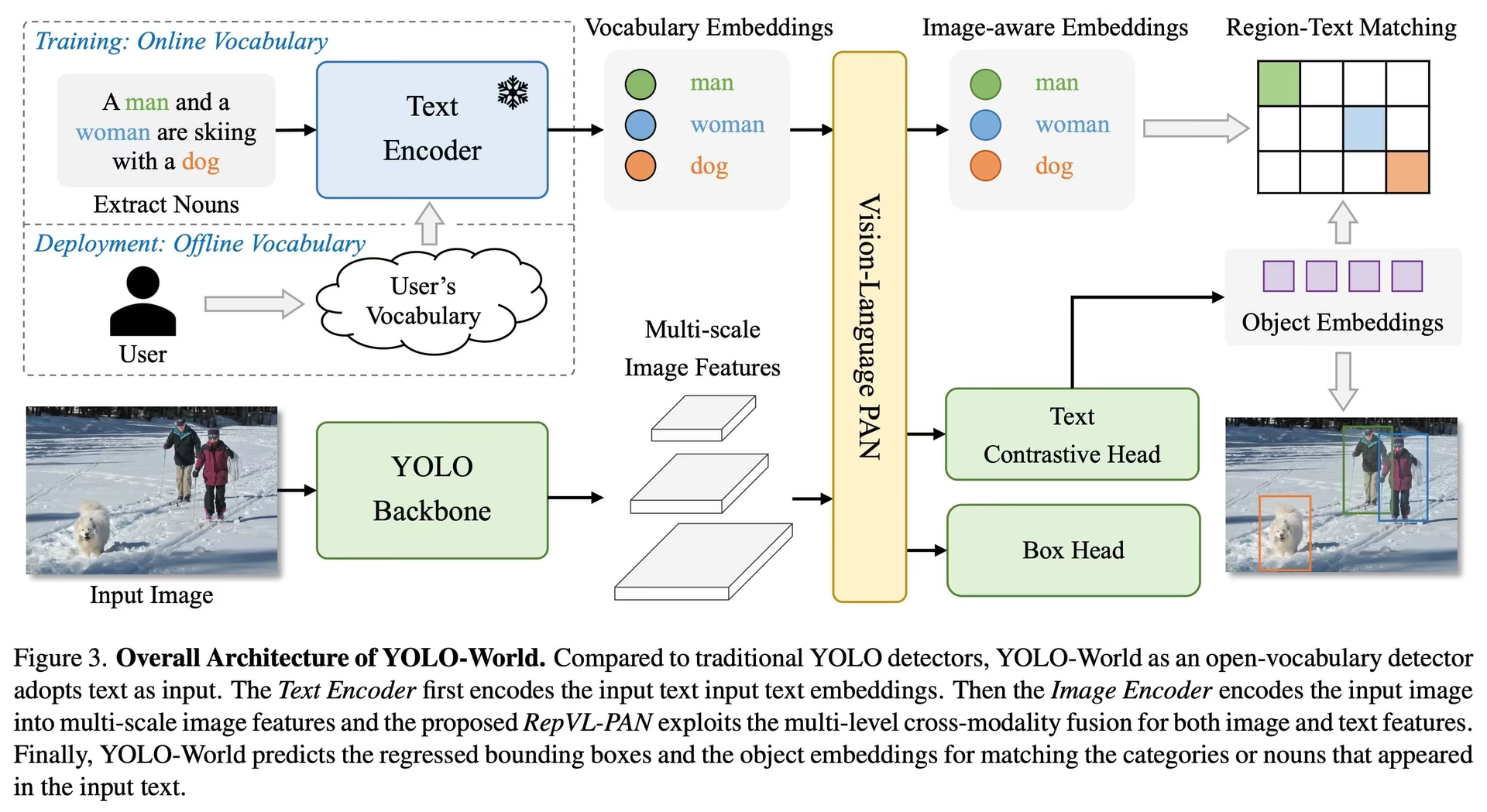
YOLO-World giải quyết những thách thức của các model phát hiện Open-Vocabulary truyền thống, vốn thường phụ thuộc vào các model Transformer nặng, đòi hỏi tài nguyên tính toán đáng kể. Ngược lại, các bộ phát hiện closed-set phụ thuộc vào những danh mục đối tượng được xác định trước, hạn chế khả năng sử dụng trong các tình huống biến động. YOLO-World mở rộng framework YOLOv8 với tính năng phát hiện open-vocabulary, sử dụng mô hình hóa thị giác-ngôn ngữ và tiền huấn luyện trên các bộ dữ liệu lớn để nhận diện hiệu quả nhiều loại đối tượng trong các tình huống zero-shot.
Đối với các tác vụ bộ từ vựng mở cũng cần mask instance, prompt thị giác hoặc chế độ không cần prompt, hãy xem YOLOE, sử dụng cùng API set_classes().
Tính năng chính#
-
Giải pháp thời gian thực: Được xây dựng trên các CNN nhanh, YOLO-World thực hiện phát hiện open-vocabulary đủ nhanh cho các ứng dụng cần kết quả tức thì.
-
Hiệu quả và hiệu năng: YOLO-World giảm yêu cầu về tính toán và tài nguyên trong khi vẫn duy trì độ chính xác, mang đến một giải pháp thay thế hiệu quả cho các bộ phát hiện open-vocabulary dựa trên Transformer nặng hơn và hỗ trợ các ứng dụng thời gian thực.
-
Suy luận với từ vựng ngoại tuyến: YOLO-World giới thiệu chiến lược "prompt-then-detect", sử dụng từ vựng ngoại tuyến để cải thiện hơn nữa hiệu quả. Cách tiếp cận này cho phép sử dụng các prompt tùy chỉnh được tính toán trước, bao gồm caption hoặc danh mục, mã hóa và lưu trữ chúng dưới dạng embedding từ vựng ngoại tuyến, qua đó tinh giản quy trình phát hiện.
-
Phát triển trên YOLOv8: Được xây dựng trên Ultralytics YOLOv8, YOLO-World điều chỉnh kiến trúc phát hiện thời gian thực để phát hiện open-vocabulary nhanh và chính xác.
-
Hiệu quả vượt trội trên benchmark: YOLO-World vượt trội hơn các bộ phát hiện open-vocabulary hiện có, bao gồm MDETR và dòng GLIP, về tốc độ và hiệu quả trên các benchmark tiêu chuẩn, khi đo trên một GPU NVIDIA V100.
-
Ứng dụng linh hoạt: Hiệu quả của YOLO-World giúp việc phát hiện open-vocabulary trở nên thiết thực trong nhiều tác vụ thị giác, với tốc độ nhanh hơn đáng kể so với các phương pháp open-vocabulary trước đây.
Các model hiện có, tác vụ được hỗ trợ và chế độ hoạt động#
Phần này trình bày chi tiết các model hiện có cùng trọng số tiền huấn luyện tương ứng, các tác vụ được hỗ trợ và khả năng tương thích với nhiều chế độ vận hành như Huấn luyện, Đánh giá, Suy luận và Xuất, được biểu thị bằng ✅ cho chế độ được hỗ trợ và ❌ cho chế độ không được hỗ trợ.
Tất cả trọng số YOLOv8-World đều được chuyển trực tiếp từ repository YOLO-World chính thức; xin ghi nhận công sức của các tác giả repository.
| Loại model | Weights pretrained | Các tác vụ được hỗ trợ | Huấn luyện | Validation | Suy luận | Export |
|---|---|---|---|---|---|---|
| YOLOv8s-world | yolov8s-world.pt | Phát hiện đối tượng | ✅ | ✅ | ✅ | ❌ |
| YOLOv8s-worldv2 | yolov8s-worldv2.pt | Phát hiện đối tượng | ✅ | ✅ | ✅ | ✅ |
| YOLOv8m-world | yolov8m-world.pt | Phát hiện đối tượng | ✅ | ✅ | ✅ | ❌ |
| YOLOv8m-worldv2 | yolov8m-worldv2.pt | Phát hiện đối tượng | ✅ | ✅ | ✅ | ✅ |
| YOLOv8l-world | yolov8l-world.pt | Phát hiện đối tượng | ✅ | ✅ | ✅ | ❌ |
| YOLOv8l-worldv2 | yolov8l-worldv2.pt | Phát hiện đối tượng | ✅ | ✅ | ✅ | ✅ |
| YOLOv8x-world | yolov8x-world.pt | Phát hiện đối tượng | ✅ | ✅ | ✅ | ❌ |
| YOLOv8x-worldv2 | yolov8x-worldv2.pt | Phát hiện đối tượng | ✅ | ✅ | ✅ | ✅ |
Chuyển giao zero-shot trên tập dữ liệu COCO#
| Loại model | mAP50-95 | mAP50 | mAP75 |
|---|---|---|---|
| yolov8s-world | 37.4 | 52.0 | 40.6 |
| yolov8s-worldv2 | 37.7 | 52.2 | 41.0 |
| yolov8m-world | 42.0 | 57.0 | 45.6 |
| yolov8m-worldv2 | 43.0 | 58.4 | 46.8 |
| yolov8l-world | 45.7 | 61.3 | 49.8 |
| yolov8l-worldv2 | 45.8 | 61.3 | 49.8 |
| yolov8x-world | 47.0 | 63.0 | 51.2 |
| yolov8x-worldv2 | 47.1 | 62.8 | 51.4 |
Ví dụ sử dụng#
Ultralytics cung cấp Python API và lệnh CLI cho các model YOLO-World.
Xem: Ví dụ sử dụng model YOLO-World với Ultralytics | Open Vocab, không cần Prompt và các nội dung khác
Cách sử dụng để huấn luyện#
Chúng tôi đặc biệt khuyến nghị sử dụng yolov8-worldv2 để huấn luyện tùy chỉnh vì công cụ này hỗ trợ huấn luyện xác định và giúp xuất sang các định dạng như ONNX và TensorRT dễ dàng hơn.
Huấn luyện model phát hiện đối tượng YOLO-World bằng phương thức train, minh họa bên dưới với bộ dữ liệu mẫu COCO8:
Có thể truyền các model *.pt pretrained PyTorch cũng như các file cấu hình *.yaml vào class YOLOWorld() để tạo một instance model trong Python:
from ultralytics import YOLOWorld

# Tải model YOLOv8s-worldv2 đã được huấn luyện trước
model = YOLOWorld("yolov8s-worldv2.pt")

# Huấn luyện model trên dataset mẫu COCO8 trong 100 epoch
results = model.train(data="coco8.yaml", epochs=100, imgsz=640)

# Chạy suy luận với model YOLO-World trên ảnh 'bus.jpg'
results = model("path/to/bus.jpg")
Cách sử dụng Predict#
Thực hiện phát hiện đối tượng bằng phương thức predict, như minh họa bên dưới:
from ultralytics import YOLOWorld

# Khởi tạo model YOLO-World
model = YOLOWorld("yolov8s-world.pt")  # hoặc chọn yolov8m/l-world.pt để sử dụng các kích thước khác nhau

# Thực hiện suy luận bằng model YOLOv8s-world trên ảnh được chỉ định
results = model.predict("path/to/image.jpg")

# Hiển thị kết quả
results[0].show()
Đoạn mã này tải một model tiền huấn luyện và chạy dự đoán trên một hình ảnh.
Cách sử dụng Val#
Đánh giá model trên một bộ dữ liệu như sau:
from ultralytics import YOLO

# Tạo model YOLO-World
model = YOLO("yolov8s-world.pt")  # hoặc chọn yolov8m/l-world.pt để sử dụng các kích thước khác nhau

# Thực hiện xác thực model trên tập dữ liệu mẫu COCO8
metrics = model.val(data="coco8.yaml")
Theo dõi sử dụng#
Thực hiện theo dõi đối tượng bằng model YOLO-World trên video hoặc hình ảnh như sau:
from ultralytics import YOLO

# Tạo model YOLO-World
model = YOLO("yolov8s-world.pt")  # hoặc chọn yolov8m/l-world.pt để sử dụng các kích thước khác nhau

# Theo dõi bằng model YOLO-World trên video
results = model.track(source="path/to/video.mp4")Các model YOLO-World do Ultralytics cung cấp được cấu hình sẵn với các danh mục của bộ dữ liệu COCO trong từ vựng ngoại tuyến, nên có thể sử dụng ngay. Nhờ đó, các model YOLOv8-World có thể trực tiếp nhận diện và dự đoán 80 danh mục tiêu chuẩn được xác định trong bộ dữ liệu COCO mà không cần thiết lập hay tùy chỉnh thêm.
Thiết lập prompt#
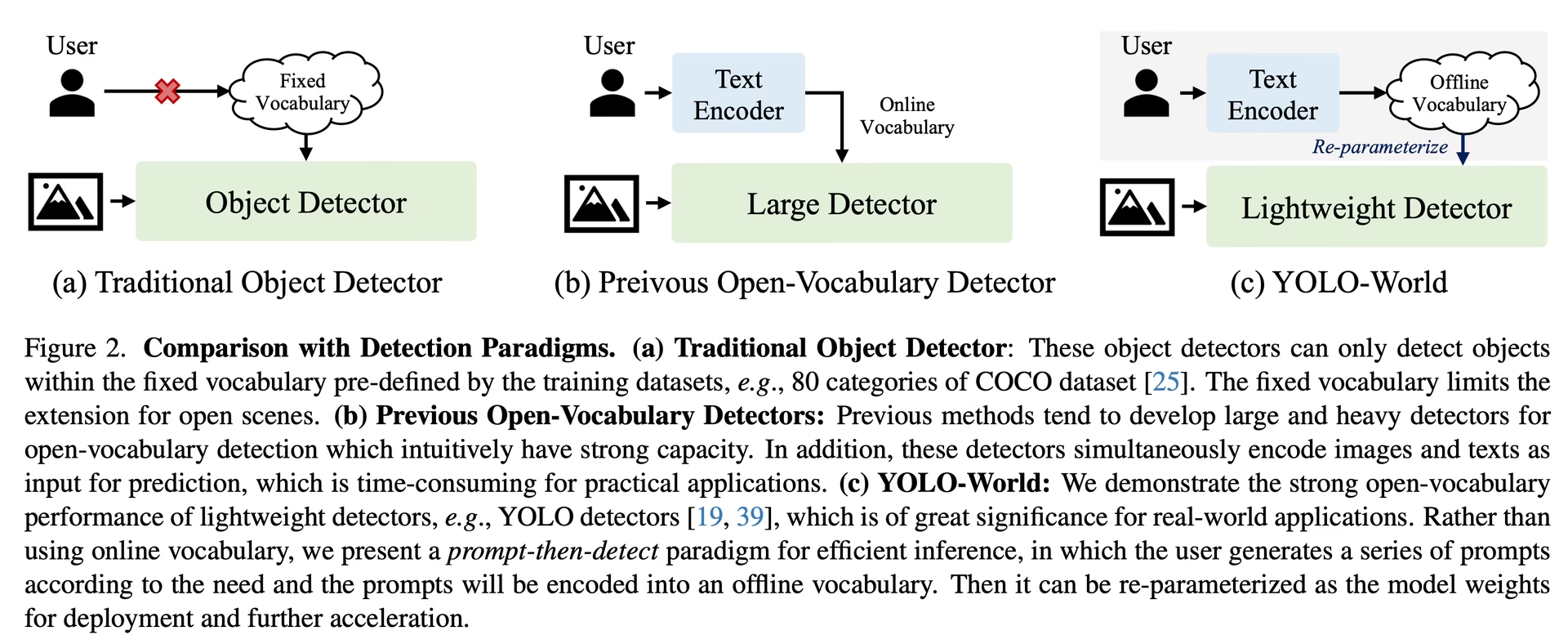
Framework YOLO-World cho phép chỉ định lớp linh hoạt thông qua prompt tùy chỉnh, giúp người dùng điều chỉnh model theo nhu cầu cụ thể mà không cần huấn luyện lại. Tính năng này đặc biệt hữu ích khi điều chỉnh model cho các miền mới hoặc tác vụ cụ thể vốn không có trong dữ liệu huấn luyện ban đầu. Bằng cách đặt prompt tùy chỉnh, người dùng hướng model đến các đối tượng cần quan tâm, cải thiện mức độ phù hợp và độ chính xác của kết quả phát hiện.
Ví dụ: nếu ứng dụng của bạn chỉ cần phát hiện các đối tượng 'person' và 'bus', bạn có thể chỉ định trực tiếp các lớp này:
from ultralytics import YOLO

# Khởi tạo model YOLO-World
model = YOLO("yolov8s-world.pt")  # hoặc chọn yolov8m/l-world.pt

# Xác định các lớp tùy chỉnh
model.set_classes(["person", "bus"])

# Thực hiện dự đoán cho các danh mục được chỉ định trong ảnh
results = model.predict("path/to/image.jpg")

# Hiển thị kết quả
results[0].show()Một số người dùng nhận thấy việc thêm chuỗi rỗng "" làm lớp nền có thể cải thiện hiệu suất phát hiện trong một số tình huống. Hành vi này có vẻ phụ thuộc vào từng tình huống và cơ chế chính xác vẫn chưa được hiểu đầy đủ:
model.set_classes(["person", "bus", ""])Chuỗi rỗng vẫn được giữ trong model.names như một lớp riêng, kể cả trong mọi model bạn lưu, vì vậy các kết quả phát hiện của lớp này sẽ có nhãn rỗng. Truyền classes=[0, 1] khi dự đoán để chỉ giữ lại các lớp thực của bạn.
Bạn cũng có thể lưu model sau khi thiết lập các lớp tùy chỉnh. Nhờ đó, bạn tạo ra một phiên bản model YOLO-World được chuyên biệt hóa cho trường hợp sử dụng cụ thể của mình. Quy trình này nhúng trực tiếp các định nghĩa lớp tùy chỉnh vào tệp model, giúp model sẵn sàng sử dụng với các lớp đã chỉ định mà không cần điều chỉnh thêm. Hãy làm theo các bước sau để lưu và tải model YOLO-World tùy chỉnh:
Trước tiên, hãy tải model YOLO-World, thiết lập các lớp tùy chỉnh cho model rồi lưu lại:
from ultralytics import YOLO

# Khởi tạo model YOLO-World
model = YOLO("yolov8s-world.pt")  # hoặc chọn yolov8m/l-world.pt

# Xác định các lớp tùy chỉnh
model.set_classes(["person", "bus"])

# Lưu model với từ vựng ngoại tuyến đã xác định
model.save("custom_yolov8s.pt")
Sau khi lưu, model custom_yolov8s.pt hoạt động như mọi model YOLOv8 đã được huấn luyện trước khác, nhưng có một điểm khác biệt quan trọng: model chỉ được tối ưu hóa để phát hiện các lớp bạn đã xác định. Tùy chỉnh này có thể cải thiện đáng kể hiệu suất phát hiện và hiệu quả cho các tình huống ứng dụng cụ thể của bạn.
from ultralytics import YOLO

# Tải model tùy chỉnh của bạn
model = YOLO("custom_yolov8s.pt")

# Chạy suy luận để phát hiện các lớp tùy chỉnh của bạn
results = model.predict("path/to/image.jpg")

# Hiển thị kết quả
results[0].show()
Lợi ích của việc lưu model với từ vựng tùy chỉnh#
- Hiệu quả: Tinh giản quy trình phát hiện bằng cách tập trung vào các đối tượng liên quan, giảm chi phí tính toán và tăng tốc suy luận.
- Tính linh hoạt: Dễ dàng điều chỉnh model cho các tác vụ phát hiện mới hoặc chuyên biệt mà không cần huấn luyện lại quy mô lớn hay thu thập thêm dữ liệu.
- Tính đơn giản: Đơn giản hóa việc triển khai bằng cách loại bỏ nhu cầu chỉ định lặp lại các lớp tùy chỉnh trong thời gian chạy, giúp có thể sử dụng model trực tiếp với từ vựng được nhúng sẵn.
- Hiệu năng: Nâng cao độ chính xác phát hiện cho các lớp được chỉ định bằng cách tập trung sự chú ý và tài nguyên của model vào việc nhận diện các đối tượng đã xác định.
Cách tiếp cận này tùy chỉnh các model phát hiện đối tượng cho những tác vụ cụ thể mà không cần huấn luyện lại, giúp phát hiện open-vocabulary trở nên thiết thực với nhiều ứng dụng hơn.
Tái tạo kết quả chính thức từ đầu (Thử nghiệm)#
Chuẩn bị tập dữ liệu#
- Dữ liệu huấn luyện
| Dataset | Kiểu | Mẫu | Boxes | Tệp chú giải |
|---|---|---|---|---|
| Objects365v1 | Phát hiện | 609k | 9621k | objects365_train.json |
| GQA | Grounding | 621k | 3681k | final_mixed_train_no_coco.json |
| Flickr30k | Grounding | 149k | 641k | final_flickr_separateGT_train.json |
- Dữ liệu xác thực
| Dataset | Kiểu | Tệp chú giải |
|---|---|---|
| LVIS minival | Phát hiện | minival.txt |
Bắt đầu huấn luyện từ đầu#
WorldTrainerFromScratch được tùy chỉnh chuyên sâu để cho phép huấn luyện đồng thời các model YOLO-World trên cả dataset phát hiện và dataset grounding.
from ultralytics import YOLOWorld
from ultralytics.models.yolo.world.train_world import WorldTrainerFromScratch

# Tùy chọn 1: Sử dụng dictionary Python
data = {
    "train": {
        "yolo_data": ["Objects365.yaml"],
        "grounding_data": [
            {
                "img_path": "flickr30k/images",
                "json_file": "flickr30k/final_flickr_separateGT_train.json",
            },
            {
                "img_path": "GQA/images",
                "json_file": "GQA/final_mixed_train_no_coco.json",
            },
        ],
    },
    "val": {"yolo_data": ["lvis.yaml"]},
}

# Tùy chọn 2: Sử dụng tệp YAML (yolo_world_data.yaml)
# train:
#   yolo_data:
#     - Objects365.yaml
#   grounding_data:
#     - img_path: flickr/full_images/
# json_file: flickr/annotations/final_flickr_separateGT_train_segm.json
# - img_path: mixed_grounding/gqa/images
# json_file: mixed_grounding/annotations/final_mixed_train_no_coco_segm.json
# val:
#   yolo_data:
# - lvis.yaml

model = YOLOWorld("yolov8s-worldv2.yaml")
model.train(
    data=data,  # hoặc dùng data="yolo_world_data.yaml" nếu sử dụng tệp YAML
    batch=128,
    epochs=100,
    trainer=WorldTrainerFromScratch,
)
Trích dẫn và lời cảm ơn#
Chúng tôi xin chân thành cảm ơn Trung tâm Thị giác Máy tính Tencent AILab vì công trình tiên phong trong lĩnh vực phát hiện đối tượng thời gian thực với từ vựng mở bằng YOLO-World:
@article{cheng2024yolow,
title={YOLO-World: Real-Time Open-Vocabulary Object Detection},
author={Cheng, Tianheng and Song, Lin and Ge, Yixiao and Liu, Wenyu and Wang, Xinggang and Shan, Ying},
journal={arXiv preprint arXiv:2401.17270},
year={2024}
}
Để tìm hiểu thêm, bài báo gốc về YOLO-World có trên arXiv. Mã nguồn và tài nguyên bổ sung của dự án có thể được truy cập thông qua kho GitHub. Chúng tôi trân trọng cam kết thúc đẩy lĩnh vực này và chia sẻ những hiểu biết giá trị với cộng đồng của họ.
Câu hỏi thường gặp#
Model YOLO-World là phương pháp phát hiện đối tượng thời gian thực dựa trên framework Ultralytics YOLOv8. Model thực hiện phát hiện Open-Vocabulary bằng cách nhận diện đối tượng trong hình ảnh dựa trên văn bản mô tả. Nhờ sử dụng mô hình hóa thị giác-ngôn ngữ và tiền huấn luyện trên các bộ dữ liệu lớn, YOLO-World đạt hiệu quả cao với nhu cầu tính toán thấp hơn, phù hợp với các ứng dụng thời gian thực.
YOLO-World hỗ trợ chiến lược "prompt-then-detect", sử dụng từ vựng ngoại tuyến để cải thiện hiệu quả. Các prompt tùy chỉnh như caption hoặc danh mục đối tượng cụ thể được mã hóa trước và lưu trữ dưới dạng embedding từ vựng ngoại tuyến. Cách tiếp cận này tinh giản quy trình phát hiện mà không cần huấn luyện lại. Bạn có thể đặt các prompt này một cách linh hoạt trong model để điều chỉnh model cho những tác vụ phát hiện cụ thể, như minh họa bên dưới:
from ultralytics import YOLOWorld # Khởi tạo model YOLO-World model = YOLOWorld("yolov8s-world.pt") # Xác định các lớp tùy chỉnh model.set_classes(["person", "bus"]) # Thực hiện dự đoán trên ảnh results = model.predict("path/to/image.jpg") # Hiển thị kết quả results[0].show()YOLO-World mang lại một số lợi thế so với các model phát hiện với từ vựng mở truyền thống:
- Hiệu năng thời gian thực: Model sử dụng CNN nhanh để phát hiện nhanh và hiệu quả.
- Hiệu quả và yêu cầu tài nguyên thấp: YOLO-World duy trì hiệu năng cao đồng thời giảm đáng kể nhu cầu tính toán và tài nguyên.
- Prompt có thể tùy chỉnh: Model hỗ trợ thiết lập prompt động, cho phép người dùng chỉ định các lớp phát hiện tùy chỉnh mà không cần huấn luyện lại.
- Vượt trội trong benchmark: Model có tốc độ và hiệu quả cao hơn các bộ phát hiện với từ vựng mở khác như MDETR và GLIP trên các benchmark tiêu chuẩn.
Huấn luyện model YOLO-World trên bộ dữ liệu của bạn bằng Python API hoặc CLI. Sau đây là cách bắt đầu huấn luyện bằng Python:
from ultralytics import YOLOWorld

# Tải model YOLOv8s-worldv2 đã được huấn luyện trước
model = YOLOWorld("yolov8s-worldv2.pt")

# Huấn luyện model trên tập dữ liệu COCO8 trong 100 epoch
results = model.train(data="coco8.yaml", epochs=100, imgsz=640)
Hoặc dùng CLI:
yolo train model=yolov8s-worldv2.pt data=coco8.yaml epochs=100 imgsz=640Ultralytics cung cấp nhiều model YOLO-World pretrained hỗ trợ các tác vụ và chế độ vận hành khác nhau:
Loại model Weights pretrained Các tác vụ được hỗ trợ Huấn luyện Validation Suy luận Export YOLOv8s-world yolov8s-world.pt Phát hiện đối tượng ✅ ✅ ✅ ❌ YOLOv8s-worldv2 yolov8s-worldv2.pt Phát hiện đối tượng ✅ ✅ ✅ ✅ YOLOv8m-world yolov8m-world.pt Phát hiện đối tượng ✅ ✅ ✅ ❌ YOLOv8m-worldv2 yolov8m-worldv2.pt Phát hiện đối tượng ✅ ✅ ✅ ✅ YOLOv8l-world yolov8l-world.pt Phát hiện đối tượng ✅ ✅ ✅ ❌ YOLOv8l-worldv2 yolov8l-worldv2.pt Phát hiện đối tượng ✅ ✅ ✅ ✅ YOLOv8x-world yolov8x-world.pt Phát hiện đối tượng ✅ ✅ ✅ ❌ YOLOv8x-worldv2 yolov8x-worldv2.pt Phát hiện đối tượng ✅ ✅ ✅ ✅ Để tái tạo kết quả chính thức từ đầu, bạn cần chuẩn bị các dataset và khởi chạy quá trình huấn luyện bằng code được cung cấp. Quy trình huấn luyện bao gồm tạo một từ điển dữ liệu và chạy phương thức
trainvới trainer tùy chỉnh:from ultralytics import YOLOWorld from ultralytics.models.yolo.world.train_world import WorldTrainerFromScratch data = { "train": { "yolo_data": ["Objects365.yaml"], "grounding_data": [ { "img_path": "flickr30k/images", "json_file": "flickr30k/final_flickr_separateGT_train.json", }, { "img_path": "GQA/images", "json_file": "GQA/final_mixed_train_no_coco.json", }, ], }, "val": {"yolo_data": ["lvis.yaml"]}, } model = YOLOWorld("yolov8s-worldv2.yaml") model.train(data=data, batch=128, epochs=100, trainer=WorldTrainerFromScratch)


Bình luận244
Đặt câu hỏi, chia sẻ kết quả hoặc giúp đỡ người khác.
IamShubhamGupto
Authors of yolo world released instructions to fine tune their models, would that be supported by ultralytics? if so id like to contribute - https://github.com/AILab-CVC/YOLO-World/blob/master/docs/finetuning.md
5 Paula DerrengerUltralytics(đã chỉnh sửa)
@IamShubhamGupto hey there! 👋
Absolutely, we're all for community contributions. Training is supported for YOLO-World models in Ultralytics (we recommend
yolov8*-worldv2.ptfor custom training), see the Train Usage section of the YOLO-World docs:from ultralytics import YOLOWorld model = YOLOWorld("yolov8s-worldv2.pt") model.train(data="coco8.yaml", epochs=100, imgsz=640)If you'd like to add parts of the authors' fine-tuning workflow that aren't covered yet, fork the repo, make your changes, and submit a pull request. Happy coding! 😊👨💻
2woerstcase
If I get you right you thinking in a use like this? https://supervision.roboflow.com/develop/notebooks/zero-shot-object-detection-with-yolo-world/#filtering-detectuions-by-area
- Paula DerrengerUltralytics(đã chỉnh sửa)
Hey there! 👋
Yes, you're on the right track! The example you've linked from Roboflow demonstrates filtering detections by area, which is indeed supported by Ultralytics YOLO models. You can achieve similar functionality by manipulating the
resultsobject after prediction to filter out detections based on their bounding box area or any other criteria you prefer.Here's a quick example of how you might do that:
from ultralytics import YOLO

# Load a pretrained YOLO26 model
model = YOLO('yolo26n.pt')

# Perform object detection on an image
results = model('path/to/image.jpg')

# Filter detections by bounding box area (e.g., area > 1000 pixels)
filtered_results = [det for det in results[0].boxes.xyxy if (det[2] - det[0]) * (det[3] - det[1]) > 1000]

# Do something with filtered_results
Hope this helps! If you have more questions or need further assistance, feel free to ask. Happy coding! 😊🚀
2 sbsbsbsbcccc
@IamShubhamGupto嗨呀!👋
当然,我们全力支持社区贡献和对 YOLO-World 等微调模型的支持。如果你有兴趣做出贡献,那就太好了!🌟
请注意,虽然我们支持各种 YOLOv8 任务和模式,但
yolov8*-world.pt目前不支持 YOLO-World 模型 ( ) 的训练模式。不过,您仍然可以使用预先训练的权重进行推理和验证。如果您有与我们现有框架兼容的特定微调流程,我们很乐意看到您的成果!请随意分叉存储库,进行更改,然后提交拉取请求。如果您需要任何帮助或在此过程中有疑问,请随时提出。
祝你编码愉快!😊👨💻
你好,大佬,我想使用mixgrouding数据集和我自己定义的封闭数据集交叉训练,你有具体的mixgrouding数据集配置教程吗data = { "train": { "yolo_data": ["Objects365.yaml"], "grounding_data": [ { "img_path": "../datasets/GQA/images", "json_file": "../datasets/GQA/final_mixed_train_no_coco.json", }, ], }, }
model = YOLOWorld("yolov8s-worldv2.yaml")这几个yaml文件哪里可以找到?
meidachen
Thanks for the great work! I'm wondering which training data has been used for yolov8x-worldv2 model? The model on the official site has "YOLO-Worldv2-X" trained on O365+GoldG+CC3M-Lite, are the training data the same as from here?
2 Glenn JocherUltralytics
@meidachen thank you for your kind words! 😊
The YOLOv8x-worldv2 model has indeed been trained on a combination of datasets, specifically Objects365, GoldG, and CC3M-Lite. This diverse training data helps the model excel in open-vocabulary detection tasks by leveraging a wide variety of object categories and contexts.
If you have any further questions or need additional details, feel free to ask. For more information on the YOLO-World model, you can also visit our YOLO-World documentation.
Happy experimenting! 🚀
Dragosjosan
The model performance of the Yolo World Hugging Face model (https://huggingface.co/spaces/stevengrove/YOLO-World) is better for my purpose than the standard inference one "YOLOv8x-worldv2" for example.
Because my lack of domain knowledge regarding this topics I can't make the HF model work on my Mac (not an M processor) so I would like to be able to use the model weights with the abstraction from the ultralytics library.
Is there any way to use the author's provided weights together with the inference library? For example: model = YOLOWorld('yolow-v8_l_clipv2_frozen_t2iv2_bn_o365_goldg_pretrain.pth')
From the author's instruction on how to run the model on an image one needs the configuration file and the weights: https://github.com/AILab-CVC/YOLO-World
The conf file I want to use and the weights are available here: https://huggingface.co/spaces/stevengrove/YOLO-World/blob/main/configs/pretrain/yolo_world_l_t2i_bn_2e-4_100e_4x8gpus_obj365v1_goldg_train_lvis_minival.py https://huggingface.co/spaces/stevengrove/YOLO-World/blob/main/yolow-v8_l_clipv2_frozen_t2iv2_bn_o365_goldg_pretrain.pth
Thank you in advance :)
1- Paula DerrengerUltralytics(đã chỉnh sửa)
Hey there! 😊 Thanks for reaching out with your query.
Loading the original authors'
.pthweights and.pyconfig file into Ultralytics isn't supported:YOLOWorld()accepts Ultralytics.ptweights or.yamlmodel files only, and the architectures and weight names differ. Use the weights provided by Ultralytics instead, for exampleyolov8x-worldv2.pt:from ultralytics import YOLOWorld model = YOLOWorld("yolov8x-worldv2.pt") results = model.predict("path/to/image.jpg")Results can differ from the Hugging Face demo because of different weights, preprocessing and settings such as
confandimgsz. If you got any more questions, feel free to ask. 🚀 Hey @pderrenger,
Thanks your for answering my request! :)
The "8.1.42" ultralytics Version doesn't have an 'config' instance attribute, so I the provided code snippet raises an error.
YOLOWorld.__init__() got an unexpected keyword argument 'config'Do you suppose I'm doing something wrong?
Thanks again 👍
- Paula DerrengerUltralytics
@Dragosjosan hey there! 😊 It looks like there was a slight misunderstanding regarding model initialization with a 'config' attribute. The
YOLOWorldclass and the way to load pre-trained models or weights with a specific configuration don't directly support an 'config' attribute as part of the initialization process in the Ultralytics YOLOv8's current implementation.For using a model with specific weights, here's the correct approach:
from ultralytics import YOLO

# Load the model using pre-trained weights
model = YOLO('path/to/your/yolov8s-worldv2.pt')  # Example model

# Now, you can use this model for inference, training, etc.
# Example for inference
results = model.predict('path/to/image.jpg')
results[0].show()
If you're trying to integrate configurations that don't directly map to the pre-trained models provided by Ultralytics, it would usually involve modifying the model's architecture or training process, which is a bit more involved and typically done within the Python scripts or notebooks rather than through the CLI.
I hope this clears things up! If you have any more questions or need further help, feel free to ask. 👍
@pderrenger thank you again for your answer.
Since we don't have the expected
model.ptexpected by the YOLO class, is there any way to convert the Hugging Facehf_model.pth?- Paula DerrengerUltralytics(đã chỉnh sửa)
Hey @Dragosjosan! 😊
Directly loading or converting external
.pthweights (such as the Hugging Face ones) into the Ultralytics framework isn't supported, since the model architectures and weight naming conventions differ. Please use the weights provided by Ultralytics, for exampleyolov8x-worldv2.pt.Hope this helps! 🚀
Hey @pderrenger,
Thank you!
- Paula DerrengerUltralytics
Hey there! 🌟
Thank you for sharing your interest and enthusiasm! 🚀 To directly address your query, here's a concise example showing how to perform inferential tasks using the pre-trained YOLO-World models with our Python API:
from ultralytics import YOLO

# Load a pre-trained YOLO-World model (e.g., yolov8s-worldv2.pt for object detection)
model = YOLO('yolov8s-worldv2.pt')

# Run inference on an image
results = model.predict('path/to/image.jpg')

# Visualize and/or process the inference results
results[0].show()  # Displays the image with detections
This snippet loads a YOLO-World model, performs object detection on a specified image, and then visualizes the results. For different tasks or models, simply change the model filename (e.g.,
yolov8m-worldv2.pt).If you're keen on training or further customizing the model, remember that the v2 models (
yolov8*-worldv2.pt) support export for deployment. Just ensure you follow the documentation closely for the best outcomes!Feel free to reach out for more help or share your progress! Happy coding! 😊
tpsvoets
Hey @Dragosjosan, did you have any success getting the .pth file to work? I am not sure why it is suggested to use a config, while that is currently not supported. And I also don't understand the latest reply by @pderrenger?
Hi @tpsvoets ,
not with the ultralytics library, no.
Some of the answers might be auto-generated I guess. Long story short: they don't support it. If you want to convert it to .pt you need to figure it out on your own with pytorch and then also adapt this .pt to the ultralytics configuration.
Are you also interested in the topic?
junnnnchi
Hey @Dragosjosan I am also interested in this topic, did you figure out how to convert .pth to .pt?
Hey @junnnnchi,
no, sorry. How do you plan on tackling this problem? Maybe we can figure it out together.
@Dragosjosan ah too bad, it's a shame we cannot get any network file to work with the code. Right now it remains unknown for me how the two demos can differ quite so much. Do we know if the architecture is the same, so if the .pth to .pt conversion works that it will result in something that actually works?
@Dragosjosan I used the roboflow's implementation for YOLO-World. This version gives better results for my project. You might consider this.
@junnnnchi for my application the model from Hugging Face works best... But good that you found something that works. May I ask what your App do? :)
mustfkeskin
Has anyone solved this problem? 🤗
How can I integrate the above mentioned files into the ultralytics library. I liked the model results better when working on Huggingface. I noticed that the model size used on Huggingface is a bit bigger size
The conf file I want to use and the weights are available here: https://huggingface.co/spaces/stevengrove/YOLO-World/blob/main/configs/pretrain/yolo_world_l_t2i_bn_2e-4_100e_4x8gpus_obj365v1_goldg_train_lvis_minival.py https://huggingface.co/spaces/stevengrove/YOLO-World/blob/main/yolow-v8_l_clipv2_frozen_t2iv2_bn_o365_goldg_pretrain.pth
- Glenn JocherUltralytics
@mustfkeskin unfortunately, integrating the specific .pth weights with the Ultralytics library isn't directly supported. You might need to convert the weights to a compatible format like .pt and adjust configurations manually. For further guidance, consider exploring PyTorch documentation or community forums.
-1
venuss920
Hi, guys, if we set and fine-tune our own dataset to fine-tune the model, then while fine-tuning the YOLO-World model, it will also learn text prompts while learning object detection as well?
- Paula DerrengerUltralytics
Fine-tuning on a standard detection dataset trains YOLO-World to associate visual features with your dataset’s class-name text embeddings; it does not learn arbitrary new prompts as separate annotations or generally train the text encoder. For richer phrase grounding, training requires paired grounding data rather than only YOLO detection labels; see the YOLO-World training reference.
feekyzz
为什么会出现单卡训练跑通train 但是多卡会出现类别和grounding之间不匹配的现象? Why does training run normally on a single GPU, but when using multiple GPUs, there is a mismatch between the nc and the grounding annotations?
- Glenn JocherUltralytics
多卡下这类
nc与 grounding 标注不匹配通常更像是 DDP 进程读到了不一致的data配置、*.cache或混合安装环境,而不是单纯类别数设置问题;请先确认你是按 YOLO-World 训练示例 使用yolov8*-worldv2和WorldTrainerFromScratch,然后把完整 traceback、你的多卡启动命令,以及ultralytics.utils.checks.collect_system_info()的输出贴在这里,如果最近改过标签或数据集结构,也请先删除labels目录下的*.cache后再试。 感谢您的答复,我按照你的建议,删除了*.cache,确认了完全按照示例使用。
这是我的train.py
from ultralytics import YOLOWorld
from ultralytics.models.yolo.world.train_world import WorldTrainerFromScratch

# Option 1: Use Python dictionary
data = dict(
    train=dict(
        yolo_data=["/home/qh1/Qwen/Yw/ultralytics-Yw/datasets/Objects365.yaml"],
        grounding_data=[
            dict(
                img_path="/home/qh1/Qwen/Yw/ultralytics-Yw/datasets/flickr30k/images",
                json_file="/home/qh1/Qwen/Yw/ultralytics-Yw/datasets/flickr30k/final_flickr_separateGT_train.json",
            ),
            dict(
                img_path="/home/qh1/Qwen/Yw/ultralytics-Yw/datasets/gqa/images",
                json_file="/home/qh1/Qwen/Yw/ultralytics-Yw/datasets/gqa/final_mixed_train_no_coco.json",
            ),
        ],
    ),
    val=dict(yolo_data=["/home/qh1/Qwen/Yw/ultralytics-Yw/datasets/lvis.yaml"]),
)
model = YOLOWorld("yolov8-worldv2.yaml")
model.train(
    data=data,
    batch=256,
    epochs=10,
    trainer=WorldTrainerFromScratch,
    workers=16,
    device=[0,2],
    name="Base-v8-worldv2",
)
这是我的训练脚本.sh
#!/bin/bash
# Stable RTDETR multi-GPU training script

# 设置使用的物理 GPU
export CUDA_VISIBLE_DEVICES=0,2

# NCCL / DDP 稳定性环境变量
export NCCL_DEBUG=INFO
export NCCL_IB_DISABLE=1
export NCCL_P2P_DISABLE=1
export TORCH_NCCL_BLOCKING_WAIT=1
export TORCH_NCCL_ASYNC_ERROR_HANDLING=1

# 设置随机 master port 避免冲突
PORT=$(shuf -i 25000-30000 -n 1)
echo "Using master port: $PORT"

# 创建日志文件
LOG_FILE="z-train2-02.log"
touch $LOG_FILE

# 后台运行训练
nohup python -u z-train2.py \
    --device 0 2 \
    --master_port $PORT \
    > $LOG_FILE 2>&1 &

echo "Training started, logging to $LOG_FILE"
echo "Use 'tail -f $LOG_FILE' to watch progress"
这是我的collect_system_info()输出
Ultralytics 8.3.229 🚀 Python-3.8.20 torch-2.1.0 CUDA:0 (NVIDIA H100 PCIe, 81089MiB)
Setup complete ✅ (128 CPUs, 503.5 GB RAM, 3277.3/24934.1 GB disk)

OS                     Linux-6.8.0-101-generic-x86_64-with-glibc2.17
Environment            Linux
Python                 3.8.20
Install                pip
Path                   /home/qh1/Qwen/Yw/ultralytics-Yw/ultralytics
RAM                    503.51 GB
Disk                   3277.3/24934.1 GB
CPU                    INTEL XEON GOLD 6530
CPU count              128
GPU                    NVIDIA H100 PCIe, 81089MiB
GPU count              8
CUDA                   12.1

numpy                  ✅ 1.24.3>=1.23.0
matplotlib             ✅ 3.7.5>=3.3.0
opencv-python          ✅ 4.13.0.92>=4.6.0
pillow                 ✅ 10.4.0>=7.1.2
pyyaml                 ✅ 6.0.2>=5.3.1
requests               ✅ 2.28.2>=2.23.0
scipy                  ✅ 1.10.1>=1.4.1
torch                  ✅ 2.1.0>=1.8.0
torch                  ✅ 2.1.0!=2.4.0,>=1.8.0; sys_platform == "win32"
torchvision            ✅ 0.16.0>=0.9.0
psutil                 ✅ 7.2.2>=5.8.0
polars                 ✅ 1.8.2>=0.20.0
ultralytics-thop       ✅ 2.0.18>=2.0.18
{'OS': 'Linux-6.8.0-101-generic-x86_64-with-glibc2.17', 'Environment': 'Linux', 'Python': '3.8.20', 'Install': 'pip', 'Path': '/home/qh1/Qwen/Yw/ultralytics-Yw/ultralytics', 'RAM': '503.51 GB', 'Disk': '3277.3/24934.1 GB', 'CPU': 'INTEL XEON GOLD 6530', 'CPU count': 128, 'GPU': 'NVIDIA H100 PCIe, 81089MiB', 'GPU count': 8, 'CUDA': '12.1', 'Package Info': {'numpy': '✅ 1.24.3>=1.23.0', 'matplotlib': '✅ 3.7.5>=3.3.0', 'opencv-python': '✅ 4.13.0.92>=4.6.0', 'pillow': '✅ 10.4.0>=7.1.2', 'pyyaml': '✅ 6.0.2>=5.3.1', 'requests': '✅ 2.28.2>=2.23.0', 'scipy': '✅ 1.10.1>=1.4.1', 'torch': '✅ 2.1.0!=2.4.0,>=1.8.0; sys_platform == "win32"', 'torchvision': '✅ 0.16.0>=0.9.0', 'psutil': '✅ 7.2.2>=5.8.0', 'polars': '✅ 1.8.2>=0.20.0', 'ultralytics-thop': '✅ 2.0.18>=2.0.18'}}
这是我的报错日志
Traceback (most recent call last): File "/home/qh1/Qwen/Yw/yw_env/lib/python3.8/site-packages/ultralytics/engine/validator.py", line 227, in __call__ self.loss += model.loss(batch, preds)[1] File "/home/qh1/Qwen/Yw/yw_env/lib/python3.8/site-packages/ultralytics/nn/tasks.py", line 977, in loss return self.criterion(preds, batch) File "/home/qh1/Qwen/Yw/yw_env/lib/python3.8/site-packages/ultralytics/utils/loss.py", line 463, in __call__ return self.loss(self.parse_output(preds), batch) File "/home/qh1/Qwen/Yw/yw_env/lib/python3.8/site-packages/ultralytics/utils/loss.py", line 468, in loss loss, loss_detach = self.get_assigned_targets_and_loss(preds, batch)[1:] File "/home/qh1/Qwen/Yw/yw_env/lib/python3.8/site-packages/ultralytics/utils/loss.py", line 414, in get_assigned_targets_and_loss _, target_bboxes, target_scores, fg_mask, target_gt_idx = self.assigner( File "/home/qh1/Qwen/Yw/yw_env/lib/python3.8/site-packages/torch/nn/modules/module.py", line 1518, in _wrapped_call_impl return self._call_impl(*args, **kwargs) File "/home/qh1/Qwen/Yw/yw_env/lib/python3.8/site-packages/torch/nn/modules/module.py", line 1527, in _call_impl return forward_call(*args, **kwargs) File "/home/qh1/Qwen/Yw/yw_env/lib/python3.8/site-packages/torch/utils/_contextlib.py", line 115, in decorate_context return func(*args, **kwargs) File "/home/qh1/Qwen/Yw/yw_env/lib/python3.8/site-packages/ultralytics/utils/tal.py", line 98, in forward return self._forward(pd_scores, pd_bboxes, anc_points, gt_labels, gt_bboxes, mask_gt) File "/home/qh1/Qwen/Yw/yw_env/lib/python3.8/site-packages/ultralytics/utils/tal.py", line 126, in _forward mask_pos, align_metric, overlaps = self.get_pos_mask( File "/home/qh1/Qwen/Yw/yw_env/lib/python3.8/site-packages/ultralytics/utils/tal.py", line 164, in get_pos_mask align_metric, overlaps = self.get_box_metrics(pd_scores, pd_bboxes, gt_labels, gt_bboxes, mask_in_gts * mask_gt) File "/home/qh1/Qwen/Yw/yw_env/lib/python3.8/site-packages/ultralytics/utils/tal.py", line 195, in get_box_metrics bbox_scores[mask_gt] = pd_scores[ind[0], :, ind[1]][mask_gt] # b, max_num_obj, h*w RuntimeError: CUDA error: device-side assert triggered CUDA kernel errors might be asynchronously reported at some other API call, so the stacktrace below might be incorrect. For debugging consider passing CUDA_LAUNCH_BLOCKING=1. Compile with `TORCH_USE_CUDA_DSA` to enable device-side assertions. During handling of the above exception, another exception occurred: Traceback (most recent call last): File "/home/qh1/.config/Ultralytics/DDP/_temp_jzzt2g3g140562231208544.py", line 13, in <module> results = trainer.train() File "/home/qh1/Qwen/Yw/ultralytics-Yw/ultralytics/engine/trainer.py", line 246, in train self._do_train() File "/home/qh1/Qwen/Yw/ultralytics-Yw/ultralytics/engine/trainer.py", line 520, in _do_train self.metrics, self.fitness = self.validate() File "/home/qh1/Qwen/Yw/ultralytics-Yw/ultralytics/engine/trainer.py", line 752, in validate metrics = self.validator(self) File "/home/qh1/Qwen/Yw/yw_env/lib/python3.8/site-packages/torch/utils/_contextlib.py", line 115, in decorate_context return func(*args, **kwargs) File "/home/qh1/Qwen/Yw/yw_env/lib/python3.8/site-packages/ultralytics/engine/validator.py", line 227, in __call__ self.loss += model.loss(batch, preds)[1] File "/home/qh1/Qwen/Yw/yw_env/lib/python3.8/site-packages/ultralytics/utils/ops.py", line 59, in __exit__ self.dt = self.time() - self.start # delta-time File "/home/qh1/Qwen/Yw/yw_env/lib/python3.8/site-packages/ultralytics/utils/ops.py", line 69, in time torch.cuda.synchronize(self.device) File "/home/qh1/Qwen/Yw/yw_env/lib/python3.8/site-packages/torch/cuda/__init__.py", line 783, in synchronize return torch._C._cuda_synchronize() RuntimeError: CUDA error: device-side assert triggered CUDA kernel errors might be asynchronously reported at some other API call, so the stacktrace below might be incorrect. For debugging consider passing CUDA_LAUNCH_BLOCKING=1. Compile with `TORCH_USE_CUDA_DSA` to enable device-side assertions. [E ProcessGroupNCCL.cpp:915] [Rank 1] NCCL watchdog thread terminated with exception: CUDA error: device-side assert triggered CUDA kernel errors might be asynchronously reported at some other API call, so the stacktrace below might be incorrect. For debugging consider passing CUDA_LAUNCH_BLOCKING=1. Compile with `TORCH_USE_CUDA_DSA` to enable device-side assertions. Exception raised from c10_cuda_check_implementation at /opt/conda/conda-bld/pytorch_1695392036766/work/c10/cuda/CUDAException.cpp:44 (most recent call first): frame #0: c10::Error::Error(c10::SourceLocation, std::string) + 0x57 (0x7a2ad6d91617 in /home/qh1/Qwen/Yw/yw_env/lib/python3.8/site-packages/torch/lib/libc10.so) frame #1: c10::detail::torchCheckFail(char const*, char const*, unsigned int, std::string const&) + 0x64 (0x7a2ad6d4c98d in /home/qh1/Qwen/Yw/yw_env/lib/python3.8/site-packages/torch/lib/libc10.so) frame #2: c10::cuda::c10_cuda_check_implementation(int, char const*, char const*, int, bool) + 0x118 (0x7a2ada9939f8 in /home/qh1/Qwen/Yw/yw_env/lib/python3.8/site-packages/torch/lib/libc10_cuda.so) frame #3: c10d::ProcessGroupNCCL::WorkNCCL::finishedGPUExecutionInternal() const + 0x80 (0x7a2a41b46790 in /home/qh1/Qwen/Yw/yw_env/lib/python3.8/site-packages/torch/lib/libtorch_cuda.so) frame #4: c10d::ProcessGroupNCCL::WorkNCCL::isCompleted() + 0x58 (0x7a2a41b4a5b8 in /home/qh1/Qwen/Yw/yw_env/lib/python3.8/site-packages/torch/lib/libtorch_cuda.so) frame #5: c10d::ProcessGroupNCCL::workCleanupLoop() + 0x24b (0x7a2a41b60dfb in /home/qh1/Qwen/Yw/yw_env/lib/python3.8/site-packages/torch/lib/libtorch_cuda.so) frame #6: c10d::ProcessGroupNCCL::ncclCommWatchdog() + 0x78 (0x7a2a41b61108 in /home/qh1/Qwen/Yw/yw_env/lib/python3.8/site-packages/torch/lib/libtorch_cuda.so) frame #7: <unknown function> + 0xdf0e6 (0x7a2ad7c0a0e6 in /home/qh1/Qwen/Yw/yw_env/bin/../lib/libstdc++.so.6) frame #8: <unknown function> + 0x94ac3 (0x7a2af4294ac3 in /lib/x86_64-linux-gnu/libc.so.6) frame #9: <unknown function> + 0x1268d0 (0x7a2af43268d0 in /lib/x86_64-linux-gnu/libc.so.6) terminate called after throwing an instance of 'std::runtime_error' what(): [Rank 1] NCCL watchdog thread terminated with exception: CUDA error: device-side assert triggered CUDA kernel errors might be asynchronously reported at some other API call, so the stacktrace below might be incorrect. For debugging consider passing CUDA_LAUNCH_BLOCKING=1. Compile with `TORCH_USE_CUDA_DSA` to enable device-side assertions. Exception raised from c10_cuda_check_implementation at /opt/conda/conda-bld/pytorch_1695392036766/work/c10/cuda/CUDAException.cpp:44 (most recent call first): frame #0: c10::Error::Error(c10::SourceLocation, std::string) + 0x57 (0x7a2ad6d91617 in /home/qh1/Qwen/Yw/yw_env/lib/python3.8/site-packages/torch/lib/libc10.so) frame #1: c10::detail::torchCheckFail(char const*, char const*, unsigned int, std::string const&) + 0x64 (0x7a2ad6d4c98d in /home/qh1/Qwen/Yw/yw_env/lib/python3.8/site-packages/torch/lib/libc10.so) frame #2: c10::cuda::c10_cuda_check_implementation(int, char const*, char const*, int, bool) + 0x118 (0x7a2ada9939f8 in /home/qh1/Qwen/Yw/yw_env/lib/python3.8/site-packages/torch/lib/libc10_cuda.so) frame #3: c10d::ProcessGroupNCCL::WorkNCCL::finishedGPUExecutionInternal() const + 0x80 (0x7a2a41b46790 in /home/qh1/Qwen/Yw/yw_env/lib/python3.8/site-packages/torch/lib/libtorch_cuda.so) frame #4: c10d::ProcessGroupNCCL::WorkNCCL::isCompleted() + 0x58 (0x7a2a41b4a5b8 in /home/qh1/Qwen/Yw/yw_env/lib/python3.8/site-packages/torch/lib/libtorch_cuda.so) frame #5: c10d::ProcessGroupNCCL::workCleanupLoop() + 0x24b (0x7a2a41b60dfb in /home/qh1/Qwen/Yw/yw_env/lib/python3.8/site-packages/torch/lib/libtorch_cuda.so) frame #6: c10d::ProcessGroupNCCL::ncclCommWatchdog() + 0x78 (0x7a2a41b61108 in /home/qh1/Qwen/Yw/yw_env/lib/python3.8/site-packages/torch/lib/libtorch_cuda.so) frame #7: <unknown function> + 0xdf0e6 (0x7a2ad7c0a0e6 in /home/qh1/Qwen/Yw/yw_env/bin/../lib/libstdc++.so.6) frame #8: <unknown function> + 0x94ac3 (0x7a2af4294ac3 in /lib/x86_64-linux-gnu/libc.so.6) frame #9: <unknown function> + 0x1268d0 (0x7a2af43268d0 in /lib/x86_64-linux-gnu/libc.so.6) WARNING ⚠️ CUDA OutOfMemoryError in TaskAlignedAssigner, using CPU [2026-04-21 22:14:56,796] torch.distributed.elastic.multiprocessing.api: [WARNING] Sending process 2677721 closing signal SIGTERM [2026-04-21 22:15:02,669] torch.distributed.elastic.multiprocessing.api: [ERROR] failed (exitcode: -6) local_rank: 1 (pid: 2677722) of binary: /home/qh1/Qwen/Yw/yw_env/bin/python Traceback (most recent call last): File "/home/qh1/Qwen/Yw/yw_env/lib/python3.8/runpy.py", line 194, in _run_module_as_main return _run_code(code, main_globals, None, File "/home/qh1/Qwen/Yw/yw_env/lib/python3.8/runpy.py", line 87, in _run_code exec(code, run_globals) File "/home/qh1/Qwen/Yw/yw_env/lib/python3.8/site-packages/torch/distributed/run.py", line 810, in <module> main() File "/home/qh1/Qwen/Yw/yw_env/lib/python3.8/site-packages/torch/distributed/elastic/multiprocessing/errors/__init__.py", line 346, in wrapper return f(*args, **kwargs) File "/home/qh1/Qwen/Yw/yw_env/lib/python3.8/site-packages/torch/distributed/run.py", line 806, in main run(args) File "/home/qh1/Qwen/Yw/yw_env/lib/python3.8/site-packages/torch/distributed/run.py", line 797, in run elastic_launch( File "/home/qh1/Qwen/Yw/yw_env/lib/python3.8/site-packages/torch/distributed/launcher/api.py", line 134, in __call__ return launch_agent(self._config, self._entrypoint, list(args)) File "/home/qh1/Qwen/Yw/yw_env/lib/python3.8/site-packages/torch/distributed/launcher/api.py", line 264, in launch_agent raise ChildFailedError( torch.distributed.elastic.multiprocessing.errors.ChildFailedError: ============================================================ /home/qh1/.config/Ultralytics/DDP/_temp_jzzt2g3g140562231208544.py FAILED ------------------------------------------------------------ Failures: <NO_OTHER_FAILURES> ------------------------------------------------------------ Root Cause (first observed failure): [0]: time : 2026-04-21_22:14:56 host : fusion-G5500-V7 rank : 1 (local_rank: 1) exitcode : -6 (pid: 2677722) error_file: <N/A> traceback : Signal 6 (SIGABRT) received by PID 2677722 ============================================================ Traceback (most recent call last): File "z-train2.py", line 24, in <module> model.train( File "/home/qh1/Qwen/Yw/ultralytics-Yw/ultralytics/engine/model.py", line 778, in train self.trainer.train() File "/home/qh1/Qwen/Yw/ultralytics-Yw/ultralytics/engine/trainer.py", line 238, in train raise e File "/home/qh1/Qwen/Yw/ultralytics-Yw/ultralytics/engine/trainer.py", line 236, in train subprocess.run(cmd, check=True) File "/home/qh1/Qwen/Yw/yw_env/lib/python3.8/subprocess.py", line 516, in run raise CalledProcessError(retcode, process.args, subprocess.CalledProcessError: Command '['/home/qh1/Qwen/Yw/yw_env/bin/python', '-m', 'torch.distributed.run', '--nproc_per_node', '2', '--master_port', '44421', '/home/qh1/.config/Ultralytics/DDP/_temp_jzzt2g3g140562231208544.py']' returned non-zero exit status 1.- Glenn JocherUltralytics
从这份 traceback 看,问题更像是 DDP 子进程混用了本地仓库和
site-packages的ultralytics(trainer.py走的是/ultralytics-Yw/,但validator.py、loss.py、tal.py来自site-packages),再叠加WorldTrainerFromScratch这类自定义组件不适合通过device=[0,2]触发自动 DDP;请按 multi-GPU custom code 说明 直接用torch.distributed.run启动训练脚本、去掉model.train()里的多卡device参数,并先统一成单一安装路径(建议只保留一个环境并用pip install -e .),另外日志里已经出现TaskAlignedAssignerOOM,先把batch=256降下来再复现,这个 OOM 也会连带触发后面的CUDA device-side assert。 感谢您的回复,我按照您的设置已经完全解决了训练的问题。 现在有一个小小的问题,batch不能设置太大,不然仍会在val的过程中触发索引不匹配,这个应该就是你说的问题吧“先把 batch=256 降下来再复现,这个 OOM 也会连带触发后面的 CUDA device-side assert”。
- Glenn JocherUltralytics
是的,这基本就是同一个问题:
val阶段的TaskAlignedAssigner对显存更敏感,大batch先触发 OOM 后,后面的“索引不匹配”或device-side assert通常只是连锁报错;建议把验证批次设得比训练更小,必要时参考 多卡自定义代码训练说明 先训练、再单独用更小batch做val。 你好,为什么在训练了30轮左右,val仍停留在0.019左右
- Glenn JocherUltralytics
如果你现在是用
WorldTrainerFromScratch从头训练,这种情况下 30 个 epoch 左右val还停在较低水平通常并不异常,尤其是用 LVISminival验证时;YOLO-World 从头训练参考 的官方配方本身就是epochs=100,而 训练常见问题 里也提到从头训练会比加载预训练权重收敛更慢。若到 100 个 epoch 后precision、recall和mAP50-95仍几乎不变,再把results.csv、训练曲线和一小份可复现数据贴出来,我们再继续看是否是数据质量或类映射问题。
wcymbnl
你好,我在训练自己的数据集的过程中,采用除了yoloworld以外的模型,精度都非常好。可是,一旦利用预训练权重是yolo-worldv2的模型后,一模一样的数据集,map一直为0。训练的代码也是你们提供的,请问如何解决。
mengdxiran
我也遇到了同样的问题,请问解决了吗?
- Glenn JocherUltralytics
@faesray Currently the YOLO-World integration only supports the built‑in CLIP text encoder (
ViT-B/32) viabuild_text_model, so swapping in a custom text encoder is not exposed as a config option—you’d need to modifyultralytics.nn.text_model.build_text_modeland retrain, which is a research-level change; for better accuracy with the existing pipeline, use the largeryolov8m/l/x-worldv2backbones rather than relying onsalone, see the model table in the YOLOWorld reference.@yizhihuo99 训练自己数据集时,普通“闭集”微调不需要在
.txt标签或yaml里写整句描述,只要在data.yaml里正确填写names,或在推理时用model.set_classes([...]),训练器会自动根据类别名生成文本特征;只有像文档示例那样用WorldTrainerFromScratch做“检测 + grounding”联合训练时,描述性语言才写在 grounding 的 JSON 里(例如 Flickr30k/GQA 的caption字段),并通过grounding_data传入,而不是放在 YOLO 的txt标签中,具体结构可以参考 WorldTrainerFromScratch 示例.@mgh-man 这里的
nc被硬编码为 80 是刻意设计,它表示“单张图像中最多使用的文本提示数”,而不是数据集的总类别数,所以即使 Objects365 有 365 类,只要一张图里实际出现的不同类别数 ≤ 80,就可以正常训练,不会因为类别 ID > 80 而“无法训练”;目前这个上限只能通过修改WorldTrainer.get_model中的nc=min(self.data["nc"], 80)以及相应模型代码来变更,暂时不支持通过yaml直接把它安全地提高到 365。@wcymbnl @mengdxiran 如果同一数据集在其它模型上 mAP 很高,而换成
yolov8*-worldv2后 mAP 始终为 0,请先确认您是用YOLOWorld类在训练,例如:from ultralytics import YOLOWorld model = YOLOWorld("yolov8s-worldv2.pt") model.train(data="your_dataset.yaml", epochs=100, imgsz=640)然后请检查
your_dataset.yaml中nc是否与names长度一致、标注类别索引是否从 0 连续编号,并在修正后删除标签目录下的*.cache文件再重新训练;如果问题仍在,烦请贴出完整的训练命令、model.train(...)调用和一次完整的日志,以及yolo checks的输出,方便我们进一步定位原因。
mgh-man
Hello, I reproduced the official results from scratch according to the example and found that objects365 has 365 categories, but I cannot set nc to 365. Model. yaml is set to nc=80 during runtime (model. yaml nc=365 with nc=80), which results in images corresponding to categories with indexes exceeding 80 being unable to be trained. I noticed the following explanation in the code:
NOTE: This
nchere is the max number of different text samples in one image, rather than the actualnc.NOTE: Following the official config, nc hard-coded to 80 for now.
So how can I customize the number of nc?
Yangyang875
参考:YOLO-World 模型 - Ultralytics YOLO 文档
Mr.Y @.***
------------------ 原始邮件 ------------------ 发件人: "ultralytics/ultralytics" @.>; 发送时间: 2025年9月6日(星期六) 晚上11:04 @.>; @.@.>; 主题: Re: [ultralytics/ultralytics] zh/models/yolo-world/ (Discussion #8458)
我想问一下,在训练自己的数据集的时候,在哪里添加具有文本描述性的语言,在txt标签文件还是训练时使用的yaml文件
— Reply to this email directly, view it on GitHub, or unsubscribe. You are receiving this because you commented.Message ID: @.***>
yizhihuo99
我想问一下,在训练自己的数据集的时候,在哪里添加具有文本描述性的语言,在txt标签文件还是训练时使用的yaml文件
BorhanPetgar
Hi, thanks for integrating YOLO-World. Is it possible to get the embedding for each bounding box?