Tải YOLOv5 từ PyTorch Hub#
📚 Hướng dẫn này giải thích cách tải YOLOv5 🚀 từ PyTorch Hub tại https://pytorch.org/hub/ultralytics_yolov5.
Trước khi bắt đầu#
Cài đặt requirements.txt trong môi trường Python>=3.8.0, bao gồm PyTorch>=1.8. Model và dataset sẽ tự động tải xuống từ bản phát hành YOLOv5 mới nhất.
pip install -r https://raw.githubusercontent.com/ultralytics/yolov5/master/requirements.txtKhông cần clone ultralytics/yolov5 — PyTorch Hub tự động tải code.
Tải YOLOv5 bằng PyTorch Hub#
Ví dụ đơn giản#
Ví dụ này tải model YOLOv5s đã huấn luyện trước từ PyTorch Hub dưới dạng model và đưa một hình ảnh vào để inference. 'yolov5s' là model YOLOv5 nhỏ, tốc độ cao. Để biết chi tiết về tất cả model hiện có, vui lòng xem README.
import torch

# Model
model = torch.hub.load("ultralytics/yolov5", "yolov5s")

# Image
im = "https://ultralytics.com/images/zidane.jpg"

# Inference
results = model(im)

results.pandas().xyxy[0]
# xmin    ymin    xmax   ymax  confidence  class    name
# 0  749.50   43.50  1148.0  704.5    0.874023      0  person
# 1  433.50  433.50   517.5  714.5    0.687988     27     tie
# 2  114.75  195.75  1095.0  708.0    0.624512      0  person
# 3  986.00  304.00  1028.0  420.0    0.286865     27     tie
Ví dụ chi tiết#
Ví dụ này minh họa inference theo batch với các nguồn hình ảnh PIL và OpenCV. Có thể in results ra console, lưu vào runs/hub, hiển thị trên màn hình trong các môi trường được hỗ trợ và trả về dưới dạng tensor hoặc DataFrame pandas.
import cv2
import torch
from PIL import Image

# Model
model = torch.hub.load("ultralytics/yolov5", "yolov5s")

# Images
for f in "zidane.jpg", "bus.jpg":
    torch.hub.download_url_to_file(f"https://ultralytics.com/images/{f}", f)  # download 2 images
im1 = Image.open("zidane.jpg")  # PIL image
im2 = cv2.imread("bus.jpg")[..., ::-1]  # OpenCV image (BGR to RGB)

# Inference
results = model([im1, im2], size=640)  # batch of images

# Results
results.print()
results.save()  # or .show()

results.xyxy[0]  # im1 predictions (tensor)
results.pandas().xyxy[0]  # im1 predictions (pandas)
#      xmin    ymin    xmax   ymax  confidence  class    name
# 0  749.50   43.50  1148.0  704.5    0.874023      0  person
# 1  433.50  433.50   517.5  714.5    0.687988     27     tie
# 2  114.75  195.75  1095.0  708.0    0.624512      0  person
# 3  986.00  304.00  1028.0  420.0    0.286865     27     tie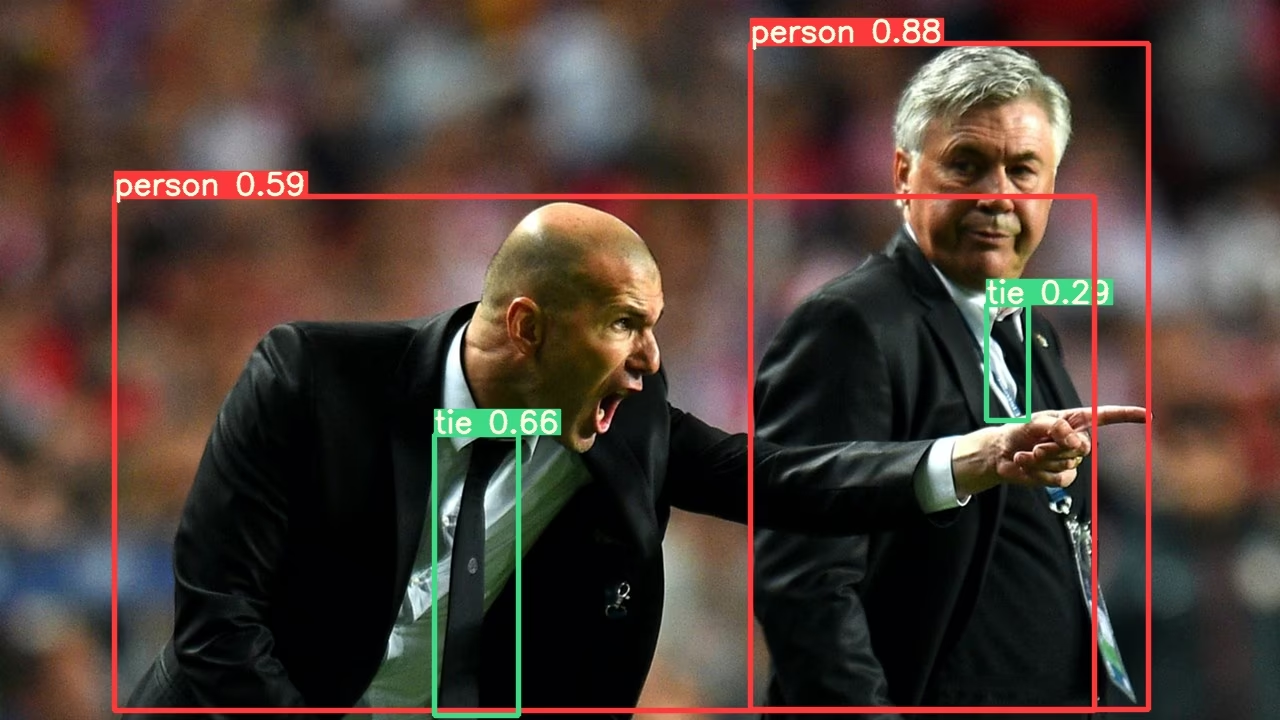
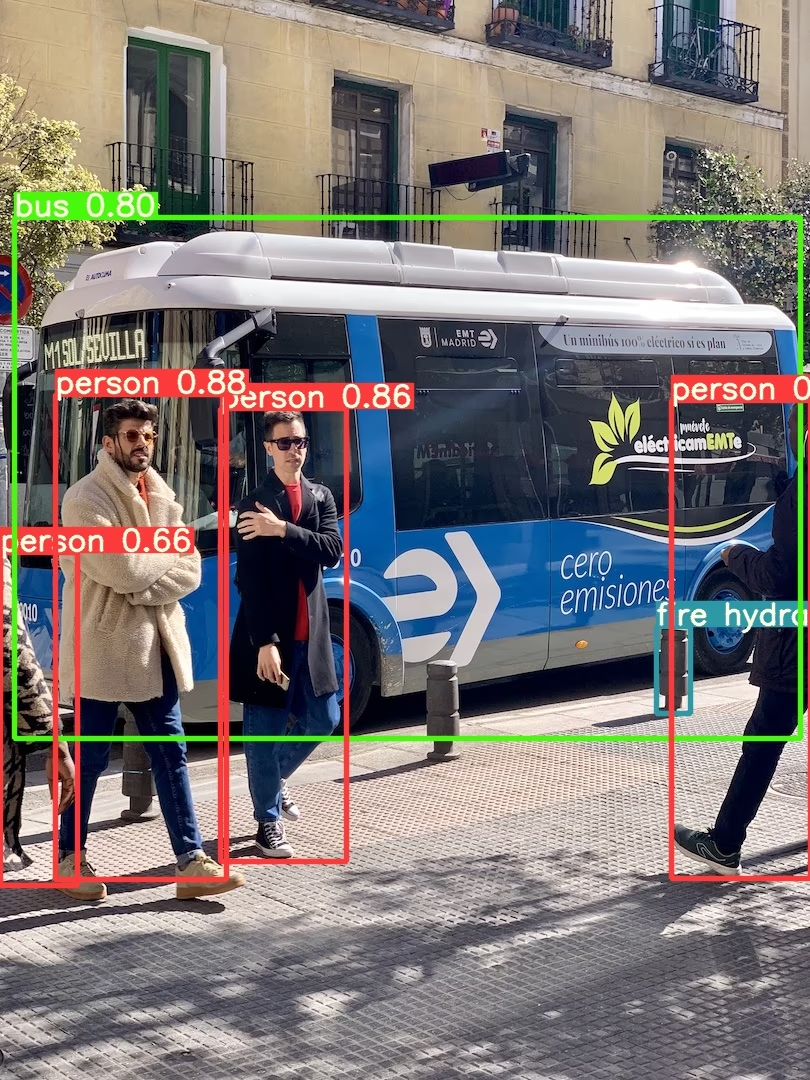
Để xem tất cả tùy chọn inference, hãy tham khảo method forward của YOLOv5 AutoShape().
Cài đặt inference#
Model YOLOv5 có nhiều thuộc tính inference như ngưỡng confidence, ngưỡng IoU, v.v. Có thể thiết lập các thuộc tính này bằng cách:
model.conf = 0.25  # Ngưỡng confidence của NMS
model.iou = 0.45  # Ngưỡng IoU của NMS
model.agnostic = False  # NMS không phụ thuộc class
model.multi_label = False  # NMS cho phép nhiều nhãn trên mỗi box
model.classes = None  # (danh sách tùy chọn) lọc theo class, ví dụ = [0, 15, 16] cho người, mèo và chó trong COCO
model.max_det = 1000  # số detection tối đa trên mỗi hình ảnh
model.amp = False  # Inference với Automatic Mixed Precision (AMP)

results = model(im, size=320)  # kích thước inference tùy chỉnh
Thiết bị#
Có thể chuyển model sang bất kỳ thiết bị nào sau khi tạo:
model.cpu()  # CPU
model.cuda()  # GPU
model.to(device)  # i.e. device=torch.device(0)
Bạn cũng có thể tạo model trực tiếp trên bất kỳ device nào:
model = torch.hub.load("ultralytics/yolov5", "yolov5s", device="cpu") # tải trên CPUHình ảnh đầu vào sẽ tự động được chuyển sang thiết bị của model phù hợp trước khi inference.
Tắt đầu ra#
Có thể tải model mà không hiển thị đầu ra bằng _verbose=False:
model = torch.hub.load("ultralytics/yolov5", "yolov5s", _verbose=False) # tải im lặngKênh đầu vào#
Để tải model YOLOv5s đã huấn luyện trước với 4 kênh đầu vào thay vì mặc định là 3:
model = torch.hub.load("ultralytics/yolov5", "yolov5s", channels=4)Trong trường hợp này, model sẽ bao gồm các trọng số đã huấn luyện trước ngoại trừ lớp đầu vào đầu tiên, do lớp này không còn cùng kích thước với lớp đầu vào đã huấn luyện trước. Lớp đầu vào sẽ tiếp tục được khởi tạo bằng trọng số ngẫu nhiên.
Số lượng class#
Để tải model YOLOv5s đã huấn luyện trước với 10 class đầu ra thay vì mặc định là 80:
model = torch.hub.load("ultralytics/yolov5", "yolov5s", classes=10)Trong trường hợp này, model sẽ bao gồm các trọng số đã huấn luyện trước ngoại trừ các lớp đầu ra, do những lớp này không còn cùng kích thước với các lớp đầu ra đã huấn luyện trước. Các lớp đầu ra sẽ tiếp tục được khởi tạo bằng trọng số ngẫu nhiên.
Tải lại bắt buộc#
Nếu gặp sự cố với các bước trên, thiết lập force_reload=True có thể hữu ích vì thao tác này loại bỏ cache hiện có và buộc tải xuống phiên bản YOLOv5 mới nhất từ PyTorch Hub. Các bản sao trong cache nằm tại ~/.cache/torch/hub; xóa thư mục đó cũng cho kết quả tương tự.
model = torch.hub.load("ultralytics/yolov5", "yolov5s", force_reload=True) # tải lại bắt buộcInference ảnh chụp màn hình#
Để chạy inference trên màn hình máy tính:
import torch
from PIL import ImageGrab

# Model
model = torch.hub.load("ultralytics/yolov5", "yolov5s")

# Image
im = ImageGrab.grab()  # chụp ảnh màn hình

# Inference
results = model(im)
Inference đa GPU#
Có thể tải model YOLOv5 lên nhiều GPU song song bằng inference đa luồng:
import threading

import torch

def run(model, im):
    """Performs inference on an image using a given model and saves the output; model must support `.save()` method."""
    results = model(im)
    results.save()

# Models
model0 = torch.hub.load("ultralytics/yolov5", "yolov5s", device=0)
model1 = torch.hub.load("ultralytics/yolov5", "yolov5s", device=1)

# Inference
threading.Thread(target=run, args=[model0, "https://ultralytics.com/images/zidane.jpg"], daemon=True).start()
threading.Thread(target=run, args=[model1, "https://ultralytics.com/images/bus.jpg"], daemon=True).start()
Huấn luyện#
Để tải model YOLOv5 cho mục đích huấn luyện thay vì inference, hãy đặt autoshape=False. Để tải model với trọng số được khởi tạo ngẫu nhiên (nhằm huấn luyện từ đầu), hãy dùng pretrained=False. Trong trường hợp này, bạn phải tự cung cấp script huấn luyện. Ngoài ra, hãy xem Hướng dẫn huấn luyện với dữ liệu tùy chỉnh YOLOv5 để huấn luyện model.
import torch

model = torch.hub.load("ultralytics/yolov5", "yolov5s", autoshape=False)  # tải model đã huấn luyện trước
model = torch.hub.load("ultralytics/yolov5", "yolov5s", autoshape=False, pretrained=False)  # tải model từ đầu
Kết quả Base64#
Dùng cho các dịch vụ API. Xem ví dụ Flask REST API để biết chi tiết.
import base64
from io import BytesIO

from PIL import Image

results = model(im)  # inference

results.ims  # mảng các hình ảnh gốc (dưới dạng mảng np) được truyền vào model để inference
results.render()  # cập nhật results.ims với các box và nhãn
for im in results.ims:
    buffered = BytesIO()
    im_base64 = Image.fromarray(im)
    im_base64.save(buffered, format="JPEG")
    print(base64.b64encode(buffered.getvalue()).decode("utf-8"))  # hình ảnh được mã hóa base64 có chứa kết quả
Kết quả đã crop#
Có thể trả về và lưu kết quả dưới dạng các vùng detection đã crop:
results = model(im)  # inference
crops = results.crop(save=True)  # dictionary các detection đã crop
Kết quả Pandas#
Có thể trả về kết quả dưới dạng DataFrame Pandas:
results = model(im)  # inference
results.pandas().xyxy[0]  # DataFrame Pandas
Đầu ra pandas (nhấp để mở rộng)
print(results.pandas().xyxy[0])
# xmin    ymin    xmax   ymax  confidence  class    name
# 0  749.50   43.50  1148.0  704.5    0.874023      0  person
# 1  433.50  433.50   517.5  714.5    0.687988     27     tie
# 2  114.75  195.75  1095.0  708.0    0.624512      0  person
# 3  986.00  304.00  1028.0  420.0    0.286865     27     tie
Kết quả đã sắp xếp#
Có thể sắp xếp kết quả theo cột, chẳng hạn sắp xếp các chữ số trên biển số xe từ trái sang phải (trục x):
results = model(im)  # inference
results.pandas().xyxy[0].sort_values("xmin")  # đã sắp xếp từ trái sang phải
Kết quả JSON#
Có thể trả về kết quả ở định dạng JSON sau khi chuyển đổi thành DataFrame .pandas() bằng method .to_json(). Có thể sửa đổi định dạng JSON bằng đối số orient. Xem tài liệu về pandas .to_json() để biết chi tiết.
results = model(im)  # inference
results.pandas().xyxy[0].to_json(orient="records")  # dự đoán JSON img1
Đầu ra JSON (nhấp để mở rộng)
[
    {
        "xmin": 749.5,
        "ymin": 43.5,
        "xmax": 1148.0,
        "ymax": 704.5,
        "confidence": 0.8740234375,
        "class": 0,
        "name": "person"
    },
    {
        "xmin": 433.5,
        "ymin": 433.5,
        "xmax": 517.5,
        "ymax": 714.5,
        "confidence": 0.6879882812,
        "class": 27,
        "name": "tie"
    },
    {
        "xmin": 115.25,
        "ymin": 195.75,
        "xmax": 1096.0,
        "ymax": 708.0,
        "confidence": 0.6254882812,
        "class": 0,
        "name": "person"
    },
    {
        "xmin": 986.0,
        "ymin": 304.0,
        "xmax": 1028.0,
        "ymax": 420.0,
        "confidence": 0.2873535156,
        "class": 27,
        "name": "tie"
    }
]
Model tùy chỉnh#
Ví dụ này tải model YOLOv5s được huấn luyện trên VOC với 20 lớp tùy chỉnh bằng PyTorch Hub 'best.pt'.
import torch

model = torch.hub.load("ultralytics/yolov5", "custom", path="path/to/best.pt")  # model cục bộ
model = torch.hub.load("path/to/yolov5", "custom", path="path/to/best.pt", source="local")  # repo cục bộ
Model TensorRT, ONNX và OpenVINO#
PyTorch Hub hỗ trợ suy luận trên hầu hết các định dạng export của YOLOv5, bao gồm cả các model được huấn luyện tùy chỉnh. Xem hướng dẫn export TFLite, ONNX, CoreML, TensorRT để biết chi tiết về cách export model.
- TensorRT có thể nhanh hơn PyTorch 2-5× theo benchmark GPU.
- ONNX và OpenVINO có thể nhanh hơn PyTorch 2-3× theo benchmark CPU.
import torch

model = torch.hub.load("ultralytics/yolov5", "custom", path="yolov5s.pt")  # PyTorch
model = torch.hub.load("ultralytics/yolov5", "custom", path="yolov5s.torchscript")  # TorchScript
model = torch.hub.load("ultralytics/yolov5", "custom", path="yolov5s.onnx")  # ONNX
model = torch.hub.load("ultralytics/yolov5", "custom", path="yolov5s_openvino_model/")  # OpenVINO
model = torch.hub.load("ultralytics/yolov5", "custom", path="yolov5s.engine")  # TensorRT
model = torch.hub.load("ultralytics/yolov5", "custom", path="yolov5s.mlpackage")  # CoreML (chỉ dành cho macOS)
model = torch.hub.load("ultralytics/yolov5", "custom", path="yolov5s.tflite")  # TFLite
model = torch.hub.load("ultralytics/yolov5", "custom", path="yolov5s_paddle_model/")  # PaddlePaddle
Môi trường được hỗ trợ#
Ultralytics cung cấp nhiều môi trường sẵn sàng sử dụng, mỗi môi trường được cài đặt sẵn các dependency thiết yếu như CUDA, CUDNN, Python và PyTorch, giúp bạn bắt đầu dự án nhanh chóng.
- Notebook GPU miễn phí:



- Google Cloud: Hướng dẫn bắt đầu nhanh với GCP
- Amazon: Hướng dẫn bắt đầu nhanh với AWS
- Azure: Hướng dẫn bắt đầu nhanh với AzureML
- Docker: Hướng dẫn bắt đầu nhanh với Docker

Trạng thái dự án#

Huy hiệu này cho biết tất cả bài kiểm thử Continuous Integration (CI) của GitHub Actions cho YOLOv5 đều đã chạy thành công. Các bài kiểm thử CI này kiểm tra nghiêm ngặt chức năng và hiệu năng của YOLOv5 trên nhiều khía cạnh chính: huấn luyện, validation, inference, export và benchmark. Các bài kiểm thử đảm bảo hoạt động nhất quán và đáng tin cậy trên macOS, Windows và Ubuntu; chúng được thực hiện mỗi 24 giờ và sau mỗi commit mới.
Câu hỏi thường gặp#
Không.
torch.hub.load("ultralytics/yolov5", ...)tải code vào~/.cache/torch/hubcùng với weights trong lần sử dụng đầu tiên. Chỉ cần cài đặt các package trongrequirements.txt.Dùng entry point
customcùng với đường dẫn checkpoint:torch.hub.load("ultralytics/yolov5", "custom", path="runs/train/exp/weights/best.pt"). Thêmsource="local"và đường dẫn repository cục bộ để tải mà không cần truy cập mạng.Có. Truyền file đã export cho loader
custom; YOLOv5 sẽ chọn backend tương ứng dựa trên phần mở rộng, chẳng hạnyolov5s.onnx,yolov5s.enginehoặcyolov5s_openvino_model/.Truyền
force_reload=Trueđể xóa repository đã lưu trong cache và tải code mới nhất, hoặc tự xóa~/.cache/torch/hub. Thao tác này cũng tải các bản phát hành YOLOv5 mới.results.xyxy[0]trả về tensor gồm các hàng[x1, y1, x2, y2, confidence, class],results.pandas().xyxy[0]trả về DataFrame có tên lớp, còn.to_json(orient="records")trên DataFrame đó tạo ra JSON.