Các model được Ultralytics hỗ trợ
Ultralytics hỗ trợ nhiều loại model, mỗi loại được thiết kế cho các tác vụ cụ thể như phát hiện đối tượng, phân đoạn instance, phân đoạn ngữ nghĩa, ước tính độ sâu, phân loại ảnh, ước tính pose và hộp giới hạn định hướng.
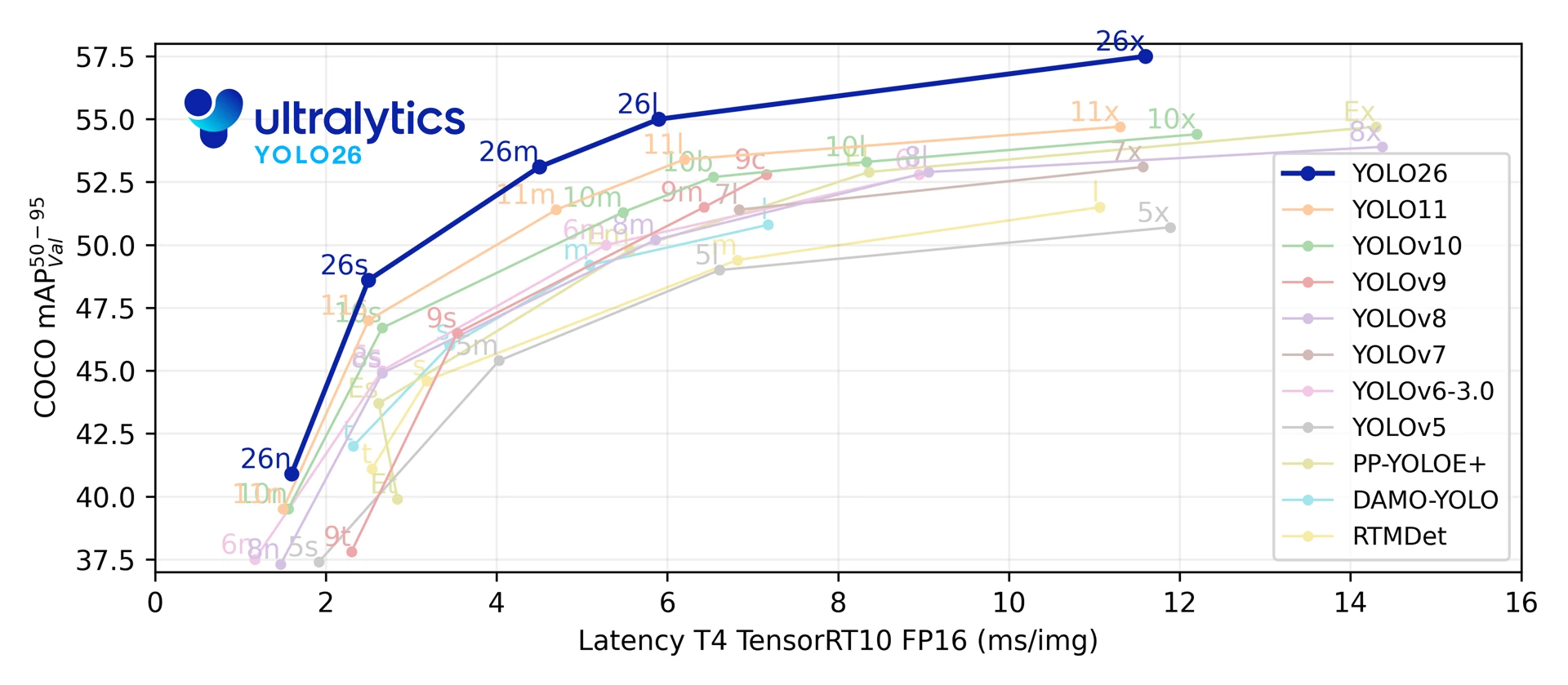
Model nổi bật#
Hãy bắt đầu dự án mới với YOLO26: đây là bản phát hành mới nhất của Ultralytics và là model duy nhất hỗ trợ cả bảy tác vụ. YOLO11 là lựa chọn thay thế đã ổn định, với checkpoint huấn luyện trước cho cả năm tác vụ được hỗ trợ. Chỉ chọn dòng model chuyên biệt khi bạn cần phân đoạn có thể điều khiển bằng prompt (SAM 3), phát hiện với từ vựng mở (YOLOE, YOLO-World) hoặc detector Transformer (RT-DETR).
YOLO27 đang trong giai đoạn R&D cuối cùng, dự kiến ra mắt vào cuối năm nay nhưng chưa có ngày ra mắt cụ thể. Xem trước kiến trúc, bảy tác vụ dự kiến và các kết quả benchmark sơ bộ. Trọng số model và hỗ trợ trong package hiện chưa khả dụng; hãy dùng YOLO26 cho các dự án hiện tại.
Bảng liệt kê các model đã phát hành và tài liệu tham khảo về kiến trúc, cùng với tác vụ, các chế độ train, val, predict và export được hỗ trợ và trường hợp sử dụng được khuyến nghị. Track không được liệt kê riêng: chế độ này chạy trên predict đối với model Detect, Segment, Pose và OBB, trong khi SAM 2 và SAM 3 theo dõi thông qua các bộ dự đoán video riêng. Benchmark cũng không được liệt kê vì chế độ này kết hợp export và val trên nhiều định dạng thay vì bổ sung hỗ trợ riêng.
| Model | Tác vụ | Chế độ | Nên chọn khi cần |
|---|---|---|---|
| YOLO26 🚀 MỚI | Detect, Segment, Semantic, Depth, Classify, Pose, OBB | Train, Val, Predict, Export | Dự án mới: suy luận không cần NMS tùy chọn, triển khai tối ưu cho edge và phạm vi tác vụ rộng nhất |
| YOLO12 | Detect, Segment, Classify, Pose, OBB | Train, Val, Predict, Export | Đánh giá benchmark bản phát hành cộng đồng tập trung vào attention; trọng số huấn luyện trước chỉ hỗ trợ phát hiện |
| YOLO11 | Detect, Segment, Classify, Pose, OBB | Train, Val, Predict, Export | Tác vụ production ổn định, với checkpoint huấn luyện trước cho mọi tác vụ được hỗ trợ |
| YOLOv10 | Detect | Train, Val, Predict, Export | Nghiên cứu phát hiện không cần NMS của Đại học Thanh Hoa |
| YOLOv9 | Detect, Segment | Train, Val, Predict, Export | Thông tin gradient có thể lập trình (PGI), được triển khai trên codebase YOLOv5 của Ultralytics |
| YOLOv8 | Detect, Segment, Classify, Pose, OBB | Train, Val, Predict, Export | Các pipeline YOLOv8 hiện có và những tích hợp bên thứ ba đã được thiết lập |
| YOLOv7 | Detect | Dự đoán | Chạy bản export YOLOv7 được huấn luyện upstream: package dự đoán từ model ONNX hoặc TensorRT tương thích, không dùng checkpoint gốc |
| YOLOv6 | Detect | Train, Val, Predict, Export | Huấn luyện kiến trúc của Meituan từ YAML; Ultralytics không cung cấp checkpoint YOLOv6 .pt |
| YOLOv5 | Detect | Train, Val, Predict, Export | Các dự án Ultralytics cũ; các bản phát hành hiện tại tải checkpoint YOLOv5u đã cập nhật |
| YOLOv4 | Không có | Không có | Chỉ dùng làm tài liệu tham khảo kiến trúc: model gốc Darknet của Alexey Bochkovskiy không được package hỗ trợ |
| YOLOv3 | Detect | Train, Val, Predict, Export | Các dự án cũ sử dụng kiến trúc gốc của Joseph Redmon; các bản phát hành hiện tại tải checkpoint YOLOv3u đã cập nhật |
| SAM 3 🚀 MỚI | Segment | Dự đoán | Phân đoạn khái niệm có thể điều khiển bằng prompt của Meta trên ảnh và video, với ví dụ đầu vào là văn bản hoặc ảnh; sam3.pt và sam3.1_multiplex.pt của SAM 3.1 (ảnh) cần được cấp quyền truy cập trên Hugging Face |
| SAM 2 | Segment | Dự đoán | Phân đoạn có thể điều khiển bằng prompt của Meta, theo dõi đối tượng qua các frame video |
| SAM | Segment | Dự đoán | Tính năng phân đoạn có thể điều khiển bằng prompt nguyên bản của Meta, bao gồm gán nhãn tự động |
| MobileSAM | Segment | Dự đoán | Phân đoạn có thể điều khiển bằng prompt trên thiết bị di động và các thiết bị khác có tài nguyên hạn chế (Đại học Kyung Hee) |
| FastSAM | Segment | Val, Predict, Export | Phân đoạn dựa trên CNN có thể điều khiển bằng prompt, phù hợp khi độ trễ của SAM là nút thắt cổ chai (Viện Hàn lâm Khoa học Trung Quốc) |
| YOLO-NAS | Detect | Val, Predict, Export | Các detector được tối ưu bằng NAS của Deci, được duy trì để suy luận và export; Deci không còn duy trì chúng sau khi NVIDIA mua lại |
| RT-DETR | Detect | Train, Val, Predict, Export | Detector DETR thời gian thực của Baidu: backbone tích chập với encoder Transformer lai |
| YOLO-World | Detect | Train, Val, Predict, Export | Phát hiện với từ vựng mở từ prompt văn bản (Tencent AI Lab); để export cần có checkpoint -worldv2 |
| YOLOE | Detect, Segment | Train, Val, Predict, Export | Phát hiện và phân đoạn với từ vựng mở, hỗ trợ suy luận bằng văn bản, hình ảnh hoặc không cần prompt |
Ultralytics cũng cung cấp LLM, một interface tương thích với OpenAI dành cho các mô hình ngôn ngữ lớn và mô hình ngôn ngữ-thị giác dùng để hiểu văn bản và hình ảnh. LLM không có tác vụ hay chế độ riêng nên không xuất hiện trong bảng phía trên, nhưng có thể kết hợp với mọi pipeline YOLO và chạy trên OpenAI, các nhà cung cấp cloud khác hoặc máy chủ on-prem hoàn toàn cục bộ.
Xem: Chạy model Ultralytics YOLO chỉ với vài dòng code.
Bắt đầu: ví dụ sử dụng#
Các ví dụ bên dưới minh họa cách huấn luyện YOLO và chạy inference đơn giản.
Ví dụ bên dưới sử dụng model YOLO26n pretrained trên COCO để phát hiện đối tượng và huấn luyện model trên bộ dữ liệu mẫu COCO8. Cùng một API được áp dụng cho các tác vụ Segment, Semantic, Depth, Classify, Pose và OBB đã liệt kê ở trên.
Các model *.pt pretrained của PyTorch có thể được truyền vào các lớp YOLO(), SAM(), NAS() và RTDETR() để tạo một instance model trong Python (YOLO() và RTDETR() cũng chấp nhận các file cấu hình *.yaml):
from ultralytics import YOLO

# Tải model YOLO26n pretrained trên COCO
model = YOLO("yolo26n.pt")

# Hiển thị thông tin model (không bắt buộc)
model.info()

# Huấn luyện model trên dataset mẫu COCO8 trong 100 epoch
results = model.train(data="coco8.yaml", epochs=100, imgsz=640)

# Chạy suy luận bằng model YOLO26n trên ảnh 'bus.jpg'
results = model("path/to/bus.jpg")
Đóng góp model mới#
Ultralytics hoan nghênh các đóng góp model mới. Để bổ sung một model:
-
Fork repository: Bắt đầu bằng cách fork repository GitHub của Ultralytics.
-
Clone fork của bạn: Clone fork về máy cục bộ và tạo một branch mới để làm việc.
-
Triển khai model: Thêm model của bạn theo các tiêu chuẩn và hướng dẫn lập trình trong Hướng dẫn đóng góp.
-
Kiểm thử kỹ lưỡng: Kiểm thử model một cách độc lập và trong toàn bộ pipeline.
-
Tạo pull request: Khi đã hài lòng với model, hãy tạo pull request đến repository chính để được xem xét.
-
Rà soát và hợp nhất code: Sau khi được rà soát, nếu model đáp ứng tiêu chí của chúng tôi, model sẽ được hợp nhất vào repository chính.
Câu hỏi thường gặp#
Model Ultralytics YOLO mới nhất được phát hành là YOLO26, ra mắt vào tháng 1 năm 2026. YOLO26 có inference end-to-end không cần NMS tùy chọn, được tối ưu cho triển khai edge và hỗ trợ phát hiện, phân đoạn instance, phân đoạn ngữ nghĩa, ước tính độ sâu, phân loại, ước tính pose, OBB cùng các phiên bản open-vocabulary. Với workload production ổn định, cả YOLO26 và YOLO11 đều là lựa chọn được khuyến nghị.
YOLO27 là dòng model sắp ra mắt, hiện đang trong giai đoạn R&D cuối cùng. Model chưa khả dụng và chưa có ngày ra mắt cụ thể.
Huấn luyện model YOLO trên dữ liệu tùy chỉnh chỉ bằng vài dòng Python hoặc một lệnh CLI:
Ví dụfrom ultralytics import YOLO # Tải model YOLO model = YOLO("yolo26n.pt") # hoặc bất kỳ model YOLO nào khác # Huấn luyện model trên dataset tùy chỉnh results = model.train(data="custom_data.yaml", epochs=100, imgsz=640)Để xem hướng dẫn chi tiết hơn, hãy truy cập trang tài liệu Train.
Ultralytics hỗ trợ nguyên bản YOLOv3, YOLOv5, YOLOv6, YOLOv8, YOLOv9, YOLOv10, YOLO11, YOLO12 và YOLO26, cùng với dòng SAM (SAM 3, SAM 2, SAM, MobileSAM và FastSAM), YOLO-NAS, RT-DETR, YOLO-World và YOLOE. Gói này không phát hành weights hoặc YAML cho YOLOv4 hay YOLOv7: YOLOv4 chỉ được tài liệu hóa như một tài liệu tham khảo về kiến trúc, còn YOLOv7 chạy dưới dạng model ONNX hoặc TensorRT đã export. Xem Các model nổi bật để biết các tác vụ và chế độ có sẵn cho từng model.
Ultralytics Platform là môi trường không cần viết mã, toàn diện để gán nhãn dataset cũng như huấn luyện, triển khai và quản lý các model YOLO machine learning. Nền tảng cung cấp huấn luyện trên cloud, khả năng quản lý dataset và giao diện phù hợp với cả người mới bắt đầu lẫn developer giàu kinh nghiệm.
Các model Ultralytics YOLO có thể thực hiện các tác vụ gồm phát hiện đối tượng, phân đoạn thực thể, phân đoạn ngữ nghĩa, ước lượng độ sâu, phân loại, ước lượng tư thế và phát hiện đối tượng định hướng (OBB). Model mới nhất, YOLO26, hỗ trợ cả bảy tác vụ cùng với phát hiện từ vựng mở.


Bình luận44
Đặt câu hỏi, chia sẻ kết quả hoặc giúp đỡ người khác.
muminaadimi-art
Naked girl
Sudharsanam-1
hello ! For detecting 31 Chinese symbols (16 true and 15 fake), how many classes should be used in the model? Is it more efficient to detect the true symbols using only true class , or should we also include the fake symbols as separate classes?
 Glenn JocherUltralytics(đã chỉnh sửa)
Use as many classes as you need to distinguish at inference: if you only care about authenticity, train a 2‑class detector (“true”, “fake”); if you need per‑symbol IDs, use 31 classes (one per symbol)—explicitly labeling “fake” typically reduces false positives versus leaving them unlabeled; you can start with YOLO26 detect and your dataset YAML as usual:
yolo detect train data=symbols.yaml model=yolo26s.pt imgsz=960 epochs=100Model overview and task setup are in the YOLO26 models documentation and the Detection task guide.
Rohith-John-kct
Hi. Could you please suggest which YOLO model works best for both detecting and segmenting 15 Chinese symbols? Also, how many images would be ideal to include in the dataset?
- Glenn JocherUltralytics(đã chỉnh sửa)
Use a single Ultralytics YOLO26 Segment model—it outputs both boxes and masks—start with
yolo26s-segfor a good speed/accuracy balance, and scale up to-m/-lif needed; for 15 symbols, begin with roughly 100–200 labeled images per class (2k–5k total instances) and increase until validation mAP stabilizes, and use a larger input size for small characters (e.g.,imgsz=960–1280):yolo segment train data=your_symbols.yaml model=yolo26s-seg.pt imgsz=960 epochs=100Model details: see the YOLO26 overview in the YOLO26 models documentation; segmentation specifics and best practices are in the Instance Segmentation task guide.
Ranjith3436
Hi Guys!, Could you please clarify how you select best.pt ? what is the parameter use for that? how early Stop works? sometime val/loss is going to high but earlystop doesn't stop training for classification?
- Glenn JocherUltralytics(đã chỉnh sửa)
best.pt is the epoch with the highest validation “fitness” metric; for detection it’s mAP50-95 (seg and pose add their mask/keypoint mAP50-95), for classification it’s the mean of top‑1 and top‑5 accuracy, and Early Stop watches the same fitness (not val_loss) and stops after patience epochs without improvement (set via patience). Rising val_loss won’t trigger stopping if that fitness is still improving; see how fitness/metrics are computed in the Insights on Model Evaluation and Fine-Tuning guide: https://docs.ultralytics.com/guides/model-evaluation-insights/.
LiJiang97
1
anyhopex
Do you support RT-DETRv2 ?
- Glenn JocherUltralytics(đã chỉnh sửa)
Ultralytics supports the original RT-DETR models (
rtdetr-landrtdetr-x) for training, validation, prediction and export, but RT-DETRv2 weights and architecture are not integrated. See the RT-DETR documentation for supported models and usage; for new projects, also consider YOLO26.
matteobona
Hi, Is it possibile to use a yolo-pose model (with a custom dataset and training) to detect simultaneously a class of objects with keypoints inside and a different class with no keypoints?. For example I need to detect a football pitch with some keypoints inside of it and the football players as simple bounding boxes. Is there a way to use a unique model instead of using two separate models (yolo-pose + yolo-detect)? for example putting at 0 0 0 any keypoints related to the players (but I think that this solution may confuse the model during the training)
- Glenn JocherUltralytics
Yes, you can train a single YOLO-pose model to detect both classes. For objects without keypoints (players), simply set all keypoint coordinates to zero in your dataset annotations. The model will learn to ignore these zero-value keypoints while still detecting bounding boxes for both classes. For implementation details, see the Pose Estimation task documentation on handling mixed annotations.
This approach is efficient and avoids the complexity of running two separate models, though we recommend thorough validation to ensure keypoint absence doesn't degrade detection performance for non-keypoint classes.
hemanthmandava945
@glenn-jocher @pderrenger Car Segmentation on Reflectivity Images
What I'm doing:
Running inference with a pretrained YOLOv8 model to segment cars in the LiDAR reflectivity domain. Detection performance (bounding boxes) looks good, but the segmentation masks aren’t very accurate. The problem:
When I project these predicted masks onto the 3D point cloud, I see a lot of misclassified points (points that are not actually part of the car end up being labeled as car). These noisy masks reduce the accuracy of any downstream tasks that rely on correct 3D segmentation. Question:
Has anyone else dealt with similar mask inaccuracy issues when segmenting LiDAR-based 2D images? Are there recommended strategies to improve segmentation masks on reflectivity images? (e.g., domain-specific data augmentation, fine-tuning from a LiDAR-focused checkpoint, multi-modal approaches, etc.)
Pallet Detection on Reflectivity Images
What I'm planning:
Train YOLOv8 to detect pallets in LiDAR reflectivity images (again, 512×128, single channel). Pallets appear relatively small in these images. Potential multi-modal approach:
Considering combining RGB camera images with LiDAR reflectivity data in the training set (even though the reflectivity images look more like grayscale). My concern: Will mixing these modalities confuse the model or help it? Pallets are already small in lidar images, and might be even harder to identify in reflectivity data. Questions:
Is it advisable to train on both RGB and reflectivity images at once, or should I keep them separate? Does anyone have experience or tips on multi-modal YOLO training (camera + LiDAR reflectivity)? If combining them is possible, any best practices for merging different modalities (e.g., input channels, data augmentation techniques, etc.)?
Additional No response
- Glenn JocherUltralytics
@hemanthmandava945 for segmentation mask inaccuracies in LiDAR reflectivity images, consider fine-tuning the pretrained YOLOv8 model on a domain-specific dataset with augmentations tailored for reflectivity images. For multi-modal training (RGB + reflectivity), it’s advisable to preprocess and align modalities carefully to avoid introducing noise. Experimenting with separate models or fusing features at specific layers during training can help. For more insights, refer to the YOLOv8 documentation. Let us know if you need further clarification!
@glenn-jocher i guess further clarification will be greatly helpful as i am beginner in this field so that the information from you will be greatly helpful for my further research
- Glenn JocherUltralytics
@hemanthmandava945 thank you for your comment! For beginners, I recommend exploring the Ultralytics YOLOv8 documentation for step-by-step guides on training, inference, and customization. If you have specific questions, feel free to ask!
@glenn-jocher i want to train the model on to detect pallet in lidar reflectivity images.as the resolution of images is 512 * 128 and single channel(0 -255).my questions are? can is use pretrained model using transfer learning to train on custom data ? is it possible? 2.do i need to resize the image of my data set for training (640 * 640)? as i used to pretrained model to detect cars in lidar reflectivity images of resolution 1024 *128 it work perfectly fine. 3. for annotation in images as i only need to detect pallet is annotating pallet would enough?
- Glenn JocherUltralytics
- Yes, you can use a pretrained YOLO model and fine-tune it on your custom dataset for pallet detection.
- Resizing your dataset to match the model's input size (e.g., 640x640) is recommended for consistent results.
- Annotating only the pallets is sufficient if pallet detection is your sole objective.
For training details, refer to the Ultralytics Train documentation. Let me know if you need further assistance!
@glenn-jocher i am using yolov8x for car segmentation on lidar 2d reflective data,i got the following results: 0: 128x1024 11 cars, 4127.8ms Speed: 1.6ms preprocess, 4127.8ms inference, 221.6ms postprocess per image at shape (1, 3, 128, 1024) which actually performs well on lidar 2d data. But catch is when i am validating the model, i made annotaion of 50 images where it consist of cats and persons but i am getting poor results: Ultralytics 8.3.28 🚀 Python-3.10.12 torch-2.5.1+cu124 CPU (Intel Core(TM) i5-8265U 1.60GHz) val: Scanning /home/mandava/myenv/share/traffic-2/valid/labels.cache... 50 images, 0 backgrounds, 0 corrupt: 100%|██████████| 50/50 [00:00<?, ?it/s] Class Images Instances Box(P R mAP50 mAP50-95) Mask(P R mAP50 mAP50-95): 100%|██████████| 4/4 [04:16 all 50 491 0.00184 0.0148 0.00104 0.000264 0.00524 0.0426 0.00275 0.000623 person 50 473 0.00367 0.0296 0.00208 0.000528 0.00367 0.0296 0.00189 0.000525 bicycle 18 18 0 0 0 0 0.0068 0.0556 0.0036 0.00072 Speed: 4.3ms preprocess, 5012.5ms inference, 0.0ms loss, 3.5ms postprocess per image Results saved to runs/segment/val4 map50-95:0.0002641973106310545 i want to evaluate the model on lidar data and inference speed it taking , can you explain why i am getting the validation metrics very poor as i am getting prediction was good. here my yaml file: names:
-
car
-
person nc: 2 roboflow:
version: 2 workspace: hemanthmandava test: ../test/images train: ../train/images val: ./valid/images
-
- Glenn JocherUltralytics
Thank you for sharing these details. The poor validation metrics could stem from class mismatches (your YAML defines 2 classes but validation includes 'cats'), potential annotation format issues, or domain gap between training/validation data. For LiDAR-specific segmentation improvements, consider fine-tuning on domain-adapted data and verifying label consistency. More validation guidance can be found in our Val Mode documentation.
@glenn-jocher could explain in more details, I am working with Ouster LiDAR reflectivity images and aiming to evaluate the inference speed and performance of pretrained YOLOv8, YOLOv9, and YOLOv11 models for instance segmentation. However, I am facing issues when using the YOLO validation function (val), even though the visual inspection of inference results looks good. note: the model or running on lidar video segmenting cars very well and tracking of masks also performs good
My Understanding & Key Questions: Fine-Tuning vs. Direct Evaluation:
I understand that fine-tuning means training a pretrained model on my dataset (LiDAR 2D images). However, my goal is to only validate the pretrained YOLO models without fine-tuning. Does the poor validation performance indicate a need for fine-tuning, or is it possible that the pretrained models just do not generalize well to my LiDAR images? Dataset & Annotation Format:
I have 50 annotated images (no separate training set, only validation). The annotations are in YOLO format, where segmentation masks are represented as polygon coordinates normalized to image width and height. Example annotation: 0 0.478515625 0.4783950617283951 0.52734375 0.4783950617283951 0.52734375 0.6790123456790124 0.478515625 0.6790123456790124 Validation Issues:
When I run YOLO inference, the visual results look reasonable, and the model seems to segment objects correctly. However, when using YOLO’s val function, the evaluation metrics are poor. What could be the reasons behind this discrepancy? Performance Metrics to Focus On:
Since my goal is to compare YOLOv8, YOLOv9, and YOLOv11 on LiDAR reflectivity images in terms of inference speed and segmentation accuracy, what are the most relevant evaluation metrics I should consider? I am currently looking at: IoU (Intersection over Union) F1 score mAP (mean Average Precision) FPS (Frames Per Second) for inference speed Are there any specific metrics better suited for LiDAR-based segmentation? What strategies would you recommend for properly evaluating segmentation models on LiDAR images? Are there better methods to verify annotation alignment and ensure the YOLO val function produces meaningful results?
- Glenn JocherUltralytics
Hi there! 👋 Your observed discrepancy between visual results and validation metrics likely stems from a domain gap between COCO-pretrained models (RGB images) and LiDAR reflectivity data (single-channel). Here's a concise breakdown:
- Domain Adaptation: Pretrained models struggle with LiDAR's unique characteristics. Fine-tuning (even briefly) on LiDAR data is strongly recommended (YOLO Train Docs)
- Annotation Verification: Use
yolo valwithplots=Trueto visualize predictions vs. ground truth. Check mask alignment in LiDAR coordinates - Key Metrics: Focus on mAP50-95(M) for segmentation quality and FPS for speed. LiDAR-specific metrics like point-wise IoU could add value
- Quick Fix: Try converting LiDAR to 3-channel (replicate single channel) to better match pretrained weights
For direct evaluation without fine-tuning, consider benchmarking against manually verified samples rather than relying solely on automated metrics. Our COCO-Seg validation example might help as reference. Let us know how it goes! 🚀
@glenn-jocher Issue: When using YOLOv8 for instance segmentation, I’ve noticed that the predicted masks extend slightly beyond the true object boundaries. This results in overlapping masks when objects are close together and inaccurate measurements of object sizes and shapes.
Observations:
Oversized Masks: The masks often include extra pixels along the edges, sometimes producing “flat” boundaries—similar to known issues where masks align too closely with the bounding box edges. Overlap with Adjacent Objects: Due to these extra pixels, masks of nearby objects tend to merge or overlap, which is problematic for applications requiring precise segmentation as i am projecting in 3d some of pixels segmented car points where projected on other objects . Architectural Artifact: The issue appears inherent to the current segmentation head in YOLOv8, where the approximated boundaries may not capture fine details, especially for smaller objects.
is it possible to reduce the size of the mask like getting 90% of mask, as i don't require the mask till the edge of the car. i can get major pixels of car.
this result of yolo inference on lidar data
- Glenn JocherUltralytics
Thank you for sharing these details. For mask size reduction in YOLOv8 segmentation, you can post-process predictions by applying a mask confidence threshold and morphological erosion. Here's a minimal example to shrink masks:
from ultralytics import YOLO
import cv2

model = YOLO('yolov8x-seg.pt')
results = model(your_image)
masks = results[0].masks.data.cpu().numpy()

# Apply erosion to shrink masks
kernel = cv2.getStructuringElement(cv2.MORPH_ELLIPSE, (5,5))  # Adjust kernel size as needed
eroded_masks = [cv2.erode(m, kernel) for m in masks]
For better domain adaptation, consider fine-tuning the segmentation head on LiDAR data using our Train docs. The pretrained COCO weights may struggle with LiDAR's unique reflectance patterns.
When using yolo11 for inference, what operations will the preprocessing process perform on the input image? Is it just scaling the image to 640? Which part is the operation file? Thank you
- Glenn JocherUltralytics(đã chỉnh sửa)
@LiJiang97 the preprocessing for YOLO11 typically involves resizing the input image to the specified
imgsz(default 640) while maintaining aspect ratio by padding as needed. These operations are handled internally in the Ultralytics framework. The resizing is done byLetterBoxinultralytics/data/augment.py, andBasePredictor.preprocessinultralytics/engine/predictor.pyconverts BGR to RGB and scales pixel values to 0-1. Let us know if you need further assistance!
Zelyanne
Hello please, is there a way for making yolov11 to predict 2 class per detection so that when it fails to detect the first class , if the second class is detected it ll show it
- Glenn JocherUltralytics
@Zelyanne thank you for your question. YOLO models are designed to predict a single class per object detection, but multi-class labeling per detection isn't natively supported. You could implement a custom post-processing step to assign secondary classes based on your criteria or train the model with augmented multi-label datasets. For advanced use cases like this, consider modifying the model or leveraging additional resources to meet your requirements.