Mastering YOLOv5 Deployment on Google Cloud Platform (GCP) Deep Learning VM
Google Cloud Platform (GCP) is a cloud computing platform whose Deep Learning VM comes preconfigured for data science and machine learning (ML) tasks. This tutorial walks through setting up Ultralytics YOLOv5 on a GCP Deep Learning VM. Whether you're taking your first steps in ML or you're an experienced practitioner, it provides a clear path to training and running object detection models with YOLOv5.
New GCP users can also claim a $300 free credit offer to get started.
Other quickstart options for YOLOv5 include our Google Colab Notebook  for a browser-based experience, or the scalability of Amazon AWS. You can also use our official Docker image available on Docker Hub

Step 1: Create and Configure Your Deep Learning VM#
Start by creating a virtual machine optimized for deep learning:
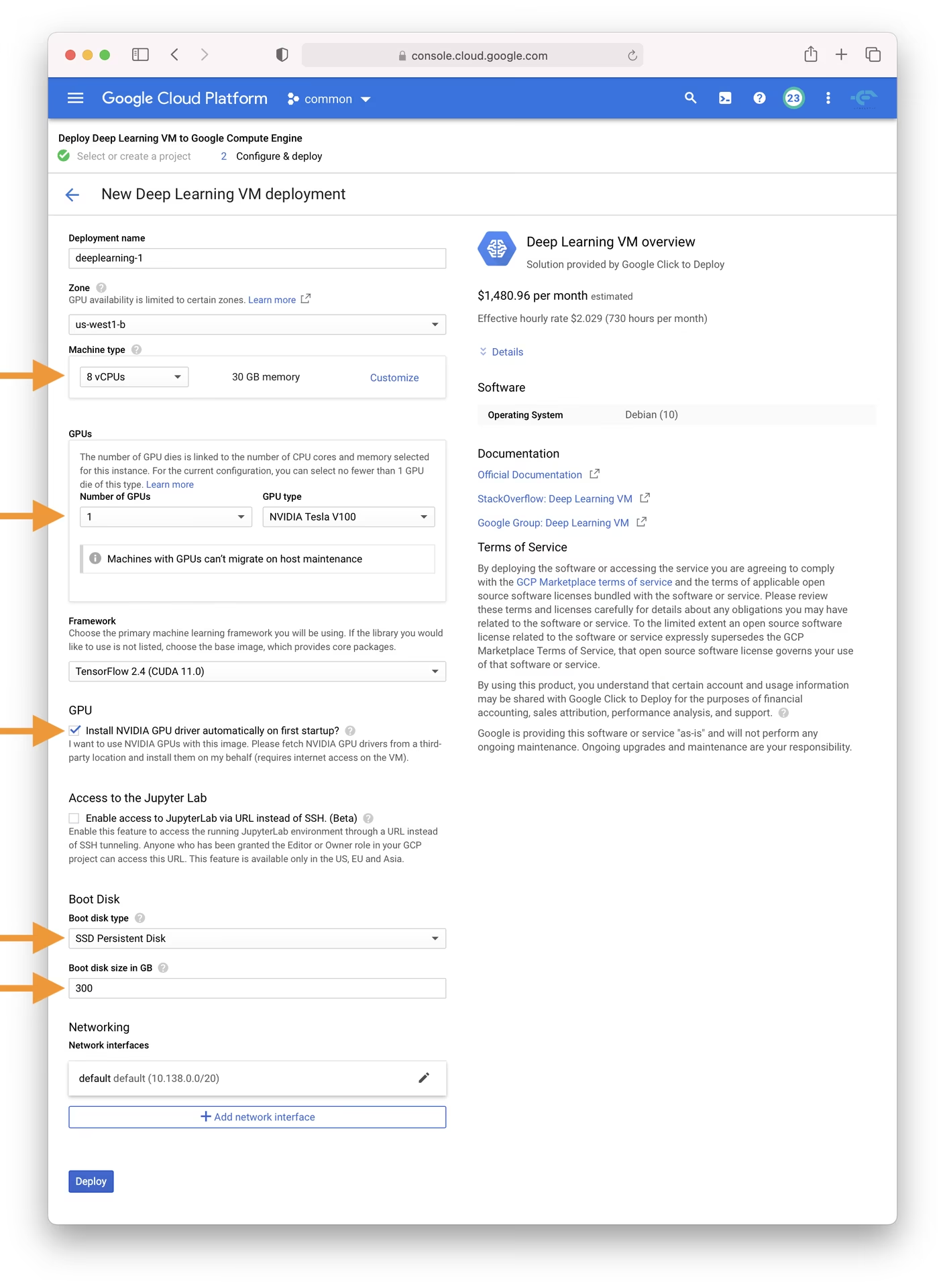
- Navigate to the GCP marketplace and select the Deep Learning VM.
- Choose an n1-standard-8 instance; it offers a balance of 8 vCPUs and 30 GB of memory, suitable for many ML tasks.
- Select a GPU. The choice depends on your workload; even a basic T4 GPU will significantly accelerate model training.
- Check the box for 'Install NVIDIA GPU driver automatically on first startup?'.
- Allocate a 300 GB SSD Persistent Disk to prevent I/O bottlenecks.
- Click 'Deploy' and allow GCP to provision your custom Deep Learning VM.
This VM comes pre-loaded with essential tools and frameworks, including the Anaconda Python distribution, which conveniently bundles many necessary dependencies for YOLOv5.
Step 2: Prepare the VM for YOLOv5#
Next, install YOLOv5 and its dependencies:
# Clone the YOLOv5 repository
git clone https://github.com/ultralytics/yolov5
cd yolov5

# Install dependencies
pip install -r requirements.txt
YOLOv5 requires Python 3.8.0 or newer and PyTorch 1.8 or later. The scripts automatically download models and datasets from the latest YOLOv5 release, simplifying the process of starting model training.
Step 3: Train and Deploy Your YOLOv5 Models#
With the setup complete, you are ready to train, validate, predict, and export with YOLOv5 on your GCP VM:
# Train a YOLOv5 model on your dataset (e.g., yolov5s)
python train.py --data coco128.yaml --weights yolov5s.pt --img 640

# Validate the trained model to check Precision, Recall, and mAP
python val.py --weights yolov5s.pt --data coco128.yaml

# Run inference using the trained model on images or videos
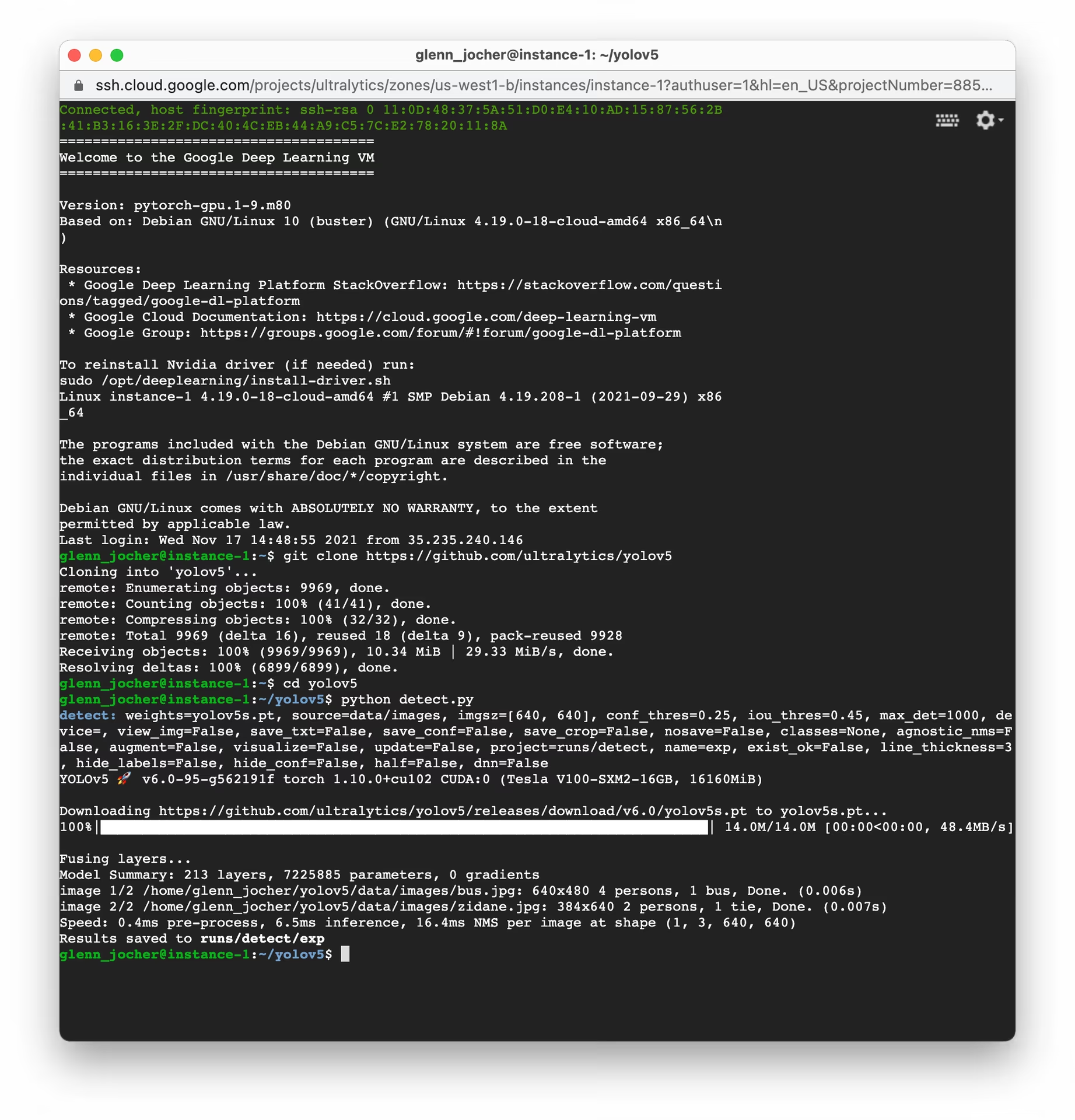
python detect.py --weights yolov5s.pt --source path/to/your/images_or_videos

# Export the trained model to various formats like ONNX, CoreML, TFLite for deployment
python export.py --weights yolov5s.pt --include onnx coreml tflite
With a few commands, you can train custom object detection models tailored to your needs or start from pretrained weights for quick results.
Allocate Swap Space (Optional)#
If you are working with particularly large datasets that might exceed your VM's RAM, consider adding swap space to prevent memory errors:
# Allocate a 64GB swap file
sudo fallocate -l 64G /swapfile

# Set the correct permissions for the swap file
sudo chmod 600 /swapfile

# Set up the Linux swap area
sudo mkswap /swapfile

# Enable the swap file
sudo swapon /swapfile

# Verify the swap space allocation (should show increased swap memory)
free -h
Training Custom Datasets#
To train YOLOv5 on your custom dataset within GCP, follow these general steps:
-
Prepare your dataset according to the YOLOv5 format (images and corresponding label files). See our datasets overview for guidance.
-
Upload your dataset to your GCP VM using
gcloud compute scpor the web console's SSH feature. -
Create a dataset configuration YAML file (
custom_dataset.yaml) that specifies the paths to your training and validation data, the number of classes, and class names. -
Begin the training process using your custom dataset YAML and potentially starting from pretrained weights:
# Example: Train YOLOv5s on a custom dataset for 100 epochs
python train.py --img 640 --batch 16 --epochs 100 --data custom_dataset.yaml --weights yolov5s.pt
For comprehensive instructions on preparing data and training with custom datasets, consult the Train Custom Data tutorial.
Leveraging Cloud Storage#
For efficient data management, especially with large datasets or numerous experiments, integrate your YOLOv5 workflow with Google Cloud Storage:
# Ensure Google Cloud SDK is installed and initialized
# If not installed: curl https://sdk.cloud.google.com/ | bash
# Then initialize: gcloud init

# Example: Copy your dataset from a GCS bucket to your VM
gsutil cp -r gs://your-data-bucket/my_dataset ./datasets/

# Example: Copy trained model weights from your VM to a GCS bucket
gsutil cp -r ./runs/train/exp/weights gs://your-models-bucket/yolov5_custom_weights/
This approach allows you to store large datasets and trained models securely and cost-effectively in the cloud, minimizing the storage requirements on your VM instance.
Concluding Thoughts#
You now have Ultralytics YOLOv5 running on a Google Cloud Platform Deep Learning VM, ready for object detection projects ranging from personal experiments and academic research to industrial solutions.
Consider using Ultralytics Platform for a no-code way to train and manage your models.
For questions and collaboration, join the GitHub discussions.
FAQ#
An
n1-standard-8machine with a single T4 GPU is enough for most YOLOv5 training and inference. Move to an L4 or A100 for large datasets or bigger models, and always tick the option to install the NVIDIA driver automatically on first startup.Stop the VM from the Compute Engine console when it is idle. You are still billed for the attached disk, so delete the VM and disk once the project is finished and your weights are safely copied to Cloud Storage.
For small datasets use
gcloud compute scp. For anything larger, upload to a Cloud Storage bucket and pull it withgsutil cp -r gs://your-bucket/dataset ./datasets/, which is much faster inside Google's network.Yes. The Deep Learning VM already has PyTorch, so
pip install ultralyticsadds YOLO26 training and export with theyoloCLI.


Comments
Ask a question, share your results, or help someone else.