TT100K 数据集#
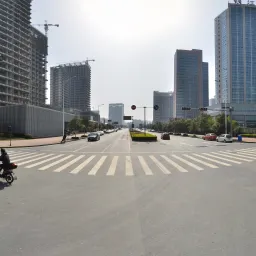
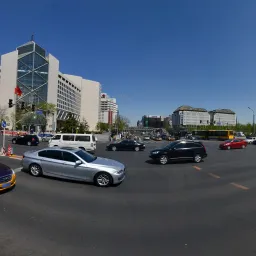
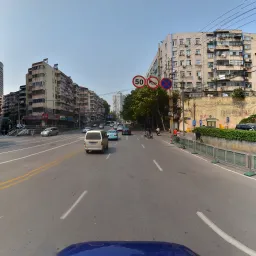
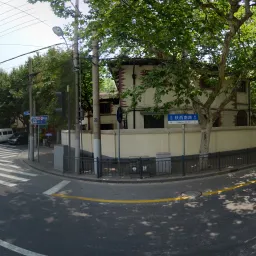
清华-腾讯 100K (TT100K) 数据集是一个用于目标检测的交通标志基准数据集,由 Zhu 等人为 CVPR 2016 论文 Traffic-Sign Detection and Classification in the Wild 创建。Ultralytics TT100K 配置包含 16,817 张图像(6,105 张训练 / 7,641 张验证 / 3,071 张测试),涵盖 221 个交通标志类别;源基准报告的标志实例超过 30,000 个。名称中的“100K”指该基准数据集所基于的大约 100,000 张腾讯街景图像,而非你下载并用于训练的图像数量。由于原论文只保留训练实例不少于 100 个的类别,因此存在常用的 45 类子集;不过,Ultralytics 配置保留了全部 221 个已标注类别(其中许多类别样本稀少)。
高分辨率街景图像呈现出光照、天气、视角和距离方面的巨大变化,使 TT100K 成为在真实驾驶场景中测试小目标检测能力的高难度基准。
主要功能#
- 多类别检测:221 个交通标志类别,涵盖中国的限速、禁令、警告、高度/宽度限制和指示标志。
- 高分辨率:图像尺寸为 2048×2048 像素,标志从近距离的大型标志到远处细小的标志都有,可充分考验细粒度检测能力。
- 真实世界条件:天气、光照、视角和遮挡情况变化很大。
- 边界框标注:每个标志都经过类别标注,并在自动转换后采用 YOLO 格式的边界框标注。
- 预定义划分:固定的训练 / 验证 / 测试集划分(6,105 / 7,641 / 3,071 张图像),确保评估结果一致。
数据集结构#
Ultralytics TT100K 配置划分为三个子集,且都包含相同的 221 个类别:
| 划分 | 图像 | 说明 |
|---|---|---|
| 训练 | 6,105 | 用于训练检测器的已标注交通场景图像 |
| 验证 | 7,641 | 数据集原始的“other”划分,用于评估 |
| 测试 | 3,071 | 留作最终评估训练后模型的图像 |
这 221 个类别分为几个主要类别组:
- 限速标志——限速标志
pl*(例如 pl5–pl120)和最低限速标志pm*(例如 pm5–pm55)。 - 禁令标志——一般禁令
p1–p29、禁止驶入/禁止停车pn/pne,以及限制标志pr*(pr10–pr100)。 - 警告标志——
w1–w67,用于提示交叉路口、急转弯、路面湿滑和施工等道路危险。 - 高度/宽度限制标志——高度限制标志
ph*(例如 ph2–ph5.5)和宽度限制标志pb/pw*。 - 指示标志——一般信息
i1–i15、限速信息il*(il50–il110)、其他信息io,以及信息辅助标志ip。
应用场景#
TT100K 广泛用于构建和评估真实条件下的交通标志识别系统。常见应用包括:
- 自动驾驶感知系统
- 高级驾驶辅助系统 (ADAS)
- 交通监控与道路基础设施分析
- 城市规划与交通流量研究
- 基于高分辨率图像的小目标计算机视觉研究
数据集 YAML#
TT100K.yaml 文件定义数据集配置,包括数据集路径、类别名称以及自动下载和转换脚本。该文件由 Ultralytics 仓库维护,地址为 https://github.com/ultralytics/ultralytics/blob/main/ultralytics/cfg/datasets/TT100K.yaml。
# Ultralytics 🚀 AGPL-3.0 License - https://ultralytics.com/license

# Tsinghua-Tencent 100K (TT100K) dataset https://cg.cs.tsinghua.edu.cn/traffic-sign/ by Tsinghua University
# Documentation: https://cg.cs.tsinghua.edu.cn/traffic-sign/tutorial.html
# Paper: Traffic-Sign Detection and Classification in the Wild (CVPR 2016)
# License: CC BY-NC 2.0 license for non-commercial use only
# Example usage: yolo train data=TT100K.yaml
# parent
# ├── ultralytics
# └── datasets
#     └── TT100K ← downloads here (~18 GB)

# Train/val/test sets as 1) dir: path/to/imgs, 2) file: path/to/imgs.txt, or 3) list: [path/to/imgs1, path/to/imgs2, ..]
path: TT100K # dataset root dir
train: images/train # train images (relative to 'path') 6105 images
val: images/val # val images (relative to 'path') 7641 images (original 'other' split)
test: images/test # test images (relative to 'path') 3071 images

# Classes (221 traffic sign categories, 45 with sufficient training instances)
names:
  0: i1
  1: i10
  2: i11
  3: i12
  4: i13
  5: i14
  6: i15
  7: i2
  8: i3
  9: i4
  10: i5
  11: il100
  12: il110
  13: il50
  14: il60
  15: il70
  16: il80
  17: il90
  18: io
  19: ip
  20: p1
  21: p10
  22: p11
  23: p12
  24: p13
  25: p14
  26: p15
  27: p16
  28: p17
  29: p18
  30: p19
  31: p2
  32: p20
  33: p21
  34: p22
  35: p23
  36: p24
  37: p25
  38: p26
  39: p27
  40: p28
  41: p3
  42: p4
  43: p5
  44: p6
  45: p7
  46: p8
  47: p9
  48: pa10
  49: pa12
  50: pa13
  51: pa14
  52: pa8
  53: pb
  54: pc
  55: pg
  56: ph1.5
  57: ph2
  58: ph2.1
  59: ph2.2
  60: ph2.4
  61: ph2.5
  62: ph2.8
  63: ph2.9
  64: ph3
  65: ph3.2
  66: ph3.5
  67: ph3.8
  68: ph4
  69: ph4.2
  70: ph4.3
  71: ph4.5
  72: ph4.8
  73: ph5
  74: ph5.3
  75: ph5.5
  76: pl10
  77: pl100
  78: pl110
  79: pl120
  80: pl15
  81: pl20
  82: pl25
  83: pl30
  84: pl35
  85: pl40
  86: pl5
  87: pl50
  88: pl60
  89: pl65
  90: pl70
  91: pl80
  92: pl90
  93: pm10
  94: pm13
  95: pm15
  96: pm1.5
  97: pm2
  98: pm20
  99: pm25
  100: pm30
  101: pm35
  102: pm40
  103: pm46
  104: pm5
  105: pm50
  106: pm55
  107: pm8
  108: pn
  109: pne
  110: po
  111: pr10
  112: pr100
  113: pr20
  114: pr30
  115: pr40
  116: pr45
  117: pr50
  118: pr60
  119: pr70
  120: pr80
  121: ps
  122: pw2
  123: pw2.5
  124: pw3
  125: pw3.2
  126: pw3.5
  127: pw4
  128: pw4.2
  129: pw4.5
  130: w1
  131: w10
  132: w12
  133: w13
  134: w16
  135: w18
  136: w20
  137: w21
  138: w22
  139: w24
  140: w28
  141: w3
  142: w30
  143: w31
  144: w32
  145: w34
  146: w35
  147: w37
  148: w38
  149: w41
  150: w42
  151: w43
  152: w44
  153: w45
  154: w46
  155: w47
  156: w48
  157: w49
  158: w5
  159: w50
  160: w55
  161: w56
  162: w57
  163: w58
  164: w59
  165: w60
  166: w62
  167: w63
  168: w66
  169: w8
  170: wo
  171: i6
  172: i7
  173: i8
  174: i9
  175: ilx
  176: p29
  177: w29
  178: w33
  179: w36
  180: w39
  181: w4
  182: w40
  183: w51
  184: w52
  185: w53
  186: w54
  187: w6
  188: w61
  189: w64
  190: w65
  191: w67
  192: w7
  193: w9
  194: pax
  195: pd
  196: pe
  197: phx
  198: plx
  199: pmx
  200: pnl
  201: prx
  202: pwx
  203: w11
  204: w14
  205: w15
  206: w17
  207: w19
  208: w2
  209: w23
  210: w25
  211: w26
  212: w27
  213: pl0
  214: pl4
  215: pl3
  216: pm2.5
  217: ph4.4
  218: pn40
  219: ph3.3
  220: ph2.6

# Download script/URL (optional) ---------------------------------------------------------------------------------------
download: |
  import json
  import shutil
  from pathlib import Path

  from PIL import Image

  from ultralytics.utils import TQDM
  from ultralytics.utils.downloads import download

  def tt100k2yolo(dir):
      """Convert TT100K annotations to YOLO format with images/{split} and labels/{split} structure."""
      data_dir = dir / "data"
      anno_file = data_dir / "annotations.json"

      print("Loading annotations...")
      with open(anno_file, encoding="utf-8") as f:
          data = json.load(f)

      # Build class name to index mapping from yaml
      names = yaml["names"]
      class_to_idx = {v: k for k, v in names.items()}

      # Create directories
      for split in ["train", "val", "test"]:
          (dir / "images" / split).mkdir(parents=True, exist_ok=True)
          (dir / "labels" / split).mkdir(parents=True, exist_ok=True)

      print("Converting annotations to YOLO format...")
      skipped = 0
      for img_id, img_data in TQDM(data["imgs"].items(), desc="Processing"):
          img_path_str = img_data["path"]
          if "train" in img_path_str:
              split = "train"
          elif "test" in img_path_str:
              split = "test"
          else:
              split = "val"

          # Source and destination paths
          src_img = data_dir / img_path_str
          if not src_img.exists():
              continue

          dst_img = dir / "images" / split / src_img.name

          # Get image dimensions
          try:
              with Image.open(src_img) as img:
                  img_width, img_height = img.size
          except Exception as e:
              print(f"Error reading {src_img}: {e}")
              continue

          # Copy image to destination
          shutil.copy2(src_img, dst_img)

          # Convert annotations
          label_file = dir / "labels" / split / f"{src_img.stem}.txt"
          lines = []

          for obj in img_data.get("objects", []):
              category = obj["category"]
              if category not in class_to_idx:
                  skipped += 1
                  continue

              bbox = obj["bbox"]
              xmin, ymin = bbox["xmin"], bbox["ymin"]
              xmax, ymax = bbox["xmax"], bbox["ymax"]

              # Convert to YOLO format (normalized center coordinates and dimensions)
              x_center = ((xmin + xmax) / 2.0) / img_width
              y_center = ((ymin + ymax) / 2.0) / img_height
              width = (xmax - xmin) / img_width
              height = (ymax - ymin) / img_height

              # Clip to valid range
              x_center = max(0, min(1, x_center))
              y_center = max(0, min(1, y_center))
              width = max(0, min(1, width))
              height = max(0, min(1, height))

              cls_idx = class_to_idx[category]
              lines.append(f"{cls_idx} {x_center:.6f} {y_center:.6f} {width:.6f} {height:.6f}\n")

          # Write label file
          if lines:
              label_file.write_text("".join(lines), encoding="utf-8")

      if skipped:
          print(f"Skipped {skipped} annotations with unknown categories")
      print("Conversion complete!")

  # Download
  dir = Path(yaml["path"])  # dataset root dir
  urls = ["https://cg.cs.tsinghua.edu.cn/traffic-sign/data_model_code/data.zip"]
  download(urls, dir=dir, curl=True, threads=1)

  # Convert
tt100k2yolo(dir)用法#
TT100K 会在首次训练时自动下载,需要约 18 GB 的可用磁盘空间。首次使用时,下载脚本会获取原始数据并将标注转换为 YOLO 格式,这可能需要几分钟。
如需使用 TT100K 数据集以 640 的图像尺寸训练 YOLO26n 模型 100 个epoch,可以使用以下代码片段。可用参数的完整列表请参阅模型训练页面。
from ultralytics import YOLO

# 加载模型
model = YOLO("yolo26n.pt")  # 加载预训练模型(推荐用于训练)

# 训练模型 - 数据集会在首次运行时自动下载
results = model.train(data="TT100K.yaml", epochs=100, imgsz=640)
如需标注其他交通标志图像,并在浏览器中管理 TT100K 训练任务,请使用 Ultralytics Platform。
示例数据和标注#
TT100K 图像是分辨率为 2048×2048 的街景,其中交通标志通常只占画面很小的一部分。单张图像中可能包含多个不同尺寸、不同距离的标志,其中一些会被车辆、植被或建筑物部分遮挡,拍摄条件也涵盖白天/夜间和晴天/雨天。小目标与复杂条件的组合,使该数据集成为检验检测器鲁棒性的有力测试。
引用与致谢#
如果你在研究或开发工作中使用 TT100K 数据集,请引用以下论文:
@InProceedings{Zhu_2016_CVPR,
    author = {Zhu, Zhe and Liang, Dun and Zhang, Songhai and Huang, Xiaolei and Li, Baoli and Hu, Shimin},
    title = {Traffic-Sign Detection and Classification in the Wild},
    booktitle = {The IEEE Conference on Computer Vision and Pattern Recognition (CVPR)},
    month = {June},
    year = {2016}
}
我们感谢清华大学与腾讯的合作,感谢双方为计算机视觉和自动驾驶社区创建并维护这一宝贵资源。要了解有关 TT100K 数据集的更多信息,请访问官方数据集网站。
常见问题#
清华-腾讯 100K (TT100K) 数据集用于真实场景下的交通标志检测与分类。该数据集包含 221 个类别和高分辨率街景图像,因此常用作自动驾驶感知、高级驾驶辅助系统 (ADAS) 和小目标检测研究的基准。
Ultralytics TT100K 配置包含 16,817 张图像:6,105 张用于训练,7,641 张用于验证(数据集原始的“other”划分),3,071 张用于测试。完整划分详情请参见数据集结构部分。
“100K”指的是创建原始基准所使用的约 100,000 张腾讯街景图像。Ultralytics 检测配置提供其中的 16,817 张图像,并配有 YOLO 格式标签;这个名称反映的是源图像集合,而不是训练集大小。
TT100K 定义了 221 个类别,涵盖限速、禁令、警告、高度/宽度限制和指示标志。原始论文仅保留至少有 100 个训练样本的 45 个类别,而 Ultralytics 配置保留全部 221 个类别。类别组划分详情请参见数据集结构。
TT100K 大约为 18 GB,首次使用
data="TT100K.yaml"训练时会自动下载——无需手动下载。该脚本还会在首次运行时将原始标注转换为 YOLO 格式。